OneNote
for Teaching
COLLABORATIVE TEACHING AND LEARNING TOOL
OneNote is
#onenote CC-by-4.0 SA @topgold
2
 An online cloud-based notebook service.
 Simple to use.
 Robust and dependable.
 Pleasant to use on desktop and mobile devices.
Experience after One Year OneNote
#onenote CC-by-4.0 SA @topgold
3
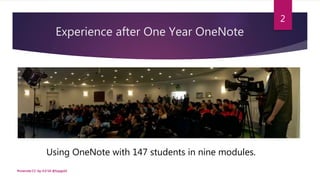
Using OneNote with 147 students in nine modules.
Also using
OneNote with
YMT.fm
#onenote CC-by-4.0 SA @topgold
4
OneNote Helps Find Things
The most compelling reason for
me to use OneNote is it helps
me find things faster.
#onenote CC-by-4.0 SA @topgold
5
OneNote on Handsets
#onenote CC-by-4.0 SA @topgold
6
Notes where you need them.
On desktop as an app.
In lab sessions as a cloud service.
Synced to handsets as timely content.
#onenote CC-by-4.0 SA @topgold
7
Me and OneNote
While teaching.
To share reading material.
Alongside Office Lens.
With Pinboard.
Working through snags.
#onenote CC-by-4.0 SA @topgold
8
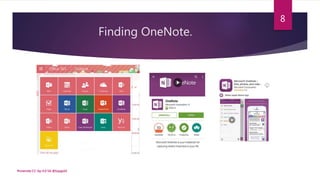
Finding OneNote.
#onenote CC-by-4.0 SA @topgold
9
Classroom Collaboration
#onenote CC-by-4.0 SA @topgold
10
Seeing Collective Learning Happen
OneNote annotates individual student
work, allowing me to see who is pulling
their weight.
#onenote CC-by-4.0 SA @topgold
11
Collective Learning
#onenote CC-by-4.0 SA @topgold
12
OneNote for Learning Assessment
#onenote CC-by-4.0 SA @topgold
13
Seeing Live Student Work
I can see student work quickly as it
unfolds on OneNote.
It’s much faster than Moodle.
#onenote CC-by-4.0 SA @topgold
14
OneNote for Feedback
#onenote CC-by-4.0 SA @topgold
15
OneNote for Curated Reading
#onenote CC-by-4.0 SA @topgold
16
Using the Content Library
I use the Content Library to share important
reading materials. It’s easy to share and
cross-reference information as it arrives on
my handset via newsfeeds and emails.
#onenote CC-by-4.0 SA @topgold
17
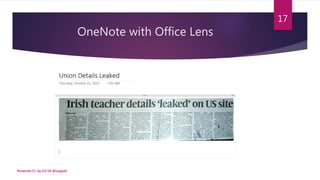
OneNote with Office Lens
#onenote CC-by-4.0 SA @topgold
18
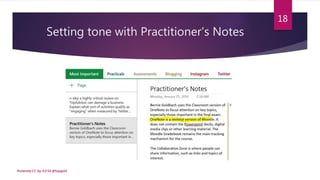
Setting tone with Practitioner’s Notes
#onenote CC-by-4.0 SA @topgold
19
OneNote Previews Lab Sessions
#onenote CC-by-4.0 SA @topgold
20
Using Pinboard.in with OneNote
 I can create plain text on Pinboard
without waiting for 3G connectivity.
 When I save the bookmark, Pinboard
creates a permanent URL for the note
and then bookmarks that URL.
#onenote CC-by-4.0 SA @topgold
21
Creating Text in Pinboard
#onenote CC-by-4.0 SA @topgold
22
Pinboard’s Auto Archiving
#onenote CC-by-4.0 SA @topgold
23
Searching Pinboard
#onenote CC-by-4.0 SA @topgold
24
Searching Desktop OneNote
#onenote CC-by-4.0 SA @topgold
25
Searching Mobile OneNote
#onenote CC-by-4.0 SA @topgold
26
Powerful OneNote Search
I have used Microsoft Cortana for voice
search and the standard keyboard search to
locate information stored or cross-
referenced in OneNote.
#onenote CC-by-4.0 SA @topgold
27
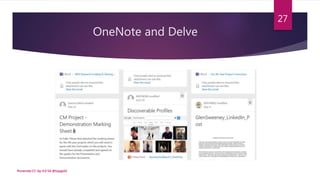
OneNote and Delve
#onenote CC-by-4.0 SA @topgold
28
Underutilised Staff OneNote
#onenote CC-by-4.0 SA @topgold
29
#onenote CC-by-4.0 SA @topgold
30
Well-used File Sharing
#onenote CC-by-4.0 SA @topgold
31
Snags Encountered with OneNote
 It does not work with weak broadband.
 You need to open and sync your primary
notebooks with your mobile phone.
 Page conflicts may occur.
#onenote CC-by-4.0 SA @topgold
32
Working Around Snags
 Keep the mobile OneNote version open if you
expect no connectivity.
 Use OneNote as a primary part of your
workflow and you will routinely open and
sync your primary notebooks.
 Clear page conflicts by reviewing them.
#onenote CC-by-4.0 SA @topgold
33
TIP: Keep Mobile Usage Focused.
#onenote CC-by-4.0 SA @topgold
34
Let’s Connect 
#onenote CC-by-4.0 SA @topgold
35
I’m @Topgold on all good social networks.
Help Fight Homelessness
#onenote CC-by-4.0 SA @topgold
36
Text HOMELESS to 50300 and give 4 euro.

Using OneNote for Teaching and Learning

Editor's Notes

  • #2 This slide deck captures conclusions formed after using OneNote in third level for an entire academic year. It was repared by Bernie @Topgold Goldbach for continuous professional development training sessions in the Limerick Institute of Technology. Content is licensed CC-by-SA 4.0 under the Creative Commons.
  • #3 OneNote brings a simple notebook metaphor to web pages and to mobile phone screens.
  • #4 Transitioning from Evernote to OneNote was seamless.
  • #5 OneNote helps the Youth Media Team stay organized. Interview at http://ymt.fm/2016/05/interview-with-aoibhinn-ni-shuilleabhain/
  • #6 Microsoft has implemented very powerful discovery tools. Screencast developed after a workshop by Pamela O’Brien.
  • #7 I keep OneNote in the top right of both handsets.
  • #8 OneNote syncs elegantly.
  • #9 I’ve been using OneNote for an entire academic year.
  • #10 OneNote is in your desktop apps. Works well on Android, iOS and Windows Mobile.
  • #11 Yellow highlights are Class Notebooks. Green is shared by a student. Orange is a campus staff notebook. Blue is content designed to be discovered on Delve.
  • #12 I can watch students annotate and add content.
  • #13 Blue highlights shows different people collaborating on assigned tasks.
  • #14 Screenshot from Moodle referencing the use of OneNote to collect information for assessment purposes.
  • #15 I can watch student work remotely or across the lab in classroom sessions.
  • #16 Screenshot from OneNote Public Relations module with feedback to students.
  • #17 Screenshot from OneNote Content Library in Social Media module.
  • #18 The Content Library has replaced large amounts of photocopied materials.
  • #19 I snap images with my cameraphone using Office Lens and send the images directly into OneNote. Sometimes these snaps are processed by Microsoft’s OCR capability and are findable via OneNote search.
  • #20 I try to set the tone for every major section by using a page called “Practitioner’s Notes”.
  • #21 I preview lab sessions by cross-posting them to OneNote, Moodle and Pinboard.
  • #22 I use Pinboard.in alongside OneNote.
  • #23 Pinboard.in (and sometimes Google Keep) lets me create notes without a cloud computing connection. This note is at https://notes.pinboard.in/u:topgold/notes/387df36596bbd0a8b6d6
  • #24 Pinboard.in scrapes everything I tweet from three different Twitter accounts then makes the info easy to find.
  • #25 Searching Pinboard.in for OneNote.
  • #26 Searching OneNote on Desktop for collaboration.
  • #27 Searching OneNote on Android for collaboration.
  • #28 Once you start putting things in One Place like inside OneNote, it’s easier to find those things.
  • #29 Objects I discover in Delve should map to OneNote when I expect the highest levels of productivity.
  • #30 Currently, we do not use OneNote to optimize staff efficiencies.
  • #31 If we used OneNote as the primary collaboration tool, collegial communications would improve.
  • #32 Orange is shared with one other staff member. Blue is heavy file sharing with two students. Each green content is shared with more than 35 students.
  • #33 You may encounter some snags with OneNote.
  • #34 It’s relatively easy to work around snags encountered with OneNote.
  • #35 My phone and its spotty 3G coverage won’t sync more than a few notebooks efficiently.
  • #36 Bernie Goldbach uses OneNote to teach and learn. His blog at http://Insideview.ie is powered by OneNote.
  • #37 Focus Ireland needs your help.