Microsoft OneNote in SharePoint
What is OneNote


• Microsoft OneNote (formerly called Microsoft Office OneNote) is a
  computer program for free-form information gathering and multi-user
  collaboration. It can gather users' notes (handwritten or
  typed), drawings, screen clippings, and audio commentaries and share
  them with other users of Microsoft OneNote over the Internet.
• Wikipedia: http://en.wikipedia.org/wiki/Onenote
• History:
    – OneNote 2003
    – OneNote 2007
    – OneNote 2010
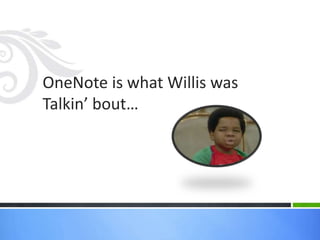
OneNote is what Willis was
Talkin’ bout…
What is it really


• The Coolest tool in the Office 2010 suite (and gasp! It is in
  every Office version – student to business to professional)
• Killer app for note-taking (particularly IT
  Professionals, Students and those that have to accumulate
  and sift/manage lots of disparate data)
• When collaborating with others, it is a kick ass WhiteBoard
  application as well
• Image and Audio OCR in a snap
• A great place to create drafts if you are an avid blogger
• Great on a Microsoft Tablet (no, I don’t mean the iPad). I
  mean the Windows kind, with a stylus
Mobility Options


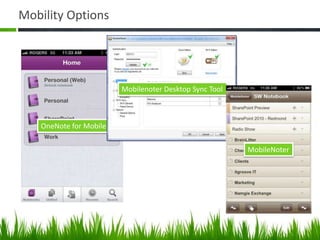
• MobileNoter (sync with OneNote on your Desktop)
   – iPhone, iPad and Android
   – Can sync with SharePoint, because the sync happens with your
     desktop
• OneNote for Mobile (from Microsoft)
   – Only synchronizes with Windows Live Skydrive or Dropbox; boo/hiss
   – iPhone, Android and Windows 7 Phone
       • pretty late to the party though…
   – Free for first 500 notes, paid version thereafter
Mobility Options


• MobileNoter (sync with OneNote on your Desktop)
   – iPhone, iPad and Android
   – Can sync with SharePoint, because the sync happens with your
     desktop
• OneNote for Mobile (from Microsoft)
   – Only synchronizes with Windows Live Skydrive or Dropbox; boo/hiss
   – iPhone, Android and Windows 7 Phone
       • pretty late to the party though…
   – Free for first 500 notes, paid version thereafter
Mobility Options


                        Mobilenoter Desktop Sync Tool


   OneNote for Mobile

                                                        MobileNoter
OneNote vs. EverNote


• OneNote is FAR more rich in overall features if you are a
  Windows User
• However, EverNote is a great platform if you want to
  access your notes on any device, anywhere – but it sure
  ain’t OneNote…
    – OneNote needs competition though and I’m hoping the two
      continue to push each other… among the other masses of note
      takers

I use both, though I use OneNote far more… and I’m hoping Microsoft comes to
the table soon with a better mobile option, specifically support for synching with
SharePoint.
That’s cool but you’re a
SharePoint Guy. Why would a
SharePoint guy care?
Introduction to OneNote Functionality
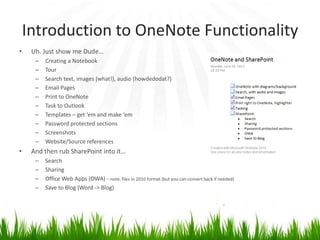
•    Uh. Just show me Dude…
      –   Creating a Notebook
      –   Tour
      –   Search text, images (what!), audio (howdedodat?)
      –   Email Pages
      –   Print to OneNote
      –   Task to Outlook
      –   Templates – get ‘em and make ‘em
      –   Password protected sections
      –   Screenshots
      –   Website/Source references
•    And then rub SharePoint into it…
      –   Search
      –   Sharing
      –   Office Web Apps (OWA) – note, files in 2010 format (but you can convert back if needed)
      –   Save to Blog (Word -> Blog)
Show Me the Money! – Some Cool Features


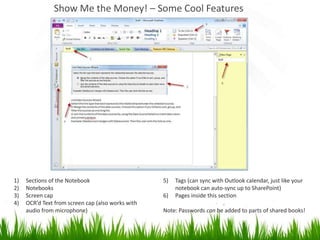
1)   Sections of the Notebook                      5)   Tags (can sync with Outlook calendar, just like your
2)   Notebooks                                          notebook can auto-sync up to SharePoint)
3)   Screen cap                                    6)   Pages inside this section
4)   OCR’d Text from screen cap (also works with
     audio from microphone)                        Note: Passwords can be added to parts of shared books!
Summary and some tips


• OneNote is AwesomeSauce. Get to know it. That is all.

• Now What (tips)
   – Use it and try to remember to use it. Put it in your startup group.
     I forget to use it somehow… I can’t explain why that is…
   – Share OneNote through SharePoint so you can
     search, share/collaborate and its getting backed up
   – Light up your IT team with it – seriously, there are no excuses for
     IT folks to not be using this
   – Draft your blogs in OneNote. Polish and publish

Microsoft OneNote in SharePoint

  • 1.
  • 2.
    What is OneNote •Microsoft OneNote (formerly called Microsoft Office OneNote) is a computer program for free-form information gathering and multi-user collaboration. It can gather users' notes (handwritten or typed), drawings, screen clippings, and audio commentaries and share them with other users of Microsoft OneNote over the Internet. • Wikipedia: http://en.wikipedia.org/wiki/Onenote • History: – OneNote 2003 – OneNote 2007 – OneNote 2010
  • 3.
    OneNote is whatWillis was Talkin’ bout…
  • 4.
    What is itreally • The Coolest tool in the Office 2010 suite (and gasp! It is in every Office version – student to business to professional) • Killer app for note-taking (particularly IT Professionals, Students and those that have to accumulate and sift/manage lots of disparate data) • When collaborating with others, it is a kick ass WhiteBoard application as well • Image and Audio OCR in a snap • A great place to create drafts if you are an avid blogger • Great on a Microsoft Tablet (no, I don’t mean the iPad). I mean the Windows kind, with a stylus
  • 5.
    Mobility Options • MobileNoter(sync with OneNote on your Desktop) – iPhone, iPad and Android – Can sync with SharePoint, because the sync happens with your desktop • OneNote for Mobile (from Microsoft) – Only synchronizes with Windows Live Skydrive or Dropbox; boo/hiss – iPhone, Android and Windows 7 Phone • pretty late to the party though… – Free for first 500 notes, paid version thereafter
  • 6.
    Mobility Options • MobileNoter(sync with OneNote on your Desktop) – iPhone, iPad and Android – Can sync with SharePoint, because the sync happens with your desktop • OneNote for Mobile (from Microsoft) – Only synchronizes with Windows Live Skydrive or Dropbox; boo/hiss – iPhone, Android and Windows 7 Phone • pretty late to the party though… – Free for first 500 notes, paid version thereafter
  • 7.
    Mobility Options Mobilenoter Desktop Sync Tool OneNote for Mobile MobileNoter
  • 8.
    OneNote vs. EverNote •OneNote is FAR more rich in overall features if you are a Windows User • However, EverNote is a great platform if you want to access your notes on any device, anywhere – but it sure ain’t OneNote… – OneNote needs competition though and I’m hoping the two continue to push each other… among the other masses of note takers I use both, though I use OneNote far more… and I’m hoping Microsoft comes to the table soon with a better mobile option, specifically support for synching with SharePoint.
  • 9.
    That’s cool butyou’re a SharePoint Guy. Why would a SharePoint guy care?
  • 10.
    Introduction to OneNoteFunctionality • Uh. Just show me Dude… – Creating a Notebook – Tour – Search text, images (what!), audio (howdedodat?) – Email Pages – Print to OneNote – Task to Outlook – Templates – get ‘em and make ‘em – Password protected sections – Screenshots – Website/Source references • And then rub SharePoint into it… – Search – Sharing – Office Web Apps (OWA) – note, files in 2010 format (but you can convert back if needed) – Save to Blog (Word -> Blog)
  • 11.
    Show Me theMoney! – Some Cool Features 1) Sections of the Notebook 5) Tags (can sync with Outlook calendar, just like your 2) Notebooks notebook can auto-sync up to SharePoint) 3) Screen cap 6) Pages inside this section 4) OCR’d Text from screen cap (also works with audio from microphone) Note: Passwords can be added to parts of shared books!
  • 12.
    Summary and sometips • OneNote is AwesomeSauce. Get to know it. That is all. • Now What (tips) – Use it and try to remember to use it. Put it in your startup group. I forget to use it somehow… I can’t explain why that is… – Share OneNote through SharePoint so you can search, share/collaborate and its getting backed up – Light up your IT team with it – seriously, there are no excuses for IT folks to not be using this – Draft your blogs in OneNote. Polish and publish