“These are a Few of
my Favourite
Things…”
The OneNote Edition
Kelly Marshall
Business Development/Consultant
Who is Kelly?
Visual Arts – Photography and Video Art
Bachelor of Fine Arts
Professional Writing – Journalism
Who is Kelly?
Rock Climbing
Photography
Roller Coasters
Who is Kelly?
Abu Dhabi, UAE
Zambia
Botswana
South Africa
Namibia
Costa Rica
Honduras
Guatemala
Nicaragua
Taking Note
Electronic Tools
What is Microsoft OneNote?
Electronic notebook / binder with dividers
What is Microsoft OneNote?
Electronic notebook / binder with dividers
What is Microsoft OneNote?
Electronic notebook / binder with dividers
What is Microsoft OneNote?
• any device
• anyone
Electronic notebook / binder with dividers
• anywhere
• anything
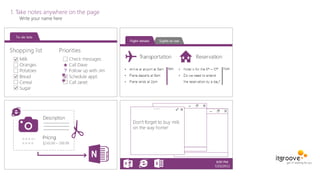
1. Take notes anywhere on the page
Write your name here
Questions? Then let’s get started…
# 10 – It’s Free!
Did you know that OneNote 2013 is now available
as a free download from Microsoft?
http://www.onenote.com/Download
# 10 – It’s Free!
#9 – No Save Button
Remember: You can manually sync.
The Save command doesn't exist in the File tab.
Notebooks are synced automatically for you:
Saving = Syncing
To the location where you stored
the notebook…
1. when you make changes.
2. when you close the program.
Every 30 seconds…
Physically on your device…
#8 - Square Brackets
[[ ]]+ = new page + hyperlink
#7 - “Unbreakable” Links
=
#7 - “Unbreakable” Links
=
#6 – Search Text in Image & Copy Text from an Image
Object Content Recognition
DEMO: The Playground
(OCR)
#5 – Email to OneNote
New! as of March 2014
Set Up: visit the email settings page.
me@onenote.com
#5 – Email to OneNote
“the content of the mail will be put into your
default section…”
Set Up: visit the email settings page.
Live Demo Time!
WARNING: OneNote does not let you recover deleted notes from the recycle bin.
#4 - Page Versions
A copy of every page
is stored in the Version History
at the end of every day.
Solution:
Only Sections
and Pages
go in the
Recycle Bin.
Reason:
Select page > History Tab > Page Versions button.
Questions?
Thank you! Email: kmarshall@itgroove.net
Blog: www.oh365eh.com
Web Site: www.itgroove.net
Twitter: @kelly_itgroove

Favethingsonenote vo365pptx

  • 1.
    “These are aFew of my Favourite Things…” The OneNote Edition
  • 2.
  • 3.
    Who is Kelly? VisualArts – Photography and Video Art Bachelor of Fine Arts Professional Writing – Journalism
  • 4.
    Who is Kelly? RockClimbing Photography Roller Coasters
  • 5.
    Who is Kelly? AbuDhabi, UAE Zambia Botswana South Africa Namibia Costa Rica Honduras Guatemala Nicaragua
  • 6.
  • 7.
  • 8.
    What is MicrosoftOneNote? Electronic notebook / binder with dividers
  • 9.
    What is MicrosoftOneNote? Electronic notebook / binder with dividers
  • 10.
    What is MicrosoftOneNote? Electronic notebook / binder with dividers
  • 11.
    What is MicrosoftOneNote? • any device • anyone Electronic notebook / binder with dividers • anywhere • anything
  • 12.
    1. Take notesanywhere on the page Write your name here
  • 14.
  • 15.
    # 10 –It’s Free! Did you know that OneNote 2013 is now available as a free download from Microsoft? http://www.onenote.com/Download
  • 16.
    # 10 –It’s Free!
  • 17.
    #9 – NoSave Button Remember: You can manually sync. The Save command doesn't exist in the File tab. Notebooks are synced automatically for you: Saving = Syncing To the location where you stored the notebook… 1. when you make changes. 2. when you close the program. Every 30 seconds… Physically on your device…
  • 19.
    #8 - SquareBrackets [[ ]]+ = new page + hyperlink
  • 20.
  • 21.
  • 22.
    #6 – SearchText in Image & Copy Text from an Image Object Content Recognition DEMO: The Playground (OCR)
  • 23.
    #5 – Emailto OneNote New! as of March 2014 Set Up: visit the email settings page. me@onenote.com
  • 24.
    #5 – Emailto OneNote “the content of the mail will be put into your default section…” Set Up: visit the email settings page.
  • 28.
  • 29.
    WARNING: OneNote doesnot let you recover deleted notes from the recycle bin. #4 - Page Versions A copy of every page is stored in the Version History at the end of every day. Solution: Only Sections and Pages go in the Recycle Bin. Reason:
  • 30.
    Select page >History Tab > Page Versions button.
  • 31.
  • 32.
    Thank you! Email:kmarshall@itgroove.net Blog: www.oh365eh.com Web Site: www.itgroove.net Twitter: @kelly_itgroove