Understanding Privacy on
Social Media and the Internet
By Christian Deschenes
Not So Private
• Reports of the NSA copying millions of faces a day
for their facial recognition software
• Facebook’s “Digital Shadow” claims to know who
you really are by colleting all of your data
• Soon to be personalized advertising that takes
your top two best friends on social media and
combining them as a personalized target
advertiser for the customer
• Malls/Companies are reportedly collecting location
info. on where users searched for WiFi when
shopping
Tools to Obtain Online Privacy
• Encrypt, Encrypt, Encrypt!
• Choosing a Correct Browser
• Disabling Online Tracking
• Setting Smart Phone
Preferences
• Understanding Social Media
Privacy Settings
• Update Software, Programs,
and Apps as much as
possible
What is Encryption?
• Form of cryptography
• Scrambles data into
algorithms
• Once data is scrambled,
a wide range of possible
items blend in data
• User’s with valid access
have a “key” to
obtaining the encrypted
data
What to Encrypt?
• Browser
• Text Messaging
• Cloud Data
• Computer/Smart
Phone Hard Drive
• Whatever else you
use (if available)
Encrypting your Browser
Using a site like: HTTPS Everywhere
• Creates protection from spyware and hackers who track
data online
• Easy to install/use
• Always nice that it’s Free
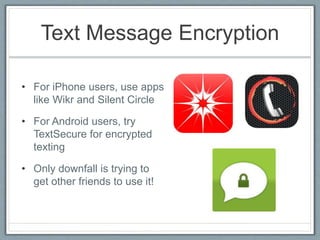
Text Message Encryption
• For iPhone users, use apps
like Wikr and Silent Circle
• For Android users, try
TextSecure for encrypted
texting
• Only downfall is trying to
get other friends to use it!
How to Encrypt the Cloud
• Using software like:
SpiderOak can encrypt
data on the cloud
• Protected even if
company is somehow
breached (by
hackers/malware)
• Only user has the “key”
to their data on the
cloud
Encrypting Hard Drives
• For Apple Macintosh use
default program:
• “FileVault”
• For Microsoft Windows use
default program:
• “BitLocker”
• For other generic Hard Drive
encryption use:
• “TrueCrypt”
• Encrypt your smartphone hard
drive (if possible)
• Really no way on an iPhone
Other Encryptions
• Encrypt email (if possible)
• Use: Gnu Privacy Guard
• Can’t fully encrypt yahoo
or gmail yet
• Encrypt your Instant
Messaging Program!
• Mac: Adium
• Windows: Pidgin
Choosing a Browser with great
Privacy Settings
• Mozilla Firefox most likely
has the best privacy
settings
• Reviews add-ons before
installation to help prevent
spyware and hackers
• Really user friendly, quick
install and clear privacy
policies
• Clearly and Accurately
informs users of their data
collection
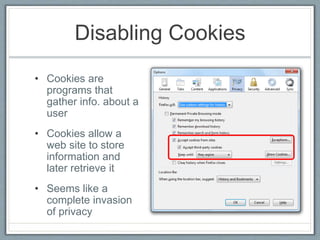
Disabling Cookies
• Cookies are
programs that
gather info. about a
user
• Cookies allow a
web site to store
information and
later retrieve it
• Seems like a
complete invasion
of privacy
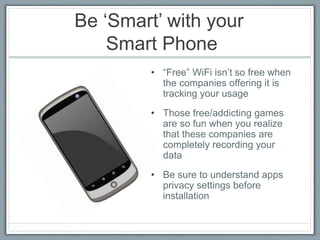
Be ‘Smart’ with your
Smart Phone
• “Free” WiFi isn’t so free when
the companies offering it is
tracking your usage
• Those free/addicting games
are so fun when you realize
that these companies are
completely recording your
data
• Be sure to understand apps
privacy settings before
installation
Understanding Social
Media’s Privacy Settings
• Make sure to set your profile on private!
• It will only allow accepted friends to view a user’s
profile
• In today’s world it’s becoming more and more
important to watch what you say and post on
social media, even previously posted items
• A program called “Simplewash” completely reviews
all the data that a user has posted on social media
Keeping Programs and Apps
Updated
• Hackers feast on old software
• Once one hacker is in, it is available to all of them
• Be sure to regularly check software for updates
Quick Tips:
• Change the personal name of your smart phone and
devices, so data miners won’t be able to put your name with
a location just from your device’s title
• Be smart with your passwords, don’t use the same
password for everything, and make sure to not use public
info. for security questions
• Turn phone on Airplane mode when playing “free” games to
avoid tracking
• Use multiple email addresses to separate advertising and
personal data
• Make sure location services are turned off on your smart
phone also to avoid tracking
The End
Sources:
• http://www.propublica.org/article/privacy-tools-
encrypt-what-you-can
• http://www.nytimes.com/2013/02/07/technology/pers
onaltech/protecting-your-privacy-on-the-new-
facebook.html?pagewanted=all&_r=0
• http://computer.howstuffworks.com/cookie1.htm
• https://ironsocket.com/blog/7-quick-tips-for-
protecting-your-online-privacy/

User's Guide to Online Privacy

  • 1.
    Understanding Privacy on SocialMedia and the Internet By Christian Deschenes
  • 2.
    Not So Private •Reports of the NSA copying millions of faces a day for their facial recognition software • Facebook’s “Digital Shadow” claims to know who you really are by colleting all of your data • Soon to be personalized advertising that takes your top two best friends on social media and combining them as a personalized target advertiser for the customer • Malls/Companies are reportedly collecting location info. on where users searched for WiFi when shopping
  • 3.
    Tools to ObtainOnline Privacy • Encrypt, Encrypt, Encrypt! • Choosing a Correct Browser • Disabling Online Tracking • Setting Smart Phone Preferences • Understanding Social Media Privacy Settings • Update Software, Programs, and Apps as much as possible
  • 4.
    What is Encryption? •Form of cryptography • Scrambles data into algorithms • Once data is scrambled, a wide range of possible items blend in data • User’s with valid access have a “key” to obtaining the encrypted data
  • 5.
    What to Encrypt? •Browser • Text Messaging • Cloud Data • Computer/Smart Phone Hard Drive • Whatever else you use (if available)
  • 6.
    Encrypting your Browser Usinga site like: HTTPS Everywhere • Creates protection from spyware and hackers who track data online • Easy to install/use • Always nice that it’s Free
  • 7.
    Text Message Encryption •For iPhone users, use apps like Wikr and Silent Circle • For Android users, try TextSecure for encrypted texting • Only downfall is trying to get other friends to use it!
  • 8.
    How to Encryptthe Cloud • Using software like: SpiderOak can encrypt data on the cloud • Protected even if company is somehow breached (by hackers/malware) • Only user has the “key” to their data on the cloud
  • 9.
    Encrypting Hard Drives •For Apple Macintosh use default program: • “FileVault” • For Microsoft Windows use default program: • “BitLocker” • For other generic Hard Drive encryption use: • “TrueCrypt” • Encrypt your smartphone hard drive (if possible) • Really no way on an iPhone
  • 10.
    Other Encryptions • Encryptemail (if possible) • Use: Gnu Privacy Guard • Can’t fully encrypt yahoo or gmail yet • Encrypt your Instant Messaging Program! • Mac: Adium • Windows: Pidgin
  • 11.
    Choosing a Browserwith great Privacy Settings • Mozilla Firefox most likely has the best privacy settings • Reviews add-ons before installation to help prevent spyware and hackers • Really user friendly, quick install and clear privacy policies • Clearly and Accurately informs users of their data collection
  • 12.
    Disabling Cookies • Cookiesare programs that gather info. about a user • Cookies allow a web site to store information and later retrieve it • Seems like a complete invasion of privacy
  • 13.
    Be ‘Smart’ withyour Smart Phone • “Free” WiFi isn’t so free when the companies offering it is tracking your usage • Those free/addicting games are so fun when you realize that these companies are completely recording your data • Be sure to understand apps privacy settings before installation
  • 14.
    Understanding Social Media’s PrivacySettings • Make sure to set your profile on private! • It will only allow accepted friends to view a user’s profile • In today’s world it’s becoming more and more important to watch what you say and post on social media, even previously posted items • A program called “Simplewash” completely reviews all the data that a user has posted on social media
  • 15.
    Keeping Programs andApps Updated • Hackers feast on old software • Once one hacker is in, it is available to all of them • Be sure to regularly check software for updates
  • 16.
    Quick Tips: • Changethe personal name of your smart phone and devices, so data miners won’t be able to put your name with a location just from your device’s title • Be smart with your passwords, don’t use the same password for everything, and make sure to not use public info. for security questions • Turn phone on Airplane mode when playing “free” games to avoid tracking • Use multiple email addresses to separate advertising and personal data • Make sure location services are turned off on your smart phone also to avoid tracking
  • 17.
    The End Sources: • http://www.propublica.org/article/privacy-tools- encrypt-what-you-can •http://www.nytimes.com/2013/02/07/technology/pers onaltech/protecting-your-privacy-on-the-new- facebook.html?pagewanted=all&_r=0 • http://computer.howstuffworks.com/cookie1.htm • https://ironsocket.com/blog/7-quick-tips-for- protecting-your-online-privacy/