Internet Safety & Privacy
What does your online activity say about you?
Introductions
Alexine Marier
Welcome!
Check out the Privacy Commissioner's website for useful
information, fact sheets, tips and resources about Online &
Wireless Privacy : https://www.priv.gc.ca/resource/topic-
sujet/owp-pvplrsf/index_e.asp
AGENDA
1. Welcome/Introductions
2. Understanding the Lingo
Cookies
IP Address
Metadata
3. ~Break~
4. Keeping Your Personal Information Private
Participating in social media on your own terms
A word on privacy policies
Be aware of phishing/scams
Identity theft
5. Keeping Your Accounts Secure
Passwords
6. Staying Vigilant
Email attachments
Free programs
Malware and virus software
Looking out for fraud
C. Keeping Your Experience Enjoyable and Safe 
“Personal data is the oil of the
internet and the new currency of
the digital world”
Megan Kuneva, Consumer Commissioner
UNDERSTANDING THE LINGO
IP Addresses, Cookies & Metadata
What is an IP Address?
• Every machine on a network has a unique identifier. Just as you
would address a letter to send in the mail, computers use the unique
identifier to send data to specific computers on a network. Most
networks today, including all computers on the Internet, use the
TCP/IP protocol as the standard for how to communicate on the
network. In the TCP/IP protocol, the unique identifier for a
computer is called its IP address.
• Note: Chances are you have more than one computer at home. In
fact, chances are you have a router that allows those several
computers or other internet-connected devices to share your
single connection to the internet. They, in turn, share the single
IP address you’ve been assigned on the internet.
Cookies (not the delicious variety)
A HTTP cookie (also
called web cookie,
Internet cookie, browser
cookie or simply cookie,
the latter which is not to
be confused with the
literal definition), is a
small piece of data sent
from a website and stored
in a user's web browser
while the user is
browsing that website.
This means that the
cookie keeps track of
information about your
activity on the site.
Why do Websites use Cookies?
Customization
Distribution
Security
Privacy
Cookies (cont.)
Basically, cookies can store tracking data about your
browsing, but cannot access any personal information from
your browser.
You can prevent cookies from being used on your computer
at all, or manage them with a custom application. You can
set your browser to reject cookies in your browser settings.
Note however, that some web sites won't let you visit unless
you accept their cookies.
Metadata
Metadata (cont.)
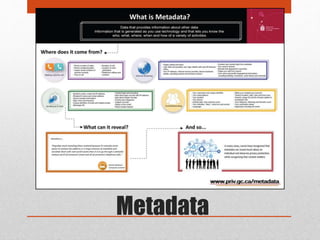
• For many, metadata is where the lines blur where your
privacy is concerned. This is because as much as
metadata can reveal a lot, it isn’t always technically
considered personal information.
• For more detailed information about metadata and the
laws and regulations pertaining to our country, visit the
Government of Canada Privacy Commissioner's website:
https://www.priv.gc.ca/metadata
Privacy Laws & Policies
in Canada
• Privacy Act governs the Federal Government agencies
• Ontario Freedom of Information and Protection of Privacy Act and
similar Provincial legislation governs Provincial Government
agencies.
• Personal Information Protection and Electronic Documents
Act governs private corporations, unless there is equivalent
Provincial legislation
• Ontario Personal Health Information Protection Act and other similar
Provincial legislation governs health information
Break
KEEPING YOUR PERSONAL
INFORMATION PRIVATE
What you need to know about social media,
privacy policies & phishing scams
Participating in Social
Media on your own Terms
• Consider what you share on Profiles
Common to include a lot of information on your profile (from employer, to
religious views, birthday and place of birth – think twice about information
you share on social media and ensure it is suitable for all eyes) NOTE: You
are not required to fill in all the fields in your profile.
• Look at the photo before posting it
Photos are great for connecting with friends and families, but they can
also make you vulnerable. Examine your photos, look at the back ground and
make sure you fuzz or crop out any photos that show your address, license
plate, or other information people could use to find you.
• Read and adjust your security settings!!!
Privacy Policies
Know what you’re agreeing too. Avoid
agreeing to the terms and conditions
without reading them first.
Policies tell you what information a certain
app or company will gather and what will
happen with the data they collect.
Always check the privacy policy before
purchasing from unknown (or renown)
websites; you may not only be the buyer in
the transaction, but the seller of your
personal information.
What is Phishing?
• Phishing is a common trick used by identity thieves to
gain your personal information. This crime involves
sending e-mails or creating sites that appear to be from a
legitimate company, asking you to confirm personal
information such as: bank account numbers, passwords,
birth dates, or addresses.
Avoiding “Fishy” Situations
• If you’re unsure, contact the supposed site directly before
adding personal information, to see if they have been
trying to contact you.
• PayPal, eBay and banks are some of the most common
targets for phishing scams. Note: Your bank will never
send you an e-mail asking for you to confirm your
banking information; someone is phishing for your
bank info.
Identifying & Reporting Scams
• 10 tips on how to identify scams:
http://blog.returnpath.com/blog/lauren-
soares/10-tips-on-how-to-identify-a-
phishing-or-spoofing-email
• You can report any scams to the
government through the Privacy
Commissioner website:
https://www.priv.gc.ca
KEEPING YOUR ACCOUNTS SECURE
The dreaded password conundrum
Passwords
• Choose a good password
• Don’t reuse passwords
• Keep your passwords in a safe
place
• Watch out for Key loggers and
Malware
Check out
https://howsecureismypassword.net/
to verify your passwords
effectiveness.
STAYING VIGILANT
Think before you click
5 Tips for Staying Vigilant
A lapse in attention can lead you to automatically click on a
link or open an email attachment that may put your
computer or your information at risk. Staying vigilant can
help you stay safe.
ALWAYS:
1. Think before opening e-mail attachment
2. Consider the legitimacy of free programs
3. Keep your virus software up to date
4. Watch for fraud
5. Be on the lookout for sexual predators
KEEP YOUR EXPERIENCE
SAFE & ENJOYABLE
Privacy in the News
• Bill C-51 (causing quite the controversy)
• Body cams on TO police http://www.ctvnews.ca/canada/toronto-police-
body-cameras-raise-privacy-concerns-1.2380593
• Canada joins global sweep of kids’ online privacy
http://www.theglobeandmail.com/report-on-business/industry-news/marketing/global-
sweep-to-focus-on-kids-online-privacy/article24378940/
“Personal data is the oil of the
internet and the new currency of
the digital world”
Megan Kuneva, Consumer Commissioner
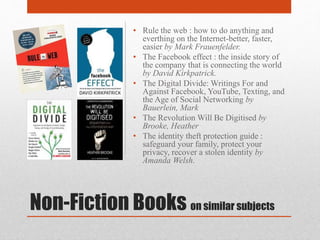
Non-Fiction Books on similar subjects
• Rule the web : how to do anything and
everthing on the Internet-better, faster,
easier by Mark Frauenfelder.
• The Facebook effect : the inside story of
the company that is connecting the world
by David Kirkpatrick.
• The Digital Divide: Writings For and
Against Facebook, YouTube, Texting, and
the Age of Social Networking by
Bauerlein, Mark
• The Revolution Will Be Digitised by
Brooke, Heather
• The identity theft protection guide :
safeguard your family, protect your
privacy, recover a stolen identity by
Amanda Welsh.
Fiction Books on similar subjects
• Invasion of Privacy: A Novel by
Christopher Reich
• Smart Girl's Guide to Privacy by
Violet Blue
• Wit's End by Karen Joy Fowler

Internet Safety & Privacy

  • 1.
    Internet Safety &Privacy What does your online activity say about you?
  • 2.
  • 3.
    Welcome! Check out thePrivacy Commissioner's website for useful information, fact sheets, tips and resources about Online & Wireless Privacy : https://www.priv.gc.ca/resource/topic- sujet/owp-pvplrsf/index_e.asp
  • 4.
    AGENDA 1. Welcome/Introductions 2. Understandingthe Lingo Cookies IP Address Metadata 3. ~Break~ 4. Keeping Your Personal Information Private Participating in social media on your own terms A word on privacy policies Be aware of phishing/scams Identity theft 5. Keeping Your Accounts Secure Passwords 6. Staying Vigilant Email attachments Free programs Malware and virus software Looking out for fraud C. Keeping Your Experience Enjoyable and Safe 
  • 5.
    “Personal data isthe oil of the internet and the new currency of the digital world” Megan Kuneva, Consumer Commissioner
  • 6.
    UNDERSTANDING THE LINGO IPAddresses, Cookies & Metadata
  • 7.
    What is anIP Address? • Every machine on a network has a unique identifier. Just as you would address a letter to send in the mail, computers use the unique identifier to send data to specific computers on a network. Most networks today, including all computers on the Internet, use the TCP/IP protocol as the standard for how to communicate on the network. In the TCP/IP protocol, the unique identifier for a computer is called its IP address. • Note: Chances are you have more than one computer at home. In fact, chances are you have a router that allows those several computers or other internet-connected devices to share your single connection to the internet. They, in turn, share the single IP address you’ve been assigned on the internet.
  • 8.
    Cookies (not thedelicious variety) A HTTP cookie (also called web cookie, Internet cookie, browser cookie or simply cookie, the latter which is not to be confused with the literal definition), is a small piece of data sent from a website and stored in a user's web browser while the user is browsing that website. This means that the cookie keeps track of information about your activity on the site.
  • 9.
    Why do Websitesuse Cookies? Customization Distribution Security Privacy
  • 10.
    Cookies (cont.) Basically, cookiescan store tracking data about your browsing, but cannot access any personal information from your browser. You can prevent cookies from being used on your computer at all, or manage them with a custom application. You can set your browser to reject cookies in your browser settings. Note however, that some web sites won't let you visit unless you accept their cookies.
  • 11.
  • 12.
    Metadata (cont.) • Formany, metadata is where the lines blur where your privacy is concerned. This is because as much as metadata can reveal a lot, it isn’t always technically considered personal information. • For more detailed information about metadata and the laws and regulations pertaining to our country, visit the Government of Canada Privacy Commissioner's website: https://www.priv.gc.ca/metadata
  • 13.
    Privacy Laws &Policies in Canada • Privacy Act governs the Federal Government agencies • Ontario Freedom of Information and Protection of Privacy Act and similar Provincial legislation governs Provincial Government agencies. • Personal Information Protection and Electronic Documents Act governs private corporations, unless there is equivalent Provincial legislation • Ontario Personal Health Information Protection Act and other similar Provincial legislation governs health information
  • 14.
  • 15.
    KEEPING YOUR PERSONAL INFORMATIONPRIVATE What you need to know about social media, privacy policies & phishing scams
  • 16.
    Participating in Social Mediaon your own Terms • Consider what you share on Profiles Common to include a lot of information on your profile (from employer, to religious views, birthday and place of birth – think twice about information you share on social media and ensure it is suitable for all eyes) NOTE: You are not required to fill in all the fields in your profile. • Look at the photo before posting it Photos are great for connecting with friends and families, but they can also make you vulnerable. Examine your photos, look at the back ground and make sure you fuzz or crop out any photos that show your address, license plate, or other information people could use to find you. • Read and adjust your security settings!!!
  • 17.
    Privacy Policies Know whatyou’re agreeing too. Avoid agreeing to the terms and conditions without reading them first. Policies tell you what information a certain app or company will gather and what will happen with the data they collect. Always check the privacy policy before purchasing from unknown (or renown) websites; you may not only be the buyer in the transaction, but the seller of your personal information.
  • 18.
    What is Phishing? •Phishing is a common trick used by identity thieves to gain your personal information. This crime involves sending e-mails or creating sites that appear to be from a legitimate company, asking you to confirm personal information such as: bank account numbers, passwords, birth dates, or addresses.
  • 19.
    Avoiding “Fishy” Situations •If you’re unsure, contact the supposed site directly before adding personal information, to see if they have been trying to contact you. • PayPal, eBay and banks are some of the most common targets for phishing scams. Note: Your bank will never send you an e-mail asking for you to confirm your banking information; someone is phishing for your bank info.
  • 20.
    Identifying & ReportingScams • 10 tips on how to identify scams: http://blog.returnpath.com/blog/lauren- soares/10-tips-on-how-to-identify-a- phishing-or-spoofing-email • You can report any scams to the government through the Privacy Commissioner website: https://www.priv.gc.ca
  • 21.
    KEEPING YOUR ACCOUNTSSECURE The dreaded password conundrum
  • 22.
    Passwords • Choose agood password • Don’t reuse passwords • Keep your passwords in a safe place • Watch out for Key loggers and Malware Check out https://howsecureismypassword.net/ to verify your passwords effectiveness.
  • 23.
  • 24.
    5 Tips forStaying Vigilant A lapse in attention can lead you to automatically click on a link or open an email attachment that may put your computer or your information at risk. Staying vigilant can help you stay safe. ALWAYS: 1. Think before opening e-mail attachment 2. Consider the legitimacy of free programs 3. Keep your virus software up to date 4. Watch for fraud 5. Be on the lookout for sexual predators
  • 25.
  • 26.
    Privacy in theNews • Bill C-51 (causing quite the controversy) • Body cams on TO police http://www.ctvnews.ca/canada/toronto-police- body-cameras-raise-privacy-concerns-1.2380593 • Canada joins global sweep of kids’ online privacy http://www.theglobeandmail.com/report-on-business/industry-news/marketing/global- sweep-to-focus-on-kids-online-privacy/article24378940/
  • 27.
    “Personal data isthe oil of the internet and the new currency of the digital world” Megan Kuneva, Consumer Commissioner
  • 28.
    Non-Fiction Books onsimilar subjects • Rule the web : how to do anything and everthing on the Internet-better, faster, easier by Mark Frauenfelder. • The Facebook effect : the inside story of the company that is connecting the world by David Kirkpatrick. • The Digital Divide: Writings For and Against Facebook, YouTube, Texting, and the Age of Social Networking by Bauerlein, Mark • The Revolution Will Be Digitised by Brooke, Heather • The identity theft protection guide : safeguard your family, protect your privacy, recover a stolen identity by Amanda Welsh.
  • 29.
    Fiction Books onsimilar subjects • Invasion of Privacy: A Novel by Christopher Reich • Smart Girl's Guide to Privacy by Violet Blue • Wit's End by Karen Joy Fowler

Editor's Notes

  • #3 Let’s get started! First, a little bit about myself… Student – Studying to be an Library & Information Technician @ AC Northern Girl, new to Kemptville CAP Student for 3 years – 2yrs @ CPL / 1yr @ NGPL I have amassed much of my knowledge through my own curiosity. My generation grew up with the technology, I was fortunate to always have a computer in my house (even though many of friends did not). Technology has always fascinated me, I yearn to understand it and use it to it’s full potential…… Professional experience– Worked for Comsatec Inc. for 6 years
  • #4 Welcome everyone! When it comes to internet safety and privacy, there’s a lot to cover! As Canadians embrace social networks and other online technologies, they are sharing increasing amounts of personal information over the Internet. Even with the toughest privacy settings, your online activities are never entirely private. Your clicks and website visits leave data trails. Over time, these coalesce into a highly informative digital shadow that reveals a lot about who you are, what you do, and what you like and dislike. And that’s valuable information. Businesses may use it to tailor ads to your interests or preferences. In extreme cases, criminals can find sophisticated ways to trick you into providing your financial and other sensitive personal information online to defraud you. In other words, you may go online to network with friends. But, in the online world, you may not always be among friends. We will cover the basics in this evenings workshop. If you want to know more, visit the Government of Canada’s Privacy Commissioner website.
  • #6 Take a moment to read this and think about it. Does anyone have anything to share about this statement? Do you understand it? We’ll come back to this when we’re done and see what our opinion is.
  • #10 Customization: Some sites use cookies to record your surfing patterns, and then optimize the information the site subsequently presents. For example, a search site may present you with advertising that reflects your interests based on the keywords you search for. Distribution: One of the key reasons web sites use cookies is to distribute the information storage. A cookie takes up a small amount of space on an individual computer, but would take up a very large amount of space if they all had to be stored back on a web site's server. Security: If a cookie was stored on a web site, then it can be accessed by anyone with access to that web site. However, when the cookie is stored on your computer, then it can't be accessed by hackers that break into the web site. Privacy: If a cookie was stored on a web site, then you would have to identify yourself somehow so the site would know which cookie to give you. But when the cookie is stored on your computer, then the web site simply uses whatever cookie it finds without requiring disclosure of your identity.
  • #16 Now that we know the lingo – let’s move on to what’s really important. What can you do to keep your personal information as private.
  • #18 Ever wonder why you receive e-mails or phone calls after making a purchase? This happens when a company shares your information and purchase history with others.
  • #23 Choose a Great Password Although it may be tempting to choose a password that's easy to remember, such as your child's name, your birth date, or your favorite sports team, these kinds of passwords leave you open to identity theft and fraud. According to Consumer Reports, 32% of adults used passwords based on simple personal information. Instead, it's better to create a password that meets the following criteria: -Eight or more characters -A number, as well as letters -A special character, like %,*,@, or ? -Upper and lowercase letters -No personal information Don't Reuse Passwords In order to remember your passwords, you may reuse the same password for multiple accounts. Avoid this if at all possible, since it makes multiple accounts vulnerable if your password is discovered. Keep Your Passwords in a Safe Spot Because you're not reusing passwords, it can be hard to remember all of them. Many people keep lists or files with the login information for their various online accounts. The safest place to store this list is on an external flash drive that you keep with you. Watch Out for Keyloggers and Malware Certain computer programs, called keyloggers, can keep track of the keys you type and transmit this information to people who might want to steal your accounts. Be sure you have adequate security programs on your computer and that you are extremely careful when entering password information on public computers.
  • #25 1. Think Before Opening Email Attachments Don't open email attachments from people you don't know. These attachments may contain viruses or other malware. Additionally, think twice before you open an attachment from someone you do know. It's common for email accounts to get hacked, and the hackers may send messages and attachments to all of the people in the address book. If it doesn't sound like something your friend might send you, email him or her separately to find out if it's legit. 2. Consider the Legitimacy of Free Programs Avoid downloading free software online unless you're certain it's from a reputable company. Many free programs are merely a device for delivering adware and spyware. 3. Keep Your Virus Software Up to Date Install virus protection software and a firewall. Check for updates regularly. 4. Watch for Fraud The global nature of the Internet has brought new life to scams. Some of the most common forms of Internet fraud include the following: Online auctions site postings that feature non-existent or falsely represented merchandise Nigerian money offers promising large sums of cash in exchange for assistance with bank account transfers Financial scams targeting consumers with poor credit who are tricked into paying upfront fees in hopes of receiving credit cards or personal loans Phony sweepstakes offers asking for payment to claim a prize that doesn't really exist To learn how to protect yourself from online fraud, visit the Internet National Fraud Information Center. 5. Be on the Lookout for Sexual Predators If you're a single woman who likes to use online dating sites, be on the lookout for potential sexual predators. It's not always easy to tell if a potential date is merely lying about his appearance or trying to conceal a criminal past. If you do decide to arrange a personal meeting with someone you met online, always request that your first date be in a restaurant or similar public place. It's also a good idea to tell a friend where you're going and make sure someone is available to check up on you later in the evening.
  • #26 If you're aware of the hazards and use the Internet responsibly, it can be a wonderful tool for meeting people, sharing experiences, shopping, and gathering information. Keep these tips in mind to ensure your Internet experience is both enjoyable and safe.
  • #28 With all your new found wisdom, do you have different thought about this statement? Here are my thoughts: I think Mrs. Kuneva is absolutely right. From a consumer point of view (us), this statement is a little scary to accept. From a business point of view however, personal data is a priceless commodity, like oil! Having information about customers, users, or better yet non-users, can help businesses target their markets in a informed way, improving profits and outreach. The “data soup” that is the internet, is heavily influenced by trends, if you want to be a part of the trend, whether it be a new app on your tablet, a new game online, or a new website that you must create an account for you are sacrificing some of your personal data for pleasure, better service and protection. The level of privacy you wish to have is to your discretion, you can achieve high levels of privacy by changing your settings on your devices and browsers, and decide whether an app is worth downloading based on their terms and conditions instead of their rating and recommendations. However, you can stay safe and sacrifice some of your privacy by enjoying all that technology has to offer. Unfortunately, personal data is becoming a currency, and apps and websites won’t let you get everything you want without you giving them a little back.