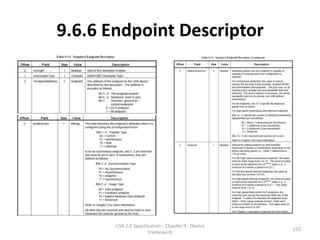
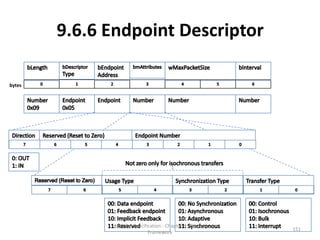
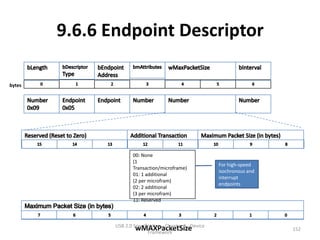
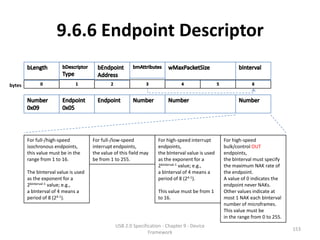
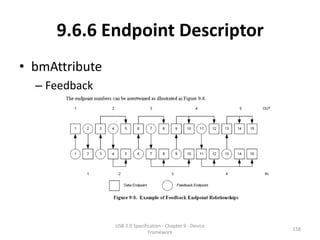
USB 2.0 Specification
      Chapter 9
USB Device Framework
         Macpaul Lin


     USB 2.0 Specification - Chapter 9 - Device
                                                  1
                    Framework
Disclaim
• All the materials of this slide is only a directive work base on
  the materials listed in Reference.
• The purpose of this slide is for knowledge sharing and for
  people understanding USB standard easier.
   – Most of the material of the Copyright should belong to Universal Serial
     Bus Specification Copyright © 2000, Compaq Computer
     Corporation, Hewlett-Packard Company, Intel Corporation, Lucent
     Technologies Inc, Microsoft Corporation, NEC Corporation, Koninklijke
     Philips Electronics N.V. All rights reserved.
   – The directive work part should be used as Creative Commons license
     3.0 “BY-NC-SA”.
   – For distributing this slide, the Disclaim and Reference should be
     included in the distribution.
                         USB 2.0 Specification - Chapter 9 - Device
                                                                           2
                                        Framework
Reference
• USB 2.0 specification
  – http://www.usb.org/developers/docs/usb_20_06
    0112.zip
• USB in a Nutshell
  – http://www.beyondlogic.org/usbnutshell/usb1.sh
    tml


                USB 2.0 Specification - Chapter 9 - Device
                                                             3
                               Framework
Outline
9.1 USB Device States
9.2 Generic USB Device Operations
9.3 USB Device Requests
9.4 Standard Device Requests
9.5 Descriptors
9.6 Standard USB Descriptor Definitions
9.7 Device Class Definitions

                USB 2.0 Specification - Chapter 9 - Device
                                                             4
                               Framework
Overview
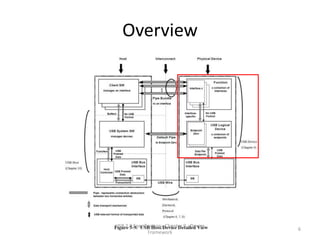
• A USB device may be divided into three layers:
   – The top layer is the functionality provided by the serial bus
     device, for instance, a mouse or ISDN interface.
   – The middle layer handles routing data between the bus
     interface and various endpoints on the device.
       • An endpoint is the ultimate consumer or provider of data. It may be
         thought of as a source or sink for data.
   – The bottom layer is a bus interface that transmits and receives
     packets.
• This chapter describes the common attributes and
  operations of the middle layer of a USB device.
   – These attributes and operations are used by the function-
     specific portions of the device to communicate through the bus
     interface and ultimately with the host.

                         USB 2.0 Specification - Chapter 9 - Device
                                                                               5
                                        Framework
Overview


USB 2.0 Specification - Chapter 9 - Device
                                             6
               Framework
9.1 USB Device States
• 9.1.1 Visible Device States
• 9.1.2 BUS Enumeration


                 USB 2.0 Specification - Chapter 9 - Device
                                                              7
                                Framework
9.1.1 Visible Device States


       USB 2.0 Specification - Chapter 9 - Device
                                                    8
                      Framework
9.1.1 Visible Device States
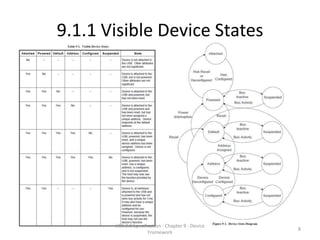
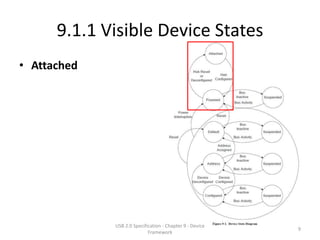
• Attached


             USB 2.0 Specification - Chapter 9 - Device
                                                          9
                            Framework
9.1.1 Visible Device States
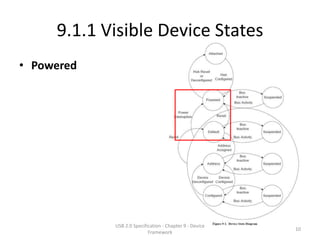
• Powered


            USB 2.0 Specification - Chapter 9 - Device
                                                         10
                           Framework
9.1.1 Visible Device States
• Powered
  – Type
     • Self-Powered
     • Bus-powered
  – Both self-powered or bus-powered devices they
    won’t be considered to be in the Powered state
    until they are attached to the USB and VBUS is
    applied to the device.


                  USB 2.0 Specification - Chapter 9 - Device
                                                               11
                                 Framework
9.1.1 Visible Device States
• Powered
   – Device
      • Devices report their power source capability through the configuration
        descriptor.
      • The current power source is reported as part of a device’s status.
      • Both mode is supported
            – If a configuration is capable of supporting both power modes, the power maximum
              reported for that configuration is the maximum the device will draw from VBUS in either
              mode.
            – The device must observe this maximum, regardless of its mode.
      • Only one mode is supported.
            – If a configuration supports only one power mode and the power source of the device
              changes, the device will lose its current configuration and address and return to the
              Powered state.
      • If a device is self-powered and its current configuration requires more than
        100 mA, then if the device switches to being bus-powered, it must return to
        the Address state.
      • Self-powered hubs that use VBUS to power the Hub Controller are allowed to
        remain in the Configured state if local power is lost.

                              USB 2.0 Specification - Chapter 9 - Device
                                                                                                      12
                                             Framework
9.1.1 Visible Device States
• Powered
  – HUB
    • Bus powered hubs do not provide any downstream
      power until they are configured.
    • A USB device must be able to be addressed within a
      specified time period from when power is initially
      applied (refer to Chapter 7).
    • After an attachment to a port has been detected, the
      host may enable the port, which will also reset the
      device attached to the port.

                  USB 2.0 Specification - Chapter 9 - Device
                                                               13
                                 Framework
9.1.1 Visible Device States
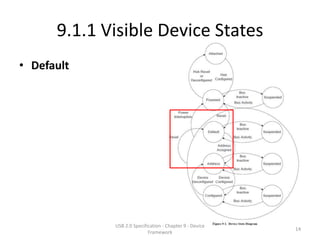
• Default


             USB 2.0 Specification - Chapter 9 - Device
                                                          14
                            Framework
9.1.1 Visible Device States
• Default
   – Device reset
       • After the device has been powered, it must not respond to any bus transactions until it
         has received a reset from the bus.
       • After receiving a reset, the device is then addressable at the default address.
   – Device speed
       • When the reset process is complete, the USB device is operating at the correct speed
         (i.e., low-/full-/highspeed).
            – The speed selection for low- and full-speed is determined by the device termination resistors.
            – A device that is capable of high-speed operation determines whether it will operate at high-
              speed as a part of the reset process (see Chapter 7 for more details).
   – Device behavior
       • A device capable of high-speed operation must reset successfully at full-speed when in
         an electrical environment that is operating at full-speed.
       • After the device is successfully reset, the device must also respond successfully to
         device and configuration descriptor requests and return appropriate information.
       • The device may or may not be able to support its intended functionality when
         operating at full-speed.


                               USB 2.0 Specification - Chapter 9 - Device
                                                                                                          15
                                              Framework
9.1.1 Visible Device States
• Address
  – All USB devices use the default address when
    initially powered or after the device has been
    reset.
  – Each USB device is assigned a unique address by
    the host after attachment or after reset.


                 USB 2.0 Specification - Chapter 9 - Device
                                                              16
                                Framework
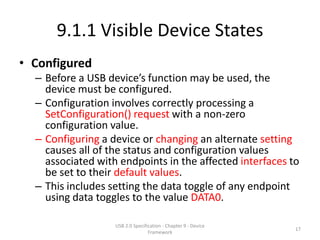
9.1.1 Visible Device States
• Configured
  – Before a USB device’s function may be used, the
    device must be configured.
  – Configuration involves correctly processing a
    SetConfiguration() request with a non-zero
    configuration value.
  – Configuring a device or changing an alternate setting
    causes all of the status and configuration values
    associated with endpoints in the affected interfaces to
    be set to their default values.
  – This includes setting the data toggle of any endpoint
    using data toggles to the value DATA0.

                   USB 2.0 Specification - Chapter 9 - Device
                                                                17
                                  Framework
9.1.1 Visible Device States
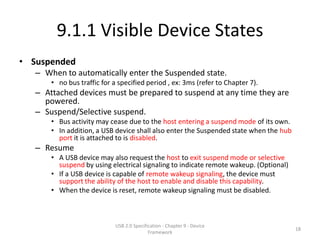
• Suspended
   – When to automatically enter the Suspended state.
       • no bus traffic for a specified period , ex: 3ms (refer to Chapter 7).
   – Attached devices must be prepared to suspend at any time they are
     powered.
   – Suspend/Selective suspend.
       • Bus activity may cease due to the host entering a suspend mode of its own.
       • In addition, a USB device shall also enter the Suspended state when the hub
         port it is attached to is disabled.
   – Resume
       • A USB device may also request the host to exit suspend mode or selective
         suspend by using electrical signaling to indicate remote wakeup. (Optional)
       • If a USB device is capable of remote wakeup signaling, the device must
         support the ability of the host to enable and disable this capability.
       • When the device is reset, remote wakeup signaling must be disabled.


                             USB 2.0 Specification - Chapter 9 - Device
                                                                                       18
                                            Framework
9.1.2 Bus Enumeration
• The host uses this process to identify and
  manage the device state changes when a USB
  device is attached to or removed.


               USB 2.0 Specification - Chapter 9 - Device
                                                            19
                              Framework
9.1.2 Bus Enumeration
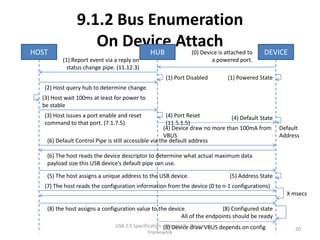
HOST
                   On Device Attach
                          HUB                                   (0) Device is attached to     DEVICE
          (1) Report event via a reply on                               a powered port.
            status change pipe. (11.12.3)
                                                     (1) Port Disabled         (1) Powered State
   (2) Host query hub to determine change.
  (3) Host wait 100ms at least for power to
  be stable
   (3) Host issues a port enable and reset              (4) Port Reset           (4) Default State
   command to that port. (7.1.7.5)                      (11.5.1.5)
                                                       (4) Device draw no more than 100mA from       Default
                                                       VBUS                                          Address
    (6) Default Control Pipe is still accessible via the default address

    (6) The host reads the device descriptor to determine what actual maximum data
    payload size this USB device’s default pipe can use.

    (5) The host assigns a unique address to the USB device.                    (5) Address State
   (7) The host reads the configuration information from the device (0 to n-1 configurations)
                                                                                                       X msecs

    (8) the host assigns a configuration value to the device.               (8) Configured state
                                                           All of the endpoints should be ready
                                USB 2.0 Specification -(8) Device draw VBUS depends on config
                                                        Chapter 9 - Device
                                                                                                          20
                                               Framework
9.1.2 Bus Enumeration
HOST
                  On Device Detach.
                          HUB                                        (0) Device is dettached   DEVICE
                                                                         to a powered port.
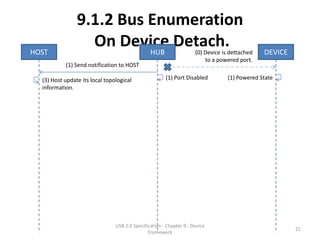
           (1) Send notification to HOST

  (3) Host update its local topological                (1) Port Disabled          (1) Powered State
  information.


                                USB 2.0 Specification - Chapter 9 - Device
                                                                                                        21
                                               Framework
9.2 Generic USB Device Operations
•   9.2.1 Dynamic Attachment and Removal
•   9.2.2 Address Assignment
•   9.2.3 Configuration
•   9.2.4 Data Transfer
•   9.2.5 Power Management
•   9.2.6 Request Processing
•   9.2.7 Request Error

                USB 2.0 Specification - Chapter 9 - Device
                                                             22
                               Framework
9.2.1 Dynamic Attachment and
              Removal
• The hub that provides the attachment point or
  port is responsible for reporting any change in
  the state of the port.
• When host enables the hub port when device
  is attached, will also lead device resetting.
  – A reset (port reset) USB device has the following
    characteristics:
     • Responds to the default USB address
     • Is not configured
     • Is not initially suspended
                   USB 2.0 Specification - Chapter 9 - Device
                                                                23
                                  Framework
9.2.2 Address Assignment
• The host is responsible for assigning a unique
  address to the device.
  – This is done after the device has been reset by the
    host, and the hub port where the device is
    attached has been enabled.


                  USB 2.0 Specification - Chapter 9 - Device
                                                               24
                                 Framework
9.2.3 Configuration
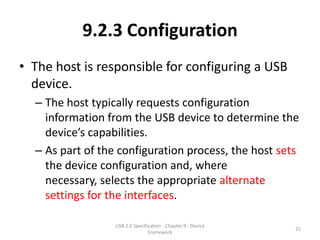
• The host is responsible for configuring a USB
  device.
  – The host typically requests configuration
    information from the USB device to determine the
    device’s capabilities.
  – As part of the configuration process, the host sets
    the device configuration and, where
    necessary, selects the appropriate alternate
    settings for the interfaces.

                  USB 2.0 Specification - Chapter 9 - Device
                                                               25
                                 Framework
9.2.3 Configuration
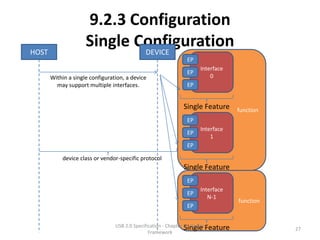
• Within a single configuration, a device may
  support multiple interfaces.


                USB 2.0 Specification - Chapter 9 - Device
                                                             26
                               Framework
9.2.3 Configuration
HOST
                     Single Configuration
                             DEVICE
                                                               EP
                                                                     Interface
                                                               EP
       Within a single configuration, a device                           0
         may support multiple interfaces.                      EP


                                                              Single Feature         function
                                                               EP
                                                                     Interface
                                                               EP
                                                                         1
                                                               EP

            device class or vendor-specific protocol
                                                              Single Feature
                                                               EP
                                                                     Interface
                                                               EP
                                                                        N-1
                                                                                     function
                                                               EP


                                 USB 2.0 Specification - Chapter 9 - DeviceFeature
                                                                 Single                         27
                                                Framework
9.2.3 Configuration
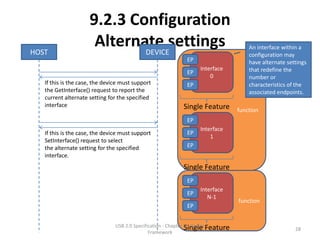
HOST
                      Alternate settings
                             DEVICE
                                                                                        An interface within a
                                                                                        configuration may
                                                              EP                        have alternate settings
                                                                    Interface           that redefine the
                                                              EP
                                                                        0               number or
   If this is the case, the device must support               EP                        characteristics of the
   the GetInterface() request to report the                                             associated endpoints.
   current alternate setting for the specified
   interface                                                 Single Feature         function
                                                              EP
                                                                    Interface
   If this is the case, the device must support               EP
                                                                        1
   SetInterface() request to select
   the alternate setting for the specified                    EP
   interface.
                                                             Single Feature
                                                              EP
                                                                    Interface
                                                              EP
                                                                       N-1
                                                                                    function
                                                              EP


                                USB 2.0 Specification - Chapter 9 - DeviceFeature
                                                                Single                                    28
                                               Framework
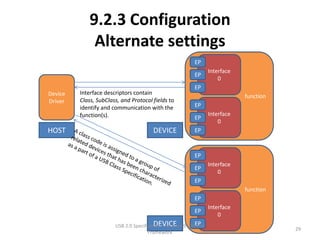
9.2.3 Configuration
              Alternate settings
                                                            EP
                                                                    Interface
                                                            EP
                                                                        0
                                                            EP
Device   Interface descriptors contain
                                                                                function
Driver   Class, SubClass, and Protocol fields to
         identify and communication with the                EP
         function(s).                                               Interface
                                                            EP
                                                                        0
HOST                                    DEVICE              EP


                                                            EP
                                                                    Interface
                                                            EP
                                                                        0
                                                            EP
                                                                                function
                                                            EP
                                                                    Interface
                                                            EP
                                                                        0
                                         DEVICE             EP
                       USB 2.0 Specification - Chapter 9 - Device
                                                                                           29
                                      Framework
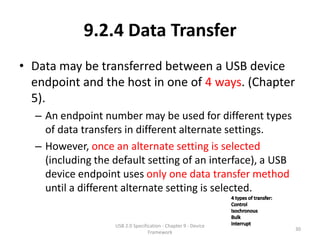
9.2.4 Data Transfer
• Data may be transferred between a USB device
  endpoint and the host in one of 4 ways. (Chapter
  5).
  – An endpoint number may be used for different types
    of data transfers in different alternate settings.
  – However, once an alternate setting is selected
    (including the default setting of an interface), a USB
    device endpoint uses only one data transfer method
    until a different alternate setting is selected.


                   USB 2.0 Specification - Chapter 9 - Device
                                                                30
                                  Framework
9.2.5 Power Management
• 9.2.5.1 Power Budgeting
• 9.2.5.2 Remote Wakeup


               USB 2.0 Specification - Chapter 9 - Device
                                                            31
                              Framework
9.2.5.1 Power Budgeting
• During device enumeration, a host evaluates a device’s
  power requirements.
   – If the power requirements of a particular configuration
     exceed the power available to the device, Host Software
     shall not select that configuration.
   – USB devices shall limit the power they consume from
     VBUS to one unit load (100mA?) or less until configured.
      • Depending on the power capabilities of the port to which the
        device is attached, a USB device may be able to draw up to five
        unit loads (500mA?) from VBUS after configuration.
   – Suspended devices, whether configured or not, shall limit
     their bus power consumption as defined in Chapter 7.

                       USB 2.0 Specification - Chapter 9 - Device
                                                                          32
                                      Framework
9.2.5.2 Remote Wakeup
• Remote wakeup allows a suspended USB device
  to signal a host that may also be suspended.
  – This notifies the host that it should resume from its
    suspended mode.
  – A USB device reports its ability to support remote
    wakeup in a configuration descriptor.
     • If a device supports remote wakeup, it must also allow the
       capability to be enabled and disabled using the standard USB
       requests.
     • Remote wakeup is accomplished using electrical signaling
       described in Section 7.1.7.7.


                    USB 2.0 Specification - Chapter 9 - Device
                                                                 33
                                   Framework
9.2.6 Request Processing
• A device may begin processing of a request as soon as the device returns
  the ACK following the Setup.
    – excepts SetAddress() requests (see Section 9.4.6).
• The device is expected to “complete” processing of the request before it
  allows the Status stage to complete successfully.
    – (Polling.)
• Some requests initiate operations that take many milliseconds to
  complete.
    – (Indication.)
    – For requests such as this, the device class is required to define a method other
      than Status stage completion to indicate that the operation has completed.
    – For example, a reset on a hub port takes at least 10 ms (ex: 10 frames/80
      microframes)to complete.
        • The SetPortFeature(PORT_RESET) (see Chapter 11) request “completes” when the reset
          on the port is initiated.
        • Note: (High-speed: 125 μs microframe, Full-Speed: 1 ms frame).


                              USB 2.0 Specification - Chapter 9 - Device
                                                                                               34
                                             Framework
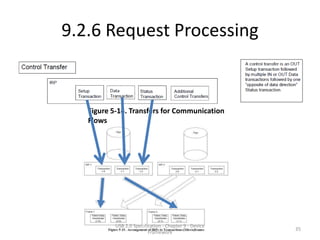
9.2.6 Request Processing


   Figure 5-14. Transfers for Communication
   Flows


           USB 2.0 Specification - Chapter 9 - Device
                                                        35
                          Framework
9.2.6 Request Processing
   • Completion of the reset operation is signaled when the
     port’s status change is set to indicate that the port is
     now enabled.
– This technique prevents the host from having to
  constantly poll for a completion when it is known
  that the request will take a relatively long period
  of time.


                  USB 2.0 Specification - Chapter 9 - Device
                                                               36
                                 Framework
9.2.6.1 Request Processing Timing
• USB sets an upper limit of 5 seconds as the
  upper limit for any command to be processed.
  – This limit is not applicable in all instances.
  – It should be noted that the limitations given below
    are intended to encompass a wide range of
    implementations.
  – Implementations should strive to complete
    requests in times that are as short as possible.

                  USB 2.0 Specification - Chapter 9 - Device
                                                               37
                                 Framework
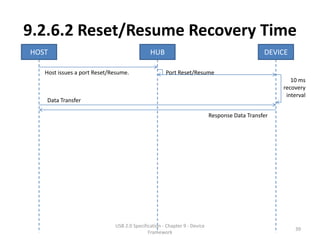
9.2.6.2 Reset/Resume Recovery Time
• After a port is reset or resumed, the USB
  System Software is expected to provide a
  “recovery” interval of 10 ms before the device
  attached to the port is expected to respond to
  data transfers.
  – The device may ignore any data transfers during
    the recovery interval.
  – After the end of the recovery interval, the device
    must accept data transfers at any time.
                  USB 2.0 Specification - Chapter 9 - Device
                                                               38
                                 Framework
9.2.6.2 Reset/Resume Recovery Time
HOST                                         HUB                                              DEVICE

   Host issues a port Reset/Resume.                 Port Reset/Resume
                                                                                                      10 ms
                                                                                                   recovery
                                                                                                    interval
   Data Transfer

                                                                          Response Data Transfer


                             USB 2.0 Specification - Chapter 9 - Device
                                                                                                       39
                                            Framework
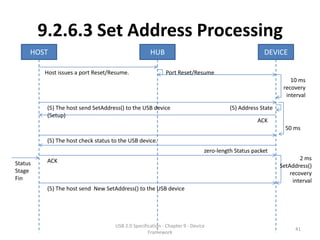
9.2.6.3 Set Address Processing
• After the reset/resume recovery interval if a device receives a
  SetAddress() request, the device must be able to complete processing of
  the request and be able to successfully complete the Status stage of the
  request within 50 ms.
• In the case of the SetAddress() request, the Status stage successfully
  completes when the
    • device sends the zero-length Status packet
    • or when the device sees the ACK in response to the Status stage data packet.
• After successful completion of the Status stage, the device is allowed a
  SetAddress() recovery interval of 2 ms.
    – At the end of this interval, the device must be able to accept Setup packets
      addressed to the new address.
    – Also, at the end of the recovery interval, the device must not respond to
      tokens sent to the old address (unless, of course, the old and new address is
      the same).


                            USB 2.0 Specification - Chapter 9 - Device
                                                                                      40
                                           Framework
9.2.6.3 Set Address Processing
     HOST                                            HUB                                             DEVICE

         Host issues a port Reset/Resume.                   Port Reset/Resume
                                                                                                                10 ms
                                                                                                             recovery
                                                                                                              interval

          (5) The host send SetAddress() to the USB device                              (5) Address State
          (Setup)
                                                                                                   ACK
                                                                                                              50 ms

          (5) The host check status to the USB device.
                                                                              zero-length Status packet
          ACK                                                                                                       2 ms
Status                                                                                                      SetAddress()
Stage                                                                                                           recovery
Fin                                                                                                              interval
          (5) The host send New SetAddress() to the USB device


                                     USB 2.0 Specification - Chapter 9 - Device
                                                                                                                  41
                                                    Framework
9.2.6.4 Standard Device Requests
• There are 3 kinds of Standard device requests.
  – Require no Data stage.
  – Require Data stage transfer to the host
  – Require Data stage transfer to the Device.


                  USB 2.0 Specification - Chapter 9 - Device
                                                               42
                                 Framework
9.2.6.4 Standard Device Requests
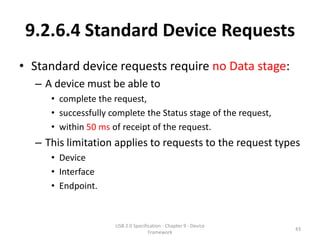
• Standard device requests require no Data stage:
  – A device must be able to
     • complete the request,
     • successfully complete the Status stage of the request,
     • within 50 ms of receipt of the request.
  – This limitation applies to requests to the request types
     • Device
     • Interface
     • Endpoint.


                     USB 2.0 Specification - Chapter 9 - Device
                                                                  43
                                    Framework
9.2.6.4 Standard Device Requests
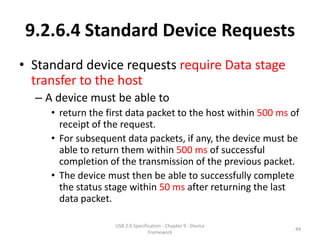
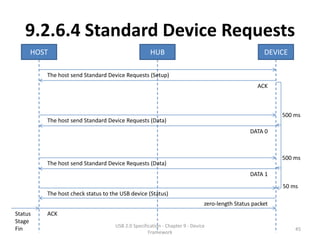
• Standard device requests require Data stage
  transfer to the host
  – A device must be able to
     • return the first data packet to the host within 500 ms of
       receipt of the request.
     • For subsequent data packets, if any, the device must be
       able to return them within 500 ms of successful
       completion of the transmission of the previous packet.
     • The device must then be able to successfully complete
       the status stage within 50 ms after returning the last
       data packet.

                    USB 2.0 Specification - Chapter 9 - Device
                                                                 44
                                   Framework
9.2.6.4 Standard Device Requests
     HOST                                           HUB                                             DEVICE

         The host send Standard Device Requests (Setup)
                                                                                                  ACK


                                                                                                         500 ms
         The host send Standard Device Requests (Data)
                                                                                               DATA 0


                                                                                                         500 ms
         The host send Standard Device Requests (Data)
                                                                                               DATA 1
                                                                                                         50 ms
         The host check status to the USB device (Status)
                                                                             zero-length Status packet
Status   ACK
Stage
                                    USB 2.0 Specification - Chapter 9 - Device
Fin                                                                                                          45
                                                   Framework
9.2.6.4 Standard Device Requests
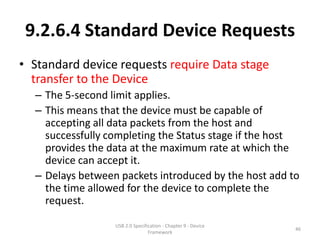
• Standard device requests require Data stage
  transfer to the Device
  – The 5-second limit applies.
  – This means that the device must be capable of
    accepting all data packets from the host and
    successfully completing the Status stage if the host
    provides the data at the maximum rate at which the
    device can accept it.
  – Delays between packets introduced by the host add to
    the time allowed for the device to complete the
    request.

                  USB 2.0 Specification - Chapter 9 - Device
                                                               46
                                 Framework
9.2.6.5 Class-specific Requests
• Unless specifically exempted in the class
  document, all class-specific requests must
  meet the timing limitations for standard
  device requests.
  – If a class document provides an exemption, the
    exemption may only be specified on a request-by-
    request basis.
  – Faster response may be required for standard and
    class-specific requests.
                 USB 2.0 Specification - Chapter 9 - Device
                                                              47
                                Framework
9.2.6.6 Speed Dependent Descriptors
• The device always knows its operational speed
  due to having to manage its transceivers correctly
  as part of reset processing (Chapter 7)
• A device also operates at a single speed after
  completing the reset sequence.
  – In particular, there is no speed switch during normal
    operation.
  – However, a high-speed capable device may have
    configurations that are speed dependent.
     – High-speed capable devices must support reporting their
       speed dependent configurations.
                    USB 2.0 Specification - Chapter 9 - Device
                                                                 48
                                   Framework
9.2.6.6 Speed Dependent Descriptors
• A high-speed capable device responds with
  descriptor information that is valid for the
  current operating speed.
  – For example, when a device is asked for
    configuration descriptors, it only returns those for
    the current operating speed (e.g., full speed).
  – However, there must be a way to determine the
    capabilities for both high- and full-speed
    operation.

                  USB 2.0 Specification - Chapter 9 - Device
                                                               49
                                 Framework
9.2.6.6 Speed Dependent Descriptors
• Two descriptors allow a high-speed capable device to
  report configuration information about the other
  operating speed.
   – The (other_speed) device_qualifier descriptor
   – The other_speed_configuration descriptor.
• These two descriptors are retrieved by the host by
  using the GetDescriptor request with the
  corresponding descriptor type values.
   – Note: These descriptors are not retrieved unless the host
     explicitly issues the corresponding GetDescriptor requests.
   – If these two requests are not issued, the device would
     simply appear to be a single speed device.

                     USB 2.0 Specification - Chapter 9 - Device
                                                                  50
                                    Framework
9.2.6.6 Speed Dependent Descriptors
• Devices that are high-speed capable must set
  the version number in the bcdUSB field of
  their descriptors to 0200H.
  – This indicates that such devices support the
    other_speed requests defined by USB 2.0.
  – A device with descriptor version numbers less
    than 0200H should cause a Request Error
    response if it receives these other_speed
    requests.
  – A USB 1.x device should not be issued the
    other_speed requests.
                 USB 2.0 Specification - Chapter 9 - Device
                                                              51
                                Framework
9.2.7 Request Error
• Occurred when request is received by a device
  – that is not defined for the device,
  – is inappropriate for the current setting of the device,
  – has values that are not compatible with the request.
• The device deals with the Request Error by
  returning a STALL PID in response to
  – the next Data stage transaction
  – or in the Status stage of the message.


                   USB 2.0 Specification - Chapter 9 - Device
                                                                52
                                  Framework
9.3 USB Device Requests
• All USB devices respond to requests from the
  host on the device’s Default Control Pipe.
  – The request and the request’s parameters are sent
    to the device in the Setup packet.
  – The host is responsible for establishing the values
    passed in the fields.
  – Every Setup packet has eight bytes.


                  USB 2.0 Specification - Chapter 9 - Device
                                                               53
                                 Framework
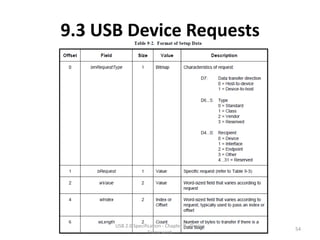
9.3 USB Device Requests


      USB 2.0 Specification - Chapter 9 - Device
                                                   54
                     Framework
9.3 USB Device Requests
bytes

                                                                                                                        Setup Data

 bits

            0: H-to-D        0: Standard                     0: Device
            1: D-to-H        1: Class                        1: Interface
                             2: Vendor                       2: Endpoint
                             3: Reserved                     3: Other
                                                             4..31: Reserved

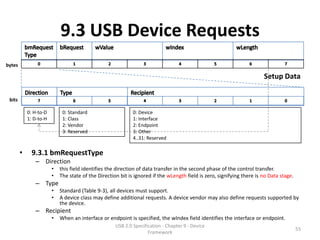
        •     9.3.1 bmRequestType
               – Direction
                        •   this field identifies the direction of data transfer in the second phase of the control transfer.
                        •   The state of the Direction bit is ignored if the wLength field is zero, signifying there is no Data stage.
               – Type
                        •   Standard (Table 9-3), all devices must support.
                        •   A device class may define additional requests. A device vendor may also define requests supported by
                            the device.
               – Recipient
                        •   When an interface or endpoint is specified, the wIndex field identifies the interface or endpoint.
                                                     USB 2.0 Specification - Chapter 9 - Device
                                                                                                                                         55
                                                                    Framework
9.3 USB Device Requests
bytes

                                                                              Setup Data
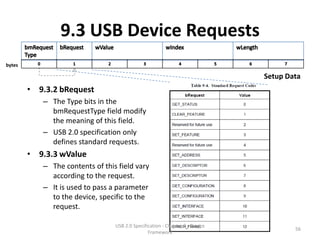
        • 9.3.2 bRequest
           – The Type bits in the
             bmRequestType field modify
             the meaning of this field.
           – USB 2.0 specification only
             defines standard requests.
        • 9.3.3 wValue
           – The contents of this field vary
             according to the request.
           – It is used to pass a parameter
             to the device, specific to the
             request.

                                 USB 2.0 Specification - Chapter 9 - Device
                                                                                      56
                                                Framework
9.3 USB Device Requests
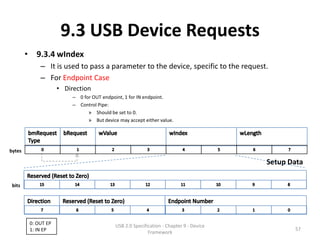
        • 9.3.4 wIndex
             – It is used to pass a parameter to the device, specific to the request.
             – For Endpoint Case
                     • Direction
                          – 0 for OUT endpoint, 1 for IN endpoint.
                          – Control Pipe:
                                » Should be set to 0.
                                » But device may accept either value.


bytes

                                                                                         Setup Data

 bits


         0: OUT EP                          USB 2.0 Specification - Chapter 9 - Device
         1: IN EP                                                                               57
                                                           Framework
9.3 USB Device Requests
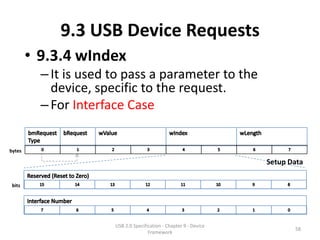
        • 9.3.4 wIndex
          – It is used to pass a parameter to the
            device, specific to the request.
          – For Interface Case


bytes

                                                                    Setup Data

 bits


                       USB 2.0 Specification - Chapter 9 - Device
                                                                           58
                                      Framework
9.3 USB Device Requests
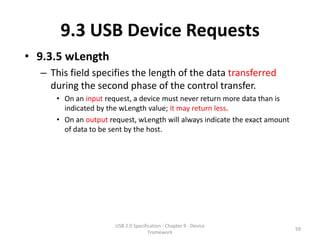
• 9.3.5 wLength
  – This field specifies the length of the data transferred
    during the second phase of the control transfer.
     • On an input request, a device must never return more data than is
       indicated by the wLength value; it may return less.
     • On an output request, wLength will always indicate the exact amount
       of data to be sent by the host.


                      USB 2.0 Specification - Chapter 9 - Device
                                                                             59
                                     Framework
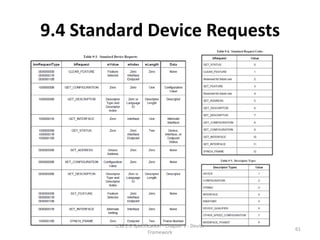
9.4 Standard Device Requests
• USB devices must respond to standard device
  requests, even if the device has not yet been
  assigned an address or has not been
  configured.


                USB 2.0 Specification - Chapter 9 - Device
                                                             60
                               Framework
9.4 Standard Device Requests


        USB 2.0 Specification - Chapter 9 - Device
                                                     61
                       Framework
9.4 Standard Device Requests
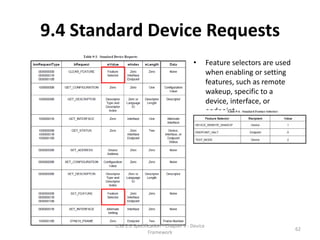
                                            •        Feature selectors are used
                                                     when enabling or setting
                                                     features, such as remote
                                                     wakeup, specific to a
                                                     device, interface, or
                                                     endpoint.


        USB 2.0 Specification - Chapter 9 - Device
                                                                                  62
                       Framework
9.4 Standard Device Requests
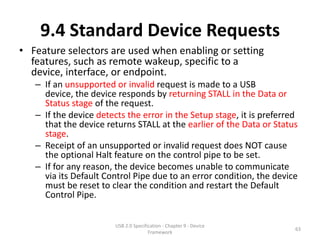
• Feature selectors are used when enabling or setting
  features, such as remote wakeup, specific to a
  device, interface, or endpoint.
   – If an unsupported or invalid request is made to a USB
     device, the device responds by returning STALL in the Data or
     Status stage of the request.
   – If the device detects the error in the Setup stage, it is preferred
     that the device returns STALL at the earlier of the Data or Status
     stage.
   – Receipt of an unsupported or invalid request does NOT cause
     the optional Halt feature on the control pipe to be set.
   – If for any reason, the device becomes unable to communicate
     via its Default Control Pipe due to an error condition, the device
     must be reset to clear the condition and restart the Default
     Control Pipe.


                        USB 2.0 Specification - Chapter 9 - Device
                                                                       63
                                       Framework
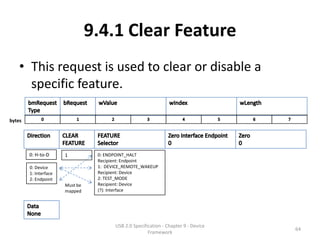
9.4.1 Clear Feature
    • This request is used to clear or disable a
      specific feature.

bytes


        0: H-to-D      1          0: ENDPOINT_HALT
                                  Recipient: Endpoint
        0: Device                 1: DEVICE_REMOTE_WAKEUP
        1: Interface              Recipient: Device
        2: Endpoint               2: TEST_MODE
                       Must be    Recipient: Device
                       mapped     (?): Interface


                                        USB 2.0 Specification - Chapter 9 - Device
                                                                                     64
                                                       Framework
9.4.1 Clear Feature
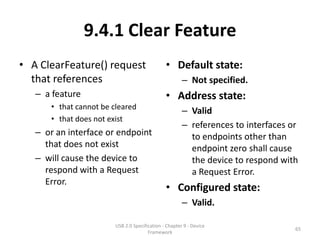
• A ClearFeature() request                     • Default state:
  that references                                      – Not specified.
   – a feature                                 • Address state:
      • that cannot be cleared
                                                       – Valid
      • that does not exist
                                                       – references to interfaces or
   – or an interface or endpoint                         to endpoints other than
     that does not exist                                 endpoint zero shall cause
   – will cause the device to                            the device to respond with
     respond with a Request                              a Request Error.
     Error.
                                               • Configured state:
                                                       – Valid.

                        USB 2.0 Specification - Chapter 9 - Device
                                                                                   65
                                       Framework
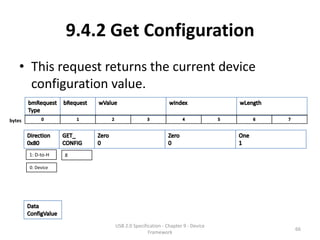
9.4.2 Get Configuration
    • This request returns the current device
      configuration value.

bytes


        1: D-to-H   8

        0: Device


                          USB 2.0 Specification - Chapter 9 - Device
                                                                       66
                                         Framework
9.4.1 Get Configuration
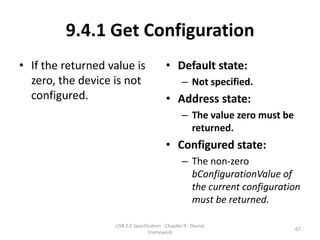
• If the returned value is                • Default state:
  zero, the device is not                         – Not specified.
  configured.                             • Address state:
                                                  – The value zero must be
                                                    returned.
                                          • Configured state:
                                                  – The non-zero
                                                    bConfigurationValue of
                                                    the current configuration
                                                    must be returned.

                   USB 2.0 Specification - Chapter 9 - Device
                                                                             67
                                  Framework
9.4.3 Get Descriptor
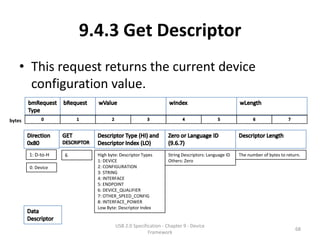
    • This request returns the current device
      configuration value.

bytes


        1: D-to-H   6     High byte: Descriptor Types     String Descriptors: Language ID   The number of bytes to return.
                          1: DEVICE                       Others: Zero
        0: Device         2: CONFIGURATION
                          3: STRING
                          4: INTERFACE
                          5: ENDPOINT
                          6: DEVICE_QUALIFIER
                          7: OTHER_SPEED_CONFIG
                          8: INTERFACE_POWER
                          Low Byte: Descriptor Index


                                  USB 2.0 Specification - Chapter 9 - Device
                                                                                                                       68
                                                 Framework
9.4.3 Get Descriptor
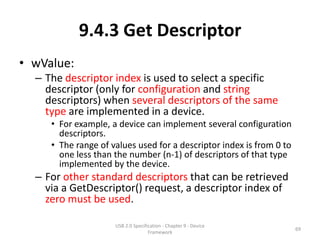
• wValue:
  – The descriptor index is used to select a specific
    descriptor (only for configuration and string
    descriptors) when several descriptors of the same
    type are implemented in a device.
     • For example, a device can implement several configuration
       descriptors.
     • The range of values used for a descriptor index is from 0 to
       one less than the number (n-1) of descriptors of that type
       implemented by the device.
  – For other standard descriptors that can be retrieved
    via a GetDescriptor() request, a descriptor index of
    zero must be used.

                     USB 2.0 Specification - Chapter 9 - Device
                                                                      69
                                    Framework
9.4.3 Get Descriptor
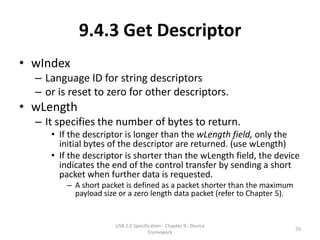
• wIndex
  – Language ID for string descriptors
  – or is reset to zero for other descriptors.
• wLength
  – It specifies the number of bytes to return.
     • If the descriptor is longer than the wLength field, only the
       initial bytes of the descriptor are returned. (use wLength)
     • If the descriptor is shorter than the wLength field, the device
       indicates the end of the control transfer by sending a short
       packet when further data is requested.
         – A short packet is defined as a packet shorter than the maximum
           payload size or a zero length data packet (refer to Chapter 5).


                      USB 2.0 Specification - Chapter 9 - Device
                                                                             70
                                     Framework
9.4.3 Get Descriptor
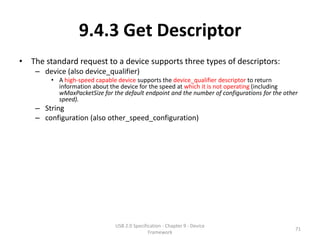
• The standard request to a device supports three types of descriptors:
    – device (also device_qualifier)
        • A high-speed capable device supports the device_qualifier descriptor to return
          information about the device for the speed at which it is not operating (including
          wMaxPacketSize for the default endpoint and the number of configurations for the other
          speed).
    – String
    – configuration (also other_speed_configuration)


                              USB 2.0 Specification - Chapter 9 - Device
                                                                                               71
                                             Framework
9.4.3 Get Descriptor
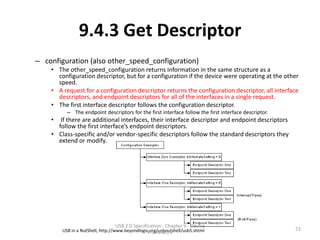
– configuration (also other_speed_configuration)
    • The other_speed_configuration returns information in the same structure as a
      configuration descriptor, but for a configuration if the device were operating at the other
      speed.
    • A request for a configuration descriptor returns the configuration descriptor, all interface
      descriptors, and endpoint descriptors for all of the interfaces in a single request.
    • The first interface descriptor follows the configuration descriptor.
          – The endpoint descriptors for the first interface follow the first interface descriptor.
    •  If there are additional interfaces, their interface descriptor and endpoint descriptors
      follow the first interface’s endpoint descriptors.
    • Class-specific and/or vendor-specific descriptors follow the standard descriptors they
      extend or modify.


                                 USB 2.0 Specification - Chapter 9 - Device
        USB in a NutShell, http://www.beyondlogic.org/usbnutshell/usb5.shtml                          72
                                                 Framework
9.4.3 Get Descriptor
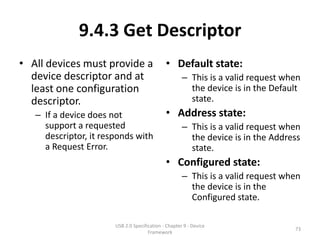
• All devices must provide a                  • Default state:
  device descriptor and at                            – This is a valid request when
  least one configuration                               the device is in the Default
  descriptor.                                           state.
   – If a device does not                     • Address state:
     support a requested                              – This is a valid request when
     descriptor, it responds with                       the device is in the Address
     a Request Error.                                   state.
                                              • Configured state:
                                                      – This is a valid request when
                                                        the device is in the
                                                        Configured state.

                       USB 2.0 Specification - Chapter 9 - Device
                                                                                  73
                                      Framework
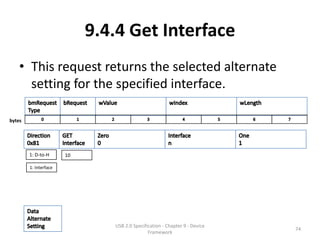
9.4.4 Get Interface
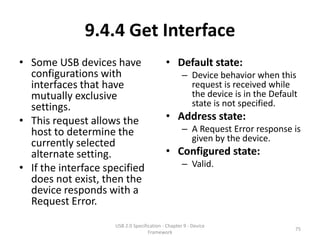
    • This request returns the selected alternate
      setting for the specified interface.

bytes


        1: D-to-H      10

        1: Interface


                               USB 2.0 Specification - Chapter 9 - Device
                                                                            74
                                              Framework
9.4.4 Get Interface
• Some USB devices have                     • Default state:
  configurations with                               – Device behavior when this
  interfaces that have                                request is received while
  mutually exclusive                                  the device is in the Default
  settings.                                           state is not specified.
• This request allows the                   • Address state:
  host to determine the                             – A Request Error response is
                                                      given by the device.
  currently selected
  alternate setting.                        • Configured state:
• If the interface specified                        – Valid.
  does not exist, then the
  device responds with a
  Request Error.
                     USB 2.0 Specification - Chapter 9 - Device
                                                                                 75
                                    Framework
9.4.5 Get Status
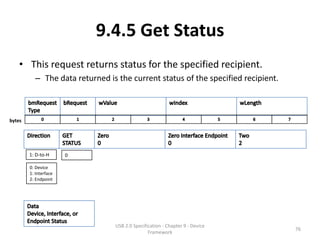
    • This request returns status for the specified recipient.
          – The data returned is the current status of the specified recipient.


bytes


        1: D-to-H      0

        0: Device
        1: Interface
        2: Endpoint


                                USB 2.0 Specification - Chapter 9 - Device
                                                                                  76
                                               Framework
9.4.5 Get Status
• If an interface or an                      • Default state:
  endpoint is specified that                         – Device behavior when this
  does not exist, then the                             request is received while the
  device responds with a                               device is in the Default state
  Request Error.                                       is not specified.
                                             • Address state:
                                                     – If an interface or an endpoint
                                                       other than endpoint zero is
                                                       specified, then the device
                                                       responds with a Request
                                                       Error.
                                             • Configured state:
                                                     – If an interface or endpoint
                                                       that does not exist is
                                                       specified, then the device
                                                       responds with a Request
                                                       Error.
                      USB 2.0 Specification - Chapter 9 - Device
                                                                                     77
                                     Framework
9.4.5 Get Status


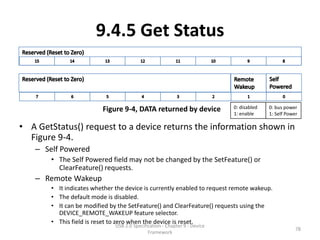
                         Figure 9-4, DATA returned by device               0: disabled   0: bus power
                                                                           1: enable     1: Self Power

• A GetStatus() request to a device returns the information shown in
  Figure 9-4.
   – Self Powered
       • The Self Powered field may not be changed by the SetFeature() or
         ClearFeature() requests.
   – Remote Wakeup
       • It indicates whether the device is currently enabled to request remote wakeup.
       • The default mode is disabled.
       • It can be modified by the SetFeature() and ClearFeature() requests using the
         DEVICE_REMOTE_WAKEUP feature selector.
       • This field is reset to zero when the device is reset.
                              USB 2.0 Specification - Chapter 9 - Device
                                                                                                     78
                                             Framework
9.4.5 Get Status
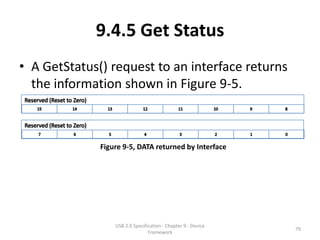
• A GetStatus() request to an interface returns
  the information shown in Figure 9-5.


              Figure 9-5, DATA returned by Interface


                  USB 2.0 Specification - Chapter 9 - Device
                                                               79
                                 Framework
9.4.5 Get Status


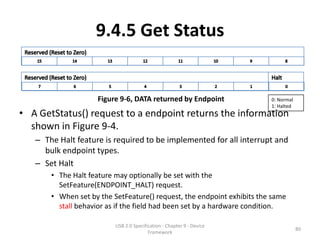
                    Figure 9-6, DATA returned by Endpoint               0: Normal
                                                                        1: Halted
• A GetStatus() request to a endpoint returns the information
  shown in Figure 9-4.
   – The Halt feature is required to be implemented for all interrupt and
     bulk endpoint types.
   – Set Halt
       • The Halt feature may optionally be set with the
         SetFeature(ENDPOINT_HALT) request.
       • When set by the SetFeature() request, the endpoint exhibits the same
         stall behavior as if the field had been set by a hardware condition.

                          USB 2.0 Specification - Chapter 9 - Device
                                                                                    80
                                         Framework
9.4.5 Get Status
• Clear Halt
   – If the condition causing a halt has been removed, clearing the Halt
     feature via a ClearFeature(ENDPOINT_HALT) request results in the
     endpoint no longer returning a STALL.
   – For endpoints using data toggle, regardless of whether an endpoint
     has the Halt feature set, a ClearFeature(ENDPOINT_HALT) request
     always results in the data toggle being reinitialized to DATA0.
   – The Halt feature is reset to zero after either a SetConfiguration() or
     SetInterface() request even if the requested configuration or interface
     is the same as the current configuration or interface.


                         USB 2.0 Specification - Chapter 9 - Device
                                                                               81
                                        Framework
9.4.5 Get Status
• It is neither required nor recommended that the Halt
  feature be implemented for the Default Control Pipe.
   – However, devices may set the Halt feature of the Default
     Control Pipe in order to reflect a functional error condition.
   – If the feature is set to one, the device will return STALL in the
     Data and Status stages of each standard request to the pipe
     except GetStatus(), SetFeature(), and ClearFeature()
     requests.
   – The device need not return STALL for class-specific and
     vendor-specific requests.


                       USB 2.0 Specification - Chapter 9 - Device
                                                                     82
                                      Framework
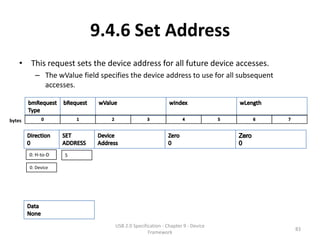
9.4.6 Set Address
    • This request sets the device address for all future device accesses.
          – The wValue field specifies the device address to use for all subsequent
            accesses.


bytes


        0: H-to-D   5

        0: Device


                                  USB 2.0 Specification - Chapter 9 - Device
                                                                                      83
                                                 Framework
9.4.6 Set Address
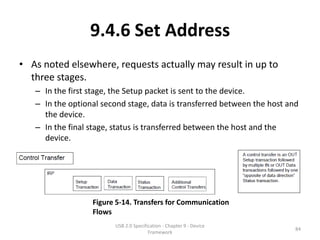
• As noted elsewhere, requests actually may result in up to
  three stages.
   – In the first stage, the Setup packet is sent to the device.
   – In the optional second stage, data is transferred between the host and
     the device.
   – In the final stage, status is transferred between the host and the
     device.


                  Figure 5-14. Transfers for Communication
                  Flows
                        USB 2.0 Specification - Chapter 9 - Device
                                                                          84
                                       Framework
9.4.6 Set Address
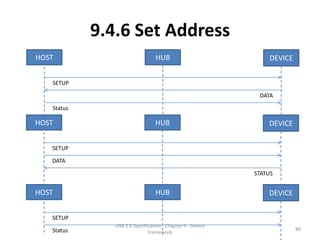
• The direction of data and status transfer depends on whether
  the host is sending data to the device or the device is sending
  data to the host.
• The Status stage transfer is always in the opposite direction of
  the Data stage.
• If there is no Data stage, the Status stage is from the device to
  the host.


                       USB 2.0 Specification - Chapter 9 - Device
                                                                    85
                                      Framework
9.4.6 Set Address
HOST                             HUB                            DEVICE


   SETUP

                                                             DATA

   Status

HOST                             HUB                            DEVICE


   SETUP

   DATA

                                                            STATUS


HOST                             HUB                            DEVICE


   SETUP
               USB 2.0 Specification - Chapter 9 - Device
   Status                                                                86
                              Framework
9.4.6 Set Address
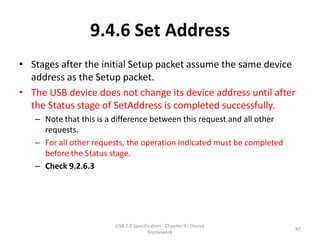
• Stages after the initial Setup packet assume the same device
  address as the Setup packet.
• The USB device does not change its device address until after
  the Status stage of SetAddress is completed successfully.
   – Note that this is a difference between this request and all other
     requests.
   – For all other requests, the operation indicated must be completed
     before the Status stage.
   – Check 9.2.6.3


                        USB 2.0 Specification - Chapter 9 - Device
                                                                         87
                                       Framework
9.4.6 Set Address
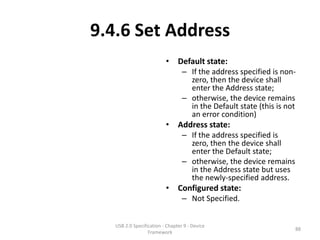
                          • Default state:
                                  – If the address specified is non-
                                    zero, then the device shall
                                    enter the Address state;
                                  – otherwise, the device remains
                                    in the Default state (this is not
                                    an error condition)
                          • Address state:
                                  – If the address specified is
                                    zero, then the device shall
                                    enter the Default state;
                                  – otherwise, the device remains
                                    in the Address state but uses
                                    the newly-specified address.
                          • Configured state:
                                  – Not Specified.


   USB 2.0 Specification - Chapter 9 - Device
                                                                    88
                  Framework
9.4.7 Set Configuration
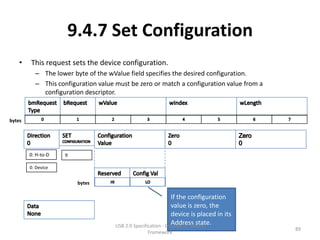
    •   This request sets the device configuration.
          – The lower byte of the wValue field specifies the desired configuration.
          – This configuration value must be zero or match a configuration value from a
            configuration descriptor.


bytes


        0: H-to-D   9

        0: Device


                        bytes

                                                               If the configuration
                                                               value is zero, the
                                                               device is placed in its
                                                               Address state.
                                     USB 2.0 Specification - Chapter 9 - Device
                                                                                          89
                                                  Framework
9.4.7 Set Configuration
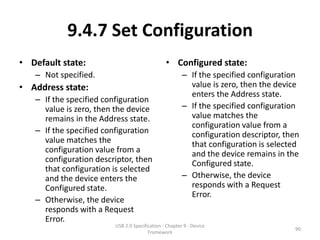
• Default state:                               • Configured state:
   – Not specified.                                    – If the specified configuration
• Address state:                                         value is zero, then the device
                                                         enters the Address state.
   – If the specified configuration
     value is zero, then the device                    – If the specified configuration
     remains in the Address state.                       value matches the
                                                         configuration value from a
   – If the specified configuration                      configuration descriptor, then
     value matches the                                   that configuration is selected
     configuration value from a                          and the device remains in the
     configuration descriptor, then                      Configured state.
     that configuration is selected
     and the device enters the                         – Otherwise, the device
     Configured state.                                   responds with a Request
                                                         Error.
   – Otherwise, the device
     responds with a Request
     Error.
                        USB 2.0 Specification - Chapter 9 - Device
                                                                                     90
                                       Framework
9.4.8 Set Descriptor
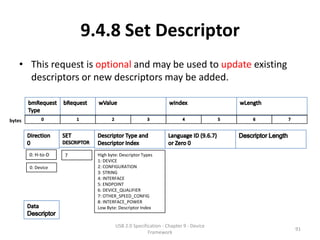
    • This request is optional and may be used to update existing
      descriptors or new descriptors may be added.


bytes


        0: H-to-D   7     High byte: Descriptor Types
                          1: DEVICE
        0: Device         2: CONFIGURATION
                          3: STRING
                          4: INTERFACE
                          5: ENDPOINT
                          6: DEVICE_QUALIFIER
                          7: OTHER_SPEED_CONFIG
                          8: INTERFACE_POWER
                          Low Byte: Descriptor Index


                                  USB 2.0 Specification - Chapter 9 - Device
                                                                               91
                                                 Framework
9.4.8 Set Descriptor
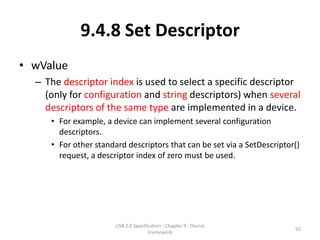
• wValue
  – The descriptor index is used to select a specific descriptor
    (only for configuration and string descriptors) when several
    descriptors of the same type are implemented in a device.
     • For example, a device can implement several configuration
       descriptors.
     • For other standard descriptors that can be set via a SetDescriptor()
       request, a descriptor index of zero must be used.


                       USB 2.0 Specification - Chapter 9 - Device
                                                                         92
                                      Framework
9.4.8 Set Descriptor
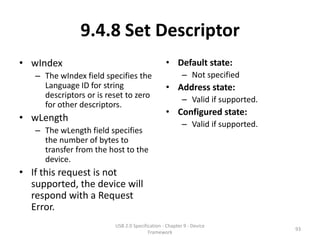
• wIndex                                        • Default state:
   – The wIndex field specifies the                     – Not specified
     Language ID for string                     • Address state:
     descriptors or is reset to zero
                                                        – Valid if supported.
     for other descriptors.
                                                • Configured state:
• wLength
                                                        – Valid if supported.
   – The wLength field specifies
     the number of bytes to
     transfer from the host to the
     device.
• If this request is not
  supported, the device will
  respond with a Request
  Error.
                         USB 2.0 Specification - Chapter 9 - Device
                                                                                93
                                        Framework
9.4.9 Set Feature
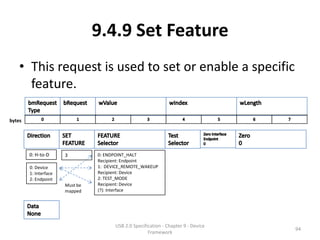
    • This request is used to set or enable a specific
      feature.

bytes


        0: H-to-D      3         0: ENDPOINT_HALT
                                 Recipient: Endpoint
        0: Device                1: DEVICE_REMOTE_WAKEUP
        1: Interface             Recipient: Device
        2: Endpoint              2: TEST_MODE
                       Must be   Recipient: Device
                       mapped    (?): Interface


                                       USB 2.0 Specification - Chapter 9 - Device
                                                                                    94
                                                      Framework
9.4.9 Set Feature
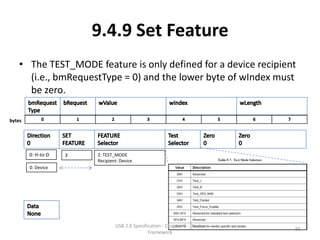
    • The TEST_MODE feature is only defined for a device recipient
      (i.e., bmRequestType = 0) and the lower byte of wIndex must
      be zero.

bytes


        0: H-to-D   3   2: TEST_MODE
                        Recipient: Device
        0: Device


                                USB 2.0 Specification - Chapter 9 - Device
                                                                             95
                                               Framework
9.4.9 Set Feature
 • Setting the TEST_MODE feature puts the device upstream
   facing port into test mode.
         – The device will respond with a request error if the request contains an
           invalid test selector.
         – The transition to test mode must be complete no later than 3 ms after
           the completion of the status stage of the request.


     HOST                                              HUB                                             DEVICE

            Host send SetFeature(TEST MODE)                                PORT transition to TEST_MODE

            The host check status to the USB device (Status)
                                                                                zero-length Status packet
Status      ACK                                                                                     3 ms
Stage                                                                    Device transition to TEST_MODE
Fin
                                       USB 2.0 Specification - Chapter 9 - Device
                                                                                                                96
                                                      Framework
9.4.9 Set Feature
• The power to the device must be cycled to exit test
  mode of an upstream facing port of a device.
• See Section 7.1.20 for definitions of each test mode.
• A device must support the TEST_MODE feature when
  in the
   – Default state
   – Address state
   – or Configured high-speed device states.


                    USB 2.0 Specification - Chapter 9 - Device
                                                                 97
                                   Framework
9.4.9 Set Feature
• A SetFeature() request that               • Default state:
  references a feature that                         – A device must be able to
                                                      accept a
  cannot be set or that does                          SetFeature(TEST_MODE, TEST
  not exist causes a STALL to                         _SELECTOR) request when in
  be returned in the Status                           the Default State.
  stage of the request.                             – Device behavior for other
                                                      SetFeature requests while the
                                                      device is in the Default state
                                                      is not specified.
                                            • Address state:
                                                    – If an interface or an endpoint
                                                      other than endpoint zero is
                                                      specified, then the device
                                                      responds with a Request
                                                      Error.
                                            • Configured state:
                     USB 2.0 Specification - Chapter 9 - Device
                                    Framework
                                                                                   98
9.4.10 Set Interface
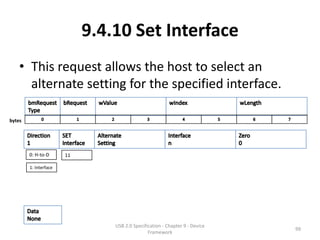
    • This request allows the host to select an
      alternate setting for the specified interface.

bytes


        0: H-to-D      11

        1: Interface


                                USB 2.0 Specification - Chapter 9 - Device
                                                                             99
                                               Framework
9.4.10 Set Interface
• Some USB devices have configurations with
  interfaces that have mutually exclusive settings.
   – This request allows the host to select the desired alternate
     setting.
   – If a device only supports a default setting for the specified
     interface, then a STALL may be returned in the Status stage
     of the request.
   – This request cannot be used to change the set of
     configured interfaces (the SetConfiguration() request must
     be used instead).


                      USB 2.0 Specification - Chapter 9 - Device
                                                                   100
                                     Framework
9.4.10 Set Interface
• If the interface or the                    • Default state:
  alternate setting does not                         – Not specified.
  exist, then the device                     • Address state:
  responds with a Request                            – The device must respond with
                                                       a Request Error.
  Error.
                                             • Configured state:
• If wLength is non-zero, then                       – Valid.
  the behavior of the device is
  not specified.


                      USB 2.0 Specification - Chapter 9 - Device
                                                                                 101
                                     Framework
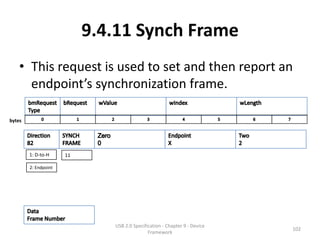
9.4.11 Synch Frame
    • This request is used to set and then report an
      endpoint’s synchronization frame.

bytes


        1: D-to-H     11

        2: Endpoint


                              USB 2.0 Specification - Chapter 9 - Device
                                                                           102
                                             Framework
9.4.11 Synch Frame
• When an endpoint supports isochronous transfers, the
  endpoint may also require per-frame transfers to vary in size
  according to a specific pattern.
   – The host and the endpoint must agree on which frame the repeating
     pattern begins.
   – The number of the frame in which the pattern began is returned to the
     host.
• If a high-speed device supports the Synch Frame request, it
  must internally synchronize itself to the zeroth microframe
  and have a time notion of classic frame.
   – Only the frame number is used to synchronize and reported by the
     device endpoint (i.e., no microframe number).
   – The endpoint must synchronize to the zeroth microframe.
                        USB 2.0 Specification - Chapter 9 - Device
                                                                        103
                                       Framework
9.4.11 Synch Frame
• This value is only used for                  • Default state:
  isochronous data transfers                          – Not specified.
  using implicit pattern                       • Address state:
  synchronization.                                    – The device shall respond with
                                                            a Request Error.
• If wValue is non-zero or                     • Configured state:
  wLength is not two, then                            – Valid.
  the behavior of the device is
  not specified.
• If the specified endpoint
  does not support this
  request, then the device will
  respond with a Request
  Error.               USB 2.0 Specification - Chapter 9 - Device
                                                                                   104
                                       Framework
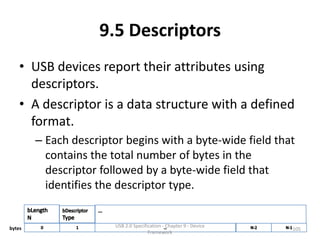
9.5 Descriptors
    • USB devices report their attributes using
      descriptors.
    • A descriptor is a data structure with a defined
      format.
        – Each descriptor begins with a byte-wide field that
          contains the total number of bytes in the
          descriptor followed by a byte-wide field that
          identifies the descriptor type.


bytes                   USB 2.0 Specification - Chapter 9 - Device
                                                                     105
                                       Framework
9.5 Descriptors
• Using descriptors allows concise storage of the
  attributes of individual configurations because
  each configuration may reuse descriptors or
  portions of descriptors from other
  configurations that have the same
  characteristics.
• In this manner, the descriptors resemble
  individual data records in a relational
  database.
                USB 2.0 Specification - Chapter 9 - Device
                                                             106
                               Framework
9.5 Descriptors
• String Descriptors
  • Where appropriate, descriptors contain references to
    string descriptors that provide displayable information
    describing a descriptor in human-readable form.
     • The inclusion of string descriptors is optional.
  • However, the reference fields within descriptors are
    mandatory.
  • If a device does not support string descriptors, string
    reference fields must be reset to zero to indicate no
    string descriptor is available.

                      USB 2.0 Specification - Chapter 9 - Device
                                                                   107
                                     Framework
9.5 Descriptors
• Return length of descriptor
  • The length < specification
     • If a descriptor returns with a value in its length field
       that is less than defined by this specification, the
       descriptor is invalid and should be rejected by the host.
  • The length > specification
     • If the descriptor returns with a value in its length field
       that is greater than defined by this specification, the
       extra bytes are ignored by the host,
     • but the next descriptor is located using the length
       returned rather than the length expected.

                     USB 2.0 Specification - Chapter 9 - Device
                                                                    108
                                    Framework
9.5 Descriptors
• Class or Vendor specific descriptors
• A device may return class- or vendor-specific descriptors in two ways:
   – 1. If they use the same format as standard descriptors (e.g., start with
      bLength + bDescriptor bytes)
        – they must be returned interleaved with standard descriptors in the configuration
          information returned by a GetDescriptor(Configuration) request.
        – In this case, the class or vendor-specific descriptors must follow a related standard
          descriptor they modify or extend.
    – 2. If they use independent of configuration information or use a
      nonstandard format
        – a GetDescriptor() request specifying the class or vendor specific descriptor type and
          index may be used to retrieve the descriptor from the device.
        – A class or vendor specification will define the appropriate way to retrieve these
          descriptors.


                              USB 2.0 Specification - Chapter 9 - Device
                                                                                             109
                                             Framework
9.6 Standard USB Descriptor
               Definitions
•   9.6.1 Device Descriptor
•   9.6.2 Device_Qualifier Descriptor
•   9.6.3 Configuration Descriptor
•   9.6.4 Other_Speed_Configuration Descriptor
•   9.6.5 Interface Descriptor
•   9.6.6 Endpoint Descriptor
•   9.6.6 String Descriptor

                 USB 2.0 Specification - Chapter 9 - Device
                                                              110
                                Framework
9.6 Standard USB Descriptor
               Definitions
• The standard descriptors defined in this specification
  may only be modified or extended by revision of the
  Universal Serial Bus Specification.
• Note: An extension to the USB 1.0 standard endpoint
  descriptor has been published in Device Class
  Specification for Audio Devices Revision 1.0.
   – This is the only extension defined outside USB
     Specification that is allowed.
   – Future revisions of the USB Specification that extend the
     standard endpoint descriptor will do so as to not conflict
     with the extension defined in the Audio Device Class
     Specification Revision 1.0.
                     USB 2.0 Specification - Chapter 9 - Device
                                                                  111
                                    Framework
9.6.1 Device Descriptor
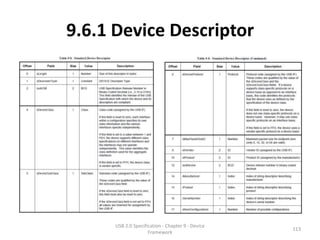
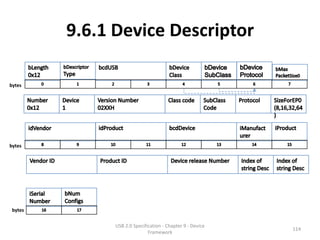
• A device descriptor describes general
  information about a USB device.
  – It includes information that applies globally to the
    device and all of the device’s configurations.
• A USB device has only one device descriptor.
• A high-speed capable device that has different
  device information for full-speed and high-
  speed must also have a device_qualifier
  descriptor (see Section 9.6.2).
                  USB 2.0 Specification - Chapter 9 - Device
                                                               112
                                 Framework
9.6.1 Device Descriptor


      USB 2.0 Specification - Chapter 9 - Device
                                                   113
                     Framework
9.6.1 Device Descriptor

bytes


bytes


 bytes

               USB 2.0 Specification - Chapter 9 - Device
                                                            114
                              Framework
9.6.1 Device Descriptor
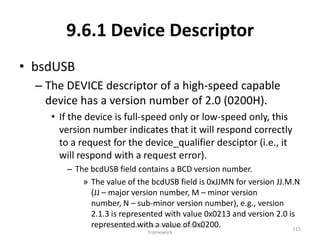
• bsdUSB
  – The DEVICE descriptor of a high-speed capable
    device has a version number of 2.0 (0200H).
     • If the device is full-speed only or low-speed only, this
       version number indicates that it will respond correctly
       to a request for the device_qualifier desciptor (i.e., it
       will respond with a request error).
        – The bcdUSB field contains a BCD version number.
            » The value of the bcdUSB field is 0xJJMN for version JJ.M.N
              (JJ – major version number, M – minor version
              number, N – sub-minor version number), e.g., version
              2.1.3 is represented with value 0x0213 and version 2.0 is
              represented with a value ofDevice
                      USB 2.0 Specification - Chapter 9 - 0x0200.
                                                                      115
                              Framework
9.6.1 Device Descriptor
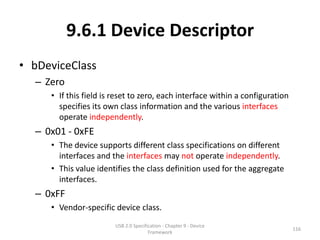
• bDeviceClass
  – Zero
     • If this field is reset to zero, each interface within a configuration
       specifies its own class information and the various interfaces
       operate independently.
  – 0x01 - 0xFE
     • The device supports different class specifications on different
       interfaces and the interfaces may not operate independently.
     • This value identifies the class definition used for the aggregate
       interfaces.
  – 0xFF
     • Vendor-specific device class.
                        USB 2.0 Specification - Chapter 9 - Device
                                                                               116
                                       Framework
9.6.1 Device Descriptor
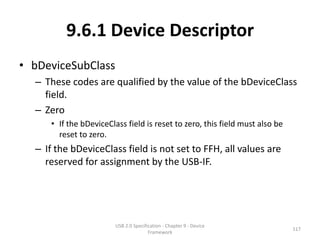
• bDeviceSubClass
  – These codes are qualified by the value of the bDeviceClass
    field.
  – Zero
     • If the bDeviceClass field is reset to zero, this field must also be
       reset to zero.
  – If the bDeviceClass field is not set to FFH, all values are
    reserved for assignment by the USB-IF.


                        USB 2.0 Specification - Chapter 9 - Device
                                                                             117
                                       Framework
9.6.1 Device Descriptor
• bDeviceProtocol
  – These codes are qualified by the value of the bDeviceClass
    and the bDeviceSubClass fields.
     • If a device supports class-specific protocols on a device basis as
       opposed to an interface basis, this code identifies the protocols
       that the device uses as defined by the specification of the device
       class.
  – Zero
     • The device does not use class-specific protocols on a device basis.
     • However, it may use class specific protocols on an interface basis.
  – 0xFF
     • The device uses a vendor-specific protocol on a device basis.
                       USB 2.0 Specification - Chapter 9 - Device
                                                                            118
                                      Framework
9.6.1 Device Descriptor
• bMaxPacketSize0
  – If the device is operating at high-speed, the
    bMaxPacketSize0 field must be 64 indicating a 64
    byte maximum packet.
  – High-speed operation does not allow other
    maximum packet sizes for the control endpoint
    (endpoint 0).


                 USB 2.0 Specification - Chapter 9 - Device
                                                              119
                                Framework
9.6.1 Device Descriptor
• bNumConfigurations
  – This field indicates the number of configurations
    at the current operating speed.
  – Configurations for the other operating speed are
    not included in the count.
     • If there are specific configurations of the device for
       specific speeds, the bNumConfigurations field only
       reflects the number of configurations for a single
       speed, not the total number of configurations for both
       speeds.

                   USB 2.0 Specification - Chapter 9 - Device
                                                                120
                                  Framework
9.6.1 Device Descriptor
• Default Control Pipe of the Device
   – All USB devices have a Default Control Pipe.
      • The maximum packet size of a device’s Default Control Pipe is described in
        the device descriptor.
   – Endpoints specific to a configuration and its interface(s)
     are described in the configuration descriptor.
   – A configuration and its interface(s) do not include an
     endpoint descriptor for the Default Control Pipe.
   – Other than the maximum packet size, the characteristics of
     the Default Control Pipe are defined by this specification
     and are the same for all USB devices.

                         USB 2.0 Specification - Chapter 9 - Device
                                                                               121
                                        Framework
9.6.2 Device_Qualifier Descriptor
• The device_qualifier descriptor describes
  information about a high-speed capable
  device that would change if the device were
  operating at the other speed.
  – For example, if the device is currently operating at
    full-speed, the device_qualifier returns
    information about how it would operate at high-
    speed and vice-versa.


                  USB 2.0 Specification - Chapter 9 - Device
                                                               122
                                 Framework
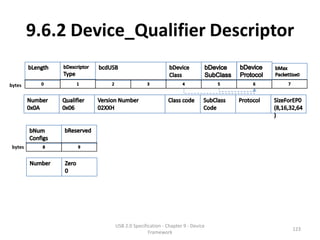
9.6.2 Device_Qualifier Descriptor

bytes


 bytes


                    USB 2.0 Specification - Chapter 9 - Device
                                                                 123
                                   Framework
9.6.2 Device_Qualifier Descriptor
• The version number for this descriptor must
  be at least 2.0 (0200H).
• The host accesses this descriptor using the
  GetDescriptor() request.


                USB 2.0 Specification - Chapter 9 - Device
                                                             124
                               Framework
9.6.2 Device_Qualifier Descriptor
• If a full-speed only device (with a device
  descriptor version number equal to 0200H)
  receives a GetDescriptor() request for a
  device_qualifier, it must respond with a
  request error.
• The host must not make a request for an
  other_speed_configuration descriptor unless
  it first successfully retrieves the
  device_qualifier descriptor.
               USB 2.0 Specification - Chapter 9 - Device
                                                            125
                              Framework
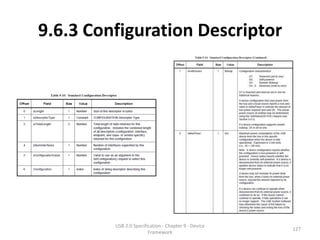
9.6.3 Configuration Descriptor
• The configuration descriptor describes
  information about a specific device
  configuration.
  – The descriptor contains a bConfigurationValue
    field with a value that, when used as a parameter
    to the SetConfiguration() request, causes the
    device to assume the described configuration.


                 USB 2.0 Specification - Chapter 9 - Device
                                                              126
                                Framework
9.6.3 Configuration Descriptor


         USB 2.0 Specification - Chapter 9 - Device
                                                      127
                        Framework
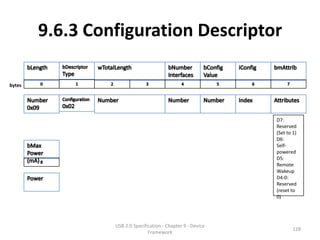
9.6.3 Configuration Descriptor

bytes


                                                              D7:
                                                              Reserved
                                                              (Set to 1)
                                                              D6:
                                                              Self-
                                                              powered
                                                              D5:
                                                              Remote
                                                              Wakeup
                                                              D4-0:
                                                              Reserved
                                                              (reset to
                                                              0)


                 USB 2.0 Specification - Chapter 9 - Device
                                                                      128
                                Framework
9.6.3 Configuration Descriptor
• Interface
   – The descriptor describes the number of interfaces
     provided by the configuration.
      • Each interface may operate independently.
          – For example,
              » 1st Configuration, an ISDN device might be configured with two
                interfaces, each providing 64 Kb/s bi-directional channels that
                have separate data sources or sinks on the host.
              » 2nd Configuration might present the ISDN device as a single
                interface, bonding the two channels into one 128 Kb/s bi-
                directional channel.
   – When the host requests the configuration descriptor, all
     related interface and endpoint descriptors are returned
     (refer to SectionUSB 2.0 Specification - Chapter 9 - Device
                       9.4.3).
                                                                             129
                                 Framework
9.6.3 Configuration Descriptor
• Endpoint
  – A USB device has one or more configuration
    descriptors.
     • Each configuration has one or more interfaces and each
       interface has zero or more endpoints.
     • An endpoint is not shared among interfaces within a
       single configuration unless the endpoint is used by
       alternate settings of the same interface.
     • Endpoints may be shared among interfaces that are
       part of different configurations without this restriction.

                    USB 2.0 Specification - Chapter 9 - Device
                                                                 130
                                   Framework
9.6.3 Configuration Descriptor
• Once configured, devices may support limited
  adjustments to the configuration.
• If a particular interface has alternate
  settings, an alternate may be selected after
  configuration.


                USB 2.0 Specification - Chapter 9 - Device
                                                             131
                               Framework
9.6.3 Configuration Descriptor
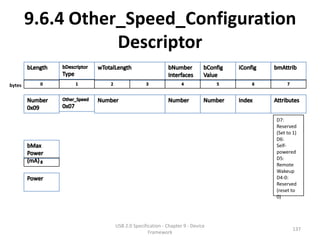
• bmAttributes
  – D7
     • is reserved and must be set to one for historical reasons.
  – D6 Self-Powered
     • A device configuration that uses power from the bus and a local
       source reports a non-zero value in bMaxPower to indicate the
       amount of bus power required and sets D6.
     • The actual power source at runtime may be determined using the
       GetStatus(DEVICE) request (see Section 9.4.5).
  – D5 Remote Wakeup
     • If a device configuration supports remote wakeup, D5 is set to one.


                       USB 2.0 Specification - Chapter 9 - Device
                                                                       132
                                      Framework
9.6.3 Configuration Descriptor
• bMaxPower
  – Maximum power consumption of the USB device
    from the bus in this specific configuration when
    the device is fully operational.
     • Expressed in 2 mA units (i.e., 50 = 100 mA).
  – Power draw
     • If a device is disconnected from its external power
       source, it updates device status to indicate that it is no
       longer self-powered.
     • If a device is disconnected from its external power
       source, it updates device status to indicate that it is no
                      USB 2.0 Specification - Chapter 9 - Device
                                                                 133
       longer self-powered.Framework
9.6.3 Configuration Descriptor
• bMaxPower
  – Power draw
    • If a device can continue to operate when disconnected
      from its external power source, it continues to do so.
    • If the device cannot continue to operate, it fails
      operations it can no longer support.
    • The USB System Software may determine the cause of
      the failure by checking the status and noting the loss of
      the device’s power source.


                   USB 2.0 Specification - Chapter 9 - Device
                                                                134
                                  Framework
9.6.4 Other_Speed_Configuration
           Descriptor
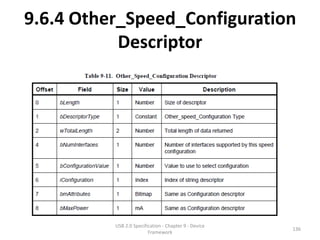
• The other_speed_configuration descriptor
  shown in Table 9-11 describes a configuration
  of a highspeed capable device if it were
  operating at its other possible speed.
• The structure of the
  other_speed_configuration is identical to a
  configuration descriptor.
• The host accesses this descriptor using the
  GetDescriptor() request.
                USB 2.0 Specification - Chapter 9 - Device
                                                             135
                               Framework
9.6.4 Other_Speed_Configuration
           Descriptor


          USB 2.0 Specification - Chapter 9 - Device
                                                       136
                         Framework
9.6.4 Other_Speed_Configuration
                   Descriptor
bytes


                                                               D7:
                                                               Reserved
                                                               (Set to 1)
                                                               D6:
                                                               Self-
                                                               powered
                                                               D5:
                                                               Remote
                                                               Wakeup
                                                               D4-0:
                                                               Reserved
                                                               (reset to
                                                               0)


                  USB 2.0 Specification - Chapter 9 - Device
                                                                       137
                                 Framework
9.6.5 Interface Descriptor
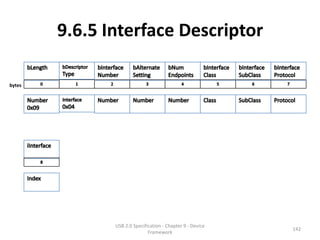
• The interface descriptor describes a specific interface within a
  configuration.
   – A configuration provides one or more interfaces, each with zero or
     more endpoint descriptors describing a unique set of endpoints within
     the configuration.
   – When a configuration supports more than one interface, the endpoint
     descriptors for a particular interface follow the interface descriptor in
     the data returned by the GetConfiguration() request.
   – An interface descriptor is always returned as part of a configuration
     descriptor.
   – Interface descriptors cannot be directly accessed with a
     GetDescriptor() or SetDescriptor() request.


                         USB 2.0 Specification - Chapter 9 - Device
                                                                            138
                                        Framework
9.6.5 Interface Descriptor


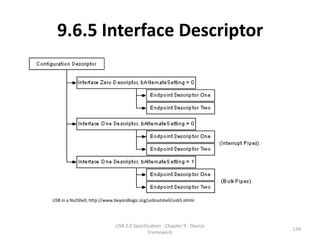
USB in a NutShell, http://www.beyondlogic.org/usbnutshell/usb5.shtml


                              USB 2.0 Specification - Chapter 9 - Device
                                                                           139
                                             Framework
9.6.5 Interface Descriptor
• An interface descriptor is always returned as
  part of a configuration descriptor.
• Interface descriptors cannot be directly
  accessed with a GetDescriptor() or
  SetDescriptor() request.


                USB 2.0 Specification - Chapter 9 - Device
                                                             140
                               Framework
9.6.5 Interface Descriptor


       USB 2.0 Specification - Chapter 9 - Device
                                                    141
                      Framework
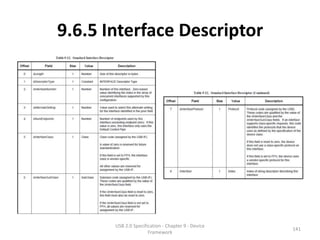
9.6.5 Interface Descriptor

bytes


               USB 2.0 Specification - Chapter 9 - Device
                                                            142
                              Framework
9.6.5 Interface Descriptor
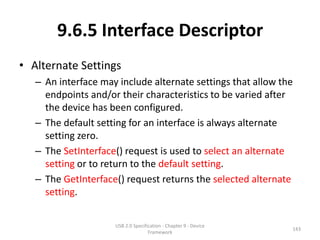
• Alternate Settings
   – An interface may include alternate settings that allow the
     endpoints and/or their characteristics to be varied after
     the device has been configured.
   – The default setting for an interface is always alternate
     setting zero.
   – The SetInterface() request is used to select an alternate
     setting or to return to the default setting.
   – The GetInterface() request returns the selected alternate
     setting.


                     USB 2.0 Specification - Chapter 9 - Device
                                                                  143
                                    Framework
9.6.5 Interface Descriptor
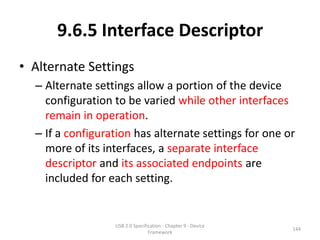
• Alternate Settings
  – Alternate settings allow a portion of the device
    configuration to be varied while other interfaces
    remain in operation.
  – If a configuration has alternate settings for one or
    more of its interfaces, a separate interface
    descriptor and its associated endpoints are
    included for each setting.


                  USB 2.0 Specification - Chapter 9 - Device
                                                               144
                                 Framework
9.6.5 Interface Descriptor
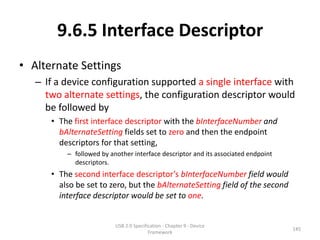
• Alternate Settings
   – If a device configuration supported a single interface with
     two alternate settings, the configuration descriptor would
     be followed by
      • The first interface descriptor with the bInterfaceNumber and
        bAlternateSetting fields set to zero and then the endpoint
        descriptors for that setting,
          – followed by another interface descriptor and its associated endpoint
            descriptors.
      • The second interface descriptor’s bInterfaceNumber field would
        also be set to zero, but the bAlternateSetting field of the second
        interface descriptor would be set to one.


                          USB 2.0 Specification - Chapter 9 - Device
                                                                                   145
                                         Framework
9.6.5 Interface Descriptor
• Endpoint
  – If an interface uses only endpoint zero, no
    endpoint descriptors follow the interface
    descriptor.
     • In this case, the bNumEndpoints field must be set to
       zero.
  – An interface descriptor never includes endpoint
    zero in the number of endpoints.


                   USB 2.0 Specification - Chapter 9 - Device
                                                                146
                                  Framework
9.6.5 Interface Descriptor
• bInterfaceClass
   – A value of zero is reserved for future standardization.
   – If this field is set to FFH, the interface class is vendor-specific.
• bInterfaceSubClass
   – These codes are qualified by the value of the bInterfaceClass field.
   – If the bInterfaceClass field is reset to zero, this field must also be reset
     to zero.
   – If the bInterfaceClass field is not set to FFH, all values are reserved for
     assignment by the USB-IF.


                           USB 2.0 Specification - Chapter 9 - Device
                                                                               147
                                          Framework
9.6.5 Interface Descriptor
• bInterfaceProtocol
   – These codes are qualified by the value of the bInterfaceClass and the
     bInterfaceSubClass fields.
   – If an interface supports class-specific requests, this code identifies the
     protocols that the device uses as defined by the specification of the
     device class.
   – Zero
       • the device does not use a class-specific protocol on this interface.
   – 0xFF
       • the device uses a vendor-specific protocol for this interface.

• iInterface
   – Index of string descriptor describing this interface.

                             USB 2.0 Specification - Chapter 9 - Device
                                                                                148
                                            Framework
9.6.6 Endpoint Descriptor
• Each endpoint used for an interface has its own
  descriptor.
   – This descriptor contains the information required by the
     host to determine the bandwidth requirements of each
     endpoint.
   – An endpoint descriptor is always returned as part of the
     configuration information returned by a
     GetDescriptor(Configuration) request.
   – An endpoint descriptor cannot be directly accessed with a
     GetDescriptor() or SetDescriptor() request.
   – There is never an endpoint descriptor for endpoint zero.
                     USB 2.0 Specification - Chapter 9 - Device
                                                                  149
                                    Framework
9.6.6 Endpoint Descriptor


       USB 2.0 Specification - Chapter 9 - Device
                                                    150
                      Framework
9.6.6 Endpoint Descriptor

bytes


               USB 2.0 Specification - Chapter 9 - Device
                                                            151
                              Framework
9.6.6 Endpoint Descriptor

bytes


                       00: None
                       (1
                                                            For high-speed
                       Transaction/microframe)
                                                            isochronous and
                       01: 1 additional
                                                            interrupt
                       (2 per microfram)
                                                            endpoints
                       02: 2 additional
                       (3 per microfram)
                       11: Reserved


               USB 2.0 Specification - Chapter 9 - Device
                        wMAXPacketSize
                              Framework
                                                                              152
9.6.6 Endpoint Descriptor

bytes


        For full-/high-speed          For full-/low-speed            For high-speed interrupt      For high-speed
        isochronous endpoints,        interrupt endpoints,           endpoints,                    bulk/control OUT
        this value must be in the     the value of this field may    the bInterval value is used   endpoints,
        range from 1 to 16.           be from 1 to 255.              as the exponent for a         the bInterval must specify
                                                                     2bInterval-1 value; e.g.,     the maximum NAK rate of
        The bInterval value is used                                  a bInterval of 4 means a      the endpoint.
        as the exponent for a                                        period of 8 (24-1).           A value of 0 indicates the
        2bInterval-1 value; e.g.,                                                                  endpoint never NAKs.
        a bInterval of 4 means a                                     This value must be from 1     Other values indicate at
        period of 8 (24-1).                                          to 16.                        most 1 NAK each bInterval
                                                                                                   number of microframes.
                                                                                                   This value must be
                                                                                                   in the range from 0 to 255.
                                                 USB 2.0 Specification - Chapter 9 - Device
                                                                                                                                 153
                                                                Framework
9.6.6 Endpoint Descriptor
• bmAttribute
  – Isochronous
     • (B5..2) are only meaningful for isochronous endpoints
       and must be reset to zero for all other transfer types.
     • If the endpoint is used as an explicit feedback endpoint
       (bits 5..4=01B),
        – then the Transfer Type must be set to isochronous (bits1..0 = 01B)
        – and the Synchronization Type must be set to No Synchronization (bits
          3..2=00B).


                      USB 2.0 Specification - Chapter 9 - Device
                                                                           154
                                     Framework
9.6.6 Endpoint Descriptor
• bmAttribute
  – This field describes the endpoint’s attributes when
    it is configured using the bConfigurationValue.
     • Transfer Type (B1..0)
     • Synchronization Type (B3..2)
     • Usage Type (B5..4)
  – If not an isochronous endpoint, (B5..2) are
    reserved and must be set to zero.


                   USB 2.0 Specification - Chapter 9 - Device
                                                                155
                                  Framework
9.6.6 Endpoint Descriptor
• bmAttribute
  – Feedback
     • A feedback endpoint (explicit or implicit) needs to be associated
       with one (or more) isochronous data endpoints to which it
       provides feedback service.
         – The association is based on endpoint number matching.
     • A feedback endpoint always has the opposite direction from the
       data endpoint(s) it services.
         – If multiple data endpoints are to be serviced by the same feedback
           endpoint, the data endpoints must have ascending ordered–but not
           necessarily consecutive–endpoint numbers.
              » The first data endpoint and the feedback endpoint must have the same
                 endpoint number (and opposite direction).
              » This ensures that a data endpoint can uniquely identify its feedback
                 endpoint by searching for the first feedback endpoint that has an
                          USB 2.0 Specification - Chapter 9 - Device
                 endpoint number equal or less than its own endpoint number.
                                         Framework
                                                                                     156
9.6.6 Endpoint Descriptor
• bmAttribute
  – Feedback
     • Example:
        – Consider the extreme case where there is a need for five groups of OUT
          asynchronous isochronous endpoints and at the same time four groups of IN
          adaptive isochronous endpoints.
        – Each group needs a separate feedback endpoint and the groups are
          composed as shown in Figure 9-7.


                       USB 2.0 Specification - Chapter 9 - Device
                                                                                  157
                                      Framework
9.6.6 Endpoint Descriptor
• bmAttribute
  – Feedback


                USB 2.0 Specification - Chapter 9 - Device
                                                             158
                               Framework
9.6.6 Endpoint Descriptor
• wMaxPacketSize
  – Maximum packet size this endpoint is capable of
    sending or receiving when this configuration is
    selected.
     • For isochronous endpoints, this value is used to reserve
       the bus time in the schedule, required for the per-
       (micro)frame data payloads.
        – The pipe may, on an ongoing basis, actually use less
          bandwidth than that reserved.
        – The device reports, if necessary, the actual bandwidth used
          via its normal, non-USB defined mechanisms.

                     USB 2.0 Specification - Chapter 9 - Device
                                                                        159
                                    Framework
9.6.6 Endpoint Descriptor
• wMaxPacketSize
  – High-speed isochronous and interrupt endpoints use
    B(12..11) of wMaxPacketSize to specify multiple
    transactions for each microframe specified by bInterval.
     • If bits 12..11 of wMaxPacketSize are zero, the maximum packet
       size for the endpoint can be any allowed value (as defined in
       Chapter 5).
     • If bits 12..11 of wMaxPacketSize are not zero (0), the allowed
       values for wMaxPacketSize bits 10..0 are limited as shown in Table
       9-14.


                                                   Table 9-14. Allowed wMaxPacketSize Values
                                                   for Different Numbers of Transactions per
                      USB 2.0 Specification - Chapter 9 - Device
                                                   Microframe                                160
                                     Framework
9.6.6 Endpoint Descriptor
• bInterval
  – Interval for polling endpoint for data transfers.
     • Expressed in frames or microframes depending on the
       device operating speed (i.e., either 1 millisecond or 125
       μs units).
     • For high-speed bulk and control OUT endpoints,
        – the bInterval field is only used for compliance purposes;
        – the host controller is not required to change its behavior
          based on the value in this field.


                     USB 2.0 Specification - Chapter 9 - Device
                                                                       161
                                    Framework
9.6.7 String Descriptor
• String descriptors are optional.
  – If a device does not support string descriptors, all
    references to string descriptors within
    device, configuration, and interface descriptors
    must be reset to zero.


                  USB 2.0 Specification - Chapter 9 - Device
                                                               162
                                 Framework
9.6.7 String Descriptor
• String descriptors use
  UNICODE encodings as
  defined by The Unicode
  Standard, V3.0
   – The strings in a USB device
     may support multiple
     languages.
   – When requesting a string
     descriptor, the requester
     specifies the desired language
     using a 16 bits language ID
     (LANGID) defined by the USB-
     IF.

                        USB 2.0 Specification - Chapter 9 - Device
                                                                     163
                                       Framework
9.6.7 String Descriptor
• String index zero for all languages returns a string descriptor
  that contains an array of two-byte LANGID codes supported
  by the device.
• A USB device may omit all string descriptors.
   – USB devices that omit all string descriptors must not return an array of
     LANGID codes.
• The array of LANGID codes is not NULL-terminated.
   – The size of the array (in bytes) is computed by subtracting two from
     the value of the first byte of the descriptor.
• The UNICODE string descriptor (shown in Table 9-16) is not
  NULL-terminated.
   – The string length is computed by subtracting two from the value of the
     first byte of the descriptor.
                         USB 2.0 Specification - Chapter 9 - Device
                                                                            164
                                        Framework
9.6.7 String Descriptor

bytes


         Table 9-15. String Descriptor Zero, Specifying Languages Supported by the Device


 bytes


          Table 9-16. UNICODE String Descriptor


                               USB 2.0 Specification - Chapter 9 - Device
                                                                                            165
                                              Framework
9.7 Device Class Definitions
• All devices must support the requests and descriptor
  definitions described in this chapter (Chapter 9).
• Most devices provide additional requests
  and, possibly, descriptors for device-specific
  extensions.
   – In addition, devices may provide extended services that
     are common to a group of devices.
   – In order to define a class of devices, the following
     information must be provided to completely define the
     appearance and behavior of the device class.
      • 9.7.1 Descriptors
      • 9.7.2 Interface(s) and Endpoint Usage
      • 9.7.3 Requests
                       USB 2.0 Specification - Chapter 9 - Device
                                                                    166
                                      Framework
9.7.1 Descriptors
• If the class requires any specific definition of the
  standard descriptors, the class definition must
  include those requirements as part of the class
  definition.
   – In addition, if the class defines a standard extended
     set of descriptors, they must also be fully defined in
     the class definition.
   – Any extended descriptor definitions must follow the
     approach used for standard descriptors; for
     example, all descriptors must begin with a length field.
                    USB 2.0 Specification - Chapter 9 - Device
                                                                 167
                                   Framework
9.7.2 Interface(s) and Endpoint Usage
• When a class of devices is standardized, the
  interfaces used by the devices, including how
  endpoints are used, must be included in the
  device class definition.
• Devices may further extend a class definition
  with proprietary features as long as they meet
  the base definition of the class.


                USB 2.0 Specification - Chapter 9 - Device
                                                             168
                               Framework
9.7.3 Requests
• All of the requests specific to the class must
  be defined.


                 USB 2.0 Specification - Chapter 9 - Device
                                                              169
                                Framework

USB Specification 2.0 - Chapter 9 - Device Framework

  • 1.
    USB 2.0 Specification Chapter 9 USB Device Framework Macpaul Lin USB 2.0 Specification - Chapter 9 - Device 1 Framework
  • 2.
    Disclaim • All thematerials of this slide is only a directive work base on the materials listed in Reference. • The purpose of this slide is for knowledge sharing and for people understanding USB standard easier. – Most of the material of the Copyright should belong to Universal Serial Bus Specification Copyright © 2000, Compaq Computer Corporation, Hewlett-Packard Company, Intel Corporation, Lucent Technologies Inc, Microsoft Corporation, NEC Corporation, Koninklijke Philips Electronics N.V. All rights reserved. – The directive work part should be used as Creative Commons license 3.0 “BY-NC-SA”. – For distributing this slide, the Disclaim and Reference should be included in the distribution. USB 2.0 Specification - Chapter 9 - Device 2 Framework
  • 3.
    Reference • USB 2.0specification – http://www.usb.org/developers/docs/usb_20_06 0112.zip • USB in a Nutshell – http://www.beyondlogic.org/usbnutshell/usb1.sh tml USB 2.0 Specification - Chapter 9 - Device 3 Framework
  • 4.
    Outline 9.1 USB DeviceStates 9.2 Generic USB Device Operations 9.3 USB Device Requests 9.4 Standard Device Requests 9.5 Descriptors 9.6 Standard USB Descriptor Definitions 9.7 Device Class Definitions USB 2.0 Specification - Chapter 9 - Device 4 Framework
  • 5.
    Overview • A USBdevice may be divided into three layers: – The top layer is the functionality provided by the serial bus device, for instance, a mouse or ISDN interface. – The middle layer handles routing data between the bus interface and various endpoints on the device. • An endpoint is the ultimate consumer or provider of data. It may be thought of as a source or sink for data. – The bottom layer is a bus interface that transmits and receives packets. • This chapter describes the common attributes and operations of the middle layer of a USB device. – These attributes and operations are used by the function- specific portions of the device to communicate through the bus interface and ultimately with the host. USB 2.0 Specification - Chapter 9 - Device 5 Framework
  • 6.
    Overview USB 2.0 Specification- Chapter 9 - Device 6 Framework
  • 7.
    9.1 USB DeviceStates • 9.1.1 Visible Device States • 9.1.2 BUS Enumeration USB 2.0 Specification - Chapter 9 - Device 7 Framework
  • 8.
    9.1.1 Visible DeviceStates USB 2.0 Specification - Chapter 9 - Device 8 Framework
  • 9.
    9.1.1 Visible DeviceStates • Attached USB 2.0 Specification - Chapter 9 - Device 9 Framework
  • 10.
    9.1.1 Visible DeviceStates • Powered USB 2.0 Specification - Chapter 9 - Device 10 Framework
  • 11.
    9.1.1 Visible DeviceStates • Powered – Type • Self-Powered • Bus-powered – Both self-powered or bus-powered devices they won’t be considered to be in the Powered state until they are attached to the USB and VBUS is applied to the device. USB 2.0 Specification - Chapter 9 - Device 11 Framework
  • 12.
    9.1.1 Visible DeviceStates • Powered – Device • Devices report their power source capability through the configuration descriptor. • The current power source is reported as part of a device’s status. • Both mode is supported – If a configuration is capable of supporting both power modes, the power maximum reported for that configuration is the maximum the device will draw from VBUS in either mode. – The device must observe this maximum, regardless of its mode. • Only one mode is supported. – If a configuration supports only one power mode and the power source of the device changes, the device will lose its current configuration and address and return to the Powered state. • If a device is self-powered and its current configuration requires more than 100 mA, then if the device switches to being bus-powered, it must return to the Address state. • Self-powered hubs that use VBUS to power the Hub Controller are allowed to remain in the Configured state if local power is lost. USB 2.0 Specification - Chapter 9 - Device 12 Framework
  • 13.
    9.1.1 Visible DeviceStates • Powered – HUB • Bus powered hubs do not provide any downstream power until they are configured. • A USB device must be able to be addressed within a specified time period from when power is initially applied (refer to Chapter 7). • After an attachment to a port has been detected, the host may enable the port, which will also reset the device attached to the port. USB 2.0 Specification - Chapter 9 - Device 13 Framework
  • 14.
    9.1.1 Visible DeviceStates • Default USB 2.0 Specification - Chapter 9 - Device 14 Framework
  • 15.
    9.1.1 Visible DeviceStates • Default – Device reset • After the device has been powered, it must not respond to any bus transactions until it has received a reset from the bus. • After receiving a reset, the device is then addressable at the default address. – Device speed • When the reset process is complete, the USB device is operating at the correct speed (i.e., low-/full-/highspeed). – The speed selection for low- and full-speed is determined by the device termination resistors. – A device that is capable of high-speed operation determines whether it will operate at high- speed as a part of the reset process (see Chapter 7 for more details). – Device behavior • A device capable of high-speed operation must reset successfully at full-speed when in an electrical environment that is operating at full-speed. • After the device is successfully reset, the device must also respond successfully to device and configuration descriptor requests and return appropriate information. • The device may or may not be able to support its intended functionality when operating at full-speed. USB 2.0 Specification - Chapter 9 - Device 15 Framework
  • 16.
    9.1.1 Visible DeviceStates • Address – All USB devices use the default address when initially powered or after the device has been reset. – Each USB device is assigned a unique address by the host after attachment or after reset. USB 2.0 Specification - Chapter 9 - Device 16 Framework
  • 17.
    9.1.1 Visible DeviceStates • Configured – Before a USB device’s function may be used, the device must be configured. – Configuration involves correctly processing a SetConfiguration() request with a non-zero configuration value. – Configuring a device or changing an alternate setting causes all of the status and configuration values associated with endpoints in the affected interfaces to be set to their default values. – This includes setting the data toggle of any endpoint using data toggles to the value DATA0. USB 2.0 Specification - Chapter 9 - Device 17 Framework
  • 18.
    9.1.1 Visible DeviceStates • Suspended – When to automatically enter the Suspended state. • no bus traffic for a specified period , ex: 3ms (refer to Chapter 7). – Attached devices must be prepared to suspend at any time they are powered. – Suspend/Selective suspend. • Bus activity may cease due to the host entering a suspend mode of its own. • In addition, a USB device shall also enter the Suspended state when the hub port it is attached to is disabled. – Resume • A USB device may also request the host to exit suspend mode or selective suspend by using electrical signaling to indicate remote wakeup. (Optional) • If a USB device is capable of remote wakeup signaling, the device must support the ability of the host to enable and disable this capability. • When the device is reset, remote wakeup signaling must be disabled. USB 2.0 Specification - Chapter 9 - Device 18 Framework
  • 19.
    9.1.2 Bus Enumeration •The host uses this process to identify and manage the device state changes when a USB device is attached to or removed. USB 2.0 Specification - Chapter 9 - Device 19 Framework
  • 20.
    9.1.2 Bus Enumeration HOST On Device Attach HUB (0) Device is attached to DEVICE (1) Report event via a reply on a powered port. status change pipe. (11.12.3) (1) Port Disabled (1) Powered State (2) Host query hub to determine change. (3) Host wait 100ms at least for power to be stable (3) Host issues a port enable and reset (4) Port Reset (4) Default State command to that port. (7.1.7.5) (11.5.1.5) (4) Device draw no more than 100mA from Default VBUS Address (6) Default Control Pipe is still accessible via the default address (6) The host reads the device descriptor to determine what actual maximum data payload size this USB device’s default pipe can use. (5) The host assigns a unique address to the USB device. (5) Address State (7) The host reads the configuration information from the device (0 to n-1 configurations) X msecs (8) the host assigns a configuration value to the device. (8) Configured state All of the endpoints should be ready USB 2.0 Specification -(8) Device draw VBUS depends on config Chapter 9 - Device 20 Framework
  • 21.
    9.1.2 Bus Enumeration HOST On Device Detach. HUB (0) Device is dettached DEVICE to a powered port. (1) Send notification to HOST (3) Host update its local topological (1) Port Disabled (1) Powered State information. USB 2.0 Specification - Chapter 9 - Device 21 Framework
  • 22.
    9.2 Generic USBDevice Operations • 9.2.1 Dynamic Attachment and Removal • 9.2.2 Address Assignment • 9.2.3 Configuration • 9.2.4 Data Transfer • 9.2.5 Power Management • 9.2.6 Request Processing • 9.2.7 Request Error USB 2.0 Specification - Chapter 9 - Device 22 Framework
  • 23.
    9.2.1 Dynamic Attachmentand Removal • The hub that provides the attachment point or port is responsible for reporting any change in the state of the port. • When host enables the hub port when device is attached, will also lead device resetting. – A reset (port reset) USB device has the following characteristics: • Responds to the default USB address • Is not configured • Is not initially suspended USB 2.0 Specification - Chapter 9 - Device 23 Framework
  • 24.
    9.2.2 Address Assignment •The host is responsible for assigning a unique address to the device. – This is done after the device has been reset by the host, and the hub port where the device is attached has been enabled. USB 2.0 Specification - Chapter 9 - Device 24 Framework
  • 25.
    9.2.3 Configuration • Thehost is responsible for configuring a USB device. – The host typically requests configuration information from the USB device to determine the device’s capabilities. – As part of the configuration process, the host sets the device configuration and, where necessary, selects the appropriate alternate settings for the interfaces. USB 2.0 Specification - Chapter 9 - Device 25 Framework
  • 26.
    9.2.3 Configuration • Withina single configuration, a device may support multiple interfaces. USB 2.0 Specification - Chapter 9 - Device 26 Framework
  • 27.
    9.2.3 Configuration HOST Single Configuration DEVICE EP Interface EP Within a single configuration, a device 0 may support multiple interfaces. EP Single Feature function EP Interface EP 1 EP device class or vendor-specific protocol Single Feature EP Interface EP N-1 function EP USB 2.0 Specification - Chapter 9 - DeviceFeature Single 27 Framework
  • 28.
    9.2.3 Configuration HOST Alternate settings DEVICE An interface within a configuration may EP have alternate settings Interface that redefine the EP 0 number or If this is the case, the device must support EP characteristics of the the GetInterface() request to report the associated endpoints. current alternate setting for the specified interface Single Feature function EP Interface If this is the case, the device must support EP 1 SetInterface() request to select the alternate setting for the specified EP interface. Single Feature EP Interface EP N-1 function EP USB 2.0 Specification - Chapter 9 - DeviceFeature Single 28 Framework
  • 29.
    9.2.3 Configuration Alternate settings EP Interface EP 0 EP Device Interface descriptors contain function Driver Class, SubClass, and Protocol fields to identify and communication with the EP function(s). Interface EP 0 HOST DEVICE EP EP Interface EP 0 EP function EP Interface EP 0 DEVICE EP USB 2.0 Specification - Chapter 9 - Device 29 Framework
  • 30.
    9.2.4 Data Transfer •Data may be transferred between a USB device endpoint and the host in one of 4 ways. (Chapter 5). – An endpoint number may be used for different types of data transfers in different alternate settings. – However, once an alternate setting is selected (including the default setting of an interface), a USB device endpoint uses only one data transfer method until a different alternate setting is selected. USB 2.0 Specification - Chapter 9 - Device 30 Framework
  • 31.
    9.2.5 Power Management •9.2.5.1 Power Budgeting • 9.2.5.2 Remote Wakeup USB 2.0 Specification - Chapter 9 - Device 31 Framework
  • 32.
    9.2.5.1 Power Budgeting •During device enumeration, a host evaluates a device’s power requirements. – If the power requirements of a particular configuration exceed the power available to the device, Host Software shall not select that configuration. – USB devices shall limit the power they consume from VBUS to one unit load (100mA?) or less until configured. • Depending on the power capabilities of the port to which the device is attached, a USB device may be able to draw up to five unit loads (500mA?) from VBUS after configuration. – Suspended devices, whether configured or not, shall limit their bus power consumption as defined in Chapter 7. USB 2.0 Specification - Chapter 9 - Device 32 Framework
  • 33.
    9.2.5.2 Remote Wakeup •Remote wakeup allows a suspended USB device to signal a host that may also be suspended. – This notifies the host that it should resume from its suspended mode. – A USB device reports its ability to support remote wakeup in a configuration descriptor. • If a device supports remote wakeup, it must also allow the capability to be enabled and disabled using the standard USB requests. • Remote wakeup is accomplished using electrical signaling described in Section 7.1.7.7. USB 2.0 Specification - Chapter 9 - Device 33 Framework
  • 34.
    9.2.6 Request Processing •A device may begin processing of a request as soon as the device returns the ACK following the Setup. – excepts SetAddress() requests (see Section 9.4.6). • The device is expected to “complete” processing of the request before it allows the Status stage to complete successfully. – (Polling.) • Some requests initiate operations that take many milliseconds to complete. – (Indication.) – For requests such as this, the device class is required to define a method other than Status stage completion to indicate that the operation has completed. – For example, a reset on a hub port takes at least 10 ms (ex: 10 frames/80 microframes)to complete. • The SetPortFeature(PORT_RESET) (see Chapter 11) request “completes” when the reset on the port is initiated. • Note: (High-speed: 125 μs microframe, Full-Speed: 1 ms frame). USB 2.0 Specification - Chapter 9 - Device 34 Framework
  • 35.
    9.2.6 Request Processing Figure 5-14. Transfers for Communication Flows USB 2.0 Specification - Chapter 9 - Device 35 Framework
  • 36.
    9.2.6 Request Processing • Completion of the reset operation is signaled when the port’s status change is set to indicate that the port is now enabled. – This technique prevents the host from having to constantly poll for a completion when it is known that the request will take a relatively long period of time. USB 2.0 Specification - Chapter 9 - Device 36 Framework
  • 37.
    9.2.6.1 Request ProcessingTiming • USB sets an upper limit of 5 seconds as the upper limit for any command to be processed. – This limit is not applicable in all instances. – It should be noted that the limitations given below are intended to encompass a wide range of implementations. – Implementations should strive to complete requests in times that are as short as possible. USB 2.0 Specification - Chapter 9 - Device 37 Framework
  • 38.
    9.2.6.2 Reset/Resume RecoveryTime • After a port is reset or resumed, the USB System Software is expected to provide a “recovery” interval of 10 ms before the device attached to the port is expected to respond to data transfers. – The device may ignore any data transfers during the recovery interval. – After the end of the recovery interval, the device must accept data transfers at any time. USB 2.0 Specification - Chapter 9 - Device 38 Framework
  • 39.
    9.2.6.2 Reset/Resume RecoveryTime HOST HUB DEVICE Host issues a port Reset/Resume. Port Reset/Resume 10 ms recovery interval Data Transfer Response Data Transfer USB 2.0 Specification - Chapter 9 - Device 39 Framework
  • 40.
    9.2.6.3 Set AddressProcessing • After the reset/resume recovery interval if a device receives a SetAddress() request, the device must be able to complete processing of the request and be able to successfully complete the Status stage of the request within 50 ms. • In the case of the SetAddress() request, the Status stage successfully completes when the • device sends the zero-length Status packet • or when the device sees the ACK in response to the Status stage data packet. • After successful completion of the Status stage, the device is allowed a SetAddress() recovery interval of 2 ms. – At the end of this interval, the device must be able to accept Setup packets addressed to the new address. – Also, at the end of the recovery interval, the device must not respond to tokens sent to the old address (unless, of course, the old and new address is the same). USB 2.0 Specification - Chapter 9 - Device 40 Framework
  • 41.
    9.2.6.3 Set AddressProcessing HOST HUB DEVICE Host issues a port Reset/Resume. Port Reset/Resume 10 ms recovery interval (5) The host send SetAddress() to the USB device (5) Address State (Setup) ACK 50 ms (5) The host check status to the USB device. zero-length Status packet ACK 2 ms Status SetAddress() Stage recovery Fin interval (5) The host send New SetAddress() to the USB device USB 2.0 Specification - Chapter 9 - Device 41 Framework
  • 42.
    9.2.6.4 Standard DeviceRequests • There are 3 kinds of Standard device requests. – Require no Data stage. – Require Data stage transfer to the host – Require Data stage transfer to the Device. USB 2.0 Specification - Chapter 9 - Device 42 Framework
  • 43.
    9.2.6.4 Standard DeviceRequests • Standard device requests require no Data stage: – A device must be able to • complete the request, • successfully complete the Status stage of the request, • within 50 ms of receipt of the request. – This limitation applies to requests to the request types • Device • Interface • Endpoint. USB 2.0 Specification - Chapter 9 - Device 43 Framework
  • 44.
    9.2.6.4 Standard DeviceRequests • Standard device requests require Data stage transfer to the host – A device must be able to • return the first data packet to the host within 500 ms of receipt of the request. • For subsequent data packets, if any, the device must be able to return them within 500 ms of successful completion of the transmission of the previous packet. • The device must then be able to successfully complete the status stage within 50 ms after returning the last data packet. USB 2.0 Specification - Chapter 9 - Device 44 Framework
  • 45.
    9.2.6.4 Standard DeviceRequests HOST HUB DEVICE The host send Standard Device Requests (Setup) ACK 500 ms The host send Standard Device Requests (Data) DATA 0 500 ms The host send Standard Device Requests (Data) DATA 1 50 ms The host check status to the USB device (Status) zero-length Status packet Status ACK Stage USB 2.0 Specification - Chapter 9 - Device Fin 45 Framework
  • 46.
    9.2.6.4 Standard DeviceRequests • Standard device requests require Data stage transfer to the Device – The 5-second limit applies. – This means that the device must be capable of accepting all data packets from the host and successfully completing the Status stage if the host provides the data at the maximum rate at which the device can accept it. – Delays between packets introduced by the host add to the time allowed for the device to complete the request. USB 2.0 Specification - Chapter 9 - Device 46 Framework
  • 47.
    9.2.6.5 Class-specific Requests •Unless specifically exempted in the class document, all class-specific requests must meet the timing limitations for standard device requests. – If a class document provides an exemption, the exemption may only be specified on a request-by- request basis. – Faster response may be required for standard and class-specific requests. USB 2.0 Specification - Chapter 9 - Device 47 Framework
  • 48.
    9.2.6.6 Speed DependentDescriptors • The device always knows its operational speed due to having to manage its transceivers correctly as part of reset processing (Chapter 7) • A device also operates at a single speed after completing the reset sequence. – In particular, there is no speed switch during normal operation. – However, a high-speed capable device may have configurations that are speed dependent. – High-speed capable devices must support reporting their speed dependent configurations. USB 2.0 Specification - Chapter 9 - Device 48 Framework
  • 49.
    9.2.6.6 Speed DependentDescriptors • A high-speed capable device responds with descriptor information that is valid for the current operating speed. – For example, when a device is asked for configuration descriptors, it only returns those for the current operating speed (e.g., full speed). – However, there must be a way to determine the capabilities for both high- and full-speed operation. USB 2.0 Specification - Chapter 9 - Device 49 Framework
  • 50.
    9.2.6.6 Speed DependentDescriptors • Two descriptors allow a high-speed capable device to report configuration information about the other operating speed. – The (other_speed) device_qualifier descriptor – The other_speed_configuration descriptor. • These two descriptors are retrieved by the host by using the GetDescriptor request with the corresponding descriptor type values. – Note: These descriptors are not retrieved unless the host explicitly issues the corresponding GetDescriptor requests. – If these two requests are not issued, the device would simply appear to be a single speed device. USB 2.0 Specification - Chapter 9 - Device 50 Framework
  • 51.
    9.2.6.6 Speed DependentDescriptors • Devices that are high-speed capable must set the version number in the bcdUSB field of their descriptors to 0200H. – This indicates that such devices support the other_speed requests defined by USB 2.0. – A device with descriptor version numbers less than 0200H should cause a Request Error response if it receives these other_speed requests. – A USB 1.x device should not be issued the other_speed requests. USB 2.0 Specification - Chapter 9 - Device 51 Framework
  • 52.
    9.2.7 Request Error •Occurred when request is received by a device – that is not defined for the device, – is inappropriate for the current setting of the device, – has values that are not compatible with the request. • The device deals with the Request Error by returning a STALL PID in response to – the next Data stage transaction – or in the Status stage of the message. USB 2.0 Specification - Chapter 9 - Device 52 Framework
  • 53.
    9.3 USB DeviceRequests • All USB devices respond to requests from the host on the device’s Default Control Pipe. – The request and the request’s parameters are sent to the device in the Setup packet. – The host is responsible for establishing the values passed in the fields. – Every Setup packet has eight bytes. USB 2.0 Specification - Chapter 9 - Device 53 Framework
  • 54.
    9.3 USB DeviceRequests USB 2.0 Specification - Chapter 9 - Device 54 Framework
  • 55.
    9.3 USB DeviceRequests bytes Setup Data bits 0: H-to-D 0: Standard 0: Device 1: D-to-H 1: Class 1: Interface 2: Vendor 2: Endpoint 3: Reserved 3: Other 4..31: Reserved • 9.3.1 bmRequestType – Direction • this field identifies the direction of data transfer in the second phase of the control transfer. • The state of the Direction bit is ignored if the wLength field is zero, signifying there is no Data stage. – Type • Standard (Table 9-3), all devices must support. • A device class may define additional requests. A device vendor may also define requests supported by the device. – Recipient • When an interface or endpoint is specified, the wIndex field identifies the interface or endpoint. USB 2.0 Specification - Chapter 9 - Device 55 Framework
  • 56.
    9.3 USB DeviceRequests bytes Setup Data • 9.3.2 bRequest – The Type bits in the bmRequestType field modify the meaning of this field. – USB 2.0 specification only defines standard requests. • 9.3.3 wValue – The contents of this field vary according to the request. – It is used to pass a parameter to the device, specific to the request. USB 2.0 Specification - Chapter 9 - Device 56 Framework
  • 57.
    9.3 USB DeviceRequests • 9.3.4 wIndex – It is used to pass a parameter to the device, specific to the request. – For Endpoint Case • Direction – 0 for OUT endpoint, 1 for IN endpoint. – Control Pipe: » Should be set to 0. » But device may accept either value. bytes Setup Data bits 0: OUT EP USB 2.0 Specification - Chapter 9 - Device 1: IN EP 57 Framework
  • 58.
    9.3 USB DeviceRequests • 9.3.4 wIndex – It is used to pass a parameter to the device, specific to the request. – For Interface Case bytes Setup Data bits USB 2.0 Specification - Chapter 9 - Device 58 Framework
  • 59.
    9.3 USB DeviceRequests • 9.3.5 wLength – This field specifies the length of the data transferred during the second phase of the control transfer. • On an input request, a device must never return more data than is indicated by the wLength value; it may return less. • On an output request, wLength will always indicate the exact amount of data to be sent by the host. USB 2.0 Specification - Chapter 9 - Device 59 Framework
  • 60.
    9.4 Standard DeviceRequests • USB devices must respond to standard device requests, even if the device has not yet been assigned an address or has not been configured. USB 2.0 Specification - Chapter 9 - Device 60 Framework
  • 61.
    9.4 Standard DeviceRequests USB 2.0 Specification - Chapter 9 - Device 61 Framework
  • 62.
    9.4 Standard DeviceRequests • Feature selectors are used when enabling or setting features, such as remote wakeup, specific to a device, interface, or endpoint. USB 2.0 Specification - Chapter 9 - Device 62 Framework
  • 63.
    9.4 Standard DeviceRequests • Feature selectors are used when enabling or setting features, such as remote wakeup, specific to a device, interface, or endpoint. – If an unsupported or invalid request is made to a USB device, the device responds by returning STALL in the Data or Status stage of the request. – If the device detects the error in the Setup stage, it is preferred that the device returns STALL at the earlier of the Data or Status stage. – Receipt of an unsupported or invalid request does NOT cause the optional Halt feature on the control pipe to be set. – If for any reason, the device becomes unable to communicate via its Default Control Pipe due to an error condition, the device must be reset to clear the condition and restart the Default Control Pipe. USB 2.0 Specification - Chapter 9 - Device 63 Framework
  • 64.
    9.4.1 Clear Feature • This request is used to clear or disable a specific feature. bytes 0: H-to-D 1 0: ENDPOINT_HALT Recipient: Endpoint 0: Device 1: DEVICE_REMOTE_WAKEUP 1: Interface Recipient: Device 2: Endpoint 2: TEST_MODE Must be Recipient: Device mapped (?): Interface USB 2.0 Specification - Chapter 9 - Device 64 Framework
  • 65.
    9.4.1 Clear Feature •A ClearFeature() request • Default state: that references – Not specified. – a feature • Address state: • that cannot be cleared – Valid • that does not exist – references to interfaces or – or an interface or endpoint to endpoints other than that does not exist endpoint zero shall cause – will cause the device to the device to respond with respond with a Request a Request Error. Error. • Configured state: – Valid. USB 2.0 Specification - Chapter 9 - Device 65 Framework
  • 66.
    9.4.2 Get Configuration • This request returns the current device configuration value. bytes 1: D-to-H 8 0: Device USB 2.0 Specification - Chapter 9 - Device 66 Framework
  • 67.
    9.4.1 Get Configuration •If the returned value is • Default state: zero, the device is not – Not specified. configured. • Address state: – The value zero must be returned. • Configured state: – The non-zero bConfigurationValue of the current configuration must be returned. USB 2.0 Specification - Chapter 9 - Device 67 Framework
  • 68.
    9.4.3 Get Descriptor • This request returns the current device configuration value. bytes 1: D-to-H 6 High byte: Descriptor Types String Descriptors: Language ID The number of bytes to return. 1: DEVICE Others: Zero 0: Device 2: CONFIGURATION 3: STRING 4: INTERFACE 5: ENDPOINT 6: DEVICE_QUALIFIER 7: OTHER_SPEED_CONFIG 8: INTERFACE_POWER Low Byte: Descriptor Index USB 2.0 Specification - Chapter 9 - Device 68 Framework
  • 69.
    9.4.3 Get Descriptor •wValue: – The descriptor index is used to select a specific descriptor (only for configuration and string descriptors) when several descriptors of the same type are implemented in a device. • For example, a device can implement several configuration descriptors. • The range of values used for a descriptor index is from 0 to one less than the number (n-1) of descriptors of that type implemented by the device. – For other standard descriptors that can be retrieved via a GetDescriptor() request, a descriptor index of zero must be used. USB 2.0 Specification - Chapter 9 - Device 69 Framework
  • 70.
    9.4.3 Get Descriptor •wIndex – Language ID for string descriptors – or is reset to zero for other descriptors. • wLength – It specifies the number of bytes to return. • If the descriptor is longer than the wLength field, only the initial bytes of the descriptor are returned. (use wLength) • If the descriptor is shorter than the wLength field, the device indicates the end of the control transfer by sending a short packet when further data is requested. – A short packet is defined as a packet shorter than the maximum payload size or a zero length data packet (refer to Chapter 5). USB 2.0 Specification - Chapter 9 - Device 70 Framework
  • 71.
    9.4.3 Get Descriptor •The standard request to a device supports three types of descriptors: – device (also device_qualifier) • A high-speed capable device supports the device_qualifier descriptor to return information about the device for the speed at which it is not operating (including wMaxPacketSize for the default endpoint and the number of configurations for the other speed). – String – configuration (also other_speed_configuration) USB 2.0 Specification - Chapter 9 - Device 71 Framework
  • 72.
    9.4.3 Get Descriptor –configuration (also other_speed_configuration) • The other_speed_configuration returns information in the same structure as a configuration descriptor, but for a configuration if the device were operating at the other speed. • A request for a configuration descriptor returns the configuration descriptor, all interface descriptors, and endpoint descriptors for all of the interfaces in a single request. • The first interface descriptor follows the configuration descriptor. – The endpoint descriptors for the first interface follow the first interface descriptor. • If there are additional interfaces, their interface descriptor and endpoint descriptors follow the first interface’s endpoint descriptors. • Class-specific and/or vendor-specific descriptors follow the standard descriptors they extend or modify. USB 2.0 Specification - Chapter 9 - Device USB in a NutShell, http://www.beyondlogic.org/usbnutshell/usb5.shtml 72 Framework
  • 73.
    9.4.3 Get Descriptor •All devices must provide a • Default state: device descriptor and at – This is a valid request when least one configuration the device is in the Default descriptor. state. – If a device does not • Address state: support a requested – This is a valid request when descriptor, it responds with the device is in the Address a Request Error. state. • Configured state: – This is a valid request when the device is in the Configured state. USB 2.0 Specification - Chapter 9 - Device 73 Framework
  • 74.
    9.4.4 Get Interface • This request returns the selected alternate setting for the specified interface. bytes 1: D-to-H 10 1: Interface USB 2.0 Specification - Chapter 9 - Device 74 Framework
  • 75.
    9.4.4 Get Interface •Some USB devices have • Default state: configurations with – Device behavior when this interfaces that have request is received while mutually exclusive the device is in the Default settings. state is not specified. • This request allows the • Address state: host to determine the – A Request Error response is given by the device. currently selected alternate setting. • Configured state: • If the interface specified – Valid. does not exist, then the device responds with a Request Error. USB 2.0 Specification - Chapter 9 - Device 75 Framework
  • 76.
    9.4.5 Get Status • This request returns status for the specified recipient. – The data returned is the current status of the specified recipient. bytes 1: D-to-H 0 0: Device 1: Interface 2: Endpoint USB 2.0 Specification - Chapter 9 - Device 76 Framework
  • 77.
    9.4.5 Get Status •If an interface or an • Default state: endpoint is specified that – Device behavior when this does not exist, then the request is received while the device responds with a device is in the Default state Request Error. is not specified. • Address state: – If an interface or an endpoint other than endpoint zero is specified, then the device responds with a Request Error. • Configured state: – If an interface or endpoint that does not exist is specified, then the device responds with a Request Error. USB 2.0 Specification - Chapter 9 - Device 77 Framework
  • 78.
    9.4.5 Get Status Figure 9-4, DATA returned by device 0: disabled 0: bus power 1: enable 1: Self Power • A GetStatus() request to a device returns the information shown in Figure 9-4. – Self Powered • The Self Powered field may not be changed by the SetFeature() or ClearFeature() requests. – Remote Wakeup • It indicates whether the device is currently enabled to request remote wakeup. • The default mode is disabled. • It can be modified by the SetFeature() and ClearFeature() requests using the DEVICE_REMOTE_WAKEUP feature selector. • This field is reset to zero when the device is reset. USB 2.0 Specification - Chapter 9 - Device 78 Framework
  • 79.
    9.4.5 Get Status •A GetStatus() request to an interface returns the information shown in Figure 9-5. Figure 9-5, DATA returned by Interface USB 2.0 Specification - Chapter 9 - Device 79 Framework
  • 80.
    9.4.5 Get Status Figure 9-6, DATA returned by Endpoint 0: Normal 1: Halted • A GetStatus() request to a endpoint returns the information shown in Figure 9-4. – The Halt feature is required to be implemented for all interrupt and bulk endpoint types. – Set Halt • The Halt feature may optionally be set with the SetFeature(ENDPOINT_HALT) request. • When set by the SetFeature() request, the endpoint exhibits the same stall behavior as if the field had been set by a hardware condition. USB 2.0 Specification - Chapter 9 - Device 80 Framework
  • 81.
    9.4.5 Get Status •Clear Halt – If the condition causing a halt has been removed, clearing the Halt feature via a ClearFeature(ENDPOINT_HALT) request results in the endpoint no longer returning a STALL. – For endpoints using data toggle, regardless of whether an endpoint has the Halt feature set, a ClearFeature(ENDPOINT_HALT) request always results in the data toggle being reinitialized to DATA0. – The Halt feature is reset to zero after either a SetConfiguration() or SetInterface() request even if the requested configuration or interface is the same as the current configuration or interface. USB 2.0 Specification - Chapter 9 - Device 81 Framework
  • 82.
    9.4.5 Get Status •It is neither required nor recommended that the Halt feature be implemented for the Default Control Pipe. – However, devices may set the Halt feature of the Default Control Pipe in order to reflect a functional error condition. – If the feature is set to one, the device will return STALL in the Data and Status stages of each standard request to the pipe except GetStatus(), SetFeature(), and ClearFeature() requests. – The device need not return STALL for class-specific and vendor-specific requests. USB 2.0 Specification - Chapter 9 - Device 82 Framework
  • 83.
    9.4.6 Set Address • This request sets the device address for all future device accesses. – The wValue field specifies the device address to use for all subsequent accesses. bytes 0: H-to-D 5 0: Device USB 2.0 Specification - Chapter 9 - Device 83 Framework
  • 84.
    9.4.6 Set Address •As noted elsewhere, requests actually may result in up to three stages. – In the first stage, the Setup packet is sent to the device. – In the optional second stage, data is transferred between the host and the device. – In the final stage, status is transferred between the host and the device. Figure 5-14. Transfers for Communication Flows USB 2.0 Specification - Chapter 9 - Device 84 Framework
  • 85.
    9.4.6 Set Address •The direction of data and status transfer depends on whether the host is sending data to the device or the device is sending data to the host. • The Status stage transfer is always in the opposite direction of the Data stage. • If there is no Data stage, the Status stage is from the device to the host. USB 2.0 Specification - Chapter 9 - Device 85 Framework
  • 86.
    9.4.6 Set Address HOST HUB DEVICE SETUP DATA Status HOST HUB DEVICE SETUP DATA STATUS HOST HUB DEVICE SETUP USB 2.0 Specification - Chapter 9 - Device Status 86 Framework
  • 87.
    9.4.6 Set Address •Stages after the initial Setup packet assume the same device address as the Setup packet. • The USB device does not change its device address until after the Status stage of SetAddress is completed successfully. – Note that this is a difference between this request and all other requests. – For all other requests, the operation indicated must be completed before the Status stage. – Check 9.2.6.3 USB 2.0 Specification - Chapter 9 - Device 87 Framework
  • 88.
    9.4.6 Set Address • Default state: – If the address specified is non- zero, then the device shall enter the Address state; – otherwise, the device remains in the Default state (this is not an error condition) • Address state: – If the address specified is zero, then the device shall enter the Default state; – otherwise, the device remains in the Address state but uses the newly-specified address. • Configured state: – Not Specified. USB 2.0 Specification - Chapter 9 - Device 88 Framework
  • 89.
    9.4.7 Set Configuration • This request sets the device configuration. – The lower byte of the wValue field specifies the desired configuration. – This configuration value must be zero or match a configuration value from a configuration descriptor. bytes 0: H-to-D 9 0: Device bytes If the configuration value is zero, the device is placed in its Address state. USB 2.0 Specification - Chapter 9 - Device 89 Framework
  • 90.
    9.4.7 Set Configuration •Default state: • Configured state: – Not specified. – If the specified configuration • Address state: value is zero, then the device enters the Address state. – If the specified configuration value is zero, then the device – If the specified configuration remains in the Address state. value matches the configuration value from a – If the specified configuration configuration descriptor, then value matches the that configuration is selected configuration value from a and the device remains in the configuration descriptor, then Configured state. that configuration is selected and the device enters the – Otherwise, the device Configured state. responds with a Request Error. – Otherwise, the device responds with a Request Error. USB 2.0 Specification - Chapter 9 - Device 90 Framework
  • 91.
    9.4.8 Set Descriptor • This request is optional and may be used to update existing descriptors or new descriptors may be added. bytes 0: H-to-D 7 High byte: Descriptor Types 1: DEVICE 0: Device 2: CONFIGURATION 3: STRING 4: INTERFACE 5: ENDPOINT 6: DEVICE_QUALIFIER 7: OTHER_SPEED_CONFIG 8: INTERFACE_POWER Low Byte: Descriptor Index USB 2.0 Specification - Chapter 9 - Device 91 Framework
  • 92.
    9.4.8 Set Descriptor •wValue – The descriptor index is used to select a specific descriptor (only for configuration and string descriptors) when several descriptors of the same type are implemented in a device. • For example, a device can implement several configuration descriptors. • For other standard descriptors that can be set via a SetDescriptor() request, a descriptor index of zero must be used. USB 2.0 Specification - Chapter 9 - Device 92 Framework
  • 93.
    9.4.8 Set Descriptor •wIndex • Default state: – The wIndex field specifies the – Not specified Language ID for string • Address state: descriptors or is reset to zero – Valid if supported. for other descriptors. • Configured state: • wLength – Valid if supported. – The wLength field specifies the number of bytes to transfer from the host to the device. • If this request is not supported, the device will respond with a Request Error. USB 2.0 Specification - Chapter 9 - Device 93 Framework
  • 94.
    9.4.9 Set Feature • This request is used to set or enable a specific feature. bytes 0: H-to-D 3 0: ENDPOINT_HALT Recipient: Endpoint 0: Device 1: DEVICE_REMOTE_WAKEUP 1: Interface Recipient: Device 2: Endpoint 2: TEST_MODE Must be Recipient: Device mapped (?): Interface USB 2.0 Specification - Chapter 9 - Device 94 Framework
  • 95.
    9.4.9 Set Feature • The TEST_MODE feature is only defined for a device recipient (i.e., bmRequestType = 0) and the lower byte of wIndex must be zero. bytes 0: H-to-D 3 2: TEST_MODE Recipient: Device 0: Device USB 2.0 Specification - Chapter 9 - Device 95 Framework
  • 96.
    9.4.9 Set Feature • Setting the TEST_MODE feature puts the device upstream facing port into test mode. – The device will respond with a request error if the request contains an invalid test selector. – The transition to test mode must be complete no later than 3 ms after the completion of the status stage of the request. HOST HUB DEVICE Host send SetFeature(TEST MODE) PORT transition to TEST_MODE The host check status to the USB device (Status) zero-length Status packet Status ACK 3 ms Stage Device transition to TEST_MODE Fin USB 2.0 Specification - Chapter 9 - Device 96 Framework
  • 97.
    9.4.9 Set Feature •The power to the device must be cycled to exit test mode of an upstream facing port of a device. • See Section 7.1.20 for definitions of each test mode. • A device must support the TEST_MODE feature when in the – Default state – Address state – or Configured high-speed device states. USB 2.0 Specification - Chapter 9 - Device 97 Framework
  • 98.
    9.4.9 Set Feature •A SetFeature() request that • Default state: references a feature that – A device must be able to accept a cannot be set or that does SetFeature(TEST_MODE, TEST not exist causes a STALL to _SELECTOR) request when in be returned in the Status the Default State. stage of the request. – Device behavior for other SetFeature requests while the device is in the Default state is not specified. • Address state: – If an interface or an endpoint other than endpoint zero is specified, then the device responds with a Request Error. • Configured state: USB 2.0 Specification - Chapter 9 - Device Framework 98
  • 99.
    9.4.10 Set Interface • This request allows the host to select an alternate setting for the specified interface. bytes 0: H-to-D 11 1: Interface USB 2.0 Specification - Chapter 9 - Device 99 Framework
  • 100.
    9.4.10 Set Interface •Some USB devices have configurations with interfaces that have mutually exclusive settings. – This request allows the host to select the desired alternate setting. – If a device only supports a default setting for the specified interface, then a STALL may be returned in the Status stage of the request. – This request cannot be used to change the set of configured interfaces (the SetConfiguration() request must be used instead). USB 2.0 Specification - Chapter 9 - Device 100 Framework
  • 101.
    9.4.10 Set Interface •If the interface or the • Default state: alternate setting does not – Not specified. exist, then the device • Address state: responds with a Request – The device must respond with a Request Error. Error. • Configured state: • If wLength is non-zero, then – Valid. the behavior of the device is not specified. USB 2.0 Specification - Chapter 9 - Device 101 Framework
  • 102.
    9.4.11 Synch Frame • This request is used to set and then report an endpoint’s synchronization frame. bytes 1: D-to-H 11 2: Endpoint USB 2.0 Specification - Chapter 9 - Device 102 Framework
  • 103.
    9.4.11 Synch Frame •When an endpoint supports isochronous transfers, the endpoint may also require per-frame transfers to vary in size according to a specific pattern. – The host and the endpoint must agree on which frame the repeating pattern begins. – The number of the frame in which the pattern began is returned to the host. • If a high-speed device supports the Synch Frame request, it must internally synchronize itself to the zeroth microframe and have a time notion of classic frame. – Only the frame number is used to synchronize and reported by the device endpoint (i.e., no microframe number). – The endpoint must synchronize to the zeroth microframe. USB 2.0 Specification - Chapter 9 - Device 103 Framework
  • 104.
    9.4.11 Synch Frame •This value is only used for • Default state: isochronous data transfers – Not specified. using implicit pattern • Address state: synchronization. – The device shall respond with a Request Error. • If wValue is non-zero or • Configured state: wLength is not two, then – Valid. the behavior of the device is not specified. • If the specified endpoint does not support this request, then the device will respond with a Request Error. USB 2.0 Specification - Chapter 9 - Device 104 Framework
  • 105.
    9.5 Descriptors • USB devices report their attributes using descriptors. • A descriptor is a data structure with a defined format. – Each descriptor begins with a byte-wide field that contains the total number of bytes in the descriptor followed by a byte-wide field that identifies the descriptor type. bytes USB 2.0 Specification - Chapter 9 - Device 105 Framework
  • 106.
    9.5 Descriptors • Usingdescriptors allows concise storage of the attributes of individual configurations because each configuration may reuse descriptors or portions of descriptors from other configurations that have the same characteristics. • In this manner, the descriptors resemble individual data records in a relational database. USB 2.0 Specification - Chapter 9 - Device 106 Framework
  • 107.
    9.5 Descriptors • StringDescriptors • Where appropriate, descriptors contain references to string descriptors that provide displayable information describing a descriptor in human-readable form. • The inclusion of string descriptors is optional. • However, the reference fields within descriptors are mandatory. • If a device does not support string descriptors, string reference fields must be reset to zero to indicate no string descriptor is available. USB 2.0 Specification - Chapter 9 - Device 107 Framework
  • 108.
    9.5 Descriptors • Returnlength of descriptor • The length < specification • If a descriptor returns with a value in its length field that is less than defined by this specification, the descriptor is invalid and should be rejected by the host. • The length > specification • If the descriptor returns with a value in its length field that is greater than defined by this specification, the extra bytes are ignored by the host, • but the next descriptor is located using the length returned rather than the length expected. USB 2.0 Specification - Chapter 9 - Device 108 Framework
  • 109.
    9.5 Descriptors • Classor Vendor specific descriptors • A device may return class- or vendor-specific descriptors in two ways: – 1. If they use the same format as standard descriptors (e.g., start with bLength + bDescriptor bytes) – they must be returned interleaved with standard descriptors in the configuration information returned by a GetDescriptor(Configuration) request. – In this case, the class or vendor-specific descriptors must follow a related standard descriptor they modify or extend. – 2. If they use independent of configuration information or use a nonstandard format – a GetDescriptor() request specifying the class or vendor specific descriptor type and index may be used to retrieve the descriptor from the device. – A class or vendor specification will define the appropriate way to retrieve these descriptors. USB 2.0 Specification - Chapter 9 - Device 109 Framework
  • 110.
    9.6 Standard USBDescriptor Definitions • 9.6.1 Device Descriptor • 9.6.2 Device_Qualifier Descriptor • 9.6.3 Configuration Descriptor • 9.6.4 Other_Speed_Configuration Descriptor • 9.6.5 Interface Descriptor • 9.6.6 Endpoint Descriptor • 9.6.6 String Descriptor USB 2.0 Specification - Chapter 9 - Device 110 Framework
  • 111.
    9.6 Standard USBDescriptor Definitions • The standard descriptors defined in this specification may only be modified or extended by revision of the Universal Serial Bus Specification. • Note: An extension to the USB 1.0 standard endpoint descriptor has been published in Device Class Specification for Audio Devices Revision 1.0. – This is the only extension defined outside USB Specification that is allowed. – Future revisions of the USB Specification that extend the standard endpoint descriptor will do so as to not conflict with the extension defined in the Audio Device Class Specification Revision 1.0. USB 2.0 Specification - Chapter 9 - Device 111 Framework
  • 112.
    9.6.1 Device Descriptor •A device descriptor describes general information about a USB device. – It includes information that applies globally to the device and all of the device’s configurations. • A USB device has only one device descriptor. • A high-speed capable device that has different device information for full-speed and high- speed must also have a device_qualifier descriptor (see Section 9.6.2). USB 2.0 Specification - Chapter 9 - Device 112 Framework
  • 113.
    9.6.1 Device Descriptor USB 2.0 Specification - Chapter 9 - Device 113 Framework
  • 114.
    9.6.1 Device Descriptor bytes bytes bytes USB 2.0 Specification - Chapter 9 - Device 114 Framework
  • 115.
    9.6.1 Device Descriptor •bsdUSB – The DEVICE descriptor of a high-speed capable device has a version number of 2.0 (0200H). • If the device is full-speed only or low-speed only, this version number indicates that it will respond correctly to a request for the device_qualifier desciptor (i.e., it will respond with a request error). – The bcdUSB field contains a BCD version number. » The value of the bcdUSB field is 0xJJMN for version JJ.M.N (JJ – major version number, M – minor version number, N – sub-minor version number), e.g., version 2.1.3 is represented with value 0x0213 and version 2.0 is represented with a value ofDevice USB 2.0 Specification - Chapter 9 - 0x0200. 115 Framework
  • 116.
    9.6.1 Device Descriptor •bDeviceClass – Zero • If this field is reset to zero, each interface within a configuration specifies its own class information and the various interfaces operate independently. – 0x01 - 0xFE • The device supports different class specifications on different interfaces and the interfaces may not operate independently. • This value identifies the class definition used for the aggregate interfaces. – 0xFF • Vendor-specific device class. USB 2.0 Specification - Chapter 9 - Device 116 Framework
  • 117.
    9.6.1 Device Descriptor •bDeviceSubClass – These codes are qualified by the value of the bDeviceClass field. – Zero • If the bDeviceClass field is reset to zero, this field must also be reset to zero. – If the bDeviceClass field is not set to FFH, all values are reserved for assignment by the USB-IF. USB 2.0 Specification - Chapter 9 - Device 117 Framework
  • 118.
    9.6.1 Device Descriptor •bDeviceProtocol – These codes are qualified by the value of the bDeviceClass and the bDeviceSubClass fields. • If a device supports class-specific protocols on a device basis as opposed to an interface basis, this code identifies the protocols that the device uses as defined by the specification of the device class. – Zero • The device does not use class-specific protocols on a device basis. • However, it may use class specific protocols on an interface basis. – 0xFF • The device uses a vendor-specific protocol on a device basis. USB 2.0 Specification - Chapter 9 - Device 118 Framework
  • 119.
    9.6.1 Device Descriptor •bMaxPacketSize0 – If the device is operating at high-speed, the bMaxPacketSize0 field must be 64 indicating a 64 byte maximum packet. – High-speed operation does not allow other maximum packet sizes for the control endpoint (endpoint 0). USB 2.0 Specification - Chapter 9 - Device 119 Framework
  • 120.
    9.6.1 Device Descriptor •bNumConfigurations – This field indicates the number of configurations at the current operating speed. – Configurations for the other operating speed are not included in the count. • If there are specific configurations of the device for specific speeds, the bNumConfigurations field only reflects the number of configurations for a single speed, not the total number of configurations for both speeds. USB 2.0 Specification - Chapter 9 - Device 120 Framework
  • 121.
    9.6.1 Device Descriptor •Default Control Pipe of the Device – All USB devices have a Default Control Pipe. • The maximum packet size of a device’s Default Control Pipe is described in the device descriptor. – Endpoints specific to a configuration and its interface(s) are described in the configuration descriptor. – A configuration and its interface(s) do not include an endpoint descriptor for the Default Control Pipe. – Other than the maximum packet size, the characteristics of the Default Control Pipe are defined by this specification and are the same for all USB devices. USB 2.0 Specification - Chapter 9 - Device 121 Framework
  • 122.
    9.6.2 Device_Qualifier Descriptor •The device_qualifier descriptor describes information about a high-speed capable device that would change if the device were operating at the other speed. – For example, if the device is currently operating at full-speed, the device_qualifier returns information about how it would operate at high- speed and vice-versa. USB 2.0 Specification - Chapter 9 - Device 122 Framework
  • 123.
    9.6.2 Device_Qualifier Descriptor bytes bytes USB 2.0 Specification - Chapter 9 - Device 123 Framework
  • 124.
    9.6.2 Device_Qualifier Descriptor •The version number for this descriptor must be at least 2.0 (0200H). • The host accesses this descriptor using the GetDescriptor() request. USB 2.0 Specification - Chapter 9 - Device 124 Framework
  • 125.
    9.6.2 Device_Qualifier Descriptor •If a full-speed only device (with a device descriptor version number equal to 0200H) receives a GetDescriptor() request for a device_qualifier, it must respond with a request error. • The host must not make a request for an other_speed_configuration descriptor unless it first successfully retrieves the device_qualifier descriptor. USB 2.0 Specification - Chapter 9 - Device 125 Framework
  • 126.
    9.6.3 Configuration Descriptor •The configuration descriptor describes information about a specific device configuration. – The descriptor contains a bConfigurationValue field with a value that, when used as a parameter to the SetConfiguration() request, causes the device to assume the described configuration. USB 2.0 Specification - Chapter 9 - Device 126 Framework
  • 127.
    9.6.3 Configuration Descriptor USB 2.0 Specification - Chapter 9 - Device 127 Framework
  • 128.
    9.6.3 Configuration Descriptor bytes D7: Reserved (Set to 1) D6: Self- powered D5: Remote Wakeup D4-0: Reserved (reset to 0) USB 2.0 Specification - Chapter 9 - Device 128 Framework
  • 129.
    9.6.3 Configuration Descriptor •Interface – The descriptor describes the number of interfaces provided by the configuration. • Each interface may operate independently. – For example, » 1st Configuration, an ISDN device might be configured with two interfaces, each providing 64 Kb/s bi-directional channels that have separate data sources or sinks on the host. » 2nd Configuration might present the ISDN device as a single interface, bonding the two channels into one 128 Kb/s bi- directional channel. – When the host requests the configuration descriptor, all related interface and endpoint descriptors are returned (refer to SectionUSB 2.0 Specification - Chapter 9 - Device 9.4.3). 129 Framework
  • 130.
    9.6.3 Configuration Descriptor •Endpoint – A USB device has one or more configuration descriptors. • Each configuration has one or more interfaces and each interface has zero or more endpoints. • An endpoint is not shared among interfaces within a single configuration unless the endpoint is used by alternate settings of the same interface. • Endpoints may be shared among interfaces that are part of different configurations without this restriction. USB 2.0 Specification - Chapter 9 - Device 130 Framework
  • 131.
    9.6.3 Configuration Descriptor •Once configured, devices may support limited adjustments to the configuration. • If a particular interface has alternate settings, an alternate may be selected after configuration. USB 2.0 Specification - Chapter 9 - Device 131 Framework
  • 132.
    9.6.3 Configuration Descriptor •bmAttributes – D7 • is reserved and must be set to one for historical reasons. – D6 Self-Powered • A device configuration that uses power from the bus and a local source reports a non-zero value in bMaxPower to indicate the amount of bus power required and sets D6. • The actual power source at runtime may be determined using the GetStatus(DEVICE) request (see Section 9.4.5). – D5 Remote Wakeup • If a device configuration supports remote wakeup, D5 is set to one. USB 2.0 Specification - Chapter 9 - Device 132 Framework
  • 133.
    9.6.3 Configuration Descriptor •bMaxPower – Maximum power consumption of the USB device from the bus in this specific configuration when the device is fully operational. • Expressed in 2 mA units (i.e., 50 = 100 mA). – Power draw • If a device is disconnected from its external power source, it updates device status to indicate that it is no longer self-powered. • If a device is disconnected from its external power source, it updates device status to indicate that it is no USB 2.0 Specification - Chapter 9 - Device 133 longer self-powered.Framework
  • 134.
    9.6.3 Configuration Descriptor •bMaxPower – Power draw • If a device can continue to operate when disconnected from its external power source, it continues to do so. • If the device cannot continue to operate, it fails operations it can no longer support. • The USB System Software may determine the cause of the failure by checking the status and noting the loss of the device’s power source. USB 2.0 Specification - Chapter 9 - Device 134 Framework
  • 135.
    9.6.4 Other_Speed_Configuration Descriptor • The other_speed_configuration descriptor shown in Table 9-11 describes a configuration of a highspeed capable device if it were operating at its other possible speed. • The structure of the other_speed_configuration is identical to a configuration descriptor. • The host accesses this descriptor using the GetDescriptor() request. USB 2.0 Specification - Chapter 9 - Device 135 Framework
  • 136.
    9.6.4 Other_Speed_Configuration Descriptor USB 2.0 Specification - Chapter 9 - Device 136 Framework
  • 137.
    9.6.4 Other_Speed_Configuration Descriptor bytes D7: Reserved (Set to 1) D6: Self- powered D5: Remote Wakeup D4-0: Reserved (reset to 0) USB 2.0 Specification - Chapter 9 - Device 137 Framework
  • 138.
    9.6.5 Interface Descriptor •The interface descriptor describes a specific interface within a configuration. – A configuration provides one or more interfaces, each with zero or more endpoint descriptors describing a unique set of endpoints within the configuration. – When a configuration supports more than one interface, the endpoint descriptors for a particular interface follow the interface descriptor in the data returned by the GetConfiguration() request. – An interface descriptor is always returned as part of a configuration descriptor. – Interface descriptors cannot be directly accessed with a GetDescriptor() or SetDescriptor() request. USB 2.0 Specification - Chapter 9 - Device 138 Framework
  • 139.
    9.6.5 Interface Descriptor USBin a NutShell, http://www.beyondlogic.org/usbnutshell/usb5.shtml USB 2.0 Specification - Chapter 9 - Device 139 Framework
  • 140.
    9.6.5 Interface Descriptor •An interface descriptor is always returned as part of a configuration descriptor. • Interface descriptors cannot be directly accessed with a GetDescriptor() or SetDescriptor() request. USB 2.0 Specification - Chapter 9 - Device 140 Framework
  • 141.
    9.6.5 Interface Descriptor USB 2.0 Specification - Chapter 9 - Device 141 Framework
  • 142.
    9.6.5 Interface Descriptor bytes USB 2.0 Specification - Chapter 9 - Device 142 Framework
  • 143.
    9.6.5 Interface Descriptor •Alternate Settings – An interface may include alternate settings that allow the endpoints and/or their characteristics to be varied after the device has been configured. – The default setting for an interface is always alternate setting zero. – The SetInterface() request is used to select an alternate setting or to return to the default setting. – The GetInterface() request returns the selected alternate setting. USB 2.0 Specification - Chapter 9 - Device 143 Framework
  • 144.
    9.6.5 Interface Descriptor •Alternate Settings – Alternate settings allow a portion of the device configuration to be varied while other interfaces remain in operation. – If a configuration has alternate settings for one or more of its interfaces, a separate interface descriptor and its associated endpoints are included for each setting. USB 2.0 Specification - Chapter 9 - Device 144 Framework
  • 145.
    9.6.5 Interface Descriptor •Alternate Settings – If a device configuration supported a single interface with two alternate settings, the configuration descriptor would be followed by • The first interface descriptor with the bInterfaceNumber and bAlternateSetting fields set to zero and then the endpoint descriptors for that setting, – followed by another interface descriptor and its associated endpoint descriptors. • The second interface descriptor’s bInterfaceNumber field would also be set to zero, but the bAlternateSetting field of the second interface descriptor would be set to one. USB 2.0 Specification - Chapter 9 - Device 145 Framework
  • 146.
    9.6.5 Interface Descriptor •Endpoint – If an interface uses only endpoint zero, no endpoint descriptors follow the interface descriptor. • In this case, the bNumEndpoints field must be set to zero. – An interface descriptor never includes endpoint zero in the number of endpoints. USB 2.0 Specification - Chapter 9 - Device 146 Framework
  • 147.
    9.6.5 Interface Descriptor •bInterfaceClass – A value of zero is reserved for future standardization. – If this field is set to FFH, the interface class is vendor-specific. • bInterfaceSubClass – These codes are qualified by the value of the bInterfaceClass field. – If the bInterfaceClass field is reset to zero, this field must also be reset to zero. – If the bInterfaceClass field is not set to FFH, all values are reserved for assignment by the USB-IF. USB 2.0 Specification - Chapter 9 - Device 147 Framework
  • 148.
    9.6.5 Interface Descriptor •bInterfaceProtocol – These codes are qualified by the value of the bInterfaceClass and the bInterfaceSubClass fields. – If an interface supports class-specific requests, this code identifies the protocols that the device uses as defined by the specification of the device class. – Zero • the device does not use a class-specific protocol on this interface. – 0xFF • the device uses a vendor-specific protocol for this interface. • iInterface – Index of string descriptor describing this interface. USB 2.0 Specification - Chapter 9 - Device 148 Framework
  • 149.
    9.6.6 Endpoint Descriptor •Each endpoint used for an interface has its own descriptor. – This descriptor contains the information required by the host to determine the bandwidth requirements of each endpoint. – An endpoint descriptor is always returned as part of the configuration information returned by a GetDescriptor(Configuration) request. – An endpoint descriptor cannot be directly accessed with a GetDescriptor() or SetDescriptor() request. – There is never an endpoint descriptor for endpoint zero. USB 2.0 Specification - Chapter 9 - Device 149 Framework
  • 150.
    9.6.6 Endpoint Descriptor USB 2.0 Specification - Chapter 9 - Device 150 Framework
  • 151.
    9.6.6 Endpoint Descriptor bytes USB 2.0 Specification - Chapter 9 - Device 151 Framework
  • 152.
    9.6.6 Endpoint Descriptor bytes 00: None (1 For high-speed Transaction/microframe) isochronous and 01: 1 additional interrupt (2 per microfram) endpoints 02: 2 additional (3 per microfram) 11: Reserved USB 2.0 Specification - Chapter 9 - Device wMAXPacketSize Framework 152
  • 153.
    9.6.6 Endpoint Descriptor bytes For full-/high-speed For full-/low-speed For high-speed interrupt For high-speed isochronous endpoints, interrupt endpoints, endpoints, bulk/control OUT this value must be in the the value of this field may the bInterval value is used endpoints, range from 1 to 16. be from 1 to 255. as the exponent for a the bInterval must specify 2bInterval-1 value; e.g., the maximum NAK rate of The bInterval value is used a bInterval of 4 means a the endpoint. as the exponent for a period of 8 (24-1). A value of 0 indicates the 2bInterval-1 value; e.g., endpoint never NAKs. a bInterval of 4 means a This value must be from 1 Other values indicate at period of 8 (24-1). to 16. most 1 NAK each bInterval number of microframes. This value must be in the range from 0 to 255. USB 2.0 Specification - Chapter 9 - Device 153 Framework
  • 154.
    9.6.6 Endpoint Descriptor •bmAttribute – Isochronous • (B5..2) are only meaningful for isochronous endpoints and must be reset to zero for all other transfer types. • If the endpoint is used as an explicit feedback endpoint (bits 5..4=01B), – then the Transfer Type must be set to isochronous (bits1..0 = 01B) – and the Synchronization Type must be set to No Synchronization (bits 3..2=00B). USB 2.0 Specification - Chapter 9 - Device 154 Framework
  • 155.
    9.6.6 Endpoint Descriptor •bmAttribute – This field describes the endpoint’s attributes when it is configured using the bConfigurationValue. • Transfer Type (B1..0) • Synchronization Type (B3..2) • Usage Type (B5..4) – If not an isochronous endpoint, (B5..2) are reserved and must be set to zero. USB 2.0 Specification - Chapter 9 - Device 155 Framework
  • 156.
    9.6.6 Endpoint Descriptor •bmAttribute – Feedback • A feedback endpoint (explicit or implicit) needs to be associated with one (or more) isochronous data endpoints to which it provides feedback service. – The association is based on endpoint number matching. • A feedback endpoint always has the opposite direction from the data endpoint(s) it services. – If multiple data endpoints are to be serviced by the same feedback endpoint, the data endpoints must have ascending ordered–but not necessarily consecutive–endpoint numbers. » The first data endpoint and the feedback endpoint must have the same endpoint number (and opposite direction). » This ensures that a data endpoint can uniquely identify its feedback endpoint by searching for the first feedback endpoint that has an USB 2.0 Specification - Chapter 9 - Device endpoint number equal or less than its own endpoint number. Framework 156
  • 157.
    9.6.6 Endpoint Descriptor •bmAttribute – Feedback • Example: – Consider the extreme case where there is a need for five groups of OUT asynchronous isochronous endpoints and at the same time four groups of IN adaptive isochronous endpoints. – Each group needs a separate feedback endpoint and the groups are composed as shown in Figure 9-7. USB 2.0 Specification - Chapter 9 - Device 157 Framework
  • 158.
    9.6.6 Endpoint Descriptor •bmAttribute – Feedback USB 2.0 Specification - Chapter 9 - Device 158 Framework
  • 159.
    9.6.6 Endpoint Descriptor •wMaxPacketSize – Maximum packet size this endpoint is capable of sending or receiving when this configuration is selected. • For isochronous endpoints, this value is used to reserve the bus time in the schedule, required for the per- (micro)frame data payloads. – The pipe may, on an ongoing basis, actually use less bandwidth than that reserved. – The device reports, if necessary, the actual bandwidth used via its normal, non-USB defined mechanisms. USB 2.0 Specification - Chapter 9 - Device 159 Framework
  • 160.
    9.6.6 Endpoint Descriptor •wMaxPacketSize – High-speed isochronous and interrupt endpoints use B(12..11) of wMaxPacketSize to specify multiple transactions for each microframe specified by bInterval. • If bits 12..11 of wMaxPacketSize are zero, the maximum packet size for the endpoint can be any allowed value (as defined in Chapter 5). • If bits 12..11 of wMaxPacketSize are not zero (0), the allowed values for wMaxPacketSize bits 10..0 are limited as shown in Table 9-14. Table 9-14. Allowed wMaxPacketSize Values for Different Numbers of Transactions per USB 2.0 Specification - Chapter 9 - Device Microframe 160 Framework
  • 161.
    9.6.6 Endpoint Descriptor •bInterval – Interval for polling endpoint for data transfers. • Expressed in frames or microframes depending on the device operating speed (i.e., either 1 millisecond or 125 μs units). • For high-speed bulk and control OUT endpoints, – the bInterval field is only used for compliance purposes; – the host controller is not required to change its behavior based on the value in this field. USB 2.0 Specification - Chapter 9 - Device 161 Framework
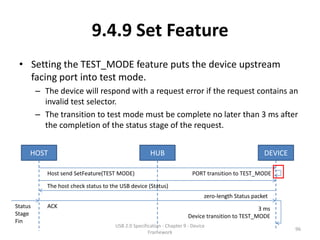
  • 162.
    9.6.7 String Descriptor •String descriptors are optional. – If a device does not support string descriptors, all references to string descriptors within device, configuration, and interface descriptors must be reset to zero. USB 2.0 Specification - Chapter 9 - Device 162 Framework
  • 163.
    9.6.7 String Descriptor •String descriptors use UNICODE encodings as defined by The Unicode Standard, V3.0 – The strings in a USB device may support multiple languages. – When requesting a string descriptor, the requester specifies the desired language using a 16 bits language ID (LANGID) defined by the USB- IF. USB 2.0 Specification - Chapter 9 - Device 163 Framework
  • 164.
    9.6.7 String Descriptor •String index zero for all languages returns a string descriptor that contains an array of two-byte LANGID codes supported by the device. • A USB device may omit all string descriptors. – USB devices that omit all string descriptors must not return an array of LANGID codes. • The array of LANGID codes is not NULL-terminated. – The size of the array (in bytes) is computed by subtracting two from the value of the first byte of the descriptor. • The UNICODE string descriptor (shown in Table 9-16) is not NULL-terminated. – The string length is computed by subtracting two from the value of the first byte of the descriptor. USB 2.0 Specification - Chapter 9 - Device 164 Framework
  • 165.
    9.6.7 String Descriptor bytes Table 9-15. String Descriptor Zero, Specifying Languages Supported by the Device bytes Table 9-16. UNICODE String Descriptor USB 2.0 Specification - Chapter 9 - Device 165 Framework
  • 166.
    9.7 Device ClassDefinitions • All devices must support the requests and descriptor definitions described in this chapter (Chapter 9). • Most devices provide additional requests and, possibly, descriptors for device-specific extensions. – In addition, devices may provide extended services that are common to a group of devices. – In order to define a class of devices, the following information must be provided to completely define the appearance and behavior of the device class. • 9.7.1 Descriptors • 9.7.2 Interface(s) and Endpoint Usage • 9.7.3 Requests USB 2.0 Specification - Chapter 9 - Device 166 Framework
  • 167.
    9.7.1 Descriptors • Ifthe class requires any specific definition of the standard descriptors, the class definition must include those requirements as part of the class definition. – In addition, if the class defines a standard extended set of descriptors, they must also be fully defined in the class definition. – Any extended descriptor definitions must follow the approach used for standard descriptors; for example, all descriptors must begin with a length field. USB 2.0 Specification - Chapter 9 - Device 167 Framework
  • 168.
    9.7.2 Interface(s) andEndpoint Usage • When a class of devices is standardized, the interfaces used by the devices, including how endpoints are used, must be included in the device class definition. • Devices may further extend a class definition with proprietary features as long as they meet the base definition of the class. USB 2.0 Specification - Chapter 9 - Device 168 Framework
  • 169.
    9.7.3 Requests • Allof the requests specific to the class must be defined. USB 2.0 Specification - Chapter 9 - Device 169 Framework