U-boot Source Code Clean
        Up Project
          and
         How-to

  Recruiting Volunteers!
        Macpaul Lin
        (2012/08/18)
Outline
• Why do we do clean up?
• Who should join the clean up project?
  And How will you be benefited with it?
• How to do the clean up work?
• Summary.
Why do we do clean up?
• U-boot is old.
  – It is an old boot loader project and widely be
    used in various embedded systems.
  – There are many dirty historical codes. Linux
    has them, too.
• Coding style are mixed.
  – It supports booting OS from various different
    devices which leverage codes from various
    open source projects. Such as dlmalloc, Linux,
    and etc.
Why do we do clean up?
• Developers usually get confused.
  – Some coding style really introduce problem
    when doing debugging.
  – New contributor usually get confused between
    old and new coding style.
    • This usually lead unnecessary time cost when
      developers reviewing and fixing their patches.
Why do we do clean up?
• It follows Linux coding style.
• However, since u-boot has long history just
  like Linux kernel, source codes some were
  dirty and need to be clean up.
• New comers and new contributors usually
  reference the old coding style. Hence the
  patch is usually need to be reworked and
  viewers spent lots of effort on replying mail.
Who should join the clean up project
  and how will you be benefits with it?
• U-boot uses git and mailing list to
  management the source code developing.
  – Student who wants to be familiar with git
    source version control.
  – Student who wants to join a open source
    project and practice with patch commitment
    mailing discussion.
  – People who is interested in boot loader with
    embedded device development environments.
How to do the clean up work?
• U-boot project uses the checkpatch.pl in
  Linux kernel to check the patches.
• Clean up patches must obey both Linux
  coding style and u-boot coding style.
• Coding style
  – http://www.denx.de/wiki/U-Boot/CodingStyle

• Patch rules
  – http://www.denx.de/wiki/U-Boot/Patches
Steps to join u-boot project
1. Sign-up the mailing list
2. Clone the source code
3. Use checkpatch.pl to check the old
codes.
4. Fix warnings reported by checkpatch.pl
5. Use git send-email to commit the
cleanup back to mailing list.
6. Fix your patch if maintainer give you
suggestion to fix.
1. Sign-up the mailing list
• Subscribe
  http://lists.denx.de/mailman/listinfo/u-boot


                                      Don't choose "yes"
                                    because maintainers
                                will reply your patch by mail.
2. Clone the source code
• Clone the source code
  – git clone git://git.denx.de/u-boot.git u-boot.git
• Setting git users and email
  – git config --global user.name "yourname";
  – git config --global user.email "you@youremail";
• Make a working branch
  – cd u-boot.git
  – git branch cleanup
• Checkout the working branch and getting start
  – git checkout cleanup
3. Use checkpatch.pl to check
         the old codes.
• Once you finish a patch, use
  tools/checkpatch.pl to verify the patch is
  clean before send it out.
• So we can use this checkpatch.pl to check
  if the current files are clean.
• Most of the old code is inside “common
  folder".
3. Use checkpatch.pl to check
         the old codes.
• 3.0 Export the path of checkpatch.pl into
  $PATH
  – export PATH=$PATH:~/u-boot.git/tools
3. Use checkpatch.pl to check
         the old codes.
• 3.1 find a unclean file in folder “common”
  – For example: "bedbug.c"
  – cd common
• 3.2 copy it as a backup
  – cp bedbug.c bedbug.c.bak
3. Use checkpatch.pl to check
         the old codes.
• 3.3 remove “bedbug.c” as commit 'A'
  because we will check the whole file later
  – git rm bedbug.c
  – git commit -s
     • Input some reason because this is just a temporary
       work.
3. Use checkpatch.pl to check
         the old codes.
• 3.4 now we recover the unclean file and
  make this as a commit 'B'.
  – mv bedbug.c.bak bedbug.c
  – git add bedbug.c
  – git commit -s
    • Input the real commit log.
4. Fix warnings reported by
           checkpatch.pl
• 4.1 Create a folder for this commit 'B'
  – mkdir patch
  – cd patch
• 4.2 Export this commit 'B' (the latest
  commit) and use checkpatch.pl to get the
  report.
  – git format-patch HEAD~1

  – checkpatch 0001-cosmetic-add-bedbug.c-
    back.patch
4. Fix warnings reported by
           checkpatch.pl
• 4.3 You will get the report from checkpatch.
4. Fix warnings reported by
           checkpatch.pl
• 4.4 Now you can fix all the error of
  bedbug.c with your favorite editor based on
  this report.
  – cd .. (back to “common" folder)
  – vim bedbug.c
  – (you can also use “git diff” to check your
    changes)
4. Fix warnings reported by
           checkpatch.pl
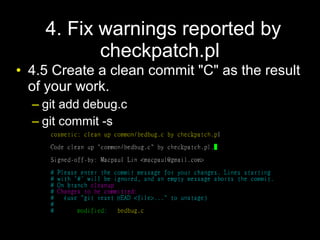
• 4.5 Create a clean commit "C" as the result
  of your work.
  – git add debug.c
  – git commit -s
4. Fix warnings reported by
           checkpatch.pl
• 4.6 Now you have 3 commits “A,B,C” in
  "cleanup" branch
4. Fix warnings reported by
           checkpatch.pl
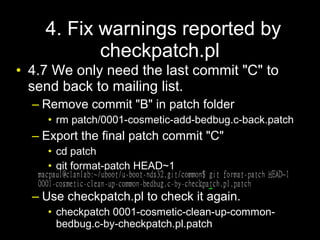
• 4.7 We only need the last commit "C" to
  send back to mailing list.
  – Remove commit "B" in patch folder
    • rm patch/0001-cosmetic-add-bedbug.c-back.patch
  – Export the final patch commit "C"
    • cd patch
    • git format-patch HEAD~1

  – Use checkpatch.pl to check it again.
    • checkpatch 0001-cosmetic-clean-up-common-
      bedbug.c-by-checkpatch.pl.patch
5. Use git send-email to commit
 the cleanup back to mailing list.
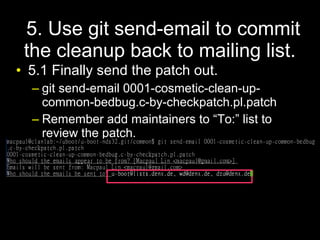
• 5.1 Finally send the patch out.
  – git send-email 0001-cosmetic-clean-up-
    common-bedbug.c-by-checkpatch.pl.patch
  – Remember add maintainers to “To:” list to
    review the patch.
6. Fix your patch if maintainer
    give you suggestion to fix.
• After a maintainer reviewed your patch, he
  will reply your mail to inform you if the
  patch has been accepted or the patch is
  still need to be fixed.
Summary
• There are many old-style codes need to be
  cleaned up. We need your help.
• Please join u-boot project.
  – Just subscribe
    http://lists.denx.de/mailman/listinfo/u-boot

U boot source clean up project how-to

  • 1.
    U-boot Source CodeClean Up Project and How-to Recruiting Volunteers! Macpaul Lin (2012/08/18)
  • 2.
    Outline • Why dowe do clean up? • Who should join the clean up project? And How will you be benefited with it? • How to do the clean up work? • Summary.
  • 3.
    Why do wedo clean up? • U-boot is old. – It is an old boot loader project and widely be used in various embedded systems. – There are many dirty historical codes. Linux has them, too. • Coding style are mixed. – It supports booting OS from various different devices which leverage codes from various open source projects. Such as dlmalloc, Linux, and etc.
  • 4.
    Why do wedo clean up? • Developers usually get confused. – Some coding style really introduce problem when doing debugging. – New contributor usually get confused between old and new coding style. • This usually lead unnecessary time cost when developers reviewing and fixing their patches.
  • 5.
    Why do wedo clean up? • It follows Linux coding style. • However, since u-boot has long history just like Linux kernel, source codes some were dirty and need to be clean up. • New comers and new contributors usually reference the old coding style. Hence the patch is usually need to be reworked and viewers spent lots of effort on replying mail.
  • 6.
    Who should jointhe clean up project and how will you be benefits with it? • U-boot uses git and mailing list to management the source code developing. – Student who wants to be familiar with git source version control. – Student who wants to join a open source project and practice with patch commitment mailing discussion. – People who is interested in boot loader with embedded device development environments.
  • 7.
    How to dothe clean up work? • U-boot project uses the checkpatch.pl in Linux kernel to check the patches. • Clean up patches must obey both Linux coding style and u-boot coding style. • Coding style – http://www.denx.de/wiki/U-Boot/CodingStyle • Patch rules – http://www.denx.de/wiki/U-Boot/Patches
  • 8.
    Steps to joinu-boot project 1. Sign-up the mailing list 2. Clone the source code 3. Use checkpatch.pl to check the old codes. 4. Fix warnings reported by checkpatch.pl 5. Use git send-email to commit the cleanup back to mailing list. 6. Fix your patch if maintainer give you suggestion to fix.
  • 9.
    1. Sign-up themailing list • Subscribe http://lists.denx.de/mailman/listinfo/u-boot Don't choose "yes" because maintainers will reply your patch by mail.
  • 10.
    2. Clone thesource code • Clone the source code – git clone git://git.denx.de/u-boot.git u-boot.git • Setting git users and email – git config --global user.name "yourname"; – git config --global user.email "you@youremail"; • Make a working branch – cd u-boot.git – git branch cleanup • Checkout the working branch and getting start – git checkout cleanup
  • 11.
    3. Use checkpatch.plto check the old codes. • Once you finish a patch, use tools/checkpatch.pl to verify the patch is clean before send it out. • So we can use this checkpatch.pl to check if the current files are clean. • Most of the old code is inside “common folder".
  • 12.
    3. Use checkpatch.plto check the old codes. • 3.0 Export the path of checkpatch.pl into $PATH – export PATH=$PATH:~/u-boot.git/tools
  • 13.
    3. Use checkpatch.plto check the old codes. • 3.1 find a unclean file in folder “common” – For example: "bedbug.c" – cd common • 3.2 copy it as a backup – cp bedbug.c bedbug.c.bak
  • 14.
    3. Use checkpatch.plto check the old codes. • 3.3 remove “bedbug.c” as commit 'A' because we will check the whole file later – git rm bedbug.c – git commit -s • Input some reason because this is just a temporary work.
  • 15.
    3. Use checkpatch.plto check the old codes. • 3.4 now we recover the unclean file and make this as a commit 'B'. – mv bedbug.c.bak bedbug.c – git add bedbug.c – git commit -s • Input the real commit log.
  • 16.
    4. Fix warningsreported by checkpatch.pl • 4.1 Create a folder for this commit 'B' – mkdir patch – cd patch • 4.2 Export this commit 'B' (the latest commit) and use checkpatch.pl to get the report. – git format-patch HEAD~1 – checkpatch 0001-cosmetic-add-bedbug.c- back.patch
  • 17.
    4. Fix warningsreported by checkpatch.pl • 4.3 You will get the report from checkpatch.
  • 18.
    4. Fix warningsreported by checkpatch.pl • 4.4 Now you can fix all the error of bedbug.c with your favorite editor based on this report. – cd .. (back to “common" folder) – vim bedbug.c – (you can also use “git diff” to check your changes)
  • 19.
    4. Fix warningsreported by checkpatch.pl • 4.5 Create a clean commit "C" as the result of your work. – git add debug.c – git commit -s
  • 20.
    4. Fix warningsreported by checkpatch.pl • 4.6 Now you have 3 commits “A,B,C” in "cleanup" branch
  • 21.
    4. Fix warningsreported by checkpatch.pl • 4.7 We only need the last commit "C" to send back to mailing list. – Remove commit "B" in patch folder • rm patch/0001-cosmetic-add-bedbug.c-back.patch – Export the final patch commit "C" • cd patch • git format-patch HEAD~1 – Use checkpatch.pl to check it again. • checkpatch 0001-cosmetic-clean-up-common- bedbug.c-by-checkpatch.pl.patch
  • 22.
    5. Use gitsend-email to commit the cleanup back to mailing list. • 5.1 Finally send the patch out. – git send-email 0001-cosmetic-clean-up- common-bedbug.c-by-checkpatch.pl.patch – Remember add maintainers to “To:” list to review the patch.
  • 23.
    6. Fix yourpatch if maintainer give you suggestion to fix. • After a maintainer reviewed your patch, he will reply your mail to inform you if the patch has been accepted or the patch is still need to be fixed.
  • 24.
    Summary • There aremany old-style codes need to be cleaned up. We need your help. • Please join u-boot project. – Just subscribe http://lists.denx.de/mailman/listinfo/u-boot