Software Usability Implications
in Requirements and Design
Natalia Juristo
Universidad Politécnica de Madrid
Bolzano, April 12 2005
Talk Contents
 Introduction to Usability
 Discussion and debunking of the myths
on usability in which developers believe
 A pattern-oriented solution
Brief state of the practice
 There are so many software products with
immature usability that we all
acknowledge the low level of use of
usability methods
 Usability is not properly addressed in most
developments, on spite of its importance
Usability integration into
development: SE + HCI
 Both the HCI and SE communities play a
crucial role in the development of usable
software
 The HCI community has the knowledge
about which features a software system
must provide to be usable
 The SE community has the knowledge
about software systems development
Usability integration into
development: Difficulties
 Different viewpoints between usability
people and software developers
 Specialist skills required
Integration of usability into the software
development process is not easy and
obvious at all
Quality includes usability
 Usability is a basic software system feature
 Several software quality attribute
classifications agree on considering usability
as a quality attribute
Usability definition
 Usability can be seen as Quality in Use
 Usability reflects
 Learnability
 Efficiency of use
 Reliability in use
 Satisfaction
Usability and UI
are not synonymous
 A system’s usability relates closely to the
software’s overall functionality
 UI vs. Interaction
 UI = The visible part of the system
 Interaction = The coordination of information
exchange user-system
Misunderstandings
 Three misunderstanding that prevent the
proper incorporation of usability features
into software development
 Usability problems can be fixed in the later
development stages
 Stating a usability feature is a sufficient
specification
 Design usability features is easy
Misunderstanding
Usability can be dealt with
late in development
Can usability really wait?
 If usability is relegated to the end of
the development process, then there
is no time left to make a difference
 Interaction design can have major
impact on the overall application
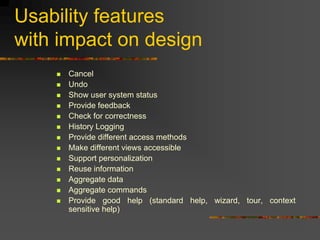
Usability features
with impact on design
 Cancel
 Undo
 Show user system status
 Provide feedback
 Check for correctness
 History Logging
 Provide different access methods
 Make different views accessible
 Support personalization
 Reuse information
 Aggregate data
 Aggregate commands
 Provide good help (standard help, wizard, tour, context
sensitive help)
Implications
of the impact on design
 The changes to be made to a software
system to add any of these features
involve all the architecture components
 The late incorporation of such usability
issues calls for a lot of rework
 These features should be addressed from
the very start of the development process
like any other functionality
Usability
as non-functional requirements
 Establishing what usability values the
system should achieve
 These are then used as a reference
standard at the subsequent product
evaluation stage
Usability
as functional requirement
 Particular usability features represent
functionalities in a software system
 Then, usability has implications for
software functionality
 Therefore, it needs to be dealt with as
functional requirements
Misunderstanding
A usability feature statement is
a good enough functional
specification
Specifying functional usability
requirements (FUR)
 An example of an HCI heuristic would be
“Visibility of system status: The system should
always keep users informed about what is
going on through appropriate feedback within
reasonable time”
 Is this a good enough specification for the
system status feature?
Statement is not
a good enough specification
 From a SE perspective, the above
description provides very limited
information
 It is not enough to properly specify the
system status functionality
 The descriptions provided by HCI for
functional usability features lead to
ambiguous and incomplete requirements
More info is neccesary
 More information needs to be elicited to
completely and unambiguously specify each
functional usability requirement
 For the system status functionality
 Place where the system status information will be
presented to the user
 Which status changes in the software will the user
want to be notified of
 How critical each of the above situations are
 What kind of information needs to be displayed to the
user in each case
 etc
Reducing the ambiguity of
FURs: Difficulties
 Users do not have the knowledge
 Software engineers do not have the
necessary HCI knowledge either. They do
not know all the details that need to be
specified to properly incorporate such
features into a requirements specification
 HCI experts do have this information
Incorporating HCI experts:
Difficulties
 Difficulties in communication may arise.
Such difficulties can be a considerable
obstacle
 The cost of this solution: many software
SMEs cannot afford to engage an HCI
expert
Our approach
 We propose an alternative approach that
uses a pattern-based solution to support
information elicitation and specification for
usability functionalities
Elicitation patterns
 We propose the use of elicitation patterns
that enable the reuse of usability
knowledge to support developers during
usability requirements elicitation
 These patterns can be used to extract all
the information to completely and
unambiguously specify a usability feature
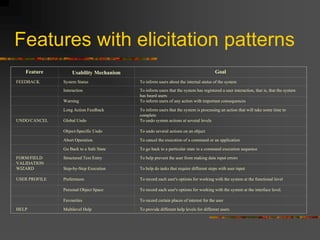
Features with elicitation patterns
Feature Usability Mechanism Goal
FEEDBACK System Status To inform users about the internal status of the system
Interaction To inform users that the system has registered a user interaction, that is, that the system
has heard users
Warning To inform users of any action with important consequences
Long Action Feedback To inform users that the system is processing an action that will take some time to
complete
UNDO/CANCEL Global Undo To undo system actions at several levels
Object-Specific Undo To undo several actions on an object
Abort Operation To cancel the execution of a command or an application
Go Back to a Safe State To go back to a particular state in a command execution sequence
FORM/FIELD
VALIDATION
Structured Text Entry To help prevent the user from making data input errors
WIZARD Step-by-Step Execution To help do tasks that require different steps with user input
USER PROFILE Preferences To record each user's options for working with the system at the functional level
Personal Object Space To record each user's options for working with the system at the interface level.
Favourites To record certain places of interest for the user
HELP Multilevel Help To provide different help levels for different users
Elicitation Pattern Structure
 Identification of the usability feature
addressed by the usability elicitation
pattern
 The problem tackled
 The context in which this pattern will be
useful
 The solution to the problem
Elicitation Pattern Structure:
Identification
 Identification of the usability feature
addressed by the usability elicitation
pattern
 Name of the usability mechanism under
consideration
 Family of usability features to which it belongs
 Aliases by which this usability mechanism
may be known
Elicitation Pattern Structure:
Problem
 The problem tackled:
“How to elicit and specify the
information needed to incorporate
the usability mechanism”
Elicitation Pattern Structure:
Context
 The context in which this pattern
will be useful
 Information related to the situation
that makes this mechanism useful for
the application under construction
Elicitation Pattern Structure:
Solution
 The solution to the problem
 The usability mechanism elicitation guide
provides knowledge for eliciting and gathering
information to fully specify the usability
mechanism
 The usability mechanism specification guide
provides a template to be instantiated for
each application
Example:
System Status Feedback
Misunderstanding
Designing a specific usability
feature is easy
Is specification enough?
 Some usability features require the far
from straightforward creation of special-
purpose components with responsibilities
 HCI literature pays no attention to the
design implications of incorporating
usability features into a system
For example...
Aspects of cancel
 The software must free the resources allocated to the cancelled
command
 The software must handle cancellation when the active command is
not responding
 If the command being cancelled is not responding, the system must
be restored to the status it had prior to command execution or as
close as possible to that status
 The software must gather information (status, resource usage,
actions, etc.) that can be used to return the system to its status prior
to the execution of the ongoing command
 The software must estimate the time to cancel
 The software must inform the user of cancellation progress
Need to provide design support:
Experiment
 Experiment run under three different
circumstances
1) Just a detailed description of the cancel feature,
including the particular commands that could be
cancelled (with no design information at all)
2) Same information as the previous group, plus a list
of responsibilities that any software system with a
cancel feature should satisfy
3) The above information, plus a sample solution
Need to provide design support:
Experiment results
 The solutions generated by students
under condition 1 (a statement of the
requirement only) performed
significantly worse (in terms of
malfunctioning errors and design time)
than the ones by students working in the
other two conditions
Our approach
 Provide mechanisms that allow software
developers to examine various facets of
the software solution to guide through
the incorporation of such solutions
into their designs
Design element of the pattern
 Design solution allocates the
general responsibilities of the
software system to specific software
components with their responsibilities
Design Solution
for System Status
Conclusions
 We need getting a better understanding of
what implications usability has for software
development
 It is necessary to provide developers with
support to satisfactorily deal with usability
features during the requirements and design
stages
 We proposed a pattern-based solution for
describing usability features
Software Usability Implications
in Requirements and Design
Natalia Juristo
Universidad Politécnica de Madrid
Bolzano, April 12 2005

Software Usability Implications in Requirements and Design

  • 1.
    Software Usability Implications inRequirements and Design Natalia Juristo Universidad Politécnica de Madrid Bolzano, April 12 2005
  • 2.
    Talk Contents  Introductionto Usability  Discussion and debunking of the myths on usability in which developers believe  A pattern-oriented solution
  • 3.
    Brief state ofthe practice  There are so many software products with immature usability that we all acknowledge the low level of use of usability methods  Usability is not properly addressed in most developments, on spite of its importance
  • 4.
    Usability integration into development:SE + HCI  Both the HCI and SE communities play a crucial role in the development of usable software  The HCI community has the knowledge about which features a software system must provide to be usable  The SE community has the knowledge about software systems development
  • 5.
    Usability integration into development:Difficulties  Different viewpoints between usability people and software developers  Specialist skills required Integration of usability into the software development process is not easy and obvious at all
  • 6.
    Quality includes usability Usability is a basic software system feature  Several software quality attribute classifications agree on considering usability as a quality attribute
  • 7.
    Usability definition  Usabilitycan be seen as Quality in Use  Usability reflects  Learnability  Efficiency of use  Reliability in use  Satisfaction
  • 8.
    Usability and UI arenot synonymous  A system’s usability relates closely to the software’s overall functionality  UI vs. Interaction  UI = The visible part of the system  Interaction = The coordination of information exchange user-system
  • 9.
    Misunderstandings  Three misunderstandingthat prevent the proper incorporation of usability features into software development  Usability problems can be fixed in the later development stages  Stating a usability feature is a sufficient specification  Design usability features is easy
  • 10.
    Misunderstanding Usability can bedealt with late in development
  • 11.
    Can usability reallywait?  If usability is relegated to the end of the development process, then there is no time left to make a difference  Interaction design can have major impact on the overall application
  • 12.
    Usability features with impacton design  Cancel  Undo  Show user system status  Provide feedback  Check for correctness  History Logging  Provide different access methods  Make different views accessible  Support personalization  Reuse information  Aggregate data  Aggregate commands  Provide good help (standard help, wizard, tour, context sensitive help)
  • 13.
    Implications of the impacton design  The changes to be made to a software system to add any of these features involve all the architecture components  The late incorporation of such usability issues calls for a lot of rework  These features should be addressed from the very start of the development process like any other functionality
  • 14.
    Usability as non-functional requirements Establishing what usability values the system should achieve  These are then used as a reference standard at the subsequent product evaluation stage
  • 15.
    Usability as functional requirement Particular usability features represent functionalities in a software system  Then, usability has implications for software functionality  Therefore, it needs to be dealt with as functional requirements
  • 16.
    Misunderstanding A usability featurestatement is a good enough functional specification
  • 17.
    Specifying functional usability requirements(FUR)  An example of an HCI heuristic would be “Visibility of system status: The system should always keep users informed about what is going on through appropriate feedback within reasonable time”  Is this a good enough specification for the system status feature?
  • 18.
    Statement is not agood enough specification  From a SE perspective, the above description provides very limited information  It is not enough to properly specify the system status functionality  The descriptions provided by HCI for functional usability features lead to ambiguous and incomplete requirements
  • 19.
    More info isneccesary  More information needs to be elicited to completely and unambiguously specify each functional usability requirement  For the system status functionality  Place where the system status information will be presented to the user  Which status changes in the software will the user want to be notified of  How critical each of the above situations are  What kind of information needs to be displayed to the user in each case  etc
  • 20.
    Reducing the ambiguityof FURs: Difficulties  Users do not have the knowledge  Software engineers do not have the necessary HCI knowledge either. They do not know all the details that need to be specified to properly incorporate such features into a requirements specification  HCI experts do have this information
  • 21.
    Incorporating HCI experts: Difficulties Difficulties in communication may arise. Such difficulties can be a considerable obstacle  The cost of this solution: many software SMEs cannot afford to engage an HCI expert
  • 22.
    Our approach  Wepropose an alternative approach that uses a pattern-based solution to support information elicitation and specification for usability functionalities
  • 23.
    Elicitation patterns  Wepropose the use of elicitation patterns that enable the reuse of usability knowledge to support developers during usability requirements elicitation  These patterns can be used to extract all the information to completely and unambiguously specify a usability feature
  • 24.
    Features with elicitationpatterns Feature Usability Mechanism Goal FEEDBACK System Status To inform users about the internal status of the system Interaction To inform users that the system has registered a user interaction, that is, that the system has heard users Warning To inform users of any action with important consequences Long Action Feedback To inform users that the system is processing an action that will take some time to complete UNDO/CANCEL Global Undo To undo system actions at several levels Object-Specific Undo To undo several actions on an object Abort Operation To cancel the execution of a command or an application Go Back to a Safe State To go back to a particular state in a command execution sequence FORM/FIELD VALIDATION Structured Text Entry To help prevent the user from making data input errors WIZARD Step-by-Step Execution To help do tasks that require different steps with user input USER PROFILE Preferences To record each user's options for working with the system at the functional level Personal Object Space To record each user's options for working with the system at the interface level. Favourites To record certain places of interest for the user HELP Multilevel Help To provide different help levels for different users
  • 25.
    Elicitation Pattern Structure Identification of the usability feature addressed by the usability elicitation pattern  The problem tackled  The context in which this pattern will be useful  The solution to the problem
  • 26.
    Elicitation Pattern Structure: Identification Identification of the usability feature addressed by the usability elicitation pattern  Name of the usability mechanism under consideration  Family of usability features to which it belongs  Aliases by which this usability mechanism may be known
  • 27.
    Elicitation Pattern Structure: Problem The problem tackled: “How to elicit and specify the information needed to incorporate the usability mechanism”
  • 28.
    Elicitation Pattern Structure: Context The context in which this pattern will be useful  Information related to the situation that makes this mechanism useful for the application under construction
  • 29.
    Elicitation Pattern Structure: Solution The solution to the problem  The usability mechanism elicitation guide provides knowledge for eliciting and gathering information to fully specify the usability mechanism  The usability mechanism specification guide provides a template to be instantiated for each application
  • 30.
  • 31.
    Misunderstanding Designing a specificusability feature is easy
  • 32.
    Is specification enough? Some usability features require the far from straightforward creation of special- purpose components with responsibilities  HCI literature pays no attention to the design implications of incorporating usability features into a system
  • 33.
    For example... Aspects ofcancel  The software must free the resources allocated to the cancelled command  The software must handle cancellation when the active command is not responding  If the command being cancelled is not responding, the system must be restored to the status it had prior to command execution or as close as possible to that status  The software must gather information (status, resource usage, actions, etc.) that can be used to return the system to its status prior to the execution of the ongoing command  The software must estimate the time to cancel  The software must inform the user of cancellation progress
  • 34.
    Need to providedesign support: Experiment  Experiment run under three different circumstances 1) Just a detailed description of the cancel feature, including the particular commands that could be cancelled (with no design information at all) 2) Same information as the previous group, plus a list of responsibilities that any software system with a cancel feature should satisfy 3) The above information, plus a sample solution
  • 35.
    Need to providedesign support: Experiment results  The solutions generated by students under condition 1 (a statement of the requirement only) performed significantly worse (in terms of malfunctioning errors and design time) than the ones by students working in the other two conditions
  • 36.
    Our approach  Providemechanisms that allow software developers to examine various facets of the software solution to guide through the incorporation of such solutions into their designs
  • 37.
    Design element ofthe pattern  Design solution allocates the general responsibilities of the software system to specific software components with their responsibilities
  • 38.
  • 39.
    Conclusions  We needgetting a better understanding of what implications usability has for software development  It is necessary to provide developers with support to satisfactorily deal with usability features during the requirements and design stages  We proposed a pattern-based solution for describing usability features
  • 40.
    Software Usability Implications inRequirements and Design Natalia Juristo Universidad Politécnica de Madrid Bolzano, April 12 2005