Upleveling Analytics with Kafka
Amy Chen
2
Upleveling Analytics with Kafka
Amy Chen, Kafka Summit 2023
Amy Chen
dbt Labs
they/them
@notamyfromdbt
amy@dbtlabs.com
3
“Always a data practitioner,
never a stakeholder”
The framework
of the
conversation
4
Yes, it is that hard.
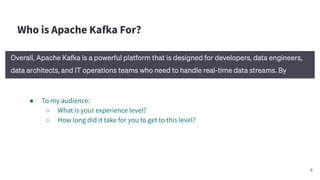
Who is Apache Kafka For?
● To my audience:
○ What is your experience level?
○ How long did it take for you to get to this level?
6
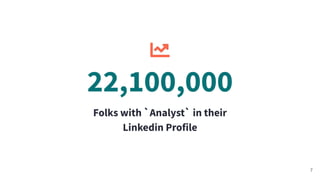
Folks with `Analyst` in their
Linkedin Profile
7
22,100,000
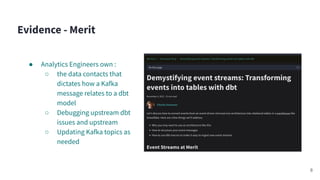
Evidence - Merit
● Analytics Engineers own :
○ the data contacts that
dictates how a Kafka
message relates to a dbt
model
○ Debugging upstream dbt
issues and upstream
○ Updating Kafka topics as
needed
8
Hypothesis: Apache Kafka is for Analysts
Why do you want an analyst to upskill?
● Career progression
● Upleveling the data team/more
hands on deck
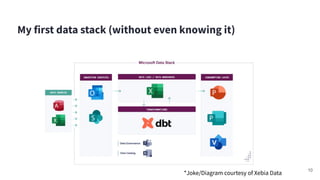
My first data stack (without even knowing it)
10
*Joke/Diagram courtesy of Xebia Data
My first data stack (without even knowing it)
11
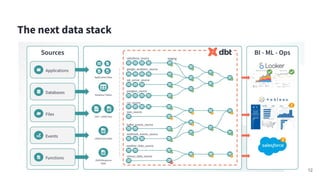
The next data stack
12
So why am I telling you my
life story?
● Because it doesnʼt start with Apache Kafka.
● Skills ahead of time:
○ Command Line
○ AWS architecture: IAM Roles, VPNs, EC2
○ Data Warehousing and modeling
○ Resource Monitoring
13
Experimentation & Testing the Hypothesis
How to learn Kafka
What didnʼt work
● Kafka: The Definitive
Guide: Real-Time Data
and Stream Processing at
Scale book
● Community slacks
15
What worked
● Friends (the text
messages were weird)
● Confluent & Snowflakeʼs
developer workshops
● Stack Overflow
● Medium posts
Analytics Engineering & Kafka : The experiment metrics
● Build a working streaming pipeline
● Apply analytics engineer best practices to make it production ready
○ Testing
○ Documentation
○ Version Control
○ Scalability
● Variable
○ Managed Kafka Service: AWS MSK and Confluent Cloud
16
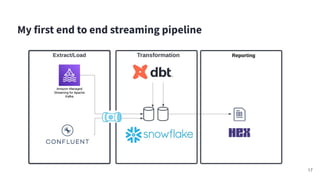
My first end to end streaming pipeline
17
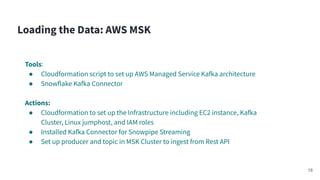
Tools:
● Cloudformation script to set up AWS Managed Service Kafka architecture
● Snowflake Kafka Connector
Actions:
● Cloudformation to set up the Infrastructure including EC2 instance, Kafka
Cluster, Linux jumphost, and IAM roles
● Installed Kafka Connector for Snowpipe Streaming
● Set up producer and topic in MSK Cluster to ingest from Rest API
Loading the Data: AWS MSK
18
Insert in Kafka Picture
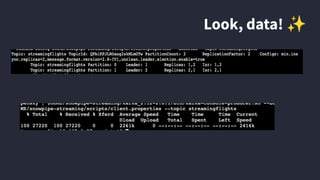
Look, data! ✨
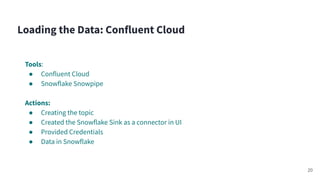
Tools:
● Confluent Cloud
● Snowflake Snowpipe
Actions:
● Creating the topic
● Created the Snowflake Sink as a connector in UI
● Provided Credentials
● Data in Snowflake
Loading the Data: Confluent Cloud
20
● Tested: ✅ ❌
○ Used a console consumer for adhoc
check
○ Up next: Schema Registry, no unit
testing
● Documented: ✅
○ in dbt project
● Version Controlled: ❌
○ Terraform Overkill for pet projects
● Scalability: ✅
○ AWS MSK - easy to switch out
Loading the Data: the Metrics
21
Lessons Learned:
● No version control logic - how do I save configurations?
● Security Access is a large determinant of success
● AWS MSK - know your bash commands well to debug
● Confluent - UI error vs third party errors
● Personal issue: cross-regional dependencies
● Overall - know the bigger picture of the connections
Loading the Data
22
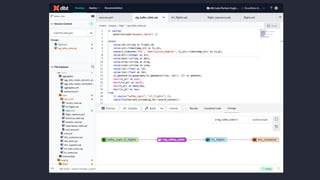
Tools:
● dbt Cloud
● Snowflake
Actions:
● Using dbt to version control my logic in dbt models, created dynamic tables
inside of Snowflake
● Applied tests and documentation to my dbt models
Transforming the data
23
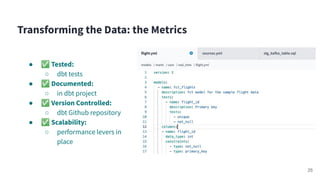
● ✅ Tested:
○ dbt tests
● ✅ Documented:
○ in dbt project
● ✅ Version Controlled:
○ dbt Github repository
● ✅ Scalability:
○ performance levers in
place
Transforming the Data: the Metrics
25
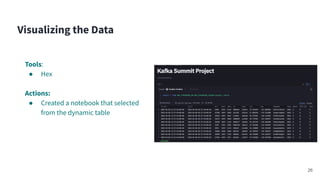
Tools:
● Hex
Actions:
● Created a notebook that selected
from the dynamic table
Visualizing the Data
26
Drawing Conclusions
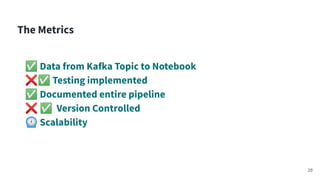
✅ Data from Kafka Topic to Notebook
❌✅ Testing implemented
✅ Documented entire pipeline
❌ ✅ Version Controlled
⏲ Scalability
The Metrics
28
Conclusion: Apache Kafka is for Analysts
● More hands on deck with
business knowledge
● Career advancement
● Learn some software
development best practices
● Dependency management
○ Where is your source coming from? What happens if thereʼs a change
upstream?
○ Data contracts
● How to debug upstream
○ Your report broke - how do you work backwards?
● SQL/Git/CLI
○ Have to flatten that json blob somehow
○ Version control & Speedy development
○ Debugging
● Cost/Performance Optimization
○ When do you need streaming?
What does an analyst actually need to know?
30
● Security
○ How much access to the infrastructure do you have?
● Data Governance
○ How do you maintain PII data?
● Cross team reliance
○ How do other teams work?
○ Data contracts
What can be blockers?
31
Thank you!
Amy Chen
@notamyfromdbt
amy@dbtlabs.com

Upleveling Analytics with Kafka with Amy Chen

  • 1.
  • 2.
    2 Upleveling Analytics withKafka Amy Chen, Kafka Summit 2023
  • 3.
  • 4.
  • 5.
    Yes, it isthat hard.
  • 6.
    Who is ApacheKafka For? ● To my audience: ○ What is your experience level? ○ How long did it take for you to get to this level? 6
  • 7.
    Folks with `Analyst`in their Linkedin Profile 7 22,100,000
  • 8.
    Evidence - Merit ●Analytics Engineers own : ○ the data contacts that dictates how a Kafka message relates to a dbt model ○ Debugging upstream dbt issues and upstream ○ Updating Kafka topics as needed 8
  • 9.
    Hypothesis: Apache Kafkais for Analysts Why do you want an analyst to upskill? ● Career progression ● Upleveling the data team/more hands on deck
  • 10.
    My first datastack (without even knowing it) 10 *Joke/Diagram courtesy of Xebia Data
  • 11.
    My first datastack (without even knowing it) 11
  • 12.
    The next datastack 12
  • 13.
    So why amI telling you my life story? ● Because it doesnʼt start with Apache Kafka. ● Skills ahead of time: ○ Command Line ○ AWS architecture: IAM Roles, VPNs, EC2 ○ Data Warehousing and modeling ○ Resource Monitoring 13
  • 14.
  • 15.
    How to learnKafka What didnʼt work ● Kafka: The Definitive Guide: Real-Time Data and Stream Processing at Scale book ● Community slacks 15 What worked ● Friends (the text messages were weird) ● Confluent & Snowflakeʼs developer workshops ● Stack Overflow ● Medium posts
  • 16.
    Analytics Engineering &Kafka : The experiment metrics ● Build a working streaming pipeline ● Apply analytics engineer best practices to make it production ready ○ Testing ○ Documentation ○ Version Control ○ Scalability ● Variable ○ Managed Kafka Service: AWS MSK and Confluent Cloud 16
  • 17.
    My first endto end streaming pipeline 17
  • 18.
    Tools: ● Cloudformation scriptto set up AWS Managed Service Kafka architecture ● Snowflake Kafka Connector Actions: ● Cloudformation to set up the Infrastructure including EC2 instance, Kafka Cluster, Linux jumphost, and IAM roles ● Installed Kafka Connector for Snowpipe Streaming ● Set up producer and topic in MSK Cluster to ingest from Rest API Loading the Data: AWS MSK 18
  • 19.
    Insert in KafkaPicture Look, data! ✨
  • 20.
    Tools: ● Confluent Cloud ●Snowflake Snowpipe Actions: ● Creating the topic ● Created the Snowflake Sink as a connector in UI ● Provided Credentials ● Data in Snowflake Loading the Data: Confluent Cloud 20
  • 21.
    ● Tested: ✅❌ ○ Used a console consumer for adhoc check ○ Up next: Schema Registry, no unit testing ● Documented: ✅ ○ in dbt project ● Version Controlled: ❌ ○ Terraform Overkill for pet projects ● Scalability: ✅ ○ AWS MSK - easy to switch out Loading the Data: the Metrics 21
  • 22.
    Lessons Learned: ● Noversion control logic - how do I save configurations? ● Security Access is a large determinant of success ● AWS MSK - know your bash commands well to debug ● Confluent - UI error vs third party errors ● Personal issue: cross-regional dependencies ● Overall - know the bigger picture of the connections Loading the Data 22
  • 23.
    Tools: ● dbt Cloud ●Snowflake Actions: ● Using dbt to version control my logic in dbt models, created dynamic tables inside of Snowflake ● Applied tests and documentation to my dbt models Transforming the data 23
  • 25.
    ● ✅ Tested: ○dbt tests ● ✅ Documented: ○ in dbt project ● ✅ Version Controlled: ○ dbt Github repository ● ✅ Scalability: ○ performance levers in place Transforming the Data: the Metrics 25
  • 26.
    Tools: ● Hex Actions: ● Createda notebook that selected from the dynamic table Visualizing the Data 26
  • 27.
  • 28.
    ✅ Data fromKafka Topic to Notebook ❌✅ Testing implemented ✅ Documented entire pipeline ❌ ✅ Version Controlled ⏲ Scalability The Metrics 28
  • 29.
    Conclusion: Apache Kafkais for Analysts ● More hands on deck with business knowledge ● Career advancement ● Learn some software development best practices
  • 30.
    ● Dependency management ○Where is your source coming from? What happens if thereʼs a change upstream? ○ Data contracts ● How to debug upstream ○ Your report broke - how do you work backwards? ● SQL/Git/CLI ○ Have to flatten that json blob somehow ○ Version control & Speedy development ○ Debugging ● Cost/Performance Optimization ○ When do you need streaming? What does an analyst actually need to know? 30
  • 31.
    ● Security ○ Howmuch access to the infrastructure do you have? ● Data Governance ○ How do you maintain PII data? ● Cross team reliance ○ How do other teams work? ○ Data contracts What can be blockers? 31
  • 33.