1
Upgrade-ux
Open Source framework to patch,
update or upgrade your Operating
System (HP-UX, Linux, Solaris,...)
http://www.it3.be/projects/upgrade-ux.html
Gratien D'haese
2
Gratien D'haese
● E-mail: gratien . dhaese @ gmail . com
● URL: http://www.it3.be
● Independent UNIX Consultant
● Over 25 years of experience with UNIX and
Linux
● Involved with several Open Source Projects:
– relax-and-recover (rear),
– cfg2html, wbemextras, adhocr,
– mkCDrec, upgrade-ux,...
3
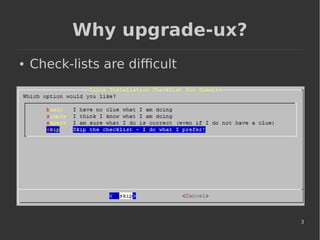
Why upgrade-ux?
● Check-lists are difficult
4
Why (again) another tool?
● Upgrade-ux prevents avoidable errors
– Patching the wrong Operating System
– Gather evidence before/after patching
– Double checks if all requirements are met
– Cannot skip a step (unless you force it)
– Check system health so it can handle an
update and survive a reboot
– Logging is extremely important for audit and
troubleshooting (if required afterwards)
5
Benefits of upgrade-ux
● Impossible to install any software when
“preview” run was not successful
● Works with stages and is configurable via
configuration files and an INI file
● Framework is borrowed from relax-and-
recover (rear) project
● Repeatable (as it remembers the stages
it executed successfully)
6
Benefits of upgrade-ux (cont.)
● After rebooting you can just continue
● Upgrade-ux is completely written in ksh
● Extremely modular (scripts are only a few
lines long)
● Easy to modify and extend to your needs
● Is Open Source:
https://github.com/gdha/upgrade-ux
7
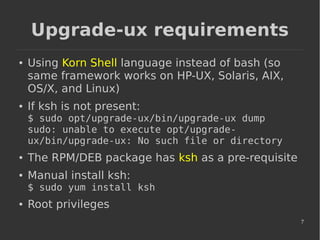
Upgrade-ux requirements
● Using Korn Shell language instead of bash (so
same framework works on HP-UX, Solaris, AIX,
OS/X, and Linux)
● If ksh is not present:
$ sudo opt/upgrade-ux/bin/upgrade-ux dump
sudo: unable to execute opt/upgrade-
ux/bin/upgrade-ux: No such file or directory
● The RPM/DEB package has ksh as a pre-requisite
● Manual install ksh:
$ sudo yum install ksh
● Root privileges
8
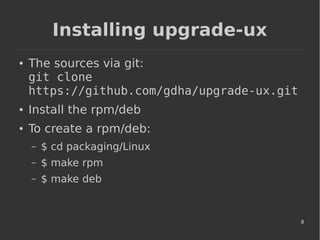
Installing upgrade-ux
● The sources via git:
git clone
https://github.com/gdha/upgrade-ux.git
● Install the rpm/deb
● To create a rpm/deb:
– $ cd packaging/Linux
– $ make rpm
– $ make deb
9
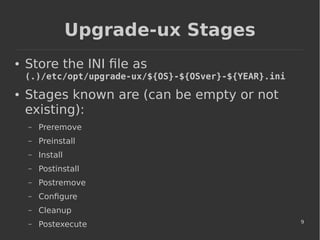
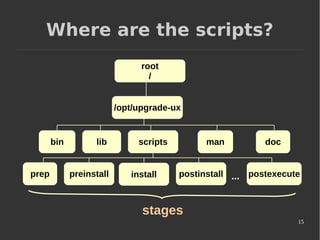
Upgrade-ux Stages
● Store the INI file as
(.)/etc/opt/upgrade-ux/${OS}-${OSver}-${YEAR}.ini
● Stages known are (can be empty or not
existing):
– Preremove
– Preinstall
– Install
– Postinstall
– Postremove
– Configure
– Cleanup
– Postexecute
10
Upgrade-ux INI file
● We should have at least [install] section defined
● Example of install definition on HP-UX 11.31:
[install]
command[0] = $SWINSTALL
options[0] = "-x mount_all_filesystems=false"
source[0] = "-s
$SDSERVER:/var/opt/depots/upd11-
31-may2014"
bundle[0] = Update-UX
version[0] = ""
11
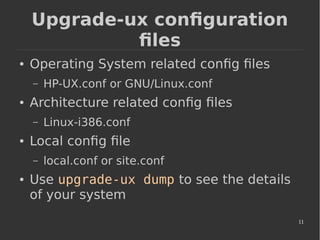
Upgrade-ux configuration
files
● Operating System related config files
– HP-UX.conf or GNU/Linux.conf
● Architecture related config files
– Linux-i386.conf
● Local config file
– local.conf or site.conf
● Use upgrade-ux dump to see the details
of your system
12
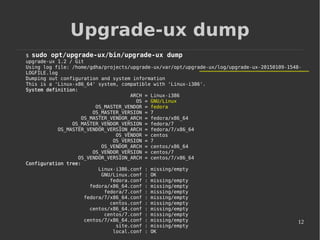
Upgrade-ux dump
$ sudo opt/upgrade-ux/bin/upgrade-ux dump
upgrade-ux 1.2 / Git
Using log file: /home/gdha/projects/upgrade-ux/var/opt/upgrade-ux/log/upgrade-ux-20150109-1548-
LOGFILE.log
Dumping out configuration and system information
This is a 'Linux-x86_64' system, compatible with 'Linux-i386'.
System definition:
ARCH = Linux-i386
OS = GNU/Linux
OS_MASTER_VENDOR = fedora
OS_MASTER_VERSION = 7
OS_MASTER_VENDOR_ARCH = fedora/x86_64
OS_MASTER_VENDOR_VERSION = fedora/7
OS_MASTER_VENDOR_VERSION_ARCH = fedora/7/x86_64
OS_VENDOR = centos
OS_VERSION = 7
OS_VENDOR_ARCH = centos/x86_64
OS_VENDOR_VERSION = centos/7
OS_VENDOR_VERSION_ARCH = centos/7/x86_64
Configuration tree:
Linux-i386.conf : missing/empty
GNU/Linux.conf : OK
fedora.conf : missing/empty
fedora/x86_64.conf : missing/empty
fedora/7.conf : missing/empty
fedora/7/x86_64.conf : missing/empty
centos.conf : missing/empty
centos/x86_64.conf : missing/empty
centos/7.conf : missing/empty
centos/7/x86_64.conf : missing/empty
site.conf : missing/empty
local.conf : OK
13
Upgrade-ux help
$ sudo opt/upgrade-ux/bin/upgrade-ux help
Usage: upgrade-ux [-dDFsSpvV] [-c DIR ] COMMAND [-- ARGS...]
upgrade-ux comes with ABSOLUTELY NO WARRANTY; for details see
the GNU General Public License at: http://www.gnu.org/licenses/gpl.html
Available options:
-c DIR alternative config directory; instead of /etc/opt/upgrade-ux
-d debug mode; log debug messages
-D debugscript mode; log every function call
-F forcing preview or upgrade to continue when entering next
stage is not allowed
-s simulation mode; show what scripts upgrade-ux would include
-S step-by-step mode; acknowledge each script individually
-p preview mode; run all install or other commands in preview
-v verbose mode; show more output
-V version information
List of commands:
dump dump configuration and system information
mkdist create a compressed tar archive distribution
purgelogs purge the LOG [var/opt/upgrade-ux/log] directory
test a simple test workflow
upgrade upgrade the operating system
14
scripts
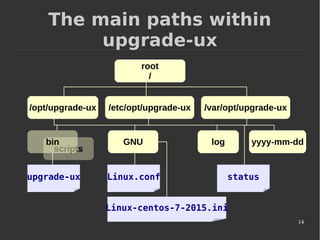
The main paths within
upgrade-ux
root
/
/opt/upgrade-ux /etc/opt/upgrade-ux /var/opt/upgrade-ux
bin GNU yyyy-mm-ddlog
upgrade-uxupgrade-ux Linux.conf status
Linux-centos-7-2015.ini
15
scripts
Where are the scripts?
root
/
/opt/upgrade-ux
bin
install
docmanlib
postexecutepreinstallprep postinstall ...
stages
16
Running upgrade-ux
● /opt/upgrade-ux/bin/upgrade-ux -vp
– When successful re-run without the “p” option
– If it fails it will tell you and give some clues
– Restart it again to continue 'till the end
● Try it out : fully functional for HP-UX
● Working on the Linux tree
● Feedback is always welcome
● More info at
http://www.it3.be/projects/upgrade-ux.html

Upgrade ux-fosdem-2015-gdhaese

  • 1.
    1 Upgrade-ux Open Source frameworkto patch, update or upgrade your Operating System (HP-UX, Linux, Solaris,...) http://www.it3.be/projects/upgrade-ux.html Gratien D'haese
  • 2.
    2 Gratien D'haese ● E-mail:gratien . dhaese @ gmail . com ● URL: http://www.it3.be ● Independent UNIX Consultant ● Over 25 years of experience with UNIX and Linux ● Involved with several Open Source Projects: – relax-and-recover (rear), – cfg2html, wbemextras, adhocr, – mkCDrec, upgrade-ux,...
  • 3.
  • 4.
    4 Why (again) anothertool? ● Upgrade-ux prevents avoidable errors – Patching the wrong Operating System – Gather evidence before/after patching – Double checks if all requirements are met – Cannot skip a step (unless you force it) – Check system health so it can handle an update and survive a reboot – Logging is extremely important for audit and troubleshooting (if required afterwards)
  • 5.
    5 Benefits of upgrade-ux ●Impossible to install any software when “preview” run was not successful ● Works with stages and is configurable via configuration files and an INI file ● Framework is borrowed from relax-and- recover (rear) project ● Repeatable (as it remembers the stages it executed successfully)
  • 6.
    6 Benefits of upgrade-ux(cont.) ● After rebooting you can just continue ● Upgrade-ux is completely written in ksh ● Extremely modular (scripts are only a few lines long) ● Easy to modify and extend to your needs ● Is Open Source: https://github.com/gdha/upgrade-ux
  • 7.
    7 Upgrade-ux requirements ● UsingKorn Shell language instead of bash (so same framework works on HP-UX, Solaris, AIX, OS/X, and Linux) ● If ksh is not present: $ sudo opt/upgrade-ux/bin/upgrade-ux dump sudo: unable to execute opt/upgrade- ux/bin/upgrade-ux: No such file or directory ● The RPM/DEB package has ksh as a pre-requisite ● Manual install ksh: $ sudo yum install ksh ● Root privileges
  • 8.
    8 Installing upgrade-ux ● Thesources via git: git clone https://github.com/gdha/upgrade-ux.git ● Install the rpm/deb ● To create a rpm/deb: – $ cd packaging/Linux – $ make rpm – $ make deb
  • 9.
    9 Upgrade-ux Stages ● Storethe INI file as (.)/etc/opt/upgrade-ux/${OS}-${OSver}-${YEAR}.ini ● Stages known are (can be empty or not existing): – Preremove – Preinstall – Install – Postinstall – Postremove – Configure – Cleanup – Postexecute
  • 10.
    10 Upgrade-ux INI file ●We should have at least [install] section defined ● Example of install definition on HP-UX 11.31: [install] command[0] = $SWINSTALL options[0] = "-x mount_all_filesystems=false" source[0] = "-s $SDSERVER:/var/opt/depots/upd11- 31-may2014" bundle[0] = Update-UX version[0] = ""
  • 11.
    11 Upgrade-ux configuration files ● OperatingSystem related config files – HP-UX.conf or GNU/Linux.conf ● Architecture related config files – Linux-i386.conf ● Local config file – local.conf or site.conf ● Use upgrade-ux dump to see the details of your system
  • 12.
    12 Upgrade-ux dump $ sudoopt/upgrade-ux/bin/upgrade-ux dump upgrade-ux 1.2 / Git Using log file: /home/gdha/projects/upgrade-ux/var/opt/upgrade-ux/log/upgrade-ux-20150109-1548- LOGFILE.log Dumping out configuration and system information This is a 'Linux-x86_64' system, compatible with 'Linux-i386'. System definition: ARCH = Linux-i386 OS = GNU/Linux OS_MASTER_VENDOR = fedora OS_MASTER_VERSION = 7 OS_MASTER_VENDOR_ARCH = fedora/x86_64 OS_MASTER_VENDOR_VERSION = fedora/7 OS_MASTER_VENDOR_VERSION_ARCH = fedora/7/x86_64 OS_VENDOR = centos OS_VERSION = 7 OS_VENDOR_ARCH = centos/x86_64 OS_VENDOR_VERSION = centos/7 OS_VENDOR_VERSION_ARCH = centos/7/x86_64 Configuration tree: Linux-i386.conf : missing/empty GNU/Linux.conf : OK fedora.conf : missing/empty fedora/x86_64.conf : missing/empty fedora/7.conf : missing/empty fedora/7/x86_64.conf : missing/empty centos.conf : missing/empty centos/x86_64.conf : missing/empty centos/7.conf : missing/empty centos/7/x86_64.conf : missing/empty site.conf : missing/empty local.conf : OK
  • 13.
    13 Upgrade-ux help $ sudoopt/upgrade-ux/bin/upgrade-ux help Usage: upgrade-ux [-dDFsSpvV] [-c DIR ] COMMAND [-- ARGS...] upgrade-ux comes with ABSOLUTELY NO WARRANTY; for details see the GNU General Public License at: http://www.gnu.org/licenses/gpl.html Available options: -c DIR alternative config directory; instead of /etc/opt/upgrade-ux -d debug mode; log debug messages -D debugscript mode; log every function call -F forcing preview or upgrade to continue when entering next stage is not allowed -s simulation mode; show what scripts upgrade-ux would include -S step-by-step mode; acknowledge each script individually -p preview mode; run all install or other commands in preview -v verbose mode; show more output -V version information List of commands: dump dump configuration and system information mkdist create a compressed tar archive distribution purgelogs purge the LOG [var/opt/upgrade-ux/log] directory test a simple test workflow upgrade upgrade the operating system
  • 14.
    14 scripts The main pathswithin upgrade-ux root / /opt/upgrade-ux /etc/opt/upgrade-ux /var/opt/upgrade-ux bin GNU yyyy-mm-ddlog upgrade-uxupgrade-ux Linux.conf status Linux-centos-7-2015.ini
  • 15.
    15 scripts Where are thescripts? root / /opt/upgrade-ux bin install docmanlib postexecutepreinstallprep postinstall ... stages
  • 16.
    16 Running upgrade-ux ● /opt/upgrade-ux/bin/upgrade-ux-vp – When successful re-run without the “p” option – If it fails it will tell you and give some clues – Restart it again to continue 'till the end ● Try it out : fully functional for HP-UX ● Working on the Linux tree ● Feedback is always welcome ● More info at http://www.it3.be/projects/upgrade-ux.html