



PC-BSD: An Easy to Use
       BSD Desktop

Dru Lavigne
Community Manager, PC-BSD Project
SCALE 2011
This presentation will cover...

How PC-BSD differs from FreeBSD

How PC-BSD differs from Linux

Current features

New features in the upcoming 9.0 release

Changes to the PBI format

How you can help
How does PC-BSD differ from FreeBSD?


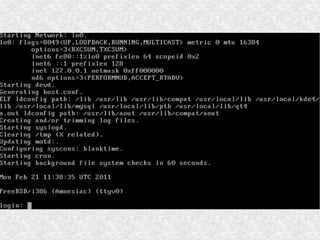
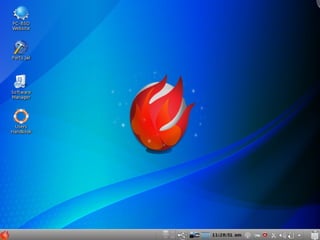
Sometimes a picture is worth a thousand
words:
How PC-BSD differs from
            FreeBSD
Graphical installer that supports GPT, ZFS,
encryption, and a live mode for testing
hardware

Desktop, video, network, sound, java, flash
are pre-configured so you can immediately
start using the system

Provides GUI applications to perform
common tasks which are specific to BSD
(i.e. not provided by desktop environment
such as KDE)
But, it is still FreeBSD "under
                the hood"
●   Uses same version numbers e.g. current
    release is 8.2

●   Anything you can do in FreeBSD, you can
    do in PC-BSD

●   FreeBSD resources (e.g. Handbook, FAQs)
    are still an excellent source of information

●   Many settings that you have to configure
    manually in FreeBSD "just work" in PC-
    BSD
KDE for Default Desktop

●   Intuitive for new users

●   Provides hundreds of GUI applications

●   Supports desktop effects

●   Very customizable
But what if I can't stand KDE?
Fluxbox is pre-configured and integrated
into PC-BSD's utilities should you need a
lighter weight desktop

PBIs are available for GNOME, XFCE, and
Enlightenment

188 window managers are available as
FreeBSD ports/packages

PC-BSD 9 will allow you to select desktop(s)
during installation
PC-BSD GUI Applications

PC-BSD provides graphical utilities to
manage common configuration tasks (e.g.
networking, firewall settings, user
management, and printing)

Designed to understand BSD device names,
expected paths, etc.

Graphical utilities for functions unique to
FreeBSD such as jail(8) management and
geli(8) disk encryption
Tweaked for Desktop Usage

●   Customized kernel

●   sysctl(8) and loader.conf(5) settings

●   rc.conf(5) settings

Can browse all customizations at
trac.pcbsd.org/browser/pcbsd/branches/8.1
How PC-BSD differs from Linux
Filesystems: UFS, UFS+J, UFS+S, ZFS

Device names: e.g. ath0 or em0 instead of
eth0

Some commands: e.g. kldload instead of
insmod

Switches: BSD instead of GNU (e.g. -l
instead of --list)

System startup: no run levels
How PC-BSD differs from Linux
Yet, much is similar:

Many of the apps that run on Linux also run
on PC-BSD (either through a port or Linux
emulation)

Both support Xorg (though GEM and KMS
are a work in progress)
Current
Features
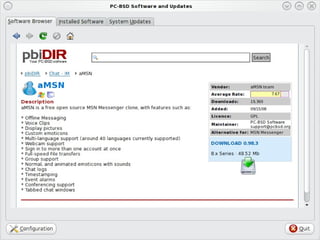
Software/Update Manager
Uses PBI (Push Button Installer) system

Recommended method for installing
software on PC-BSD

Even novice users can easily and safely
find, install, uninstall, and upgrade software

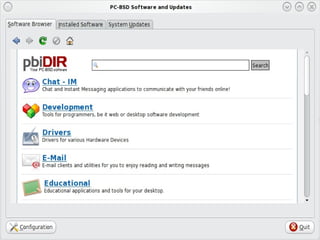
Provides a software browser for finding
applications--simply click Download button
in application's description
Software/Update Manager

Automatically detects platform and version
and installs correct PBI

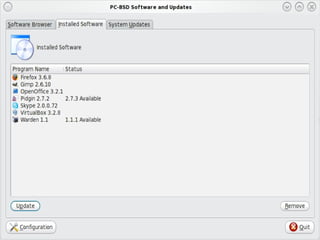
Installed software is listed

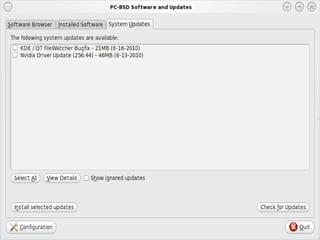
User automatically notified when new
versions are available, for both software
and the operating system

OS updates include link to security advisory
description
Ports Jail

Allows advanced users to safely use
FreeBSD ports and packages without
affecting the software installed with the
operating system

For more information about jails, see:
http://en.wikipedia.org/wiki/FreeBSD_jail
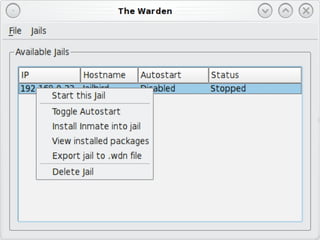
Warden

GUI that allows advanced users to easily
create, manage, and delete FreeBSD jails

Makes it easy to clone a jail (save as .wdn
file)

Makes it easy to create and install inmates
(.wit files) which are pre-configured server
environments e.g. an AMP stack
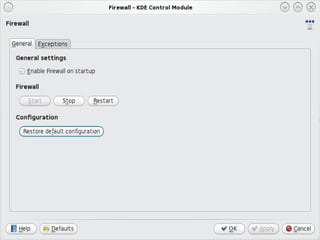
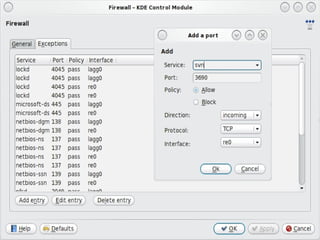
Firewall Manager

GUI for starting and stopping the firewall
and adding, deleting, modifying firewall
rules

Designed for pf
http://www.openbsd.org/faq/pf/

May be replaced by fwbuilder in 9.0
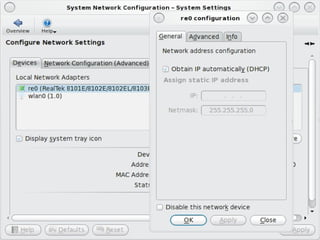
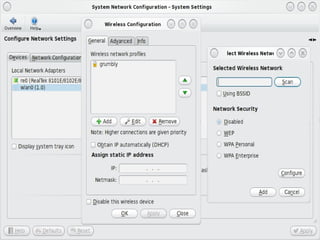
Network Manager

GUI to view and configure network
interfaces (Ethernet, wireless, PPP/PPPoE)

Auto-detects interfaces

Allows creation of wireless profiles

Shows interface stats and IP addressing info
for active interfaces
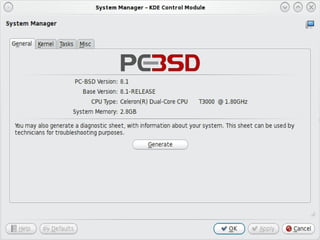
System Manager

GUI to view system info and generate a
diagnostic report

Kernel tab used to set boot delay

Tasks tab used to install src or ports tree

Misc tab used to customize boot splash
screen
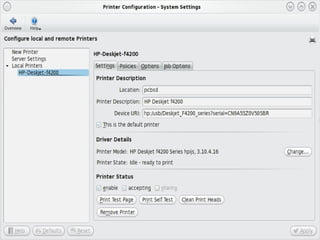
Printer Manager

GUI to configure and manage printers

Auto-detects connected printers as well as
printers shared over a network

Auto-detects correct driver for the printer

Provides print job management
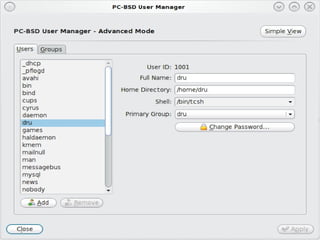
User Manager

GUI to manage user accounts

Simple view shows users only, Advanced
view also shows system accounts

Can be used to change root or users'
passwords

Can change user's home directory or shell

Easy to add/remove users from groups
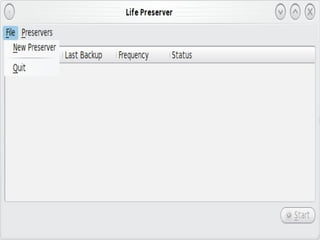
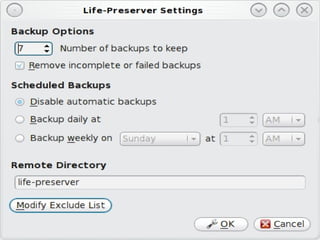
Life Preserver

GUI to backup entire system to a remote
system using rsync and SSH

Provides scheduler to automate backups
and determine how many backups to keep

Installation utility allows you to restore a
system from a specified Life Preserver
backup
PBI Builder

Command line tool for converting an
existing FreeBSD package into a PBI

Can be as simple as modifying a few
variables to indicate the program's name
and location in KDE menu

Provides variables for advanced
configuration

Creates clean build sandbox for each PBI
pc-sysinstall

●   Scriptable backend to GUI installer

●   Allows for the creation of custom and
    automated installations

Examples of custom configurations can be
found in /PCBSD/pc-sysinstall/examples
Plans for 9.0
Plans for 9.0
Uncouple PC-BSD utilities from KDE so they
can integrate into any window manager

Allow the selection of more window
managers during installation

Early days yet, we're open to features users
find useful (due out in summer 2011)

http://wiki.pcbsd.org/index.php/
PC-BSD_9.0_TODO
Plans for 9.0

Overhaul the PBI structure to include
incremental PBIs (download just the change
instead of the whole PBI)
http://wiki.pcbsd.org/index.php/PBI9_Format

Overhaul the PC-BSD Users Handbook and
include an off-line version with the release

Provide translations of documentation
resources
Changes to PBI
   Format
New PBI Format

Provide command line tools with names and
features familiar to FreeBSD users (e.g.
pbi_add, pbi_info, pbi_delete)

Added digital signature verification and
intelligent library sharing (i.e. PBIs are no
longer entirely self-contained)

Can be used with any (or no) window
manager and on FreeBSD systems as well
New PBI Format
pbi_makerepo, pbi_addrepo, and
pbi_deleterepo allow user to create custom
software repositories

pbi_listrepo allows user to prioritize repos or
specify a repo to use with pbi_add

convertoldmod.sh utility can be used to
convert existing PBIs to 9.x format

New format will be documented at
http://wiki.pcbsd.org/index.php/PC-BSD_9_Handbook
How you can
   Help
Community

PC-BSD is designed for users and takes user
feedback seriously

Many opportunities for user involvement:

●   Localization and translations

●   PBI requestors, creators and testers

●   Assisting others on forums, IRC
Community

●   Write or proof read documentation
●

●   Become a beta tester

Details can be found at:

http://wiki.pcbsd.org/index.php/Supporting_PC-BSD


and

http://wiki.pcbsd.org/index.php/Tasks_Looking_for_People
Additional
Resources
Additional Resources

PC-BSD Website: http://www.pcbsd.org

PC-BSD Users Handbook:
http://wiki.pcbsd.org/index.php/
PC-BSD_Users_Handbook

PC-BSD FAQs:
http://wiki.pcbsd.org/index.php/
PC-BSD_FAQS
Additional Resources

Official Blog:   http://blog.pcbsd.org

PC-BSD on Freenode IRC:      #pcbsd

PC-BSD Forums:      http://forums.pcbsd.org

PC-BSD Mailing Lists:
http://lists.pcbsd.org/mailman/listinfo
Additional Resources

Facebook Group:
http://www.facebook.com/home.php?
#!/group.php?gid=4210443834

LinkedIn Group:
http://www.linkedin.com/groups?
mostPopular=&gid=1942544

Definitive Guide to PC-BSD (Apress)
Questions?

    dru@freebsd.org


      URL to slides:
http://www.slideshare.net/
  dlavigne/scale9x_sun

Scale9x sun

  • 1.
    PC-BSD: An Easyto Use BSD Desktop Dru Lavigne Community Manager, PC-BSD Project SCALE 2011
  • 2.
    This presentation willcover... How PC-BSD differs from FreeBSD How PC-BSD differs from Linux Current features New features in the upcoming 9.0 release Changes to the PBI format How you can help
  • 3.
    How does PC-BSDdiffer from FreeBSD? Sometimes a picture is worth a thousand words:
  • 6.
    How PC-BSD differsfrom FreeBSD Graphical installer that supports GPT, ZFS, encryption, and a live mode for testing hardware Desktop, video, network, sound, java, flash are pre-configured so you can immediately start using the system Provides GUI applications to perform common tasks which are specific to BSD (i.e. not provided by desktop environment such as KDE)
  • 7.
    But, it isstill FreeBSD "under the hood" ● Uses same version numbers e.g. current release is 8.2 ● Anything you can do in FreeBSD, you can do in PC-BSD ● FreeBSD resources (e.g. Handbook, FAQs) are still an excellent source of information ● Many settings that you have to configure manually in FreeBSD "just work" in PC- BSD
  • 8.
    KDE for DefaultDesktop ● Intuitive for new users ● Provides hundreds of GUI applications ● Supports desktop effects ● Very customizable
  • 9.
    But what ifI can't stand KDE? Fluxbox is pre-configured and integrated into PC-BSD's utilities should you need a lighter weight desktop PBIs are available for GNOME, XFCE, and Enlightenment 188 window managers are available as FreeBSD ports/packages PC-BSD 9 will allow you to select desktop(s) during installation
  • 10.
    PC-BSD GUI Applications PC-BSDprovides graphical utilities to manage common configuration tasks (e.g. networking, firewall settings, user management, and printing) Designed to understand BSD device names, expected paths, etc. Graphical utilities for functions unique to FreeBSD such as jail(8) management and geli(8) disk encryption
  • 11.
    Tweaked for DesktopUsage ● Customized kernel ● sysctl(8) and loader.conf(5) settings ● rc.conf(5) settings Can browse all customizations at trac.pcbsd.org/browser/pcbsd/branches/8.1
  • 12.
    How PC-BSD differsfrom Linux Filesystems: UFS, UFS+J, UFS+S, ZFS Device names: e.g. ath0 or em0 instead of eth0 Some commands: e.g. kldload instead of insmod Switches: BSD instead of GNU (e.g. -l instead of --list) System startup: no run levels
  • 13.
    How PC-BSD differsfrom Linux Yet, much is similar: Many of the apps that run on Linux also run on PC-BSD (either through a port or Linux emulation) Both support Xorg (though GEM and KMS are a work in progress)
  • 14.
  • 15.
    Software/Update Manager Uses PBI(Push Button Installer) system Recommended method for installing software on PC-BSD Even novice users can easily and safely find, install, uninstall, and upgrade software Provides a software browser for finding applications--simply click Download button in application's description
  • 18.
    Software/Update Manager Automatically detectsplatform and version and installs correct PBI Installed software is listed User automatically notified when new versions are available, for both software and the operating system OS updates include link to security advisory description
  • 21.
    Ports Jail Allows advancedusers to safely use FreeBSD ports and packages without affecting the software installed with the operating system For more information about jails, see: http://en.wikipedia.org/wiki/FreeBSD_jail
  • 22.
    Warden GUI that allowsadvanced users to easily create, manage, and delete FreeBSD jails Makes it easy to clone a jail (save as .wdn file) Makes it easy to create and install inmates (.wit files) which are pre-configured server environments e.g. an AMP stack
  • 24.
    Firewall Manager GUI forstarting and stopping the firewall and adding, deleting, modifying firewall rules Designed for pf http://www.openbsd.org/faq/pf/ May be replaced by fwbuilder in 9.0
  • 27.
    Network Manager GUI toview and configure network interfaces (Ethernet, wireless, PPP/PPPoE) Auto-detects interfaces Allows creation of wireless profiles Shows interface stats and IP addressing info for active interfaces
  • 30.
    System Manager GUI toview system info and generate a diagnostic report Kernel tab used to set boot delay Tasks tab used to install src or ports tree Misc tab used to customize boot splash screen
  • 32.
    Printer Manager GUI toconfigure and manage printers Auto-detects connected printers as well as printers shared over a network Auto-detects correct driver for the printer Provides print job management
  • 34.
    User Manager GUI tomanage user accounts Simple view shows users only, Advanced view also shows system accounts Can be used to change root or users' passwords Can change user's home directory or shell Easy to add/remove users from groups
  • 36.
    Life Preserver GUI tobackup entire system to a remote system using rsync and SSH Provides scheduler to automate backups and determine how many backups to keep Installation utility allows you to restore a system from a specified Life Preserver backup
  • 39.
    PBI Builder Command linetool for converting an existing FreeBSD package into a PBI Can be as simple as modifying a few variables to indicate the program's name and location in KDE menu Provides variables for advanced configuration Creates clean build sandbox for each PBI
  • 40.
    pc-sysinstall ● Scriptable backend to GUI installer ● Allows for the creation of custom and automated installations Examples of custom configurations can be found in /PCBSD/pc-sysinstall/examples
  • 41.
  • 42.
    Plans for 9.0 UncouplePC-BSD utilities from KDE so they can integrate into any window manager Allow the selection of more window managers during installation Early days yet, we're open to features users find useful (due out in summer 2011) http://wiki.pcbsd.org/index.php/ PC-BSD_9.0_TODO
  • 43.
    Plans for 9.0 Overhaulthe PBI structure to include incremental PBIs (download just the change instead of the whole PBI) http://wiki.pcbsd.org/index.php/PBI9_Format Overhaul the PC-BSD Users Handbook and include an off-line version with the release Provide translations of documentation resources
  • 44.
  • 45.
    New PBI Format Providecommand line tools with names and features familiar to FreeBSD users (e.g. pbi_add, pbi_info, pbi_delete) Added digital signature verification and intelligent library sharing (i.e. PBIs are no longer entirely self-contained) Can be used with any (or no) window manager and on FreeBSD systems as well
  • 46.
    New PBI Format pbi_makerepo,pbi_addrepo, and pbi_deleterepo allow user to create custom software repositories pbi_listrepo allows user to prioritize repos or specify a repo to use with pbi_add convertoldmod.sh utility can be used to convert existing PBIs to 9.x format New format will be documented at http://wiki.pcbsd.org/index.php/PC-BSD_9_Handbook
  • 47.
  • 48.
    Community PC-BSD is designedfor users and takes user feedback seriously Many opportunities for user involvement: ● Localization and translations ● PBI requestors, creators and testers ● Assisting others on forums, IRC
  • 49.
    Community ● Write or proof read documentation ● ● Become a beta tester Details can be found at: http://wiki.pcbsd.org/index.php/Supporting_PC-BSD and http://wiki.pcbsd.org/index.php/Tasks_Looking_for_People
  • 50.
  • 51.
    Additional Resources PC-BSD Website:http://www.pcbsd.org PC-BSD Users Handbook: http://wiki.pcbsd.org/index.php/ PC-BSD_Users_Handbook PC-BSD FAQs: http://wiki.pcbsd.org/index.php/ PC-BSD_FAQS
  • 52.
    Additional Resources Official Blog: http://blog.pcbsd.org PC-BSD on Freenode IRC: #pcbsd PC-BSD Forums: http://forums.pcbsd.org PC-BSD Mailing Lists: http://lists.pcbsd.org/mailman/listinfo
  • 53.
    Additional Resources Facebook Group: http://www.facebook.com/home.php? #!/group.php?gid=4210443834 LinkedInGroup: http://www.linkedin.com/groups? mostPopular=&gid=1942544 Definitive Guide to PC-BSD (Apress)
  • 54.
    Questions? dru@freebsd.org URL to slides: http://www.slideshare.net/ dlavigne/scale9x_sun