Installing and managing Linux softwareAmir khakshoor
packageWhat is a package?When Linux developers create their software they typically bundle all the executable and data files into a single file called a "package" file. Type of packages in software context:source code packages :  suite of files related to one program: source code, documentation, and configuration files.Binary packages:  source code packages that have been configured for a particular Unix variant or package manager program.
Software packagePackages have different formats Packages contain different control files Where the rest of the files should be placedThe permissions they should have A list of prerequisite packages that are required for the package to function correctly
Main Package Formats in LinuxPackages Distributed in Binaries or Source Code formMain Package Management StandardsRPM (RedHat Package Manager) (.rpm)Introduced by RedHat and has been adopted by many other distributions (Fedora, Mandrake, SuSe) . The most popular Linux package formatDEB (Debian Package Manager) (.deb)Introduced by Debian distribution Tarball files (.tar.gz/.tar.bz2)The old-fashioned way of distributing software in Linux/UnixCompatible with all distros4
Package management systemDef: collection of software tools to automate the process of installing, upgrading, configuring, and removing software packages for a computer's operating system in a consistent manner.{= install manager}Functions:Verifying file checksums to ensure correct and complete packages.Verifying digital signatures to authenticate the origin of packages.Applying file archivers to manage encapsulated files.Upgrading software with latest versions, typically from a software repository.Grouping of packages by function to help eliminate user confusion.Managing dependencies to ensure a package is installed with all packages it requires.
Package management system(continue)Repositories: give users more control over the kinds of software that they are allowing to be installed on their systemPackage formats: Each package manager relies on the format and metadata of the packages it can manage. E.g. yum relies on rpm as a backend. Common package management systems on: Red Hat Linux systems : RPM, yum, apt4rpm.Debian Linux systems : Aptitude
Package management system(continue)yum is better than RPM (why)?install from network repositoriesit can find and install dependent packages needed by the packages you requestIn other words: resolve dependencies automatically.
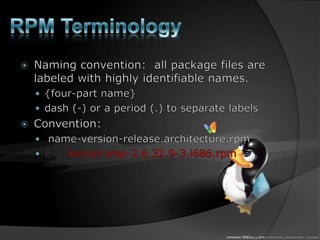
RPM TerminologyNaming convention:  all package files are labeled with highly identifiable names.{four-part name}dash (-) or a period (.) to separate labelsConvention: name-version-release.architecture.rpmE.g. kernel-smp-2.6.32.9-3.i686.rpm
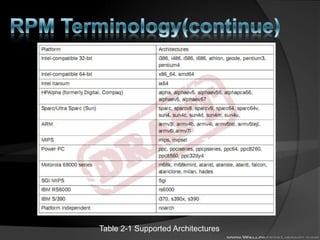
RPM Terminology(continue)Table 2-1 Supported Architectures
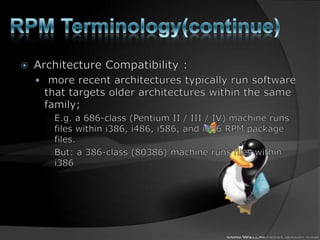
RPM Terminology(continue)Architecture Compatibility : more recent architectures typically run software that targets older architectures within the same family; E.g. a 686-class (Pentium II / III / IV) machine runs files within i386, i486, i586, and i686 RPM package files.But: a 386-class (80386) machine runs files within i386
RPM Terminology(continue)Note:noarch in architecture label:indicates this is a special architecture such that the files in the package work on any architecture Why? All files in package are interpreted scripts, not binary executables, or they are documentation. usually only the root user can install packages.
Binary RPMs and Source RPMsbinary RPM: has been compiled for a particular architecture.E.g., httpd-2.2.17-1.fc13.1.i686.rpmplatform-independent binary RPMs: noarch{Applications written in Perl, Python, or other scripting languages}Source RPMs: contain all the commands, usually in scripts, necessary to recreate the binary RPM.you can recreate the binary RPM at any time.
How login as another user?su : Substitute (switch) UserWhy? For installing software you need to be root! And so on. Without logging out!	How to use?suuserid note: defaultuserid= root
InstllingSoftware From RPM FilesThere are generally two ways to install RPM files manually. using a file previously downloaded to your hard driveinstall the RPM from some sort of removable media such as a CD-ROM driveUse command “rpm” to install (in other word =upgrade).rpm fileMost common usage:rpm -Uhv package_file.rpm14
The RPM Command rpm -Uvh is the command to install  package -U qualifier is used for updating an RPM to the latest version-h qualifier gives a list of hash # characters during the installation -v qualifier prints verbose status messages while the command is runrpm command options in depth:-i: installing specified Package(s)-e : uninstalling (Erasing) specified Package(s)-U :Upgrading= Erasing old one + Installing new one-q : Query whether specifed package exist and installed or not-V : Verifying Installed RPM Packages15
The RPM Command (continue) Options to use with –ioption:-v: print out verbose information as the command runs.-h: print a series of hash marks, #, to provide feedback that the command is still running.--excludedocs:  ignore documentation In RPM --includedocs: reverse of --excludedocs. {Default Option}--replacepkgs: replace, or reinstall, packages it may have already installed.{Fresh Start}--replacefiles: Install package even if it replaces files from other packages--force:  A short hand for --replacepkgsand                         –-replacefiles--nodeps: skip the dependencies check--noscripts: skip running the pre- and post-installation scripts.= --noscripts= --nopre+ --nopost16
The RPM Command (continue) Options to use with –U option: all of options that can used by –i option.Plus:  --oldpackage: install an older version of a package on top of a more recent one.{downgrade}Why installing an old one?Some bug or security vulnerabilityNewer one won't work with some other package17
The RPM Command (continue) Options to use with –q option: --whatprovides [capability] : what package provides the specified capability. e.g. webserverOr : trace individual files: which package provides specified file.-i: Detailed information about specified package(s)-l: list files that are bundling in specified package--scripts: lists the scripts associated with a package.Note: RPM database itself is stored in the directory /var/lib/rpm/18
RPM command example19[root@bigboytmp]# rpm -Uvh mysql-server-3.23.58-9.i386.rpmPreparing...        ####################### [100%]  1:mysql-server   ####################### [100%][root@bigboytmp]#
RPM Installation Errors Sometimes RPM installations will fail giving Failed dependencies errors which really mean that a prerequisite RPM needs to be installedTo get around this problem by run the rpm command with the --nodepsoption to disable dependency checks20[root@bigboytmp]# rpm -Uvh--nodeps mysql-3.23.58-9.i386.rpm
Yum (Yellowdog Updater, Modified)YUM adds automatic updates and package management, including dependency management, to RPM systems.Can works with repositories too.
Automatic Updates with yum 	The yum automatic RPM update program comes as a standard feature of Fedora Core. It has a number of valuable features: You can configure the URLs of download sites you want to use. This provides the added advantage of you choosing the most reliable sites in your part of the globe. yum makes multiple attempts to download RPMs before failing. yum automatically figures out not only the RPMs packages that need updating, but also all the supporting RPMs. It then installs them all.22
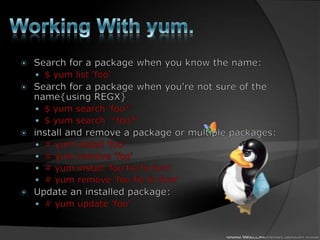
Working With yum.Search for a package when you know the name:$ yum list 'foo‘Search for a package when you're not sure of the name{using REGX}$ yum search 'foo*'$ yum search '*foo?'install and remove a package or multiple packages: # yum install 'foo'# yum remove 'foo'# yum install 'foo fie fofum'# yum remove 'foo fie fofum'Update an installed package:# yum update 'foo'
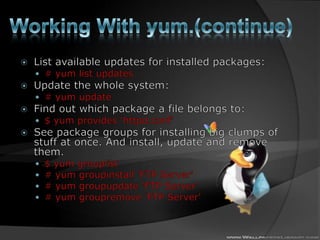
Working With yum.(continue)List available updates for installed packages:# yum list updatesUpdate the whole system:# yum updateFind out which package a file belongs to:$ yum provides ‘httpd.conf‘See package groups for installing big clumps of stuff at once. And install, update and remove them.$ yum grouplist# yum groupinstall 'FTP Server'# yum groupupdate 'FTP Server'# yum groupremove 'FTP Server'
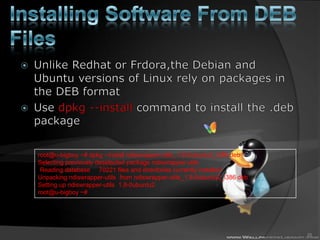
Installing Software From DEB FilesUnlike Redhat or Frdora,theDebian and Ubuntu versions of Linux rely on packages in the DEB formatUse dpkg --install command to install the .deb package25root@u-bigboy:~# dpkg--install ndiswrapper-utils_1.8-0ubuntu2_i386.debSelecting previously deselected package ndiswrapper-utils.(Reading database ... 70221 files and directories currently installed.)Unpacking ndiswrapper-utils(from ndiswrapper-utils_1.8-0ubuntu2_i386.deb) ...Setting up ndiswrapper-utils(1.8-0ubuntu2) ...root@u-bigboy:~#
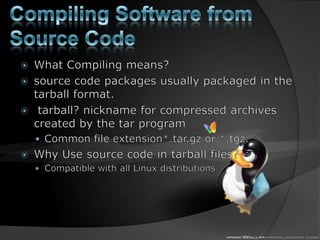
Compiling Software from Source CodeWhat Compiling means?source code packages usually packaged in the tarball format.tarball? nickname for compressed archives created by the tar programCommon file extension*.tar.gz or *.tgz. Why Use source code in tarball files?Compatible with all Linux distributions
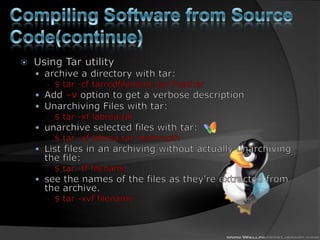
Compiling Software from Source Code(continue)Using Tar utilityarchive a directory with tar:$ tar -cf tarredfilename.tar FeatherAdd –v option to get a verbose descriptionUnarchiving Files with tar:$ tar -xf labrea.tarunarchive selected files with tar:$ tar -xf labrea.tar mammothList files in an archiving without actually unarchiving the file:$ tar -tf filename see the names of the files as they're extracted from the archive. $ tar -xvf filename
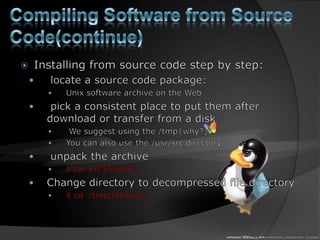
Compiling Software from Source Code(continue)Installing from source code step by step: locate a source code package:Unix software archive on the Web pick a consistent place to put them after download or transfer from a disk We suggest using the /tmp{why?}You can also use the /usr/src directory, unpack the archive$ tar xvffilenameChange directory to decompressed file directory$ cd  /tmp/filename
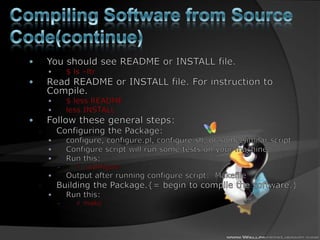
Compiling Software from Source Code(continue)You should see README or INSTALL file.$ ls –ltrRead README or INSTALL file. For instruction to Compile.$ less READMEless INSTALL Follow these general steps:Configuring the Package:configure, configure.pl, configure.sh, or some similar script.Configure script will run some tests on your machine.Run this:# ./configureOutput after running configure script:  MakefileBuilding the Package.{= begin to compile the software.}Run this:# make
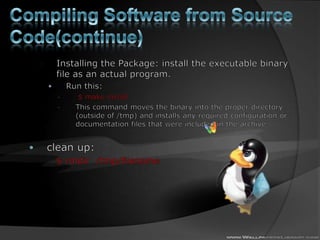
Compiling Software from Source Code(continue)Installing the Package: install the executable binary file as an actual program.Run this: $ make installThis command moves the binary into the proper directory (outside of /tmp) and installs any required configuration or documentation files that were included in the archiveclean up:$ rmdir  /tmp/filename
Where to get used PackagesPackages on Linux Installation CDsManually Downloaded Packagestwo most common ways of getting packages are by manually using FTP or a Web browser31
Popular Package Download SitesRedhathttp://www.redhat.com/ http://www.rpmfind.net/ Fedoraftp://download.fedora.redhat.com/pub/fedora/linux/core/ http://download.fedora.redhat.com/pub/fedora/linux/core/http://www.rpmfind.net/32
Popular Package Download SitesDebainhttp://packages.debian.org Ubuntuhttp://packages.ubuntu.com 33
How to Download Software Getting Software Using Web-Based FTPBrowse the desired Web site until you find the link to the software package. Click on the link for the desired software package. Save the file to hard drive Getting RPMs Using Command-Line Anonymous FTP34
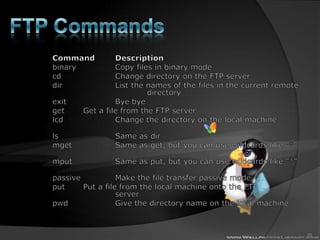
FTP Commands Command 	Description 	binary		Copy files in binary mode 	cd			Change directory on the FTP server 	dir			List the names of the files in the current remote 			directory 	exit		Bye byeget		Get a file from the FTP server 	lcd			Change the directory on the local machine 	ls			Same as dir 	mget		Same as get, but you can use wildcards like "*" 	mput		Same as put, but you can use wildcards like "*" 	passive		Make the file transfer passive mode 	put		Put a file from the local machine onto the FTP 			server 	pwd		Give the directory name on the local machine 	35
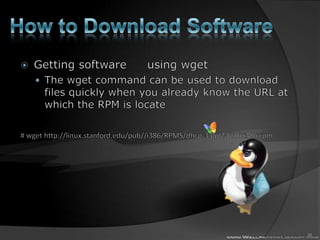
How to Download SoftwareGetting software 	using wget The wget command can be used to download files quickly when you already know the URL at which the RPM is locate# wget http://linux.stanford.edu/pub//i386/RPMS/dhcp-3.0pl2-6.16.i386.rpm36
Thanks for your patient.Any Question?Ask me now orLater on by email: khakshoor.amir@gmail.com

Software management in linux

  • 1.
    Installing and managingLinux softwareAmir khakshoor
  • 2.
    packageWhat is apackage?When Linux developers create their software they typically bundle all the executable and data files into a single file called a "package" file. Type of packages in software context:source code packages : suite of files related to one program: source code, documentation, and configuration files.Binary packages: source code packages that have been configured for a particular Unix variant or package manager program.
  • 3.
    Software packagePackages havedifferent formats Packages contain different control files Where the rest of the files should be placedThe permissions they should have A list of prerequisite packages that are required for the package to function correctly
  • 4.
    Main Package Formatsin LinuxPackages Distributed in Binaries or Source Code formMain Package Management StandardsRPM (RedHat Package Manager) (.rpm)Introduced by RedHat and has been adopted by many other distributions (Fedora, Mandrake, SuSe) . The most popular Linux package formatDEB (Debian Package Manager) (.deb)Introduced by Debian distribution Tarball files (.tar.gz/.tar.bz2)The old-fashioned way of distributing software in Linux/UnixCompatible with all distros4
  • 5.
    Package management systemDef:collection of software tools to automate the process of installing, upgrading, configuring, and removing software packages for a computer's operating system in a consistent manner.{= install manager}Functions:Verifying file checksums to ensure correct and complete packages.Verifying digital signatures to authenticate the origin of packages.Applying file archivers to manage encapsulated files.Upgrading software with latest versions, typically from a software repository.Grouping of packages by function to help eliminate user confusion.Managing dependencies to ensure a package is installed with all packages it requires.
  • 6.
    Package management system(continue)Repositories:give users more control over the kinds of software that they are allowing to be installed on their systemPackage formats: Each package manager relies on the format and metadata of the packages it can manage. E.g. yum relies on rpm as a backend. Common package management systems on: Red Hat Linux systems : RPM, yum, apt4rpm.Debian Linux systems : Aptitude
  • 7.
    Package management system(continue)yumis better than RPM (why)?install from network repositoriesit can find and install dependent packages needed by the packages you requestIn other words: resolve dependencies automatically.
  • 8.
    RPM TerminologyNaming convention: all package files are labeled with highly identifiable names.{four-part name}dash (-) or a period (.) to separate labelsConvention: name-version-release.architecture.rpmE.g. kernel-smp-2.6.32.9-3.i686.rpm
  • 9.
    RPM Terminology(continue)Table 2-1Supported Architectures
  • 10.
    RPM Terminology(continue)Architecture Compatibility: more recent architectures typically run software that targets older architectures within the same family; E.g. a 686-class (Pentium II / III / IV) machine runs files within i386, i486, i586, and i686 RPM package files.But: a 386-class (80386) machine runs files within i386
  • 11.
    RPM Terminology(continue)Note:noarch inarchitecture label:indicates this is a special architecture such that the files in the package work on any architecture Why? All files in package are interpreted scripts, not binary executables, or they are documentation. usually only the root user can install packages.
  • 12.
    Binary RPMs andSource RPMsbinary RPM: has been compiled for a particular architecture.E.g., httpd-2.2.17-1.fc13.1.i686.rpmplatform-independent binary RPMs: noarch{Applications written in Perl, Python, or other scripting languages}Source RPMs: contain all the commands, usually in scripts, necessary to recreate the binary RPM.you can recreate the binary RPM at any time.
  • 13.
    How login asanother user?su : Substitute (switch) UserWhy? For installing software you need to be root! And so on. Without logging out! How to use?suuserid note: defaultuserid= root
  • 14.
    InstllingSoftware From RPMFilesThere are generally two ways to install RPM files manually. using a file previously downloaded to your hard driveinstall the RPM from some sort of removable media such as a CD-ROM driveUse command “rpm” to install (in other word =upgrade).rpm fileMost common usage:rpm -Uhv package_file.rpm14
  • 15.
    The RPM Commandrpm -Uvh is the command to install package -U qualifier is used for updating an RPM to the latest version-h qualifier gives a list of hash # characters during the installation -v qualifier prints verbose status messages while the command is runrpm command options in depth:-i: installing specified Package(s)-e : uninstalling (Erasing) specified Package(s)-U :Upgrading= Erasing old one + Installing new one-q : Query whether specifed package exist and installed or not-V : Verifying Installed RPM Packages15
  • 16.
    The RPM Command(continue) Options to use with –ioption:-v: print out verbose information as the command runs.-h: print a series of hash marks, #, to provide feedback that the command is still running.--excludedocs: ignore documentation In RPM --includedocs: reverse of --excludedocs. {Default Option}--replacepkgs: replace, or reinstall, packages it may have already installed.{Fresh Start}--replacefiles: Install package even if it replaces files from other packages--force: A short hand for --replacepkgsand –-replacefiles--nodeps: skip the dependencies check--noscripts: skip running the pre- and post-installation scripts.= --noscripts= --nopre+ --nopost16
  • 17.
    The RPM Command(continue) Options to use with –U option: all of options that can used by –i option.Plus: --oldpackage: install an older version of a package on top of a more recent one.{downgrade}Why installing an old one?Some bug or security vulnerabilityNewer one won't work with some other package17
  • 18.
    The RPM Command(continue) Options to use with –q option: --whatprovides [capability] : what package provides the specified capability. e.g. webserverOr : trace individual files: which package provides specified file.-i: Detailed information about specified package(s)-l: list files that are bundling in specified package--scripts: lists the scripts associated with a package.Note: RPM database itself is stored in the directory /var/lib/rpm/18
  • 19.
    RPM command example19[root@bigboytmp]#rpm -Uvh mysql-server-3.23.58-9.i386.rpmPreparing... ####################### [100%] 1:mysql-server ####################### [100%][root@bigboytmp]#
  • 20.
    RPM Installation ErrorsSometimes RPM installations will fail giving Failed dependencies errors which really mean that a prerequisite RPM needs to be installedTo get around this problem by run the rpm command with the --nodepsoption to disable dependency checks20[root@bigboytmp]# rpm -Uvh--nodeps mysql-3.23.58-9.i386.rpm
  • 21.
    Yum (Yellowdog Updater,Modified)YUM adds automatic updates and package management, including dependency management, to RPM systems.Can works with repositories too.
  • 22.
    Automatic Updates withyum The yum automatic RPM update program comes as a standard feature of Fedora Core. It has a number of valuable features: You can configure the URLs of download sites you want to use. This provides the added advantage of you choosing the most reliable sites in your part of the globe. yum makes multiple attempts to download RPMs before failing. yum automatically figures out not only the RPMs packages that need updating, but also all the supporting RPMs. It then installs them all.22
  • 23.
    Working With yum.Searchfor a package when you know the name:$ yum list 'foo‘Search for a package when you're not sure of the name{using REGX}$ yum search 'foo*'$ yum search '*foo?'install and remove a package or multiple packages: # yum install 'foo'# yum remove 'foo'# yum install 'foo fie fofum'# yum remove 'foo fie fofum'Update an installed package:# yum update 'foo'
  • 24.
    Working With yum.(continue)Listavailable updates for installed packages:# yum list updatesUpdate the whole system:# yum updateFind out which package a file belongs to:$ yum provides ‘httpd.conf‘See package groups for installing big clumps of stuff at once. And install, update and remove them.$ yum grouplist# yum groupinstall 'FTP Server'# yum groupupdate 'FTP Server'# yum groupremove 'FTP Server'
  • 25.
    Installing Software FromDEB FilesUnlike Redhat or Frdora,theDebian and Ubuntu versions of Linux rely on packages in the DEB formatUse dpkg --install command to install the .deb package25root@u-bigboy:~# dpkg--install ndiswrapper-utils_1.8-0ubuntu2_i386.debSelecting previously deselected package ndiswrapper-utils.(Reading database ... 70221 files and directories currently installed.)Unpacking ndiswrapper-utils(from ndiswrapper-utils_1.8-0ubuntu2_i386.deb) ...Setting up ndiswrapper-utils(1.8-0ubuntu2) ...root@u-bigboy:~#
  • 26.
    Compiling Software fromSource CodeWhat Compiling means?source code packages usually packaged in the tarball format.tarball? nickname for compressed archives created by the tar programCommon file extension*.tar.gz or *.tgz. Why Use source code in tarball files?Compatible with all Linux distributions
  • 27.
    Compiling Software fromSource Code(continue)Using Tar utilityarchive a directory with tar:$ tar -cf tarredfilename.tar FeatherAdd –v option to get a verbose descriptionUnarchiving Files with tar:$ tar -xf labrea.tarunarchive selected files with tar:$ tar -xf labrea.tar mammothList files in an archiving without actually unarchiving the file:$ tar -tf filename see the names of the files as they're extracted from the archive. $ tar -xvf filename
  • 28.
    Compiling Software fromSource Code(continue)Installing from source code step by step: locate a source code package:Unix software archive on the Web pick a consistent place to put them after download or transfer from a disk We suggest using the /tmp{why?}You can also use the /usr/src directory, unpack the archive$ tar xvffilenameChange directory to decompressed file directory$ cd /tmp/filename
  • 29.
    Compiling Software fromSource Code(continue)You should see README or INSTALL file.$ ls –ltrRead README or INSTALL file. For instruction to Compile.$ less READMEless INSTALL Follow these general steps:Configuring the Package:configure, configure.pl, configure.sh, or some similar script.Configure script will run some tests on your machine.Run this:# ./configureOutput after running configure script: MakefileBuilding the Package.{= begin to compile the software.}Run this:# make
  • 30.
    Compiling Software fromSource Code(continue)Installing the Package: install the executable binary file as an actual program.Run this: $ make installThis command moves the binary into the proper directory (outside of /tmp) and installs any required configuration or documentation files that were included in the archiveclean up:$ rmdir /tmp/filename
  • 31.
    Where to getused PackagesPackages on Linux Installation CDsManually Downloaded Packagestwo most common ways of getting packages are by manually using FTP or a Web browser31
  • 32.
    Popular Package DownloadSitesRedhathttp://www.redhat.com/ http://www.rpmfind.net/ Fedoraftp://download.fedora.redhat.com/pub/fedora/linux/core/ http://download.fedora.redhat.com/pub/fedora/linux/core/http://www.rpmfind.net/32
  • 33.
    Popular Package DownloadSitesDebainhttp://packages.debian.org Ubuntuhttp://packages.ubuntu.com 33
  • 34.
    How to DownloadSoftware Getting Software Using Web-Based FTPBrowse the desired Web site until you find the link to the software package. Click on the link for the desired software package. Save the file to hard drive Getting RPMs Using Command-Line Anonymous FTP34
  • 35.
    FTP Commands Command Description binary Copy files in binary mode cd Change directory on the FTP server dir List the names of the files in the current remote directory exit Bye byeget Get a file from the FTP server lcd Change the directory on the local machine ls Same as dir mget Same as get, but you can use wildcards like "*" mput Same as put, but you can use wildcards like "*" passive Make the file transfer passive mode put Put a file from the local machine onto the FTP server pwd Give the directory name on the local machine 35
  • 36.
    How to DownloadSoftwareGetting software using wget The wget command can be used to download files quickly when you already know the URL at which the RPM is locate# wget http://linux.stanford.edu/pub//i386/RPMS/dhcp-3.0pl2-6.16.i386.rpm36
  • 37.
    Thanks for yourpatient.Any Question?Ask me now orLater on by email: khakshoor.amir@gmail.com