1
Diving into SWUpdate: adding new platform
support in 30 minutes with Yocto/OE !
Security, Safety, Update
Pierre-Jean Texier
Live Embedded 2020
2
Pierre-Jean Texier

Embedded Linux Engineer LAFON (part of Madic group)

30 yo

FOSS enthusiast

Contributions : U-Boot, Kernel Linux, Yocto/OE, Buildroot …

Co-author of "Yocto for Raspberry Pi" and author for GNU/Linux magazine France and Open
silicium (RIP)
3
Agenda

Motivation

A quick introduction about update process & SWUpdate

How to generate a clean Yocto/OE setup for this session

SWUpdate practical example with the Microchip SAMA5D27-SOM1-EK1

Deployment and tests !

Patch submissions !

Conclusion
4
Motivation
5
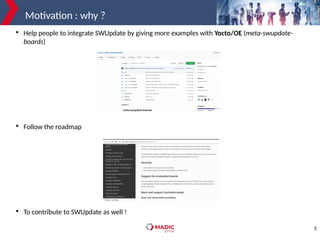
Motivation : why ?

Help people to integrate SWUpdate by giving more examples with Yocto/OE (meta-swupdate-
boards)

Follow the roadmap

To contribute to SWUpdate as well !
6
A quick introduction about
update process & SWUpdate
7
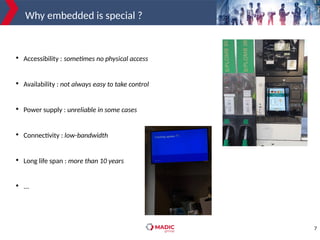
Why embedded is special ?

Accessibility : sometimes no physical access

Availability : not always easy to take control

Power supply : unreliable in some cases

Connectivity : low-bandwidth

Long life span : more than 10 years

...
8
Why do we need update ?

Fixing bugs

New features

Security updates (CVE)
9
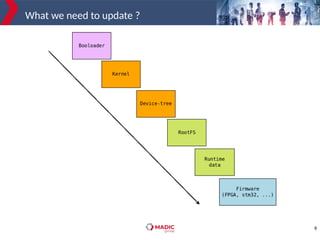
What we need to update ?
10
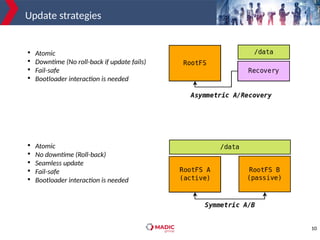
Update strategies

Atomic

Downtime (No roll-back if update fails)

Fail-safe

Bootloader interaction is needed

Atomic

No downtime (Roll-back)

Seamless update

Fail-safe

Bootloader interaction is needed
11
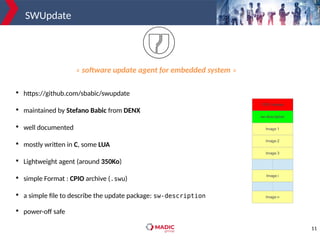
SWUpdate

https://github.com/sbabic/swupdate

maintained by Stefano Babic from DENX

well documented

mostly written in C, some LUA

Lightweight agent (around 350Ko)

simple Format : CPIO archive (.swu)

a simple file to describe the update package: sw-description

power-off safe
« software update agent for embedded system »
12
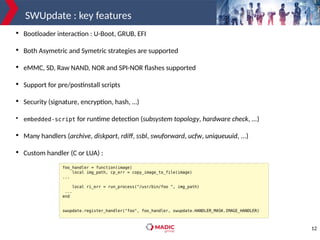
SWUpdate : key features

Bootloader interaction : U-Boot, GRUB, EFI

Both Asymetric and Symetric strategies are supported

eMMC, SD, Raw NAND, NOR and SPI-NOR flashes supported

Support for pre/postinstall scripts

Security (signature, encryption, hash, …)

embedded-script for runtime detection (subsystem topology, hardware check, ...)

Many handlers (archive, diskpart, rdiff, ssbl, swuforward, ucfw, uniqueuuid, ...)

Custom handler (C or LUA) :
foo_handler = function(image)
local img_path, cp_err = copy_image_to_file(image)
...
local ri_err = run_process("/usr/bin/foo ", img_path)
...
end
swupdate.register_handler("foo", foo_handler, swupdate.HANDLER_MASK.IMAGE_HANDLER)
13
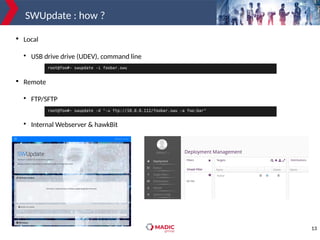
SWUpdate : how ?

Local

USB drive drive (UDEV), command line

Remote

FTP/SFTP

Internal Webserver & hawkBit
root@foo#~ swupdate -d "-u ftp://10.0.0.112/foobar.swu -a foo:bar"
root@foo#~ swupdate -i foobar.swu
14
How to generate a clean Yocto/OE setup for this
session
15
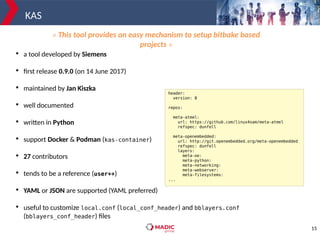
KAS

a tool developed by Siemens

first release 0.9.0 (on 14 June 2017)

maintained by Jan Kiszka

well documented

written in Python

support Docker & Podman (kas-container)

27 contributors

tends to be a reference (user++)

YAML or JSON are supported (YAML preferred)

useful to customize local.conf (local_conf_header) and bblayers.conf
(bblayers_conf_header) files
header:
version: 8
repos:
meta-atmel:
url: https://github.com/linux4sam/meta-atmel
refspec: dunfell
meta-openembedded:
url: http://git.openembedded.org/meta-openembedded
refspec: dunfell
layers:
meta-oe:
meta-python:
meta-networking:
meta-webserver:
meta-filesystems:
...
« This tool provides an easy mechanism to setup bitbake based
projects »
16
KAS : our needs

Poky, the reference distribution of the Yocto Project

git://git.yoctoproject.org/poky

meta-atmel, the meta-layer that provides support for Microchip microprocessors

https://github.com/linux4sam/meta-atmel

meta-openembedded, if we need to add some packages

https://git.openembedded.org/meta-openembedded

meta-swupdate{-boards}, to add SWUpdate support

https://github.com/sbabic/meta-swupdate{-boards}

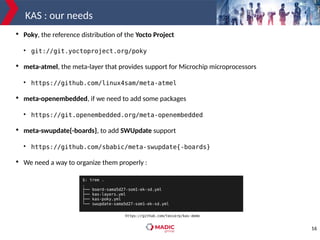
We need a way to organize them properly :
$: tree .
.
├── board-sama5d27-som1-ek-sd.yml
├── kas-layers.yml
├── kas-poky.yml
└── swupdate-sama5d27-som1-ek-sd.yml
https://github.com/texierp/kas-demo
17
KAS : let’s try it ! (1/2)
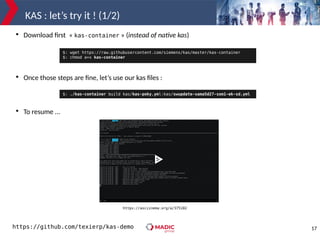
https://asciinema.org/a/375102
$: wget https://raw.githubusercontent.com/siemens/kas/master/kas-container
$: chmod a+x kas-container

Download first « kas-container » (instead of native kas)

Once those steps are fine, let’s use our kas files :

To resume ...
$: ./kas-container build kas/kas-poky.yml:kas/swupdate-sama5d27-som1-ek-sd.yml
https://github.com/texierp/kas-demo
18
KAS : let’s try it ! (2/2)

Now, we have all the layers to start :

But with some errors when we try to « bitbake » …

But will fix it now !
$: tree . -L 1
.
├── build
├── kas
├── meta-atmel
├── meta-openembedded
├── meta-swupdate
├── meta-swupdate-boards
└── poky
ERROR: Nothing RPROVIDES 'u-boot-default-env' (but /work/poky/meta/recipes-bsp/u-boot/libubootenv_0.3.1.bb RDEPENDS
on or otherwise requires it)
NOTE: Runtime target 'u-boot-default-env' is unbuildable, removing...
...
Missing or unbuildable dependency chain was: ['libubootenv-bin', 'u-boot-default-env']
ERROR: Nothing RPROVIDES 'libubootenv' (but /work/poky/meta/recipes-bsp/u-boot/libubootenv_0.3.1.bb RDEPENDS on or
otherwise requires it)
No eligible RPROVIDERs exist for 'libubootenv'
NOTE: Runtime target 'libubootenv' is unbuildable, removing...
Missing or unbuildable dependency chain was: ['libubootenv']
ERROR: Nothing RPROVIDES 'libubootenv-dev' (but /work/poky/meta/recipes-bsp/u-boot/libubootenv_0.3.1.bb RDEPENDS on
or otherwise requires it)
No eligible RPROVIDERs exist for 'libubootenv-dev'
NOTE: Runtime target 'libubootenv-dev' is unbuildable, removing...
Missing or unbuildable dependency chain was: ['libubootenv-dev']
..
19
KAS, but not the only one

git-submodules

repo

combo-layer

yocto-cooker (maintained by Christophe Blaess & Patrick Boettcher)
20
SWUpdate practical example with the Microchip
SAMA5D27-SOM1-EK1
21
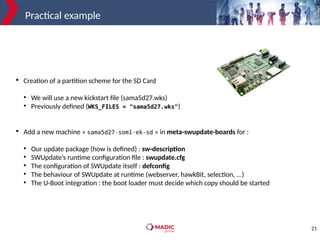
Practical example

Creation of a partition scheme for the SD Card
●
We will use a new kickstart file (sama5d27.wks)
●
Previously defined (WKS_FILES = "sama5d27.wks")

Add a new machine « sama5d27-som1-ek-sd » in meta-swupdate-boards for :
●
Our update package (how is defined) : sw-description
●
SWUpdate’s runtime configuration file : swupdate.cfg
●
The configuration of SWUpdate itself : defconfig
●
The behaviour of SWUpdate at runtime (webserver, hawkBit, selection, ...)
●
The U-Boot integration : the boot loader must decide which copy should be started
22
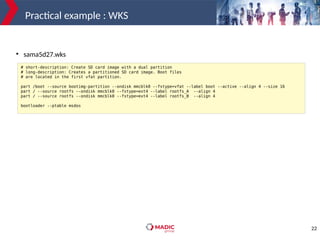
Practical example : WKS
# short-description: Create SD card image with a dual partition
# long-description: Creates a partitioned SD card image. Boot files
# are located in the first vfat partition.
part /boot --source bootimg-partition --ondisk mmcblk0 --fstype=vfat --label boot --active --align 4 --size 16
part / --source rootfs --ondisk mmcblk0 --fstype=ext4 --label rootfs_A --align 4
part / --source rootfs --ondisk mmcblk0 --fstype=ext4 --label rootfs_B --align 4
bootloader --ptable msdos
●
sama5d27.wks
23
Practical example
software =
{
version = "0.1.0";
sama5d27-som1-ek-sd = {
hardware-compatibility: ["1.0"];
stable : {
copy1 : {
images: ({
filename = "core-image-full-cmdline-sama5d27-som1-ek-sd.ext4.gz";
type = "raw";
sha256 = "@core-image-full-cmdline-sama5d27-som1-ek-sd.ext4.gz";
compressed = "zlib";
device = "/dev/mmcblk0p2";
});
uboot: ({
name = "rootpart";
value = "2";
});
};
copy2 : {
images: ({
filename = "core-image-full-cmdline-sama5d27-som1-ek-sd.ext4.gz";
type = "raw";
sha256 = "@core-image-full-cmdline-sama5d27-som1-ek-sd.ext4.gz";
compressed = "zlib";
device = "/dev/mmcblk0p3";
});
uboot: ({
name = "rootpart";
value = "3";
});
};
};
}
}
24
Practical example
rootfs=`mount | grep "on / type" | cut -d':' -f 2 | cut -d' ' -f 1`
if [ $rootfs == '/dev/mmcblk0p2' ];then
selection="-e stable,copy2"
else
selection="-e stable,copy1"
fi
state=`fw_printenv ustate | cut -f 2 -d'='`
if [ $state == 1 ];then
SWUPDATE_SURICATTA_ARGS="-c 2"
else
SWUPDATE_SURICATTA_ARGS=" "
fi
SWUPDATE_ARGS="-H sama5d27-som1-ek-sd:1.0 ${selection} -f /etc/swupdate.cfg"
●
How SWUpdate should start :
●
selection = indicates which software component should be updated, defined in sw-description.
●
SWUPDATE_SURICATTA_ARGS = to interact with hawkBit (in this case ustate is used).
●
SWUPDATE_ARGS = exports all the arguments that are needed at startup. This variable is passed as
an argument to SWUpdate.
25
Deployment and tests !
26
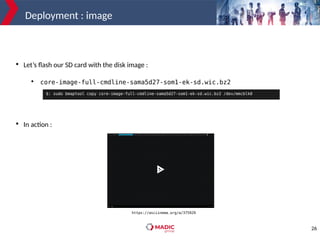
Deployment : image

Let’s flash our SD card with the disk image :
●
core-image-full-cmdline-sama5d27-som1-ek-sd.wic.bz2

In action :
$: sudo bmaptool copy core-image-full-cmdline-sama5d27-som1-ek-sd.wic.bz2 /dev/mmcblk0
https://asciinema.org/a/375929
27
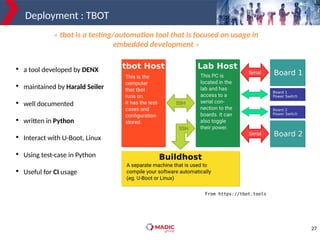
Deployment : TBOT

a tool developed by DENX

maintained by Harald Seiler

well documented

written in Python

Interact with U-Boot, Linux

Using test-case in Python

Useful for CI usage
« tbot is a testing/automation tool that is focused on usage in
embedded development »
From https://tbot.tools
28
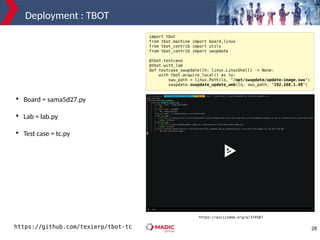
Deployment : TBOT
import tbot
from tbot.machine import board,linux
from tbot_contrib import utils
from tbot_contrib import swupdate
@tbot.testcase
@tbot.with_lab
def testcase_swupdate(lh: linux.LinuxShell) -> None:
with tbot.acquire_local() as lo:
swu_path = linux.Path(lo, "/opt/swupdate/update-image.swu")
swupdate.swupdate_update_web(lo, swu_path, "192.168.1.48")

Board = sama5d27.py

Lab = lab.py

Test case = tc.py
https://asciinema.org/a/374587
https://github.com/texierp/tbot-tc
29
Patch submissions !
30
Conclusion
31
Conclusion

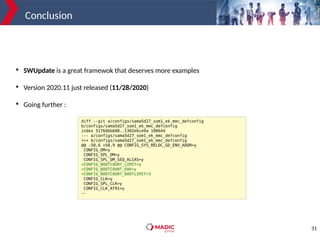
SWUpdate is a great framewok that deserves more examples

Version 2020.11 just released (11/28/2020)

Going further :
diff --git a/configs/sama5d27_som1_ek_mmc_defconfig
b/configs/sama5d27_som1_ek_mmc_defconfig
index 5176dbbb08..1302ebce9a 100644
--- a/configs/sama5d27_som1_ek_mmc_defconfig
+++ b/configs/sama5d27_som1_ek_mmc_defconfig
@@ -50,6 +50,9 @@ CONFIG_SYS_RELOC_GD_ENV_ADDR=y
CONFIG_DM=y
CONFIG_SPL_DM=y
CONFIG_SPL_DM_SEQ_ALIAS=y
+CONFIG_BOOTCOUNT_LIMIT=y
+CONFIG_BOOTCOUNT_ENV=y
+CONFIG_BOOTCOUNT_BOOTLIMIT=3
CONFIG_CLK=y
CONFIG_SPL_CLK=y
CONFIG_CLK_AT91=y
--
32
Q&A
@texierp
@pjtexier

Diving into SWUpdate: adding new platform support in 30minutes with Yocto/OE !

  • 1.
    1 Diving into SWUpdate:adding new platform support in 30 minutes with Yocto/OE ! Security, Safety, Update Pierre-Jean Texier Live Embedded 2020
  • 2.
    2 Pierre-Jean Texier  Embedded LinuxEngineer LAFON (part of Madic group)  30 yo  FOSS enthusiast  Contributions : U-Boot, Kernel Linux, Yocto/OE, Buildroot …  Co-author of "Yocto for Raspberry Pi" and author for GNU/Linux magazine France and Open silicium (RIP)
  • 3.
    3 Agenda  Motivation  A quick introductionabout update process & SWUpdate  How to generate a clean Yocto/OE setup for this session  SWUpdate practical example with the Microchip SAMA5D27-SOM1-EK1  Deployment and tests !  Patch submissions !  Conclusion
  • 4.
  • 5.
    5 Motivation : why?  Help people to integrate SWUpdate by giving more examples with Yocto/OE (meta-swupdate- boards)  Follow the roadmap  To contribute to SWUpdate as well !
  • 6.
    6 A quick introductionabout update process & SWUpdate
  • 7.
    7 Why embedded isspecial ?  Accessibility : sometimes no physical access  Availability : not always easy to take control  Power supply : unreliable in some cases  Connectivity : low-bandwidth  Long life span : more than 10 years  ...
  • 8.
    8 Why do weneed update ?  Fixing bugs  New features  Security updates (CVE)
  • 9.
    9 What we needto update ?
  • 10.
    10 Update strategies  Atomic  Downtime (Noroll-back if update fails)  Fail-safe  Bootloader interaction is needed  Atomic  No downtime (Roll-back)  Seamless update  Fail-safe  Bootloader interaction is needed
  • 11.
    11 SWUpdate  https://github.com/sbabic/swupdate  maintained by StefanoBabic from DENX  well documented  mostly written in C, some LUA  Lightweight agent (around 350Ko)  simple Format : CPIO archive (.swu)  a simple file to describe the update package: sw-description  power-off safe « software update agent for embedded system »
  • 12.
    12 SWUpdate : keyfeatures  Bootloader interaction : U-Boot, GRUB, EFI  Both Asymetric and Symetric strategies are supported  eMMC, SD, Raw NAND, NOR and SPI-NOR flashes supported  Support for pre/postinstall scripts  Security (signature, encryption, hash, …)  embedded-script for runtime detection (subsystem topology, hardware check, ...)  Many handlers (archive, diskpart, rdiff, ssbl, swuforward, ucfw, uniqueuuid, ...)  Custom handler (C or LUA) : foo_handler = function(image) local img_path, cp_err = copy_image_to_file(image) ... local ri_err = run_process("/usr/bin/foo ", img_path) ... end swupdate.register_handler("foo", foo_handler, swupdate.HANDLER_MASK.IMAGE_HANDLER)
  • 13.
    13 SWUpdate : how?  Local  USB drive drive (UDEV), command line  Remote  FTP/SFTP  Internal Webserver & hawkBit root@foo#~ swupdate -d "-u ftp://10.0.0.112/foobar.swu -a foo:bar" root@foo#~ swupdate -i foobar.swu
  • 14.
    14 How to generatea clean Yocto/OE setup for this session
  • 15.
    15 KAS  a tool developedby Siemens  first release 0.9.0 (on 14 June 2017)  maintained by Jan Kiszka  well documented  written in Python  support Docker & Podman (kas-container)  27 contributors  tends to be a reference (user++)  YAML or JSON are supported (YAML preferred)  useful to customize local.conf (local_conf_header) and bblayers.conf (bblayers_conf_header) files header: version: 8 repos: meta-atmel: url: https://github.com/linux4sam/meta-atmel refspec: dunfell meta-openembedded: url: http://git.openembedded.org/meta-openembedded refspec: dunfell layers: meta-oe: meta-python: meta-networking: meta-webserver: meta-filesystems: ... « This tool provides an easy mechanism to setup bitbake based projects »
  • 16.
    16 KAS : ourneeds  Poky, the reference distribution of the Yocto Project  git://git.yoctoproject.org/poky  meta-atmel, the meta-layer that provides support for Microchip microprocessors  https://github.com/linux4sam/meta-atmel  meta-openembedded, if we need to add some packages  https://git.openembedded.org/meta-openembedded  meta-swupdate{-boards}, to add SWUpdate support  https://github.com/sbabic/meta-swupdate{-boards}  We need a way to organize them properly : $: tree . . ├── board-sama5d27-som1-ek-sd.yml ├── kas-layers.yml ├── kas-poky.yml └── swupdate-sama5d27-som1-ek-sd.yml https://github.com/texierp/kas-demo
  • 17.
    17 KAS : let’stry it ! (1/2) https://asciinema.org/a/375102 $: wget https://raw.githubusercontent.com/siemens/kas/master/kas-container $: chmod a+x kas-container  Download first « kas-container » (instead of native kas)  Once those steps are fine, let’s use our kas files :  To resume ... $: ./kas-container build kas/kas-poky.yml:kas/swupdate-sama5d27-som1-ek-sd.yml https://github.com/texierp/kas-demo
  • 18.
    18 KAS : let’stry it ! (2/2)  Now, we have all the layers to start :  But with some errors when we try to « bitbake » …  But will fix it now ! $: tree . -L 1 . ├── build ├── kas ├── meta-atmel ├── meta-openembedded ├── meta-swupdate ├── meta-swupdate-boards └── poky ERROR: Nothing RPROVIDES 'u-boot-default-env' (but /work/poky/meta/recipes-bsp/u-boot/libubootenv_0.3.1.bb RDEPENDS on or otherwise requires it) NOTE: Runtime target 'u-boot-default-env' is unbuildable, removing... ... Missing or unbuildable dependency chain was: ['libubootenv-bin', 'u-boot-default-env'] ERROR: Nothing RPROVIDES 'libubootenv' (but /work/poky/meta/recipes-bsp/u-boot/libubootenv_0.3.1.bb RDEPENDS on or otherwise requires it) No eligible RPROVIDERs exist for 'libubootenv' NOTE: Runtime target 'libubootenv' is unbuildable, removing... Missing or unbuildable dependency chain was: ['libubootenv'] ERROR: Nothing RPROVIDES 'libubootenv-dev' (but /work/poky/meta/recipes-bsp/u-boot/libubootenv_0.3.1.bb RDEPENDS on or otherwise requires it) No eligible RPROVIDERs exist for 'libubootenv-dev' NOTE: Runtime target 'libubootenv-dev' is unbuildable, removing... Missing or unbuildable dependency chain was: ['libubootenv-dev'] ..
  • 19.
    19 KAS, but notthe only one  git-submodules  repo  combo-layer  yocto-cooker (maintained by Christophe Blaess & Patrick Boettcher)
  • 20.
    20 SWUpdate practical examplewith the Microchip SAMA5D27-SOM1-EK1
  • 21.
    21 Practical example  Creation ofa partition scheme for the SD Card ● We will use a new kickstart file (sama5d27.wks) ● Previously defined (WKS_FILES = "sama5d27.wks")  Add a new machine « sama5d27-som1-ek-sd » in meta-swupdate-boards for : ● Our update package (how is defined) : sw-description ● SWUpdate’s runtime configuration file : swupdate.cfg ● The configuration of SWUpdate itself : defconfig ● The behaviour of SWUpdate at runtime (webserver, hawkBit, selection, ...) ● The U-Boot integration : the boot loader must decide which copy should be started
  • 22.
    22 Practical example :WKS # short-description: Create SD card image with a dual partition # long-description: Creates a partitioned SD card image. Boot files # are located in the first vfat partition. part /boot --source bootimg-partition --ondisk mmcblk0 --fstype=vfat --label boot --active --align 4 --size 16 part / --source rootfs --ondisk mmcblk0 --fstype=ext4 --label rootfs_A --align 4 part / --source rootfs --ondisk mmcblk0 --fstype=ext4 --label rootfs_B --align 4 bootloader --ptable msdos ● sama5d27.wks
  • 23.
    23 Practical example software = { version= "0.1.0"; sama5d27-som1-ek-sd = { hardware-compatibility: ["1.0"]; stable : { copy1 : { images: ({ filename = "core-image-full-cmdline-sama5d27-som1-ek-sd.ext4.gz"; type = "raw"; sha256 = "@core-image-full-cmdline-sama5d27-som1-ek-sd.ext4.gz"; compressed = "zlib"; device = "/dev/mmcblk0p2"; }); uboot: ({ name = "rootpart"; value = "2"; }); }; copy2 : { images: ({ filename = "core-image-full-cmdline-sama5d27-som1-ek-sd.ext4.gz"; type = "raw"; sha256 = "@core-image-full-cmdline-sama5d27-som1-ek-sd.ext4.gz"; compressed = "zlib"; device = "/dev/mmcblk0p3"; }); uboot: ({ name = "rootpart"; value = "3"; }); }; }; } }
  • 24.
    24 Practical example rootfs=`mount |grep "on / type" | cut -d':' -f 2 | cut -d' ' -f 1` if [ $rootfs == '/dev/mmcblk0p2' ];then selection="-e stable,copy2" else selection="-e stable,copy1" fi state=`fw_printenv ustate | cut -f 2 -d'='` if [ $state == 1 ];then SWUPDATE_SURICATTA_ARGS="-c 2" else SWUPDATE_SURICATTA_ARGS=" " fi SWUPDATE_ARGS="-H sama5d27-som1-ek-sd:1.0 ${selection} -f /etc/swupdate.cfg" ● How SWUpdate should start : ● selection = indicates which software component should be updated, defined in sw-description. ● SWUPDATE_SURICATTA_ARGS = to interact with hawkBit (in this case ustate is used). ● SWUPDATE_ARGS = exports all the arguments that are needed at startup. This variable is passed as an argument to SWUpdate.
  • 25.
  • 26.
    26 Deployment : image  Let’sflash our SD card with the disk image : ● core-image-full-cmdline-sama5d27-som1-ek-sd.wic.bz2  In action : $: sudo bmaptool copy core-image-full-cmdline-sama5d27-som1-ek-sd.wic.bz2 /dev/mmcblk0 https://asciinema.org/a/375929
  • 27.
    27 Deployment : TBOT  atool developed by DENX  maintained by Harald Seiler  well documented  written in Python  Interact with U-Boot, Linux  Using test-case in Python  Useful for CI usage « tbot is a testing/automation tool that is focused on usage in embedded development » From https://tbot.tools
  • 28.
    28 Deployment : TBOT importtbot from tbot.machine import board,linux from tbot_contrib import utils from tbot_contrib import swupdate @tbot.testcase @tbot.with_lab def testcase_swupdate(lh: linux.LinuxShell) -> None: with tbot.acquire_local() as lo: swu_path = linux.Path(lo, "/opt/swupdate/update-image.swu") swupdate.swupdate_update_web(lo, swu_path, "192.168.1.48")  Board = sama5d27.py  Lab = lab.py  Test case = tc.py https://asciinema.org/a/374587 https://github.com/texierp/tbot-tc
  • 29.
  • 30.
  • 31.
    31 Conclusion  SWUpdate is agreat framewok that deserves more examples  Version 2020.11 just released (11/28/2020)  Going further : diff --git a/configs/sama5d27_som1_ek_mmc_defconfig b/configs/sama5d27_som1_ek_mmc_defconfig index 5176dbbb08..1302ebce9a 100644 --- a/configs/sama5d27_som1_ek_mmc_defconfig +++ b/configs/sama5d27_som1_ek_mmc_defconfig @@ -50,6 +50,9 @@ CONFIG_SYS_RELOC_GD_ENV_ADDR=y CONFIG_DM=y CONFIG_SPL_DM=y CONFIG_SPL_DM_SEQ_ALIAS=y +CONFIG_BOOTCOUNT_LIMIT=y +CONFIG_BOOTCOUNT_ENV=y +CONFIG_BOOTCOUNT_BOOTLIMIT=3 CONFIG_CLK=y CONFIG_SPL_CLK=y CONFIG_CLK_AT91=y --
  • 32.