INTRODUCTION To
Qt
What is Qt?
❏ Cross-platform application development
framework.
❏ Used to create graphical user interfaces.
❏ It can be used with several different
programming languages.
❏ “t” in Qt refers to toolkit which defines Qt
much better. Therefore, it can effectively be
defined as a set of tools.
Qt TOOLS
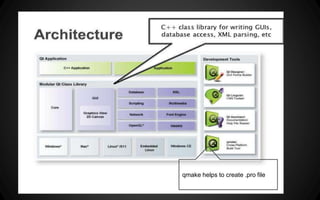
❏ The main component is a set of libraries, written
natively in C++. These libraries include: the core library
providing the most important stuff, the GUI library
providing the GUI components, the XML library.
❏ Meta Object Compiler(moc) used to handle Qt’s C++
extensions.This extends C++ a little bit, adding nice
features like the signals/slots mechanism
❏ The GUI designer tool and the UIC. Qt Designer is a
graphical tool to create GUIs visually and save them to
XML files, and the UIC is a command-line tool to
translate those XML files to C++ code.
❏ Qt Linguist, tool to internationalize
applications.Qt Linguist is a graphical tool for
translator to edit those XML files and provide
translations.
❏ The qmake tool, used to automate build
process, so you don't have to run MOC, C++
compiler, UIC and other things manually.
❏ The Qt Creator, a graphical IDE to integrate
all the stuff described above into a single
environment.
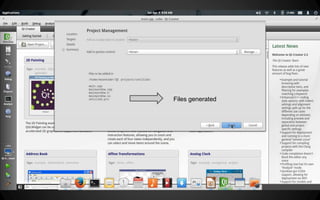
qmake helps to create .pro file
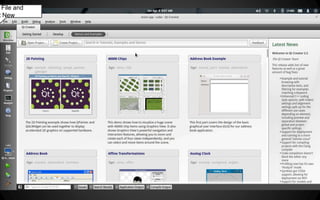
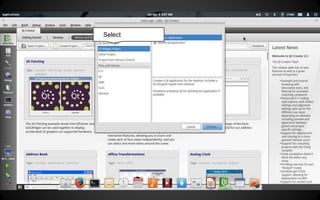
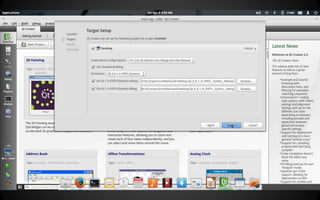
Creating a Qt project
File and
t New
Select
Files generated
Examples
Similarly a 2D graphic
such as a circle,ellipse
can be built
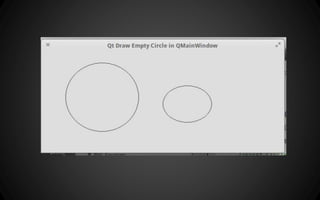
The code uses QPainter on QMainWindow. Circle
drawing is done during gui decoration process , it is
not drawn as an animation.Drawing empty circle on
QMainWindow involves subclassing of
QMainWindow and overriding
paintEvent(QPaintEvent*) method.
using Coin3D and SoQt
3-D Graphics in Qt
❏ Coin3D is a high level 3D graphics toolkit for
developing cross-platform 3D visualizations.
❏ It uses scene graph data structures to render
3D graphics.
❏ Based on the de facto standard Open
Inventor, Coin3D is a set of libraries for
creating 3D graphics applications.
Coin3D
Few Steps to install
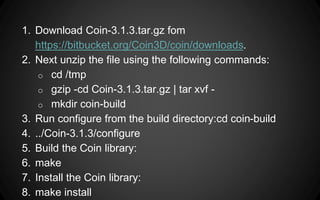
1. Download Coin-3.1.3.tar.gz fom
https://bitbucket.org/Coin3D/coin/downloads.
2. Next unzip the file using the following commands:
o cd /tmp
o gzip -cd Coin-3.1.3.tar.gz | tar xvf -
o mkdir coin-build
3. Run configure from the build directory:cd coin-build
4. ../Coin-3.1.3/configure
5. Build the Coin library:
6. make
7. Install the Coin library:
8. make install
Just install:libsoqt40-dev
SoQt is a library which provides bridge
between Coin3D visualistion and Qt
2D Graphical Interface.
Linking
Add in the pro file:
LIBS += -lCoin3D -lSoQt
Open Inventor
Open Inventor is a “scenegraph“ graphics API:
All visible objects are stored in a scenegraph
Capabilities of Open Inventor
❏ Easy construction of 3D scenes
❏ User interaction
❏ Animation
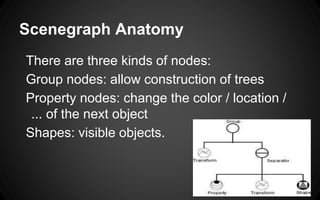
Scenegraph Anatomy
There are three kinds of nodes:
Group nodes: allow construction of trees
Property nodes: change the color / location /
... of the next object
Shapes: visible objects.
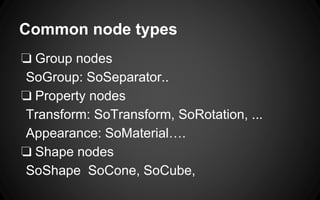
Common node types
❏ Group nodes
SoGroup: SoSeparator..
❏ Property nodes
Transform: SoTransform, SoRotation, ...
Appearance: SoMaterial….
❏ Shape nodes
SoShape SoCone, SoCube,
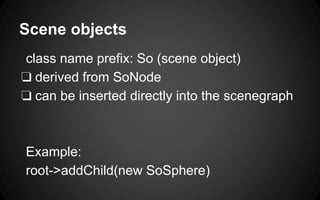
Scene objects
class name prefix: So (scene object)
❏ derived from SoNode
❏ can be inserted directly into the scenegraph
Example:
root->addChild(new SoSphere)
#
<Inventor/Qt/viewers/SoQtExaminerViewer.h>
#include <Inventor/nodes/SoSeparator.h>
#include <Inventor/nodes/SoCube.h>
int main(int argc, char ** argv)
{
QWidget * mainwin = SoQt::init(argc, argv,
argv[0]);
SoSeparator * root = new SoSeparator;
root->ref();
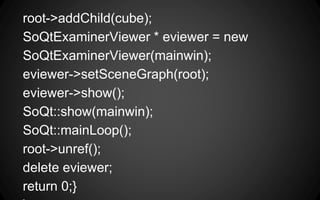
root->addChild(cube);
SoQtExaminerViewer * eviewer = new
SoQtExaminerViewer(mainwin);
eviewer->setSceneGraph(root);
eviewer->show();
SoQt::show(mainwin);
SoQt::mainLoop();
root->unref();
delete eviewer;
return 0;}
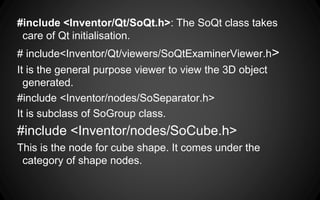
#include <Inventor/Qt/SoQt.h>: The SoQt class takes
care of Qt initialisation.
# include<Inventor/Qt/viewers/SoQtExaminerViewer.h>
It is the general purpose viewer to view the 3D object
generated.
#include <Inventor/nodes/SoSeparator.h>
It is subclass of SoGroup class.
#include <Inventor/nodes/SoCube.h>
This is the node for cube shape. It comes under the
category of shape nodes.
❏ QWidget * mainwin = SoQt::init(argc, argv, argv[0]);
SoQt ::init with a string creates a QApplication and its
main window, and returns its window handle.
❏ SoSeparator * root = new SoSeparator;
root->ref();
The root node of the scene graph is created here.
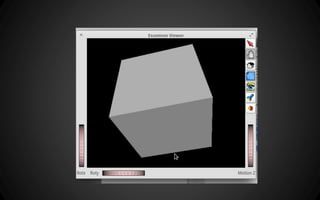
❏ SoCube *cube = new SoCube;
root->addChild(cube);
A cube is added to the scene as a child to the root node.
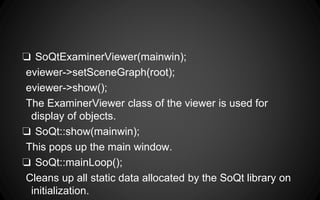
❏ SoQtExaminerViewer(mainwin);
eviewer->setSceneGraph(root);
eviewer->show();
The ExaminerViewer class of the viewer is used for
display of objects.
❏ SoQt::show(mainwin);
This pops up the main window.
❏ SoQt::mainLoop();
Cleans up all static data allocated by the SoQt library on
initialization.
Thank You

Untitled presentation(4)

  • 1.
  • 2.
    What is Qt? ❏Cross-platform application development framework. ❏ Used to create graphical user interfaces. ❏ It can be used with several different programming languages. ❏ “t” in Qt refers to toolkit which defines Qt much better. Therefore, it can effectively be defined as a set of tools.
  • 3.
    Qt TOOLS ❏ Themain component is a set of libraries, written natively in C++. These libraries include: the core library providing the most important stuff, the GUI library providing the GUI components, the XML library. ❏ Meta Object Compiler(moc) used to handle Qt’s C++ extensions.This extends C++ a little bit, adding nice features like the signals/slots mechanism ❏ The GUI designer tool and the UIC. Qt Designer is a graphical tool to create GUIs visually and save them to XML files, and the UIC is a command-line tool to translate those XML files to C++ code.
  • 4.
    ❏ Qt Linguist,tool to internationalize applications.Qt Linguist is a graphical tool for translator to edit those XML files and provide translations. ❏ The qmake tool, used to automate build process, so you don't have to run MOC, C++ compiler, UIC and other things manually. ❏ The Qt Creator, a graphical IDE to integrate all the stuff described above into a single environment.
  • 5.
    qmake helps tocreate .pro file
  • 6.
  • 7.
  • 8.
  • 10.
  • 11.
  • 16.
    Similarly a 2Dgraphic such as a circle,ellipse can be built
  • 17.
    The code usesQPainter on QMainWindow. Circle drawing is done during gui decoration process , it is not drawn as an animation.Drawing empty circle on QMainWindow involves subclassing of QMainWindow and overriding paintEvent(QPaintEvent*) method.
  • 19.
    using Coin3D andSoQt 3-D Graphics in Qt
  • 20.
    ❏ Coin3D isa high level 3D graphics toolkit for developing cross-platform 3D visualizations. ❏ It uses scene graph data structures to render 3D graphics. ❏ Based on the de facto standard Open Inventor, Coin3D is a set of libraries for creating 3D graphics applications.
  • 21.
  • 22.
    1. Download Coin-3.1.3.tar.gzfom https://bitbucket.org/Coin3D/coin/downloads. 2. Next unzip the file using the following commands: o cd /tmp o gzip -cd Coin-3.1.3.tar.gz | tar xvf - o mkdir coin-build 3. Run configure from the build directory:cd coin-build 4. ../Coin-3.1.3/configure 5. Build the Coin library: 6. make 7. Install the Coin library: 8. make install
  • 23.
    Just install:libsoqt40-dev SoQt isa library which provides bridge between Coin3D visualistion and Qt 2D Graphical Interface.
  • 24.
    Linking Add in thepro file: LIBS += -lCoin3D -lSoQt
  • 25.
    Open Inventor Open Inventoris a “scenegraph“ graphics API: All visible objects are stored in a scenegraph
  • 26.
    Capabilities of OpenInventor ❏ Easy construction of 3D scenes ❏ User interaction ❏ Animation
  • 27.
    Scenegraph Anatomy There arethree kinds of nodes: Group nodes: allow construction of trees Property nodes: change the color / location / ... of the next object Shapes: visible objects.
  • 28.
    Common node types ❏Group nodes SoGroup: SoSeparator.. ❏ Property nodes Transform: SoTransform, SoRotation, ... Appearance: SoMaterial…. ❏ Shape nodes SoShape SoCone, SoCube,
  • 29.
    Scene objects class nameprefix: So (scene object) ❏ derived from SoNode ❏ can be inserted directly into the scenegraph Example: root->addChild(new SoSphere)
  • 30.
    # <Inventor/Qt/viewers/SoQtExaminerViewer.h> #include <Inventor/nodes/SoSeparator.h> #include <Inventor/nodes/SoCube.h> intmain(int argc, char ** argv) { QWidget * mainwin = SoQt::init(argc, argv, argv[0]); SoSeparator * root = new SoSeparator; root->ref();
  • 31.
    root->addChild(cube); SoQtExaminerViewer * eviewer= new SoQtExaminerViewer(mainwin); eviewer->setSceneGraph(root); eviewer->show(); SoQt::show(mainwin); SoQt::mainLoop(); root->unref(); delete eviewer; return 0;}
  • 33.
    #include <Inventor/Qt/SoQt.h>: TheSoQt class takes care of Qt initialisation. # include<Inventor/Qt/viewers/SoQtExaminerViewer.h> It is the general purpose viewer to view the 3D object generated. #include <Inventor/nodes/SoSeparator.h> It is subclass of SoGroup class. #include <Inventor/nodes/SoCube.h> This is the node for cube shape. It comes under the category of shape nodes.
  • 34.
    ❏ QWidget *mainwin = SoQt::init(argc, argv, argv[0]); SoQt ::init with a string creates a QApplication and its main window, and returns its window handle. ❏ SoSeparator * root = new SoSeparator; root->ref(); The root node of the scene graph is created here. ❏ SoCube *cube = new SoCube; root->addChild(cube); A cube is added to the scene as a child to the root node.
  • 35.
    ❏ SoQtExaminerViewer(mainwin); eviewer->setSceneGraph(root); eviewer->show(); The ExaminerViewerclass of the viewer is used for display of objects. ❏ SoQt::show(mainwin); This pops up the main window. ❏ SoQt::mainLoop(); Cleans up all static data allocated by the SoQt library on initialization.
  • 36.