電子工程系應 用 電 子 組
電 腦 遊 戲 設 計 組
Unity遊戲程式設計(05)
2D移動與碰撞處理II
吳錫修
Oct 24, 2016
shapethefuture
 遊戲世界裡必須透過碰撞器來模擬現實世界的物體碰撞情形
 碰撞器是在元件加入⼀層透明的偵測層,代表元件物理效應發⽣的
範圍
 選單命令Component>Physics 2D內可找到所有碰撞器
 Rigidbody 2D (剛體)
 具備物理性質:摩擦力 (Mass)、線性阻力 ( Linear Drag)、旋轉阻力
(Angular Drag)、重力 (Gravity Scale)
 剛體會被碰撞器阻擋
 IsKinematic屬性
 設定為運動物件,本身不受重力影響
 埸景中的活動物件都應使用剛體來實現
剛體、碰撞器與觸發器 1/3
2 Wu, ShyiShiou Dept. of E.E., NKUT
shapethefuture
 碰撞器
 Box Collider 2D (方框碰撞器)
 適用於矩形物件上
 Circle Collider 2D (圓形碰撞器)
 適用於球形物件上
 Edge Collider 2D (邊緣碰撞器)
 適用於邊界、地板或天花板
 可編輯/調整線段節點
 Polygon Collider 2D (多邊形碰撞器)
 能較精準貼近不規則物件,但會耗用較多運算資源
剛體、碰撞器與觸發器 2/3
3 Wu, ShyiShiou Dept. of E.E., NKUT
shapethefuture
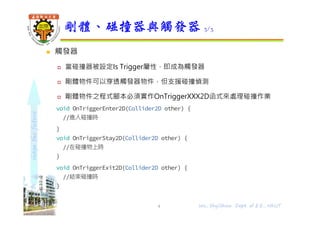
 觸發器
 當碰撞器被設定Is Trigger屬性,即成為觸發器
 剛體物件可以穿透觸發器物件,但支援碰撞偵測
 剛體物件之程式腳本必須實作OnTriggerXXX2D函式來處理碰撞作業
void OnTriggerEnter2D(Collider2D other) {
//進入碰撞時
}
void OnTriggerStay2D(Collider2D other) {
//在碰撞物上時
}
void OnTriggerExit2D(Collider2D other) {
//結束碰撞時
}
剛體、碰撞器與觸發器 3/3
4 Wu, ShyiShiou Dept. of E.E., NKUT
shapethefuture
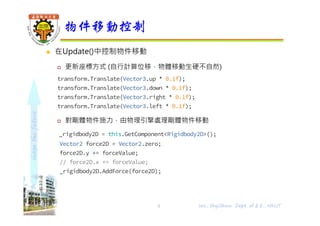
 在Update()中控制物件移動
 更新座標方式 (自行計算位移,物體移動⽣硬不自然)
transform.Translate(Vector3.up * 0.1f);
transform.Translate(Vector3.down * 0.1f);
transform.Translate(Vector3.right * 0.1f);
transform.Translate(Vector3.left * 0.1f);
 對剛體物件施力,由物理引擎處理剛體物件移動
_rigidbody2D = this.GetComponent<Rigidbody2D>();
Vector2 force2D = Vector2.zero;
force2D.y += forceValue;
// force2D.x += forceValue;
_rigidbody2D.AddForce(force2D);
物件移動控制
5 Wu, ShyiShiou Dept. of E.E., NKUT
shapethefuture
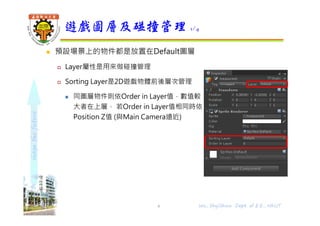
 預設場景上的物件都是放置在Default圖層
 Layer屬性是用來做碰撞管理
 Sorting Layer是2D遊戲物體前後層次管理
 同圖層物件則依Order in Layer值,數值較
大者在上層, 若Order in Layer值相同時依
Position Z值 (與Main Camera遠近)
遊戲圖層及碰撞管理 1/4
Wu, ShyiShiou Dept. of E.E., NKUT6
shapethefuture
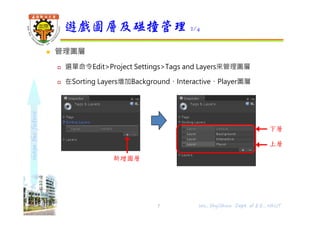
 管理圖層
 選單命令Edit>Project Settings>Tags and Layers來管理圖層
 在Sorting Layers增加Background、Interactive、Player圖層
遊戲圖層及碰撞管理 2/4
下層
上層
Wu, ShyiShiou Dept. of E.E., NKUT7
新增圖層
shapethefuture
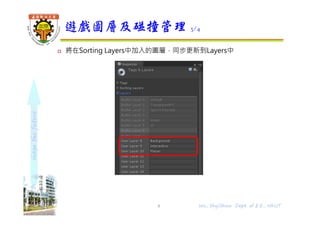
 將在Sorting Layers中加入的圖層,同步更新到Layers中
遊戲圖層及碰撞管理 3/4
8 Wu, ShyiShiou Dept. of E.E., NKUT
shapethefuture
 碰撞管理
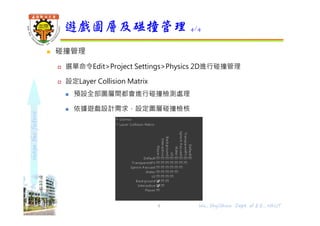
 選單命令Edit>Project Settings>Physics 2D進行碰撞管理
 設定Layer Collision Matrix
 預設全部圖層間都會進行碰撞檢測處理
 依據遊戲設計需求,設定圖層碰撞檢核
遊戲圖層及碰撞管理 4/4
9 Wu, ShyiShiou Dept. of E.E., NKUT
shapethefuture
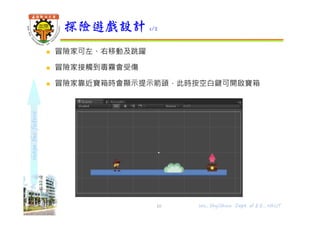
 冒險家可左、右移動及跳躍
 冒險家接觸到毒霧會受傷
 冒險家靠近寶箱時會顯示提示箭頭,此時按空白鍵可開啟寶箱
探險遊戲設計 1/2
10 Wu, ShyiShiou Dept. of E.E., NKUT
shapethefuture
 新增2D遊戲專案
 將預設場景以adventure名稱存檔
 將floor.png、trap0.png、trap1.png、trap2.png、tresure0.png、
treasure1.png、up.png及主角分鏡素材滙入到專案AssetsSprite
資料夾
 Main Camera
 Size設定為16
 Background設定為深藍色
探險遊戲設計 2/2
11 Wu, ShyiShiou Dept. of E.E., NKUT
shapethefuture
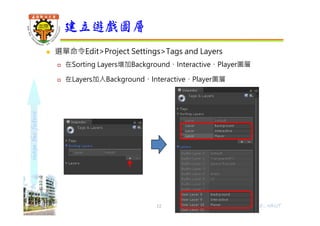
 選單命令Edit>Project Settings>Tags and Layers
 在Sorting Layers增加Background、Interactive、Player圖層
 在Layers加入Background、Interactive、Player圖層
建立遊戲圖層
12 Wu, ShyiShiou Dept. of E.E., NKUT
shapethefuture
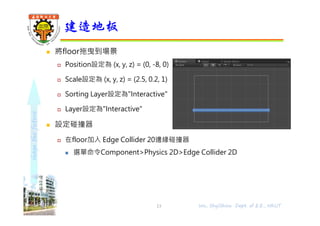
 將floor拖曳到場景
 Position設定為 (x, y, z) = (0, -8, 0)
 Scale設定為 (x, y, z) = (2.5, 0.2, 1)
 Sorting Layer設定為"Interactive"
 Layer設定為"Interactive"
 設定碰撞器
 在floor加入 Edge Collider 20邊緣碰撞器
 選單命令Component>Physics 2D>Edge Collider 2D
建造地板
13 Wu, ShyiShiou Dept. of E.E., NKUT
shapethefuture
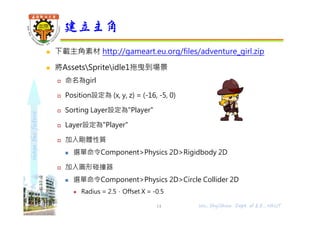
 下載主角素材 http://gameart.eu.org/files/adventure_girl.zip
 將AssetsSpriteidle1拖曳到場景
 命名為girl
 Position設定為 (x, y, z) = (-16, -5, 0)
 Sorting Layer設定為"Player"
 Layer設定為"Player"
 加入剛體性質
 選單命令Component>Physics 2D>Rigidbody 2D
 加入圓形碰撞器
 選單命令Component>Physics 2D>Circle Collider 2D
 Radius = 2.5,Offset X = -0.5
建立主角
14 Wu, ShyiShiou Dept. of E.E., NKUT
shapethefuture
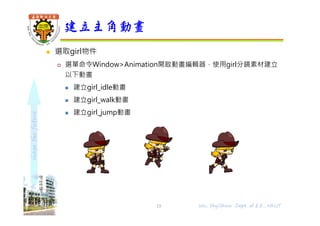
 選取girl物件
 選單命令Window>Animation開啟動畫編輯器,使用girl分鏡素材建立
以下動畫
 建立girl_idle動畫
 建立girl_walk動畫
 建立girl_jump動畫
建立主角動畫
15 Wu, ShyiShiou Dept. of E.E., NKUT
shapethefuture
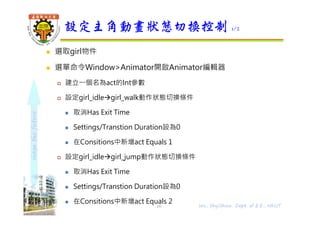
 選取girl物件
 選單命令Window>Animator開啟Animator編輯器
 建立⼀個名為act的Int參數
 設定girl_idlegirl_walk動作狀態切換條件
 取消Has Exit Time
 Settings/Transtion Duration設為0
 在Consitions中新增act Equals 1
 設定girl_idlegirl_jump動作狀態切換條件
 取消Has Exit Time
 Settings/Transtion Duration設為0
 在Consitions中新增act Equals 2
設定主角動畫狀態切換控制 1/2
16 Wu, ShyiShiou Dept. of E.E., NKUT
shapethefuture
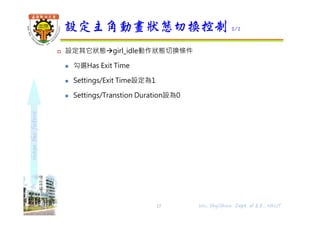
 設定其它狀態girl_idle動作狀態切換條件
 勾選Has Exit Time
 Settings/Exit Time設定為1
 Settings/Transtion Duration設為0
設定主角動畫狀態切換控制 2/2
17 Wu, ShyiShiou Dept. of E.E., NKUT
shapethefuture
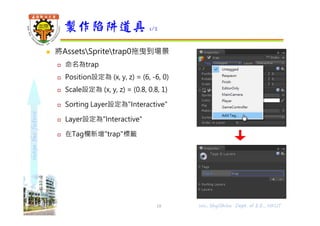
 將AssetsSpritetrap0拖曳到場景
 命名為trap
 Position設定為 (x, y, z) = (6, -6, 0)
 Scale設定為 (x, y, z) = (0.8, 0.8, 1)
 Sorting Layer設定為"Interactive"
 Layer設定為"Interactive"
 在Tag欄新增"trap"標籤
製作陷阱道具 1/2
18 Wu, ShyiShiou Dept. of E.E., NKUT
shapethefuture
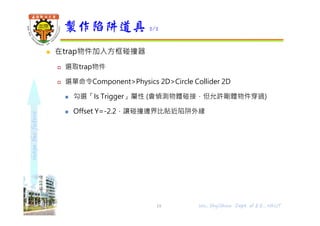
 在trap物件加入方框碰撞器
 選取trap物件
 選單命令Component>Physics 2D>Circle Collider 2D
 勾選「Is Trigger」屬性 (會偵測物體碰接,但允許剛體物件穿過)
 Offset Y=-2.2,讓碰撞邊界比貼近陷阱外緣
製作陷阱道具 2/2
19 Wu, ShyiShiou Dept. of E.E., NKUT
shapethefuture
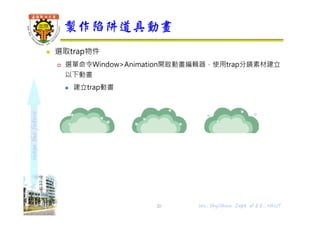
 選取trap物件
 選單命令Window>Animation開啟動畫編輯器,使用trap分鏡素材建立
以下動畫
 建立trap動畫
製作陷阱道具動畫
20 Wu, ShyiShiou Dept. of E.E., NKUT
shapethefuture
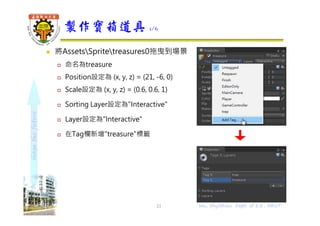
 將AssetsSpritetreasures0拖曳到場景
 命名為treasure
 Position設定為 (x, y, z) = (21, -6, 0)
 Scale設定為 (x, y, z) = (0.6, 0.6, 1)
 Sorting Layer設定為"Interactive"
 Layer設定為"Interactive"
 在Tag欄新增"treasure"標籤
製作寶箱道具 1/6
21 Wu, ShyiShiou Dept. of E.E., NKUT
shapethefuture
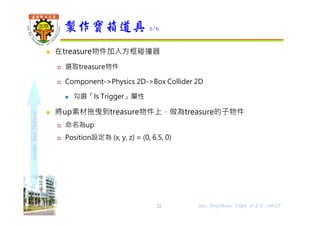
 在treasure物件加入方框碰撞器
 選取treasure物件
 Component->Physics 2D->Box Collider 2D
 勾選「Is Trigger」屬性
 將up素材拖曳到treasure物件上,做為treasure的子物件
 命名為up
 Position設定為 (x, y, z) = (0, 6.5, 0)
製作寶箱道具 2/6
22 Wu, ShyiShiou Dept. of E.E., NKUT
shapethefuture
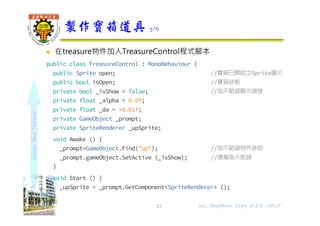
 在treasure物件加入TreasureControl程式腳本
public class TreasureControl : MonoBehaviour {
public Sprite open; //寶箱已開啟之Sprite圖片
public bool isOpen; //寶箱狀態
private bool _isShow = false; //指示箭頭顯示旗號
private float _alpha = 0.0f;
private float _da = -0.01f;
private GameObject _prompt;
private SpriteRenderer _upSprite;
void Awake () {
_prompt=GameObject.Find("up"); //指示箭頭物件參照
_prompt.gameObject.SetActive (_isShow); //隱藏指示箭頭
}
void Start () {
_upSprite = _prompt.GetComponent<SpriteRenderer> ();
}
製作寶箱道具 3/6
23 Wu, ShyiShiou Dept. of E.E., NKUT
shapethefuture
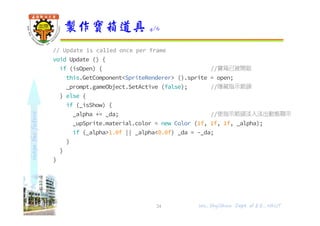
// Update is called once per frame
void Update () {
if (isOpen) { //寶箱已被開啟
this.GetComponent<SpriteRenderer> ().sprite = open;
_prompt.gameObject.SetActive (false); //隱藏指示箭頭
} else {
if (_isShow) {
_alpha += _da; //使指示箭頭淡入淡出動態顯示
_upSprite.material.color = new Color (1f, 1f, 1f, _alpha);
if (_alpha>1.0f || _alpha<0.0f) _da = -_da;
}
}
}
製作寶箱道具 4/6
24 Wu, ShyiShiou Dept. of E.E., NKUT
shapethefuture
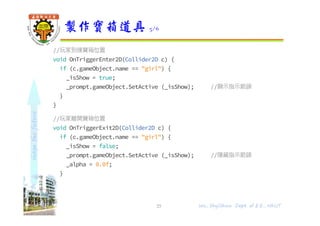
//玩家到達寶箱位置
void OnTriggerEnter2D(Collider2D c) {
if (c.gameObject.name == "girl") {
_isShow = true;
_prompt.gameObject.SetActive (_isShow); //顯示指示箭頭
}
}
//玩家離開寶箱位置
void OnTriggerExit2D(Collider2D c) {
if (c.gameObject.name == "girl") {
_isShow = false;
_prompt.gameObject.SetActive (_isShow); //隱藏指示箭頭
_alpha = 0.0f;
}
}
}
製作寶箱道具 5/6
25 Wu, ShyiShiou Dept. of E.E., NKUT
shapethefuture
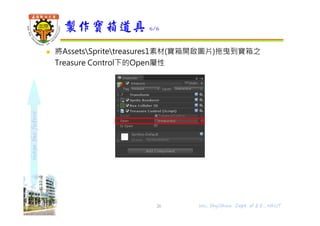
 將AssetsSpritetreasures1素材(寶箱開啟圖片)拖曳到寶箱之
Treasure Control下的Open屬性
製作寶箱道具 6/6
26 Wu, ShyiShiou Dept. of E.E., NKUT
shapethefuture
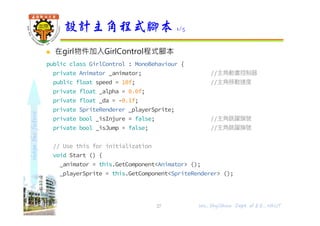
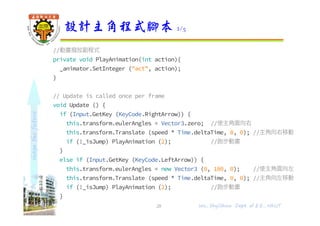
 在girl物件加入GirlControl程式腳本
public class GirlControl : MonoBehaviour {
private Animator _animator; //主角動畫控制器
public float speed = 10f; //主角移動速度
private float _alpha = 0.0f;
private float _da = -0.1f;
private SpriteRenderer _playerSprite;
private bool _isInjure = false; //主角跳躍旗號
private bool _isJump = false; //主角跳躍旗號
// Use this for initialization
void Start () {
_animator = this.GetComponent<Animator> ();
_playerSprite = this.GetComponent<SpriteRenderer> ();
}
設計主角程式腳本 1/5
27 Wu, ShyiShiou Dept. of E.E., NKUT
shapethefuture
//動畫撥放副程式
private void PlayAnimation(int action){
_animator.SetInteger ("act", action);
}
// Update is called once per frame
void Update () {
if (Input.GetKey (KeyCode.RightArrow)) {
this.transform.eulerAngles = Vector3.zero; //使主角面向右
this.transform.Translate (speed * Time.deltaTime, 0, 0); //主角向右移動
if (!_isJump) PlayAnimation (2); //跑步動畫
}
else if (Input.GetKey (KeyCode.LeftArrow)) {
this.transform.eulerAngles = new Vector3 (0, 180, 0); //使主角面向左
this.transform.Translate (speed * Time.deltaTime, 0, 0); //主角向左移動
if (!_isJump) PlayAnimation (2); //跑步動畫
}
設計主角程式腳本 2/5
28 Wu, ShyiShiou Dept. of E.E., NKUT
shapethefuture
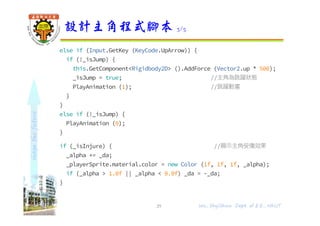
else if (Input.GetKey (KeyCode.UpArrow)) {
if (!_isJump) {
this.GetComponent<Rigidbody2D> ().AddForce (Vector2.up * 500);
_isJump = true; //主角為跳躍狀態
PlayAnimation (1); //跳躍動畫
}
}
else if (!_isJump) {
PlayAnimation (0);
}
if (_isInjure) { //顯示主角受傷效果
_alpha += _da;
_playerSprite.material.color = new Color (1f, 1f, 1f, _alpha);
if (_alpha > 1.0f || _alpha < 0.0f) _da = -_da;
}
}
設計主角程式腳本 3/5
29 Wu, ShyiShiou Dept. of E.E., NKUT
shapethefuture
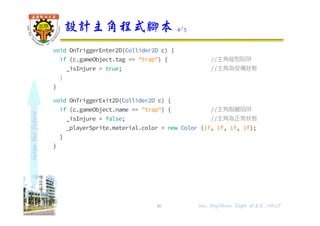
void OnTriggerEnter2D(Collider2D c) {
if (c.gameObject.tag == "trap") { //主角碰到陷阱
_isInjure = true; //主角為受傷狀態
}
}
void OnTriggerExit2D(Collider2D c) {
if (c.gameObject.name == "trap") { //主角脫離陷阱
_isInjure = false; //主角為正常狀態
_playerSprite.material.color = new Color (1f, 1f, 1f, 1f);
}
}
設計主角程式腳本 4/5
30 Wu, ShyiShiou Dept. of E.E., NKUT
shapethefuture
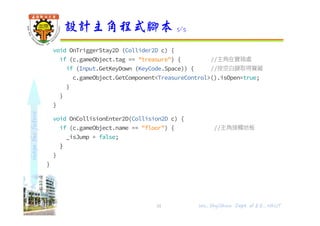
void OnTriggerStay2D (Collider2D c) {
if (c.gameObject.tag == "treasure") { //主角在寶箱處
if (Input.GetKeyDown (KeyCode.Space)) { //按空白鍵取得寶藏
c.gameObject.GetComponent<TreasureControl>().isOpen=true;
}
}
}
void OnCollisionEnter2D(Collision2D c) {
if (c.gameObject.name == "floor") { //主角接觸地板
_isJump = false;
}
}
}
設計主角程式腳本 5/5
31 Wu, ShyiShiou Dept. of E.E., NKUT

Unity遊戲程式設計(05) 2D移動與碰撞處理II