Video
Jessica Collins
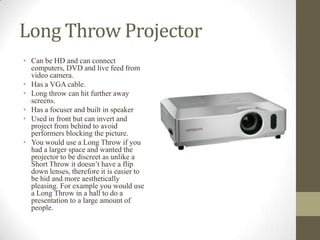
Long Throw Projector
• Can be HD and can connect
computers, DVD and live feed from
video camera.
• Has a VGA cable.
• Long throw can hit further away
screens.
• Has a focuser and built in speaker
• Used in front but can invert and
project from behind to avoid
performers blocking the picture.
• You would use a Long Throw if you
had a larger space and wanted the
projector to be discreet as unlike a
Short Throw it doesn’t have a flip
down lenses, therefore it is easier to
be hid and more aesthetically
pleasing. For example you would use
a Long Throw in a hall to do a
presentation to a large amount of
people.
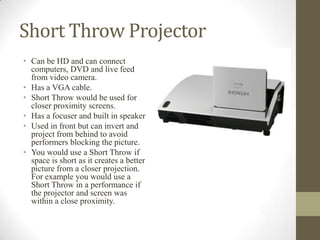
Short Throw Projector
• Can be HD and can connect
computers, DVD and live feed
from video camera.
• Has a VGA cable.
• Short Throw would be used for
closer proximity screens.
• Has a focuser and built in speaker
• Used in front but can invert and
project from behind to avoid
performers blocking the picture.
• You would use a Short Throw if
space is short as it creates a better
picture from a closer projection.
For example you would use a
Short Throw in a performance if
the projector and screen was
within a close proximity.
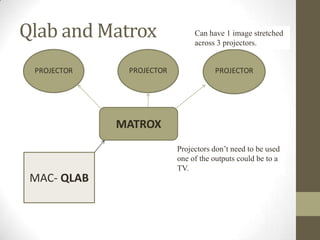
Qlab and Matrox
MAC- QLAB
MATROX
Can have 1 image stretched
across 3 projectors.
Projectors don’t need to be used
one of the outputs could be to a
TV.
How to use Qlab..
• Only works on MAC’s.
• Allows you to drop in MP3s and play multiple videos and
videos need to be converted into QuickTime.
• Can’t work without a matrox.
Step by Step
• Press GO.
• Drop MP3 into Qlab (you can change name to sound queue).
• Click on preferences and connect Patch 1 to USB Audio
Codec.
• After you’ve done this the red X will disappear meaning it is now
loaded.

Unit 65 video and projection

  • 1.
  • 2.
    Long Throw Projector •Can be HD and can connect computers, DVD and live feed from video camera. • Has a VGA cable. • Long throw can hit further away screens. • Has a focuser and built in speaker • Used in front but can invert and project from behind to avoid performers blocking the picture. • You would use a Long Throw if you had a larger space and wanted the projector to be discreet as unlike a Short Throw it doesn’t have a flip down lenses, therefore it is easier to be hid and more aesthetically pleasing. For example you would use a Long Throw in a hall to do a presentation to a large amount of people.
  • 3.
    Short Throw Projector •Can be HD and can connect computers, DVD and live feed from video camera. • Has a VGA cable. • Short Throw would be used for closer proximity screens. • Has a focuser and built in speaker • Used in front but can invert and project from behind to avoid performers blocking the picture. • You would use a Short Throw if space is short as it creates a better picture from a closer projection. For example you would use a Short Throw in a performance if the projector and screen was within a close proximity.
  • 4.
    Qlab and Matrox MAC-QLAB MATROX Can have 1 image stretched across 3 projectors. Projectors don’t need to be used one of the outputs could be to a TV.
  • 5.
    How to useQlab.. • Only works on MAC’s. • Allows you to drop in MP3s and play multiple videos and videos need to be converted into QuickTime. • Can’t work without a matrox. Step by Step • Press GO. • Drop MP3 into Qlab (you can change name to sound queue). • Click on preferences and connect Patch 1 to USB Audio Codec. • After you’ve done this the red X will disappear meaning it is now loaded.