SOUND
Jessica Collins
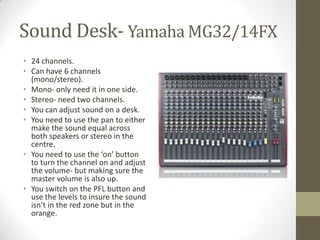
Sound Desk- Yamaha MG32/14FX
• 24 channels.
• Can have 6 channels
(mono/stereo).
• Mono- only need it in one side.
• Stereo- need two channels.
• You can adjust sound on a desk.
• You need to use the pan to either
make the sound equal across
both speakers or stereo in the
centre.
• You need to use the ‘on’ button
to turn the channel on and adjust
the volume- but making sure the
master volume is also up.
• You switch on the PFL button and
use the levels to insure the sound
isn’t in the red zone but in the
orange.
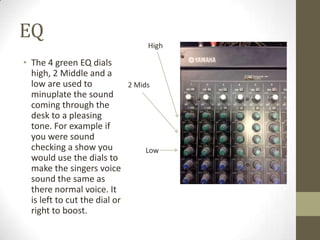
EQ
• The 4 green EQ dials
high, 2 Middle and a
low are used to
minuplate the sound
coming through the
desk to a pleasing
tone. For example if
you were sound
checking a show you
would use the dials to
make the singers voice
sound the same as
there normal voice. It
is left to cut the dial or
right to boost.
High
2 Mids
Low
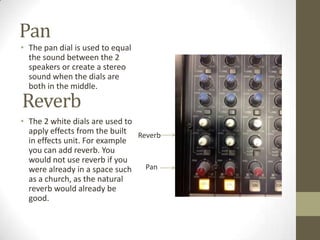
Pan
• The pan dial is used to equal
the sound between the 2
speakers or create a stereo
sound when the dials are
both in the middle.
• The 2 white dials are used to
apply effects from the built
in effects unit. For example
you can add reverb. You
would not use reverb if you
were already in a space such
as a church, as the natural
reverb would already be
good.
Pan
Reverb
Reverb
PFL and Gain
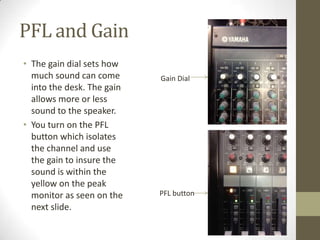
• The gain dial sets how
much sound can come
into the desk. The gain
allows more or less
sound to the speaker.
• You turn on the PFL
button which isolates
the channel and use
the gain to insure the
sound is within the
yellow on the peak
monitor as seen on the
next slide.
PFL button
Gain Dial
Peak Monitor
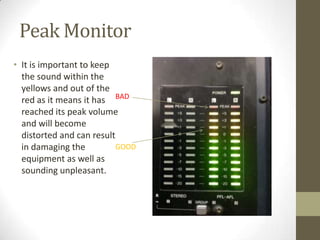
• It is important to keep
the sound within the
yellows and out of the
red as it means it has
reached its peak volume
and will become
distorted and can result
in damaging the
equipment as well as
sounding unpleasant.
GOOD
BAD
Speakers- Passive/Active
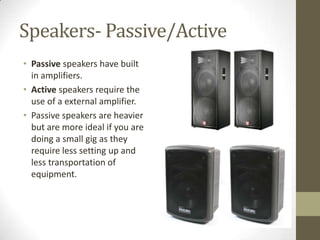
• Passive speakers have built
in amplifiers.
• Active speakers require the
use of a external amplifier.
• Passive speakers are heavier
but are more ideal if you are
doing a small gig as they
require less setting up and
less transportation of
equipment.
Sound Accessories
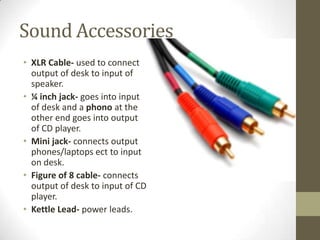
• XLR Cable- used to connect
output of desk to input of
speaker.
• ¼ inch jack- goes into input
of desk and a phono at the
other end goes into output
of CD player.
• Mini jack- connects output
phones/laptops ect to input
on desk.
• Figure of 8 cable- connects
output of desk to input of CD
player.
• Kettle Lead- power leads.

Unit 65 sound

  • 1.
  • 2.
    Sound Desk- YamahaMG32/14FX • 24 channels. • Can have 6 channels (mono/stereo). • Mono- only need it in one side. • Stereo- need two channels. • You can adjust sound on a desk. • You need to use the pan to either make the sound equal across both speakers or stereo in the centre. • You need to use the ‘on’ button to turn the channel on and adjust the volume- but making sure the master volume is also up. • You switch on the PFL button and use the levels to insure the sound isn’t in the red zone but in the orange.
  • 3.
    EQ • The 4green EQ dials high, 2 Middle and a low are used to minuplate the sound coming through the desk to a pleasing tone. For example if you were sound checking a show you would use the dials to make the singers voice sound the same as there normal voice. It is left to cut the dial or right to boost. High 2 Mids Low
  • 4.
    Pan • The pandial is used to equal the sound between the 2 speakers or create a stereo sound when the dials are both in the middle. • The 2 white dials are used to apply effects from the built in effects unit. For example you can add reverb. You would not use reverb if you were already in a space such as a church, as the natural reverb would already be good. Pan Reverb Reverb
  • 5.
    PFL and Gain •The gain dial sets how much sound can come into the desk. The gain allows more or less sound to the speaker. • You turn on the PFL button which isolates the channel and use the gain to insure the sound is within the yellow on the peak monitor as seen on the next slide. PFL button Gain Dial
  • 6.
    Peak Monitor • Itis important to keep the sound within the yellows and out of the red as it means it has reached its peak volume and will become distorted and can result in damaging the equipment as well as sounding unpleasant. GOOD BAD
  • 7.
    Speakers- Passive/Active • Passivespeakers have built in amplifiers. • Active speakers require the use of a external amplifier. • Passive speakers are heavier but are more ideal if you are doing a small gig as they require less setting up and less transportation of equipment.
  • 8.
    Sound Accessories • XLRCable- used to connect output of desk to input of speaker. • ¼ inch jack- goes into input of desk and a phono at the other end goes into output of CD player. • Mini jack- connects output phones/laptops ect to input on desk. • Figure of 8 cable- connects output of desk to input of CD player. • Kettle Lead- power leads.