


Unit - 1
Chapter
No.
Chapter
Name
Session
Number
Description Duration
(mins)
Mode of
delivery
Source of
material
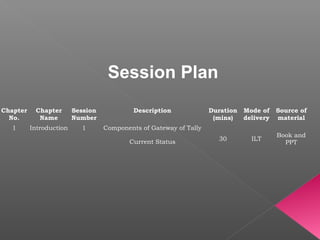
1 Introduction 1 Components of Gateway of Tally
30 ILT
Book and
PPTCurrent Status
Session Plan
Learning Objectives
•Tally.ERP 9
•The Hardware requirement for Tally software.
•The new features available in Tally.ERP 9.
Chapter 1 Introduction
Introduction
Tally.ERP 9 enables business owners to manage their business efficiently.
Features like remote access, support centre and security management required for
high-performance business management, all focused on delivering peace of mind
are included in Tally.ERP 9.
The multilingual capacity of Tally gives great freedom of communication so that
business accounts can be maintained in any language. Tally Silver / Gold
incorporate multiple language support at different levels.
Tally.ERP 9 provides you with two specialized features:
a. Single-User Licensing
b. Multi-User Licensing
Chapter 1 Introduction
The advanced technology empowering Tally.ERP 9 has the
following advantages:
Powerful remote capabilities that boost collaboration.
Input data can be entered in the language of your choice.
Language-specific aliases can be captured for all masters.
Reports, vouchers, and invoices can be printed in any language, based on the
information input in a language-specific alias through transliteration.
Data can be entered through normal and phonetic keyboards.
The list of built-in interface languages enables the interaction with the menu options
in a vernacular language.
Advanced TDS options.
Excise for Manufacturers.
Advanced Payroll Reports.
Computer Hardware requirements:
 
 Windows 98 or NT/ME. However these operating systems support only English 
and not the various languages available in Tally. To get the best out of Tally 9, 
the use of Windows 2000, 2003 or Windows XP is recommended.
 
 Intel Pentium IV or above and equivalent.
 
 256 MB Ram.
 
40 MB free Hard Disk Space.
 
533 Mhz Processor / its equivalent Processor.
New Features in Tally.ERP 9
•  Remote Access
• Tally.NET
• Control Centre
• Support Centre
• Enhanced Look and Feel
• Enhanced Payroll Compliance
• Excise for Manufacturers
• Enhanced Tax Deducted at Source
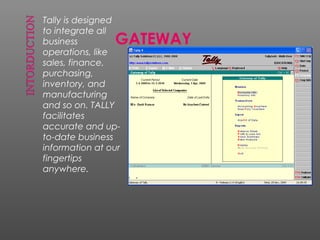
Tally is designed
to integrate all
business
operations, like
sales, finance,
purchasing,
inventory, and
manufacturing
and so on. TALLY
facilitates
accurate and up-
to-date business
information at our
fingertips
anywhere.
GATEWAY
 Simplicity: Tally.ERP 9 is easy to setup & it requires basic
knowledge of Accounts to use it.
 Speed: Tally.ERP 9 provides the capability to generate
accurate report, which inspire the Mgmt. to
take correct decision in favor of company.
 Support Center: Allows a user to directly post his supp
queries on functional and technical aspects
of the product.
 Tally. Net: Tally.NET establish a connection through
which the remote user can access the data without
copying/transferring.
 Remote Access: Tally provides remote capabilities to
access the data from any-where anytime.
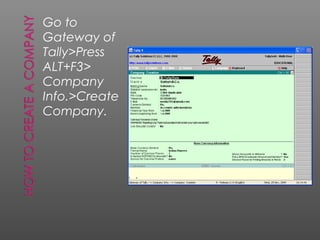
Go to
Gateway of
Tally>Press
ALT+F3>
Company
Info.>Create
Company.
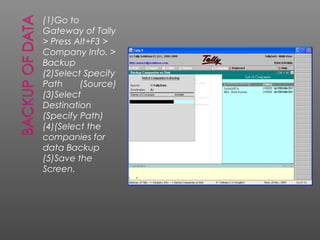
(1)Go to
Gateway of Tally
> Press Alt+F3 >
Company Info. >
Backup
(2)Select Specify
Path (Source)
(3)Select
Destination
(Specify Path)
(4)(Select the
companies for
data Backup
(5)Save the
Screen.
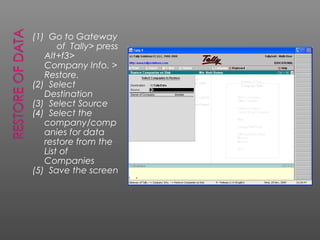
(1) Go to Gateway
of Tally> press
Alt+f3>
Company Info. >
Restore.
(2) Select
Destination
(3) Select Source
(4) Select the
company/comp
anies for data
restore from the
List of
Companies
(5) Save the screen
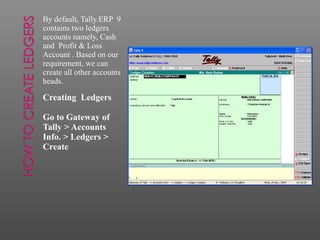
By default, Tally.ERP 9
contains two ledgers
accounts namely, Cash
and Profit & Loss
Account . Based on our
requirement, we can
create all other accounts
heads.
Creating Ledgers
Go to Gateway of
Tally > Accounts
Info. > Ledgers >
Create
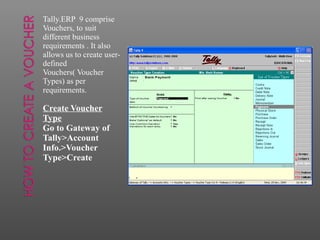
Tally.ERP 9 comprise
Vouchers, to suit
different business
requirements . It also
allows us to create user-
defined
Vouchers( Voucher
Types) as per
requirements.
Create Voucher
Type
Go to Gateway of
Tally>Account
Info.>Voucher
Type>Create
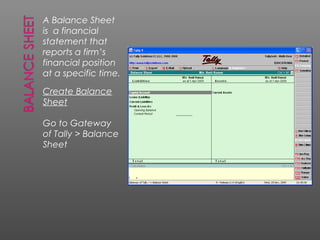
A Balance Sheet
is a financial
statement that
reports a firm’s
financial position
at a specific time.
Create Balance
Sheet
Go to Gateway
of Tally > Balance
Sheet
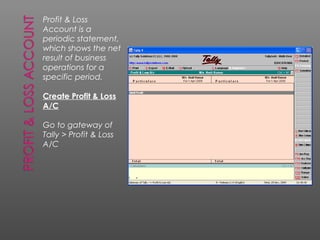
Profit & Loss
Account is a
periodic statement,
which shows the net
result of business
operations for a
specific period.
Create Profit & Loss
A/C
Go to gateway of
Tally > Profit & Loss
A/C

Unit 1 introduction to tally erp 9

  • 1.
  • 2.
    Chapter No. Chapter Name Session Number Description Duration (mins) Mode of delivery Sourceof material 1 Introduction 1 Components of Gateway of Tally 30 ILT Book and PPTCurrent Status Session Plan
  • 3.
    Learning Objectives •Tally.ERP 9 •TheHardware requirement for Tally software. •The new features available in Tally.ERP 9. Chapter 1 Introduction
  • 4.
    Introduction Tally.ERP 9 enablesbusiness owners to manage their business efficiently. Features like remote access, support centre and security management required for high-performance business management, all focused on delivering peace of mind are included in Tally.ERP 9. The multilingual capacity of Tally gives great freedom of communication so that business accounts can be maintained in any language. Tally Silver / Gold incorporate multiple language support at different levels. Tally.ERP 9 provides you with two specialized features: a. Single-User Licensing b. Multi-User Licensing Chapter 1 Introduction
  • 5.
    The advanced technologyempowering Tally.ERP 9 has the following advantages: Powerful remote capabilities that boost collaboration. Input data can be entered in the language of your choice. Language-specific aliases can be captured for all masters. Reports, vouchers, and invoices can be printed in any language, based on the information input in a language-specific alias through transliteration. Data can be entered through normal and phonetic keyboards. The list of built-in interface languages enables the interaction with the menu options in a vernacular language. Advanced TDS options. Excise for Manufacturers. Advanced Payroll Reports.
  • 6.
  • 7.
    New Features inTally.ERP 9 •  Remote Access • Tally.NET • Control Centre • Support Centre • Enhanced Look and Feel • Enhanced Payroll Compliance • Excise for Manufacturers • Enhanced Tax Deducted at Source
  • 10.
    Tally is designed tointegrate all business operations, like sales, finance, purchasing, inventory, and manufacturing and so on. TALLY facilitates accurate and up- to-date business information at our fingertips anywhere. GATEWAY
  • 11.
     Simplicity: Tally.ERP9 is easy to setup & it requires basic knowledge of Accounts to use it.  Speed: Tally.ERP 9 provides the capability to generate accurate report, which inspire the Mgmt. to take correct decision in favor of company.  Support Center: Allows a user to directly post his supp queries on functional and technical aspects of the product.  Tally. Net: Tally.NET establish a connection through which the remote user can access the data without copying/transferring.  Remote Access: Tally provides remote capabilities to access the data from any-where anytime.
  • 12.
  • 13.
    (1)Go to Gateway ofTally > Press Alt+F3 > Company Info. > Backup (2)Select Specify Path (Source) (3)Select Destination (Specify Path) (4)(Select the companies for data Backup (5)Save the Screen.
  • 14.
    (1) Go toGateway of Tally> press Alt+f3> Company Info. > Restore. (2) Select Destination (3) Select Source (4) Select the company/comp anies for data restore from the List of Companies (5) Save the screen
  • 15.
    By default, Tally.ERP9 contains two ledgers accounts namely, Cash and Profit & Loss Account . Based on our requirement, we can create all other accounts heads. Creating Ledgers Go to Gateway of Tally > Accounts Info. > Ledgers > Create
  • 16.
    Tally.ERP 9 comprise Vouchers,to suit different business requirements . It also allows us to create user- defined Vouchers( Voucher Types) as per requirements. Create Voucher Type Go to Gateway of Tally>Account Info.>Voucher Type>Create
  • 17.
    A Balance Sheet isa financial statement that reports a firm’s financial position at a specific time. Create Balance Sheet Go to Gateway of Tally > Balance Sheet
  • 18.
    Profit & Loss Accountis a periodic statement, which shows the net result of business operations for a specific period. Create Profit & Loss A/C Go to gateway of Tally > Profit & Loss A/C

Editor's Notes

  • #3 Trainer’s References: http://www.tallysolutions.com/website/CHM/TallyERP9/Licensing/work_in_educational__mode.htm
  • #4 Trainer’s References: Use the following link to get some more information about introduction on Tally.ERP 9 : http://www.slideshare.net/ravi78/tallyerp-9-a-preview Use the following link to get information about installation process. http://www.tallysolutions.com/website/CHM/TallyERP9/Installation/Installing_Tally.ERP_9_Single_User_Silver.htm 3) Use the following link to know about new features available in Tally.ERP 9 http://www.tallysolutions.com/website/CHM/TallyERP9/New_Features_in_Tally.ERP_9.htm
  • #5 Trainer’s References: Trainers can also discuss in brief about Tally Solutions saying the following details. About Tally Solutions Founded in 1986 With an objective to develop a cutting edge technology product that has a practical relevance to all Businesses. Tally accounting software by design provides a flexible and easily comprehensible business solution, of similar nature or qualities to the manual accounting system, mimics the human train of thought, while optimizing advancement in technology First Company in the world to introduce the No-Codes concept in Accounting Software. First company in the world to introduce concurrent multilingual capability. Today, Tally Solutions has moved from single product company to a multiple product one with several innovative products and service offerings – Accounting, Retail, Enterprise Resource Planning, Audit space Tally today has more than 2 Million satisfied users Multi-lingual Tally allows the user to enter transactions, view them and print reports in any language of your choice, at the same time. Tally.ERP Edition Tally.ERP 9 is available in 4 editions – Silver, Gold, Diamond and Platinum. These editions differ in only one aspect that is scalability. No functional differences are there in these editions. Silver Edition - (Single User) LAN support for Tally 9 Silver - Single Users License. A single company data can be accessed simultaneously by more than one Tally 9 Silver (Single User License). Gold Edition -Up to 10 Users can accessed simultaneously. Diamond Edition -100's of Users can accessed simultaneously. Platinum Edition - 1000's of Users can accessed simultaneously.
  • #6 Click on this linked address http://www.antraweb.com/whatsinitforyou.htm
  • #7 Trainer’s References: Use the following link to get information about installation process. http://www.tallysolutions.com/website/CHM/TallyERP9/Installation/Installing_Tally.ERP_9_Single_User_Silver.htm http://www.tallysolutions.com/website/CHM/TallyERP9/Installation/Pre-Installation.htm
  • #8 Trainer’s References: Use the following link to get information about New Features in Tally.ERP 9 http://www.tallysolutions.com/website/CHM/TallyERP9/New_Features_in_Tally.ERP_9.htm