Unified Batch & Stream Processing
with Apache Samza
Navina Ramesh
Sr. Software Engineer, LinkedIn
Committer and PMC member, Apache Samza
@navina_r navina@apache.org
Agenda
● Data Processing at LinkedIn
● Data Pipelines in Batch & Stream
● Overview of Apache Samza
● Convergence of Pipelines with Apache Samza
○ Support for Batch Data
○ Unified Data Processing API
○ Flexible Deployment Model
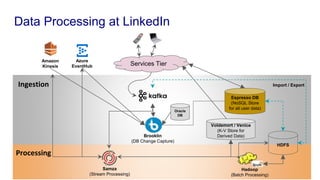
Data Processing at LinkedIn
Azure
EventHub
Oracle
DB
Espresso DB
(NoSQL Store
for all user data)
Brooklin
(DB Change Capture)
HDFS
Hadoop
(Batch Processing)
Import / Export
Services Tier
Ingestion
Processing
Voldemort / Venice
(K-V Store for
Derived Data)
Samza
(Stream Processing)
Amazon
Kinesis
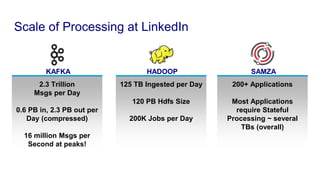
Scale of Processing at LinkedIn
KAFKA
2.3 Trillion
Msgs per Day
0.6 PB in, 2.3 PB out per
Day (compressed)
16 million Msgs per
Second at peaks!
HADOOP
125 TB Ingested per Day
120 PB Hdfs Size
200K Jobs per Day
SAMZA
200+ Applications
Most Applications
require Stateful
Processing ~ several
TBs (overall)
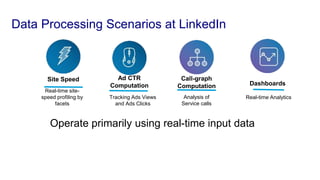
Data Processing Scenarios at LinkedIn
Site Speed
Real-time site-
speed profiling by
facets
Call-graph
Computation
Analysis of
Service calls
Dashboards
Real-time Analytics
Ad CTR
Computation
Tracking Ads Views
and Ads Clicks
Operate primarily using real-time input data
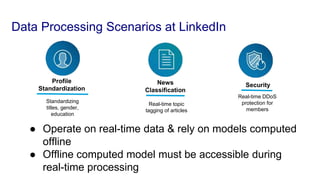
Data Processing Scenarios at LinkedIn
News
Classification
Real-time topic
tagging of articles
Profile
Standardization
Standardizing
titles, gender,
education
Security
Real-time DDoS
protection for
members
● Operate on real-time data & rely on models computed
offline
● Offline computed model must be accessible during
real-time processing
Agenda
● Data Processing at LinkedIn
● Data Pipelines in Batch & Stream
● Overview of Apache Samza
● Convergence of Pipelines with Apache Samza
○ Support for Batch Data
○ Unified Data Processing API
○ Flexible Deployment Model
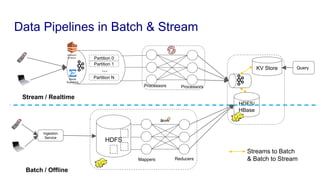
Ingestion
Service
HDFS
Mappers Reducers
HDFS/
HBase
Processors Processors
KV Store
Partition 0
Partition 1
Partition N
... Query
Data Pipelines in Batch & Stream
Azure
EventHub
Batch / Offline
Stream / Realtime
Streams to Batch
& Batch to Stream
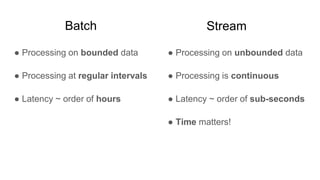
Batch
● Processing on bounded data
● Processing at regular intervals
● Latency ~ order of hours
● Processing on unbounded data
● Processing is continuous
● Latency ~ order of sub-seconds
● Time matters!
Stream
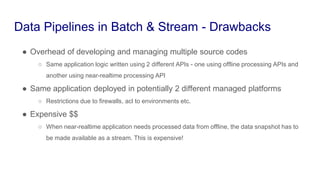
● Overhead of developing and managing multiple source codes
○ Same application logic written using 2 different APIs - one using offline processing APIs and
another using near-realtime processing API
● Same application deployed in potentially 2 different managed platforms
○ Restrictions due to firewalls, acl to environments etc.
● Expensive $$
○ When near-realtime application needs processed data from offline, the data snapshot has to
be made available as a stream. This is expensive!
Data Pipelines in Batch & Stream - Drawbacks
Ingestion
Service
HDFS
Mappers Reducers
HDFS/
HBase
Processors Processors
HDFS
KV
Store
Partition 0
Partition 1
Partition N
... Query
Query
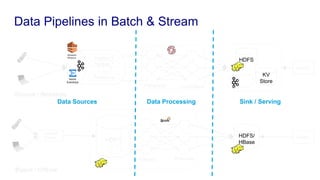
Data Pipelines in Batch & Stream
Azure
EventHub
Data Sources Data Processing Sink / Serving
Batch / Offline
Stream / Realtime
Ingestion
Service
HDFS
Mappers Reducers
HDFS/
HBase
Processors Processors
HDFS
KV
Store
Partition 0
Partition 1
Partition N
... Query
Query
Azure
EventHub
Data Sources
Data Processing
Sink / Serving
Batch / Offline
Stream / Realtime
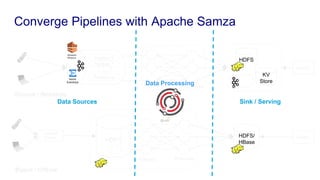
Converge Pipelines with Apache Samza
Agenda
● Data Processing at LinkedIn
● Data Pipelines in Batch & Stream
● Overview of Apache Samza
● Convergence of Pipelines with Apache Samza
○ Support for Batch Data
○ Unified Data Processing API
○ Flexible Deployment Model
Apache Samza
• Production at LinkedIn since 2013
• Apache TLP since 2014
• Streams as first-class citizen
– Batch as a special case of streaming
Apache Samza
● Provides distributed and scalable data processing platform
with
○ Configurable and heterogeneous data sources and
sinks (Eg. Kafka, HDFS, Kinesis, EventHub etc)
○ Efficient state management - local state and
incremental checkpoints
○ Unified Processing API for Batch & Streaming
○ Flexible deployment models
Apache Samza
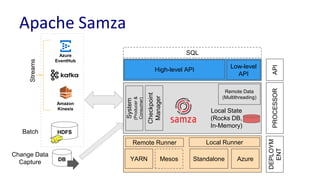
Azure
EventHub
Amazon
Kinesis
HDFS
Remote Runner
Standalone
Local Runner
AzureYARN Mesos
System
(Producer&
Consumer)
Local State
(Rocks DB,
In-Memory)
Checkpoint
Manager
Remote Data
(Multithreading)
High-level API
Low-level
API
PROCESSOR
DEPLOYM
ENT
API
SQL
DB
Streams
Batch
Change Data
Capture
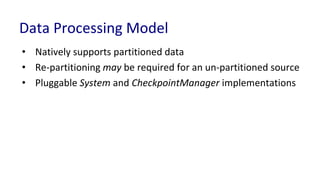
Data Processing Model
• Natively supports partitioned data
• Re-partitioning may be required for an un-partitioned source
• Pluggable System and CheckpointManager implementations
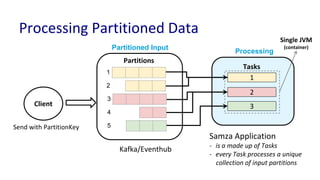
Partitions
Partitioned Input
Tasks
1
2
3
Processing
Kafka/Eventhub
Client
Send with PartitionKey
Samza Application
- is a made up of Tasks
- every Task processes a unique
collection of input partitions
1
2
3
4
5
Processing Partitioned Data
Single JVM
(container)
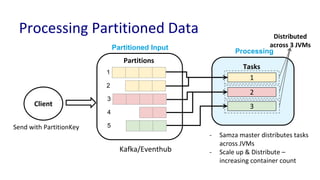
Partitions
Partitioned Input
Tasks
1
2
3
Processing
Kafka/Eventhub
Client
Send with PartitionKey
- Samza master distributes tasks
across JVMs
- Scale up & Distribute –
increasing container count
1
2
3
4
5
Processing Partitioned Data Distributed
across 3 JVMs
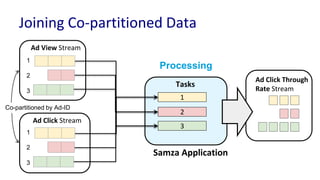
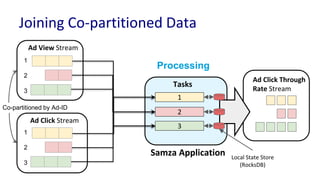
Ad View Stream
Samza Application
1
2
3
Ad Click Stream
Ad Click Through
Rate Stream
Tasks
Processing
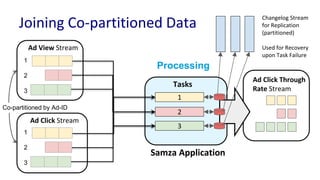
Joining Co-partitioned Data
1
2
3
1
2
3
Co-partitioned by Ad-ID
Ad View Stream
Samza Application
1
2
3
Ad Click Stream
Ad Click Through
Rate Stream
Tasks
Processing
Joining Co-partitioned Data
Local State Store
(RocksDB)
1
2
3
1
2
3
Co-partitioned by Ad-ID
Ad View Stream
Samza Application
1
2
3
Ad Click Stream
Ad Click Through
Rate Stream
Tasks
Processing
Joining Co-partitioned Data
1
2
3
1
2
3
Co-partitioned by Ad-ID
Changelog Stream
for Replication
(partitioned)
Used for Recovery
upon Task Failure
Agenda
● Data Processing at LinkedIn
● Data Pipelines in Batch & Stream
● Overview of Apache Samza
● Convergence of Pipelines with Apache Samza
○ Support for Batch Data
○ Unified Data Processing API
○ Flexible Deployment Model
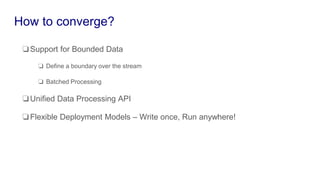
❏Support for Bounded Data
❏ Define a boundary over the stream
❏ Batched Processing
❏Unified Data Processing API
❏Flexible Deployment Models – Write once, Run anywhere!
How to converge?
Agenda
● Data Processing at LinkedIn
● Data Pipelines in Batch & Stream
● Overview of Apache Samza
● Convergence of Pipelines with Apache Samza
○ Support for Batch Data
○ Unified Data Processing API
○ Flexible Deployment Model
Support for Batch Data
• Batch as a special Case of Stream:
 Define boundary on stream
 Batched processing – end of batch basically ends the job
Defining a Boundary on the Stream
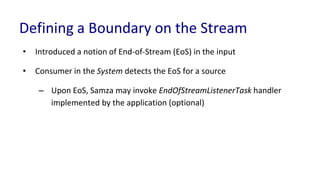
• Introduced a notion of End-of-Stream (EoS) in the input
• Consumer in the System detects the EoS for a source
– Upon EoS, Samza may invoke EndOfStreamListenerTask handler
implemented by the application (optional)
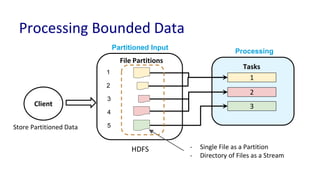
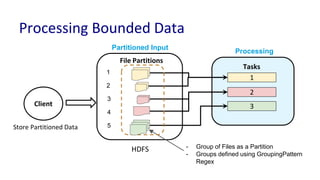
File Partitions
Partitioned Input
Tasks
1
2
3
Processing
HDFS
Client
Store Partitioned Data
1
2
3
4
5
Processing Bounded Data
- Single File as a Partition
- Directory of Files as a Stream
File Partitions
Partitioned Input
Tasks
1
2
3
Processing
HDFS
Client
Store Partitioned Data
1
2
3
4
5
Processing Bounded Data
- Group of Files as a Partition
- Groups defined using GroupingPattern
Regex
Support for Batch Data
• Batch as a special Case of Stream:
 Define boundary on stream
 Batched processing – end of batch basically ends the job
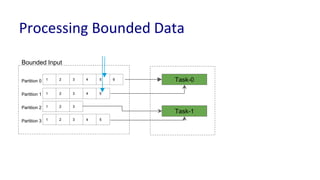
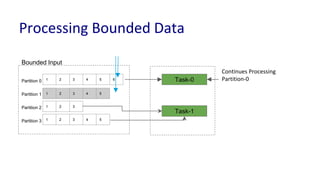
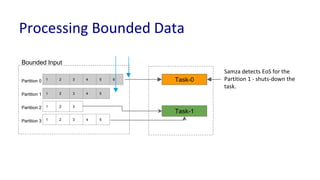
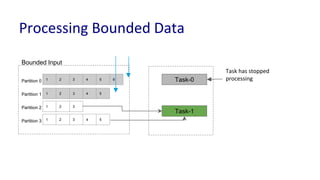
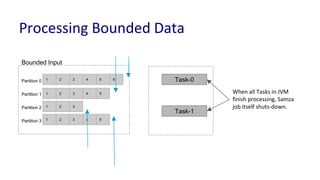
Processing Bounded Data
1 2 3 4 5 6
1 2 3 4 5
1 2 3
1 2 3 4 5
Partition 0
Partition 1
Partition 2
Partition 3
Bounded Input
Task-0
Task-1
1 2 3 4 5 6
1 2 3 4 5
1 2 3
1 2 3 4 5
Partition 0
Partition 1
Partition 2
Partition 3
Bounded Input
Task-0
Task-1
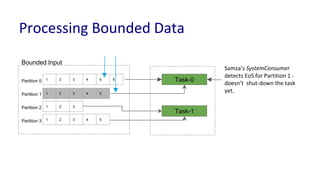
Processing Bounded Data
Samza’s SystemConsumer
detects EoS for Partition 1 -
doesn’t shut-down the task
yet.
1 2 3 4 5 6
1 2 3 4 5
1 2 3
1 2 3 4 5
Partition 0
Partition 1
Partition 2
Partition 3
Bounded Input
Task-0
Task-1
Processing Bounded Data
Continues Processing
Partition-0
1 2 3 4 5 6
1 2 3 4 5
1 2 3
1 2 3 4 5
Partition 0
Partition 1
Partition 2
Partition 3
Bounded Input
Task-0
Task-1
Samza detects EoS for the
Partition 1 - shuts-down the
task.
Processing Bounded Data
1 2 3 4 5 6
1 2 3 4 5
1 2 3
1 2 3 4 5
Partition 0
Partition 1
Partition 2
Partition 3
Bounded Input
Task-0
Task-1
Task has stopped
processing
Processing Bounded Data
1 2 3 4 5 6
1 2 3 4 5
1 2 3
1 2 3 4 5
Partition 0
Partition 1
Partition 2
Partition 3
Bounded Input
Task-0
Task-1
When all Tasks in JVM
finish processing, Samza
job itself shuts-down.
Processing Bounded Data
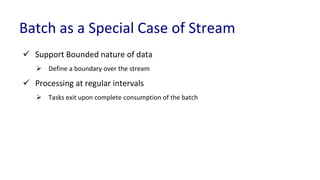
Batch as a Special Case of Stream
 Support Bounded nature of data
 Define a boundary over the stream
 Processing at regular intervals
 Tasks exit upon complete consumption of the batch
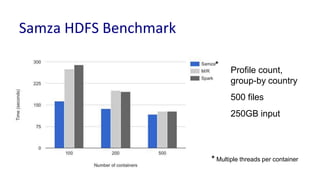
Profile count,
group-by country
500 files
250GB input
Samza HDFS Benchmark
* Multiple threads per container
*
Agenda
● Data Processing at LinkedIn
● Data Pipelines in Batch & Stream
● Overview of Apache Samza
● Convergence of Pipelines with Apache Samza
○ Support for Batch Data
○ Unified Data Processing API
○ Flexible Deployment Model
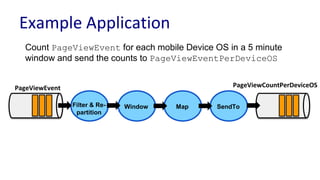
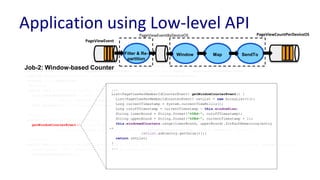
Example Application
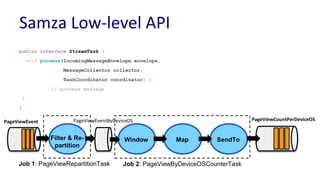
Count PageViewEvent for each mobile Device OS in a 5 minute
window and send the counts to PageViewEventPerDeviceOS
PageViewEvent PageViewCountPerDeviceOS
Filter & Re-
partition
Window Map SendTo
Samza Low-level API
public interface StreamTask {
void process(IncomingMessageEnvelope envelope,
MessageCollector collector,
TaskCoordinator coordinator) {
// process message
}
}
PageViewEvent PageViewCountPerDeviceOS
Filter & Re-
partition
Window Map SendTo
Job 1: PageViewRepartitionTask Job 2: PageViewByDeviceOSCounterTask
PageViewEventByDeviceOS
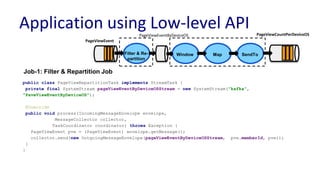
Application using Low-level API
public class PageViewRepartitionTask implements StreamTask {
private final SystemStream pageViewEventByDeviceOSStream = new SystemStream("kafka",
"PaveViewEventByDeviceOS");
@Override
public void process(IncomingMessageEnvelope envelope,
MessageCollector collector,
TaskCoordinator coordinator) throws Exception {
PageViewEvent pve = (PageViewEvent) envelope.getMessage();
collector.send(new OutgoingMessageEnvelope(pageViewEventByDeviceOSStream, pve.memberId, pve));
}
}
Job-1: Filter & Repartition Job
PageViewEvent
PageViewCountPerDeviceOS
Filter & Re-
partition
Window Map SendTo
PageViewEventByDeviceOS
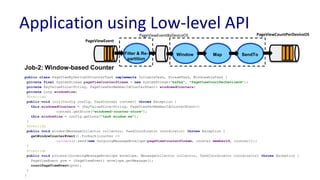
Application using Low-level API
public class PageViewByDeviceOSCounterTask implements InitableTask, StreamTask, WindowableTask {
private final SystemStream pageViewCounterStream = new SystemStream("kafka", "PageViewCountPerDeviceOS");
private KeyValueStore<String, PageViewPerMemberIdCounterEvent> windowedCounters;
private Long windowSize;
@Override
public void init(Config config, TaskContext context) throws Exception {
this.windowedCounters = (KeyValueStore<String, PageViewPerMemberIdCounterEvent>)
context.getStore("windowed-counter-store");
this.windowSize = config.getLong("task.window.ms");
}
@Override
public void window(MessageCollector collector, TaskCoordinator coordinator) throws Exception {
getWindowCounterEvent().forEach(counter ->
collector.send(new OutgoingMessageEnvelope(pageViewCounterStream, counter.memberId, counter)));
}
@Override
public void process(IncomingMessageEnvelope envelope, MessageCollector collector, TaskCoordinator coordinator) throws Exception {
PageViewEvent pve = (PageViewEvent) envelope.getMessage();
countPageViewEvent(pve);
}
}
Job-2: Window-based Counter
PageViewEvent
PageViewCountPerDeviceOS
Filter & Re-
partition
Window Map SendTo
PageViewEventByDeviceOS
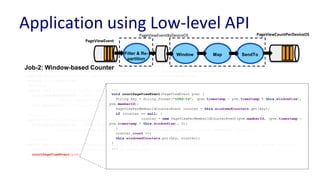
Application using Low-level API
public class PageViewByDeviceOSCounterTask implements InitableTask, StreamTask, WindowableTask {
private final SystemStream pageViewCounterStream = new SystemStream("kafka", "PageViewCountPerDeviceOS");
private KeyValueStore<String, PageViewPerMemberIdCounterEvent> windowedCounters;
private Long windowSize;
@Override
public void init(Config config, TaskContext context) throws Exception {
this.windowedCounters = (KeyValueStore<String, PageViewPerMemberIdCounterEvent>)
context.getStore("windowed-counter-store");
this.windowSize = config.getLong("task.window.ms");
}
@Override
public void window(MessageCollector collector, TaskCoordinator coordinator) throws Exception {
getWindowCounterEvent().forEach(counter ->
collector.send(new OutgoingMessageEnvelope(pageViewCounterStream, counter.memberId, counter)));
}
@Override
public void process(IncomingMessageEnvelope envelope, MessageCollector collector, TaskCoordinator coordinator) throws Exception {
PageViewEvent pve = (PageViewEvent) envelope.getMessage();
countPageViewEvent(pve);
}
}
...
void countPageViewEvent(PageViewEvent pve) {
String key = String.format("%08d-%s", (pve.timestamp - pve.timestamp % this.windowSize),
pve.memberId);
PageViewPerMemberIdCounterEvent counter = this.windowedCounters.get(key);
if (counter == null) {
counter = new PageViewPerMemberIdCounterEvent(pve.memberId, (pve.timestamp -
pve.timestamp % this.windowSize), 0);
}
counter.count ++;
this.windowedCounters.put(key, counter);
}
...
Job-2: Window-based Counter
PageViewEvent
PageViewCountPerDeviceOS
Filter & Re-
partition
Window Map SendTo
PageViewEventByDeviceOS
Application using Low-level API
public class PageViewByDeviceOSCounterTask implements InitableTask, StreamTask, WindowableTask {
private final SystemStream pageViewCounterStream = new SystemStream("kafka", "PageViewCountPerDeviceOS");
private KeyValueStore<String, PageViewPerMemberIdCounterEvent> windowedCounters;
private Long windowSize;
@Override
public void init(Config config, TaskContext context) throws Exception {
this.windowedCounters = (KeyValueStore<String, PageViewPerMemberIdCounterEvent>)
context.getStore("windowed-counter-store");
this.windowSize = config.getLong("task.window.ms");
}
@Override
public void window(MessageCollector collector, TaskCoordinator coordinator) throws Exception {
getWindowCounterEvent().forEach(counter ->
collector.send(new OutgoingMessageEnvelope(pageViewCounterStream, counter.memberId, counter)));
}
@Override
public void process(IncomingMessageEnvelope envelope, MessageCollector collector, TaskCoordinator coordinator) throws Exception {
PageViewEvent pve = (PageViewEvent) envelope.getMessage();
countPageViewEvent(pve);
}
}
...
List<PageViewPerMemberIdCounterEvent> getWindowCounterEvent() {
List<PageViewPerMemberIdCounterEvent> retList = new ArrayList<>();
Long currentTimestamp = System.currentTimeMillis();
Long cutoffTimestamp = currentTimestamp - this.windowSize;
String lowerBound = String.format("%08d-", cutoffTimestamp);
String upperBound = String.format("%08d-", currentTimestamp + 1);
this.windowedCounters.range(lowerBound, upperBound).forEachRemaining(entry
->
retList.add(entry.getValue()));
return retList;
}
...
Job-2: Window-based Counter
PageViewEvent
PageViewCountPerDeviceOS
Filter & Re-
partition
Window Map SendTo
PageViewEventByDeviceOS
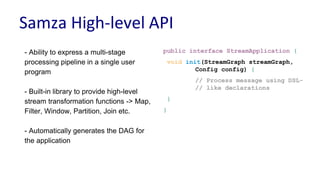
Samza High-level API
public interface StreamApplication {
void init(StreamGraph streamGraph,
Config config) {
// Process message using DSL-
// like declarations
}
}
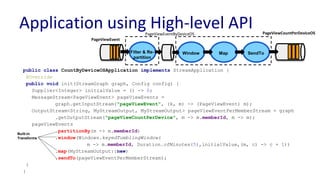
- Ability to express a multi-stage
processing pipeline in a single user
program
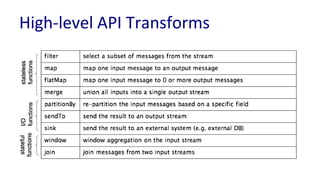
- Built-in library to provide high-level
stream transformation functions -> Map,
Filter, Window, Partition, Join etc.
- Automatically generates the DAG for
the application
public class CountByDeviceOSApplication implements StreamApplication {
@Override
public void init(StreamGraph graph, Config config) {
Supplier<Integer> initialValue = () -> 0;
MessageStream<PageViewEvent> pageViewEvents =
graph.getInputStream("pageViewEvent", (k, m) -> (PageViewEvent) m);
OutputStream<String, MyStreamOutput, MyStreamOutput> pageViewEventPerMemberStream = graph
.getOutputStream("pageViewCountPerDevice", m -> m.memberId, m -> m);
pageViewEvents
.partitionBy(m -> m.memberId)
.window(Windows.keyedTumblingWindow(
m -> m.memberId, Duration.ofMinutes(5),initialValue,(m, c) -> c + 1))
.map(MyStreamOutput::new)
.sendTo(pageViewEventPerMemberStream);
}
}
Built-in
Transforms
Application using High-level API
PageViewEvent
PageViewCountPerDeviceOS
Filter & Re-
partition
Window Map SendTo
PageViewEventByDeviceOS
public class CountByDeviceOSApplication implements StreamApplication {
@Override
public void init(StreamGraph graph, Config config) {
Supplier<Integer> initialValue = () -> 0;
MessageStream<PageViewEvent> pageViewEvents =
graph.getInputStream("pageViewEvent", (k, m) -> (PageViewEvent) m);
OutputStream<String, MyStreamOutput, MyStreamOutput> pageViewEventPerMemberStream = graph
.getOutputStream("pageViewCountPerDevice", m -> m.memberId, m -> m);
pageViewEvents
.partitionBy(m -> m.memberId)
.window(Windows.keyedTumblingWindow(
m -> m.memberId, Duration.ofMinutes(5), initialValue, (m, c) -> c + 1))
.map(MyStreamOutput::new)
.sendTo(pageViewEventPerMemberStream);
}
}
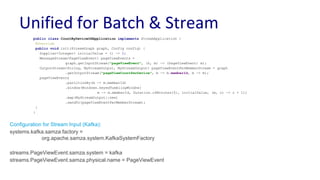
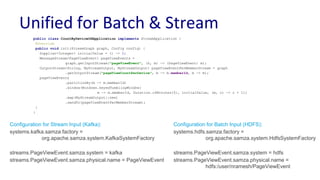
Unified for Batch & Stream
Configuration for Stream Input (Kafka):
systems.kafka.samza.factory =
org.apache.samza.system.KafkaSystemFactory
streams.PageViewEvent.samza.system = kafka
streams.PageViewEvent.samza.physical.name = PageViewEvent
public class CountByDeviceOSApplication implements StreamApplication {
@Override
public void init(StreamGraph graph, Config config) {
Supplier<Integer> initialValue = () -> 0;
MessageStream<PageViewEvent> pageViewEvents =
graph.getInputStream("pageViewEvent", (k, m) -> (PageViewEvent) m);
OutputStream<String, MyStreamOutput, MyStreamOutput> pageViewEventPerMemberStream = graph
.getOutputStream("pageViewCountPerDevice", m -> m.memberId, m -> m);
pageViewEvents
.partitionBy(m -> m.memberId)
.window(Windows.keyedTumblingWindow(
m -> m.memberId, Duration.ofMinutes(5), initialValue, (m, c) -> c + 1))
.map(MyStreamOutput::new)
.sendTo(pageViewEventPerMemberStream);
}
}
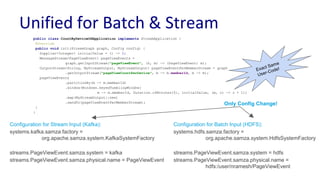
Unified for Batch & Stream
Configuration for Stream Input (Kafka):
systems.kafka.samza.factory =
org.apache.samza.system.KafkaSystemFactory
streams.PageViewEvent.samza.system = kafka
streams.PageViewEvent.samza.physical.name = PageViewEvent
Configuration for Batch Input (HDFS):
systems.hdfs.samza.factory =
org.apache.samza.system.HdfsSystemFactory
streams.PageViewEvent.samza.system = hdfs
streams.PageViewEvent.samza.physical.name =
hdfs:/user/nramesh/PageViewEvent
public class CountByDeviceOSApplication implements StreamApplication {
@Override
public void init(StreamGraph graph, Config config) {
Supplier<Integer> initialValue = () -> 0;
MessageStream<PageViewEvent> pageViewEvents =
graph.getInputStream("pageViewEvent", (k, m) -> (PageViewEvent) m);
OutputStream<String, MyStreamOutput, MyStreamOutput> pageViewEventPerMemberStream = graph
.getOutputStream("pageViewCountPerDevice", m -> m.memberId, m -> m);
pageViewEvents
.partitionBy(m -> m.memberId)
.window(Windows.keyedTumblingWindow(
m -> m.memberId, Duration.ofMinutes(5), initialValue, (m, c) -> c + 1))
.map(MyStreamOutput::new)
.sendTo(pageViewEventPerMemberStream);
}
}
Unified for Batch & Stream
Configuration for Stream Input (Kafka):
systems.kafka.samza.factory =
org.apache.samza.system.KafkaSystemFactory
streams.PageViewEvent.samza.system = kafka
streams.PageViewEvent.samza.physical.name = PageViewEvent
Configuration for Batch Input (HDFS):
systems.hdfs.samza.factory =
org.apache.samza.system.HdfsSystemFactory
streams.PageViewEvent.samza.system = hdfs
streams.PageViewEvent.samza.physical.name =
hdfs:/user/nramesh/PageViewEvent
Only Config Change!
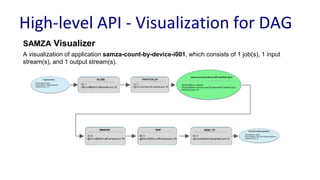
High-level API - Visualization for DAG
SAMZA Visualizer
A visualization of application samza-count-by-device-i001, which consists of 1 job(s), 1 input
stream(s), and 1 output stream(s).
High-level API Transforms
Agenda
● Data Processing at LinkedIn
● Data Pipelines in Batch & Stream
● Overview of Apache Samza
● Convergence of Pipelines with Apache Samza
○ Support for Batch Data
○ Unified Data Processing API
○ Flexible Deployment Model
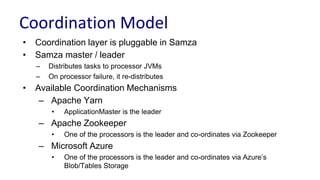
Coordination Model
• Coordination layer is pluggable in Samza
• Samza master / leader
– Distributes tasks to processor JVMs
– On processor failure, it re-distributes
• Available Coordination Mechanisms
– Apache Yarn
• ApplicationMaster is the leader
– Apache Zookeeper
• One of the processors is the leader and co-ordinates via Zookeeper
– Microsoft Azure
• One of the processors is the leader and co-ordinates via Azure’s
Blob/Tables Storage
Embedding Processor within Application
- An instance of the processor is
embedded within user’s application
- LocalApplicationRunner helps launch
the processor within the application
public static void main(String[] args) {
CommandLine cmdLine = new CommandLine();
OptionSet options = cmdLine.parser().parse(args);
Config config = cmdLine.loadConfig(options);
LocalApplicationRunner runner = new
LocalApplicationRunner(config);
CountByDeviceOSApplication app = new
CountByDeviceOSApplication();
runner.run(app);
runner.waitForFinish();
}
Pluggable Coordination Config
public static void main(String[] args) {
CommandLine cmdLine = new CommandLine();
OptionSet options = cmdLine.parser().parse(args);
Config config = cmdLine.loadConfig(options);
LocalApplicationRunner runner = new
LocalApplicationRunner(config);
CountByDeviceOSApplication app = new
CountByDeviceOSApplication();
runner.run(app);
runner.waitForFinish();
}
Configs with Zk-based coordination
job.coordinator.factory =
org.apache.samza.zk.ZkJobCoordinatorFactory
job.coordinator.zk.connect = foobar:2181/samza
Pluggable Coordination Config
public static void main(String[] args) {
CommandLine cmdLine = new CommandLine();
OptionSet options = cmdLine.parser().parse(args);
Config config = cmdLine.loadConfig(options);
LocalApplicationRunner runner = new
LocalApplicationRunner(config);
CountByDeviceOSApplication app = new
CountByDeviceOSApplication();
runner.run(app);
runner.waitForFinish();
}
Configs with Azure-based coordination:
job.coordinator.factory =
org.apache.samza.azure.AzureJobCoordinatorFactory
job.coordinator.azure.connect = http://foobar:29892/storage/
Configs with Zk-based coordination
job.coordinator.factory =
org.apache.samza.zk.ZkJobCoordinatorFactory
job.coordinator.zk.connect = foobar:2181/samza
Pluggable Coordination Config
public static void main(String[] args) {
CommandLine cmdLine = new CommandLine();
OptionSet options = cmdLine.parser().parse(args);
Config config = cmdLine.loadConfig(options);
LocalApplicationRunner runner = new
LocalApplicationRunner(config);
CountByDeviceOSApplication app = new
CountByDeviceOSApplication();
runner.run(app);
runner.waitForFinish();
}
Only Config Change!
Configs with Azure-based coordination:
job.coordinator.factory =
org.apache.samza.azure.AzureJobCoordinatorFactory
job.coordinator.azure.connect = http://foobar:29892/storage/
Configs with Zk-based coordination
job.coordinator.factory =
org.apache.samza.zk.ZkJobCoordinatorFactory
job.coordinator.zk.connect = foobar:2181/samza
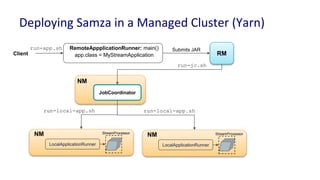
Deploying Samza in a Managed Cluster (Yarn)
app.class = MyStreamApplication
RemoteAppplicationRunner: main()
RM
NM
LocalApplicationRunner
StreamProcessor
JobCoordinator
NM
NM
LocalApplicationRunner
StreamProcessor
Client
Submits JAR
run-jc.sh
run-app.sh
run-local-app.sh run-local-app.sh
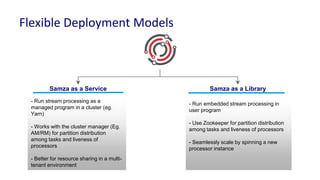
Flexible Deployment Models
Samza as a Library
- Run embedded stream processing in
user program
- Use Zookeeper for partition distribution
among tasks and liveness of processors
- Seamlessly scale by spinning a new
processor instance
Samza as a Service
- Run stream processing as a
managed program in a cluster (eg.
Yarn)
- Works with the cluster manager (Eg.
AM/RM) for partition distribution
among tasks and liveness of
processors
- Better for resource sharing in a multi-
tenant environment
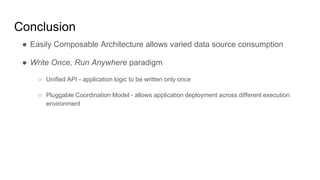
Conclusion
● Easily Composable Architecture allows varied data source consumption
● Write Once, Run Anywhere paradigm
○ Unified API - application logic to be written only once
○ Pluggable Coordination Model - allows application deployment across different execution
environment
Future Work
● Support SQL on Streams with Samza
● Table Abstraction in Samza
● Event-time processing
● Samza runner for Apache Beam
Contributions are welcome!
● Contributor’s Corner - http://samza.apache.org/contribute/contributors-corner.html
● Ask any question - dev@samza.apache.org
● Follow or tweet us @apachesamza
Questions?
Extra Slides
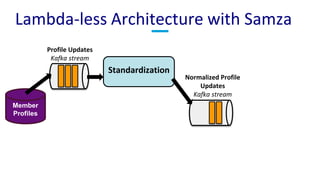
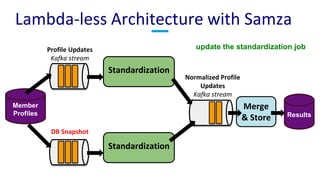
Lambda-less Architecture with Samza
Profile Updates
Kafka stream
Standardization
Normalized Profile
Updates
Kafka stream
Member
Profiles
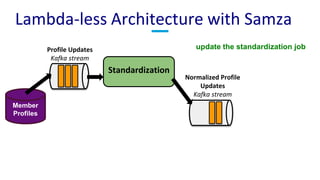
Lambda-less Architecture with Samza
Profile Updates
Kafka stream
Standardization
Normalized Profile
Updates
Kafka stream
Member
Profiles
update the standardization job
Lambda-less Architecture with Samza
Profile Updates
Kafka stream
Standardization
Normalized Profile
Updates
Kafka stream
Member
Profiles
update the standardization job
DB Snapshot
Standardization
Merge
& Store Results
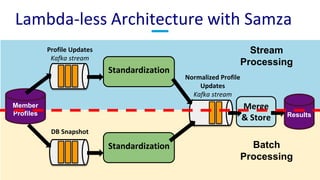
Lambda-less Architecture with Samza
Profile Updates
Kafka stream
Standardization
Normalized Profile
Updates
Kafka stream
Member
Profiles
DB Snapshot
Standardization
Merge
& Store Results
Stream
Processing
Batch
Processing
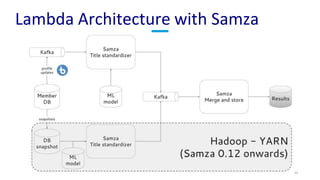
Lambda Architecture with Samza

Unified Batch & Stream Processing with Apache Samza

  • 1.
    Unified Batch &Stream Processing with Apache Samza Navina Ramesh Sr. Software Engineer, LinkedIn Committer and PMC member, Apache Samza @navina_r navina@apache.org
  • 2.
    Agenda ● Data Processingat LinkedIn ● Data Pipelines in Batch & Stream ● Overview of Apache Samza ● Convergence of Pipelines with Apache Samza ○ Support for Batch Data ○ Unified Data Processing API ○ Flexible Deployment Model
  • 3.
    Data Processing atLinkedIn Azure EventHub Oracle DB Espresso DB (NoSQL Store for all user data) Brooklin (DB Change Capture) HDFS Hadoop (Batch Processing) Import / Export Services Tier Ingestion Processing Voldemort / Venice (K-V Store for Derived Data) Samza (Stream Processing) Amazon Kinesis
  • 4.
    Scale of Processingat LinkedIn KAFKA 2.3 Trillion Msgs per Day 0.6 PB in, 2.3 PB out per Day (compressed) 16 million Msgs per Second at peaks! HADOOP 125 TB Ingested per Day 120 PB Hdfs Size 200K Jobs per Day SAMZA 200+ Applications Most Applications require Stateful Processing ~ several TBs (overall)
  • 5.
    Data Processing Scenariosat LinkedIn Site Speed Real-time site- speed profiling by facets Call-graph Computation Analysis of Service calls Dashboards Real-time Analytics Ad CTR Computation Tracking Ads Views and Ads Clicks Operate primarily using real-time input data
  • 6.
    Data Processing Scenariosat LinkedIn News Classification Real-time topic tagging of articles Profile Standardization Standardizing titles, gender, education Security Real-time DDoS protection for members ● Operate on real-time data & rely on models computed offline ● Offline computed model must be accessible during real-time processing
  • 7.
    Agenda ● Data Processingat LinkedIn ● Data Pipelines in Batch & Stream ● Overview of Apache Samza ● Convergence of Pipelines with Apache Samza ○ Support for Batch Data ○ Unified Data Processing API ○ Flexible Deployment Model
  • 8.
    Ingestion Service HDFS Mappers Reducers HDFS/ HBase Processors Processors KVStore Partition 0 Partition 1 Partition N ... Query Data Pipelines in Batch & Stream Azure EventHub Batch / Offline Stream / Realtime Streams to Batch & Batch to Stream
  • 9.
    Batch ● Processing onbounded data ● Processing at regular intervals ● Latency ~ order of hours ● Processing on unbounded data ● Processing is continuous ● Latency ~ order of sub-seconds ● Time matters! Stream
  • 10.
    ● Overhead ofdeveloping and managing multiple source codes ○ Same application logic written using 2 different APIs - one using offline processing APIs and another using near-realtime processing API ● Same application deployed in potentially 2 different managed platforms ○ Restrictions due to firewalls, acl to environments etc. ● Expensive $$ ○ When near-realtime application needs processed data from offline, the data snapshot has to be made available as a stream. This is expensive! Data Pipelines in Batch & Stream - Drawbacks
  • 11.
    Ingestion Service HDFS Mappers Reducers HDFS/ HBase Processors Processors HDFS KV Store Partition0 Partition 1 Partition N ... Query Query Data Pipelines in Batch & Stream Azure EventHub Data Sources Data Processing Sink / Serving Batch / Offline Stream / Realtime
  • 12.
    Ingestion Service HDFS Mappers Reducers HDFS/ HBase Processors Processors HDFS KV Store Partition0 Partition 1 Partition N ... Query Query Azure EventHub Data Sources Data Processing Sink / Serving Batch / Offline Stream / Realtime Converge Pipelines with Apache Samza
  • 13.
    Agenda ● Data Processingat LinkedIn ● Data Pipelines in Batch & Stream ● Overview of Apache Samza ● Convergence of Pipelines with Apache Samza ○ Support for Batch Data ○ Unified Data Processing API ○ Flexible Deployment Model
  • 14.
    Apache Samza • Productionat LinkedIn since 2013 • Apache TLP since 2014 • Streams as first-class citizen – Batch as a special case of streaming
  • 15.
    Apache Samza ● Providesdistributed and scalable data processing platform with ○ Configurable and heterogeneous data sources and sinks (Eg. Kafka, HDFS, Kinesis, EventHub etc) ○ Efficient state management - local state and incremental checkpoints ○ Unified Processing API for Batch & Streaming ○ Flexible deployment models
  • 16.
    Apache Samza Azure EventHub Amazon Kinesis HDFS Remote Runner Standalone LocalRunner AzureYARN Mesos System (Producer& Consumer) Local State (Rocks DB, In-Memory) Checkpoint Manager Remote Data (Multithreading) High-level API Low-level API PROCESSOR DEPLOYM ENT API SQL DB Streams Batch Change Data Capture
  • 17.
    Data Processing Model •Natively supports partitioned data • Re-partitioning may be required for an un-partitioned source • Pluggable System and CheckpointManager implementations
  • 18.
    Partitions Partitioned Input Tasks 1 2 3 Processing Kafka/Eventhub Client Send withPartitionKey Samza Application - is a made up of Tasks - every Task processes a unique collection of input partitions 1 2 3 4 5 Processing Partitioned Data Single JVM (container)
  • 19.
    Partitions Partitioned Input Tasks 1 2 3 Processing Kafka/Eventhub Client Send withPartitionKey - Samza master distributes tasks across JVMs - Scale up & Distribute – increasing container count 1 2 3 4 5 Processing Partitioned Data Distributed across 3 JVMs
  • 20.
    Ad View Stream SamzaApplication 1 2 3 Ad Click Stream Ad Click Through Rate Stream Tasks Processing Joining Co-partitioned Data 1 2 3 1 2 3 Co-partitioned by Ad-ID
  • 21.
    Ad View Stream SamzaApplication 1 2 3 Ad Click Stream Ad Click Through Rate Stream Tasks Processing Joining Co-partitioned Data Local State Store (RocksDB) 1 2 3 1 2 3 Co-partitioned by Ad-ID
  • 22.
    Ad View Stream SamzaApplication 1 2 3 Ad Click Stream Ad Click Through Rate Stream Tasks Processing Joining Co-partitioned Data 1 2 3 1 2 3 Co-partitioned by Ad-ID Changelog Stream for Replication (partitioned) Used for Recovery upon Task Failure
  • 23.
    Agenda ● Data Processingat LinkedIn ● Data Pipelines in Batch & Stream ● Overview of Apache Samza ● Convergence of Pipelines with Apache Samza ○ Support for Batch Data ○ Unified Data Processing API ○ Flexible Deployment Model
  • 24.
    ❏Support for BoundedData ❏ Define a boundary over the stream ❏ Batched Processing ❏Unified Data Processing API ❏Flexible Deployment Models – Write once, Run anywhere! How to converge?
  • 25.
    Agenda ● Data Processingat LinkedIn ● Data Pipelines in Batch & Stream ● Overview of Apache Samza ● Convergence of Pipelines with Apache Samza ○ Support for Batch Data ○ Unified Data Processing API ○ Flexible Deployment Model
  • 26.
    Support for BatchData • Batch as a special Case of Stream:  Define boundary on stream  Batched processing – end of batch basically ends the job
  • 27.
    Defining a Boundaryon the Stream • Introduced a notion of End-of-Stream (EoS) in the input • Consumer in the System detects the EoS for a source – Upon EoS, Samza may invoke EndOfStreamListenerTask handler implemented by the application (optional)
  • 28.
    File Partitions Partitioned Input Tasks 1 2 3 Processing HDFS Client StorePartitioned Data 1 2 3 4 5 Processing Bounded Data - Single File as a Partition - Directory of Files as a Stream
  • 29.
    File Partitions Partitioned Input Tasks 1 2 3 Processing HDFS Client StorePartitioned Data 1 2 3 4 5 Processing Bounded Data - Group of Files as a Partition - Groups defined using GroupingPattern Regex
  • 30.
    Support for BatchData • Batch as a special Case of Stream:  Define boundary on stream  Batched processing – end of batch basically ends the job
  • 31.
    Processing Bounded Data 12 3 4 5 6 1 2 3 4 5 1 2 3 1 2 3 4 5 Partition 0 Partition 1 Partition 2 Partition 3 Bounded Input Task-0 Task-1
  • 32.
    1 2 34 5 6 1 2 3 4 5 1 2 3 1 2 3 4 5 Partition 0 Partition 1 Partition 2 Partition 3 Bounded Input Task-0 Task-1 Processing Bounded Data Samza’s SystemConsumer detects EoS for Partition 1 - doesn’t shut-down the task yet.
  • 33.
    1 2 34 5 6 1 2 3 4 5 1 2 3 1 2 3 4 5 Partition 0 Partition 1 Partition 2 Partition 3 Bounded Input Task-0 Task-1 Processing Bounded Data Continues Processing Partition-0
  • 34.
    1 2 34 5 6 1 2 3 4 5 1 2 3 1 2 3 4 5 Partition 0 Partition 1 Partition 2 Partition 3 Bounded Input Task-0 Task-1 Samza detects EoS for the Partition 1 - shuts-down the task. Processing Bounded Data
  • 35.
    1 2 34 5 6 1 2 3 4 5 1 2 3 1 2 3 4 5 Partition 0 Partition 1 Partition 2 Partition 3 Bounded Input Task-0 Task-1 Task has stopped processing Processing Bounded Data
  • 36.
    1 2 34 5 6 1 2 3 4 5 1 2 3 1 2 3 4 5 Partition 0 Partition 1 Partition 2 Partition 3 Bounded Input Task-0 Task-1 When all Tasks in JVM finish processing, Samza job itself shuts-down. Processing Bounded Data
  • 37.
    Batch as aSpecial Case of Stream  Support Bounded nature of data  Define a boundary over the stream  Processing at regular intervals  Tasks exit upon complete consumption of the batch
  • 38.
    Profile count, group-by country 500files 250GB input Samza HDFS Benchmark * Multiple threads per container *
  • 39.
    Agenda ● Data Processingat LinkedIn ● Data Pipelines in Batch & Stream ● Overview of Apache Samza ● Convergence of Pipelines with Apache Samza ○ Support for Batch Data ○ Unified Data Processing API ○ Flexible Deployment Model
  • 40.
    Example Application Count PageViewEventfor each mobile Device OS in a 5 minute window and send the counts to PageViewEventPerDeviceOS PageViewEvent PageViewCountPerDeviceOS Filter & Re- partition Window Map SendTo
  • 41.
    Samza Low-level API publicinterface StreamTask { void process(IncomingMessageEnvelope envelope, MessageCollector collector, TaskCoordinator coordinator) { // process message } } PageViewEvent PageViewCountPerDeviceOS Filter & Re- partition Window Map SendTo Job 1: PageViewRepartitionTask Job 2: PageViewByDeviceOSCounterTask PageViewEventByDeviceOS
  • 42.
    Application using Low-levelAPI public class PageViewRepartitionTask implements StreamTask { private final SystemStream pageViewEventByDeviceOSStream = new SystemStream("kafka", "PaveViewEventByDeviceOS"); @Override public void process(IncomingMessageEnvelope envelope, MessageCollector collector, TaskCoordinator coordinator) throws Exception { PageViewEvent pve = (PageViewEvent) envelope.getMessage(); collector.send(new OutgoingMessageEnvelope(pageViewEventByDeviceOSStream, pve.memberId, pve)); } } Job-1: Filter & Repartition Job PageViewEvent PageViewCountPerDeviceOS Filter & Re- partition Window Map SendTo PageViewEventByDeviceOS
  • 43.
    Application using Low-levelAPI public class PageViewByDeviceOSCounterTask implements InitableTask, StreamTask, WindowableTask { private final SystemStream pageViewCounterStream = new SystemStream("kafka", "PageViewCountPerDeviceOS"); private KeyValueStore<String, PageViewPerMemberIdCounterEvent> windowedCounters; private Long windowSize; @Override public void init(Config config, TaskContext context) throws Exception { this.windowedCounters = (KeyValueStore<String, PageViewPerMemberIdCounterEvent>) context.getStore("windowed-counter-store"); this.windowSize = config.getLong("task.window.ms"); } @Override public void window(MessageCollector collector, TaskCoordinator coordinator) throws Exception { getWindowCounterEvent().forEach(counter -> collector.send(new OutgoingMessageEnvelope(pageViewCounterStream, counter.memberId, counter))); } @Override public void process(IncomingMessageEnvelope envelope, MessageCollector collector, TaskCoordinator coordinator) throws Exception { PageViewEvent pve = (PageViewEvent) envelope.getMessage(); countPageViewEvent(pve); } } Job-2: Window-based Counter PageViewEvent PageViewCountPerDeviceOS Filter & Re- partition Window Map SendTo PageViewEventByDeviceOS
  • 44.
    Application using Low-levelAPI public class PageViewByDeviceOSCounterTask implements InitableTask, StreamTask, WindowableTask { private final SystemStream pageViewCounterStream = new SystemStream("kafka", "PageViewCountPerDeviceOS"); private KeyValueStore<String, PageViewPerMemberIdCounterEvent> windowedCounters; private Long windowSize; @Override public void init(Config config, TaskContext context) throws Exception { this.windowedCounters = (KeyValueStore<String, PageViewPerMemberIdCounterEvent>) context.getStore("windowed-counter-store"); this.windowSize = config.getLong("task.window.ms"); } @Override public void window(MessageCollector collector, TaskCoordinator coordinator) throws Exception { getWindowCounterEvent().forEach(counter -> collector.send(new OutgoingMessageEnvelope(pageViewCounterStream, counter.memberId, counter))); } @Override public void process(IncomingMessageEnvelope envelope, MessageCollector collector, TaskCoordinator coordinator) throws Exception { PageViewEvent pve = (PageViewEvent) envelope.getMessage(); countPageViewEvent(pve); } } ... void countPageViewEvent(PageViewEvent pve) { String key = String.format("%08d-%s", (pve.timestamp - pve.timestamp % this.windowSize), pve.memberId); PageViewPerMemberIdCounterEvent counter = this.windowedCounters.get(key); if (counter == null) { counter = new PageViewPerMemberIdCounterEvent(pve.memberId, (pve.timestamp - pve.timestamp % this.windowSize), 0); } counter.count ++; this.windowedCounters.put(key, counter); } ... Job-2: Window-based Counter PageViewEvent PageViewCountPerDeviceOS Filter & Re- partition Window Map SendTo PageViewEventByDeviceOS
  • 45.
    Application using Low-levelAPI public class PageViewByDeviceOSCounterTask implements InitableTask, StreamTask, WindowableTask { private final SystemStream pageViewCounterStream = new SystemStream("kafka", "PageViewCountPerDeviceOS"); private KeyValueStore<String, PageViewPerMemberIdCounterEvent> windowedCounters; private Long windowSize; @Override public void init(Config config, TaskContext context) throws Exception { this.windowedCounters = (KeyValueStore<String, PageViewPerMemberIdCounterEvent>) context.getStore("windowed-counter-store"); this.windowSize = config.getLong("task.window.ms"); } @Override public void window(MessageCollector collector, TaskCoordinator coordinator) throws Exception { getWindowCounterEvent().forEach(counter -> collector.send(new OutgoingMessageEnvelope(pageViewCounterStream, counter.memberId, counter))); } @Override public void process(IncomingMessageEnvelope envelope, MessageCollector collector, TaskCoordinator coordinator) throws Exception { PageViewEvent pve = (PageViewEvent) envelope.getMessage(); countPageViewEvent(pve); } } ... List<PageViewPerMemberIdCounterEvent> getWindowCounterEvent() { List<PageViewPerMemberIdCounterEvent> retList = new ArrayList<>(); Long currentTimestamp = System.currentTimeMillis(); Long cutoffTimestamp = currentTimestamp - this.windowSize; String lowerBound = String.format("%08d-", cutoffTimestamp); String upperBound = String.format("%08d-", currentTimestamp + 1); this.windowedCounters.range(lowerBound, upperBound).forEachRemaining(entry -> retList.add(entry.getValue())); return retList; } ... Job-2: Window-based Counter PageViewEvent PageViewCountPerDeviceOS Filter & Re- partition Window Map SendTo PageViewEventByDeviceOS
  • 46.
    Samza High-level API publicinterface StreamApplication { void init(StreamGraph streamGraph, Config config) { // Process message using DSL- // like declarations } } - Ability to express a multi-stage processing pipeline in a single user program - Built-in library to provide high-level stream transformation functions -> Map, Filter, Window, Partition, Join etc. - Automatically generates the DAG for the application
  • 47.
    public class CountByDeviceOSApplicationimplements StreamApplication { @Override public void init(StreamGraph graph, Config config) { Supplier<Integer> initialValue = () -> 0; MessageStream<PageViewEvent> pageViewEvents = graph.getInputStream("pageViewEvent", (k, m) -> (PageViewEvent) m); OutputStream<String, MyStreamOutput, MyStreamOutput> pageViewEventPerMemberStream = graph .getOutputStream("pageViewCountPerDevice", m -> m.memberId, m -> m); pageViewEvents .partitionBy(m -> m.memberId) .window(Windows.keyedTumblingWindow( m -> m.memberId, Duration.ofMinutes(5),initialValue,(m, c) -> c + 1)) .map(MyStreamOutput::new) .sendTo(pageViewEventPerMemberStream); } } Built-in Transforms Application using High-level API PageViewEvent PageViewCountPerDeviceOS Filter & Re- partition Window Map SendTo PageViewEventByDeviceOS
  • 48.
    public class CountByDeviceOSApplicationimplements StreamApplication { @Override public void init(StreamGraph graph, Config config) { Supplier<Integer> initialValue = () -> 0; MessageStream<PageViewEvent> pageViewEvents = graph.getInputStream("pageViewEvent", (k, m) -> (PageViewEvent) m); OutputStream<String, MyStreamOutput, MyStreamOutput> pageViewEventPerMemberStream = graph .getOutputStream("pageViewCountPerDevice", m -> m.memberId, m -> m); pageViewEvents .partitionBy(m -> m.memberId) .window(Windows.keyedTumblingWindow( m -> m.memberId, Duration.ofMinutes(5), initialValue, (m, c) -> c + 1)) .map(MyStreamOutput::new) .sendTo(pageViewEventPerMemberStream); } } Unified for Batch & Stream Configuration for Stream Input (Kafka): systems.kafka.samza.factory = org.apache.samza.system.KafkaSystemFactory streams.PageViewEvent.samza.system = kafka streams.PageViewEvent.samza.physical.name = PageViewEvent
  • 49.
    public class CountByDeviceOSApplicationimplements StreamApplication { @Override public void init(StreamGraph graph, Config config) { Supplier<Integer> initialValue = () -> 0; MessageStream<PageViewEvent> pageViewEvents = graph.getInputStream("pageViewEvent", (k, m) -> (PageViewEvent) m); OutputStream<String, MyStreamOutput, MyStreamOutput> pageViewEventPerMemberStream = graph .getOutputStream("pageViewCountPerDevice", m -> m.memberId, m -> m); pageViewEvents .partitionBy(m -> m.memberId) .window(Windows.keyedTumblingWindow( m -> m.memberId, Duration.ofMinutes(5), initialValue, (m, c) -> c + 1)) .map(MyStreamOutput::new) .sendTo(pageViewEventPerMemberStream); } } Unified for Batch & Stream Configuration for Stream Input (Kafka): systems.kafka.samza.factory = org.apache.samza.system.KafkaSystemFactory streams.PageViewEvent.samza.system = kafka streams.PageViewEvent.samza.physical.name = PageViewEvent Configuration for Batch Input (HDFS): systems.hdfs.samza.factory = org.apache.samza.system.HdfsSystemFactory streams.PageViewEvent.samza.system = hdfs streams.PageViewEvent.samza.physical.name = hdfs:/user/nramesh/PageViewEvent
  • 50.
    public class CountByDeviceOSApplicationimplements StreamApplication { @Override public void init(StreamGraph graph, Config config) { Supplier<Integer> initialValue = () -> 0; MessageStream<PageViewEvent> pageViewEvents = graph.getInputStream("pageViewEvent", (k, m) -> (PageViewEvent) m); OutputStream<String, MyStreamOutput, MyStreamOutput> pageViewEventPerMemberStream = graph .getOutputStream("pageViewCountPerDevice", m -> m.memberId, m -> m); pageViewEvents .partitionBy(m -> m.memberId) .window(Windows.keyedTumblingWindow( m -> m.memberId, Duration.ofMinutes(5), initialValue, (m, c) -> c + 1)) .map(MyStreamOutput::new) .sendTo(pageViewEventPerMemberStream); } } Unified for Batch & Stream Configuration for Stream Input (Kafka): systems.kafka.samza.factory = org.apache.samza.system.KafkaSystemFactory streams.PageViewEvent.samza.system = kafka streams.PageViewEvent.samza.physical.name = PageViewEvent Configuration for Batch Input (HDFS): systems.hdfs.samza.factory = org.apache.samza.system.HdfsSystemFactory streams.PageViewEvent.samza.system = hdfs streams.PageViewEvent.samza.physical.name = hdfs:/user/nramesh/PageViewEvent Only Config Change!
  • 51.
    High-level API -Visualization for DAG SAMZA Visualizer A visualization of application samza-count-by-device-i001, which consists of 1 job(s), 1 input stream(s), and 1 output stream(s).
  • 52.
  • 53.
    Agenda ● Data Processingat LinkedIn ● Data Pipelines in Batch & Stream ● Overview of Apache Samza ● Convergence of Pipelines with Apache Samza ○ Support for Batch Data ○ Unified Data Processing API ○ Flexible Deployment Model
  • 54.
    Coordination Model • Coordinationlayer is pluggable in Samza • Samza master / leader – Distributes tasks to processor JVMs – On processor failure, it re-distributes • Available Coordination Mechanisms – Apache Yarn • ApplicationMaster is the leader – Apache Zookeeper • One of the processors is the leader and co-ordinates via Zookeeper – Microsoft Azure • One of the processors is the leader and co-ordinates via Azure’s Blob/Tables Storage
  • 55.
    Embedding Processor withinApplication - An instance of the processor is embedded within user’s application - LocalApplicationRunner helps launch the processor within the application public static void main(String[] args) { CommandLine cmdLine = new CommandLine(); OptionSet options = cmdLine.parser().parse(args); Config config = cmdLine.loadConfig(options); LocalApplicationRunner runner = new LocalApplicationRunner(config); CountByDeviceOSApplication app = new CountByDeviceOSApplication(); runner.run(app); runner.waitForFinish(); }
  • 56.
    Pluggable Coordination Config publicstatic void main(String[] args) { CommandLine cmdLine = new CommandLine(); OptionSet options = cmdLine.parser().parse(args); Config config = cmdLine.loadConfig(options); LocalApplicationRunner runner = new LocalApplicationRunner(config); CountByDeviceOSApplication app = new CountByDeviceOSApplication(); runner.run(app); runner.waitForFinish(); } Configs with Zk-based coordination job.coordinator.factory = org.apache.samza.zk.ZkJobCoordinatorFactory job.coordinator.zk.connect = foobar:2181/samza
  • 57.
    Pluggable Coordination Config publicstatic void main(String[] args) { CommandLine cmdLine = new CommandLine(); OptionSet options = cmdLine.parser().parse(args); Config config = cmdLine.loadConfig(options); LocalApplicationRunner runner = new LocalApplicationRunner(config); CountByDeviceOSApplication app = new CountByDeviceOSApplication(); runner.run(app); runner.waitForFinish(); } Configs with Azure-based coordination: job.coordinator.factory = org.apache.samza.azure.AzureJobCoordinatorFactory job.coordinator.azure.connect = http://foobar:29892/storage/ Configs with Zk-based coordination job.coordinator.factory = org.apache.samza.zk.ZkJobCoordinatorFactory job.coordinator.zk.connect = foobar:2181/samza
  • 58.
    Pluggable Coordination Config publicstatic void main(String[] args) { CommandLine cmdLine = new CommandLine(); OptionSet options = cmdLine.parser().parse(args); Config config = cmdLine.loadConfig(options); LocalApplicationRunner runner = new LocalApplicationRunner(config); CountByDeviceOSApplication app = new CountByDeviceOSApplication(); runner.run(app); runner.waitForFinish(); } Only Config Change! Configs with Azure-based coordination: job.coordinator.factory = org.apache.samza.azure.AzureJobCoordinatorFactory job.coordinator.azure.connect = http://foobar:29892/storage/ Configs with Zk-based coordination job.coordinator.factory = org.apache.samza.zk.ZkJobCoordinatorFactory job.coordinator.zk.connect = foobar:2181/samza
  • 59.
    Deploying Samza ina Managed Cluster (Yarn) app.class = MyStreamApplication RemoteAppplicationRunner: main() RM NM LocalApplicationRunner StreamProcessor JobCoordinator NM NM LocalApplicationRunner StreamProcessor Client Submits JAR run-jc.sh run-app.sh run-local-app.sh run-local-app.sh
  • 60.
    Flexible Deployment Models Samzaas a Library - Run embedded stream processing in user program - Use Zookeeper for partition distribution among tasks and liveness of processors - Seamlessly scale by spinning a new processor instance Samza as a Service - Run stream processing as a managed program in a cluster (eg. Yarn) - Works with the cluster manager (Eg. AM/RM) for partition distribution among tasks and liveness of processors - Better for resource sharing in a multi- tenant environment
  • 61.
    Conclusion ● Easily ComposableArchitecture allows varied data source consumption ● Write Once, Run Anywhere paradigm ○ Unified API - application logic to be written only once ○ Pluggable Coordination Model - allows application deployment across different execution environment
  • 62.
    Future Work ● SupportSQL on Streams with Samza ● Table Abstraction in Samza ● Event-time processing ● Samza runner for Apache Beam Contributions are welcome! ● Contributor’s Corner - http://samza.apache.org/contribute/contributors-corner.html ● Ask any question - dev@samza.apache.org ● Follow or tweet us @apachesamza
  • 63.
  • 64.
  • 65.
    Lambda-less Architecture withSamza Profile Updates Kafka stream Standardization Normalized Profile Updates Kafka stream Member Profiles
  • 66.
    Lambda-less Architecture withSamza Profile Updates Kafka stream Standardization Normalized Profile Updates Kafka stream Member Profiles update the standardization job
  • 67.
    Lambda-less Architecture withSamza Profile Updates Kafka stream Standardization Normalized Profile Updates Kafka stream Member Profiles update the standardization job DB Snapshot Standardization Merge & Store Results
  • 68.
    Lambda-less Architecture withSamza Profile Updates Kafka stream Standardization Normalized Profile Updates Kafka stream Member Profiles DB Snapshot Standardization Merge & Store Results Stream Processing Batch Processing
  • 69.