When using Microsoft Excel, you may
encounter a few common Excel errors
while creating or working with formulas.
It is important to learn how to correct
these errors, otherwise you may risk the
chance of unintended results being
displayed on your spreadsheet.
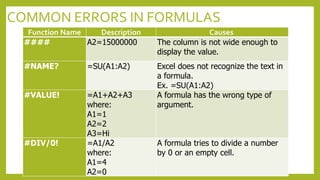
COMMON ERRORS IN FORMULAS
Function Name Description Causes
#### A2=15000000 The column is not wide enough to
display the value.
#NAME? =SU(A1:A2) Excel does not recognize the text in
a formula.
Ex. =SU(A1:A2)
#VALUE! =A1+A2+A3
where:
A1=1
A2=2
A3=Hi
A formula has the wrong type of
argument.
#DIV/0! =A1/A2
where:
A1=4
A2=0
A formula tries to divide a number
by 0 or an empty cell.
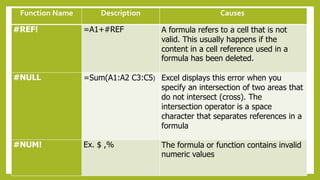
Function Name Description Causes
#REF! =A1+#REF A formula refers to a cell that is not
valid. This usually happens if the
content in a cell reference used in a
formula has been deleted.
#NULL =Sum(A1:A2 C3:C5) Excel displays this error when you
specify an intersection of two areas that
do not intersect (cross). The
intersection operator is a space
character that separates references in a
formula
#NUM! Ex. $ ,% The formula or function contains invalid
numeric values
HOW DO YOU HANDLE
FAILURES?
When you commit a mistake, it means
that there is a right way to do that thing.
If you are committed to achieve it, you
would go out on a limb to make it
happen.
LET’SWRAP UP!
 Excel errors are common especially
when you create more formula in
Excel Worksheets.
 It is important to be able to identify
these Excel errors and how to correct
them.

Understanding-Common-Errors.pptx

  • 1.
    When using MicrosoftExcel, you may encounter a few common Excel errors while creating or working with formulas. It is important to learn how to correct these errors, otherwise you may risk the chance of unintended results being displayed on your spreadsheet.
  • 2.
    COMMON ERRORS INFORMULAS Function Name Description Causes #### A2=15000000 The column is not wide enough to display the value. #NAME? =SU(A1:A2) Excel does not recognize the text in a formula. Ex. =SU(A1:A2) #VALUE! =A1+A2+A3 where: A1=1 A2=2 A3=Hi A formula has the wrong type of argument. #DIV/0! =A1/A2 where: A1=4 A2=0 A formula tries to divide a number by 0 or an empty cell.
  • 3.
    Function Name DescriptionCauses #REF! =A1+#REF A formula refers to a cell that is not valid. This usually happens if the content in a cell reference used in a formula has been deleted. #NULL =Sum(A1:A2 C3:C5) Excel displays this error when you specify an intersection of two areas that do not intersect (cross). The intersection operator is a space character that separates references in a formula #NUM! Ex. $ ,% The formula or function contains invalid numeric values
  • 4.
    HOW DO YOUHANDLE FAILURES?
  • 5.
    When you commita mistake, it means that there is a right way to do that thing. If you are committed to achieve it, you would go out on a limb to make it happen.
  • 6.
    LET’SWRAP UP!  Excelerrors are common especially when you create more formula in Excel Worksheets.  It is important to be able to identify these Excel errors and how to correct them.