Electronic
Spreadsheet
Electronic spreadsheet
refers to a collection of text and numbers
laid out in a rectangular grid. It is an
application program commonly used for
budgeting, inventory management, decision
making, forecasting and other finance-
related tasks.
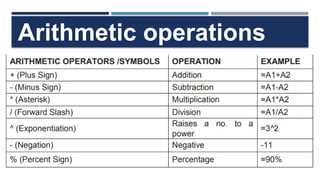
Arithmetic operations
Formula
– is an equation that performs
operation on worksheet data.A
formula in Microsoft Excel always
begins with an equal sign (=).
Common Error Values That You Can
Encounter from Faulty Formulas
1.#DIV/0! appears when entering a formula that
performs explicit division by zero (0), using a
reference to a blank cell or to a cell that contains
zero as the divisor in a formula or function that
performs division or running a macro that uses a
function or a formula that returns the #DIV/0!
error.
Common Error Values That You Can
Encounter from Faulty Formulas
1.#DIV/0! appears when entering a formula that
performs explicit division by zero (0), using a
reference to a blank cell or to a cell that contains
zero as the divisor in a formula or function that
performs division or running a macro that uses a
function or a formula that returns the #DIV/0!
error.
Common Error Values That You Can
Encounter from Faulty Formulas
2.##### - appears when the column
is not wide enough to display the
content and/or dates and times are
negative numbers. The solution is to
increase the column width.
Common Error Values That You Can
Encounter from Faulty Formulas
3.#NULL! Appears most often
when you insert a space (where
you should have used a comma) to
separate cell references used as
arguments for functions
Common Error Values That You Can
Encounter from Faulty Formulas
4.#NUM! Appears when Excel encounters
a problem with a number in the formula,
such as the wrong type of argument in an
Excel function or a calculation that
produces a number too large or too small
to be represented in the worksheet.
Common Error Values That You Can
Encounter from Faulty Formulas
5.#REF! Appears when Excel
encounters an invalid cell reference,
such as when you delete a cell referred
to in a formula or paste cells over the
cells referred to in a formula.
Common Error Values That You Can
Encounter from Faulty Formulas
6.#VALUE! Appears when you use the wrong
type of argument or operator in a function, or
when you call for a mathematical operation that
refers to cells that contain text entries.
For example, the formula =A1+B1, where A1
contains the string "Hello" and B1 contains the
number 3, returns the #VALUE! error.

Ms electronic spreadsheet and basic formula

  • 1.
  • 2.
    Electronic spreadsheet refers toa collection of text and numbers laid out in a rectangular grid. It is an application program commonly used for budgeting, inventory management, decision making, forecasting and other finance- related tasks.
  • 3.
  • 4.
    Formula – is anequation that performs operation on worksheet data.A formula in Microsoft Excel always begins with an equal sign (=).
  • 5.
    Common Error ValuesThat You Can Encounter from Faulty Formulas 1.#DIV/0! appears when entering a formula that performs explicit division by zero (0), using a reference to a blank cell or to a cell that contains zero as the divisor in a formula or function that performs division or running a macro that uses a function or a formula that returns the #DIV/0! error.
  • 6.
    Common Error ValuesThat You Can Encounter from Faulty Formulas 1.#DIV/0! appears when entering a formula that performs explicit division by zero (0), using a reference to a blank cell or to a cell that contains zero as the divisor in a formula or function that performs division or running a macro that uses a function or a formula that returns the #DIV/0! error.
  • 7.
    Common Error ValuesThat You Can Encounter from Faulty Formulas 2.##### - appears when the column is not wide enough to display the content and/or dates and times are negative numbers. The solution is to increase the column width.
  • 8.
    Common Error ValuesThat You Can Encounter from Faulty Formulas 3.#NULL! Appears most often when you insert a space (where you should have used a comma) to separate cell references used as arguments for functions
  • 9.
    Common Error ValuesThat You Can Encounter from Faulty Formulas 4.#NUM! Appears when Excel encounters a problem with a number in the formula, such as the wrong type of argument in an Excel function or a calculation that produces a number too large or too small to be represented in the worksheet.
  • 10.
    Common Error ValuesThat You Can Encounter from Faulty Formulas 5.#REF! Appears when Excel encounters an invalid cell reference, such as when you delete a cell referred to in a formula or paste cells over the cells referred to in a formula.
  • 11.
    Common Error ValuesThat You Can Encounter from Faulty Formulas 6.#VALUE! Appears when you use the wrong type of argument or operator in a function, or when you call for a mathematical operation that refers to cells that contain text entries. For example, the formula =A1+B1, where A1 contains the string "Hello" and B1 contains the number 3, returns the #VALUE! error.

Editor's Notes

  • #2 According to emerald.com electronic spreadsheet is probably the most useful general-purpose software for the microcomputer user. Almost all spreadsheets are now packaged in combination with other applications, such as database system and graphic capabilities. It replaces the traditional financial modeling tools, the accountant’s columnar pad, pencil and calculator. It a spreadsheet program, data and formulas used to calculate those data are entered into ledge-like forms (Spreadsheets or Worksheets) for analysis, tracking, planning, or “what-if” evaluations of the impact of real or proposed changes on an economic strategy.
  • #6 The solution is to make sure that the divisor in the function or formula is not zero (0) or blank or change the cell reference in the formula to another cell that does not contain a zero or a blank value.