Producing reaction time
and impact force measuring device
BY
Noppadol Surichamorn 5810756287
Anucha Thainapa 5810751833
Advisor : Asst. Prof. Dr. Jak Chuanasa
1
Project overview
2
3
Project overview
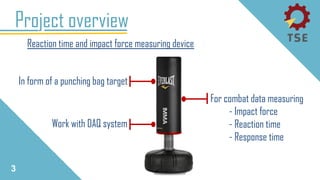
Reaction time and impact force measuring device
In form of a punching bag target
For combat data measuring
- Impact force
- Reaction time
- Response time
Work with DAQ system
4
Project overview
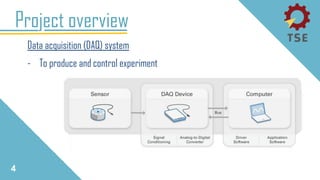
Data acquisition (DAQ) system
- To produce and control experiment
5
Project overview
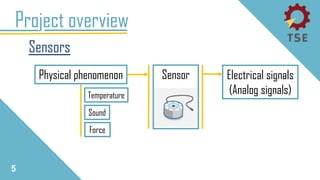
Sensors
Electrical signals
(Analog signals)
SensorPhysical phenomenon
Temperature
Force
Sound
6
Project overview
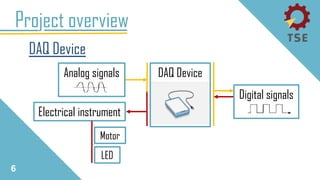
DAQ Device
Analog signals DAQ Device
Electrical instrument
Digital signals
Motor
LED
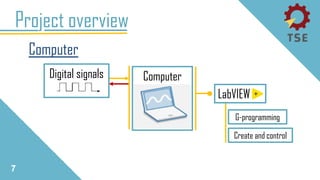
7
Project overview
Computer
Computer
Create and control
G-programming
LabVIEW
Digital signals
Instruments intro.
8
9
Project overview
Footswitch
LabVIEW
Sensor
[1]
Laser pointer
Sensor
[2]
LabVIEW and DAQ device
10
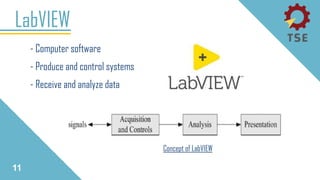
- Computer software
- Produce and control systems
- Receive and analyze data
LabVIEW
11
Concept of LabVIEW
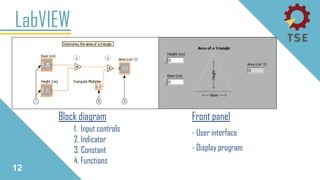
Block diagram
LabVIEW
12
Front panel
- User interface
- Display program
1. Input controls
2. Indicator
3. Constant
4. Functions
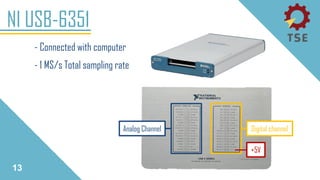
- Connected with computer
- 1 MS/s Total sampling rate
NI USB-6351
13
Analog Channel Digital channel
+5V
Sensor kit
14
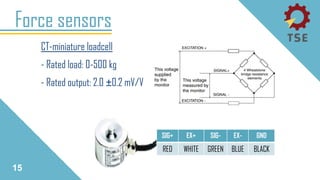
CT-miniature loadcell
- Rated load: 0-500 kg
- Rated output: 2.0 ±0.2 mV/V
Force sensors
15
SIG+ EX+ SIG- EX- GND
RED WHITE GREEN BLUE BLACK
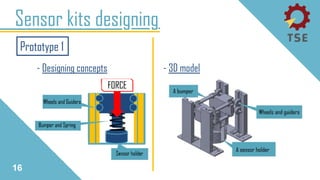
- Designing concepts
Sensor kits designing
- 3D model
16
Prototype 1
Sensor kits designing
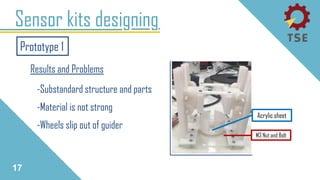
17
M3 Nut and Bolt
Acrylic sheet
Prototype 1
-Substandard structure and parts
-Material is not strong
-Wheels slip out of guider
Results and Problems
Sensor kits designing
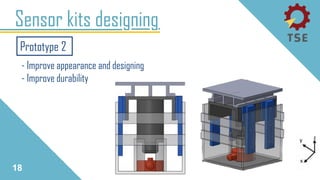
18
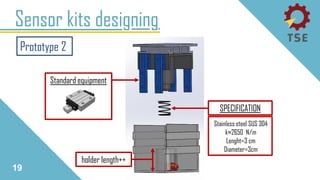
Prototype 2
- Improve appearance and designing
- Improve durability
Sensor kits designing
19
Prototype 2
Standard equipment
holder length++
Stainless steel SUS 304
k≈2650 N/m
Lenght=3 cm
Diameter=3cm
SPECIFICATION
Sensor kits designing
20
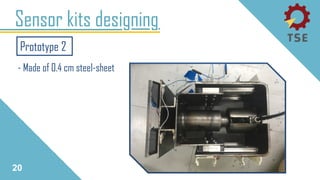
Prototype 2
- Made of 0.4 cm steel-sheet
Foot-switch
21
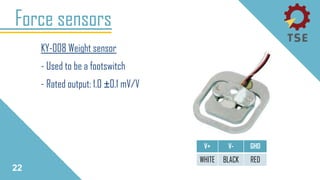
KY-008 Weight sensor
- Used to be a footswitch
- Rated output: 1.0 ±0.1 mV/V
22
Force sensors
V+ V- GHD
WHITE BLACK RED
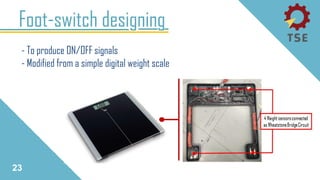
Foot-switch designing
23
- To produce ON/OFF signals
- Modified from a simple digital weight scale
Laser pointer
24
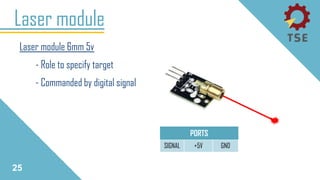
Laser module
Laser module 6mm 5v
- Role to specify target
- Commanded by digital signal
SIGNAL +5V GND
PORTS
25
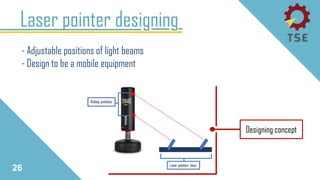
Laser pointer designing
26
- Adjustable positions of light beams
- Design to be a mobile equipment
Designing concept
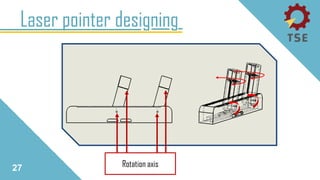
Laser pointer designing
27 Rotation axis
Additional Equipment
28
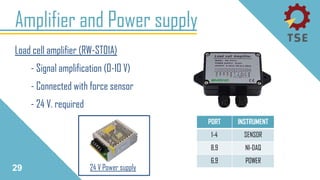
Amplifier and Power supply
29
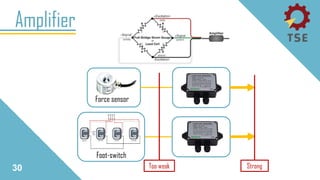
Load cell amplifier (RW-ST01A)
- Signal amplification (0-10 V)
- Connected with force sensor
- 24 V. required
PORT INSTRUMENT
1-4 SENSOR
8,9 NI-DAQ
6,9 POWER
24 V Power supply
Amplifier
30 Too weak Strong
Force sensor
Foot-switch
31
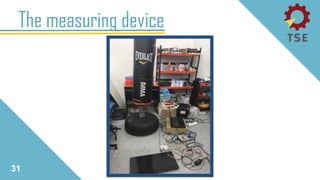
The measuring device
Programming
32
Programming of the device
- Force sensors calibration
- LabVIEW programming
Project’s progression
33
Sensor calibration
34
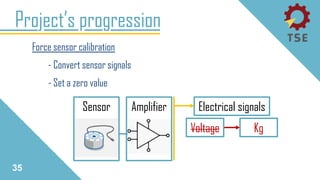
Force sensor calibration
- Convert sensor signals
- Set a zero value
Project’s progression
35
Electrical signalsSensor
Voltage Kg
Amplifier
Project’s progression
36
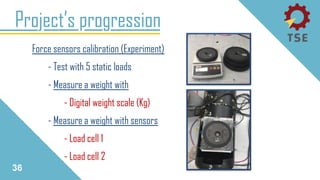
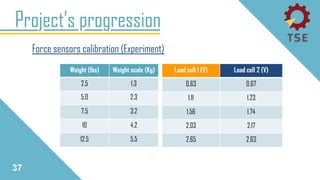
Force sensors calibration (Experiment)
- Test with 5 static loads
- Measure a weight with
- Digital weight scale (Kg)
- Measure a weight with sensors
- Load cell 1
- Load cell 2
Project’s progression
37
Force sensors calibration (Experiment)
Load cell 1 (V) Load cell 2 (V)
0.63 0.67
1.11 1.23
1.56 1.74
2.03 2.17
2.65 2.63
Weight (lbs) Weight scale (Kg)
2.5 1.3
5.0 2.3
7.5 3.2
10 4.2
12.5 5.5
Project’s progression
38
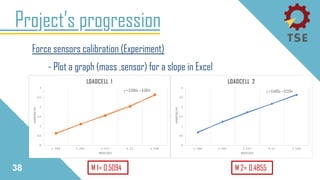
Force sensors calibration (Experiment)
- Plot a graph (mass ,sensor) for a slope in Excel
M 1= 0.5094 M 2= 0.4855
Project’s progression
39
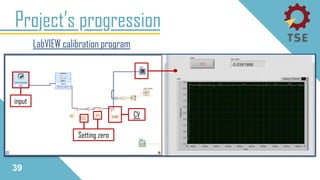
LabVIEW calibration program
Setting zero
CV
input
LabVIEW Programming
40
41
LabVIEW Programming
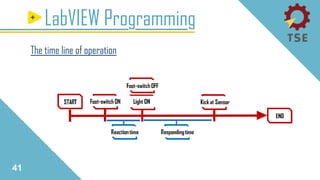
The time line of operation
42
LabVIEW Programming
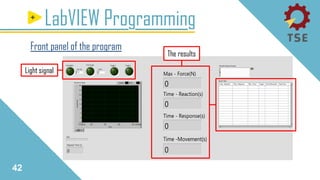
Front panel of the program
The results
Light signal
43
LabVIEW Programming
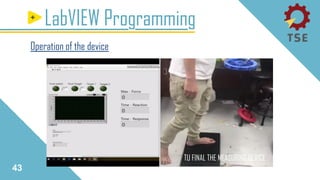
Operation of the device
TU FINAL THE MEASURING DEVICE
Experimental research
44
Experimental research
- Static force measurement
- Dynamic force measurement
- Force loss in materials
Project’s progression
45
Experimental research
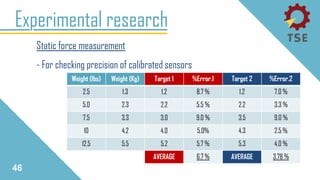
Static force measurement
- For checking precision of calibrated sensors
46
Weight (lbs) Weight (Kg) Target 1 %Error.1 Target 2 %Error.2
2.5 1.3 1.2 8.7 % 1.2 7.0 %
5.0 2.3 2.2 5.5 % 2.2 3.3 %
7.5 3.3 3.0 9.0 % 3.5 9.0 %
10 4.2 4.0 5.0% 4.3 2.5 %
12.5 5.5 5.2 5.7 % 5.3 4.0 %
AVERAGE 6.7 % AVERAGE 3.78 %
Experimental research
Dynamic force measurement
- From theory of impact force
47
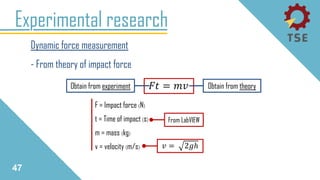
𝐹𝑡 = 𝑚𝑣
𝑣 = 2𝑔ℎ
F = Impact force (N)
t = Time of impact (s)
m = mass (kg)
v = velocity (m/s)
Obtain from theoryObtain from experiment
From LabVIEW
Experimental research
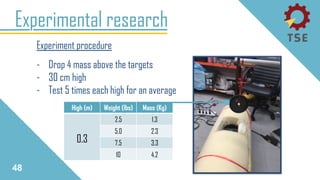
Experiment procedure
- Drop 4 mass above the targets
- 30 cm high
- Test 5 times each high for an average
48
High (m) Weight (lbs) Mass (Kg)
0.3
2.5 1.3
5.0 2.3
7.5 3.3
10 4.2
Experimental research
Dynamic force measurement
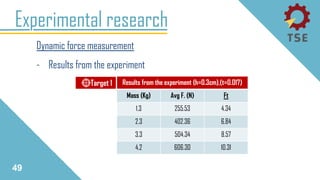
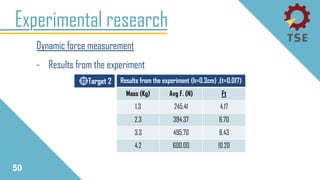
- Results from the experiment
49
Results from the experiment (h=0.3cm),(t=0.017)
Mass (Kg) Avg F. (N) Ft
1.3 255.53 4.34
2.3 402.36 6.84
3.3 504.34 8.57
4.2 606.30 10.31
Target 1
Experimental research
Dynamic force measurement
- Results from the experiment
50
Target 2 Results from the experiment (h=0.3cm) ,(t=0.017)
Mass (Kg) Avg F. (N) Ft
1.3 245.41 4.17
2.3 394.37 6.70
3.3 495.70 8.43
4.2 600.00 10.20
Experimental research
Dynamic force measurement
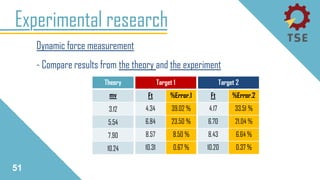
- Compare results from the theory and the experiment
51
Target 1
Ft %Error.1
4.34 39.02 %
6.84 23.50 %
8.57 8.50 %
10.31 0.67 %
Target 2
Ft %Error.2
4.17 33.51 %
6.70 21.04 %
8.43 6.64 %
10.20 0.37 %
Theory
mv
3.12
5.54
7.90
10.24
Experimental research
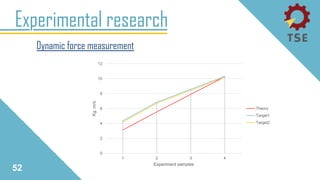
Dynamic force measurement
52
0
2
4
6
8
10
12
1 2 3 4
Kg.m/s
Experiment samples
Theory
Target1
Target2
Experimental research
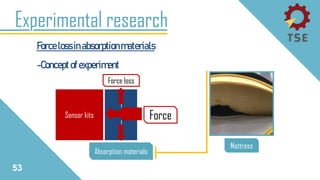
Forcelossinabsorptionmaterials
-Conceptofexperiment
Sensor kits
Force loss
Force
Absorption materials
Mattress
53
Experimental research
Forcelossinabsorptionmaterials
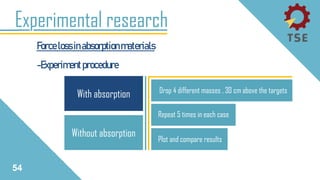
-Experimentprocedure
Without absorption
With absorption Drop 4 different masses , 30 cm above the targets
Repeat 5 times in each case
Plot and compare results
54
Experimental research
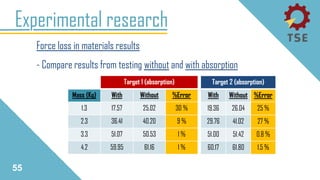
Force loss in materials results
- Compare results from testing without and with absorption
55
Target 1 (absorption)
Mass (Kg) With Without %Error
1.3 17.57 25.02 30 %
2.3 36.41 40.20 9 %
3.3 51.07 50.53 1 %
4.2 59.95 61.16 1 %
Target 2 (absorption)
With Without %Error
19.36 26.04 25 %
29.76 41.02 27 %
51.00 51.42 0.8 %
60.17 61.80 1.5 %
Experimental research
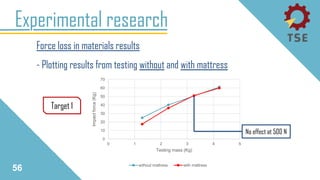
Force loss in materials results
- Plotting results from testing without and with mattress
56
0
10
20
30
40
50
60
70
0 1 2 3 4 5
Impactforce(Kg)
Testing mass (Kg)
without mattress with mattress
Target 1
No effect at 500 N
Experimental research
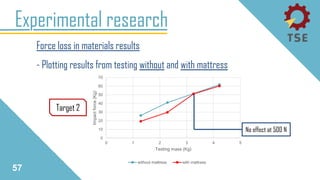
Force loss in materials results
- Plotting results from testing without and with mattress
57
0
10
20
30
40
50
60
70
0 1 2 3 4 5
Impactforce(Kg)
Testing mass (Kg)
without mattress with mattress
Target 2
No effect at 500 N
Conclusion
58
Working problem [1]
Conclusion
59
Have delay in work Lack of knowledge
in programming
PROBLEM FROM
Learn from
a professional
SOLUTION
Lack of knowledge
in electrical
instruments
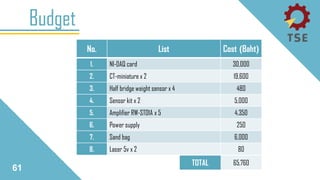
Budget
60
Budget
61
No. List Cost (Baht)
1. NI-DAQ card 30,000
2. CT-miniature x 2 19,600
3. Half bridge weight sensor x 4 480
4. Sensor kit x 2 5,000
5. Amplifier RW-ST01A x 5 4,350
6. Power supply 250
7. Sand bag 6,000
8. Laser 5v x 2 80
TOTAL 65,760
Question?
62
20
Wiring diagram
ANALOG S.
DIGITAL S.
POWER
CONTROL
Load cell 2
Load cell 1
W.Sensor 1
W.Sensor 2
W.Sensor 3
T.1
T.2
FS.
AMP
[1] [2]
AMP
[3] [4]
AMP
[5]
PS. +24V
Laser 2
Laser 1
+5V
USB-6351 NI
Computer
LabVIEW
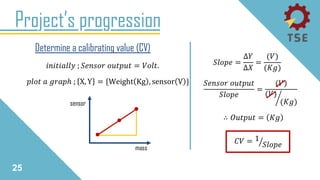
Project’s progression
25
𝑖𝑛𝑖𝑡𝑖𝑎𝑙𝑙𝑦 ; 𝑆𝑒𝑛𝑠𝑜𝑟 𝑜𝑢𝑡𝑝𝑢𝑡 = 𝑉𝑜𝑙𝑡.
Determine a calibrating value (CV)
𝑝𝑙𝑜𝑡 𝑎 𝑔𝑟𝑎𝑝ℎ ; X, Y = {Weight Kg , sensor V }
mass
sensor
𝑆𝑙𝑜𝑝𝑒 =
∆𝑌
∆𝑋
=
(𝑉)
(𝐾𝑔)
∴ 𝑂𝑢𝑡𝑝𝑢𝑡 = 𝐾𝑔
𝑆𝑒𝑛𝑠𝑜𝑟 𝑜𝑢𝑡𝑝𝑢𝑡
𝑆𝑙𝑜𝑝𝑒
=
(𝑉)
൘
(𝑉)
(𝐾𝑔)
𝐶𝑉 = ൗ1
𝑆𝑙𝑜𝑝𝑒
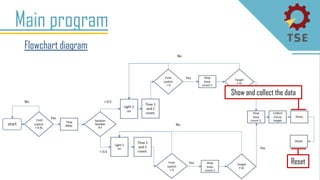
Flowchart diagram
Main program
4
Show and collect the data
Reset
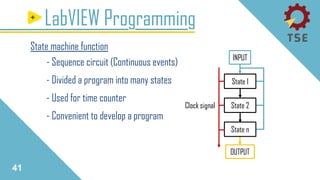
41
LabVIEW Programming
State machine function
- Sequence circuit (Continuous events)
- Divided a program into many states
- Used for time counter
- Convenient to develop a program
OUTPUT
State 1
State 2
State n
Clock signal
INPUT
42
LabVIEW Programming
State .1 [initial]
Clock signals
Wait for going
to next state
Data line
43
LabVIEW Programming
State .2 [ wait_foot_sw_on ]
Footswitch operation
FS. input
44
LabVIEW Programming
State .3 [ delay_5_second ]
Random a delay time
45
LabVIEW Programming
State .4 [ light_on ]
Random laser
LS. output
Count the times
46
LabVIEW Programming
State .5 [ wait_foot_sw_off ]
FS.OFF
Stop reaction T.
Switch state
[target 1] or [target 2]
[7],[8]
47
LabVIEW Programming
State .6 [ wait_target_1_hit ], ( Switching condition =light 1 )
Sensor calibration
Sensor inputs
Stop Response T.
Display the force
48
LabVIEW Programming
State .7 [ wait_target_2_hit ] ,( Switching condition =light 2 )
Sensor calibration
Sensor inputs
Stop Response T.
Display the force
49
LabVIEW Programming
State .8 [ save_data ]
END
Display and
collect data
Collect data as a table
Question?
79
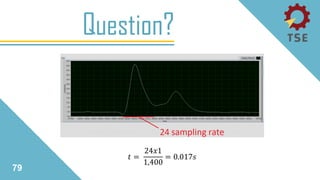
𝑡 =
24𝑥1
1,400
= 0.017𝑠
Question?
79

TU FINAL THE MEASURING DEVICE 1