Aleksandr Dolbilov
CTO, JoyCraft Games
Optimizing Unity Games
About me
Aleksandr Dolbilov
- 10+ years in game industry
- Android, iOS, PS2, PS3, PSP, XBox, XBox 360...
Nitro Nation
Agenda
- Performance problems from real-world games
- Live profile, bottleneck detection and optimization
- Unity profiler and platform-specific tools in action
- Solutions and tips which help to improve performance of
your games
- Grab your projects today and perform live performance
analysis tomorrow!!
Today
- Few notes about performance in games
- CPU optimization
- Static scene
- Vertex constants arrays
- Vertex constants instancing
- Math optimization
Tomorrow...
- GPU performance optimization
- Vertex shaders optimization
- Fragment shaders optimization
Performance in games
Frame time
- Frame time depends on CPU time and GPU time
- Both units work in parallel if you don’t touch GPU data
from CPU
Locate your bottleneck
- Detect if game is CPU or GPU bound
- Gfx.WaitForPresent in Unity Profiler is good indicator
- Platform-specific tools provide units utilization info
Locate your bottleneck (CPU bound)
- Use Unity Profiler for further analysis
- Use Profiler.BeginSample and Profiler.EndSample to
get detailed information on device
- Deep profile option is very helpful to find hidden pitfalls
(implicit type casts, redundant constructors etc.)
- Time.realtimeSinceStartup can help you to monitor
performance for release builds
Locate your bottleneck (GPU bound)
- Use platform-specific tools
- Adreno Profiler (Qualcomm, Adreno )
- PerfHUD ES (nVidia, Tegra )
- PVRTune, PVRTrace (Imagination tec., PowerVR )
- Mali Graphics Debugger (ARM, Mali )
- Show/hide method
Optimization tips
- Always measure optimization results
- Use milliseconds (not FPS!!)
- If it’s possible, create simple test for faster iterations
- Check if everything work properly 
CPU performance
optimization
Render CPU time measurement
- Check Camera.Render time in Unity Profiler
- Or create custom MonoBehaviour
- OnPreCull is timestamp begin
- OnPostRender is timestamp end
- OnGUI for render result
Static scene
Initial scene
GameObject count: 1440
Material count: 32
Shader count: 2
Textures count: 32
Draw calls: 1434
CPU time (HTC One S):~75 ms
Combine geometry: how to
- Usually made by artists according to ‘common sense’
Combine geometry: motivation
- Reduce engine overhead on Transform and
MeshRenderer processing
- Geometry transform validation
- Visibility/Occlusion culling
….
- Reduce draw calls count
Combine geometry: result
GameObject count: 51/1440
Material count: 32
Shader count: 2
Textures count: 32
Draw calls: 90/1434
CPU time (HTC One S):~5.2 ms /~75 ms
Bake textures to atlases: how to
- Can be made manually by artists but...
- … better to automate the process with script
(use Texture2D.PackTextures)
Bake textures to atlases: how to
- Our approach is to create separate atlases for opaque
and transparent objects
- Tiled textures are excluded from atlas
- Huge textures are excluded from atlas
- 2048x2048 texture resolution is usually enough to fit all
static scene textures
Bake textures to atlases: motivation
- Reduce Material and Texture count
- Reduce engine overhead on Material setup
- Reduce engine overhead on Texture switch
Bake textures to atlases: result
GameObject count: 51
Material count: 4/32
Shader count: 2
Textures count: 4/32
Draw calls: 90
CPU time (HTC One S):~3.2 ms/~5.2 ms
Move geometry to world space
- Pre-transform geometry to world space
- Use Shader.SetGlobalVector for ViewProjection matrix:
- Reduce engine overhead on World*ViewProjection
- Reduce engine overhead on shader constants setup, because Unity has
setup cache for Vector properties
- We have ~25% performance boost on some scenes
- CPU time (HTC One S):~2.8 ms/~3.2 ms
Static batching
- Reduce draw calls count but…
- … this is not for free
- Performance depends on triangle count
- Some devices doesn’t like dynamic geometry
- We have severe performance degrade on Mali devices
- Doesn’t get any speed improvement for HTC One S
- Your mileage may vary
Vertex shader arrays
Motivation
- Reduce draw call count for objects with slightly different
materials
General algorithm
- Combine all meshes and store MaterialID for each vertex
(index in array)
- Add array of uniforms to vertex shader
- Add value extraction code to vertex shader
- Map array elements as material properties
MaterialID pack/unpack
- Using texcoord (uv/uv2)
- pack: mesh.uv[i].x = mesh.uv[i].x + MaterialID;
- unpack: int MaterialID = (int) v.texcoord.x;
- Using color
- pack: mesh.colors32[i].a = MaterialID;
- unpack: int MaterialID = (int) (v.color.a*255.0f + 0.5f);
Shader code
Material properties
- Each array element can be mapped as individual property
PropertyName = ArrayName+ElementIndex
Usage tips
- Don’t make vertex array too large
- Every array element require glUniform… call (in Unity3D)
- It can significantly degrade vertex shader performance on some
platforms
- You can use custom property names to display in
inspector
- hood color, body color, etc..
Results
Before After
Draw calls 37 29
Frame time (HTC One S), ms 3.7 2.7
Vertex constants
instancing
Motivation
- Reduce draw call count for objects with similar materials
even if they have different transform
General algorithm
- Create custom Mesh which contains N copies of original
Mesh with InstanceID stored in vertex
- Set custom bounding box
- Add array of uniform matrices to vertex shader
(InstanceData)
- Add value extraction code to vertex shader
- Write custom script to update InstanceData
Visibility problem
- Create custom bounding box which preserve geometry to
become hidden when it should be visible
Custom setup code
- Use OnWillRenderObject to setup your data
- called only if object is visible
- Use propertyID for material setup
- works much faster than usual ‘string’ version
Results
Before After
Draw calls 29 17
Frame time (HTC One S), ms 2.7 2.0
Efficiency depending on batch size
4 elements batch 8 elements batch 16 elements batch
Mali-400 MP x2.8 x4.0 x6.0
Adreno 220 x2.9 x5.0 x6.5
PowerVR SGX 540 x3.1 x5.0 x6.5
nVidia Tegra 3 x2.5 x4.0 x5.0
Efficiency = timeBefore/timeAfter
Math optimization
Case study
- Getting 20 000 matrices which transform
object from local space to camera space
- Naive implementation: 125 ms (HTC One S)
Cache complex expressions
- Most of the properties evaluate complex expression every
time they invoked!! (Transform.forward, Vector3.zero ...)
- Sometimes they result to safe/unsafe context switch
- Optimized implementation: 33.5 ms/125 ms (HTC One S)
Remove redundant copies
- Matrix4x4 is value-type
- We have 2 redundant copies for input arguments
- We have 1 redundant copy for output result
- Create our own method using reference semantic
- Optimized implementation: 21.5 ms/33.5 ms (HTC One S)
Remove redundant calculations
- All our matrices has Matrix43 semantic
- We can remove a lot of calculations using this fact
- Optimized implementation: 15.2 ms/21.5 ms (HTC One S)
Write native plug-in (C code)
- You can use functions from android shared libraries using
Platform Invoke Service
- Create your own library using Android-NDK
- Create functions with C-linkage (extern “C” for *.cpp)
- Define your own struct Matrix4x4 (be careful with
elements order !!)
- Pass and return elements using pointers
- Now you can use all C++ optimizations !!
Write native plug-in (C code)
- Simply port our optimized operator to C
Write native plug-in (C# code)
- Insert ‘using System.Runtime.InteropServices;’
- Declare P/Invoke method
Write native plug-in (C# code)
- Pass pointers to array as reference to first element
Write native plug-in
- Native plug-ins has constant overhead due to safe/unsafe
context switch, so try to use them for large batches of data
- Make sure you enable all compiler/linker optimizations to
get maximum performance
- Optimized implementation: 6.8 ms/15.2 ms (HTC One S)
Use ASM code
Use ASM code
- Lowest possible level
- cache prefetch
- parallel load/store
- hardware registers management
- …
- NEON extension is really helpful for vector/matrix math
- Optimized implementation: 3.3 ms/6.8 ms (HTC One S)
Don’t give up 
- Final result ~40 times faster than naive approach !!
- For most situations it’s enough to perform smart C#
optimizations (~8 times faster)
- But keep in mind native plug-ins for computationally
intensive tasks (additional ~5 times faster)
GPU performance
optimization
Mobile GPU vendors
- Imagination Technologies (PowerVR)
- Series 5, 5XT, 6, 6XT, Wizard
- ARM (Mali)
- Utgard (Mali 400), Midgard (Mali T624)
- Qualcomm (Adreno)
- Adreno 2xx, 3xx, 4xx
- nVidia (Tegra)
- Tegra 2, 3, 4, K1
Rendering approach PowerVR
- Tile-Based Deferred Rendering (TBDR)
- pixel-perfect HSR (Hidden Surface Removal)
- small tiles 32x32 (on-chip registers)
- Scalar ALU architecture (from 6 series)
- Different fragment shader precision supported
- Unified ALU
- High-quality fast MSAA
- 32-bit internal color precision
Rendering approach Mali
- Tile-Based Rendering (TBR)
- early-Z used for HSR
- small tiles 16x16 (on-chip registers)
- Separate ALU (Utgard), unified ALU (Midgard)
- Different fragment shader precision supported
- High-quality fast MSAA
- 32-bit internal color precision
Rendering approach Adreno
- Tile-Based Rendering (TBR)
- early-Z used for HSR
- large tiles (about 256 Kb, on-chip GMem)
- binning algorithm to classify polygons
- vertex shader can be called multiple times
- Unified ALU
- Different fragment shader precision supported
- Scalar ALU (from 3xx)
- MSAA can significantly increase vertex processing cost
- Color precision can be used to reduce tile count
Rendering approach Tegra
- Immediate-Mode Rendering
- early-Z used for HSR (Hi-Z for Tegra K1)
- render directly to framebuffer
- framebuffer compression (from Tegra 4)
- Separate ALU (Tegra 2, 3, 4), unified (Tegra K1)
- CSAA (Tegra 2, 3)
- MSAA (Tegra 4, K1)
- Color precision can reduce bandwidth
Vertex shaders
optimization
Motivation
- High-poly meshes
- Some GPUs have separate vertex ALU
- Adreno GPU can process vertices multiple times due to
binning algorithm (especially when MSAA is enabled)
Optimize before vertex ALU
- Always enable ‘Optimize Mesh’ option in Mesh Import
Settings
- Post-transform vertex cache optimization
- Pre-transform vertex cache optimization
- Always enable ‘Optimize Mesh Data’ option in
‘Player Settings->Other Settings’
- Remove redundant vertex attributes (tangents, normals, color etc.)
Case study: Car paint vertex shader
- Use a lot of features
- diffuse light from 3 light sources
- fresnel
- tunnel mapping
….
- Optimize for PowerVR SGX 540
Optimization pipeline
- Grab GLSL ES code
Optimization pipeline
- Copy code from ‘#ifdef VERTEX’
section
Optimization pipeline
- Paste code into PVRShaderEditor
- Select appropriate compiler ‘Preferences->Compiler
Settings->Compiler’
- Analyze the result
Analyze the result
- Emulated Cycles (Worst Case)
- maximum number of cycles spent by ALU to process single vertex
- Temporary Registers Used
- ALU has limited amount of temporary registers
- the number of shader threads that work simultaneously depends on this
parameter
- more threads help you to avoid stalls when vertex attribute fetch occurs
Bake complex calculations
- atan2 function consume too many cycles
- We can pre-compute it using
AssetPostprocessor.OnPostprocessModel
- Store result in mesh.uv2.x
Skip redundant normalization
- Use #pragma glsl_no_auto_normalization if your
normals and tangents don’t need normalization
Simplify math
- Original expression:
fresnel = _ReflectionFactor*((1.0f - _FresnelFactor) + _FresnelFactor*pow(1.0f - RdotN, 5.0f));
- Simplified expression:
fresnel = _FresnelAdd + _FresnelMul*pow(1.0f - RdotN, 5.0f));
Simplify math
- Swap pow(x, 5.0f) with x*x (visually effect is similar):
fresnelTemp = 1.0f - RdotN;
fresnel = _FresnelAdd + _FresnelMul*fresnelTemp*fresnelTemp;
saturate(x) vs. max(x, 0)
- Usually GPU apply saturate for free…
- … but this is not correct for PowerVR
- saturate(x) = max(min(x, 1), 0)
- so it’s more beneficial to use max(x, 0) for PowerVR
Optimize Point-Matrix multiplication
- mul(float4x4, float4) doesn’t know anything about actual
values
- PowerVR SGX 540 consume 1 cycle for each scalar
madd in vertex shader
- So it’s beneficial to know that point = (x, y, z, 1)
- And some matrices has (0, 0, 0, 1) row
Optimize Point-Matrix multiplication
- We see that actual cycle count has grown slightly…
- … but temporary registers usage reduced
Fragment shaders
optimization
Motivation
- Modern android devices has lots of megapixels 
- So every cycle can make you GPU bound
Case study: diffuse lighting
- Per-pixel diffuse lighting from 3 directional light sources
- Target device HTC One S (Adreno 220)
- Use Adreno Profiler to measure actual cycles spent by
GPU
Naive implementation
saturate(x) vs. max(x, 0)
Bake lighting to diffuse cubemap
- Contain lighting environment information about all
directional light sources and ambient
- Normal vector used to sample diffuse lighting with single
texCUBE instruction
- Generated on CPU with relatively simple code
- Pre-multiplied by 0.5 to increase intensity range
- Size of 32 texels is usually enough
Bake lighting to diffuse cubemap
Case study: specular lighting
- Per-pixel phong specular lighting from 3 directional light
sources
- Target device HTC One S (Adreno 220)
Naive implementation
Optimize computation scheme
Use fast pow approximation
- pow is usually scalar and
consume a lot of cycles
- approximation can make up to
4 pows in just 2 cycles!!
Use fast pow approximation
Move calculations to vertex shader
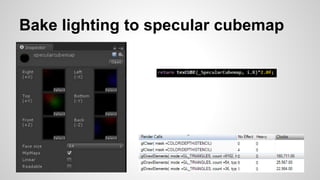
Bake lighting to specular cubemap
- Reflected view vector used to sample specular lighting
with single texCUBE instruction
- Size of 64 texels is usually enough
- Pre-multiplied by 0.5 to increase intensity range
- Really interesting BRDF can be baked using this
approach
Bake lighting to specular cubemap
Case study: specular map
- Specular intensity map greatly improve realism
- Optimize for HTC One S
Naive approach
- Store in alpha channel of diffuse texture
- Use ARGB32 texture format
Naive approach
Use better texture format
- Adreno GPUs support compressed texture format with 8
bits per pixel which contains alpha channel
- The problem is you should select different format for all
platforms
- Mali Utgard doesn’t support compressed textures with
alpha channel 
Recover specular map in shader
- Use ETC1 to store diffuse map
- Compute diffuse luminance for each pixel
luminance = 0.3*R + 0.58*G + 0.12*B
- Scale and bias this luminance to get specular intensity
specIntensity = saturate(luminance*scale + bias)
- Combine both formulas
specIntensity = saturate( dot(RGB1, specConst) )
specConst = (0.3*scale, 0.58*scale, 0.12*scale, bias)
Recover specular map in shader
Questions ?

Optimizing unity games (Google IO 2014)

  • 1.
    Aleksandr Dolbilov CTO, JoyCraftGames Optimizing Unity Games
  • 2.
    About me Aleksandr Dolbilov -10+ years in game industry - Android, iOS, PS2, PS3, PSP, XBox, XBox 360...
  • 3.
  • 4.
    Agenda - Performance problemsfrom real-world games - Live profile, bottleneck detection and optimization - Unity profiler and platform-specific tools in action - Solutions and tips which help to improve performance of your games - Grab your projects today and perform live performance analysis tomorrow!!
  • 5.
    Today - Few notesabout performance in games - CPU optimization - Static scene - Vertex constants arrays - Vertex constants instancing - Math optimization
  • 6.
    Tomorrow... - GPU performanceoptimization - Vertex shaders optimization - Fragment shaders optimization
  • 7.
  • 8.
    Frame time - Frametime depends on CPU time and GPU time - Both units work in parallel if you don’t touch GPU data from CPU
  • 9.
    Locate your bottleneck -Detect if game is CPU or GPU bound - Gfx.WaitForPresent in Unity Profiler is good indicator - Platform-specific tools provide units utilization info
  • 10.
    Locate your bottleneck(CPU bound) - Use Unity Profiler for further analysis - Use Profiler.BeginSample and Profiler.EndSample to get detailed information on device - Deep profile option is very helpful to find hidden pitfalls (implicit type casts, redundant constructors etc.) - Time.realtimeSinceStartup can help you to monitor performance for release builds
  • 11.
    Locate your bottleneck(GPU bound) - Use platform-specific tools - Adreno Profiler (Qualcomm, Adreno ) - PerfHUD ES (nVidia, Tegra ) - PVRTune, PVRTrace (Imagination tec., PowerVR ) - Mali Graphics Debugger (ARM, Mali ) - Show/hide method
  • 12.
    Optimization tips - Alwaysmeasure optimization results - Use milliseconds (not FPS!!) - If it’s possible, create simple test for faster iterations - Check if everything work properly 
  • 13.
  • 14.
    Render CPU timemeasurement - Check Camera.Render time in Unity Profiler - Or create custom MonoBehaviour - OnPreCull is timestamp begin - OnPostRender is timestamp end - OnGUI for render result
  • 15.
  • 16.
    Initial scene GameObject count:1440 Material count: 32 Shader count: 2 Textures count: 32 Draw calls: 1434 CPU time (HTC One S):~75 ms
  • 17.
    Combine geometry: howto - Usually made by artists according to ‘common sense’
  • 18.
    Combine geometry: motivation -Reduce engine overhead on Transform and MeshRenderer processing - Geometry transform validation - Visibility/Occlusion culling …. - Reduce draw calls count
  • 19.
    Combine geometry: result GameObjectcount: 51/1440 Material count: 32 Shader count: 2 Textures count: 32 Draw calls: 90/1434 CPU time (HTC One S):~5.2 ms /~75 ms
  • 20.
    Bake textures toatlases: how to - Can be made manually by artists but... - … better to automate the process with script (use Texture2D.PackTextures)
  • 21.
    Bake textures toatlases: how to - Our approach is to create separate atlases for opaque and transparent objects - Tiled textures are excluded from atlas - Huge textures are excluded from atlas - 2048x2048 texture resolution is usually enough to fit all static scene textures
  • 22.
    Bake textures toatlases: motivation - Reduce Material and Texture count - Reduce engine overhead on Material setup - Reduce engine overhead on Texture switch
  • 23.
    Bake textures toatlases: result GameObject count: 51 Material count: 4/32 Shader count: 2 Textures count: 4/32 Draw calls: 90 CPU time (HTC One S):~3.2 ms/~5.2 ms
  • 24.
    Move geometry toworld space - Pre-transform geometry to world space - Use Shader.SetGlobalVector for ViewProjection matrix: - Reduce engine overhead on World*ViewProjection - Reduce engine overhead on shader constants setup, because Unity has setup cache for Vector properties - We have ~25% performance boost on some scenes - CPU time (HTC One S):~2.8 ms/~3.2 ms
  • 25.
    Static batching - Reducedraw calls count but… - … this is not for free - Performance depends on triangle count - Some devices doesn’t like dynamic geometry - We have severe performance degrade on Mali devices - Doesn’t get any speed improvement for HTC One S - Your mileage may vary
  • 26.
  • 27.
    Motivation - Reduce drawcall count for objects with slightly different materials
  • 28.
    General algorithm - Combineall meshes and store MaterialID for each vertex (index in array) - Add array of uniforms to vertex shader - Add value extraction code to vertex shader - Map array elements as material properties
  • 29.
    MaterialID pack/unpack - Usingtexcoord (uv/uv2) - pack: mesh.uv[i].x = mesh.uv[i].x + MaterialID; - unpack: int MaterialID = (int) v.texcoord.x; - Using color - pack: mesh.colors32[i].a = MaterialID; - unpack: int MaterialID = (int) (v.color.a*255.0f + 0.5f);
  • 30.
  • 31.
    Material properties - Eacharray element can be mapped as individual property PropertyName = ArrayName+ElementIndex
  • 32.
    Usage tips - Don’tmake vertex array too large - Every array element require glUniform… call (in Unity3D) - It can significantly degrade vertex shader performance on some platforms - You can use custom property names to display in inspector - hood color, body color, etc..
  • 33.
    Results Before After Draw calls37 29 Frame time (HTC One S), ms 3.7 2.7
  • 34.
  • 35.
    Motivation - Reduce drawcall count for objects with similar materials even if they have different transform
  • 36.
    General algorithm - Createcustom Mesh which contains N copies of original Mesh with InstanceID stored in vertex - Set custom bounding box - Add array of uniform matrices to vertex shader (InstanceData) - Add value extraction code to vertex shader - Write custom script to update InstanceData
  • 37.
    Visibility problem - Createcustom bounding box which preserve geometry to become hidden when it should be visible
  • 38.
    Custom setup code -Use OnWillRenderObject to setup your data - called only if object is visible - Use propertyID for material setup - works much faster than usual ‘string’ version
  • 39.
    Results Before After Draw calls29 17 Frame time (HTC One S), ms 2.7 2.0
  • 40.
    Efficiency depending onbatch size 4 elements batch 8 elements batch 16 elements batch Mali-400 MP x2.8 x4.0 x6.0 Adreno 220 x2.9 x5.0 x6.5 PowerVR SGX 540 x3.1 x5.0 x6.5 nVidia Tegra 3 x2.5 x4.0 x5.0 Efficiency = timeBefore/timeAfter
  • 41.
  • 42.
    Case study - Getting20 000 matrices which transform object from local space to camera space - Naive implementation: 125 ms (HTC One S)
  • 43.
    Cache complex expressions -Most of the properties evaluate complex expression every time they invoked!! (Transform.forward, Vector3.zero ...) - Sometimes they result to safe/unsafe context switch - Optimized implementation: 33.5 ms/125 ms (HTC One S)
  • 44.
    Remove redundant copies -Matrix4x4 is value-type - We have 2 redundant copies for input arguments - We have 1 redundant copy for output result - Create our own method using reference semantic - Optimized implementation: 21.5 ms/33.5 ms (HTC One S)
  • 45.
    Remove redundant calculations -All our matrices has Matrix43 semantic - We can remove a lot of calculations using this fact - Optimized implementation: 15.2 ms/21.5 ms (HTC One S)
  • 46.
    Write native plug-in(C code) - You can use functions from android shared libraries using Platform Invoke Service - Create your own library using Android-NDK - Create functions with C-linkage (extern “C” for *.cpp) - Define your own struct Matrix4x4 (be careful with elements order !!) - Pass and return elements using pointers - Now you can use all C++ optimizations !!
  • 47.
    Write native plug-in(C code) - Simply port our optimized operator to C
  • 48.
    Write native plug-in(C# code) - Insert ‘using System.Runtime.InteropServices;’ - Declare P/Invoke method
  • 49.
    Write native plug-in(C# code) - Pass pointers to array as reference to first element
  • 50.
    Write native plug-in -Native plug-ins has constant overhead due to safe/unsafe context switch, so try to use them for large batches of data - Make sure you enable all compiler/linker optimizations to get maximum performance - Optimized implementation: 6.8 ms/15.2 ms (HTC One S)
  • 51.
  • 52.
    Use ASM code -Lowest possible level - cache prefetch - parallel load/store - hardware registers management - … - NEON extension is really helpful for vector/matrix math - Optimized implementation: 3.3 ms/6.8 ms (HTC One S)
  • 53.
    Don’t give up - Final result ~40 times faster than naive approach !! - For most situations it’s enough to perform smart C# optimizations (~8 times faster) - But keep in mind native plug-ins for computationally intensive tasks (additional ~5 times faster)
  • 54.
  • 55.
    Mobile GPU vendors -Imagination Technologies (PowerVR) - Series 5, 5XT, 6, 6XT, Wizard - ARM (Mali) - Utgard (Mali 400), Midgard (Mali T624) - Qualcomm (Adreno) - Adreno 2xx, 3xx, 4xx - nVidia (Tegra) - Tegra 2, 3, 4, K1
  • 56.
    Rendering approach PowerVR -Tile-Based Deferred Rendering (TBDR) - pixel-perfect HSR (Hidden Surface Removal) - small tiles 32x32 (on-chip registers) - Scalar ALU architecture (from 6 series) - Different fragment shader precision supported - Unified ALU - High-quality fast MSAA - 32-bit internal color precision
  • 57.
    Rendering approach Mali -Tile-Based Rendering (TBR) - early-Z used for HSR - small tiles 16x16 (on-chip registers) - Separate ALU (Utgard), unified ALU (Midgard) - Different fragment shader precision supported - High-quality fast MSAA - 32-bit internal color precision
  • 58.
    Rendering approach Adreno -Tile-Based Rendering (TBR) - early-Z used for HSR - large tiles (about 256 Kb, on-chip GMem) - binning algorithm to classify polygons - vertex shader can be called multiple times - Unified ALU - Different fragment shader precision supported - Scalar ALU (from 3xx) - MSAA can significantly increase vertex processing cost - Color precision can be used to reduce tile count
  • 59.
    Rendering approach Tegra -Immediate-Mode Rendering - early-Z used for HSR (Hi-Z for Tegra K1) - render directly to framebuffer - framebuffer compression (from Tegra 4) - Separate ALU (Tegra 2, 3, 4), unified (Tegra K1) - CSAA (Tegra 2, 3) - MSAA (Tegra 4, K1) - Color precision can reduce bandwidth
  • 60.
  • 61.
    Motivation - High-poly meshes -Some GPUs have separate vertex ALU - Adreno GPU can process vertices multiple times due to binning algorithm (especially when MSAA is enabled)
  • 62.
    Optimize before vertexALU - Always enable ‘Optimize Mesh’ option in Mesh Import Settings - Post-transform vertex cache optimization - Pre-transform vertex cache optimization - Always enable ‘Optimize Mesh Data’ option in ‘Player Settings->Other Settings’ - Remove redundant vertex attributes (tangents, normals, color etc.)
  • 63.
    Case study: Carpaint vertex shader - Use a lot of features - diffuse light from 3 light sources - fresnel - tunnel mapping …. - Optimize for PowerVR SGX 540
  • 64.
  • 65.
    Optimization pipeline - Copycode from ‘#ifdef VERTEX’ section
  • 66.
    Optimization pipeline - Pastecode into PVRShaderEditor - Select appropriate compiler ‘Preferences->Compiler Settings->Compiler’ - Analyze the result
  • 67.
    Analyze the result -Emulated Cycles (Worst Case) - maximum number of cycles spent by ALU to process single vertex - Temporary Registers Used - ALU has limited amount of temporary registers - the number of shader threads that work simultaneously depends on this parameter - more threads help you to avoid stalls when vertex attribute fetch occurs
  • 68.
    Bake complex calculations -atan2 function consume too many cycles - We can pre-compute it using AssetPostprocessor.OnPostprocessModel - Store result in mesh.uv2.x
  • 69.
    Skip redundant normalization -Use #pragma glsl_no_auto_normalization if your normals and tangents don’t need normalization
  • 70.
    Simplify math - Originalexpression: fresnel = _ReflectionFactor*((1.0f - _FresnelFactor) + _FresnelFactor*pow(1.0f - RdotN, 5.0f)); - Simplified expression: fresnel = _FresnelAdd + _FresnelMul*pow(1.0f - RdotN, 5.0f));
  • 71.
    Simplify math - Swappow(x, 5.0f) with x*x (visually effect is similar): fresnelTemp = 1.0f - RdotN; fresnel = _FresnelAdd + _FresnelMul*fresnelTemp*fresnelTemp;
  • 72.
    saturate(x) vs. max(x,0) - Usually GPU apply saturate for free… - … but this is not correct for PowerVR - saturate(x) = max(min(x, 1), 0) - so it’s more beneficial to use max(x, 0) for PowerVR
  • 73.
    Optimize Point-Matrix multiplication -mul(float4x4, float4) doesn’t know anything about actual values - PowerVR SGX 540 consume 1 cycle for each scalar madd in vertex shader - So it’s beneficial to know that point = (x, y, z, 1) - And some matrices has (0, 0, 0, 1) row
  • 74.
  • 75.
    Optimize Point-Matrix multiplication -We see that actual cycle count has grown slightly… - … but temporary registers usage reduced
  • 76.
  • 77.
    Motivation - Modern androiddevices has lots of megapixels  - So every cycle can make you GPU bound
  • 78.
    Case study: diffuselighting - Per-pixel diffuse lighting from 3 directional light sources - Target device HTC One S (Adreno 220) - Use Adreno Profiler to measure actual cycles spent by GPU
  • 79.
  • 80.
  • 81.
    Bake lighting todiffuse cubemap - Contain lighting environment information about all directional light sources and ambient - Normal vector used to sample diffuse lighting with single texCUBE instruction - Generated on CPU with relatively simple code - Pre-multiplied by 0.5 to increase intensity range - Size of 32 texels is usually enough
  • 82.
    Bake lighting todiffuse cubemap
  • 83.
    Case study: specularlighting - Per-pixel phong specular lighting from 3 directional light sources - Target device HTC One S (Adreno 220)
  • 84.
  • 85.
  • 86.
  • 87.
    Use fast powapproximation - pow is usually scalar and consume a lot of cycles - approximation can make up to 4 pows in just 2 cycles!!
  • 88.
    Use fast powapproximation
  • 89.
    Move calculations tovertex shader
  • 90.
    Bake lighting tospecular cubemap - Reflected view vector used to sample specular lighting with single texCUBE instruction - Size of 64 texels is usually enough - Pre-multiplied by 0.5 to increase intensity range - Really interesting BRDF can be baked using this approach
  • 91.
    Bake lighting tospecular cubemap
  • 92.
    Case study: specularmap - Specular intensity map greatly improve realism - Optimize for HTC One S
  • 93.
    Naive approach - Storein alpha channel of diffuse texture - Use ARGB32 texture format
  • 94.
  • 95.
    Use better textureformat - Adreno GPUs support compressed texture format with 8 bits per pixel which contains alpha channel - The problem is you should select different format for all platforms - Mali Utgard doesn’t support compressed textures with alpha channel 
  • 96.
    Recover specular mapin shader - Use ETC1 to store diffuse map - Compute diffuse luminance for each pixel luminance = 0.3*R + 0.58*G + 0.12*B - Scale and bias this luminance to get specular intensity specIntensity = saturate(luminance*scale + bias) - Combine both formulas specIntensity = saturate( dot(RGB1, specConst) ) specConst = (0.3*scale, 0.58*scale, 0.12*scale, bias)
  • 97.
  • 98.