Triangle Drupal  User GroupApril 12, 2010WebFM Modulefor Drupal 6.x
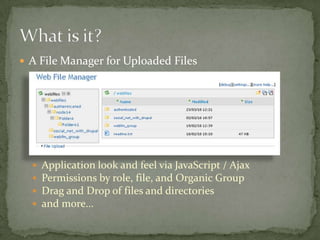
A File Manager for Uploaded FilesApplication look and feel via JavaScript / AjaxPermissions by role, file, and Organic GroupDrag and Drop of files and directoriesand more…What is it?
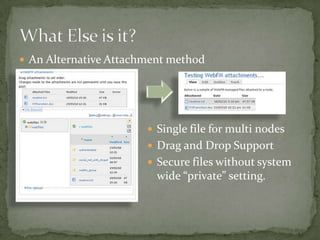
An Alternative Attachment methodWhat Else is it?Single file for multi nodes
Drag and Drop Support
Secure files without system wide “private” setting.Attached Image resizingLots of Security features (like limit IP access)MP3 Support File Meta data (Title/Description)Views Support (in head)Some Support for opening File Browser in popup window for WYSIWIG editors (some patches needed)Custom Layout support for creating blocks or other special items (requires patch)Wait.. There’s more
Ajax adds to the “Coolness” factorFile Security without “Private Files” overheadMaintain images/documents references on multiple nodes in one place.File sharing in OG contexts.Custom Layout lets you easily expose a directory of documents to users.So Why Use It?
Get the module from:        http://drupal.org/projects/webfmShameless plug warning… Optionally, get the Custom Layout patch from:        http://drupal.org/node/736548Unpack the module (and optionally apply patch).Put the module directory in your sites/all/modules  directoryHow To Set it up
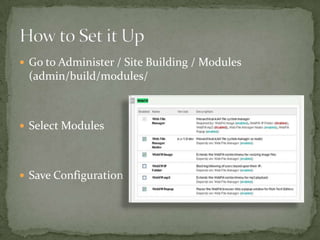
Go to Administer / Site Building / Modules(admin/build/modules/Select ModulesSave ConfigurationHow to Set it Up
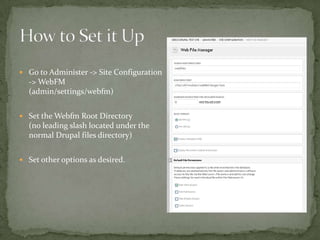
Go to Administer -> Site Configuration -> WebFM(admin/settings/webfm)Set the Webfm Root Directory(no leading slash located under the normal Drupal files directory)Set other options as desired.How to Set it Up
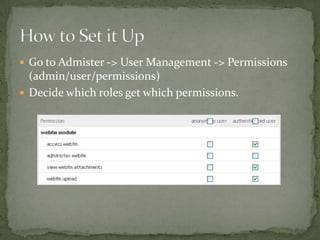
Go to Admister -> User Management -> Permissions(admin/user/permissions)Decide which roles get which permissions.How to Set it Up
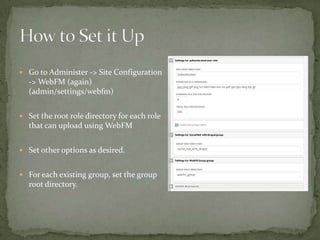
Go to Administer -> Site Configuration -> WebFM (again)(admin/settings/webfm)Set the root role directory for each role that can upload using WebFMSet other options as desired.For each existing group, set the group root directory.How to Set it Up
	Secure the files by creating an .htaccess in the WebFM root directory        <drupal file system path>/<webfm root>with the following lines:         order deny, allow             deny from allHow to Set it Up
Reports of Drag and Drop misbehaving  in some browsers/themesOnly WebfmAdmins can create directoriesNo support for individual “home” directories (but patch with minor issues available)Maintainer burn-out (Rob Milne -> others -> Rob)Slightly confusing to users (without Custom Layout patch)Gotchas and Popular Feature Requests

TriDUG WebFM Presentation

  • 1.
    Triangle Drupal User GroupApril 12, 2010WebFM Modulefor Drupal 6.x
  • 2.
    A File Managerfor Uploaded FilesApplication look and feel via JavaScript / AjaxPermissions by role, file, and Organic GroupDrag and Drop of files and directoriesand more…What is it?
  • 3.
    An Alternative AttachmentmethodWhat Else is it?Single file for multi nodes
  • 4.
  • 5.
    Secure files withoutsystem wide “private” setting.Attached Image resizingLots of Security features (like limit IP access)MP3 Support File Meta data (Title/Description)Views Support (in head)Some Support for opening File Browser in popup window for WYSIWIG editors (some patches needed)Custom Layout support for creating blocks or other special items (requires patch)Wait.. There’s more
  • 6.
    Ajax adds tothe “Coolness” factorFile Security without “Private Files” overheadMaintain images/documents references on multiple nodes in one place.File sharing in OG contexts.Custom Layout lets you easily expose a directory of documents to users.So Why Use It?
  • 7.
    Get the modulefrom: http://drupal.org/projects/webfmShameless plug warning… Optionally, get the Custom Layout patch from: http://drupal.org/node/736548Unpack the module (and optionally apply patch).Put the module directory in your sites/all/modules directoryHow To Set it up
  • 8.
    Go to Administer/ Site Building / Modules(admin/build/modules/Select ModulesSave ConfigurationHow to Set it Up
  • 9.
    Go to Administer-> Site Configuration -> WebFM(admin/settings/webfm)Set the Webfm Root Directory(no leading slash located under the normal Drupal files directory)Set other options as desired.How to Set it Up
  • 10.
    Go to Admister-> User Management -> Permissions(admin/user/permissions)Decide which roles get which permissions.How to Set it Up
  • 11.
    Go to Administer-> Site Configuration -> WebFM (again)(admin/settings/webfm)Set the root role directory for each role that can upload using WebFMSet other options as desired.For each existing group, set the group root directory.How to Set it Up
  • 12.
    Secure the filesby creating an .htaccess in the WebFM root directory <drupal file system path>/<webfm root>with the following lines: order deny, allow deny from allHow to Set it Up
  • 13.
    Reports of Dragand Drop misbehaving in some browsers/themesOnly WebfmAdmins can create directoriesNo support for individual “home” directories (but patch with minor issues available)Maintainer burn-out (Rob Milne -> others -> Rob)Slightly confusing to users (without Custom Layout patch)Gotchas and Popular Feature Requests