
GUJARAT TECHNOLOGICAL UNIVERSITY
Chandkheda, Ahmedabad
Affiliated
G. H. Patel College of Engineering and Technology,
VallabhVidyanagar
A
Presentation
On
Transforming XML using XSL and XSLT
Under subject of
WEB TECHNOLOGY
Semester – VI
Computer Engineering
Submitted by:Hemant Suthar(130110107058) Submitted to:Prof. Rajesh Ahir
Content
• INTRODUCING XSL
• XML TRANSFORMED
• XSL ELEMENTS
• SIMPLE EXAMPLE
INTRODUCING XSL
• CSS is used as a style sheet language for HTML, XSL is equivalent for
XML.
CONTINUE..
• It covers a family of different languages:
1. XSL Transformations (XSLT):a language for transforming XML.
2. The XML Path Language (XPath):an expression language used by
XSLT (and many other languages) to access or refer to parts of an
XML document.
3. XSL Formatting Objects (XSL-FO):an XML vocabulary for specifying
formatting semantics.
XML TRANSFORMED
• XSLT (Extensible Stylesheet Language Transformations) is a language
for transforming XML documents into other XML documents, or other
formats such as HTML for web pages, plain text or into XSL Formatting
Objects, which may subsequently be converted to other formats, such
as PDF, PostScript and PNG.
• Several browsers support actual implementation of XSLT; like IE,
Firefox, Netscape.
• XSLT allows elements and attributes in the tree to be navigated. Using
Xpath, XSLT defines part of an XML document that match a template.
Once found and matched to template the elements can be
transformed.
XSL ELEMENTS
• XSL contains many elements that can be used to manipulate, iterate and
select XML for output.
1. value-of: allows information to be extracted and added do the resulting
document. select attribute consists of an XPath expression that is similar
in addressing parts to an operating system’s file hierarchy with forward
slash selecting sub-directories.
2. for-each: used to iterate and select through every XML element; select
attribute contains an XPath.
3. sort: information can be sorted for output, simply by adding an <xsl:sort>
element inside for-each.
Example:xsl-elements.pdf
CONTINUE…
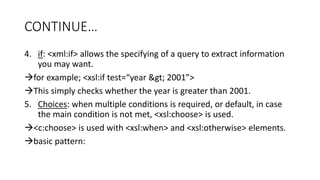
4. if: <xml:if> allows the specifying of a query to extract information
you may want.
for example; <xsl:if test=“year &gt; 2001”>
This simply checks whether the year is greater than 2001.
5. Choices: when multiple conditions is required, or default, in case
the main condition is not met, <xsl:choose> is used.
<c:choose> is used with <xsl:when> and <xsl:otherwise> elements.
basic pattern:
CONTINUE…
<xsl:choose>
<xsl:when test “test expression”>
output if true
</xsl:when>
<xsl:otherwise>
output in other cases
</xsl:otherwise>
</xsl:choose>
Example:xsl-elements.pdf
CONTINUE…
6. Applying Templates: The <xsl:apply-templates> element applies a
template to the current element or to the current element's child
nodes.
The <xsl:apply-templates> element applies a template to the current
element or to the current element's child nodes.
Example:template-xsl.pdf
SIMPLE EXAMPLE
• Create an XSLT style sheet for one student element of the store
library information document and use it to create a display of that
element.
• final-example.pdf
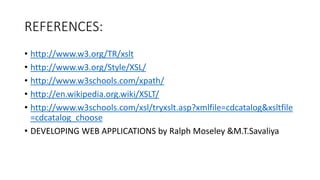
REFERENCES:
• http://www.w3.org/TR/xslt
• http://www.w3.org/Style/XSL/
• http://www.w3schools.com/xpath/
• http://en.wikipedia.org.wiki/XSLT/
• http://www.w3schools.com/xsl/tryxslt.asp?xmlfile=cdcatalog&xsltfile
=cdcatalog_choose
• DEVELOPING WEB APPLICATIONS by Ralph Moseley &M.T.Savaliya
transforming xml using xsl and xslt

transforming xml using xsl and xslt

  • 1.
    GUJARAT TECHNOLOGICAL UNIVERSITY Chandkheda,Ahmedabad Affiliated G. H. Patel College of Engineering and Technology, VallabhVidyanagar A Presentation On Transforming XML using XSL and XSLT Under subject of WEB TECHNOLOGY Semester – VI Computer Engineering Submitted by:Hemant Suthar(130110107058) Submitted to:Prof. Rajesh Ahir
  • 2.
    Content • INTRODUCING XSL •XML TRANSFORMED • XSL ELEMENTS • SIMPLE EXAMPLE
  • 3.
    INTRODUCING XSL • CSSis used as a style sheet language for HTML, XSL is equivalent for XML.
  • 4.
    CONTINUE.. • It coversa family of different languages: 1. XSL Transformations (XSLT):a language for transforming XML. 2. The XML Path Language (XPath):an expression language used by XSLT (and many other languages) to access or refer to parts of an XML document. 3. XSL Formatting Objects (XSL-FO):an XML vocabulary for specifying formatting semantics.
  • 5.
    XML TRANSFORMED • XSLT(Extensible Stylesheet Language Transformations) is a language for transforming XML documents into other XML documents, or other formats such as HTML for web pages, plain text or into XSL Formatting Objects, which may subsequently be converted to other formats, such as PDF, PostScript and PNG. • Several browsers support actual implementation of XSLT; like IE, Firefox, Netscape. • XSLT allows elements and attributes in the tree to be navigated. Using Xpath, XSLT defines part of an XML document that match a template. Once found and matched to template the elements can be transformed.
  • 6.
    XSL ELEMENTS • XSLcontains many elements that can be used to manipulate, iterate and select XML for output. 1. value-of: allows information to be extracted and added do the resulting document. select attribute consists of an XPath expression that is similar in addressing parts to an operating system’s file hierarchy with forward slash selecting sub-directories. 2. for-each: used to iterate and select through every XML element; select attribute contains an XPath. 3. sort: information can be sorted for output, simply by adding an <xsl:sort> element inside for-each. Example:xsl-elements.pdf
  • 7.
    CONTINUE… 4. if: <xml:if>allows the specifying of a query to extract information you may want. for example; <xsl:if test=“year &gt; 2001”> This simply checks whether the year is greater than 2001. 5. Choices: when multiple conditions is required, or default, in case the main condition is not met, <xsl:choose> is used. <c:choose> is used with <xsl:when> and <xsl:otherwise> elements. basic pattern:
  • 8.
    CONTINUE… <xsl:choose> <xsl:when test “testexpression”> output if true </xsl:when> <xsl:otherwise> output in other cases </xsl:otherwise> </xsl:choose> Example:xsl-elements.pdf
  • 9.
    CONTINUE… 6. Applying Templates:The <xsl:apply-templates> element applies a template to the current element or to the current element's child nodes. The <xsl:apply-templates> element applies a template to the current element or to the current element's child nodes. Example:template-xsl.pdf
  • 10.
    SIMPLE EXAMPLE • Createan XSLT style sheet for one student element of the store library information document and use it to create a display of that element. • final-example.pdf
  • 11.
    REFERENCES: • http://www.w3.org/TR/xslt • http://www.w3.org/Style/XSL/ •http://www.w3schools.com/xpath/ • http://en.wikipedia.org.wiki/XSLT/ • http://www.w3schools.com/xsl/tryxslt.asp?xmlfile=cdcatalog&xsltfile =cdcatalog_choose • DEVELOPING WEB APPLICATIONS by Ralph Moseley &M.T.Savaliya