XSLT
Extensible StyleSheet Language
Transformations
XSLT
• XSLT stands for Extensible Stylesheet Language
Transformations
• XSLT is used to transform XML documents into
other kinds of documents.
• XSLT can produce XML, HTML, and TXT
documents
• We will focus on HTML
• XSLT a W3C standard developed largely by
Michael Kay
XSL
• XSL is divided up into XSLT and XSL-FO
• XSL-FO is for formatting objects, mainly for
creating PDFs, and other “printer friendly”
output files.
• XSL-FO has not been as widely implemented
as originally though
• XSLT is widely used. XSL and XSLT are often
used interchangeably
What XSLT can do that CSS can’t
• XSLT can:
– do calculations
– combine multiple documents
– change the order of document elements
– do calculations that are specifically designed to be
used on XML documents
• Cascading StyleSheets, while powerful, are
primarily used to style HTML not XML
XSL Transformations
• XSLT uses two input files:
– The XML document containing the actual data
– The XSL document containing both the
“framework” in which to insert the data, and XSLT
commands to do so
• Includes over 100 built-in functions to
specifically to transform XML
• Based on pattern matching using XPath i.e.
“when you see a pattern that looks like that,
do this…”
XSLT Processor
• Processor takes in the XML and XSLT
documents and produces a result document,
such as HTML
• Client and Server side processors
• Server side processors only option until 2008
• Processors handle XSLT commands
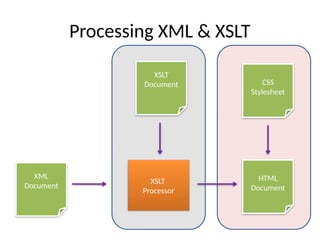
Processing XML & XSLT
XSLT
Document
XML
Document
XSLT
Processor
HTML
Document
CSS
Stylesheet
XSLT Support in Browsers
• Firefox supports XML, XSLT, and XPath from
version 3 (2008)
• Internet Explorer supports XML, XSLT, and
XPath from version 6 (2008)
• Chrome supports XML, XSLT, and XPath from
version 1 (2008)
• Safari supports XML and XSLT from version 3
(2007)
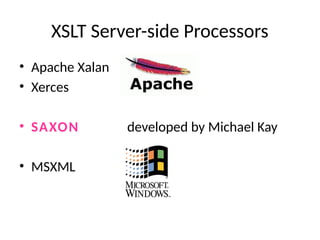
XSLT Server-side Processors
• Apache Xalan
• Xerces
• SAXON developed by Michael Kay
• MSXML
XSLT processors
• Not all processors are the same.
• They all serve the same function, but interpret
XSLT commands different ways
• Example, MSXML optimizes processes to work
with Microsoft technologies.
• Relying on processing in client browsers is
convenient, but can be risky
• Using server-side processing is more difficult to
implement, but less risky and preferred
Parts of XSLT File
• XSLT is XML, so it needs an XML declaration like
this:
<?xml version="1.0"?>
• This XML implements the XSLT namespace:
<xsl:stylesheet
xmlns:xsl="http://www.w3.org/19
99/XSL/Transform" version="1.0">
Parts of XSLT File
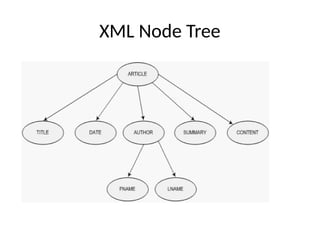
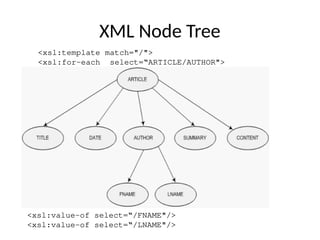
• The XML text document is read in and stored
as a tree of nodes
• In the first step of this transformation, the
XSLT processor analyzes the XML document
and converts it into a node tree.
• The Root Template is written as such:
<xsl:template match="/"> and selects the
entire tree of nodes
XML Node Tree
Parts of XSLT File
• The rules within the template are applied to
the matching nodes, thus changing the
structure of the XML tree
• Unmatched parts of the XML tree are not
changed
• After the template is applied, the tree is
written out again as a text document
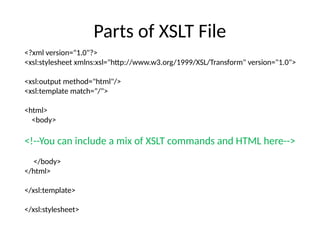
Parts of XSLT File
<?xml version="1.0"?>
<xsl:stylesheet xmlns:xsl="http://www.w3.org/1999/XSL/Transform" version="1.0">
<xsl:output method="html"/>
<xsl:template match="/">
<html>
<body>
<!--You can include a mix of XSLT commands and HTML here-->
</body>
</html>
</xsl:template>
</xsl:stylesheet>
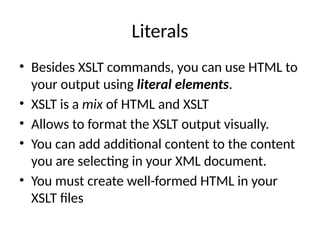
Literals
• Besides XSLT commands, you can use HTML to
your output using literal elements.
• XSLT is a mix of HTML and XSLT
• Allows to format the XSLT output visually.
• You can add additional content to the content
you are selecting in your XML document.
• You must create well-formed HTML in your
XSLT files
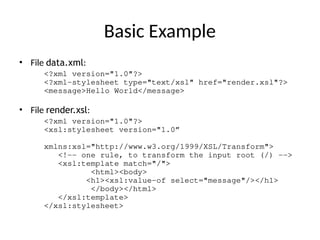
Basic Example
• File data.xml:
<?xml version="1.0"?>
<?xml-stylesheet type="text/xsl" href="render.xsl"?>
<message>Hello World</message>
• File render.xsl:
<?xml version="1.0"?>
<xsl:stylesheet version="1.0”
xmlns:xsl="http://www.w3.org/1999/XSL/Transform">
<!-- one rule, to transform the input root (/) -->
<xsl:template match="/">
<html><body>
<h1><xsl:value-of select="message"/></h1>
</body></html>
</xsl:template>
</xsl:stylesheet>
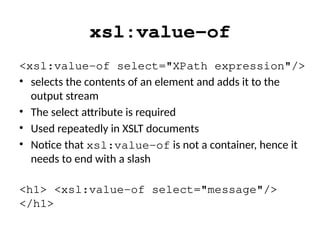
xsl:value-of
<xsl:value-of select="XPath expression"/>
• selects the contents of an element and adds it to the
output stream
• The select attribute is required
• Used repeatedly in XSLT documents
• Notice that xsl:value-of is not a container, hence it
needs to end with a slash
<h1> <xsl:value-of select="message"/>
</h1>
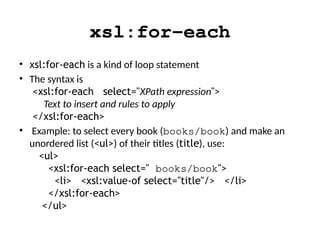
xsl:for-each
• xsl:for-each is a kind of loop statement
• The syntax is
<xsl:for-each select="XPath expression">
Text to insert and rules to apply
</xsl:for-each>
• Example: to select every book (books/book) and make an
unordered list (<ul>) of their titles (title), use:
<ul>
<xsl:for-each select=" books/book">
<li> <xsl:value-of select="title"/> </li>
</xsl:for-each>
</ul>
XML Node Tree
<xsl:value-of select=“/FNAME"/>
<xsl:value-of select=“/LNAME"/>
<xsl:template match="/">
<xsl:for-each select=“ARTICLE/AUTHOR">
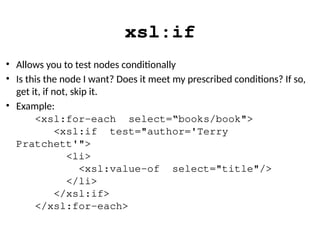
xsl:if
• Allows you to test nodes conditionally
• Is this the node I want? Does it meet my prescribed conditions? If so,
get it, if not, skip it.
• Example:
<xsl:for-each select=“books/book">
<xsl:if test="author='Terry
Pratchett'">
<li>
<xsl:value-of select="title"/>
</li>
</xsl:if>
</xsl:for-each>
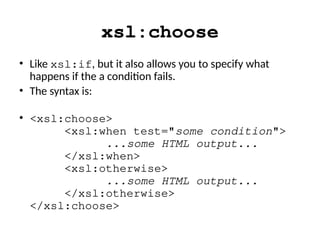
xsl:choose
• Like xsl:if, but it also allows you to specify what
happens if the a condition fails.
• The syntax is:
• <xsl:choose>
<xsl:when test="some condition">
...some HTML output...
</xsl:when>
<xsl:otherwise>
...some HTML output...
</xsl:otherwise>
</xsl:choose>
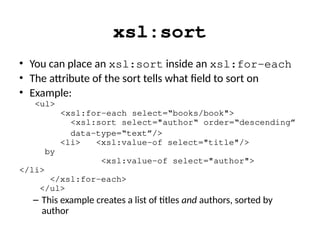
xsl:sort
• You can place an xsl:sort inside an xsl:for-each
• The attribute of the sort tells what field to sort on
• Example:
<ul>
<xsl:for-each select=“books/book">
<xsl:sort select="author“ order=“descending”
data-type=“text”/>
<li> <xsl:value-of select="title"/>
by
<xsl:value-of select="author">
</li>
</xsl:for-each>
</ul>
– This example creates a list of titles and authors, sorted by
author
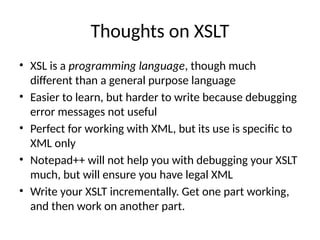
Thoughts on XSLT
• XSL is a programming language, though much
different than a general purpose language
• Easier to learn, but harder to write because debugging
error messages not useful
• Perfect for working with XML, but its use is specific to
XML only
• Notepad++ will not help you with debugging your XSLT
much, but will ensure you have legal XML
• Write your XSLT incrementally. Get one part working,
and then work on another part.

XSLT - Extensible StyleSheet Language Transformations.pptx

  • 1.
  • 2.
    XSLT • XSLT standsfor Extensible Stylesheet Language Transformations • XSLT is used to transform XML documents into other kinds of documents. • XSLT can produce XML, HTML, and TXT documents • We will focus on HTML • XSLT a W3C standard developed largely by Michael Kay
  • 3.
    XSL • XSL isdivided up into XSLT and XSL-FO • XSL-FO is for formatting objects, mainly for creating PDFs, and other “printer friendly” output files. • XSL-FO has not been as widely implemented as originally though • XSLT is widely used. XSL and XSLT are often used interchangeably
  • 4.
    What XSLT cando that CSS can’t • XSLT can: – do calculations – combine multiple documents – change the order of document elements – do calculations that are specifically designed to be used on XML documents • Cascading StyleSheets, while powerful, are primarily used to style HTML not XML
  • 5.
    XSL Transformations • XSLTuses two input files: – The XML document containing the actual data – The XSL document containing both the “framework” in which to insert the data, and XSLT commands to do so • Includes over 100 built-in functions to specifically to transform XML • Based on pattern matching using XPath i.e. “when you see a pattern that looks like that, do this…”
  • 6.
    XSLT Processor • Processortakes in the XML and XSLT documents and produces a result document, such as HTML • Client and Server side processors • Server side processors only option until 2008 • Processors handle XSLT commands
  • 7.
    Processing XML &XSLT XSLT Document XML Document XSLT Processor HTML Document CSS Stylesheet
  • 8.
    XSLT Support inBrowsers • Firefox supports XML, XSLT, and XPath from version 3 (2008) • Internet Explorer supports XML, XSLT, and XPath from version 6 (2008) • Chrome supports XML, XSLT, and XPath from version 1 (2008) • Safari supports XML and XSLT from version 3 (2007)
  • 9.
    XSLT Server-side Processors •Apache Xalan • Xerces • SAXON developed by Michael Kay • MSXML
  • 10.
    XSLT processors • Notall processors are the same. • They all serve the same function, but interpret XSLT commands different ways • Example, MSXML optimizes processes to work with Microsoft technologies. • Relying on processing in client browsers is convenient, but can be risky • Using server-side processing is more difficult to implement, but less risky and preferred
  • 11.
    Parts of XSLTFile • XSLT is XML, so it needs an XML declaration like this: <?xml version="1.0"?> • This XML implements the XSLT namespace: <xsl:stylesheet xmlns:xsl="http://www.w3.org/19 99/XSL/Transform" version="1.0">
  • 12.
    Parts of XSLTFile • The XML text document is read in and stored as a tree of nodes • In the first step of this transformation, the XSLT processor analyzes the XML document and converts it into a node tree. • The Root Template is written as such: <xsl:template match="/"> and selects the entire tree of nodes
  • 13.
  • 14.
    Parts of XSLTFile • The rules within the template are applied to the matching nodes, thus changing the structure of the XML tree • Unmatched parts of the XML tree are not changed • After the template is applied, the tree is written out again as a text document
  • 15.
    Parts of XSLTFile <?xml version="1.0"?> <xsl:stylesheet xmlns:xsl="http://www.w3.org/1999/XSL/Transform" version="1.0"> <xsl:output method="html"/> <xsl:template match="/"> <html> <body> <!--You can include a mix of XSLT commands and HTML here--> </body> </html> </xsl:template> </xsl:stylesheet>
  • 16.
    Literals • Besides XSLTcommands, you can use HTML to your output using literal elements. • XSLT is a mix of HTML and XSLT • Allows to format the XSLT output visually. • You can add additional content to the content you are selecting in your XML document. • You must create well-formed HTML in your XSLT files
  • 17.
    Basic Example • Filedata.xml: <?xml version="1.0"?> <?xml-stylesheet type="text/xsl" href="render.xsl"?> <message>Hello World</message> • File render.xsl: <?xml version="1.0"?> <xsl:stylesheet version="1.0” xmlns:xsl="http://www.w3.org/1999/XSL/Transform"> <!-- one rule, to transform the input root (/) --> <xsl:template match="/"> <html><body> <h1><xsl:value-of select="message"/></h1> </body></html> </xsl:template> </xsl:stylesheet>
  • 18.
    xsl:value-of <xsl:value-of select="XPath expression"/> •selects the contents of an element and adds it to the output stream • The select attribute is required • Used repeatedly in XSLT documents • Notice that xsl:value-of is not a container, hence it needs to end with a slash <h1> <xsl:value-of select="message"/> </h1>
  • 19.
    xsl:for-each • xsl:for-each isa kind of loop statement • The syntax is <xsl:for-each select="XPath expression"> Text to insert and rules to apply </xsl:for-each> • Example: to select every book (books/book) and make an unordered list (<ul>) of their titles (title), use: <ul> <xsl:for-each select=" books/book"> <li> <xsl:value-of select="title"/> </li> </xsl:for-each> </ul>
  • 20.
    XML Node Tree <xsl:value-ofselect=“/FNAME"/> <xsl:value-of select=“/LNAME"/> <xsl:template match="/"> <xsl:for-each select=“ARTICLE/AUTHOR">
  • 21.
    xsl:if • Allows youto test nodes conditionally • Is this the node I want? Does it meet my prescribed conditions? If so, get it, if not, skip it. • Example: <xsl:for-each select=“books/book"> <xsl:if test="author='Terry Pratchett'"> <li> <xsl:value-of select="title"/> </li> </xsl:if> </xsl:for-each>
  • 22.
    xsl:choose • Like xsl:if,but it also allows you to specify what happens if the a condition fails. • The syntax is: • <xsl:choose> <xsl:when test="some condition"> ...some HTML output... </xsl:when> <xsl:otherwise> ...some HTML output... </xsl:otherwise> </xsl:choose>
  • 23.
    xsl:sort • You canplace an xsl:sort inside an xsl:for-each • The attribute of the sort tells what field to sort on • Example: <ul> <xsl:for-each select=“books/book"> <xsl:sort select="author“ order=“descending” data-type=“text”/> <li> <xsl:value-of select="title"/> by <xsl:value-of select="author"> </li> </xsl:for-each> </ul> – This example creates a list of titles and authors, sorted by author
  • 24.
    Thoughts on XSLT •XSL is a programming language, though much different than a general purpose language • Easier to learn, but harder to write because debugging error messages not useful • Perfect for working with XML, but its use is specific to XML only • Notepad++ will not help you with debugging your XSLT much, but will ensure you have legal XML • Write your XSLT incrementally. Get one part working, and then work on another part.