E X tensible  S tylesheet  L anguage Sep 3, 2010
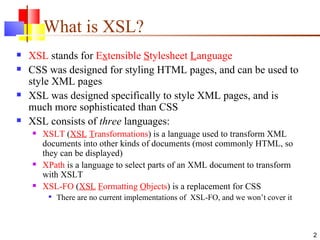
What is XSL? XSL  stands for  E x tensible  S tylesheet  L anguage CSS was designed for styling HTML pages, and can be used to style XML pages XSL was designed specifically to style XML pages, and is much more sophisticated than CSS XSL consists of  three  languages: XSLT  ( XSL   T ransformations ) is a language used to transform XML documents into other kinds of documents (most commonly HTML, so they can be displayed) XPath  is a language to select parts of an XML document to transform with XSLT XSL-FO  ( XSL   F ormatting  O bjects ) is a replacement for CSS There are no current implementations of  XSL-FO, and we won’t cover it
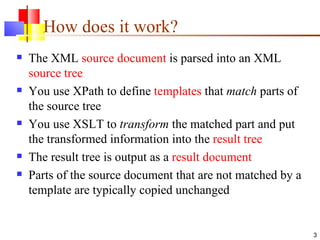
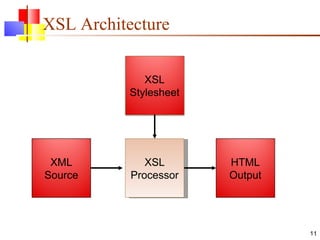
How does it work? The XML  source document  is parsed into an XML  source tree You use XPath to define  templates  that  match  parts of the source tree You use XSLT to  transform  the matched part and put the transformed information into the  result tree The result tree is output as a  result document Parts of the source document that are not matched by a template are typically copied unchanged
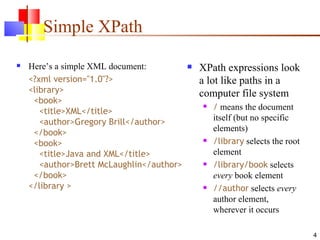
Simple XPath Here’s a simple XML document: <?xml version=&quot;1.0&quot;?> <library>   <book>   <title>XML</title>   <author>Gregory Brill</author>   </book>   <book>   <title>Java and XML</title>   <author>Brett McLaughlin</author>   </book> </library > XPath expressions look a lot like paths in a computer file system /  means the document itself (but no specific elements) /library  selects the root element /library/book  selects  every  book element //author  selects  every  author element, wherever it occurs
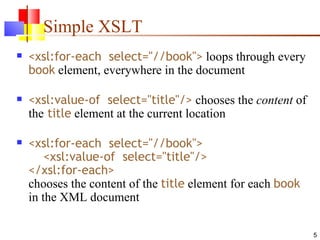
Simple XSLT <xsl:for-each  select=&quot;//book&quot;>  loops through every  book  element, everywhere in the document <xsl:value-of  select=&quot;title&quot;/>  chooses the  content  of the  title  element at the current location <xsl:for-each  select=&quot;//book&quot;>   <xsl:value-of  select=&quot;title&quot;/> </xsl:for-each> chooses the content of the  title  element for each  book  in the XML document
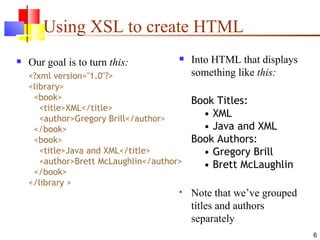
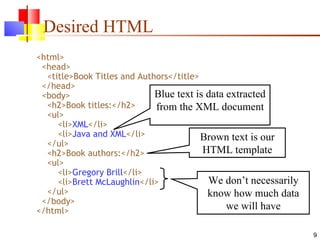
Using XSL to create HTML Our goal is to turn  this: <?xml version=&quot;1.0&quot;?> <library>   <book>   <title>XML</title>   <author>Gregory Brill</author>   </book>   <book>   <title>Java and XML</title>   <author>Brett McLaughlin</author>   </book> </library > Into HTML that displays something like  this: Book Titles:   • XML   • Java and XML Book Authors:   • Gregory Brill   • Brett McLaughlin Note that we’ve grouped titles and authors separately
What we need to do We need to save our XML into a file (let’s call it  books.xml ) We need to create a file (say,  books.xsl ) that describes how to select elements from  books.xml  and embed them into an HTML page We do this by intermixing the HTML and the XSL in the  books.xsl   file We need to add a line to our  books.xml  file to tell it to refer to  books.xsl  for formatting information
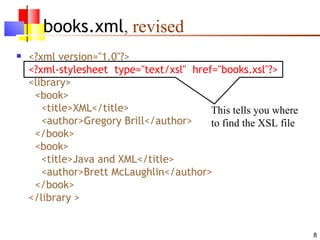
books.xml , revised <?xml version=&quot;1.0&quot;?> <?xml-stylesheet  type=&quot;text/xsl&quot;  href=&quot;books.xsl&quot;?> <library>   <book>   <title>XML</title>   <author>Gregory Brill</author>   </book>   <book>   <title>Java and XML</title>   <author>Brett McLaughlin</author>   </book> </library > This tells you where to find the XSL file
Desired HTML <html>   <head>   <title>Book Titles and Authors</title>   </head>   <body>   <h2>Book titles:</h2>   <ul>   <li> XML </li>   <li> Java and XML </li>   </ul>   <h2>Book authors:</h2>   <ul>   <li> Gregory Brill </li>   <li> Brett McLaughlin </li>   </ul>   </body> </html> Blue text is data extracted from the XML document Brown text is our HTML template We don’t necessarily know how much data we will have
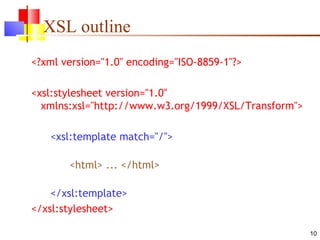
XSL outline <?xml version=&quot;1.0&quot; encoding=&quot;ISO-8859-1&quot;?> <xsl:stylesheet version=&quot;1.0&quot;   xmlns:xsl=&quot;http://www.w3.org/1999/XSL/Transform&quot;> <xsl:template match=&quot;/&quot;> <html> ... </html> </xsl:template> </xsl:stylesheet>
XSL Architecture XSL Processor XML Source XSL Stylesheet HTML Output
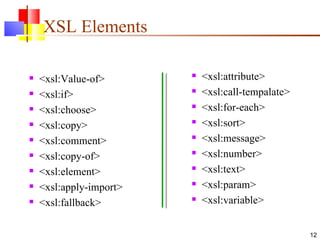
XSL Elements <xsl:Value-of> <xsl:if> <xsl:choose> <xsl:copy> <xsl:comment> <xsl:copy-of> <xsl:element> <xsl:apply-import> <xsl:fallback> <xsl:attribute> <xsl:call-tempalate> <xsl:for-each> <xsl:sort> <xsl:message> <xsl:number> <xsl:text> <xsl:param> <xsl:variable>
  <xsl:value-of>  Element The XSL element  <xsl:value-of>  can be used to extract the value of an element that is selected from the source XML document The extracted value is added to the output stream The selected element is located by an XPath expression that appears as the value of the  select  attribute <xsl:value-of select =“xpath-expression”/>
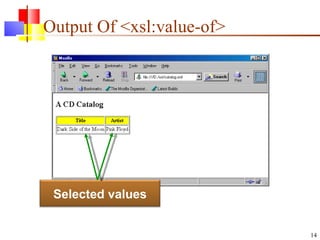
Output Of <xsl:value-of> Selected values
<xsl:for-each>  Element The  <xsl:for-each>  element loops over all the nodes in the nodelist of the XPath expression that appears as the value of the  select  attribute The value of each node can be extracted by an <xsl:value-of> element <xsl:for-each select =“xpath-expression”/>
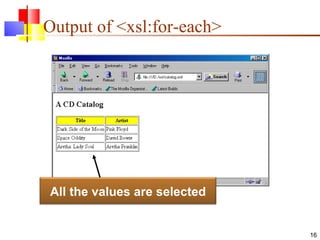
Output of <xsl:for-each> All the values are selected
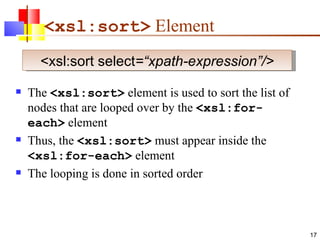
<xsl:sort>  Element The  <xsl:sort>  element is used to sort the list of nodes that are looped over by the  <xsl:for-each>  element Thus, the  <xsl:sort>  must appear inside the  <xsl:for-each>  element The looping is done in sorted order <xsl:sort select =“xpath-expression”/>
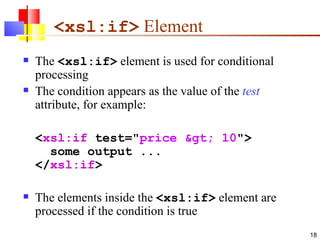
<xsl:if>  Element The  <xsl:if>  element is used for conditional processing The condition appears as the value of the  test  attribute, for example: < xsl:if  test=&quot; price &gt; 10 &quot;>    some output ... </ xsl:if > The elements inside the  <xsl:if>  element are processed if the condition is true
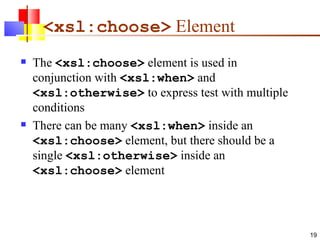
<xsl:choose>  Element The  <xsl:choose>  element is used in conjunction with  <xsl:when>  and  <xsl:otherwise>  to express test with multiple conditions There can be many  <xsl:when>  inside an  <xsl:choose>  element, but there should be a single  <xsl:otherwise>  inside an  <xsl:choose>  element
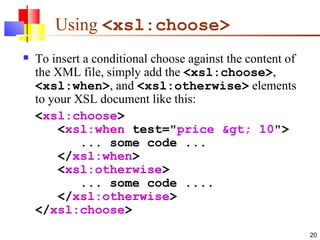
Using  <xsl:choose>   To insert a conditional choose against the content of the XML file, simply add the  <xsl:choose> ,  <xsl:when> , and  <xsl:otherwise>  elements to your XSL document like this: < xsl:choose >    < xsl:when  test=&quot; price &gt; 10 &quot;>        ... some code ...    </ xsl:when >    < xsl:otherwise >        ... some code ....    </ xsl:otherwise > </ xsl:choose >
How to use it In a  modern  browser, such as Netscape 6, Internet Explorer 6, or Mozilla 1.0, you can just open the XML file Older browsers will ignore the XSL and just show you the XML contents as continuous text You can use a program such as Xalan, MSXML, or Saxon to create the HTML as a file This can be done on the server side, so that all the client side browser sees is plain HTML The server can create the HTML  dynamically  from the information currently in XML
XSL Disadvantages Confusing syntax and semantics Like Prolog+C+XML  It's really a programming language, but using markup language  Hard to debug XSL Trace helps a little Don't have full power of, say, Java inside templates No database access, hashtables, methods, objects, etc. Still need separate .xsl file for each client device

C:\fakepath\xsl final

  • 1.
    E X tensible S tylesheet L anguage Sep 3, 2010
  • 2.
    What is XSL?XSL stands for E x tensible S tylesheet L anguage CSS was designed for styling HTML pages, and can be used to style XML pages XSL was designed specifically to style XML pages, and is much more sophisticated than CSS XSL consists of three languages: XSLT ( XSL T ransformations ) is a language used to transform XML documents into other kinds of documents (most commonly HTML, so they can be displayed) XPath is a language to select parts of an XML document to transform with XSLT XSL-FO ( XSL F ormatting O bjects ) is a replacement for CSS There are no current implementations of XSL-FO, and we won’t cover it
  • 3.
    How does itwork? The XML source document is parsed into an XML source tree You use XPath to define templates that match parts of the source tree You use XSLT to transform the matched part and put the transformed information into the result tree The result tree is output as a result document Parts of the source document that are not matched by a template are typically copied unchanged
  • 4.
    Simple XPath Here’sa simple XML document: <?xml version=&quot;1.0&quot;?> <library> <book> <title>XML</title> <author>Gregory Brill</author> </book> <book> <title>Java and XML</title> <author>Brett McLaughlin</author> </book> </library > XPath expressions look a lot like paths in a computer file system / means the document itself (but no specific elements) /library selects the root element /library/book selects every book element //author selects every author element, wherever it occurs
  • 5.
    Simple XSLT <xsl:for-each select=&quot;//book&quot;> loops through every book element, everywhere in the document <xsl:value-of select=&quot;title&quot;/> chooses the content of the title element at the current location <xsl:for-each select=&quot;//book&quot;> <xsl:value-of select=&quot;title&quot;/> </xsl:for-each> chooses the content of the title element for each book in the XML document
  • 6.
    Using XSL tocreate HTML Our goal is to turn this: <?xml version=&quot;1.0&quot;?> <library> <book> <title>XML</title> <author>Gregory Brill</author> </book> <book> <title>Java and XML</title> <author>Brett McLaughlin</author> </book> </library > Into HTML that displays something like this: Book Titles: • XML • Java and XML Book Authors: • Gregory Brill • Brett McLaughlin Note that we’ve grouped titles and authors separately
  • 7.
    What we needto do We need to save our XML into a file (let’s call it books.xml ) We need to create a file (say, books.xsl ) that describes how to select elements from books.xml and embed them into an HTML page We do this by intermixing the HTML and the XSL in the books.xsl file We need to add a line to our books.xml file to tell it to refer to books.xsl for formatting information
  • 8.
    books.xml , revised<?xml version=&quot;1.0&quot;?> <?xml-stylesheet type=&quot;text/xsl&quot; href=&quot;books.xsl&quot;?> <library> <book> <title>XML</title> <author>Gregory Brill</author> </book> <book> <title>Java and XML</title> <author>Brett McLaughlin</author> </book> </library > This tells you where to find the XSL file
  • 9.
    Desired HTML <html> <head> <title>Book Titles and Authors</title> </head> <body> <h2>Book titles:</h2> <ul> <li> XML </li> <li> Java and XML </li> </ul> <h2>Book authors:</h2> <ul> <li> Gregory Brill </li> <li> Brett McLaughlin </li> </ul> </body> </html> Blue text is data extracted from the XML document Brown text is our HTML template We don’t necessarily know how much data we will have
  • 10.
    XSL outline <?xmlversion=&quot;1.0&quot; encoding=&quot;ISO-8859-1&quot;?> <xsl:stylesheet version=&quot;1.0&quot; xmlns:xsl=&quot;http://www.w3.org/1999/XSL/Transform&quot;> <xsl:template match=&quot;/&quot;> <html> ... </html> </xsl:template> </xsl:stylesheet>
  • 11.
    XSL Architecture XSLProcessor XML Source XSL Stylesheet HTML Output
  • 12.
    XSL Elements <xsl:Value-of><xsl:if> <xsl:choose> <xsl:copy> <xsl:comment> <xsl:copy-of> <xsl:element> <xsl:apply-import> <xsl:fallback> <xsl:attribute> <xsl:call-tempalate> <xsl:for-each> <xsl:sort> <xsl:message> <xsl:number> <xsl:text> <xsl:param> <xsl:variable>
  • 13.
    <xsl:value-of> Element The XSL element <xsl:value-of> can be used to extract the value of an element that is selected from the source XML document The extracted value is added to the output stream The selected element is located by an XPath expression that appears as the value of the select attribute <xsl:value-of select =“xpath-expression”/>
  • 14.
    Output Of <xsl:value-of>Selected values
  • 15.
    <xsl:for-each> ElementThe <xsl:for-each> element loops over all the nodes in the nodelist of the XPath expression that appears as the value of the select attribute The value of each node can be extracted by an <xsl:value-of> element <xsl:for-each select =“xpath-expression”/>
  • 16.
    Output of <xsl:for-each>All the values are selected
  • 17.
    <xsl:sort> ElementThe <xsl:sort> element is used to sort the list of nodes that are looped over by the <xsl:for-each> element Thus, the <xsl:sort> must appear inside the <xsl:for-each> element The looping is done in sorted order <xsl:sort select =“xpath-expression”/>
  • 18.
    <xsl:if> ElementThe <xsl:if> element is used for conditional processing The condition appears as the value of the test attribute, for example: < xsl:if test=&quot; price &gt; 10 &quot;>   some output ... </ xsl:if > The elements inside the <xsl:if> element are processed if the condition is true
  • 19.
    <xsl:choose> ElementThe <xsl:choose> element is used in conjunction with <xsl:when> and <xsl:otherwise> to express test with multiple conditions There can be many <xsl:when> inside an <xsl:choose> element, but there should be a single <xsl:otherwise> inside an <xsl:choose> element
  • 20.
    Using <xsl:choose> To insert a conditional choose against the content of the XML file, simply add the <xsl:choose> , <xsl:when> , and <xsl:otherwise> elements to your XSL document like this: < xsl:choose >    < xsl:when test=&quot; price &gt; 10 &quot;>       ... some code ...    </ xsl:when >    < xsl:otherwise >       ... some code ....    </ xsl:otherwise > </ xsl:choose >
  • 21.
    How to useit In a modern browser, such as Netscape 6, Internet Explorer 6, or Mozilla 1.0, you can just open the XML file Older browsers will ignore the XSL and just show you the XML contents as continuous text You can use a program such as Xalan, MSXML, or Saxon to create the HTML as a file This can be done on the server side, so that all the client side browser sees is plain HTML The server can create the HTML dynamically from the information currently in XML
  • 22.
    XSL Disadvantages Confusingsyntax and semantics Like Prolog+C+XML It's really a programming language, but using markup language Hard to debug XSL Trace helps a little Don't have full power of, say, Java inside templates No database access, hashtables, methods, objects, etc. Still need separate .xsl file for each client device