CSV to XML transformation in Mule
Today we will be discussing on transformation
of CSV to XML format of data.
The configuration details for each of the Mule flow
component is explained below.
The first component of the flow is File Endpoint.
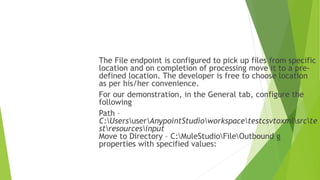
The File endpoint is configured to pick up files from specific
location and on completion of processing move it to a pre-
defined location. The developer is free to choose location
as per his/her convenience.
For our demonstration, in the General tab, configure the
following
Path –
C:UsersuserAnypointStudioworkspacetestcsvtoxmlsrcte
stresourcesinput
Move to Directory – C:MuleStudioFileOutbound g
properties with specified values:
Move to Directory –
C:UsersuserAnypointStudioworkspacetestcsvtoxmlsrcte
stresourcesoutput
The next component is logger. The message property value
of the logger component defines the logging statement. In
the General tab, configure the following.
Message – #[string: output #[message]]
The message object provides developer with insights
regarding message’s meta-data.
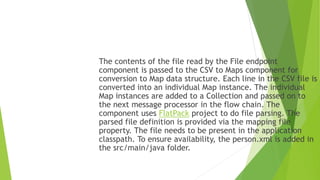
The contents of the file read by the File endpoint
component is passed to the CSV to Maps component for
conversion to Map data structure. Each line in the CSV file is
converted into an individual Map instance. The individual
Map instances are added to a Collection and passed on to
the next message processor in the flow chain. The
component uses FlatPack project to do file parsing. The
parsed file definition is provided via the mapping file
property. The file needs to be present in the application
classpath. To ensure availability, the person.xml is added in
the src/main/java folder.
In the General tab of the CSV to Maps component configure
the following properties with specific values
Delimiter – ,
Mapping file – person.xml
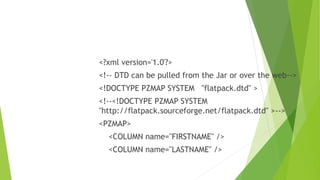
<?xml version='1.0'?>
<!-- DTD can be pulled from the Jar or over the web-->
<!DOCTYPE PZMAP SYSTEM "flatpack.dtd" >
<!--<!DOCTYPE PZMAP SYSTEM
"http://flatpack.sourceforge.net/flatpack.dtd" >-->
<PZMAP>
<COLUMN name="FIRSTNAME" />
<COLUMN name="LASTNAME" />
<COLUMN name="DOB" />
</PZMAP>
In the Java component’s General tab configure the
following property with specific value.
Class Name – com.vinraj.integration.file.CSVProcessor
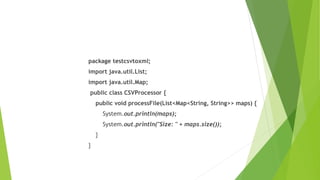
The source code of the CSVProcessor is shown below.
package testcsvtoxml;
import java.util.List;
import java.util.Map;
public class CSVProcessor {
public void processFile(List<Map<String, String>> maps) {
System.out.println(maps);
System.out.println("Size: " + maps.size());
}
}
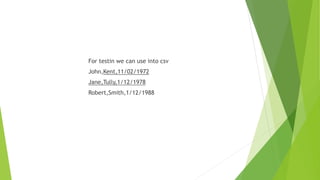
For testin we can use into csv
John,Kent,11/02/1972
Jane,Tully,1/12/1978
Robert,Smith,1/12/1988
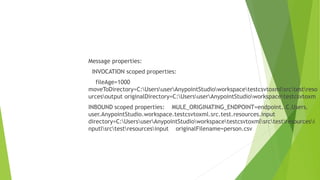
Message properties:
INVOCATION scoped properties:
fileAge=1000
moveToDirectory=C:UsersuserAnypointStudioworkspacetestcsvtoxmlsrctestreso
urcesoutput originalDirectory=C:UsersuserAnypointStudioworkspacetestcsvtoxm
INBOUND scoped properties: MULE_ORIGINATING_ENDPOINT=endpoint..C.Users.
user.AnypointStudio.workspace.testcsvtoxml.src.test.resources.input
directory=C:UsersuserAnypointStudioworkspacetestcsvtoxmlsrctestresourcesi
nputlsrctestresourcesinput originalFilename=person.csv
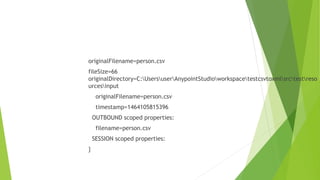
originalFilename=person.csv
fileSize=66
originalDirectory=C:UsersuserAnypointStudioworkspacetestcsvtoxmlsrctestreso
urcesinput
originalFilename=person.csv
timestamp=1464105815396
OUTBOUND scoped properties:
filename=person.csv
SESSION scoped properties:
}
[{FIRSTNAME=John, DOB=11/02/1972, LASTNAME=Kent}, {FIRSTNAME=Jane,
DOB=1/12/1978, LASTNAME=Tully}, {FIRSTNAME=Robert, DOB=1/12/1988,
LASTNAME=Smith}]
Size: 3
The graphic flow is

Transformation csvtoxml

  • 1.
    CSV to XMLtransformation in Mule
  • 2.
    Today we willbe discussing on transformation of CSV to XML format of data. The configuration details for each of the Mule flow component is explained below. The first component of the flow is File Endpoint.
  • 3.
    The File endpointis configured to pick up files from specific location and on completion of processing move it to a pre- defined location. The developer is free to choose location as per his/her convenience. For our demonstration, in the General tab, configure the following Path – C:UsersuserAnypointStudioworkspacetestcsvtoxmlsrcte stresourcesinput Move to Directory – C:MuleStudioFileOutbound g properties with specified values:
  • 4.
    Move to Directory– C:UsersuserAnypointStudioworkspacetestcsvtoxmlsrcte stresourcesoutput The next component is logger. The message property value of the logger component defines the logging statement. In the General tab, configure the following. Message – #[string: output #[message]] The message object provides developer with insights regarding message’s meta-data.
  • 5.
    The contents ofthe file read by the File endpoint component is passed to the CSV to Maps component for conversion to Map data structure. Each line in the CSV file is converted into an individual Map instance. The individual Map instances are added to a Collection and passed on to the next message processor in the flow chain. The component uses FlatPack project to do file parsing. The parsed file definition is provided via the mapping file property. The file needs to be present in the application classpath. To ensure availability, the person.xml is added in the src/main/java folder.
  • 6.
    In the Generaltab of the CSV to Maps component configure the following properties with specific values Delimiter – , Mapping file – person.xml
  • 7.
    <?xml version='1.0'?> <!-- DTDcan be pulled from the Jar or over the web--> <!DOCTYPE PZMAP SYSTEM "flatpack.dtd" > <!--<!DOCTYPE PZMAP SYSTEM "http://flatpack.sourceforge.net/flatpack.dtd" >--> <PZMAP> <COLUMN name="FIRSTNAME" /> <COLUMN name="LASTNAME" />
  • 8.
    <COLUMN name="DOB" /> </PZMAP> Inthe Java component’s General tab configure the following property with specific value. Class Name – com.vinraj.integration.file.CSVProcessor The source code of the CSVProcessor is shown below.
  • 9.
    package testcsvtoxml; import java.util.List; importjava.util.Map; public class CSVProcessor { public void processFile(List<Map<String, String>> maps) { System.out.println(maps); System.out.println("Size: " + maps.size()); } }
  • 10.
    For testin wecan use into csv John,Kent,11/02/1972 Jane,Tully,1/12/1978 Robert,Smith,1/12/1988
  • 11.
    Message properties: INVOCATION scopedproperties: fileAge=1000 moveToDirectory=C:UsersuserAnypointStudioworkspacetestcsvtoxmlsrctestreso urcesoutput originalDirectory=C:UsersuserAnypointStudioworkspacetestcsvtoxm INBOUND scoped properties: MULE_ORIGINATING_ENDPOINT=endpoint..C.Users. user.AnypointStudio.workspace.testcsvtoxml.src.test.resources.input directory=C:UsersuserAnypointStudioworkspacetestcsvtoxmlsrctestresourcesi nputlsrctestresourcesinput originalFilename=person.csv
  • 12.
  • 13.
    [{FIRSTNAME=John, DOB=11/02/1972, LASTNAME=Kent},{FIRSTNAME=Jane, DOB=1/12/1978, LASTNAME=Tully}, {FIRSTNAME=Robert, DOB=1/12/1988, LASTNAME=Smith}] Size: 3 The graphic flow is