Mule Batch
Processing
Batch Processing
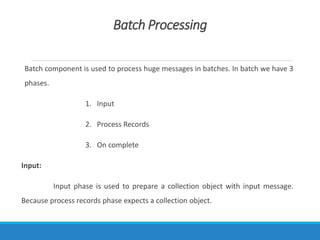
Batch component is used to process huge messages in batches. In batch we have 3
phases.
1. Input
2. Process Records
3. On complete
Input:
Input phase is used to prepare a collection object with input message.
Because process records phase expects a collection object.
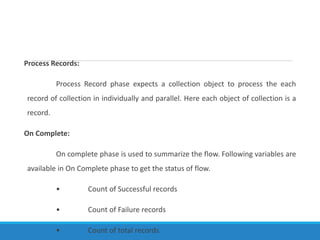
Process Records:
Process Record phase expects a collection object to process the each
record of collection in individually and parallel. Here each object of collection is a
record.
On Complete:
On complete phase is used to summarize the flow. Following variables are
available in On Complete phase to get the status of flow.
• Count of Successful records
• Count of Failure records
• Count of total records.
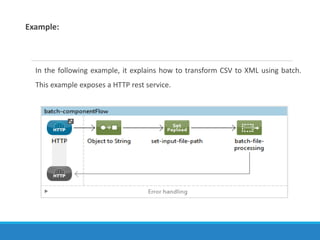
Example:
In the following example, it explains how to transform CSV to XML using batch.
This example exposes a HTTP rest service.
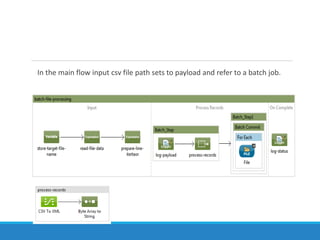
In the main flow input csv file path sets to payload and refer to a batch job.
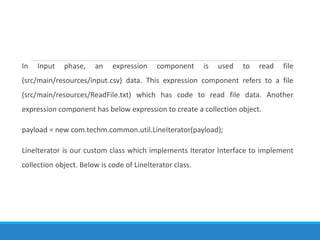
In Input phase, an expression component is used to read file
(src/main/resources/input.csv) data. This expression component refers to a file
(src/main/resources/ReadFile.txt) which has code to read file data. Another
expression component has below expression to create a collection object.
payload = new com.techm.common.util.LineIterator(payload);
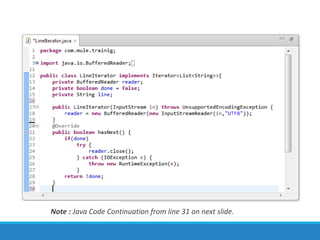
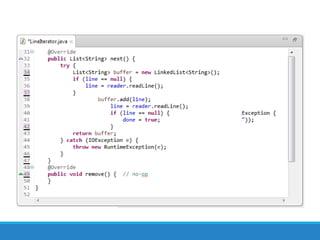
LineIterator is our custom class which implements Iterator Interface to implement
collection object. Below is code of LineIterator class.
Note : Java Code Continuation from line 31 on next slide.
In Process Records phase, we have two batch steps to transform payload from
csv to xml using datamapper and write the xml data into a file. Second batch
step contains batch commit. The message processors which are in batch
commit scope get execute depends of size of batch commit.
<batch:commit size="5" doc:name="Batch Commit">
This batch commit get executed for every 5 records as configured.
On Complete phase has one logger component which logs successful, failure
and total no of records.
Note : SOAP UI project to test this application is placed in src/test/resources.
Thank You All

Mulebatch

  • 1.
  • 2.
    Batch Processing Batch componentis used to process huge messages in batches. In batch we have 3 phases. 1. Input 2. Process Records 3. On complete Input: Input phase is used to prepare a collection object with input message. Because process records phase expects a collection object.
  • 3.
    Process Records: Process Recordphase expects a collection object to process the each record of collection in individually and parallel. Here each object of collection is a record. On Complete: On complete phase is used to summarize the flow. Following variables are available in On Complete phase to get the status of flow. • Count of Successful records • Count of Failure records • Count of total records.
  • 4.
    Example: In the followingexample, it explains how to transform CSV to XML using batch. This example exposes a HTTP rest service.
  • 5.
    In the mainflow input csv file path sets to payload and refer to a batch job.
  • 6.
    In Input phase,an expression component is used to read file (src/main/resources/input.csv) data. This expression component refers to a file (src/main/resources/ReadFile.txt) which has code to read file data. Another expression component has below expression to create a collection object. payload = new com.techm.common.util.LineIterator(payload); LineIterator is our custom class which implements Iterator Interface to implement collection object. Below is code of LineIterator class.
  • 7.
    Note : JavaCode Continuation from line 31 on next slide.
  • 9.
    In Process Recordsphase, we have two batch steps to transform payload from csv to xml using datamapper and write the xml data into a file. Second batch step contains batch commit. The message processors which are in batch commit scope get execute depends of size of batch commit. <batch:commit size="5" doc:name="Batch Commit"> This batch commit get executed for every 5 records as configured. On Complete phase has one logger component which logs successful, failure and total no of records. Note : SOAP UI project to test this application is placed in src/test/resources.
  • 10.