Batching
Vasanthi
Batch Processing
• Batch component is used to process huge messages in batches. In batch we
have 3 phases.
1. Input
2. Process Records
3. On complete
Input:
Input phase is used to prepare a collection object with input message.
Because process records phase expects a collection object.
Process Records:
• Process Record phase expects a collection object to process the each
record of collection in individually and parallel. Here each object of collection
is a record.
On Complete:
• On complete phase is used to summarize the flow. Following variables
are available in On Complete phase to get the status of flow.
• Count of Successful records
• Count of Failure records
• Count of total records.
Example:
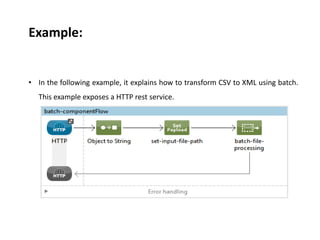
• In the following example, it explains how to transform CSV to XML using batch.
This example exposes a HTTP rest service.
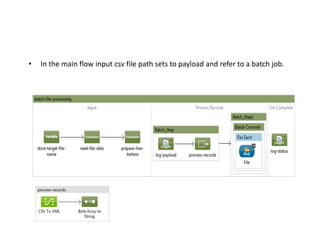
• In the main flow input csv file path sets to payload and refer to a batch job.
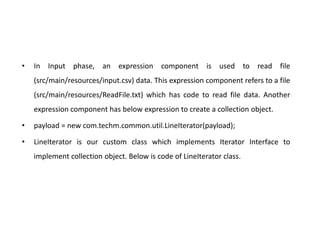
• In Input phase, an expression component is used to read file
(src/main/resources/input.csv) data. This expression component refers to a file
(src/main/resources/ReadFile.txt) which has code to read file data. Another
expression component has below expression to create a collection object.
• payload = new com.techm.common.util.LineIterator(payload);
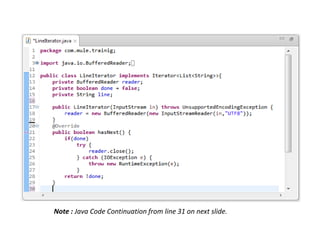
• LineIterator is our custom class which implements Iterator Interface to
implement collection object. Below is code of LineIterator class.
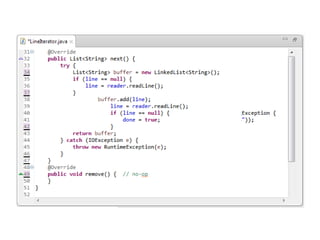
Note : Java Code Continuation from line 31 on next slide.
• In Process Records phase, we have two batch steps to transform payload
from csv to xml using datamapper and write the xml data into a file. Second
batch step contains batch commit. The message processors which are in
batch commit scope get execute depends of size of batch commit.
• <batch:commit size="5" doc:name="Batch Commit">
• This batch commit get executed for every 5 records as configured.
• On Complete phase has one logger component which logs successful,
failure and total no of records.
• Note : SOAP UI project to test this application is placed in
src/test/resources.
•Thank You All

M batching

  • 1.
  • 2.
    Batch Processing • Batchcomponent is used to process huge messages in batches. In batch we have 3 phases. 1. Input 2. Process Records 3. On complete Input: Input phase is used to prepare a collection object with input message. Because process records phase expects a collection object.
  • 3.
    Process Records: • ProcessRecord phase expects a collection object to process the each record of collection in individually and parallel. Here each object of collection is a record. On Complete: • On complete phase is used to summarize the flow. Following variables are available in On Complete phase to get the status of flow. • Count of Successful records • Count of Failure records • Count of total records.
  • 4.
    Example: • In thefollowing example, it explains how to transform CSV to XML using batch. This example exposes a HTTP rest service.
  • 5.
    • In themain flow input csv file path sets to payload and refer to a batch job.
  • 6.
    • In Inputphase, an expression component is used to read file (src/main/resources/input.csv) data. This expression component refers to a file (src/main/resources/ReadFile.txt) which has code to read file data. Another expression component has below expression to create a collection object. • payload = new com.techm.common.util.LineIterator(payload); • LineIterator is our custom class which implements Iterator Interface to implement collection object. Below is code of LineIterator class.
  • 7.
    Note : JavaCode Continuation from line 31 on next slide.
  • 9.
    • In ProcessRecords phase, we have two batch steps to transform payload from csv to xml using datamapper and write the xml data into a file. Second batch step contains batch commit. The message processors which are in batch commit scope get execute depends of size of batch commit. • <batch:commit size="5" doc:name="Batch Commit"> • This batch commit get executed for every 5 records as configured. • On Complete phase has one logger component which logs successful, failure and total no of records. • Note : SOAP UI project to test this application is placed in src/test/resources.
  • 10.