Download as PDF, PPTX

![STRUCTURE OF A LATEX DOCUMENT
The general syntax of a LaTeX file is as follows:
documentclass[options]{class}
Further optional global commands and options, such as
usepackage{packagename}
begin{document} text mixed with typesetting commands
end{document}](https://image.slidesharecdn.com/manitbhopalgroup1latexassignmentpart2-1-120807011655-phpapp01/85/Manit-bhopal-group_1_latex_assignment_part_2-1-4-320.jpg)
![TITLE AND AUTHOR
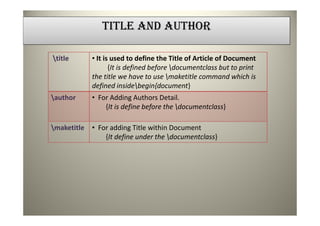
Under LaTeX We Can define Title and Authors
Information in following way-
title{Our First LaTeXe{} Document}
author{
Mrs. Aarti Kumar
Department of Computer Applications
MANIT Bhopal
Mrs. Dipti Chauhan
Department of Computer Applications
MANIT Bhopal
Mr. Dharmendra Singh Rajput
Department of Computer Applications
MANIT Bhopal
Mr. Krishna K. Mohbey
Department of Computer Applications
MANIT Bhopal
}
date{today}
documentclass[12pt]{article}
begin{document}
maketitle
end{document}](https://image.slidesharecdn.com/manitbhopalgroup1latexassignmentpart2-1-120807011655-phpapp01/85/Manit-bhopal-group_1_latex_assignment_part_2-1-5-320.jpg)

![ABSTRACT
documentclass[12pt]{article}
begin{abstract}
This is the paper's abstract.
end{abstract}
end{document}](https://image.slidesharecdn.com/manitbhopalgroup1latexassignmentpart2-1-120807011655-phpapp01/85/Manit-bhopal-group_1_latex_assignment_part_2-1-8-320.jpg)
![SECTION AND SUBSECTION
documentclass[12pt]{article}
section{Section Headings}
We explain in this section how to obtain headings
for the various sections and subsections of our
document.
subsection{Headings in the `article' Document Style}
In the `article' style, the document may be divided up
into sections, subsections and subsubsections, and each
can be given a title, printed in a boldface font,
simply by issuing the appropriate command.
end{document}](https://image.slidesharecdn.com/manitbhopalgroup1latexassignmentpart2-1-120807011655-phpapp01/85/Manit-bhopal-group_1_latex_assignment_part_2-1-10-320.jpg)

![TEXT FORMATTING
The Following are some Text Formatting Commands
documentstyle[11pt]{article}
setlength{topmargin}{-.5in}
setlength{textheight}{9in}
setlength{oddsidemargin}{.125in}
setlength{textwidth}{6.25in}
begin{document}
title{LaTeX Typesetting By Example}
author{Mrs. Aarti Kumar
Department of Computer Applications}
renewcommand{today}{July 5, 2012}
maketitle
This article demonstrates a basic set of LaTeX
formatting commands.
Compare the typeset output side-by-side with
the input document.
end{document}](https://image.slidesharecdn.com/manitbhopalgroup1latexassignmentpart2-1-120807011655-phpapp01/85/Manit-bhopal-group_1_latex_assignment_part_2-1-12-320.jpg)


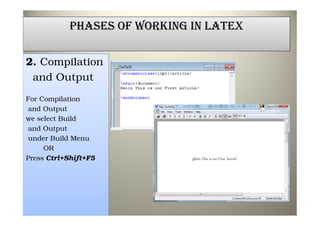
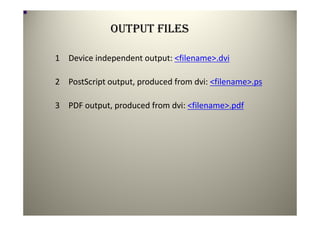
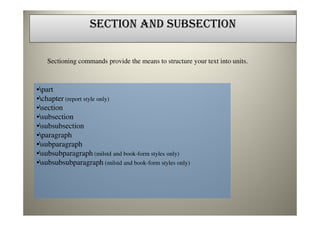
The document discusses the phases of working in LaTeX including compilation and output, the structure of a LaTeX document, defining the title and author, adding sections and subsections, and text formatting. It provides information on the output files like .dvi, .ps, and .pdf generated during compilation. It also demonstrates how to define the title, author, date and include a maketitle command to display it. Sections and subsections can be added using commands like \section and \subsection along with headings. Finally, it lists some common text formatting commands in LaTeX.


