Intercompany Integration Solution 2.0 for SAP Business One
Overview Presentation
SAP Business One Global Rollout
October 2016
© 2016 SAP SE or an SAP affiliate company. All rights reserved. 2Customer
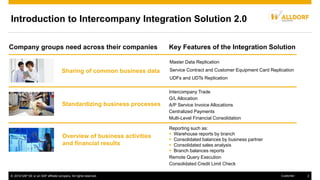
Sharing of common business data
Standardizing business processes
Overview of business activities
and financial results
Master Data Replication
Service Contract and Customer Equipment Card Replication
UDFs and UDTs Replication
Company groups need across their companies
Introduction to Intercompany Integration Solution 2.0
Reporting such as:
 Warehouse reports by branch
 Consolidated balances by business partner
 Consolidated sales analysis
 Branch balances reports
Remote Query Execution
Consolidated Credit Limit Check
Intercompany Trade
G/L Allocation
A/P Service Invoice Allocations
Centralized Payments
Multi-Level Financial Consolidation
Key Features of the Integration Solution
© 2016 SAP SE or an SAP affiliate company. All rights reserved. 3Customer
Overview of Application Components
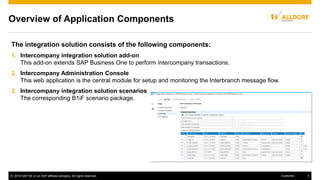
The integration solution consists of the following components:
1. Intercompany integration solution add-on
This add-on extends SAP Business One to perform intercompany transactions.
2. Intercompany Administration Console
This web application is the central module for setup and monitoring the Interbranch message flow.
3. Intercompany integration solution scenarios
The corresponding B1iF scenario package.
© 2016 SAP SE or an SAP affiliate company. All rights reserved. 4Customer
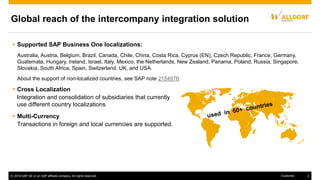
Global reach of the intercompany integration solution
 Supported SAP Business One localizations:
Australia, Austria, Belgium, Brazil, Canada, Chile, China, Costa Rica, Cyprus (EN), Czech Republic, France, Germany,
Guatemala, Hungary, Ireland, Israel, Italy, Mexico, the Netherlands, New Zealand, Panama, Poland, Russia, Singapore,
Slovakia, South Africa, Spain, Switzerland, UK, and USA.
About the support of non-localized countries, see SAP note 2154976.
 Cross Localization
Integration and consolidation of subsidiaries that currently
use different country localizations
 Multi-Currency
Transactions in foreign and local currencies are supported.
© 2016 SAP SE or an SAP affiliate company. All rights reserved. 5Customer
 Master Data Replication
 Service Contract and Customer Equipment Card Replication
 UDFs and UDTs Replication
 Intercompany Trade
 Expenses Allocation among branch companies/subsidiaries
 A/P Service Invoice Allocations
 Centralized Payments
Key functions of Intercompany Integration Solution, explained in the following:
 Financial Data Consolidation
 Intercompany Reports
 Remote Query Execution
 Consolidated Credit Limit Check
 Key Mapping Mechanism
 Custom Language Tool
© 2016 SAP SE or an SAP affiliate company. All rights reserved. 6Customer
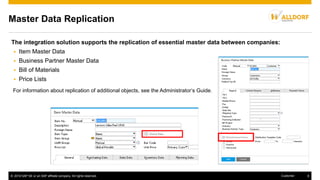
Master Data Replication
The integration solution supports the replication of essential master data between companies:
 Item Master Data
 Business Partner Master Data
 Bill of Materials
 Price Lists
For information about replication of additional objects, see the Administrator‘s Guide.
© 2016 SAP SE or an SAP affiliate company. All rights reserved. 7Customer
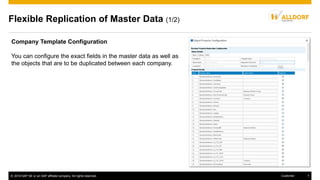
Flexible Replication of Master Data (1/2)
Company Template Configuration
You can configure the exact fields in the master data as well as
the objects that are to be duplicated between each company.
© 2016 SAP SE or an SAP affiliate company. All rights reserved. 8Customer
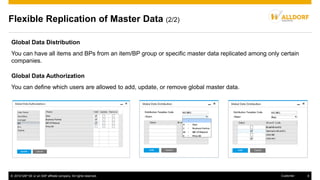
Flexible Replication of Master Data (2/2)
Global Data Distribution
You can have all items and BPs from an item/BP group or specific master data replicated among only certain
companies.
Global Data Authorization
You can define which users are allowed to add, update, or remove global master data.
© 2016 SAP SE or an SAP affiliate company. All rights reserved. 9Customer
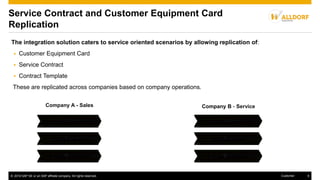
Service Contract and Customer Equipment Card
Replication
The integration solution caters to service oriented scenarios by allowing replication of:
 Customer Equipment Card
 Service Contract
 Contract Template
These are replicated across companies based on company operations.
Customer Equipment Card Customer Equipment Card
Service Contract Service Contract
Contract Templates Contract Templates
Company A - Sales Company B - Service
© 2016 SAP SE or an SAP affiliate company. All rights reserved. 10Customer
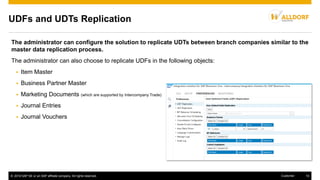
UDFs and UDTs Replication
The administrator can configure the solution to replicate UDTs between branch companies similar to the
master data replication process.
The administrator can also choose to replicate UDFs in the following objects:
 Item Master
 Business Partner Master
 Marketing Documents (which are supported by Intercompany Trade)
 Journal Entries
 Journal Vouchers
© 2016 SAP SE or an SAP affiliate company. All rights reserved. 11Customer
Intercompany Trade
The intercompany integration solution enables automatic recording of reciprocal business transactions
among branch companies.
Benefits:
 Elimination of redundant data entries
 Saves time
 Improvement of data quality
 Increase of organization efficiency
Example: Company A and B are 2 companies that perform intercompany trading. Adding a purchase order to
company A triggers the automatic creation of a sales order in company B.
© 2016 SAP SE or an SAP affiliate company. All rights reserved. 12Customer
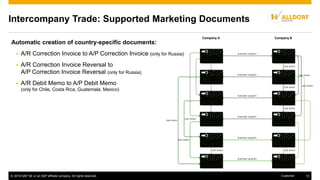
Intercompany Trade: Supported Marketing Documents
Automatic creation of country-specific documents:
 A/R Correction Invoice to A/P Correction Invoice (only for Russia)
 A/R Correction Invoice Reversal to
A/P Correction Invoice Reversal (only for Russia)
 A/R Debit Memo to A/P Debit Memo
(only for Chile, Costa Rica, Guatemala, Mexico)
Purchase Order Sales Order
A/R Reserve
Invoice
Automatic using B1i
A/P Reserve
Invoice
DeliveryGoods Receipt PO
A/R InvoiceA/P Invoice
ReturnGoods Return
A/R Credit MemoA/P Credit Memo
Automatic using B1i
Automatic using B1i
Automatic using B1i
Automatic using B1i
Automatic using B1i
User Action
User Action
User Action
User Action
User Action
User ActionUser Action
User Action
User Action
User Action
Company A Company B
© 2016 SAP SE or an SAP affiliate company. All rights reserved. 13Customer
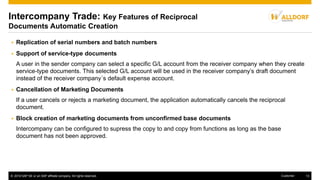
Intercompany Trade: Key Features of Reciprocal
Documents Automatic Creation
 Replication of serial numbers and batch numbers
 Support of service-type documents
A user in the sender company can select a specific G/L account from the receiver company when they create
service-type documents. This selected G/L account will be used in the receiver company’s draft document
instead of the receiver company´s default expense account.
 Cancellation of Marketing Documents
If a user cancels or rejects a marketing document, the application automatically cancels the reciprocal
document.
 Block creation of marketing documents from unconfirmed base documents
Intercompany can be configured to supress the copy to and copy from functions as long as the base
document has not been approved.
© 2016 SAP SE or an SAP affiliate company. All rights reserved. 14Customer
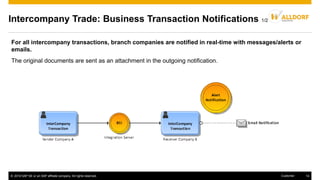
Intercompany Trade: Business Transaction Notifications 1/2
For all intercompany transactions, branch companies are notified in real-time with messages/alerts or
emails.
The original documents are sent as an attachment in the outgoing notification.
© 2016 SAP SE or an SAP affiliate company. All rights reserved. 15Customer
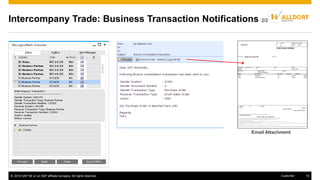
Email Attachment
Intercompany Trade: Business Transaction Notifications 2/2
© 2016 SAP SE or an SAP affiliate company. All rights reserved. 16Customer
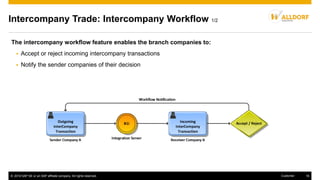
Intercompany Trade: Intercompany Workflow 1/2
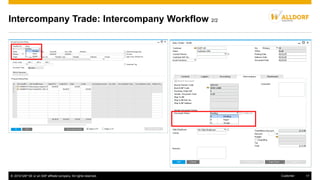
The intercompany workflow feature enables the branch companies to:
 Accept or reject incoming intercompany transactions
 Notify the sender companies of their decision
© 2016 SAP SE or an SAP affiliate company. All rights reserved. 17Customer
Intercompany Trade: Intercompany Workflow 2/2
© 2016 SAP SE or an SAP affiliate company. All rights reserved. 18Customer
Company A - Head Office
Company D
Subsidiary 3
Company C
Subsidiary 2
Company B
Subsidiary 1Debit Credit
Due From Co. B
USD 250
Due From Co. C
USD 350
Due From Co. D
USD 400
Expense – Management Fee
USD 1000
Expenses Allocation among branch
companies/subsidiaries
Debit Credit
Intercompany Expenses
USD 250
Due To Company A
USD 250
Debit Credit
Intercompany Expenses
USD 350
Due To Company A
USD 350
Debit Credit
Intercompany Expenses
USD 400
Due To Company A
USD 400
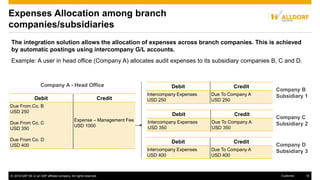
The integration solution allows the allocation of expenses across branch companies. This is achieved
by automatic postings using intercompany G/L accounts.
Example: A user in head office (Company A) allocates audit expenses to its subsidiary companies B, C and D.
© 2016 SAP SE or an SAP affiliate company. All rights reserved. 19Customer
Expenses Allocation among branch
companies/subsidiaries
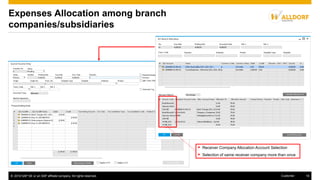
 Receiver Company Allocation Account Selection
 Selection of same receiver company more than once
© 2016 SAP SE or an SAP affiliate company. All rights reserved. 20Customer
Expenses Allocation among branch
companies/subsidiaries
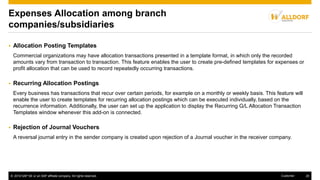
 Allocation Posting Templates
Commercial organizations may have allocation transactions presented in a template format, in which only the recorded
amounts vary from transaction to transaction. This feature enables the user to create pre-defined templates for expenses or
profit allocation that can be used to record repeatedly occurring transactions.
 Recurring Allocation Postings
Every business has transactions that recur over certain periods, for example on a monthly or weekly basis. This feature will
enable the user to create templates for recurring allocation postings which can be executed individually, based on the
recurrence information. Additionally, the user can set up the application to display the Recurring G/L Allocation Transaction
Templates window whenever this add-on is connected.
 Rejection of Journal Vouchers
A reversal journal entry in the sender company is created upon rejection of a Journal voucher in the receiver company.
© 2016 SAP SE or an SAP affiliate company. All rights reserved. 21Customer
A/P Service Invoice Allocations
Company A - Head Office
Company D
Subsidiary 3
Company C
Subsidiary 2
Company B
Subsidiary 1Debit Credit
Due From Co. B
USD 250
Due From Co. C
USD 350
Due From Co. D
USD 400
Expense – Management Fee
USD 1000
Debit Credit
Intercompany Expenses
USD 250
Due To Company A
USD 250
Debit Credit
Intercompany Expenses
USD 350
Due To Company A
USD 350
Debit Credit
Intercompany Expenses
USD 400
Due To Company A
USD 400
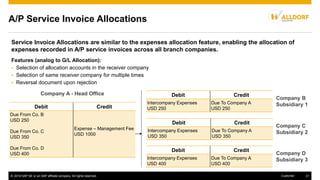
Service Invoice Allocations are similar to the expenses allocation feature, enabling the allocation of
expenses recorded in A/P service invoices across all branch companies.
Features (analog to G/L Allocation):
 Selection of allocation accounts in the receiver company
 Selection of same receiver company for multiple times
 Reversal document upon rejection
© 2016 SAP SE or an SAP affiliate company. All rights reserved. 22Customer
Centralized Payments
Company A - Subsidiary
User action in subsidiary:
Delegation of payment line to the head office
Debit Credit
Vendor Account Due to Account Company B
automatic
Company B - Head Office
Outgoing Payment
User action
Debit Credit
Vendor Account Cash/Bank Account
Debit Credit
Due from Account Company
A
Vendor Account
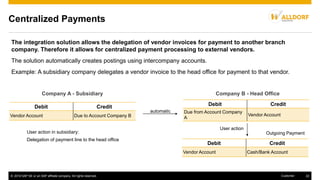
The integration solution allows the delegation of vendor invoices for payment to another branch
company. Therefore it allows for centralized payment processing to external vendors.
The solution automatically creates postings using intercompany accounts.
Example: A subsidiary company delegates a vendor invoice to the head office for payment to that vendor.
© 2016 SAP SE or an SAP affiliate company. All rights reserved. 23Customer
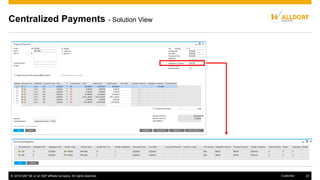
Centralized Payments - Solution View
© 2016 SAP SE or an SAP affiliate company. All rights reserved. 24Customer
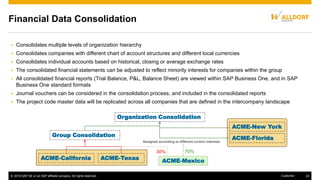
 Consolidates multiple levels of organization hierarchy
 Consolidates companies with different chart of account structures and different local currencies
 Consolidates individual accounts based on historical, closing or average exchange rates
 The consolidated financial statements can be adjusted to reflect minority interests for companies within the group
 All consolidated financial reports (Trial Balance, P&L, Balance Sheet) are viewed within SAP Business One, and in SAP
Business One standard formats
 Journal vouchers can be considered in the consolidation process, and included in the consolidated reports
 The project code master data will be replicated across all companies that are defined in the intercompany landscape
ACME-New York
ACME-Florida
ACME-California ACME-Texas
Organization Consolidation
Group Consolidation
30% 70%
Assigned according to different control interests
Financial Data Consolidation
ACME-Mexico
© 2016 SAP SE or an SAP affiliate company. All rights reserved. 25Customer
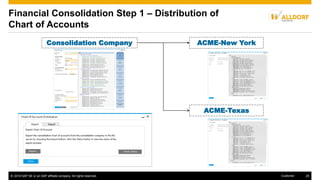
ACME-New York
ACME-Texas
Consolidation Company
Financial Consolidation Step 1 – Distribution of
Chart of Accounts
© 2016 SAP SE or an SAP affiliate company. All rights reserved. 26Customer
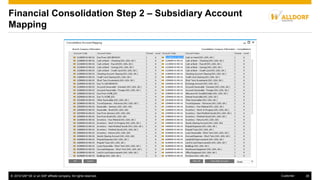
Financial Consolidation Step 2 – Subsidiary Account
Mapping
© 2016 SAP SE or an SAP affiliate company. All rights reserved. 27Customer
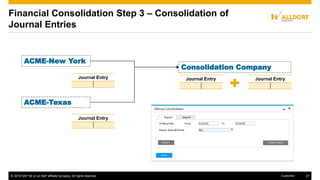
ACME-New York
ACME-Texas
Consolidation Company
Journal Entry
Journal Entry Journal Entry Journal Entry
Financial Consolidation Step 3 – Consolidation of
Journal Entries
© 2016 SAP SE or an SAP affiliate company. All rights reserved. 28Customer
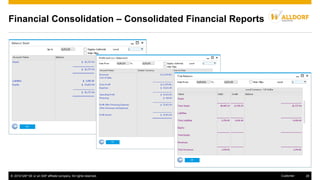
Financial Consolidation – Consolidated Financial Reports
© 2016 SAP SE or an SAP affiliate company. All rights reserved. 29Customer
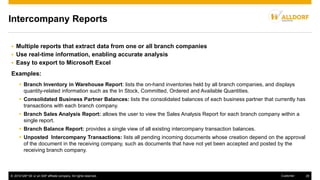
Intercompany Reports
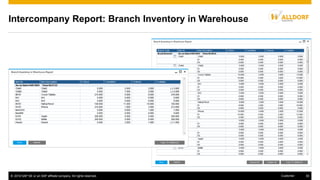
 Branch Inventory in Warehouse Report: lists the on-hand inventories held by all branch companies, and displays
quantity-related information such as the In Stock, Committed, Ordered and Available Quantities.
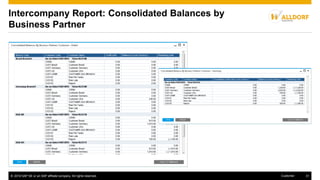
 Consolidated Business Partner Balances: lists the consolidated balances of each business partner that currently has
transactions with each branch company.
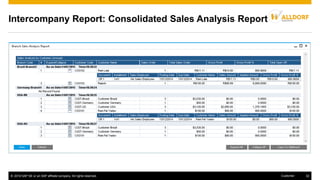
 Branch Sales Analysis Report: allows the user to view the Sales Analysis Report for each branch company within a
single report.
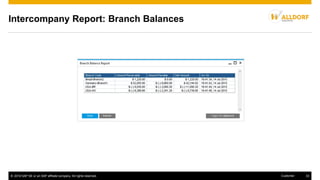
 Branch Balance Report: provides a single view of all existing intercompany transaction balances.
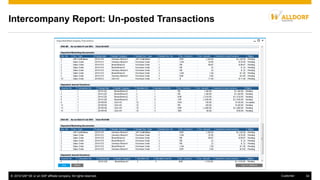
 Unposted Intercompany Transactions: lists all pending incoming documents whose creation depend on the approval
of the document in the receiving company, such as documents that have not yet been accepted and posted by the
receiving branch company.
 Multiple reports that extract data from one or all branch companies
 Use real-time information, enabling accurate analysis
 Easy to export to Microsoft Excel
Examples:
© 2016 SAP SE or an SAP affiliate company. All rights reserved. 30Customer
Intercompany Report: Branch Inventory in Warehouse
© 2016 SAP SE or an SAP affiliate company. All rights reserved. 31Customer
Intercompany Report: Consolidated Balances by
Business Partner
© 2016 SAP SE or an SAP affiliate company. All rights reserved. 32Customer
Intercompany Report: Consolidated Sales Analysis Report
© 2016 SAP SE or an SAP affiliate company. All rights reserved. 33Customer
Intercompany Report: Branch Balances
© 2016 SAP SE or an SAP affiliate company. All rights reserved. 34Customer
Intercompany Report: Un-posted Transactions
© 2016 SAP SE or an SAP affiliate company. All rights reserved. 35Customer
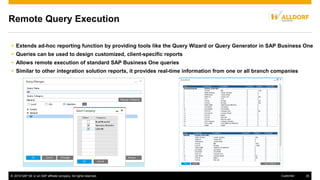
Remote Query Execution
 Extends ad-hoc reporting function by providing tools like the Query Wizard or Query Generator in SAP Business One
 Queries can be used to design customized, client-specific reports
 Allows remote execution of standard SAP Business One queries
 Similar to other integration solution reports, it provides real-time information from one or all branch companies
© 2016 SAP SE or an SAP affiliate company. All rights reserved. 36Customer
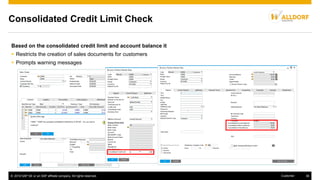
Consolidated Credit Limit Check
Based on the consolidated credit limit and account balance it
 Restricts the creation of sales documents for customers
 Prompts warning messages
© 2016 SAP SE or an SAP affiliate company. All rights reserved. 37Customer
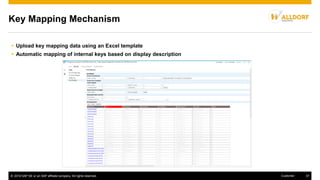
Key Mapping Mechanism
 Upload key mapping data using an Excel template
 Automatic mapping of internal keys based on display description
© 2016 SAP SE or an SAP affiliate company. All rights reserved. 38Customer
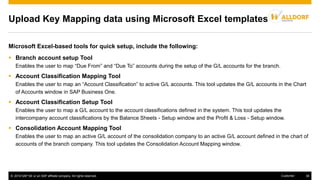
Upload Key Mapping data using Microsoft Excel templates
Microsoft Excel-based tools for quick setup, include the following:
 Branch account setup Tool
Enables the user to map “Due From” and “Due To” accounts during the setup of the G/L accounts for the branch.
 Account Classification Mapping Tool
Enables the user to map an “Account Classification” to active G/L accounts. This tool updates the G/L accounts in the Chart
of Accounts window in SAP Business One.
 Account Classification Setup Tool
Enables the user to map a G/L account to the account classifications defined in the system. This tool updates the
intercompany account classifications by the Balance Sheets - Setup window and the Profit & Loss - Setup window.
 Consolidation Account Mapping Tool
Enables the user to map an active G/L account of the consolidation company to an active G/L account defined in the chart of
accounts of the branch company. This tool updates the Consolidation Account Mapping window.
© 2016 SAP SE or an SAP affiliate company. All rights reserved. 39Customer
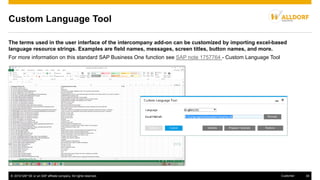
Custom Language Tool
The terms used in the user interface of the intercompany add-on can be customized by importing excel-based
language resource strings. Examples are field names, messages, screen titles, button names, and more.
For more information on this standard SAP Business One function see SAP note 1757764 - Custom Language Tool
 Visit SAP PartnerEdge.com for all assets
 See the Administrator's Guide for the integration solution
 See the User Guide for the integration solution
 Check the Training Curriculum
Check the SAP Business One YouTube playlist to learn more
SAP Business One Partners only:
Key links for more information
© 2016 SAP SE or an SAP affiliate company. All rights reserved. 41Customer
© 2016 SAP SE or an SAP affiliate company. All rights reserved.
No part of this publication may be reproduced or transmitted in any form or for any purpose without the express permission of SAP SE or an SAP affiliate company.
SAP and other SAP products and services mentioned herein as well as their respective logos are trademarks or registered trademarks of SAP SE (or an SAP affiliate
company) in Germany and other countries. Please see http://global12.sap.com/corporate-en/legal/copyright/index.epx for additional trademark information and notices.
Some software products marketed by SAP SE and its distributors contain proprietary software components of other software vendors.
National product specifications may vary.
These materials are provided by SAP SE or an SAP affiliate company for informational purposes only, without representation or warranty of any kind, and SAP SE or its
affiliated companies shall not be liable for errors or omissions with respect to the materials. The only warranties for SAP SE or SAP affiliate company products and
services are those that are set forth in the express warranty statements accompanying such products and services, if any. Nothing herein should be construed as
constituting an additional warranty.
In particular, SAP SE or its affiliated companies have no obligation to pursue any course of business outlined in this document or any related presentation, or to develop
or release any functionality mentioned therein. This document, or any related presentation, and SAP SE’s or its affiliated companies’ strategy and possible future
developments, products, and/or platform directions and functionality are all subject to change and may be changed by SAP SE or its affiliated companies at any time
for any reason without notice. The information in this document is not a commitment, promise, or legal obligation to deliver any material, code, or functionality. All forward-
looking statements are subject to various risks and uncertainties that could cause actual results to differ materially from expectations. Readers are cautioned not to place
undue reliance on these forward-looking statements, which speak only as of their dates, and they should not be relied upon in making purchasing decisions.

Overview presentation intercompany integration solution for sap business one

  • 1.
    Intercompany Integration Solution2.0 for SAP Business One Overview Presentation SAP Business One Global Rollout October 2016
  • 2.
    © 2016 SAPSE or an SAP affiliate company. All rights reserved. 2Customer Sharing of common business data Standardizing business processes Overview of business activities and financial results Master Data Replication Service Contract and Customer Equipment Card Replication UDFs and UDTs Replication Company groups need across their companies Introduction to Intercompany Integration Solution 2.0 Reporting such as:  Warehouse reports by branch  Consolidated balances by business partner  Consolidated sales analysis  Branch balances reports Remote Query Execution Consolidated Credit Limit Check Intercompany Trade G/L Allocation A/P Service Invoice Allocations Centralized Payments Multi-Level Financial Consolidation Key Features of the Integration Solution
  • 3.
    © 2016 SAPSE or an SAP affiliate company. All rights reserved. 3Customer Overview of Application Components The integration solution consists of the following components: 1. Intercompany integration solution add-on This add-on extends SAP Business One to perform intercompany transactions. 2. Intercompany Administration Console This web application is the central module for setup and monitoring the Interbranch message flow. 3. Intercompany integration solution scenarios The corresponding B1iF scenario package.
  • 4.
    © 2016 SAPSE or an SAP affiliate company. All rights reserved. 4Customer Global reach of the intercompany integration solution  Supported SAP Business One localizations: Australia, Austria, Belgium, Brazil, Canada, Chile, China, Costa Rica, Cyprus (EN), Czech Republic, France, Germany, Guatemala, Hungary, Ireland, Israel, Italy, Mexico, the Netherlands, New Zealand, Panama, Poland, Russia, Singapore, Slovakia, South Africa, Spain, Switzerland, UK, and USA. About the support of non-localized countries, see SAP note 2154976.  Cross Localization Integration and consolidation of subsidiaries that currently use different country localizations  Multi-Currency Transactions in foreign and local currencies are supported.
  • 5.
    © 2016 SAPSE or an SAP affiliate company. All rights reserved. 5Customer  Master Data Replication  Service Contract and Customer Equipment Card Replication  UDFs and UDTs Replication  Intercompany Trade  Expenses Allocation among branch companies/subsidiaries  A/P Service Invoice Allocations  Centralized Payments Key functions of Intercompany Integration Solution, explained in the following:  Financial Data Consolidation  Intercompany Reports  Remote Query Execution  Consolidated Credit Limit Check  Key Mapping Mechanism  Custom Language Tool
  • 6.
    © 2016 SAPSE or an SAP affiliate company. All rights reserved. 6Customer Master Data Replication The integration solution supports the replication of essential master data between companies:  Item Master Data  Business Partner Master Data  Bill of Materials  Price Lists For information about replication of additional objects, see the Administrator‘s Guide.
  • 7.
    © 2016 SAPSE or an SAP affiliate company. All rights reserved. 7Customer Flexible Replication of Master Data (1/2) Company Template Configuration You can configure the exact fields in the master data as well as the objects that are to be duplicated between each company.
  • 8.
    © 2016 SAPSE or an SAP affiliate company. All rights reserved. 8Customer Flexible Replication of Master Data (2/2) Global Data Distribution You can have all items and BPs from an item/BP group or specific master data replicated among only certain companies. Global Data Authorization You can define which users are allowed to add, update, or remove global master data.
  • 9.
    © 2016 SAPSE or an SAP affiliate company. All rights reserved. 9Customer Service Contract and Customer Equipment Card Replication The integration solution caters to service oriented scenarios by allowing replication of:  Customer Equipment Card  Service Contract  Contract Template These are replicated across companies based on company operations. Customer Equipment Card Customer Equipment Card Service Contract Service Contract Contract Templates Contract Templates Company A - Sales Company B - Service
  • 10.
    © 2016 SAPSE or an SAP affiliate company. All rights reserved. 10Customer UDFs and UDTs Replication The administrator can configure the solution to replicate UDTs between branch companies similar to the master data replication process. The administrator can also choose to replicate UDFs in the following objects:  Item Master  Business Partner Master  Marketing Documents (which are supported by Intercompany Trade)  Journal Entries  Journal Vouchers
  • 11.
    © 2016 SAPSE or an SAP affiliate company. All rights reserved. 11Customer Intercompany Trade The intercompany integration solution enables automatic recording of reciprocal business transactions among branch companies. Benefits:  Elimination of redundant data entries  Saves time  Improvement of data quality  Increase of organization efficiency Example: Company A and B are 2 companies that perform intercompany trading. Adding a purchase order to company A triggers the automatic creation of a sales order in company B.
  • 12.
    © 2016 SAPSE or an SAP affiliate company. All rights reserved. 12Customer Intercompany Trade: Supported Marketing Documents Automatic creation of country-specific documents:  A/R Correction Invoice to A/P Correction Invoice (only for Russia)  A/R Correction Invoice Reversal to A/P Correction Invoice Reversal (only for Russia)  A/R Debit Memo to A/P Debit Memo (only for Chile, Costa Rica, Guatemala, Mexico) Purchase Order Sales Order A/R Reserve Invoice Automatic using B1i A/P Reserve Invoice DeliveryGoods Receipt PO A/R InvoiceA/P Invoice ReturnGoods Return A/R Credit MemoA/P Credit Memo Automatic using B1i Automatic using B1i Automatic using B1i Automatic using B1i Automatic using B1i User Action User Action User Action User Action User Action User ActionUser Action User Action User Action User Action Company A Company B
  • 13.
    © 2016 SAPSE or an SAP affiliate company. All rights reserved. 13Customer Intercompany Trade: Key Features of Reciprocal Documents Automatic Creation  Replication of serial numbers and batch numbers  Support of service-type documents A user in the sender company can select a specific G/L account from the receiver company when they create service-type documents. This selected G/L account will be used in the receiver company’s draft document instead of the receiver company´s default expense account.  Cancellation of Marketing Documents If a user cancels or rejects a marketing document, the application automatically cancels the reciprocal document.  Block creation of marketing documents from unconfirmed base documents Intercompany can be configured to supress the copy to and copy from functions as long as the base document has not been approved.
  • 14.
    © 2016 SAPSE or an SAP affiliate company. All rights reserved. 14Customer Intercompany Trade: Business Transaction Notifications 1/2 For all intercompany transactions, branch companies are notified in real-time with messages/alerts or emails. The original documents are sent as an attachment in the outgoing notification.
  • 15.
    © 2016 SAPSE or an SAP affiliate company. All rights reserved. 15Customer Email Attachment Intercompany Trade: Business Transaction Notifications 2/2
  • 16.
    © 2016 SAPSE or an SAP affiliate company. All rights reserved. 16Customer Intercompany Trade: Intercompany Workflow 1/2 The intercompany workflow feature enables the branch companies to:  Accept or reject incoming intercompany transactions  Notify the sender companies of their decision
  • 17.
    © 2016 SAPSE or an SAP affiliate company. All rights reserved. 17Customer Intercompany Trade: Intercompany Workflow 2/2
  • 18.
    © 2016 SAPSE or an SAP affiliate company. All rights reserved. 18Customer Company A - Head Office Company D Subsidiary 3 Company C Subsidiary 2 Company B Subsidiary 1Debit Credit Due From Co. B USD 250 Due From Co. C USD 350 Due From Co. D USD 400 Expense – Management Fee USD 1000 Expenses Allocation among branch companies/subsidiaries Debit Credit Intercompany Expenses USD 250 Due To Company A USD 250 Debit Credit Intercompany Expenses USD 350 Due To Company A USD 350 Debit Credit Intercompany Expenses USD 400 Due To Company A USD 400 The integration solution allows the allocation of expenses across branch companies. This is achieved by automatic postings using intercompany G/L accounts. Example: A user in head office (Company A) allocates audit expenses to its subsidiary companies B, C and D.
  • 19.
    © 2016 SAPSE or an SAP affiliate company. All rights reserved. 19Customer Expenses Allocation among branch companies/subsidiaries  Receiver Company Allocation Account Selection  Selection of same receiver company more than once
  • 20.
    © 2016 SAPSE or an SAP affiliate company. All rights reserved. 20Customer Expenses Allocation among branch companies/subsidiaries  Allocation Posting Templates Commercial organizations may have allocation transactions presented in a template format, in which only the recorded amounts vary from transaction to transaction. This feature enables the user to create pre-defined templates for expenses or profit allocation that can be used to record repeatedly occurring transactions.  Recurring Allocation Postings Every business has transactions that recur over certain periods, for example on a monthly or weekly basis. This feature will enable the user to create templates for recurring allocation postings which can be executed individually, based on the recurrence information. Additionally, the user can set up the application to display the Recurring G/L Allocation Transaction Templates window whenever this add-on is connected.  Rejection of Journal Vouchers A reversal journal entry in the sender company is created upon rejection of a Journal voucher in the receiver company.
  • 21.
    © 2016 SAPSE or an SAP affiliate company. All rights reserved. 21Customer A/P Service Invoice Allocations Company A - Head Office Company D Subsidiary 3 Company C Subsidiary 2 Company B Subsidiary 1Debit Credit Due From Co. B USD 250 Due From Co. C USD 350 Due From Co. D USD 400 Expense – Management Fee USD 1000 Debit Credit Intercompany Expenses USD 250 Due To Company A USD 250 Debit Credit Intercompany Expenses USD 350 Due To Company A USD 350 Debit Credit Intercompany Expenses USD 400 Due To Company A USD 400 Service Invoice Allocations are similar to the expenses allocation feature, enabling the allocation of expenses recorded in A/P service invoices across all branch companies. Features (analog to G/L Allocation):  Selection of allocation accounts in the receiver company  Selection of same receiver company for multiple times  Reversal document upon rejection
  • 22.
    © 2016 SAPSE or an SAP affiliate company. All rights reserved. 22Customer Centralized Payments Company A - Subsidiary User action in subsidiary: Delegation of payment line to the head office Debit Credit Vendor Account Due to Account Company B automatic Company B - Head Office Outgoing Payment User action Debit Credit Vendor Account Cash/Bank Account Debit Credit Due from Account Company A Vendor Account The integration solution allows the delegation of vendor invoices for payment to another branch company. Therefore it allows for centralized payment processing to external vendors. The solution automatically creates postings using intercompany accounts. Example: A subsidiary company delegates a vendor invoice to the head office for payment to that vendor.
  • 23.
    © 2016 SAPSE or an SAP affiliate company. All rights reserved. 23Customer Centralized Payments - Solution View
  • 24.
    © 2016 SAPSE or an SAP affiliate company. All rights reserved. 24Customer  Consolidates multiple levels of organization hierarchy  Consolidates companies with different chart of account structures and different local currencies  Consolidates individual accounts based on historical, closing or average exchange rates  The consolidated financial statements can be adjusted to reflect minority interests for companies within the group  All consolidated financial reports (Trial Balance, P&L, Balance Sheet) are viewed within SAP Business One, and in SAP Business One standard formats  Journal vouchers can be considered in the consolidation process, and included in the consolidated reports  The project code master data will be replicated across all companies that are defined in the intercompany landscape ACME-New York ACME-Florida ACME-California ACME-Texas Organization Consolidation Group Consolidation 30% 70% Assigned according to different control interests Financial Data Consolidation ACME-Mexico
  • 25.
    © 2016 SAPSE or an SAP affiliate company. All rights reserved. 25Customer ACME-New York ACME-Texas Consolidation Company Financial Consolidation Step 1 – Distribution of Chart of Accounts
  • 26.
    © 2016 SAPSE or an SAP affiliate company. All rights reserved. 26Customer Financial Consolidation Step 2 – Subsidiary Account Mapping
  • 27.
    © 2016 SAPSE or an SAP affiliate company. All rights reserved. 27Customer ACME-New York ACME-Texas Consolidation Company Journal Entry Journal Entry Journal Entry Journal Entry Financial Consolidation Step 3 – Consolidation of Journal Entries
  • 28.
    © 2016 SAPSE or an SAP affiliate company. All rights reserved. 28Customer Financial Consolidation – Consolidated Financial Reports
  • 29.
    © 2016 SAPSE or an SAP affiliate company. All rights reserved. 29Customer Intercompany Reports  Branch Inventory in Warehouse Report: lists the on-hand inventories held by all branch companies, and displays quantity-related information such as the In Stock, Committed, Ordered and Available Quantities.  Consolidated Business Partner Balances: lists the consolidated balances of each business partner that currently has transactions with each branch company.  Branch Sales Analysis Report: allows the user to view the Sales Analysis Report for each branch company within a single report.  Branch Balance Report: provides a single view of all existing intercompany transaction balances.  Unposted Intercompany Transactions: lists all pending incoming documents whose creation depend on the approval of the document in the receiving company, such as documents that have not yet been accepted and posted by the receiving branch company.  Multiple reports that extract data from one or all branch companies  Use real-time information, enabling accurate analysis  Easy to export to Microsoft Excel Examples:
  • 30.
    © 2016 SAPSE or an SAP affiliate company. All rights reserved. 30Customer Intercompany Report: Branch Inventory in Warehouse
  • 31.
    © 2016 SAPSE or an SAP affiliate company. All rights reserved. 31Customer Intercompany Report: Consolidated Balances by Business Partner
  • 32.
    © 2016 SAPSE or an SAP affiliate company. All rights reserved. 32Customer Intercompany Report: Consolidated Sales Analysis Report
  • 33.
    © 2016 SAPSE or an SAP affiliate company. All rights reserved. 33Customer Intercompany Report: Branch Balances
  • 34.
    © 2016 SAPSE or an SAP affiliate company. All rights reserved. 34Customer Intercompany Report: Un-posted Transactions
  • 35.
    © 2016 SAPSE or an SAP affiliate company. All rights reserved. 35Customer Remote Query Execution  Extends ad-hoc reporting function by providing tools like the Query Wizard or Query Generator in SAP Business One  Queries can be used to design customized, client-specific reports  Allows remote execution of standard SAP Business One queries  Similar to other integration solution reports, it provides real-time information from one or all branch companies
  • 36.
    © 2016 SAPSE or an SAP affiliate company. All rights reserved. 36Customer Consolidated Credit Limit Check Based on the consolidated credit limit and account balance it  Restricts the creation of sales documents for customers  Prompts warning messages
  • 37.
    © 2016 SAPSE or an SAP affiliate company. All rights reserved. 37Customer Key Mapping Mechanism  Upload key mapping data using an Excel template  Automatic mapping of internal keys based on display description
  • 38.
    © 2016 SAPSE or an SAP affiliate company. All rights reserved. 38Customer Upload Key Mapping data using Microsoft Excel templates Microsoft Excel-based tools for quick setup, include the following:  Branch account setup Tool Enables the user to map “Due From” and “Due To” accounts during the setup of the G/L accounts for the branch.  Account Classification Mapping Tool Enables the user to map an “Account Classification” to active G/L accounts. This tool updates the G/L accounts in the Chart of Accounts window in SAP Business One.  Account Classification Setup Tool Enables the user to map a G/L account to the account classifications defined in the system. This tool updates the intercompany account classifications by the Balance Sheets - Setup window and the Profit & Loss - Setup window.  Consolidation Account Mapping Tool Enables the user to map an active G/L account of the consolidation company to an active G/L account defined in the chart of accounts of the branch company. This tool updates the Consolidation Account Mapping window.
  • 39.
    © 2016 SAPSE or an SAP affiliate company. All rights reserved. 39Customer Custom Language Tool The terms used in the user interface of the intercompany add-on can be customized by importing excel-based language resource strings. Examples are field names, messages, screen titles, button names, and more. For more information on this standard SAP Business One function see SAP note 1757764 - Custom Language Tool
  • 40.
     Visit SAPPartnerEdge.com for all assets  See the Administrator's Guide for the integration solution  See the User Guide for the integration solution  Check the Training Curriculum Check the SAP Business One YouTube playlist to learn more SAP Business One Partners only: Key links for more information
  • 41.
    © 2016 SAPSE or an SAP affiliate company. All rights reserved. 41Customer © 2016 SAP SE or an SAP affiliate company. All rights reserved. No part of this publication may be reproduced or transmitted in any form or for any purpose without the express permission of SAP SE or an SAP affiliate company. SAP and other SAP products and services mentioned herein as well as their respective logos are trademarks or registered trademarks of SAP SE (or an SAP affiliate company) in Germany and other countries. Please see http://global12.sap.com/corporate-en/legal/copyright/index.epx for additional trademark information and notices. Some software products marketed by SAP SE and its distributors contain proprietary software components of other software vendors. National product specifications may vary. These materials are provided by SAP SE or an SAP affiliate company for informational purposes only, without representation or warranty of any kind, and SAP SE or its affiliated companies shall not be liable for errors or omissions with respect to the materials. The only warranties for SAP SE or SAP affiliate company products and services are those that are set forth in the express warranty statements accompanying such products and services, if any. Nothing herein should be construed as constituting an additional warranty. In particular, SAP SE or its affiliated companies have no obligation to pursue any course of business outlined in this document or any related presentation, or to develop or release any functionality mentioned therein. This document, or any related presentation, and SAP SE’s or its affiliated companies’ strategy and possible future developments, products, and/or platform directions and functionality are all subject to change and may be changed by SAP SE or its affiliated companies at any time for any reason without notice. The information in this document is not a commitment, promise, or legal obligation to deliver any material, code, or functionality. All forward- looking statements are subject to various risks and uncertainties that could cause actual results to differ materially from expectations. Readers are cautioned not to place undue reliance on these forward-looking statements, which speak only as of their dates, and they should not be relied upon in making purchasing decisions.