Touch Screen 
Disusun oleh: 
Didi Santoso 
12111019 
12.2B.14
Touch screen 
The touch screen is a computer input 
device 
that works with the touch screen using a 
finger or digital pen. 
Touch-screen interface, where users operate 
the computer system by touching a 
picture or writing on the screen itself, is the 
easiest way to operate a computer and are 
increasingly used in various applications.
Components 
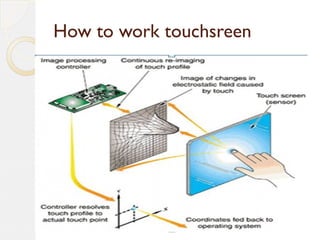
Panel touch screen sensor 
Located in exterior and generate electric current in place getting 
touch 
Touch screen controller 
connective peripheral between panel sensor with peripheral of 
computer to process the touch. 
Driver software 
translates the data into mouse movement, 
enabling the sensor panel to function like a mouse,
How to work touchsreen
Types of touch screen 
Capacitive overlay 
This type have strong endurance and also clear 
appearance. 
Guided acoustic wave 
It works by transmitting acoustic waves through a layer 
of glass is placed on the display screen. 
Resistive overlay 
Superior in durability, especially against the harsh 
treatment and at an affordable price.
Infrared Scanning 
In [screen/sail] frame there are overall light dioda and photo 
transistor detecting the loss of light and transmit signals that 
identify co-ordinate of x and y. 
Near field imaging (NFI) 
This type uses a tool or a sophisticated touch detection circuit 
for detecting a touch 
Surface acoustic wave 
Works by sending acoustic waves through the glass panel that 
is equipped with multiple transducers and reflectors.
Usage 
Public information system 
System of a restaurant or retail 
Supermarket 
Computer-based Training
Advantages 
 There is control and direct interaction between 
the senses of sight and sense 
of touch(input and output are on the same location) 
 The ability to enter and monitor data quickly 
because of its use easy, is not required too much user 
training to operate the touch screen system 
Only valid options and likely to be accepted that can 
be displayed 
 Easily accepted by users 
 No need for the user memory
Disadvantages 
 The amount of the cost of developing a touch 
screen system as a technology recently 
used in manufactured goods in bulk 
 Requires additional time in the process 
of programming 
 Less flexible to some kind of specific input 
 Errors in the displayed image will cause an 
error operation 
 Perceived fatigue due to repeated close to the screen 
 Fingers often covers the visual display screen 
 Need for new methods in programming the device fine
THANK 
YOU!!!

Touch screen

  • 1.
    Touch Screen Disusunoleh: Didi Santoso 12111019 12.2B.14
  • 2.
    Touch screen Thetouch screen is a computer input device that works with the touch screen using a finger or digital pen. Touch-screen interface, where users operate the computer system by touching a picture or writing on the screen itself, is the easiest way to operate a computer and are increasingly used in various applications.
  • 3.
    Components Panel touchscreen sensor Located in exterior and generate electric current in place getting touch Touch screen controller connective peripheral between panel sensor with peripheral of computer to process the touch. Driver software translates the data into mouse movement, enabling the sensor panel to function like a mouse,
  • 4.
    How to worktouchsreen
  • 5.
    Types of touchscreen Capacitive overlay This type have strong endurance and also clear appearance. Guided acoustic wave It works by transmitting acoustic waves through a layer of glass is placed on the display screen. Resistive overlay Superior in durability, especially against the harsh treatment and at an affordable price.
  • 6.
    Infrared Scanning In[screen/sail] frame there are overall light dioda and photo transistor detecting the loss of light and transmit signals that identify co-ordinate of x and y. Near field imaging (NFI) This type uses a tool or a sophisticated touch detection circuit for detecting a touch Surface acoustic wave Works by sending acoustic waves through the glass panel that is equipped with multiple transducers and reflectors.
  • 7.
    Usage Public informationsystem System of a restaurant or retail Supermarket Computer-based Training
  • 8.
    Advantages  Thereis control and direct interaction between the senses of sight and sense of touch(input and output are on the same location)  The ability to enter and monitor data quickly because of its use easy, is not required too much user training to operate the touch screen system Only valid options and likely to be accepted that can be displayed  Easily accepted by users  No need for the user memory
  • 9.
    Disadvantages  Theamount of the cost of developing a touch screen system as a technology recently used in manufactured goods in bulk  Requires additional time in the process of programming  Less flexible to some kind of specific input  Errors in the displayed image will cause an error operation  Perceived fatigue due to repeated close to the screen  Fingers often covers the visual display screen  Need for new methods in programming the device fine
  • 10.

Editor's Notes

  • #11 <number>