Time-of-Use Exceptions and Conditional Billing 
With respect to the future advancements offered in AMI, SAP ISU now supports ‘demand response programs’ 
which can be triggered by scenarios like peak time consumption, potential load fluctuations etc. So in SAP 
these are mapped as TOU exception programs, an enhancement in ISU Billing. Say I have an On/Off peak rate 
setup. But there are periods in On peak rate usage during which the consumption surpasses the expected 
peak consumption and I would like to bill these exceptions with ‘another’ (or add to the existing rate steps) 
conditional rate setup. This works only in consumption data in the form of time series, so TOU Billing and 
RTP Billing qualify. 
As the demand response is to be triggered from the Metering infrastructure, so SAP is the reactive system 
here as always. A customer can opt in /opt out of this TOU exception program the effect of which is 
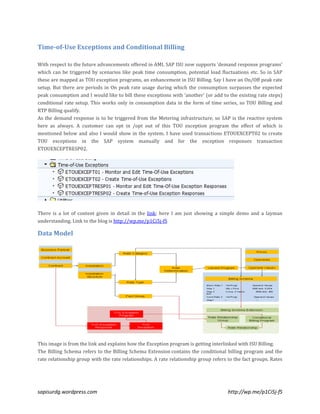
mentioned below and also I would show in the system. I have used transactions ETOUEXCEPT02 to create 
TOU exceptions in the SAP system manually and for the exception responses transaction 
ETOUEXCEPTRESP02. 
There is a lot of content given in detail in the link; here I am just showing a simple demo and a layman 
understanding. Link to the blog is http://wp.me/p1Ci5j-fS 
Data Model 
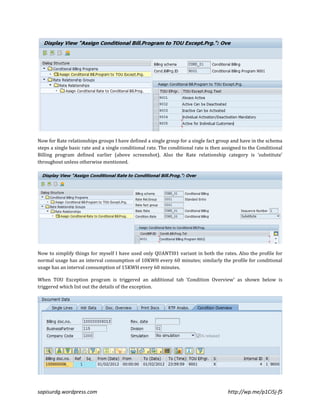
This image is from the link and explains how the Exception program is getting interlinked with ISU Billing. 
The Billing Schema refers to the Billing Schema Extension contains the conditional billing program and the 
rate relationship group with the rate relationships. A rate relationship group refers to the fact groups. Rates 
sapisurdg.wordpress.com http://wp.me/p1Ci5j-fS
use the RTP or TOU interface defined in the rate fact group. Basic rates and conditional rates must be used in 
the same schema and be defined with the same relationship in rate determination. 
The Conditional Billing program defined in the billing schema extension is used to activate conditional rates. 
Assigning conditional billing programs to TOU Exception programs executes the corresponding rates in the 
billing schema extension for an active TOU exception. The TOU exception responses are stored at register 
level with the key of the logical register number. This provides an indirect connection to the contract with 
Register > Device > Installation. 
Rate Relationship Category 
The relationship between basic rates and conditional rates is defined using the rate relationship category: 
• In the case of the rate relationship category ‘Supplement’, the conditional rate is executed in addition to 
the basic rate. 
• In the case of the rate relationship category ‘Substitute’, the basic rate processes the result of the TOU 
interface without the TOU exception period. Instead, the system executes the TOU interface of the 
conditional rate for the TOU exception period. The result is processed in the rate steps for the conditional 
rate. 
• There is concept on proration and splitting which can be read in the link. I have not shown it in my 
screenshots. 
• Also only rates which are of type interval meters or device or facts permissible are allowed in the 
billing schema extension. 
• In the Rate category and Schema header level the check box for ‘Conditional Billing program’ needs 
to be checked. 
sapisurdg.wordpress.com http://wp.me/p1Ci5j-fS
Activation Category 
The activation category combines the validity of TOU exceptions at the level of a TOU exception program with 
individual activation at contract level. 
Activation Category Meaning 
Always active Each TOU exception is billing-relevant for all installations in the TOU exception program. No 
individual activation or deactivation is possible, with the exception of corrections. 
Active, can be deactivated Each TOU exception is billing-relevant for all installations in the TOU exception program. The 
customer can enter a negative TOU exception response (opt-out), which deactivates an 
individual TOU exception. 
Inactive, can be activated A TOU exception is only relevant for billing if a positive TOU exception response (opt-in) has 
been created for it. 
Individual 
activation/deactivation is 
mandatory 
Billing requires a positive or negative TOU exception response (opt-in/opt-out), which 
activates or deactivates the TOU exception. 
Active for individual customers A TOU exception is entered when a positive TOU exception response (opt-in) is created and is 
hereby activated for selected customers. 
During contract billing, the system observes valid TOU exceptions in relation to the meter involved. 
Time-of-Use Exceptions and Exception Responses 
A time-of-use exception is an activation of a TOU exception program for a specific period and is described 
using the following attributes: 
• Start of activation (date and time) 
sapisurdg.wordpress.com http://wp.me/p1Ci5j-fS
• End of activation 
• Reference to the TOU exception program activated 
The TOU exception response has the following attributes: 
• Logical register number 
• Reference to TOU exception 
• Response category 
The response category can have one of the following statuses: 
o Opt-in: The TOU exception is to be taken into account as active during billing. 
o Opt-out: The TOU exception is not to be taken into account during billing. 
Activating a TOU exception program in billing for a contract is dependent on the interaction of the TOU 
exception and the TOU exception response. A TOU exception response can be optional or mandatory 
according to the activation category of the TOU exception program. If the user wants to make a correction at 
contract level, for example to deactivate a TOU exception for a specific contract, they can create a TOU 
exception response with a suitable response category for the TOU exception in the system. 
Checking the Schema Extension 
Inside the schema steps, one can either through the menu (as shown) or directly by the use of the Button 
(shown) can go to the Schema Extension screen. 
The below screenshots is the conditional billing setup. I have defined a single Conditional billing program 
which holds all the TOU exception programs. 
sapisurdg.wordpress.com http://wp.me/p1Ci5j-fS
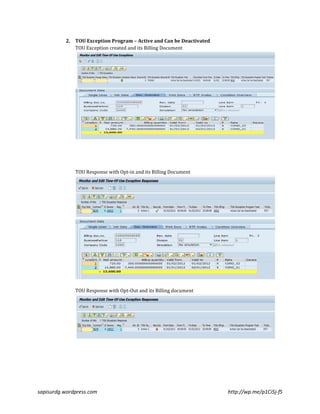
Now for Rate relationships groups I have defined a single group for a single fact group and have in the schema 
steps a single basic rate and a single conditional rate. The conditional rate is then assigned to the Conditional 
Billing program defined earlier (above screenshot). Also the Rate relationship category is ‘substitute’ 
throughout unless otherwise mentioned. 
Now to simplify things for myself I have used only QUANTI01 variant in both the rates. Also the profile for 
normal usage has an interval consumption of 10KWH every 60 minutes; similarly the profile for conditional 
usage has an interval consumption of 15KWH every 60 minutes. 
When TOU Exception program is triggered an additional tab ‘Condition Overview’ as shown below is 
triggered which list out the details of the exception. 
sapisurdg.wordpress.com http://wp.me/p1Ci5j-fS
If execute Billing without the TOU exception then I get the below document with the basic rate executed. 
10KWH * 24(60 min intervals) * 32 days = 7680 KWH for the period. 
Now I have divided the rest content on the TOU exception program which I have defined. 
1. TOU Exception Program – Always Active 
TOU Exception created and its Billing Document 
TOU Exception period has 15KWH*24*1 Day which comes to 360 KWH 
For normal period its 10KWH*24*31 days which comes to 7440KWH 
TOU Response with Opt-in and its Billing Document 
Op-in has the Check Box (in green). The net total of Opt-in and without TOU response is the 
same as the TOU Exception program is always Active. 
sapisurdg.wordpress.com http://wp.me/p1Ci5j-fS
TOU Response with Opt-Out and its Billing document 
As the response is Opt-Out so the Exception period is ignored. 
10KWH *24*32 days = 7680KWH 
sapisurdg.wordpress.com http://wp.me/p1Ci5j-fS
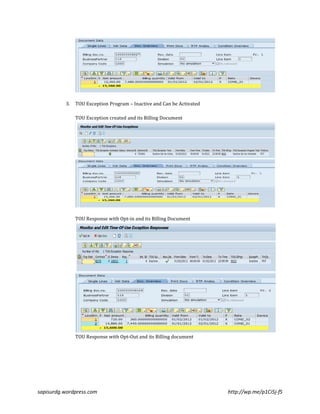
2. TOU Exception Program – Active and Can be Deactivated 
TOU Exception created and its Billing Document 
TOU Response with Opt-in and its Billing Document 
TOU Response with Opt-Out and its Billing document 
sapisurdg.wordpress.com http://wp.me/p1Ci5j-fS
3. TOU Exception Program – Inactive and Can be Activated 
TOU Exception created and its Billing Document 
TOU Response with Opt-in and its Billing Document 
TOU Response with Opt-Out and its Billing document 
sapisurdg.wordpress.com http://wp.me/p1Ci5j-fS
4. TOU Exception Program – Individual Activation/Deactivation 
TOU Exception created and its Billing Document 
Here we need a TOU response without which the Billing cannot proceed. 
TOU Response with Opt-in and its Billing Document 
sapisurdg.wordpress.com http://wp.me/p1Ci5j-fS
TOU Response with Opt-Out and its Billing document 
5. TOU Exception Program – Active for Individual customers 
TOU Exception created and its Billing Document 
TOU Response with Opt-in and its Billing Document 
sapisurdg.wordpress.com http://wp.me/p1Ci5j-fS
TOU Response with Opt-Out and its Billing document 
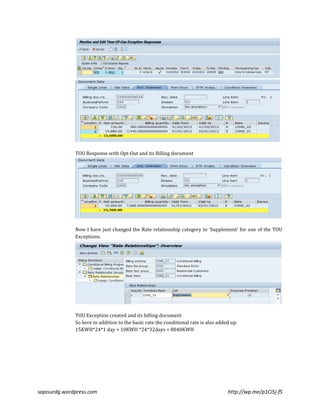
Now I have just changed the Rate relationship category to ‘Supplement’ for one of the TOU 
Exceptions. 
TOU Exception created and its billing document 
So here in addition to the basic rate the conditional rate is also added up. 
15KWH*24*1 day + 10KWH *24*32days = 8040KWH 
sapisurdg.wordpress.com http://wp.me/p1Ci5j-fS
TOU Response – Opt-In and its Billing Document 
TOU Response –Opt-Out and its Billing document. 
sapisurdg.wordpress.com http://wp.me/p1Ci5j-fS
There’s more to TOU Exception and Conditional Billing as one can see by reading through the link, here I just 
tried to capture a basic understanding. Do get back to me for any feedback.  
sapisurdg.wordpress.com http://wp.me/p1Ci5j-fS

SAP ISU : TOU Exception Program & Conditional Billing

  • 1.
    Time-of-Use Exceptions andConditional Billing With respect to the future advancements offered in AMI, SAP ISU now supports ‘demand response programs’ which can be triggered by scenarios like peak time consumption, potential load fluctuations etc. So in SAP these are mapped as TOU exception programs, an enhancement in ISU Billing. Say I have an On/Off peak rate setup. But there are periods in On peak rate usage during which the consumption surpasses the expected peak consumption and I would like to bill these exceptions with ‘another’ (or add to the existing rate steps) conditional rate setup. This works only in consumption data in the form of time series, so TOU Billing and RTP Billing qualify. As the demand response is to be triggered from the Metering infrastructure, so SAP is the reactive system here as always. A customer can opt in /opt out of this TOU exception program the effect of which is mentioned below and also I would show in the system. I have used transactions ETOUEXCEPT02 to create TOU exceptions in the SAP system manually and for the exception responses transaction ETOUEXCEPTRESP02. There is a lot of content given in detail in the link; here I am just showing a simple demo and a layman understanding. Link to the blog is http://wp.me/p1Ci5j-fS Data Model This image is from the link and explains how the Exception program is getting interlinked with ISU Billing. The Billing Schema refers to the Billing Schema Extension contains the conditional billing program and the rate relationship group with the rate relationships. A rate relationship group refers to the fact groups. Rates sapisurdg.wordpress.com http://wp.me/p1Ci5j-fS
  • 2.
    use the RTPor TOU interface defined in the rate fact group. Basic rates and conditional rates must be used in the same schema and be defined with the same relationship in rate determination. The Conditional Billing program defined in the billing schema extension is used to activate conditional rates. Assigning conditional billing programs to TOU Exception programs executes the corresponding rates in the billing schema extension for an active TOU exception. The TOU exception responses are stored at register level with the key of the logical register number. This provides an indirect connection to the contract with Register > Device > Installation. Rate Relationship Category The relationship between basic rates and conditional rates is defined using the rate relationship category: • In the case of the rate relationship category ‘Supplement’, the conditional rate is executed in addition to the basic rate. • In the case of the rate relationship category ‘Substitute’, the basic rate processes the result of the TOU interface without the TOU exception period. Instead, the system executes the TOU interface of the conditional rate for the TOU exception period. The result is processed in the rate steps for the conditional rate. • There is concept on proration and splitting which can be read in the link. I have not shown it in my screenshots. • Also only rates which are of type interval meters or device or facts permissible are allowed in the billing schema extension. • In the Rate category and Schema header level the check box for ‘Conditional Billing program’ needs to be checked. sapisurdg.wordpress.com http://wp.me/p1Ci5j-fS
  • 3.
    Activation Category Theactivation category combines the validity of TOU exceptions at the level of a TOU exception program with individual activation at contract level. Activation Category Meaning Always active Each TOU exception is billing-relevant for all installations in the TOU exception program. No individual activation or deactivation is possible, with the exception of corrections. Active, can be deactivated Each TOU exception is billing-relevant for all installations in the TOU exception program. The customer can enter a negative TOU exception response (opt-out), which deactivates an individual TOU exception. Inactive, can be activated A TOU exception is only relevant for billing if a positive TOU exception response (opt-in) has been created for it. Individual activation/deactivation is mandatory Billing requires a positive or negative TOU exception response (opt-in/opt-out), which activates or deactivates the TOU exception. Active for individual customers A TOU exception is entered when a positive TOU exception response (opt-in) is created and is hereby activated for selected customers. During contract billing, the system observes valid TOU exceptions in relation to the meter involved. Time-of-Use Exceptions and Exception Responses A time-of-use exception is an activation of a TOU exception program for a specific period and is described using the following attributes: • Start of activation (date and time) sapisurdg.wordpress.com http://wp.me/p1Ci5j-fS
  • 4.
    • End ofactivation • Reference to the TOU exception program activated The TOU exception response has the following attributes: • Logical register number • Reference to TOU exception • Response category The response category can have one of the following statuses: o Opt-in: The TOU exception is to be taken into account as active during billing. o Opt-out: The TOU exception is not to be taken into account during billing. Activating a TOU exception program in billing for a contract is dependent on the interaction of the TOU exception and the TOU exception response. A TOU exception response can be optional or mandatory according to the activation category of the TOU exception program. If the user wants to make a correction at contract level, for example to deactivate a TOU exception for a specific contract, they can create a TOU exception response with a suitable response category for the TOU exception in the system. Checking the Schema Extension Inside the schema steps, one can either through the menu (as shown) or directly by the use of the Button (shown) can go to the Schema Extension screen. The below screenshots is the conditional billing setup. I have defined a single Conditional billing program which holds all the TOU exception programs. sapisurdg.wordpress.com http://wp.me/p1Ci5j-fS
  • 5.
    Now for Raterelationships groups I have defined a single group for a single fact group and have in the schema steps a single basic rate and a single conditional rate. The conditional rate is then assigned to the Conditional Billing program defined earlier (above screenshot). Also the Rate relationship category is ‘substitute’ throughout unless otherwise mentioned. Now to simplify things for myself I have used only QUANTI01 variant in both the rates. Also the profile for normal usage has an interval consumption of 10KWH every 60 minutes; similarly the profile for conditional usage has an interval consumption of 15KWH every 60 minutes. When TOU Exception program is triggered an additional tab ‘Condition Overview’ as shown below is triggered which list out the details of the exception. sapisurdg.wordpress.com http://wp.me/p1Ci5j-fS
  • 6.
    If execute Billingwithout the TOU exception then I get the below document with the basic rate executed. 10KWH * 24(60 min intervals) * 32 days = 7680 KWH for the period. Now I have divided the rest content on the TOU exception program which I have defined. 1. TOU Exception Program – Always Active TOU Exception created and its Billing Document TOU Exception period has 15KWH*24*1 Day which comes to 360 KWH For normal period its 10KWH*24*31 days which comes to 7440KWH TOU Response with Opt-in and its Billing Document Op-in has the Check Box (in green). The net total of Opt-in and without TOU response is the same as the TOU Exception program is always Active. sapisurdg.wordpress.com http://wp.me/p1Ci5j-fS
  • 7.
    TOU Response withOpt-Out and its Billing document As the response is Opt-Out so the Exception period is ignored. 10KWH *24*32 days = 7680KWH sapisurdg.wordpress.com http://wp.me/p1Ci5j-fS
  • 8.
    2. TOU ExceptionProgram – Active and Can be Deactivated TOU Exception created and its Billing Document TOU Response with Opt-in and its Billing Document TOU Response with Opt-Out and its Billing document sapisurdg.wordpress.com http://wp.me/p1Ci5j-fS
  • 9.
    3. TOU ExceptionProgram – Inactive and Can be Activated TOU Exception created and its Billing Document TOU Response with Opt-in and its Billing Document TOU Response with Opt-Out and its Billing document sapisurdg.wordpress.com http://wp.me/p1Ci5j-fS
  • 10.
    4. TOU ExceptionProgram – Individual Activation/Deactivation TOU Exception created and its Billing Document Here we need a TOU response without which the Billing cannot proceed. TOU Response with Opt-in and its Billing Document sapisurdg.wordpress.com http://wp.me/p1Ci5j-fS
  • 11.
    TOU Response withOpt-Out and its Billing document 5. TOU Exception Program – Active for Individual customers TOU Exception created and its Billing Document TOU Response with Opt-in and its Billing Document sapisurdg.wordpress.com http://wp.me/p1Ci5j-fS
  • 12.
    TOU Response withOpt-Out and its Billing document Now I have just changed the Rate relationship category to ‘Supplement’ for one of the TOU Exceptions. TOU Exception created and its billing document So here in addition to the basic rate the conditional rate is also added up. 15KWH*24*1 day + 10KWH *24*32days = 8040KWH sapisurdg.wordpress.com http://wp.me/p1Ci5j-fS
  • 13.
    TOU Response –Opt-In and its Billing Document TOU Response –Opt-Out and its Billing document. sapisurdg.wordpress.com http://wp.me/p1Ci5j-fS
  • 14.
    There’s more toTOU Exception and Conditional Billing as one can see by reading through the link, here I just tried to capture a basic understanding. Do get back to me for any feedback. sapisurdg.wordpress.com http://wp.me/p1Ci5j-fS