USER MANUAL
Negative Stock Control
Ksv Technologies
New No. 141, Old No. 53/2b, Patel Road,2nd Floor,
Perambur,Chennai - 600 011.Ph.no: 080 – 49110110
E-mail: support@ksvtech.in
Negative Stock Control
Introduction
Prevent user to consume stock when there is no stock/sufficient stock. This add-on works with Godown
and Batches also.
This module will prevent the user from entering negative stock quantity in the voucher Creation as well as
Alteration.
Installation Steps
This add-on is installed automatically when downloaded from Tally Shop.
System Requirements
No additional hardware/ software infrastructure is required for executing and operating this application
module.
Quick Set up Guide
1. Enable the option “Prevent Negative Stock” in Inventory Features
Detailed Set up Guide
To achieve this feature user have to follow the following steps:
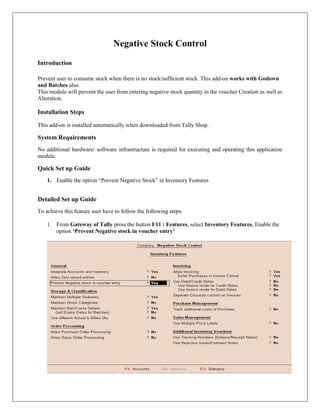
1. From Gateway of Tally press the button F11 : Features, select Inventory Features, Enable the
option ‘Prevent Negative stock in voucher entry’
From Gateway of Tally > Company features (F11) > Inventory features > and enable the
option „Prevent Negative stock in voucher entry’
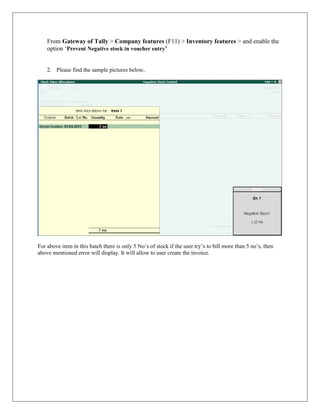
2. Please find the sample pictures below,
For above item in this batch there is only 5 No‟s of stock if the user try‟s to bill more than 5 no‟s, then
above mentioned error will display. It will allow to user create the invoice.
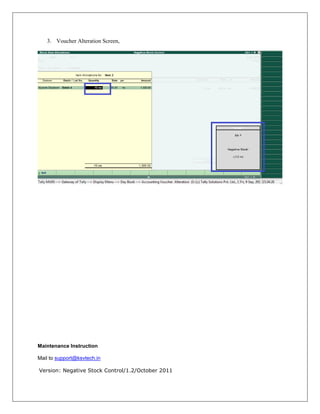
3. Voucher Alteration Screen,
Maintenance Instruction
Mail to support@ksvtech.in
Version: Negative Stock Control/1.2/October 2011
FAQ’s – Voucher Authorization
How do I purchase Negative Stock Control Add-ons?
Please contact your Tally partner or Tally Service Partner. Alternatively, please visit our website
http://www.tallysolutions.com/tallyweb/modules/sd/docmgmt/CMktPlaceHomepageWIC.php and
purchase this module. You could purchase this module either by paying through credit card or Tally
Currency.
Do I need to do installation after I purchase?
No, you don’t need to install anything. You just need to update your license once.
Which versions of Tally does the module support?
This add-on will work with Tally.ERP 9 Series A, release 1.5 to Tally.ERP 9 Series A release 3.2
I have more than one Tally License, Does I need to purchase once or I have to pay for each License?
The module needs to be purchased for each serial number.
Any NEW features added will be available to us or not?
We offer one year availability of all support and new features free of cost. After one year, nominal
subscription cost will be applicable to you to continue to get free support and updates.
What will happen after one Year?
20% of the MRP will be charged in case free support and updates will be required by you.
If I need some enhancement / changes to be incorporated for the module, whom should I contact?
Please to write to us on support@ksvtech.in with your additional requirements and we will revert to you in
24 hours.
© 2011 ksvtechnologies. All rights reserved.
Version: Price List Import /1.2/October 2011.

Negative stock control

  • 1.
    USER MANUAL Negative StockControl Ksv Technologies New No. 141, Old No. 53/2b, Patel Road,2nd Floor, Perambur,Chennai - 600 011.Ph.no: 080 – 49110110 E-mail: support@ksvtech.in
  • 2.
    Negative Stock Control Introduction Preventuser to consume stock when there is no stock/sufficient stock. This add-on works with Godown and Batches also. This module will prevent the user from entering negative stock quantity in the voucher Creation as well as Alteration. Installation Steps This add-on is installed automatically when downloaded from Tally Shop. System Requirements No additional hardware/ software infrastructure is required for executing and operating this application module. Quick Set up Guide 1. Enable the option “Prevent Negative Stock” in Inventory Features Detailed Set up Guide To achieve this feature user have to follow the following steps: 1. From Gateway of Tally press the button F11 : Features, select Inventory Features, Enable the option ‘Prevent Negative stock in voucher entry’
  • 3.
    From Gateway ofTally > Company features (F11) > Inventory features > and enable the option „Prevent Negative stock in voucher entry’ 2. Please find the sample pictures below, For above item in this batch there is only 5 No‟s of stock if the user try‟s to bill more than 5 no‟s, then above mentioned error will display. It will allow to user create the invoice.
  • 4.
    3. Voucher AlterationScreen, Maintenance Instruction Mail to support@ksvtech.in Version: Negative Stock Control/1.2/October 2011
  • 5.
    FAQ’s – VoucherAuthorization How do I purchase Negative Stock Control Add-ons? Please contact your Tally partner or Tally Service Partner. Alternatively, please visit our website http://www.tallysolutions.com/tallyweb/modules/sd/docmgmt/CMktPlaceHomepageWIC.php and purchase this module. You could purchase this module either by paying through credit card or Tally Currency. Do I need to do installation after I purchase? No, you don’t need to install anything. You just need to update your license once. Which versions of Tally does the module support? This add-on will work with Tally.ERP 9 Series A, release 1.5 to Tally.ERP 9 Series A release 3.2 I have more than one Tally License, Does I need to purchase once or I have to pay for each License? The module needs to be purchased for each serial number. Any NEW features added will be available to us or not? We offer one year availability of all support and new features free of cost. After one year, nominal subscription cost will be applicable to you to continue to get free support and updates. What will happen after one Year? 20% of the MRP will be charged in case free support and updates will be required by you. If I need some enhancement / changes to be incorporated for the module, whom should I contact? Please to write to us on support@ksvtech.in with your additional requirements and we will revert to you in 24 hours. © 2011 ksvtechnologies. All rights reserved. Version: Price List Import /1.2/October 2011.