1
Computer Networks
• A computer network is basically a collection of
  computers which are connected to each other. It is
  an interconnection of computers for the purposes
  of sharing information and resources.
• A popular example of a computer network is the
  internet, which allows millions of users to share
  information.


                                                   2
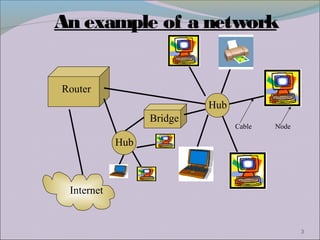
An example of a network


Router
                           Hub
                  Bridge
                                 Cable   Node

            Hub


 Internet


                                                3
TOPOLOGY
There are certain rules or methods so as to
 connect the computers to each other.
Hence, here the word TOPOLOGY exists.
A Topology is a map of computer which
 allows how to connect computers with each
 other.
It is a physical connection of computers
 within a particular network.
It defines the nodes and cables that
 together makes up a network.
                                               4
Types of Topology
Generally, there are 3 types of topologies. They are :-
 Bus Topology
 Star Topology
 Ring Topology
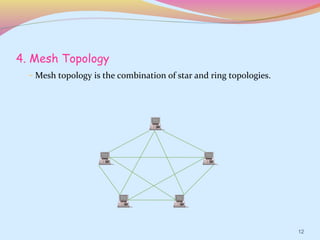
Now besides these 3 topologies, there is one more
 topology named as Mesh Topology which is the
 combination of star and ring topology. It comes
 under Hybrid Networks.

                                                     5
Network Topologies
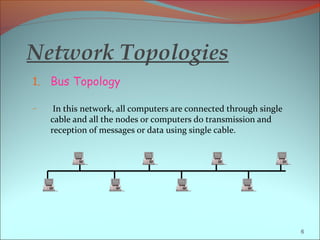
1. Bus Topology

–    In this network, all computers are connected through single
    cable and all the nodes or computers do transmission and
    reception of messages or data using single cable.


                                                                   6
Bus Topology
Advantages                       Disadvantages

Such networks is easy to        The failure of the cable
 build and install.               brings the whole network
It is inexpensive and easy       to shut down.
 to use it.                      At a time, only 1 node can
If one node fails, others are    transmit signals due to
 not affected.                    which the communication
                                  becomes slow.


                                                               7
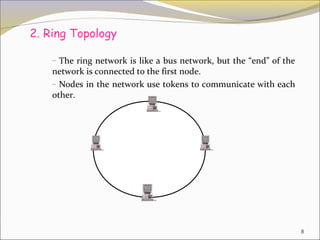
2. Ring Topology

    – The ring network is like a bus network, but the “end” of the
    network is connected to the first node.
    – Nodes in the network use tokens to communicate with each
    other.


                                                                     8
Ring Topology
Advantages                     Disadvantages
Ring networks are             Failure of one computer
 moderately easy to install.    affects the whole network.
Cable faults are easily       Adding or removing
 located making                 computers is difficult to
 troubleshooting easier.        achieve.


                                                             9
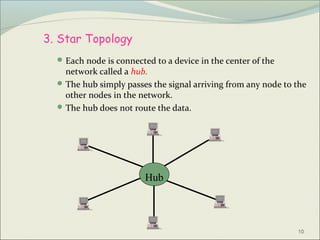
3. Star Topology
   Each node is connected to a device in the center of the
    network called a hub.
   The hub simply passes the signal arriving from any node to the
    other nodes in the network.
   The hub does not route the data.


                         Hub


                                                               10
Star Topology
Advantages                     Disadvantages
                               Failure of the central hub
The failure of a single
                                causes the whole network
  computer or cable does not
                                to shut down.
  bring down the entire
  network.                     It is slightly expensive
                                than Bus Topology.


                                                             11
4. Mesh Topology
  – Mesh topology is the combination of star and ring topologies.


                                                                    12
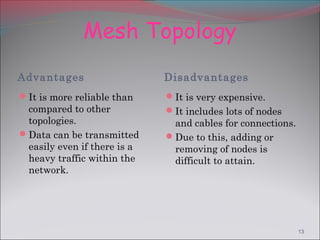
Mesh Topology
Advantages                   Disadvantages
It is more reliable than    It is very expensive.
 compared to other           It includes lots of nodes
 topologies.                  and cables for connections.
Data can be transmitted     Due to this, adding or
 easily even if there is a    removing of nodes is
 heavy traffic within the     difficult to attain.
 network.


                                                            13
Recommendations
For single or a small group of users, it is suggested to
use a bus or ring topology as it is cheap and easy to
install and use.
For a company or a big organization, it is better to fix
mesh or star topology. Although it is an expensive
network but, it will yield good and satisfying
performance.


                                                           14
Conclusion
Hence, we can say that a topology is geometric
representation of the relationship of all the linking
devices to one another. Despite having some merits
and demerits, these various topologies can be utilized
according to the user’s needs and desires.
                                                     15
Acknowledgement

Website - www.wikipedia.com

Data Communications And Networking - by
Behrouz A. Forouzan


                                          16
17

Topology

  • 1.
  • 2.
    Computer Networks • Acomputer network is basically a collection of computers which are connected to each other. It is an interconnection of computers for the purposes of sharing information and resources. • A popular example of a computer network is the internet, which allows millions of users to share information. 2
  • 3.
    An example ofa network Router Hub Bridge Cable Node Hub Internet 3
  • 4.
    TOPOLOGY There are certainrules or methods so as to connect the computers to each other. Hence, here the word TOPOLOGY exists. A Topology is a map of computer which allows how to connect computers with each other. It is a physical connection of computers within a particular network. It defines the nodes and cables that together makes up a network. 4
  • 5.
    Types of Topology Generally,there are 3 types of topologies. They are :-  Bus Topology  Star Topology  Ring Topology Now besides these 3 topologies, there is one more topology named as Mesh Topology which is the combination of star and ring topology. It comes under Hybrid Networks. 5
  • 6.
    Network Topologies 1. BusTopology – In this network, all computers are connected through single cable and all the nodes or computers do transmission and reception of messages or data using single cable. 6
  • 7.
    Bus Topology Advantages Disadvantages Such networks is easy to The failure of the cable build and install. brings the whole network It is inexpensive and easy to shut down. to use it. At a time, only 1 node can If one node fails, others are transmit signals due to not affected. which the communication becomes slow. 7
  • 8.
    2. Ring Topology – The ring network is like a bus network, but the “end” of the network is connected to the first node. – Nodes in the network use tokens to communicate with each other. 8
  • 9.
    Ring Topology Advantages Disadvantages Ring networks are Failure of one computer moderately easy to install. affects the whole network. Cable faults are easily Adding or removing located making computers is difficult to troubleshooting easier. achieve. 9
  • 10.
    3. Star Topology  Each node is connected to a device in the center of the network called a hub.  The hub simply passes the signal arriving from any node to the other nodes in the network.  The hub does not route the data. Hub 10
  • 11.
    Star Topology Advantages Disadvantages Failure of the central hub The failure of a single causes the whole network computer or cable does not to shut down. bring down the entire network. It is slightly expensive than Bus Topology. 11
  • 12.
    4. Mesh Topology – Mesh topology is the combination of star and ring topologies. 12
  • 13.
    Mesh Topology Advantages Disadvantages It is more reliable than It is very expensive. compared to other It includes lots of nodes topologies. and cables for connections. Data can be transmitted Due to this, adding or easily even if there is a removing of nodes is heavy traffic within the difficult to attain. network. 13
  • 14.
    Recommendations For single ora small group of users, it is suggested to use a bus or ring topology as it is cheap and easy to install and use. For a company or a big organization, it is better to fix mesh or star topology. Although it is an expensive network but, it will yield good and satisfying performance. 14
  • 15.
    Conclusion Hence, we cansay that a topology is geometric representation of the relationship of all the linking devices to one another. Despite having some merits and demerits, these various topologies can be utilized according to the user’s needs and desires. 15
  • 16.
    Acknowledgement Website - www.wikipedia.com DataCommunications And Networking - by Behrouz A. Forouzan 16
  • 17.