
Tool
Management
Solution
Tool Management Overview
â–Ş Tool Management is a software tool that assists an organization to control
their tools better without the hassle of tons and tons of paperwork.
â–Ş Tool Management is easy to use and very efficient.
â–Ş Tool Management uses the latest's technology to build traceability data.
â–Ş Tool Management is cost effective and easy to manage.
â–Ş Tool Management can be used as a stand alone system, or can be
implemented to be used at more than one location with easily transferable
data export.
Tool Management Features
â–Ş Tool Control and Tracing without the hassle of paperwork
â–Ş Use 2D code scanner to issue and receive Tool s
â–Ş Use biometrics to create chain of custody.
â–Ş Easy data capturing by mean of dropdown list boxes
â–Ş Make provision for maintenance scheduling
â–Ş Tool Management Secure User Administration
â–Ş Capture all 10 Fingers for security
â–Ş Make provision for amputee
â–Ş User level matrix.
â–Ş Tool Management enables an organization to do easy stock verification with a
simple scanning process.
Tool Management Features
â–Ş Tool Control and Tracing without the hassle of paperwork
â–Ş Use 2D code scanner to issue and receive Tool s
â–Ş Use biometrics to create chain of custody.
â–Ş Easy data capturing by mean of dropdown list boxes
â–Ş Make provision for maintenance scheduling
â–Ş Tool Management Secure User Administration
â–Ş Capture all 10 Fingers for security
â–Ş Make provision for amputee
â–Ş User level matrix.
â–Ş Tool Management enables an organization to do easy stock verification with a
simple scanning process.
Tool Management Features
â–Ş The export function in Tool Management makes it easy to administrate other
locations without the hassle of setting up a whole new location.
â–Ş The transfer function in Tool Management makes it easy to transfer Tool s
from one location to another with the added function of a biometrics and
scanning handover process.
â–Ş Tool Management management reports have provision for three standard
reports (Reports can added upon request)
â–Ş Tool Movement Report (See Sample Slide 10)
â–Ş Stock Verification Report
â–Ş Tool Audit Report
Hardware Requirements
• Biometrics Fingerprint Scanner
• Futronics FS80 (See Specification Slide 13)
• Futronics FS88 (See Specification Slide 13)
 Recommendation on Tool Identification Marking
• Poly Propylene Labels –Non Tamper Evident
• High Security Tamper Evident Labels
• Anodized Aluminium Tags
• Laser Marking Direct onto Tools
• Pinstamp® Directly onto Tools
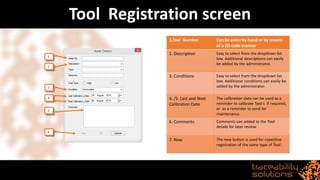
Tool Registration screen
1.Tool Number Can be enter by hand or by means
of a 2D code scanner
2. Description Easy to select from the dropdown list
box. Additional descriptions can easily
be added by the administrator.
3. Conditions Easy to select from the dropdown list
box. Additional conditions can easily be
added by the administrator.
4. /5. Last and Next
Calibration Date
The calibration date can be used as a
reminder to calibrate Tool s if required,
or as a reminder to send for
maintenance.
6. Comments Comments can added to the Tool
details for later review.
7. New The new button is used for repetitive
registration of the same type of Tool .
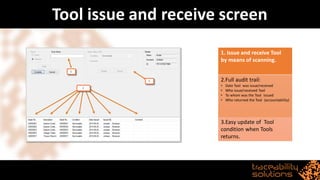
Tool issue and receive screen
1. Issue and receive Tool
by means of scanning.
2.Full audit trail:
• Date Tool was issue/received
• Who issue/received Tool
• To whom was the Tool issued
• Who returned the Tool (accountability)
3.Easy update of Tool
condition when Tools
returns.
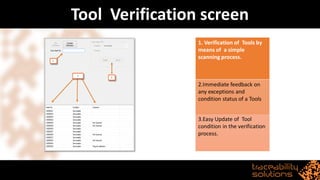
Tool Verification screen
1. Verification of Tools by
means of a simple
scanning process.
2.Immediate feedback on
any exceptions and
condition status of a Tools
3.Easy Update of Tool
condition in the verification
process.
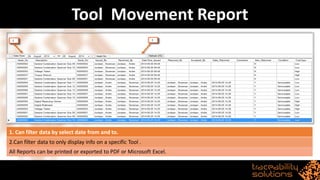
Tool Movement Report
1. Can filter data by select date from and to.
2.Can filter data to only display info on a specific Tool .
All Reports can be printed or exported to PDF or Microsoft Excel.
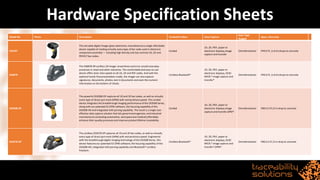
Hardware Specification Sheets
Model No Photo Description Corded/Cordless Data Capture
Scan Type
Rugged
Specs. Warranty
DS6707
This versatile digital imager gives electronics manufacturers a single affordable
device capable of reading virtually every type of bar code used in electronic
component assembly — including high density and low contrast 1D, 2D and
PDF417 bar codes.
Corded
1D, 2D, PDF, paper or
electronic displays,image
capture and transfer
Omnidirectional IP43 6 ft. (1.8 m) drops to concrete
DS6878
The DS6878-SR cordless 2D imager streamlines and error-proofs everyday
processes in retail and other industries. The comfortable and easy-to-use
device offers laser-class speed on all 1D, 2D and PDF codes. And with the
optional hands-freepresentation cradle, the imager can also capture
signatures, documents, photos, text in documents and even the numeric
information on the bottom of checks
Cordless Bluetooth®
1D, 2D, PDF, paper or
electronic displays, OCR/
MICR,* image capture and
transfer*
Omnidirectional IP43 6 ft. (1.8 m) drops to concrete
DS3508-DP
The powerful DS3508-DP captures all 1D and 2D bar codes, as well as virtually
every type of direct part mark (DPM) with extraordinaryspeed. This corded
device integrates the breakthrough imaging performance of the DS3500 Series,
along with our patented EZ-DPM software, the focusing capability of the
DS3508-HD and integrated IUID parsing capability. The result is a single cost-
effective data capture solution that lets government agencies and industrial
manufacturers (including automotive, aerospaceand medical) affordably
enhance their quality processes and improve product lifetime traceability.
Corded
1D, 2D, PDF, paper or
electronic displays,image
capture and transfer,DPM*.
Omnidirectional IP65 6.5 ft./2 m drop to concrete
DS3578-DP
The cordless DS3578-DP captures all 1D and 2D bar codes, as well as virtually
every type of direct part mark (DPM) with extraordinaryspeed. Engineered
with the breakthrough digital imaging technology of the DS3500 Series, this
device features our patented EZ-DPM software, the focusing capability of the
DS3508-HD, integrated IUID parsing capability and Bluetooth® cordless
freedom.
Cordless Bluetooth®
1D, 2D, PDF, paper or
electronic displays, OCR/
MICR,* image capture and
transfer*,DPM*.
Omnidirectional IP65 6.5 ft./2 m drop to concrete
Hardware Specification Sheets
Model No Photo Specification Electrical characteristics
FS80
Fingerprint scanning window size is 16x24mm
Image resolution is 480x320 pixel, 500 DPI
Image format is 8 bit 256 grayscale.
Raw fingerprint image file size is 150K byte
With Live Finger Detection (LFD) feature
USB 2.0 compatible interface, plug and play device
Lifetime up to 1 million scans
With a 2M standard USB cable
Small size, 45 x 63 x 26 mm
Light weight, 120 gram
Operation temperature: -10 to +55 C
Light source: Infrared LED
Supply voltage: DC 4.5-5.5V via USB port
Power consumption:
Active<600mW(during finger scanning),
Standby<200mW,
sleep mode<11mW
ESD contact – 8KV no permanent damage
Air discharge - 16KV no permanentdamage
FS88
Finger scanning window size is 16.26 x
24.38mm
Image resolution is 320x480 pixel, 500 DPI,
8 bit grey level.
Raw fingerprint image file size is 150K byte
With Live Finger Detection (LFD) feature
USB 2.0 compatible, plug and play device
Unique serial number programmed to USB
Device Descriptor
With 16K Byte memory for
application-specific data storage
With a 2M standard USB cable
Other Certifications:
Ingress Protection Rating:
IP54(scanning window only).
IEC60950, International
Electromechanical Commission(IEC)standard forsafety.
STQC(Standardization Test and Quality Certification),from the Department of
Electronics and Information Technology of India.
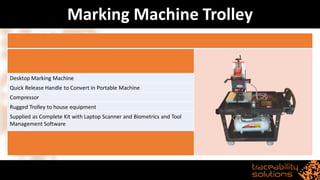
Marking Machine Trolley
Desktop Marking Machine
Quick Release Handle to Convert in Portable Machine
Compressor
Rugged Trolley to house equipment
Supplied as Complete Kit with Laptop Scanner and Biometrics and Tool
Management Software
Contact Us
For more information or advice on your marking requirements,
please do not hesitate to contact Andre Jordaan on
andre@tracesol.co.za or alternately Tel: (010) 020 7220

Tool management system

  • 1.
  • 2.
    Tool Management Overview â–ŞTool Management is a software tool that assists an organization to control their tools better without the hassle of tons and tons of paperwork. â–Ş Tool Management is easy to use and very efficient. â–Ş Tool Management uses the latest's technology to build traceability data. â–Ş Tool Management is cost effective and easy to manage. â–Ş Tool Management can be used as a stand alone system, or can be implemented to be used at more than one location with easily transferable data export.
  • 3.
    Tool Management Features â–ŞTool Control and Tracing without the hassle of paperwork â–Ş Use 2D code scanner to issue and receive Tool s â–Ş Use biometrics to create chain of custody. â–Ş Easy data capturing by mean of dropdown list boxes â–Ş Make provision for maintenance scheduling â–Ş Tool Management Secure User Administration â–Ş Capture all 10 Fingers for security â–Ş Make provision for amputee â–Ş User level matrix. â–Ş Tool Management enables an organization to do easy stock verification with a simple scanning process.
  • 4.
    Tool Management Features â–ŞTool Control and Tracing without the hassle of paperwork â–Ş Use 2D code scanner to issue and receive Tool s â–Ş Use biometrics to create chain of custody. â–Ş Easy data capturing by mean of dropdown list boxes â–Ş Make provision for maintenance scheduling â–Ş Tool Management Secure User Administration â–Ş Capture all 10 Fingers for security â–Ş Make provision for amputee â–Ş User level matrix. â–Ş Tool Management enables an organization to do easy stock verification with a simple scanning process.
  • 5.
    Tool Management Features â–ŞThe export function in Tool Management makes it easy to administrate other locations without the hassle of setting up a whole new location. â–Ş The transfer function in Tool Management makes it easy to transfer Tool s from one location to another with the added function of a biometrics and scanning handover process. â–Ş Tool Management management reports have provision for three standard reports (Reports can added upon request) â–Ş Tool Movement Report (See Sample Slide 10) â–Ş Stock Verification Report â–Ş Tool Audit Report
  • 6.
    Hardware Requirements • BiometricsFingerprint Scanner • Futronics FS80 (See Specification Slide 13) • Futronics FS88 (See Specification Slide 13)  Recommendation on Tool Identification Marking • Poly Propylene Labels –Non Tamper Evident • High Security Tamper Evident Labels • Anodized Aluminium Tags • Laser Marking Direct onto Tools • Pinstamp® Directly onto Tools
  • 7.
    Tool Registration screen 1.ToolNumber Can be enter by hand or by means of a 2D code scanner 2. Description Easy to select from the dropdown list box. Additional descriptions can easily be added by the administrator. 3. Conditions Easy to select from the dropdown list box. Additional conditions can easily be added by the administrator. 4. /5. Last and Next Calibration Date The calibration date can be used as a reminder to calibrate Tool s if required, or as a reminder to send for maintenance. 6. Comments Comments can added to the Tool details for later review. 7. New The new button is used for repetitive registration of the same type of Tool .
  • 8.
    Tool issue andreceive screen 1. Issue and receive Tool by means of scanning. 2.Full audit trail: • Date Tool was issue/received • Who issue/received Tool • To whom was the Tool issued • Who returned the Tool (accountability) 3.Easy update of Tool condition when Tools returns.
  • 9.
    Tool Verification screen 1.Verification of Tools by means of a simple scanning process. 2.Immediate feedback on any exceptions and condition status of a Tools 3.Easy Update of Tool condition in the verification process.
  • 10.
    Tool Movement Report 1.Can filter data by select date from and to. 2.Can filter data to only display info on a specific Tool . All Reports can be printed or exported to PDF or Microsoft Excel.
  • 11.
    Hardware Specification Sheets ModelNo Photo Description Corded/Cordless Data Capture Scan Type Rugged Specs. Warranty DS6707 This versatile digital imager gives electronics manufacturers a single affordable device capable of reading virtually every type of bar code used in electronic component assembly — including high density and low contrast 1D, 2D and PDF417 bar codes. Corded 1D, 2D, PDF, paper or electronic displays,image capture and transfer Omnidirectional IP43 6 ft. (1.8 m) drops to concrete DS6878 The DS6878-SR cordless 2D imager streamlines and error-proofs everyday processes in retail and other industries. The comfortable and easy-to-use device offers laser-class speed on all 1D, 2D and PDF codes. And with the optional hands-freepresentation cradle, the imager can also capture signatures, documents, photos, text in documents and even the numeric information on the bottom of checks Cordless Bluetooth® 1D, 2D, PDF, paper or electronic displays, OCR/ MICR,* image capture and transfer* Omnidirectional IP43 6 ft. (1.8 m) drops to concrete DS3508-DP The powerful DS3508-DP captures all 1D and 2D bar codes, as well as virtually every type of direct part mark (DPM) with extraordinaryspeed. This corded device integrates the breakthrough imaging performance of the DS3500 Series, along with our patented EZ-DPM software, the focusing capability of the DS3508-HD and integrated IUID parsing capability. The result is a single cost- effective data capture solution that lets government agencies and industrial manufacturers (including automotive, aerospaceand medical) affordably enhance their quality processes and improve product lifetime traceability. Corded 1D, 2D, PDF, paper or electronic displays,image capture and transfer,DPM*. Omnidirectional IP65 6.5 ft./2 m drop to concrete DS3578-DP The cordless DS3578-DP captures all 1D and 2D bar codes, as well as virtually every type of direct part mark (DPM) with extraordinaryspeed. Engineered with the breakthrough digital imaging technology of the DS3500 Series, this device features our patented EZ-DPM software, the focusing capability of the DS3508-HD, integrated IUID parsing capability and Bluetooth® cordless freedom. Cordless Bluetooth® 1D, 2D, PDF, paper or electronic displays, OCR/ MICR,* image capture and transfer*,DPM*. Omnidirectional IP65 6.5 ft./2 m drop to concrete
  • 12.
    Hardware Specification Sheets ModelNo Photo Specification Electrical characteristics FS80 Fingerprint scanning window size is 16x24mm Image resolution is 480x320 pixel, 500 DPI Image format is 8 bit 256 grayscale. Raw fingerprint image file size is 150K byte With Live Finger Detection (LFD) feature USB 2.0 compatible interface, plug and play device Lifetime up to 1 million scans With a 2M standard USB cable Small size, 45 x 63 x 26 mm Light weight, 120 gram Operation temperature: -10 to +55 C Light source: Infrared LED Supply voltage: DC 4.5-5.5V via USB port Power consumption: Active<600mW(during finger scanning), Standby<200mW, sleep mode<11mW ESD contact – 8KV no permanent damage Air discharge - 16KV no permanentdamage FS88 Finger scanning window size is 16.26 x 24.38mm Image resolution is 320x480 pixel, 500 DPI, 8 bit grey level. Raw fingerprint image file size is 150K byte With Live Finger Detection (LFD) feature USB 2.0 compatible, plug and play device Unique serial number programmed to USB Device Descriptor With 16K Byte memory for application-specific data storage With a 2M standard USB cable Other Certifications: Ingress Protection Rating: IP54(scanning window only). IEC60950, International Electromechanical Commission(IEC)standard forsafety. STQC(Standardization Test and Quality Certification),from the Department of Electronics and Information Technology of India.
  • 13.
    Marking Machine Trolley DesktopMarking Machine Quick Release Handle to Convert in Portable Machine Compressor Rugged Trolley to house equipment Supplied as Complete Kit with Laptop Scanner and Biometrics and Tool Management Software
  • 15.
    Contact Us For moreinformation or advice on your marking requirements, please do not hesitate to contact Andre Jordaan on andre@tracesol.co.za or alternately Tel: (010) 020 7220