TMS320DM8148 Embedded
Linux
Overview
Introduction
• Linux Kernel & Components used in
embedded system
• Embedded Linux Devices everywhere around
us
– Android Phones
– Digital & Smart TVs
– Set Top Boxes
Embedded Hardware Architecture
• Linux Kernel supports 32 & 64 bit architectures
– X86 & x86-64
– ARM
– Power PC
– MIPS
– SuperH
– BlackFin
– Microblaze
– ColdFire, AVR32
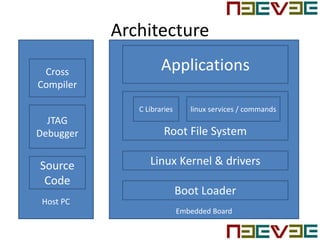
Architecture
Embedded Board
Host PC
Root File System
Linux Kernel & drivers
Boot Loader
C Libraries linux services / commands
ApplicationsCross
Compiler
JTAG
Debugger
Source
Code
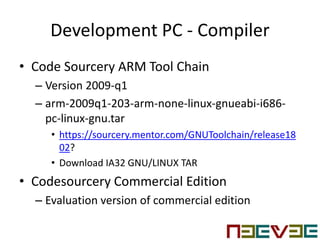
Development PC - Compiler
• Code Sourcery ARM Tool Chain
– Version 2009-q1
– arm-2009q1-203-arm-none-linux-gnueabi-i686-
pc-linux-gnu.tar
• https://sourcery.mentor.com/GNUToolchain/release18
02?
• Download IA32 GNU/LINUX TAR
• Codesourcery Commercial Edition
– Evaluation version of commercial edition
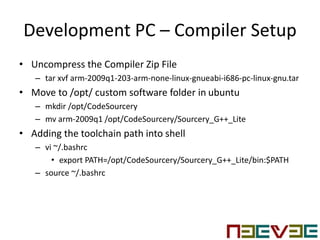
Development PC – Compiler Setup
• Uncompress the Compiler Zip File
– tar xvf arm-2009q1-203-arm-none-linux-gnueabi-i686-pc-linux-gnu.tar
• Move to /opt/ custom software folder in ubuntu
– mkdir /opt/CodeSourcery
– mv arm-2009q1 /opt/CodeSourcery/Sourcery_G++_Lite
• Adding the toolchain path into shell
– vi ~/.bashrc
• export PATH=/opt/CodeSourcery/Sourcery_G++_Lite/bin:$PATH
– source ~/.bashrc
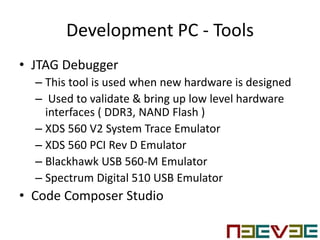
Development PC - Tools
• JTAG Debugger
– This tool is used when new hardware is designed
– Used to validate & bring up low level hardware
interfaces ( DDR3, NAND Flash )
– XDS 560 V2 System Trace Emulator
– XDS 560 PCI Rev D Emulator
– Blackhawk USB 560-M Emulator
– Spectrum Digital 510 USB Emulator
• Code Composer Studio
Development PC - Console
• Serial Console
– Used to get boot up log messages & acts as linux shell
to execute the applications
– Default settings : 115200 8N1
– Flow Control : None
• Minicom
– Text based modem control & terminal emulation
utility
– PC Serial console
– Run “minicom –S” to configure the serial console
Development PC – EZSDK
• EZSDK
– Linux EZ Software Development Kit
– Linux support based on 2.6.37 Kernel
– Quick Start Development
– Video / Audio Codecs
– DSP accelerated alogrithms
– Application Examples – Networked Audio / Video
– Qt graphics SDK plugin
– OpenMax libraries
– Matrix Application Launcher
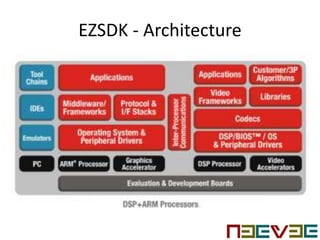
EZSDK - Architecture
EZSDK - Components
• Linux Kernel 2.6.37
• Bootloader
• File System
• Qt/Webkit application framework
• 3D Graphics Support
• Flash Tools & Pin Muxing Utility
• HDVICP2 Accelerated Codec
– H.264 Encode / Decode, MPEG4 Encode / Decode,
MPEG2 Decode & VC1/WMV9 to the video detector
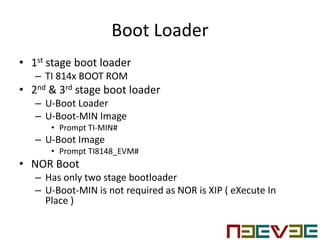
Boot Loader
• 1st stage boot loader
– TI 814x BOOT ROM
• 2nd & 3rd stage boot loader
– U-Boot Loader
– U-Boot-MIN Image
• Prompt TI-MIN#
– U-Boot Image
• Prompt TI8148_EVM#
• NOR Boot
– Has only two stage bootloader
– U-Boot-MIN is not required as NOR is XIP ( eXecute In
Place )
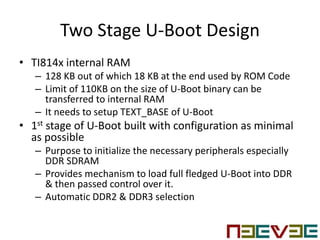
Two Stage U-Boot Design
• TI814x internal RAM
– 128 KB out of which 18 KB at the end used by ROM Code
– Limit of 110KB on the size of U-Boot binary can be
transferred to internal RAM
– It needs to setup TEXT_BASE of U-Boot
• 1st stage of U-Boot built with configuration as minimal
as possible
– Purpose to initialize the necessary peripherals especially
DDR SDRAM
– Provides mechanism to load full fledged U-Boot into DDR
& then passed control over it.
– Automatic DDR2 & DDR3 selection
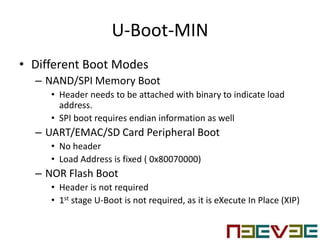
U-Boot-MIN
• Different Boot Modes
– NAND/SPI Memory Boot
• Header needs to be attached with binary to indicate load
address.
• SPI boot requires endian information as well
– UART/EMAC/SD Card Peripheral Boot
• No header
• Load Address is fixed ( 0x80070000)
– NOR Flash Boot
• Header is not required
• 1st stage U-Boot is not required, as it is eXecute In Place (XIP)
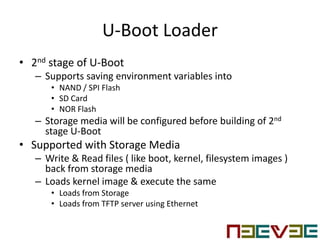
U-Boot Loader
• 2nd stage of U-Boot
– Supports saving environment variables into
• NAND / SPI Flash
• SD Card
• NOR Flash
– Storage media will be configured before building of 2nd
stage U-Boot
• Supported with Storage Media
– Write & Read files ( like boot, kernel, filesystem images )
back from storage media
– Loads kernel image & execute the same
• Loads from Storage
• Loads from TFTP server using Ethernet
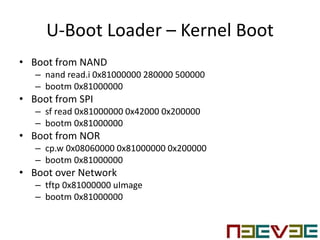
U-Boot Loader – Kernel Boot
• Boot from NAND
– nand read.i 0x81000000 280000 500000
– bootm 0x81000000
• Boot from SPI
– sf read 0x81000000 0x42000 0x200000
– bootm 0x81000000
• Boot from NOR
– cp.w 0x08060000 0x81000000 0x200000
– bootm 0x81000000
• Boot over Network
– tftp 0x81000000 uImage
– bootm 0x81000000
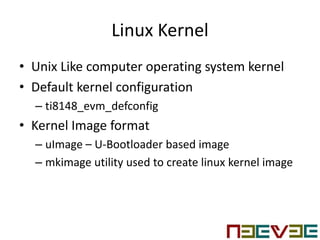
Linux Kernel
• Unix Like computer operating system kernel
• Default kernel configuration
– ti8148_evm_defconfig
• Kernel Image format
– uImage – U-Bootloader based image
– mkimage utility used to create linux kernel image
Linux Kernel
• Manages all the hardware peripherals like
CPU, Memory, IO
• Provides an interface for user space
application & libraries to access hardware
interfaces
• Manages multiple user access
– Provides a hardware interface access for multiple
user application access
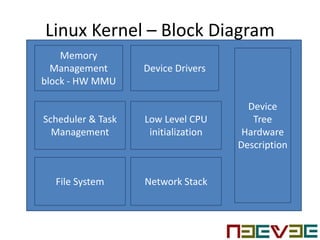
Linux Kernel – Block Diagram
Memory
Management
block - HW MMU
Scheduler & Task
Management
File System
Device Drivers
Low Level CPU
initialization
Network Stack
Device
Tree
Hardware
Description
Linux Kernel – Device Drivers
• Power Management
• GPIO Driver
• EDMA3 Driver
• Audio Driver
• SATA Driver
• USB Driver
• SD / MMC Card Driver
• Ethernet Switch Driver
• VPSS Video Driver
– VPSS Video Capture Driver
• HDMI Driver
• McSPI Driver
• PCI Express Root Complex Driver
• PCI Express End Point Driver
• Touch Screen Driver
• Watchdog Timer
File System
• Root File System
– Ramdisk
– Cramfs
– Ext 2,3,4
– FAT
• Pseudo file system
– Proc
– Sysfs
– Dev Filesystem
Root File System Structure
• bin
• boot
• dev
• etc
• lib
• lost+found
• misc
• mnt
• net
• opt
• proc
• root
• sbin
• tmp
• usr
• Var
Contact US
• For Embedded Design Service
• Web : www.neeveetech.com
• Sales : sales@neeveetech.com

TMS320DM8148 Embedded Linux

  • 1.
  • 2.
    Introduction • Linux Kernel& Components used in embedded system • Embedded Linux Devices everywhere around us – Android Phones – Digital & Smart TVs – Set Top Boxes
  • 3.
    Embedded Hardware Architecture •Linux Kernel supports 32 & 64 bit architectures – X86 & x86-64 – ARM – Power PC – MIPS – SuperH – BlackFin – Microblaze – ColdFire, AVR32
  • 4.
    Architecture Embedded Board Host PC RootFile System Linux Kernel & drivers Boot Loader C Libraries linux services / commands ApplicationsCross Compiler JTAG Debugger Source Code
  • 5.
    Development PC -Compiler • Code Sourcery ARM Tool Chain – Version 2009-q1 – arm-2009q1-203-arm-none-linux-gnueabi-i686- pc-linux-gnu.tar • https://sourcery.mentor.com/GNUToolchain/release18 02? • Download IA32 GNU/LINUX TAR • Codesourcery Commercial Edition – Evaluation version of commercial edition
  • 6.
    Development PC –Compiler Setup • Uncompress the Compiler Zip File – tar xvf arm-2009q1-203-arm-none-linux-gnueabi-i686-pc-linux-gnu.tar • Move to /opt/ custom software folder in ubuntu – mkdir /opt/CodeSourcery – mv arm-2009q1 /opt/CodeSourcery/Sourcery_G++_Lite • Adding the toolchain path into shell – vi ~/.bashrc • export PATH=/opt/CodeSourcery/Sourcery_G++_Lite/bin:$PATH – source ~/.bashrc
  • 7.
    Development PC -Tools • JTAG Debugger – This tool is used when new hardware is designed – Used to validate & bring up low level hardware interfaces ( DDR3, NAND Flash ) – XDS 560 V2 System Trace Emulator – XDS 560 PCI Rev D Emulator – Blackhawk USB 560-M Emulator – Spectrum Digital 510 USB Emulator • Code Composer Studio
  • 8.
    Development PC -Console • Serial Console – Used to get boot up log messages & acts as linux shell to execute the applications – Default settings : 115200 8N1 – Flow Control : None • Minicom – Text based modem control & terminal emulation utility – PC Serial console – Run “minicom –S” to configure the serial console
  • 9.
    Development PC –EZSDK • EZSDK – Linux EZ Software Development Kit – Linux support based on 2.6.37 Kernel – Quick Start Development – Video / Audio Codecs – DSP accelerated alogrithms – Application Examples – Networked Audio / Video – Qt graphics SDK plugin – OpenMax libraries – Matrix Application Launcher
  • 10.
  • 11.
    EZSDK - Components •Linux Kernel 2.6.37 • Bootloader • File System • Qt/Webkit application framework • 3D Graphics Support • Flash Tools & Pin Muxing Utility • HDVICP2 Accelerated Codec – H.264 Encode / Decode, MPEG4 Encode / Decode, MPEG2 Decode & VC1/WMV9 to the video detector
  • 12.
    Boot Loader • 1ststage boot loader – TI 814x BOOT ROM • 2nd & 3rd stage boot loader – U-Boot Loader – U-Boot-MIN Image • Prompt TI-MIN# – U-Boot Image • Prompt TI8148_EVM# • NOR Boot – Has only two stage bootloader – U-Boot-MIN is not required as NOR is XIP ( eXecute In Place )
  • 13.
    Two Stage U-BootDesign • TI814x internal RAM – 128 KB out of which 18 KB at the end used by ROM Code – Limit of 110KB on the size of U-Boot binary can be transferred to internal RAM – It needs to setup TEXT_BASE of U-Boot • 1st stage of U-Boot built with configuration as minimal as possible – Purpose to initialize the necessary peripherals especially DDR SDRAM – Provides mechanism to load full fledged U-Boot into DDR & then passed control over it. – Automatic DDR2 & DDR3 selection
  • 14.
    U-Boot-MIN • Different BootModes – NAND/SPI Memory Boot • Header needs to be attached with binary to indicate load address. • SPI boot requires endian information as well – UART/EMAC/SD Card Peripheral Boot • No header • Load Address is fixed ( 0x80070000) – NOR Flash Boot • Header is not required • 1st stage U-Boot is not required, as it is eXecute In Place (XIP)
  • 15.
    U-Boot Loader • 2ndstage of U-Boot – Supports saving environment variables into • NAND / SPI Flash • SD Card • NOR Flash – Storage media will be configured before building of 2nd stage U-Boot • Supported with Storage Media – Write & Read files ( like boot, kernel, filesystem images ) back from storage media – Loads kernel image & execute the same • Loads from Storage • Loads from TFTP server using Ethernet
  • 16.
    U-Boot Loader –Kernel Boot • Boot from NAND – nand read.i 0x81000000 280000 500000 – bootm 0x81000000 • Boot from SPI – sf read 0x81000000 0x42000 0x200000 – bootm 0x81000000 • Boot from NOR – cp.w 0x08060000 0x81000000 0x200000 – bootm 0x81000000 • Boot over Network – tftp 0x81000000 uImage – bootm 0x81000000
  • 17.
    Linux Kernel • UnixLike computer operating system kernel • Default kernel configuration – ti8148_evm_defconfig • Kernel Image format – uImage – U-Bootloader based image – mkimage utility used to create linux kernel image
  • 18.
    Linux Kernel • Managesall the hardware peripherals like CPU, Memory, IO • Provides an interface for user space application & libraries to access hardware interfaces • Manages multiple user access – Provides a hardware interface access for multiple user application access
  • 19.
    Linux Kernel –Block Diagram Memory Management block - HW MMU Scheduler & Task Management File System Device Drivers Low Level CPU initialization Network Stack Device Tree Hardware Description
  • 20.
    Linux Kernel –Device Drivers • Power Management • GPIO Driver • EDMA3 Driver • Audio Driver • SATA Driver • USB Driver • SD / MMC Card Driver • Ethernet Switch Driver • VPSS Video Driver – VPSS Video Capture Driver • HDMI Driver • McSPI Driver • PCI Express Root Complex Driver • PCI Express End Point Driver • Touch Screen Driver • Watchdog Timer
  • 21.
    File System • RootFile System – Ramdisk – Cramfs – Ext 2,3,4 – FAT • Pseudo file system – Proc – Sysfs – Dev Filesystem
  • 22.
    Root File SystemStructure • bin • boot • dev • etc • lib • lost+found • misc • mnt • net • opt • proc • root • sbin • tmp • usr • Var
  • 23.
    Contact US • ForEmbedded Design Service • Web : www.neeveetech.com • Sales : sales@neeveetech.com