NVDK-ESP32 Quick Start
Environment Setup, Sample Applications, JTAG Debugger Setup
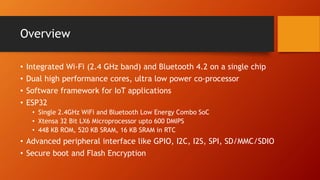
Overview
• Integrated Wi-Fi (2.4 GHz band) and Bluetooth 4.2 on a single chip
• Dual high performance cores, ultra low power co-processor
• Software framework for IoT applications
• ESP32
• Single 2.4GHz WiFi and Bluetooth Low Energy Combo SoC
• Xtensa 32 Bit LX6 Microprocessor upto 600 DMIPS
• 448 KB ROM, 520 KB SRAM, 16 KB SRAM in RTC
• Advanced peripheral interface like GPIO, I2C, I2S, SPI, SD/MMC/SDIO
• Secure boot and Flash Encryption
Toolchain Setup
• Download the cross compiler
$ mkdir ~/esp/
$ wget https://dl.espressif.com/dl/xtensa-esp32-elf-linux64-1.22.0-80-g6c4433a-5.2.0.tar.gz
$ tar zxvf xtensa-esp32-elf-linux64-1.22.0-80-g6c4433a-5.2.0.tar.gz
$ export PATH=~/esp/xtensa-esp32-elf/bin:$PATH
ESP-IDF Setup
• Espressif IoT Development Framework
• Download ESP-IDF
$ git clone --recursive https://github.com/espressif/esp-idf.git
$ cd ~/esp/esp-idf
$ git submodule update --init
• Setup PATH to ESP-IDF
$ export IDF_PATH=~/esp/esp-idf
• hello_world project
$ cd ~/esp
$ cp -r $IDF_PATH/examples/get-started/hello_world .
• To Configure
$ make menuconfig
• To compile
$ make all
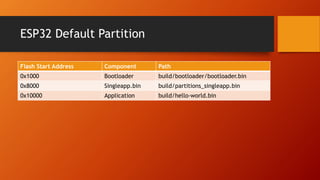
ESP32 Default Partition
Flash Start Address Component Path
0x1000 Bootloader build/bootloader/bootloader.bin
0x8000 Singleapp.bin build/partitions_singleapp.bin
0x10000 Application build/hello-world.bin
OpenOCD Setup
• Install dependencies
$ sudo apt-get install git make libtool pkg-config autoconf automake texinfo libusb-1.0
• Download sources of ESP32 enabled OpenOCD variant
$ mkdir ~/esp
$ cd ~/esp
$ git clone --recursive https://github.com/espressif/openocd-esp32.git
• Build OpenOCD
$ cd ~/esp/openocd-esp32
$ ./bootstrap
$ ./configure
$ make
$ sudo make install
JTAG Debugger Setup
• To connect with JTAG,
$ sudo openocd -s tools/scripts/ -f tcl/interface/ftdi/um232h.cfg -f
tcl/board/esp-wroom-32.cfg
• GNU Debugger
$ xtensa-esp32-elf-gdb
(gdb) target remote :3333
(gdb) mon reset halt
• To load the application firmware
(gdb) mon program_esp32 <application.bin> 0x10000 verify
• To continue with execution
(gdb) continue
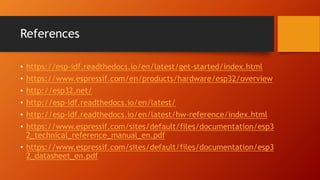
References
• https://esp-idf.readthedocs.io/en/latest/get-started/index.html
• https://www.espressif.com/en/products/hardware/esp32/overview
• http://esp32.net/
• http://esp-idf.readthedocs.io/en/latest/
• http://esp-idf.readthedocs.io/en/latest/hw-reference/index.html
• https://www.espressif.com/sites/default/files/documentation/esp3
2_technical_reference_manual_en.pdf
• https://www.espressif.com/sites/default/files/documentation/esp3
2_datasheet_en.pdf
Web : www.neeveetech.com
E-Mail : nvhariharan@neeveetech.com
Thank You. Subscribe for updates

NVDK-ESP32 Quick Start Guide

  • 1.
    NVDK-ESP32 Quick Start EnvironmentSetup, Sample Applications, JTAG Debugger Setup
  • 2.
    Overview • Integrated Wi-Fi(2.4 GHz band) and Bluetooth 4.2 on a single chip • Dual high performance cores, ultra low power co-processor • Software framework for IoT applications • ESP32 • Single 2.4GHz WiFi and Bluetooth Low Energy Combo SoC • Xtensa 32 Bit LX6 Microprocessor upto 600 DMIPS • 448 KB ROM, 520 KB SRAM, 16 KB SRAM in RTC • Advanced peripheral interface like GPIO, I2C, I2S, SPI, SD/MMC/SDIO • Secure boot and Flash Encryption
  • 3.
    Toolchain Setup • Downloadthe cross compiler $ mkdir ~/esp/ $ wget https://dl.espressif.com/dl/xtensa-esp32-elf-linux64-1.22.0-80-g6c4433a-5.2.0.tar.gz $ tar zxvf xtensa-esp32-elf-linux64-1.22.0-80-g6c4433a-5.2.0.tar.gz $ export PATH=~/esp/xtensa-esp32-elf/bin:$PATH
  • 4.
    ESP-IDF Setup • EspressifIoT Development Framework • Download ESP-IDF $ git clone --recursive https://github.com/espressif/esp-idf.git $ cd ~/esp/esp-idf $ git submodule update --init • Setup PATH to ESP-IDF $ export IDF_PATH=~/esp/esp-idf • hello_world project $ cd ~/esp $ cp -r $IDF_PATH/examples/get-started/hello_world . • To Configure $ make menuconfig • To compile $ make all
  • 5.
    ESP32 Default Partition FlashStart Address Component Path 0x1000 Bootloader build/bootloader/bootloader.bin 0x8000 Singleapp.bin build/partitions_singleapp.bin 0x10000 Application build/hello-world.bin
  • 6.
    OpenOCD Setup • Installdependencies $ sudo apt-get install git make libtool pkg-config autoconf automake texinfo libusb-1.0 • Download sources of ESP32 enabled OpenOCD variant $ mkdir ~/esp $ cd ~/esp $ git clone --recursive https://github.com/espressif/openocd-esp32.git • Build OpenOCD $ cd ~/esp/openocd-esp32 $ ./bootstrap $ ./configure $ make $ sudo make install
  • 7.
    JTAG Debugger Setup •To connect with JTAG, $ sudo openocd -s tools/scripts/ -f tcl/interface/ftdi/um232h.cfg -f tcl/board/esp-wroom-32.cfg • GNU Debugger $ xtensa-esp32-elf-gdb (gdb) target remote :3333 (gdb) mon reset halt • To load the application firmware (gdb) mon program_esp32 <application.bin> 0x10000 verify • To continue with execution (gdb) continue
  • 8.
    References • https://esp-idf.readthedocs.io/en/latest/get-started/index.html • https://www.espressif.com/en/products/hardware/esp32/overview •http://esp32.net/ • http://esp-idf.readthedocs.io/en/latest/ • http://esp-idf.readthedocs.io/en/latest/hw-reference/index.html • https://www.espressif.com/sites/default/files/documentation/esp3 2_technical_reference_manual_en.pdf • https://www.espressif.com/sites/default/files/documentation/esp3 2_datasheet_en.pdf
  • 9.
    Web : www.neeveetech.com E-Mail: nvhariharan@neeveetech.com Thank You. Subscribe for updates