Timeline Tips & Tricks Workshop:
  Get the most out of your Page
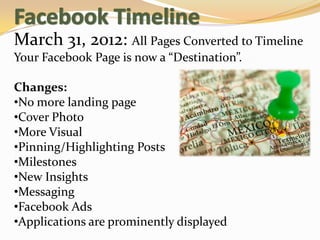
March 31, 2012: All Pages Converted to Timeline
Your Facebook Page is now a “Destination”.

Changes:
•No more landing page
•Cover Photo
•More Visual
•Pinning/Highlighting Posts
•Milestones
•New Insights
•Messaging
•Facebook Ads
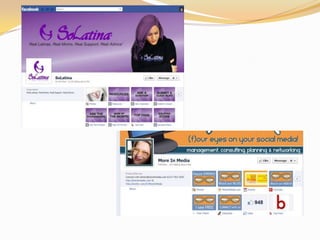
•Applications are prominently displayed
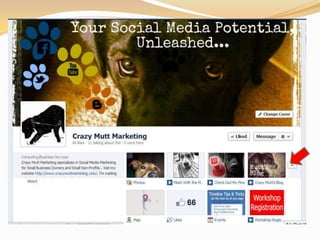
Cover Photo
             Your Cover Photo is your “Billboard”.
                           Use it to:
           •Show your Business’s Personality
           •Showcase Your Fans
           •Motivate Your Fans
           •Be Creative With Your Brand
           •What will YOU use it for?


http://blog.hubspot.com/blog/tabid/6307/bid/32215/17-Examples-of-Creative-Facebook-Page-Cover-
   Photos.aspx
Cover Photo
 Do’s & Don’ts
 Don’t
 •Just post a larger image of your logo or profile photo
 •Use any “Calls to Action”, Contact Information, or references
 to “Like” or “Share”
 •Encourage your fans to use your Cover Photo on their
 personal page as a promotion

 Do
 •Use the space to highlight what makes your business unique
 •Use it as a tool to engage your Fans
 •Not over stress yourself
 •Feel free to change it
 Dimensions: 851 x 315
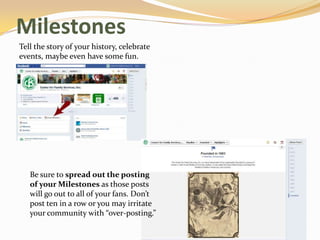
Milestones
Tell the story of your history, celebrate
events, maybe even have some fun.


   Be sure to spread out the posting
   of your Milestones as those posts
   will go out to all of your fans. Don’t
   post ten in a row or you may irritate
   your community with “over-posting.”
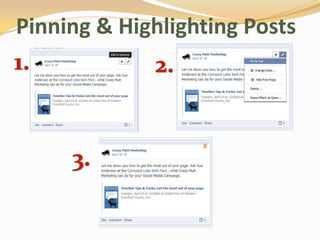
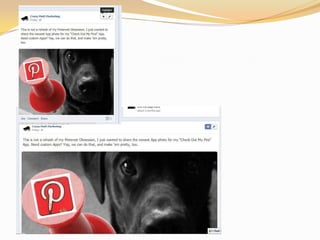
Pinning & Highlighting Posts
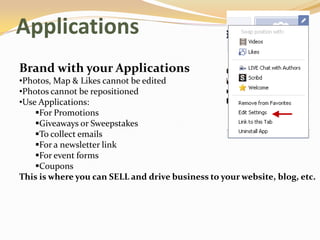
Applications
Brand with your Applications
•Photos, Map & Likes cannot be edited
•Photos cannot be repositioned
•Use Applications:
    For Promotions
    Giveaways or Sweepstakes
    To collect emails
    For a newsletter link
    For event forms
    Coupons
This is where you can SELL and drive business to your website, blog, etc.
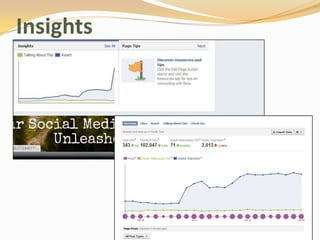
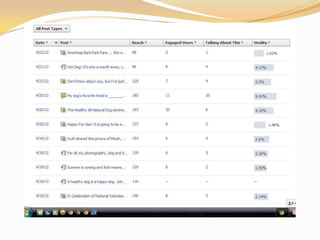
Insights
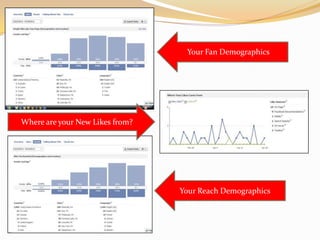
Your Fan Demographics
                                            Y


Where are your New Likes from?


                                 Your Reach Demographics
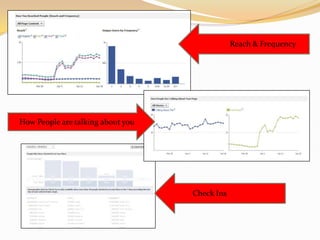
Reach & Frequency
                                                   Y


How People are talking about you


                                   Check Ins
                                           Y
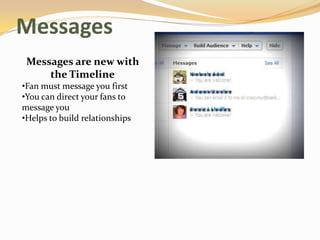
Messages
 Messages are new with
     the Timeline
•Fan must message you first
•You can direct your fans to
message you
•Helps to build relationships
Facebook Ads

Ads vs. Sponsored Stories

•Ad shows up in the right side of your targeted audience
•Use Facebook Ads to advertise a Page, Event or App

• Sponsored Stories promote organic interactions between
    People and your business.
•Sponsored Stories show up in your fan’s friend’s newsfeed
The What, When & How
Posting 101

What To Post:
•Remember the 80/20 Rule
•Find what your fans will value
    •Focus on what makes your business unique for your fans
•Tell micro-stories
•Photos & Videos*Photos get 2x the attention, according to Facebook
•Ask questions or Fill in the blank

Pay attention to your fans and how they respond to your posts
The What, When & How
Posting 101
When To Post:
•According to research by Media Buddy
    Best Time? 8pm – 7am
    Best Day? Wednesdays & Saturdays to improve engagement
    Daily? 1- 2 times
    Weekly? 1 – 4 times
     I say “Find what works best for you.”
•Incorporate post ideas into your Marketing Calendar
The What, When & How
Posting 101
How
•Be personal, but keep it professional. Avoid excessive !!!!!
Or =)
•Everyone makes mistakes, but try to keep grammatical
errors and typos to a minimum
•NO CAPS..
•Keep it short, most posts should be three lines or less.
•Engage your fans in conversation and allow them to engage
you as well
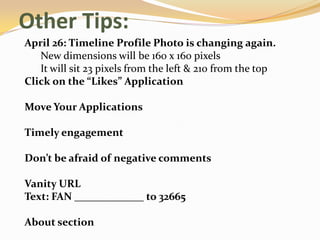
Other Tips:
April 26: Timeline Profile Photo is changing again.
   New dimensions will be 160 x 160 pixels
   It will sit 23 pixels from the left & 210 from the top
Click on the “Likes” Application

Move Your Applications

Timely engagement

Don’t be afraid of negative comments

Vanity URL
Text: FAN _____________ to 32665

About section
Thank You For Coming!


Like me     facebook.com/CrazyMuttMarketing

Follow me on Twitter   @crazymuttmarket

Read my blog     crazymuttsblog.blogspot.com

Follow my Pins    Pinterest.com/CrazyMutt/

           Crazymuttmarketing.com

Timeline workshop

  • 1.
    Timeline Tips &Tricks Workshop: Get the most out of your Page
  • 2.
    March 31, 2012:All Pages Converted to Timeline Your Facebook Page is now a “Destination”. Changes: •No more landing page •Cover Photo •More Visual •Pinning/Highlighting Posts •Milestones •New Insights •Messaging •Facebook Ads •Applications are prominently displayed
  • 3.
    Cover Photo Your Cover Photo is your “Billboard”. Use it to: •Show your Business’s Personality •Showcase Your Fans •Motivate Your Fans •Be Creative With Your Brand •What will YOU use it for? http://blog.hubspot.com/blog/tabid/6307/bid/32215/17-Examples-of-Creative-Facebook-Page-Cover- Photos.aspx
  • 4.
    Cover Photo Do’s& Don’ts Don’t •Just post a larger image of your logo or profile photo •Use any “Calls to Action”, Contact Information, or references to “Like” or “Share” •Encourage your fans to use your Cover Photo on their personal page as a promotion Do •Use the space to highlight what makes your business unique •Use it as a tool to engage your Fans •Not over stress yourself •Feel free to change it Dimensions: 851 x 315
  • 5.
    Milestones Tell the storyof your history, celebrate events, maybe even have some fun. Be sure to spread out the posting of your Milestones as those posts will go out to all of your fans. Don’t post ten in a row or you may irritate your community with “over-posting.”
  • 6.
  • 8.
    Applications Brand with yourApplications •Photos, Map & Likes cannot be edited •Photos cannot be repositioned •Use Applications: For Promotions Giveaways or Sweepstakes To collect emails For a newsletter link For event forms Coupons This is where you can SELL and drive business to your website, blog, etc.
  • 11.
  • 12.
    Your Fan Demographics Y Where are your New Likes from? Your Reach Demographics
  • 13.
    Reach & Frequency Y How People are talking about you Check Ins Y
  • 15.
    Messages Messages arenew with the Timeline •Fan must message you first •You can direct your fans to message you •Helps to build relationships
  • 16.
    Facebook Ads Ads vs.Sponsored Stories •Ad shows up in the right side of your targeted audience •Use Facebook Ads to advertise a Page, Event or App • Sponsored Stories promote organic interactions between People and your business. •Sponsored Stories show up in your fan’s friend’s newsfeed
  • 17.
    The What, When& How Posting 101 What To Post: •Remember the 80/20 Rule •Find what your fans will value •Focus on what makes your business unique for your fans •Tell micro-stories •Photos & Videos*Photos get 2x the attention, according to Facebook •Ask questions or Fill in the blank Pay attention to your fans and how they respond to your posts
  • 18.
    The What, When& How Posting 101 When To Post: •According to research by Media Buddy Best Time? 8pm – 7am Best Day? Wednesdays & Saturdays to improve engagement Daily? 1- 2 times Weekly? 1 – 4 times I say “Find what works best for you.” •Incorporate post ideas into your Marketing Calendar
  • 19.
    The What, When& How Posting 101 How •Be personal, but keep it professional. Avoid excessive !!!!! Or =) •Everyone makes mistakes, but try to keep grammatical errors and typos to a minimum •NO CAPS.. •Keep it short, most posts should be three lines or less. •Engage your fans in conversation and allow them to engage you as well
  • 20.
    Other Tips: April 26:Timeline Profile Photo is changing again. New dimensions will be 160 x 160 pixels It will sit 23 pixels from the left & 210 from the top Click on the “Likes” Application Move Your Applications Timely engagement Don’t be afraid of negative comments Vanity URL Text: FAN _____________ to 32665 About section
  • 21.
    Thank You ForComing! Like me facebook.com/CrazyMuttMarketing Follow me on Twitter @crazymuttmarket Read my blog crazymuttsblog.blogspot.com Follow my Pins Pinterest.com/CrazyMutt/ Crazymuttmarketing.com