Trimble TILOS
Plan with Confidence
Linear Construction Project Planning
2
Plan with Confidence
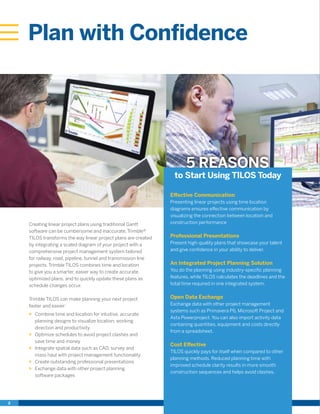
Creating linear project plans using traditional Gantt
software can be cumbersome and inaccurate. Trimble®
TILOS transforms the way linear project plans are created
by integrating a scaled diagram of your project with a
comprehensive project management system tailored
for railway, road, pipeline, tunnel and transmission line
projects. Trimble TILOS combines time and location
to give you a smarter, easier way to create accurate,
optimized plans, and to quickly update these plans as
schedule changes occur.
Trimble TILOS can make planning your next project
faster and easier:
XX Combine time and location for intuitive, accurate
planning designs to visualize location, working
direction and productivity
XX Optimize schedules to avoid project clashes and
save time and money
XX Integrate spatial data such as CAD, survey and
mass haul with project management functionality
XX Create outstanding professional presentations
XX Exchange data with other project planning
software packages
Effective Communication
Presenting linear projects using time location
diagrams ensures effective communication by
visualizing the connection between location and
construction performance
Professional Presentations
Present high-quality plans that showcase your talent
and give confidence in your ability to deliver.
An Integrated Project Planning Solution
You do the planning using industry-specific planning
features, while TILOS calculates the deadlines and the
total time required in one integrated system.
Open Data Exchange
Exchange data with other project management
systems such as Primavera P6, Microsoft Project and
Asta Powerproject. You can also import activity data
containing quantities, equipment and costs directly
from a spreadsheet.
Cost Effective
TILOS quickly pays for itself when compared to other
planning methods. Reduced planning time with
improved schedule clarity results in more smooth
construction sequences and helps avoid clashes.
to Start Using TILOS Today
5 REASONS
POWERFUL, INTUITIVE
SCHEDULING SAVES YOU
TIME AND MONEY
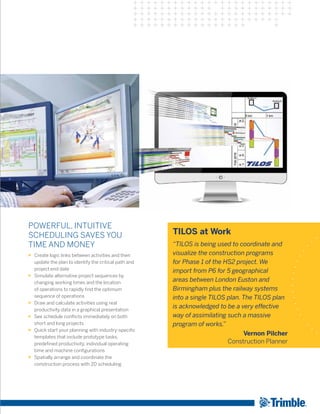
XX Create logic links between activities and then
update the plan to identify the critical path and
project end date
XX Simulate alternative project sequences by
changing working times and the location
of operations to rapidly find the optimum
sequence of operations
XX Draw and calculate activities using real
productivity data in a graphical presentation
XX See schedule conflicts immediately on both
short and long projects
XX Quick start your planning with industry-specific
templates that include prototype tasks,
predefined productivity, individual operating
time and machine configurations
XX Spatially arrange and coordinate the
construction process with 2D scheduling
TILOS at Work
“TILOS is being used to coordinate and
visualize the construction programs
for Phase 1 of the HS2 project. We
import from P6 for 5 geographical
areas between London Euston and
Birmingham plus the railway systems
into a single TILOS plan. The TILOS plan
is acknowledged to be a very effective
way of assimilating such a massive
program of works.”
Vernon Pilcher
Construction Planner
4
Communicate Plans
Effectively
XX Present and communicate the entire project in one diagram, including graphs and maps
XX Win more contracts, deliver plans more efficiently and justify cause-and-effect delays
XX Ensure that everyone receives the right information at the right time
XX Understand project status and the construction process easily
EASY-TO-USE INTERFACE FEATURES COMMON CAD ELEMENTS
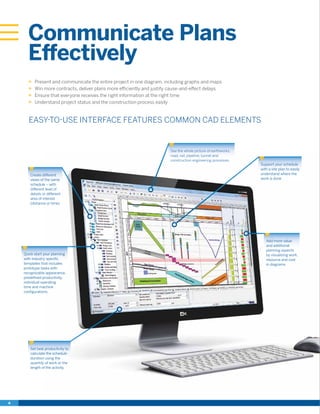
Create different
views of the same
schedule – with
different level of
details or different
area of interest
(distance or time)
Quick start your planning
with industry specific
templates that includes
prototype tasks with
recognizable appearance,
predefined productivity,
individual operating
time and machine
configurations.
Set task productivity to
calculate the schedule
duration using the
quantity of work or the
length of the activity.
Add more value
and additional
planning aspects
by visualizing work,
resource and cost
in diagrams
Support your schedule
with a site plan to easily
understand where the
work is done
See the whole picture of earthworks,
road, rail, pipeline, tunnel and
construction engineering processes
CREATE PROFESSIONAL PRINTOUTS AND USE THEM
ON SITE, IN MEETINGS AND FOR CONTRACTS
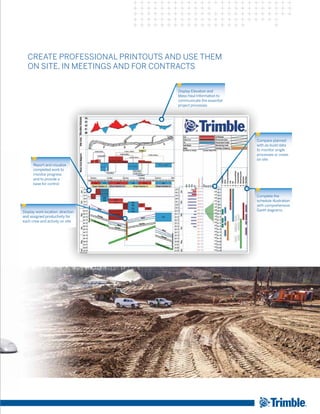
Report and visualize
completed work to
monitor progress
and to provide a
base for control
Display work location, direction
and assigned productivity for
each crew and activity on site
Display Elevation and
Mass Haul Information to
communicate the essential
project processes
Compare planned
with as-build data
to monitor single
processes or crews
on site
Complete the
schedule illustration
with comprehensive
Gantt diagrams
6
Dig Deeper into TILOS
SCALED LOCATION CHARTS
XX Use powerful drawing tools to place symbols and
objects based on distance coordinates
XX Use a symbol library to easily prepare scheme drawing
diagrams
XX Import existing route-diagrams directly into the chart
and scale them to size automatically
XX One chart has everything you need:
•	 Split the chart into multiple sections so you can
display more information
•	 Clearly show the different stages of construction
•	 Include detailed drawings with site plans
•	 Show resource usage (plant, people and materials)
RESOURCE AND
COST PLANNING
XX Reduce risk by integrating cost, quantity and
performance planning
XX Calculate task duration from the working speed
(performance) and the distance or from work quantity
and performance
XX Calculate resource utilization using quantities or time
with flexible calculation models
XX Create quantity and cost charts to show time-specific
and absolute resource requirements over the duration
of a project
XX Compare costs and income to show project profit
XX Compare values with a project baseline or use other
project profiles
XX Calculate costs based on resource usage
CUSTOMIZABLE VIEWS
XX Define project, scale, site plan and chart areas, and use
them to create customizable project views showing
common data in different ways
XX Set axis orientation and direction individually for
each cell
XX Integrate Gantt diagrams, time and location diagrams,
cost and resource diagrams, and spatial information to
one comprehensive chart
MASS HAUL DATA
AND DIAGRAMS
XX Create different types of material such as cut, fill
and disposal
XX Enter or import different cut/fill locations and quantities
XX Dictate where the cut from one area goes to fill another
XX Create tasks based on quantity and productivity for each
cut/fill movement to quickly build a schedule
XX Display consumption graphs based on location or time
PROGRESS TRACKING
XX Update projects regularly and constantly monitor actual
progress against the original plan
XX Define the report date to progress tasks
XX Progress tasks by location as well as by time and
what completion percentage has been reached.
XX Baseline and compare the original plan to current
project progress to detect variances immediately and
compensate for them in real-time.
XX Instantly update the current project status and calculate
new deadlines with reference to the reporting date
XX Calculate earned value measures for tasks and
sub-projects
XX Import and export progress and the actual data via
a spreadsheet
XX Display distance progress as a distance Gantt chart
CONNECTED SOFTWARE
XX Exchange data with:
•	 Business Center - HCE by Trimble
•	 Tekla Civil
•	 Oracle® Primavera® P6
•	 Microsoft® Office Project
•	 Asta Powerproject®
•	 Spreadsheet programs
“TILOS transformed our engineers’
attitude toward project scheduling from
something extra they never had time for
to a tool they “owned” and wouldn’t go
to a meeting without.”
James Lyon
HDR Inc. USA
“Awesome piece of software with
many applications in the job.”
Stuart Shortland
Parsons Brinkeroff Ltd, UK
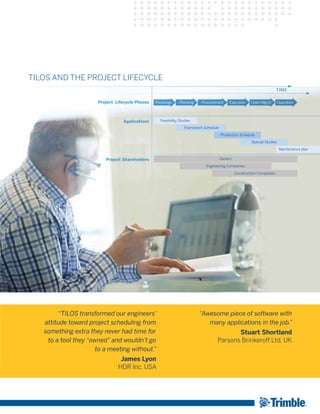
TILOS AND THE PROJECT LIFECYCLE
TIME
Project Lifecycle Phases
Applications
Project Shareholders
Feasibility Studies
Framework Schedule
Production Schedule
Owners
Engineering Companies
Construction Companies
Special Studies
Maintenance plan
Predesign Planning Claim MgmtProcurement Execution Operation
Trimble provides the tools and support to let you integrate planning, design, site positioning, machine control and asset
management information throughout the construction life cycle for more efficient operations and higher profits. Contact
Trimble or your local dealer today to learn how easy it is to utilize technology that makes significant improvements in
project workflow, dramatically increases your production, improves your accuracy and lowers your operating costs.
Trimble:
Transforming the Way the World Works
© 2016,Trimble Navigation Limited.All rights reserved.Trimble and the Globe & Triangle, are trademarks of Trimble Navigation Limited, registered in the United States and other countries. Microsoft, Encarta, MSN, and
Windows are either registered trademarks or trademarks of Microsoft Corporation in the United States and/or other countries. Primavera and P6 are either registered trademarks or trademarks of Oracle Corporation in
the United States and or other countries.Asta Powerproject is a registered trademark of Asta Developments plc.All other trademarks are the property of their respective owners. PN 022482-3430 (01/16)
TRANSFORMING THE WAYTHE WORLD WORKS
Trimble Civil Engineering and Construction
10368 Westmoor Drive
Westminster, Colorado 80021 USA
800-361-1249 (Toll Free)
+1-937-245-5154 Phone
construction_news@trimble.com

TILOS, Plan Linear Projects with Confidence

  • 1.
    Trimble TILOS Plan withConfidence Linear Construction Project Planning
  • 2.
    2 Plan with Confidence Creatinglinear project plans using traditional Gantt software can be cumbersome and inaccurate. Trimble® TILOS transforms the way linear project plans are created by integrating a scaled diagram of your project with a comprehensive project management system tailored for railway, road, pipeline, tunnel and transmission line projects. Trimble TILOS combines time and location to give you a smarter, easier way to create accurate, optimized plans, and to quickly update these plans as schedule changes occur. Trimble TILOS can make planning your next project faster and easier: XX Combine time and location for intuitive, accurate planning designs to visualize location, working direction and productivity XX Optimize schedules to avoid project clashes and save time and money XX Integrate spatial data such as CAD, survey and mass haul with project management functionality XX Create outstanding professional presentations XX Exchange data with other project planning software packages Effective Communication Presenting linear projects using time location diagrams ensures effective communication by visualizing the connection between location and construction performance Professional Presentations Present high-quality plans that showcase your talent and give confidence in your ability to deliver. An Integrated Project Planning Solution You do the planning using industry-specific planning features, while TILOS calculates the deadlines and the total time required in one integrated system. Open Data Exchange Exchange data with other project management systems such as Primavera P6, Microsoft Project and Asta Powerproject. You can also import activity data containing quantities, equipment and costs directly from a spreadsheet. Cost Effective TILOS quickly pays for itself when compared to other planning methods. Reduced planning time with improved schedule clarity results in more smooth construction sequences and helps avoid clashes. to Start Using TILOS Today 5 REASONS
  • 3.
    POWERFUL, INTUITIVE SCHEDULING SAVESYOU TIME AND MONEY XX Create logic links between activities and then update the plan to identify the critical path and project end date XX Simulate alternative project sequences by changing working times and the location of operations to rapidly find the optimum sequence of operations XX Draw and calculate activities using real productivity data in a graphical presentation XX See schedule conflicts immediately on both short and long projects XX Quick start your planning with industry-specific templates that include prototype tasks, predefined productivity, individual operating time and machine configurations XX Spatially arrange and coordinate the construction process with 2D scheduling TILOS at Work “TILOS is being used to coordinate and visualize the construction programs for Phase 1 of the HS2 project. We import from P6 for 5 geographical areas between London Euston and Birmingham plus the railway systems into a single TILOS plan. The TILOS plan is acknowledged to be a very effective way of assimilating such a massive program of works.” Vernon Pilcher Construction Planner
  • 4.
    4 Communicate Plans Effectively XX Presentand communicate the entire project in one diagram, including graphs and maps XX Win more contracts, deliver plans more efficiently and justify cause-and-effect delays XX Ensure that everyone receives the right information at the right time XX Understand project status and the construction process easily EASY-TO-USE INTERFACE FEATURES COMMON CAD ELEMENTS Create different views of the same schedule – with different level of details or different area of interest (distance or time) Quick start your planning with industry specific templates that includes prototype tasks with recognizable appearance, predefined productivity, individual operating time and machine configurations. Set task productivity to calculate the schedule duration using the quantity of work or the length of the activity. Add more value and additional planning aspects by visualizing work, resource and cost in diagrams Support your schedule with a site plan to easily understand where the work is done See the whole picture of earthworks, road, rail, pipeline, tunnel and construction engineering processes
  • 5.
    CREATE PROFESSIONAL PRINTOUTSAND USE THEM ON SITE, IN MEETINGS AND FOR CONTRACTS Report and visualize completed work to monitor progress and to provide a base for control Display work location, direction and assigned productivity for each crew and activity on site Display Elevation and Mass Haul Information to communicate the essential project processes Compare planned with as-build data to monitor single processes or crews on site Complete the schedule illustration with comprehensive Gantt diagrams
  • 6.
    6 Dig Deeper intoTILOS SCALED LOCATION CHARTS XX Use powerful drawing tools to place symbols and objects based on distance coordinates XX Use a symbol library to easily prepare scheme drawing diagrams XX Import existing route-diagrams directly into the chart and scale them to size automatically XX One chart has everything you need: • Split the chart into multiple sections so you can display more information • Clearly show the different stages of construction • Include detailed drawings with site plans • Show resource usage (plant, people and materials) RESOURCE AND COST PLANNING XX Reduce risk by integrating cost, quantity and performance planning XX Calculate task duration from the working speed (performance) and the distance or from work quantity and performance XX Calculate resource utilization using quantities or time with flexible calculation models XX Create quantity and cost charts to show time-specific and absolute resource requirements over the duration of a project XX Compare costs and income to show project profit XX Compare values with a project baseline or use other project profiles XX Calculate costs based on resource usage CUSTOMIZABLE VIEWS XX Define project, scale, site plan and chart areas, and use them to create customizable project views showing common data in different ways XX Set axis orientation and direction individually for each cell XX Integrate Gantt diagrams, time and location diagrams, cost and resource diagrams, and spatial information to one comprehensive chart MASS HAUL DATA AND DIAGRAMS XX Create different types of material such as cut, fill and disposal XX Enter or import different cut/fill locations and quantities XX Dictate where the cut from one area goes to fill another XX Create tasks based on quantity and productivity for each cut/fill movement to quickly build a schedule XX Display consumption graphs based on location or time PROGRESS TRACKING XX Update projects regularly and constantly monitor actual progress against the original plan XX Define the report date to progress tasks XX Progress tasks by location as well as by time and what completion percentage has been reached. XX Baseline and compare the original plan to current project progress to detect variances immediately and compensate for them in real-time. XX Instantly update the current project status and calculate new deadlines with reference to the reporting date XX Calculate earned value measures for tasks and sub-projects XX Import and export progress and the actual data via a spreadsheet XX Display distance progress as a distance Gantt chart CONNECTED SOFTWARE XX Exchange data with: • Business Center - HCE by Trimble • Tekla Civil • Oracle® Primavera® P6 • Microsoft® Office Project • Asta Powerproject® • Spreadsheet programs
  • 7.
    “TILOS transformed ourengineers’ attitude toward project scheduling from something extra they never had time for to a tool they “owned” and wouldn’t go to a meeting without.” James Lyon HDR Inc. USA “Awesome piece of software with many applications in the job.” Stuart Shortland Parsons Brinkeroff Ltd, UK TILOS AND THE PROJECT LIFECYCLE TIME Project Lifecycle Phases Applications Project Shareholders Feasibility Studies Framework Schedule Production Schedule Owners Engineering Companies Construction Companies Special Studies Maintenance plan Predesign Planning Claim MgmtProcurement Execution Operation
  • 8.
    Trimble provides thetools and support to let you integrate planning, design, site positioning, machine control and asset management information throughout the construction life cycle for more efficient operations and higher profits. Contact Trimble or your local dealer today to learn how easy it is to utilize technology that makes significant improvements in project workflow, dramatically increases your production, improves your accuracy and lowers your operating costs. Trimble: Transforming the Way the World Works © 2016,Trimble Navigation Limited.All rights reserved.Trimble and the Globe & Triangle, are trademarks of Trimble Navigation Limited, registered in the United States and other countries. Microsoft, Encarta, MSN, and Windows are either registered trademarks or trademarks of Microsoft Corporation in the United States and/or other countries. Primavera and P6 are either registered trademarks or trademarks of Oracle Corporation in the United States and or other countries.Asta Powerproject is a registered trademark of Asta Developments plc.All other trademarks are the property of their respective owners. PN 022482-3430 (01/16) TRANSFORMING THE WAYTHE WORLD WORKS Trimble Civil Engineering and Construction 10368 Westmoor Drive Westminster, Colorado 80021 USA 800-361-1249 (Toll Free) +1-937-245-5154 Phone construction_news@trimble.com