Easy to use, yet powerful.
Utilized on many international projects.
Help desk and consulting support available.
Simply the best tool for planning and managing linear projects.
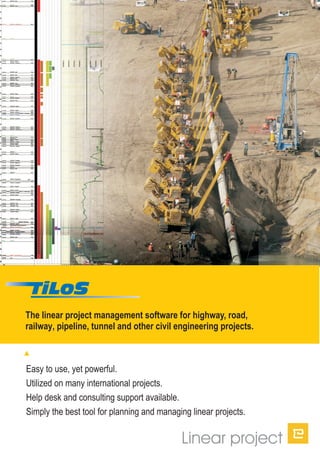
The linear project management software for highway, road,
railway, pipeline, tunnel and other civil engineering projects.
TILOS can be used in all phases of a project, from early design to controlling
on site. The ability to schedule, in as much detail as required, enables you to
show overall plans or detailed plans down to one minute precision.
.
Design phase for feasibility studies
Tendering and procurement phase
Execution phase
Claim management
: TILOS is designed to allow quick
and easy planning by simply drawing the schedule directly on the screen
: TILOS demonstrates that the bid has
been well prepared and the company will be able to finish the project
successfully in the specified time frame. Collisions can be easy detected.
: TILOS allows you to plan the project in detail, execute
the work and record progress on the project.
: analyze changes to the project and show the results
while preparing and defending claims.
How can TILOS be used on your project?
Traditional planning systems display their results in bar charts or
network diagrams. Linear projects present unique challenges
because the crews and equipment move along the construction
right-of-way to perform their work.
Neither of the traditional diagrams are able to show a graphical
link between the location where the work is performed (the
distance axis) and the time when it is executed (the time axis).
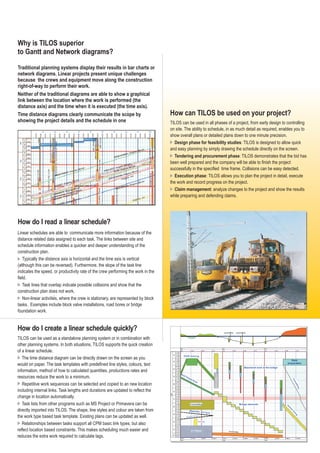
Time distance diagrams clearly communicate the scope by
showing the project details and the schedule in one
TILOS can be used as a standalone planning system or in combination with
other planning systems. In both situations, TILOS supports the quick creation
of a linear schedule.
The time distance diagram can be directly drawn on the screen as you
would on paper. The task templates with predefined line styles, colours, text
information, method of how to calculated quantities, productions rates and
resources reduce the work to a minimum.
Repetitive work sequences can be selected and copied to an new location
including internal links. Task lengths and durations updated to reflect the
change in location automatically.
Task lists from other programs such as MS Project or Primavera can be
directly imported into TILOS. The shape, line styles and colour are taken from
the work type based task template. Existing plans can be updated as well.
Relationships between tasks support all CPM basic link types, but also
reflect location based constraints. This makes scheduling much easier and
reduces the extra work required to calculate lags.
are
Linear schedules are able to communicate more information because of the
distance related data assigned to each task. The links between site and
schedule information enables a quicker and deeper understanding of the
construction plan.
Task lines that overlap indicate possible collisions and show that the
construction plan does not work.
Typically the distance axis is horizontal and the time axis is vertical
(although this can be reversed). Furthermore, the slope of the task line
indicates the speed, or productivity rate of the crew performing the work in the
field.
Non-linear activities, where the crew is stationary, are represented by block
tasks. Examples include block valve installations, road bores or bridge
foundation work.
How do I create a linear schedule quickly?
Why is TILOS superior
to Gantt and Network diagrams?
How do I read a linear schedule?
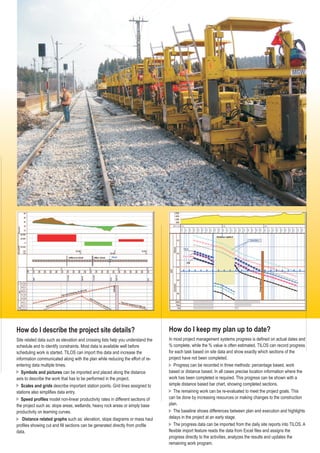
Site related data such as elevation and crossing lists help you understand the
schedule and to identify constraints. Most data is available well before
scheduling work is started. TILOS can import this data and increase the
information communicated along with the plan while reducing the effort of re-
entering data multiple times.
can be imported and placed along the distance
axis to describe the work that has to be performed in the project.
describe important station points. Grid lines assigned to
stations also simplifies data entry.
model non-linear productivity rates in different sections of
the project such as: slope areas, wetlands, heavy rock areas or simply base
productivity on learning curves.
such as: elevation, slope diagrams or mass haul
profiles showing cut and fill sections can be generated directly from profile
data.
Symbols and pictures
Scales and grids
Speed profiles
Distance related graphs
How do I describe the project site details?
In most project management systems progress is defined on actual dates and
% complete, while the % value is often estimated. TILOS can record progress
for each task based on site data and show exactly which sections of the
project have not been completed.
Progress can be recorded in three methods: percentage based, work
based or distance based. In all cases precise location information where the
work has been completed is required. This progress can be shown with a
simple distance based bar chart, showing completed sections.
The remaining work can be re-evaluated to meet the project goals. This
can be done by increasing resources or making changes to the construction
plan.
The baseline shows differences between plan and execution and highlights
delays in the project at an early stage.
The progress data can be imported from the daily site reports into TILOS. A
flexible import feature reads the data from Excel files and assigns the
progress directly to the activities, analyzes the results and updates the
remaining work program.
How do I keep my plan up to date?
Fully graphical interface for planning time-distance-diagram with full
support of the critical path technology, enhanced by location and
production constraints .
Flexible view system allows maximum customization to your specific
needs. Place as many sub plans from the same or other projects into
the same view to show the overall project or more detailed plans.
Import/Export functions: TILOS allows the import of graphics and
synchronization with distance axis as well as activity, links, resource
and other site data such as elevation and productivity profiles.
Clash detection and clash avoidance. Specify the distance between
crews to avoid collisions, but if it happens TILOS will tell you where.
Distance based calculation: TILOS calculates the work parameters
based on the distance values. For example, in rail construction a
sleeper is installed every .667 m. Based on the length of the task
TILOS calculates the number of sleepers needed and the number of
railcars needed to transport them.
Plan a project naturally by directly drawing it on the screen.
Provides maximum flexibility in organizing your plan.
Allows integration of data already prepared.
Eliminates planning mistakes.
Realistic planning using construction specifications.
Top ten reasons why you should use TILOS for linear projects!
Powerful resource calculation: TILOS supports flexible resource
calculations based on the task quantity and time parameters to model
the construction process and driving parameters precisely.
Library: TILOS supports template activities in a library with their
display and resource attributes. Drawing a task as a simple line
means: setting the speed of the process, calculating the work
parameters, the resource assignments and their cost in the
background with little extra effort.
Baselining allows the comparison of the planned versus actual
schedule to identify and highlight any differences.
High quality output: TILOS produces high quality drawings in any
size, similar to CAD systems.
Saves time and money. A client study has shown, that even on the
first project, the planning time was reduced by 50% from 40 to 20
hours.
Full control over costs and resources.
Save time planning by using company templates.
Highlights changes in order to prepare claims.
High quality output of your professional plans.
Quick return on investment and consistent savings on
new projects.
Our mission
We have over 18 years experience in project management and have
concentrated for the past 10 years on linear scheduling. TILOS is
constantly improved with one major release every year. After the
innovative TILOS6 release, with the excellent feedback we received,
we know that we are on the right path, providing site and schedule
information in a single plan to provide more clarity.
Our vision is to make linear scheduling the preferred method for
scheduling linear projects, as a stand alone system or in combination
with other planning software and to keep TILOS’s position as the best
product for this kind of projects.
Feedback from clients
James Lyon from HDR Inc. in USA:
"TILOS transformed our engineers' attitude toward project scheduling
from something extra they never had time for to a tool they "owned"
and wouldn't go to a meeting without.”
“I appreciate that the TILOS team continuously improves this
application and also listens to the client for improvement, so please
continue on this level.”
Geert Bijmolt from NACAP in Netherlands:
Linear project GmbH
G.-Braun Strasse 14
76187 Karlsruhe
Germany
Tel. +49 721 4647 280
Fax: +49 721 5096 1042
Email Info@TILOS.org
www.TILOS.org
Contact us !

TILOS: Brochure

  • 1.
    Easy to use,yet powerful. Utilized on many international projects. Help desk and consulting support available. Simply the best tool for planning and managing linear projects. The linear project management software for highway, road, railway, pipeline, tunnel and other civil engineering projects.
  • 2.
    TILOS can beused in all phases of a project, from early design to controlling on site. The ability to schedule, in as much detail as required, enables you to show overall plans or detailed plans down to one minute precision. . Design phase for feasibility studies Tendering and procurement phase Execution phase Claim management : TILOS is designed to allow quick and easy planning by simply drawing the schedule directly on the screen : TILOS demonstrates that the bid has been well prepared and the company will be able to finish the project successfully in the specified time frame. Collisions can be easy detected. : TILOS allows you to plan the project in detail, execute the work and record progress on the project. : analyze changes to the project and show the results while preparing and defending claims. How can TILOS be used on your project? Traditional planning systems display their results in bar charts or network diagrams. Linear projects present unique challenges because the crews and equipment move along the construction right-of-way to perform their work. Neither of the traditional diagrams are able to show a graphical link between the location where the work is performed (the distance axis) and the time when it is executed (the time axis). Time distance diagrams clearly communicate the scope by showing the project details and the schedule in one TILOS can be used as a standalone planning system or in combination with other planning systems. In both situations, TILOS supports the quick creation of a linear schedule. The time distance diagram can be directly drawn on the screen as you would on paper. The task templates with predefined line styles, colours, text information, method of how to calculated quantities, productions rates and resources reduce the work to a minimum. Repetitive work sequences can be selected and copied to an new location including internal links. Task lengths and durations updated to reflect the change in location automatically. Task lists from other programs such as MS Project or Primavera can be directly imported into TILOS. The shape, line styles and colour are taken from the work type based task template. Existing plans can be updated as well. Relationships between tasks support all CPM basic link types, but also reflect location based constraints. This makes scheduling much easier and reduces the extra work required to calculate lags. are Linear schedules are able to communicate more information because of the distance related data assigned to each task. The links between site and schedule information enables a quicker and deeper understanding of the construction plan. Task lines that overlap indicate possible collisions and show that the construction plan does not work. Typically the distance axis is horizontal and the time axis is vertical (although this can be reversed). Furthermore, the slope of the task line indicates the speed, or productivity rate of the crew performing the work in the field. Non-linear activities, where the crew is stationary, are represented by block tasks. Examples include block valve installations, road bores or bridge foundation work. How do I create a linear schedule quickly? Why is TILOS superior to Gantt and Network diagrams? How do I read a linear schedule?
  • 3.
    Site related datasuch as elevation and crossing lists help you understand the schedule and to identify constraints. Most data is available well before scheduling work is started. TILOS can import this data and increase the information communicated along with the plan while reducing the effort of re- entering data multiple times. can be imported and placed along the distance axis to describe the work that has to be performed in the project. describe important station points. Grid lines assigned to stations also simplifies data entry. model non-linear productivity rates in different sections of the project such as: slope areas, wetlands, heavy rock areas or simply base productivity on learning curves. such as: elevation, slope diagrams or mass haul profiles showing cut and fill sections can be generated directly from profile data. Symbols and pictures Scales and grids Speed profiles Distance related graphs How do I describe the project site details? In most project management systems progress is defined on actual dates and % complete, while the % value is often estimated. TILOS can record progress for each task based on site data and show exactly which sections of the project have not been completed. Progress can be recorded in three methods: percentage based, work based or distance based. In all cases precise location information where the work has been completed is required. This progress can be shown with a simple distance based bar chart, showing completed sections. The remaining work can be re-evaluated to meet the project goals. This can be done by increasing resources or making changes to the construction plan. The baseline shows differences between plan and execution and highlights delays in the project at an early stage. The progress data can be imported from the daily site reports into TILOS. A flexible import feature reads the data from Excel files and assigns the progress directly to the activities, analyzes the results and updates the remaining work program. How do I keep my plan up to date?
  • 4.
    Fully graphical interfacefor planning time-distance-diagram with full support of the critical path technology, enhanced by location and production constraints . Flexible view system allows maximum customization to your specific needs. Place as many sub plans from the same or other projects into the same view to show the overall project or more detailed plans. Import/Export functions: TILOS allows the import of graphics and synchronization with distance axis as well as activity, links, resource and other site data such as elevation and productivity profiles. Clash detection and clash avoidance. Specify the distance between crews to avoid collisions, but if it happens TILOS will tell you where. Distance based calculation: TILOS calculates the work parameters based on the distance values. For example, in rail construction a sleeper is installed every .667 m. Based on the length of the task TILOS calculates the number of sleepers needed and the number of railcars needed to transport them. Plan a project naturally by directly drawing it on the screen. Provides maximum flexibility in organizing your plan. Allows integration of data already prepared. Eliminates planning mistakes. Realistic planning using construction specifications. Top ten reasons why you should use TILOS for linear projects! Powerful resource calculation: TILOS supports flexible resource calculations based on the task quantity and time parameters to model the construction process and driving parameters precisely. Library: TILOS supports template activities in a library with their display and resource attributes. Drawing a task as a simple line means: setting the speed of the process, calculating the work parameters, the resource assignments and their cost in the background with little extra effort. Baselining allows the comparison of the planned versus actual schedule to identify and highlight any differences. High quality output: TILOS produces high quality drawings in any size, similar to CAD systems. Saves time and money. A client study has shown, that even on the first project, the planning time was reduced by 50% from 40 to 20 hours. Full control over costs and resources. Save time planning by using company templates. Highlights changes in order to prepare claims. High quality output of your professional plans. Quick return on investment and consistent savings on new projects. Our mission We have over 18 years experience in project management and have concentrated for the past 10 years on linear scheduling. TILOS is constantly improved with one major release every year. After the innovative TILOS6 release, with the excellent feedback we received, we know that we are on the right path, providing site and schedule information in a single plan to provide more clarity. Our vision is to make linear scheduling the preferred method for scheduling linear projects, as a stand alone system or in combination with other planning software and to keep TILOS’s position as the best product for this kind of projects. Feedback from clients James Lyon from HDR Inc. in USA: "TILOS transformed our engineers' attitude toward project scheduling from something extra they never had time for to a tool they "owned" and wouldn't go to a meeting without.” “I appreciate that the TILOS team continuously improves this application and also listens to the client for improvement, so please continue on this level.” Geert Bijmolt from NACAP in Netherlands: Linear project GmbH G.-Braun Strasse 14 76187 Karlsruhe Germany Tel. +49 721 4647 280 Fax: +49 721 5096 1042 Email Info@TILOS.org www.TILOS.org Contact us !