





The Mixing Console
stuartdjones@southwales.ac.u
k
www.stuartjones.org
The Channel Strip
Agenda
1. Input Section
2. Basic Principles
3. Signal Flow
4. Mixing Desk Sections
Mixing Desk Sections
Input Section
Mixing Console
Sections
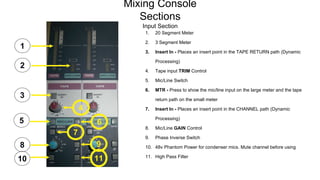
Input Section
1
1. 20 Segment Meter
2. 3 Segment Meter
3. Insert In - Places an insert point in the TAPE RETURN path (Dynamic
Processing)
4. Tape input TRIM Control
5. Mic/Line Switch
6. MTR - Press to show the mic/line input on the large meter and the tape
return path on the small meter
7. Insert In - Places an insert point in the CHANNEL path (Dynamic
Processing)
8. Mic/Line GAIN Control
9. Phase Inverse Switch
10. 48v Phantom Power for condenser mics. Mute channel before using
11. High Pass Filter
2
3
4
5 6
7
8 9
10 11
Mixing Desk Sections
Routing
Mixing Console
Sections
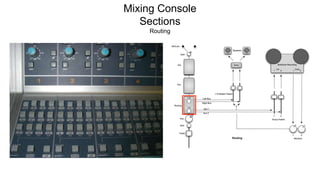
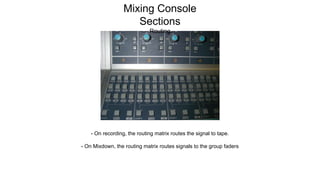
Routing
- On recording, the routing matrix routes the signal to tape.
- On Mixdown, the routing matrix routes signals to the group faders
Mixing Console
Sections
Routing
Mixing Desk Sections
Auxiliaries
Mixing Desk Sections
Auxiliaries
Auxiliary Section
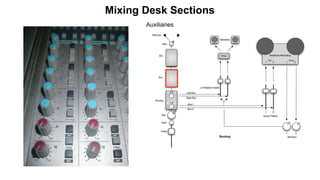
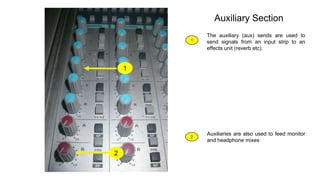
The auxiliary (aux) sends are used to
send signals from an input strip to an
effects unit (reverb etc).
Auxiliaries are also used to feed monitor
and headphone mixes
1
2
1
2
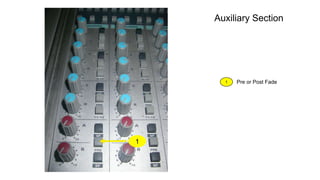
Pre or Post Fade
1
1
Auxiliary Section
Mixing Desk Sections
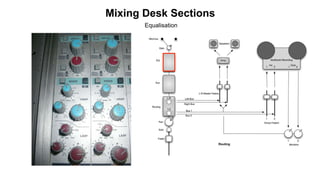
Equalisation
Mixing Desk Sections
Equalisation
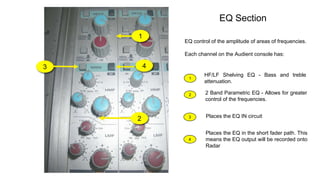
EQ Section
EQ control of the amplitude of areas of frequencies.
Each channel on the Audient console has:
1
2
1
2
HF/LF Shelving EQ - Bass and treble
attenuation.
2 Band Parametric EQ - Allows for greater
control of the frequencies.
3 Places the EQ IN circuit
3 4
4
Places the EQ in the short fader path. This
means the EQ output will be recorded onto
Radar
Mixing Desk Sections
Channel Path
Mixing Desk Sections
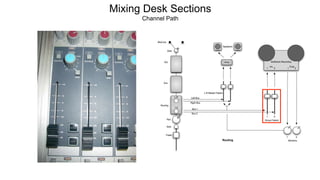
Channel Path
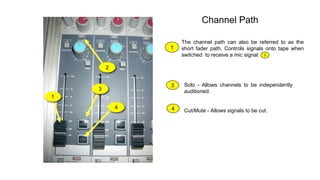
Channel Path
The channel path can also be referred to as the
short fader path. Controls signals onto tape when
switched to receive a mic signal.
1
1
2
2
3 Solo - Allows channels to be independently
auditioned.
4 Cut/Mute - Allows signals to be cut.
3
4
Mixing Desk Sections
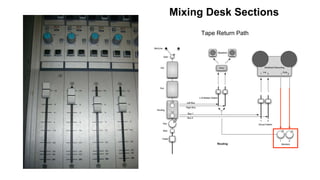
Tape Return Path
Mixing Desk Sections
Tape Return Path
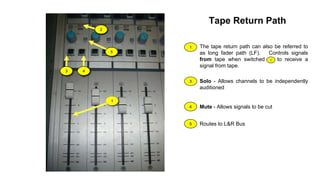
Tape Return Path
The tape return path can also be referred to
as long fader path (LF). Controls signals
from tape when switched to receive a
signal from tape.
1
1
2
2
3 4
3 Solo - Allows channels to be independently
auditioned
4 Mute - Allows signals to be cut
5
5 Routes to L&R Bus
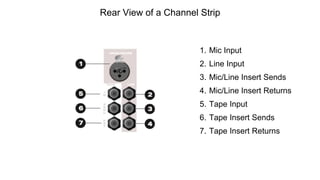
Rear View of a Channel Strip
1. Mic Input
2. Line Input
3. Mic/Line Insert Sends
4. Mic/Line Insert Returns
5. Tape Input
6. Tape Insert Sends
7. Tape Insert Returns
The Mixing Console
stuartdjones@southwales.ac.u
k
www.stuartjones.org
The Channel Strip

The Mixing Console Channel Strip

Editor's Notes

  • #12 headphones would be pre fade.