THE LINUX KERNEL HIDDEN
INSIDE WINDOWS 10
BLACKHAT 2016
ALEX IONESCU
@AIONESCU
BIO
Vice President of EDR Strategy at CrowdStrike, a security startup
Previously worked at Apple on iOS Core Platform Team
Co-author of Windows Internals 5th and 6th Editions
Reverse engineering NT since 2000 – main kernel developer of ReactOS
Instructor of worldwide Windows Internals classes
Conference speaking:
• Infiltrate 2015
• Blackhat 2016, 2015, 2013, 2008
• SyScan 2015-2012, NoSuchCon 2014-2013, Breakpoint 2012
• Recon 2016-2010, 2006
For more info, see www.alex-ionescu.com
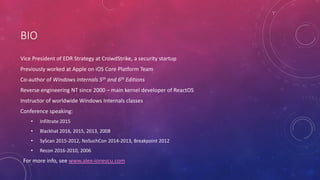
MJF HAS SPOKEN: YOU CAN ALL GO HOME NOW
“Spoiler alert”: This is not how the English
language works.
OUTLINE
• Architectural Overview
• Minimal and Pico Processes
• Pico Provider Interface
• LXSS Components
• LxCore Kernel-Mode Driver
• Functionality, Interfaces & Attack Surface
• LxssManager Service
• Functionality, Interfaces & Attack Surface
• LXSS IPC Interfaces
• Win32-Linux Communication
OUTLINE
• Security Design Considerations
• Before & After
• Kernel Callout & API Behavior for Endpoint Products
• Forensic Analysis (DbgView / WinDBG) (if time allows)
• Pico Demos (if time allows)
• Conclusion
• Q & A
ARCHITECTURAL OVERVIEW
PICO PROCESS INTERNALS
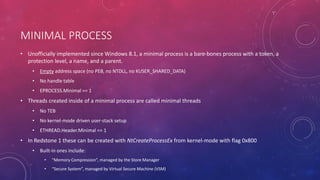
MINIMAL PROCESS
• Unofficially implemented since Windows 8.1, a minimal process is a bare-bones process with a token, a
protection level, a name, and a parent.
• Empty address space (no PEB, no NTDLL, no KUSER_SHARED_DATA)
• No handle table
• EPROCESS.Minimal == 1
• Threads created inside of a minimal process are called minimal threads
• No TEB
• No kernel-mode driven user-stack setup
• ETHREAD.Header.Minimal == 1
• In Redstone 1 these can be created with NtCreateProcessEx from kernel-mode with flag 0x800
• Built-in ones include:
• “Memory Compression”, managed by the Store Manager
• “Secure System”, managed by Virtual Secure Machine (VSM)
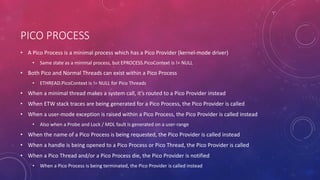
PICO PROCESS
• A Pico Process is a minimal process which has a Pico Provider (kernel-mode driver)
• Same state as a minimal process, but EPROCESS.PicoContext is != NULL
• Both Pico and Normal Threads can exist within a Pico Process
• ETHREAD.PicoContext is != NULL for Pico Threads
• When a minimal thread makes a system call, it’s routed to a Pico Provider instead
• When ETW stack traces are being generated for a Pico Process, the Pico Provider is called
• When a user-mode exception is raised within a Pico Process, the Pico Provider is called instead
• Also when a Probe and Lock / MDL fault is generated on a user-range
• When the name of a Pico Process is being requested, the Pico Provider is called instead
• When a handle is being opened to a Pico Process or Pico Thread, the Pico Provider is called
• When a Pico Thread and/or a Pico Process die, the Pico Provider is notified
• When a Pico Process is being terminated, the Pico Provider is called instead
PICO PROVIDERS
• Pico providers are essentially custom written kernel modules which implement the necessary callbacks
to respond to the list of possible events (shown earlier) that a Pico process can cause to arise
• NT implementation of the “Drawbridge” Microsoft Research Project
• Can be registered with PsRegisterPicoProvider
• Pass in array of functions which handle the required event callbacks
• Receive array of functions which allow creation and control of Pico processes (see next slide)
• However, only allowed if PspPicoRegistrationDisabled is FALSE
• Set as soon as PipInitializeCoreDriversByGroup returns – before ELAM and 3rd party drivers can load
• Currently only one Pico provider can be registered, as the callbacks are simply a global function array
PICO API
• Create Pico processes and threads: PspCreatePicoProcess, PspCreatePicoThread
• Get and set PicoContext pointer: PspGetPicoProcessContext, PspGetPicoThreadContext
• Get and set CPU CONTEXT structure: PspGetContextThreadInternal, PspSetContextThreadInternal
• Destroy Pico processes and threads: PspTerminateThreadByPointer, PspTerminatePicoProcess
• Resume and suspend Pico processes and threads: PsResumeThread, PsSuspendThread
• Set user-mode FS and GS segment for Pico threads: PspSetPicoThreadDescriptorBase
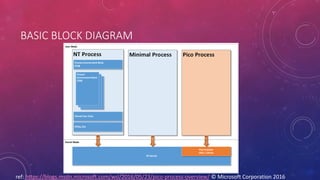
BASIC BLOCK DIAGRAM
ref: https://blogs.msdn.microsoft.com/wsl/2016/05/23/pico-process-overview/ © Microsoft Corporation 2016
PICO PROVIDER SECURITY
• Pico Providers also “register” with PatchGuard, providing it with their internal list of system call handlers
• Essentially, this means that the Linux system calls are protected by PatchGuard, just like the NT ones
• Additionally, attempting to register a “fake” Pico Provider, or modifying key Pico Provider state will also
result in PatchGuard’s wrath
• For example, playing with PspPicoRegistrationDisabled
• Even if restoring the value back to its original value
• Patching the callbacks (PspPicoProviderRoutines) will also result in detection by PatchGuard
• As seen before, only “core” drivers can be Pico Providers
• Boot Loader enforces that core drivers are signed by Microsoft, and “lxss.sys” is hardcoded inside the code
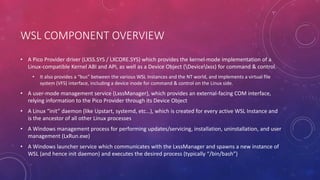
WSL COMPONENT OVERVIEW
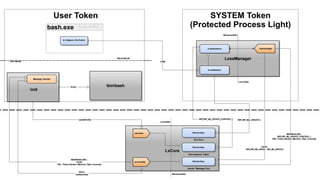
• A Pico Provider driver (LXSS.SYS / LXCORE.SYS) which provides the kernel-mode implementation of a
Linux-compatible Kernel ABI and API, as well as a Device Object (Devicelxss) for command & control.
• It also provides a “bus” between the various WSL Instances and the NT world, and implements a virtual file
system (VFS) interface, including a device inode for command & control on the Linux side.
• A user-mode management service (LxssManager), which provides an external-facing COM interface,
relying information to the Pico Provider through its Device Object
• A Linux “init” daemon (like Upstart, systemd, etc…), which is created for every active WSL Instance and
is the ancestor of all other Linux processes
• A Windows management process for performing updates/servicing, installation, uninstallation, and user
management (LxRun.exe)
• A Windows launcher service which communicates with the LxssManager and spawns a new instance of
WSL (and hence init daemon) and executes the desired process (typically “/bin/bash”)
ARCHITECTURAL OVERVIEW
LXCORE (KERNEL-MODE) INTERNALS
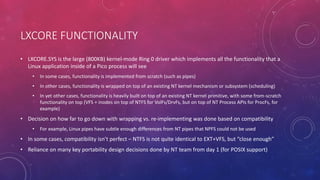
LXCORE FUNCTIONALITY
• LXCORE.SYS is the large (800KB) kernel-mode Ring 0 driver which implements all the functionality that a
Linux application inside of a Pico process will see
• In some cases, functionality is implemented from scratch (such as pipes)
• In other cases, functionality is wrapped on top of an existing NT kernel mechanism or subsystem (scheduling)
• In yet other cases, functionality is heavily built on top of an existing NT kernel primitive, with some from-scratch
functionality on top (VFS + inodes on top of NTFS for VolFs/DrvFs, but on top of NT Process APIs for ProcFs, for
example)
• Decision on how far to go down with wrapping vs. re-implementing was done based on compatibility
• For example, Linux pipes have subtle enough differences from NT pipes that NPFS could not be used
• In some cases, compatibility isn’t perfect – NTFS is not quite identical to EXT+VFS, but “close enough”
• Reliance on many key portability design decisions done by NT team from day 1 (for POSIX support)
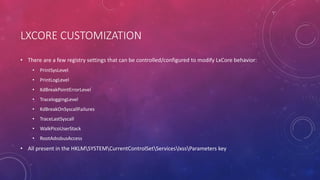
LXCORE CUSTOMIZATION
• There are a few registry settings that can be controlled/configured to modify LxCore behavior:
• PrintSysLevel
• PrintLogLevel
• KdBreakPointErrorLevel
• TraceloggingLevel
• KdBreakOnSyscallFailures
• TraceLastSyscall
• WalkPicoUserStack
• RootAdssbusAccess
• All present in the HKLMSYSTEMCurrentControlSetServiceslxssParameters key
SYSTEM CALLS
• Full “official” list available from Microsoft: https://msdn.microsoft.com/en-
us/commandline/wsl/release_notes
• 216 implemented as of the release build
• Called by LxpSysDispatch
• Support for ptrace() tracing of system calls
• Can enable breaking on system call failure, for debugging
• LxpTraceSyscall used for both ETW logging (LxpPrintSysLevel) and DbgView (LxpTraceLastSyscall)
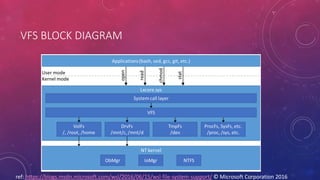
VFS / FILE SYSTEM
• Implements a “VolFs” system, which is the Linux-facing file system with support for UNIX rights, etc.
• Implemented on top of Alternate Data Streams and Extended Attributes part of NTFS
• Not interoperable with Win32 applications
• Also implements a “DrvFs” system, which is the Linux-facing file system that maps Win32 drives
• Implemented as mount points that map to actual NTFS data on the machine
• Rights are dependent on the token that was used to launch the initial WSL instance
• Provides emulation/wrapping/actual implementation for various virtual file system concepts:
• ProcFs mostly works (calls kernel query APIs as needed) or just already has the data
• TmpFs also exists and implements various devices, including the Binder (key Android IPC from the BeOS days)
• SysFs is there, etc…
VFS BLOCK DIAGRAM
ref: https://blogs.msdn.microsoft.com/wsl/2016/06/15/wsl-file-system-support/ © Microsoft Corporation 2016
LXCORE INITIALIZATION
• When LxCore initializes (LxInitialize), it first
• Registers itself as a Pico Provider
• Then creates an IRP queue for the IPC mechanism,
• Sets up Event Log tracing,
• And creates its Devicelxss Device Object with the appropriate Security Descriptor
• No other work is performed until IRPs are received
• Create/Close/Cleanup for managing handles to its various entities
• DeviceControl for sending actual command & control requests
• Read/Write for the IPC mechanism
DEVICE OBJECT INTERFACES
• Although Devicelxss is a single Device Object, it implements 5 different interfaces on top of it.
• A Root Bus Interface – used by LxssManager to create new Instances. Only accepts the single IOCTL.
• A Bus Instance Interface – automatically opened by the Root Bus Interface when a new Instance is
created. Internally represented as Devicelxss{Instance-GUID}. Acts as the command and control
interface for the Instance.
• A Bus Client Interface – used by LxssManager whenever an IPC Bus Server is registered or connected to,
such as when talking with the init daemon. Represented as Devicelxss{Instance-GUID}Client
• An IPC Server Port Interface – used when an IPC Bus Server is registered. Represented by
Devicelxss{Instance-GUID}ServerPort
• An IPC Message Port Interface – used when an IPC Bus Client connects to its Server. Represented by
Devicelxss{Instance-GUID}MessagePort
ROOT BUS / INSTANCE CREATION
• The Root Bus implements a single IOCTL:
• 0x22006F = IOCTL_ADSS_CONTROL_DEVICE_CREATE_INSTANCE
• A handle is obtained by directly opening Devicelxss with no other parameter or EA
• LxssInstance::_StartInstance called by LxssInstance::StartSelf is normally the only path here
• Creating an instance requires
• An instance GUID
• A root directory handle (RootFs)
• A temporary directory handle (TmpFs)
• A job object handle for the init process
• A token handle for the init process
• Information on which paths to map with DriveFs
• An instance termination event handle
BUS INSTANCES
• Once an instance is created, LxCore will automatically open a handle to its corresponding file object
under the Devicelxss namespace, which will be represented by its GUID
• Cannot arbitrarily attempt to open Devicelxss{GUID} from user-mode
• Accepts the following IOCTLs:
• 0x220073 = IOCTL_ADSS_SET_INSTANCE_STATE
• 0x22007B = IOCTL_ADSS_BUS_MAP_PATH
• 0x22007F = IOCTL_ADSS_BUS_MAP_PATH_2
• 0x220083 = IOCTL_ADSS_UPDATE_NETWORK
• 0x220087 = IOCTL_ADSS_CLIENT_OPEN
• Starting an instance will cause the creation of the initial thread group & process for the init daemon
• Other IOCTLs used for DriveFs mappings and for updating the NICs exposed to the WSL Instance
BUS CLIENTS
• Automatically opened by the Bus Instance when IOCTL_ADSS_CLIENT_OPEN is used, creating a File
Object with the “Client” suffix under the Instance GUID
• Accepts the following IOCTLs:
• 0x20002B = IOCTL_ADSS_REGISTER_SERVER
• 0x22002F = IOCTL_ADSS_CONNECT_SERVER
• 0x22003F = IOCTL_ADSS_ENLIGHTENED_FORK
• 0x22004B = IOCTL_ADSS_ENLIGHTENED_FORK_CALLBACK
• 0x22004F = IOCTL_ADSS_ENLIGHTENED_FORK_CALLBACK_STATUS
• 0x22008F = IOCTL_ADSS_FILE_SYSTEM_CALLBACK
• 0x220093 = IOCTL_ADSS_FILE_SYSTEM_CALLBACK_STATUS
• Additionally, exposed to the WSL Instance itself in the Linux world under devlxss
• Normally only the init daemon (PID == 1) is allowed a handle to this
SERVER /MESSAGE PORTS
• A server port is automatically created as a ServerPort file object under the Instance GUID when
IOCTL_ADSS_REGISTER_SERVER is sent from a Bus Client
• Similarly, a message port (MessagePort) is created when
IOCTL_ADSS_IPC_SERVER_WAIT_FOR_CONNECTION is used (and a connection is established)
• Support for all the marshalling and unmarshalling IOCTLs is implemented here
• Also supports map/unmap memory IOCTLs
• Allows registration and signaling of a port-associated event
• And finally registration/unregistration and create/open of shared memory sections
• More in the IPC section…
ARCHITECTURAL OVERVIEW
LXSSMANAGER (USER-MODE) INTERNALS – WIN32 SIDE
LXSSMANAGER INITIALIZATION
• LxssManager (LXSSMANAGER.DLL) is a service-hosted service living inside of a SVCHOST.EXE process
• Runs as a Protected Process Light (PPL) at the Windows Level (0x51)
• Will discuss in the security section
• Registers a COM Class (CLSID_LxssUserSession) which implements the IID_ILxssSession interface
LXSSMANAGER INTERFACES
• LxssManager has internal classes for managing the state of WSL in general (Filesystem::,
LxssNetworking::/LxssLinuxTimezone::LifetimeManager::)
• It exposes LxssSession:: over COM
• GetCurrentInstance(), StartDefaultInstance(), SetState(), QueryState(), InitializeFileSystem()
• Once an instance is started or queried, an IID_ILxssInstance interface is exposed (LxssInstance::)
• GetConfiguration(), GetId(), QueryState(), SetState(), CreateLxProcess(), RegisterAdssBusServer(),
ConnectAdssBusServer(), GetState(), StartSelf(), StopSelf(), GetSuspendState()
• Some requests can be done from any arbitrary user (CreateLxProcess) while others require Admin rights
(RegisterAdssBusServer)
• Two in-box components communicate with it: LXRUN.EXE and BASH.EXE
LXRUN INTERFACE
• LxRun (LXRUN.EXE) is responsible for User Management, Installation and Uninstallation of WSL,
Servicing/Updates.
• Functionality exposed through command-line interface: /install, /uninstall, /setdefaultuser, /update
• Uses the lx::helpers::SvcComm class to communicate with LxssManager
• Uses lx::helpers::LxUser to provide user management
• Essentially done by launching the /usr/sbin/usermod, /usr/bin/id, /usr/bin/passwd, /usr/sbin/addgroup,
/usr/sbin/deluser, /usr/sbin/adduser binaries in an invisible WSL Instance
• Users lx::run (DoUpdate, DoInstall, HashFile, InstallCleanup, RemoveFolderStructure, AcquireFile)
• Again, relies on Linux binaries such as /usr/lib/update-notifier/apt-check, /usr/bin/apt, /usr/sbin/update-locale
BASH.EXE INTERFACE
• BASH.EXE is responsible for being the Win32-friendly launcher of WSL Instances
• lx::bash::DoLaunch is used to either launch /bin/bash or another binary, if BASH.EXE –c “valid path” was used
• NOTE: BASH.EXE –c “man 2 open” will actually launch “/usr/bin/man” and not “/bin/bash –c /usr/bin/man”
• Launch is done by using the same lx::helpers::SvcComm class as LXRUN.EXE
• Reads the DefaultUid in the user’s registry settings to associate the correct Linux user with which to spawn
• HKCUSoftwareMicrosoftWindowsCurrentVersionLxss
ARCHITECTURAL OVERVIEW
INIT (USER-MODE) INTERNALS – LINUX SIDE
INIT DAEMON INITIALIZATION (INITENTRY)
• close() every handle from 0 to 2048
• open() a handle to /dev/kmsg and then dup3() into stderr it for error logging
• open() a handle to /dev/null and then dup3() into stdin and stdout
• open() a handle to /dev/lxss
• Call ConfigCreateResolvConfSymlinkTarget to symlink ../run/resolveconv/resolv.conf into /etc/resolv.conf
• Call InitConnectToServer and send IOCTL_ADSS_CONNECT_SERVER to connect to the IPC Server “lxssmanager”
• Call SaveSignalHandlers and SetSignalHandlers, using sigaction() to save and set new signal handlers as needed
• Call ReadMessageFromServer in a loop, calling reboot() if an invalid message is received
INIT RESPONSIBILITIES
• Through the lxssmanager IPC channel, init will listen for message requests.
• Update Network Information (InitUpdateNetworkInformation) -> update /etc/resolv.conf
• Update Timezone Information (ConfigUpdateTimezoneInformation) -> update
/usr/share/zoneinfo/Msft/localtime and symlink it to /etc/localtime
• Update Hostname Information (ConfigUpdateHostNameInformation) -> sethostname(),
setdomainname(), update /etc/hostname and create /etc/hosts
• Create process (CreateProcess) -> create the environment block, set the command line and working
directory, setup the standard handles, then call fork(). Once the new PID exists, setup UID/GID,
HOME/PATH environment variables, set the TTY SID, duplicate the standard handles and execvpe() the
new process
• Create session leader (InitCreateSessionLeader) -> fork() another init and connection to lxssmanager
LXSS IPC INTERFACES
WIN32-LINUX COMMUNICATION
SOCKETS / FILES
• Unix sockets are supported for Linux-Linux application communication, but Internet sockets are also
implemented, allowing both local and remote communications over IP
• By creating a localhost server, a Win32 application can connect to it and engage in standard socket API
communications
• Similarly, the server could be on the Win32 side, and the client is in an WSL Instance
• Raw sockets are supported, but require an Admin Token on the NT side to comply with TCPIP.SYS checks
• Using DriveFs, it should be possible for a Windows and Linux app to use read/write/epoll on a file
descriptor on the Linux side, and a file object on the Windows side with Read/Write/WaitForSingleObject
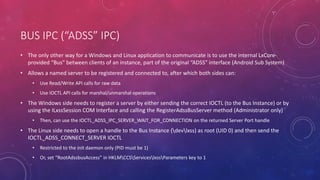
BUS IPC (“ADSS” IPC)
• The only other way for a Windows and Linux application to communicate is to use the internal LxCore-
provided “Bus” between clients of an instance, part of the original “ADSS” interface (Android Sub System)
• Allows a named server to be registered and connected to, after which both sides can:
• Use Read/Write API calls for raw data
• Use IOCTL API calls for marshal/unmarshal operations
• The Windows side needs to register a server by either sending the correct IOCTL (to the Bus Instance) or by
using the ILxssSession COM Interface and calling the RegisterAdssBusServer method (Administrator only)
• Then, can use the IOCTL_ADSS_IPC_SERVER_WAIT_FOR_CONNECTION on the returned Server Port handle
• The Linux side needs to open a handle to the Bus Instance (devlxss) as root (UID 0) and then send the
IOCTL_ADSS_CONNECT_SERVER IOCTL
• Restricted to the init daemon only (PID must be 1)
• Or, set “RootAdssbusAccess” in HKLMCCSServiceslxssParameters key to 1
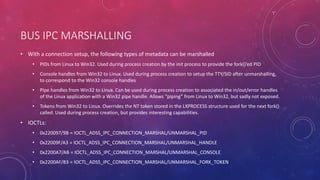
BUS IPC MARSHALLING
• With a connection setup, the following types of metadata can be marshalled
• PIDs from Linux to Win32. Used during process creation by the init process to provide the fork()’ed PID
• Console handles from Win32 to Linux. Used during process creation to setup the TTY/SID after unmarshalling,
to correspond to the Win32 console handles
• Pipe handles from Win32 to Linux. Can be used during process creation to associated the in/out/error handles
of the Linux application with a Win32 pipe handle. Allows “piping” from Linux to Win32, but sadly not exposed.
• Tokens from Win32 to Linux. Overrides the NT token stored in the LXPROCESS structure used for the next fork()
called. Used during process creation, but provides interesting capabilities.
• IOCTLs:
• 0x220097/9B = IOCTL_ADSS_IPC_CONNECTION_MARSHAL/UNMARSHAL_PID
• 0x22009F/A3 = IOCTL_ADSS_IPC_CONNECTION_MARSHAL/UNMARSHAL_HANDLE
• 0x2200A7/AB = IOCTL_ADSS_IPC_CONNECTION_MARSHAL/UNMARSHAL_CONSOLE
• 0x2200AF/B3 = IOCTL_ADSS_IPC_CONNECTION_MARSHAL/UNMARSHAL_FORK_TOKEN
BUS IPC DATA EXCHANGE
• A Linux application can share part of its virtual address space with an NT application, which can then map it
• Both sides can register/unregister and create/open shared memory sections, which appear as file descriptors
on Linux and Section Object handles on Win32
• A Win32 application can register an Event Object handle and associate it with the message port, and then
call WaitForSingleObject on it – the Linux side can signal it with an IOCTL
• A Linux application can use epoll() to wait on its message port file descriptor, and a Win32 application can
signal it with an IOCTL
• IOCTLs:
• 0x220037/3B = IOCTL_ADSS_IPC_CONNECTION_SHARE/UNSHARE_MEMORY
• 0x220043/47 = IOCTL_ADSS_IPC_CONNECTION_MAP/UNMAP_MEMORY
• 0x220053/57 = IOCTL_ADSS_IPC_CONNECTION_CREATE/OPEN_SHARED_SECTION
• 0x22005B/5F = IOCTL_ADSS_IPC_CONNECTION_REGISTER/UNREGISTER_SHARED_SECTION
• 0x220063/67 = IOCTL_ADSS_IPC_CONNECTION_REGISTER/SET_SIGNAL_EVENT
SECURITY DESIGN CONSIDERATIONS
BEFORE & AFTER
INITIAL ANALYSIS
• Pico Processes were originally the cornerstone behind “Project Astoria”
• Full Android Runtime on Windows 10 Mobile / Phone, implemented as a “true” NT Subsystem
• Only on Phone SKU, and was killed in 1511 Update RTM
• In Windows 10 Anniversary Update Previews, Pico functions were once again functional
• Adss.sys was replaced by lxss.sys
• No more “Project Astoria”: Pico processes are now used for the re-re-reimplementation of the original
POSIX subsystem from Windows NT
• New Name: Windows Subsystem for Linux (WSL)
• Instead of running Android, the user-space environment is Ubuntu 14
• Significant improvements to run desktop-class Linux applications were made
• Other Android-specific features removed, such as /dev/fb or /dev/adb
DESIGN ISSUES IN PREVIEW BUILDS
• WSL processes were initially invisible in Task Manager
• Still visible in other tools
• Documented kernel API did not provide notification for Pico processes or threads
• Invisible from endpoint security products/AV
• WSL processes and libraries (.so) are not loaded as SEC_IMAGE, so no image load notifications
• Invisible from endpoint security products/AV
• Completely bypasses AppLocker rules
• WSL file access and network I/O is kernel-sourced
• Does result in minifilter and WFP callbacks, but might be “trusted” due to kernel being the caller
• SeLocateProcessImageName returns NULL for Pico processes
• Cannot create firewall rules or get the name in WFP callout driver
• “Developer Mode” and “Feature Installation” were required for WSL – but driver could be
communicated with from
DESIGN ISSUES IN PREVIEW BUILDS
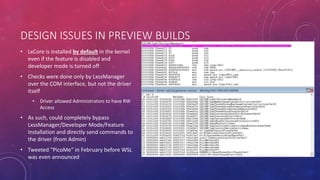
• LxCore is installed by default in the kernel
even if the feature is disabled and
developer mode is turned off
• Checks were done only by LxssManager
over the COM interface, but not the driver
itself
• Driver allowed Administrators to have RW
Access
• As such, could completely bypass
LxssManager/Developer Mode/Feature
Installation and directly send commands to
the driver (from Admin)
• Tweeted “PicoMe” in February before WSL
was even announced
DESIGN ISSUES IN PREVIEW BUILDS
• All WSL process’ handles were kernel handles
• Handle table appears empty to all tools and software
• Impossible to determine resource access
• Could inject Win32 threads into Pico processes
• But can still change context of Pico threads
• Kernel-mode callers can still do the above – could still cause issues
• Could inject memory/duplicate handles/read/write memory of Pico processes from Win32 processes
• Allocations < 64KB are allowed for Pico processes, due to compatibility
• No PEB, no NTDLL, no TEB, etc… and the main executable is ELF
• Would security products ready to handle these types of processes?
• Reached out to Microsoft in order to help address these issues and provide suggestions
STATE OF CURRENT RELEASE (THE GOOD)
• Processes now show up in Task Manager
• SeLocateProcessImageName now returns the correct Pico Process name
• LxCore driver is now ACLed as follows:
• D:P(A;;GA;;;S-1-5-18)S:(TL;;0x0;;;S-1-19-512-4096)
• SACL: Trust Label ACE: S-1-19-512-4096 (WINDOWS LITE)
• In other words, only allows a Protected Process Light, at the Windows Level (5) to communicate with it
• Developer mode is now an enforcement as only way to obtain handle is through LxssManager
• Can fully see network I/O in netstat and other tools, attributed to the correct process
• Same for file I/O in resource monitor
• PspProcessOpen and PspThreadOpen now perform similar checks for Pico processes as they do for
Protected Processes – certain access rights are not permitted if one side is Win32
• Only PROCESS_QUERY_LIMITED_INFORMATION, PROCESS_TERMINATE and SYNCHRONIZE rights allowed
STATE OF CURRENT RELEASE (THE BAD)
• Some things remain by design:
• Because of VFS-in-kernel implementation – file handles are still kernel handles
• Similar for any Linux synchronization file descriptors that map to NT objects
• The reality is that Pico processes execute ELF binaries, so no PE files / image sections (aka no DLLs, etc.)
• And hence no AppLocker
• Others are still dubious, but understandable due to compatibility concerns:
• Still no documented API for 3rd parties to receive Pico process notifications
• No API at all for Pico thread notifications
• Also, minor WinDbg annoyances:
• !process does not understand Pico processes (will show “System Process” for all of them)
• No symbols for LxCore, so cannot analyze Pico processes or their state
ATTACK SURFACE ANALYSIS
• 216 system calls that can now result in possible local privilege escalation
• Yay! An extra 700KB attack surface!
• Full network access (within firewall rules)
• Full disk access (within token rules)
• Ransomelfware, anyone?
• BSODs were found – accidentally – during the Insider Preview
• One NULL pointer dereference
• One invalid pointer dereference (may have led to LPE)
• And this is without anyone actually fuzzing this thing!
• At least the IPC interfaces are locked down… (for now)
• But an unprivileged user can replace the init daemon!
• Optional feature for now, requires admin to enable
SECURITY DESIGN CONSIDERATIONS
KERNEL CALLOUT & API BEHAVIOR FOR ENDPOINT PRODUCTS
PROCESS / THREAD NOTIFICATIONS & BEHAVIOR
• Pico Processes will not result in notifications registered through PsSetCreateProcessNotifyRoutine or
PsSetCreateProcessNotifyRoutineEx
• Pico Threads will not result in notifications registered through PsSetCreateThreadNotifyRoutine or
PsSetCreateThreadNotifyRoutineEx
• Undocumented API exists: PsSetCreateProcessNotifyRoutineEx2 which allows requesting notifications
for Pico Processes
• The PS_CREATE_NOTIFY_INFO Flags field now contains an undocumented field to indicate this is a Pico process
• Used by tcpip.sys, but not Windows Defender (probably would have to document it at that point)
• Essentially no documented way to have visibility into the creation/termination of Pico applications
• WARNING: No NTDLL, no PEB, no TEBs, no KUSER_SHARED_DATA, no API Set Map, no Section Object!
IMAGE LOAD NOTIFICATIONS & BEHAVIOR
• Nothing is ever loaded with SEC_IMAGE inside of a Pico Process – no PE files exist so no Image Section
Objects can be created
• As such, no callbacks received if registered through PsSetLoadImageNotifyRoutine
• Careful: many security products rely on these callbacks to either see NTDLL loading or to see the .EXE itself loading
(indicates process is now running, and called in-process, vs. process was started, and called out-of-process)
• That being said, if _all_ memory mappings are enumerated (undocumented), will see SEC_FILE mappings
associated with the ELF binary and the .so files which have been mapped inside of it
• For example, see Process Hacker
• Everything is ELF.
• PE parsers will not work/break
MINIFILTER & WFP NOTIFICATIONS AND BEHAVIOR
• Filter Manager will issue notifications for all File I/O issued from a Pico Process
• Unfortunately, because all I/O is done by the kernel through IoCreateFile/ZwReadFile/ZwWriteFile APIs
which will set Previous Mode to kernel
• All file handles will thus be kernel handles!
• Additionally, attempting to lookup the PID/TID will return a Pico Process – with no API to actually
indicate that this is a Pico Process
• Will probably confuse many security products and make them crash/assert
• Additionally, if product keeps PID/TID state: won’t find anything, because of lack of notifications
• QUICK DEMO: SysInternals Procmon and Pico Processes
FORENSIC ANALYSIS (EXTRA)
VISIBILITY INTO LINUX PROCESSES
DBGVIEW
• With certain tracing settings turned on, can see significant volume of data from LxCore
• LxpAdssBusLoggingEnabled – full view into all ADSS/BUS IPC communications
• LxKdBreakPointErrorLevel – full view of every error/warning
• However, will NT_ASSERT in many cases, so a debugger is needed to avoid a blue screen of death
• LxpTraceLastSyscall – full view of every system call
WINDBG
• The debugger does not have any type information for lxss.pdb at this time
• Requesting Microsoft to add some basic types/extensions (or use NatVis) to dump current WSL instances,
thread groups, processes, and file descriptors opened
• Will be working on writing my own scripts/extensions to dump this data – expect to publish on my GitHub
(ionescu007) page at a later time
• Start with lxcore!LxGlobal
• Contains a linked list of all currently active instances
• Dump each instance…
• Contains linked list of all running thread groups, etc…
DEMO 1: ANALYSIS OF A PICO PROCESS
DEMO 2: VISUAL STUDIO AND LINUX
DEMO 3: IPC BETWEEN WINDOWS AND LINUX
CONCLUSION
• Microsoft took the time to both address an onslaught of user requests for more functionality (over 700 issues
filed) throughout the Insider Preview as well as actually address absolutely 100% of the technical issues I
privately brought up to them
• The publishing of the blog posts and videos provides useful, good, internals information for researchers, power
users, and administrators
• However – have not seen actual guidance for AV vendors at this point
• PsSetCreateProcessNotifyRoutineEx2 remains undocumented
• No PsIsPicoProcess and/or PsIsMinimalProcess or similar documented API
• Most security software would probably crash/assert when hit with processes that have no PEB, NTDLL, etc…
• Should vendors start building ELF parsers? Should they launch their Linux AV SKU (if they have one) in WSL?
• Afraid that vendors will do what they do best: hook/hack their way around, use undocumented data structures
and APIs
REFERENCES & GREETZ
• Sincere thanks to the following people for their assistance, support and help with this presentation and
WSL-related research:
• Arun Kishan, Nick Judge, Jamie Schwartz, Deepu Thomas, Jason Shirk, John Lento
• Thanks to Ange Albertini for his amazing work on the presentation logo “Evil Penguin Hiding in Windows”
• Be sure to check out the official WSL Blog and GitHub as well as the Product Page (release notes, etc…)
• https://blogs.msdn.microsoft.com/wsl
• https://github.com/Microsoft/BashOnWindows
• https://msdn.microsoft.com/en-us/commandline/wsl/
• https://github.com/ionescu007/lxss for presentation slides and code
Q & A
THANK YOU

The linux kernel hidden inside windows 10

  • 1.
    THE LINUX KERNELHIDDEN INSIDE WINDOWS 10 BLACKHAT 2016 ALEX IONESCU @AIONESCU
  • 2.
    BIO Vice President ofEDR Strategy at CrowdStrike, a security startup Previously worked at Apple on iOS Core Platform Team Co-author of Windows Internals 5th and 6th Editions Reverse engineering NT since 2000 – main kernel developer of ReactOS Instructor of worldwide Windows Internals classes Conference speaking: • Infiltrate 2015 • Blackhat 2016, 2015, 2013, 2008 • SyScan 2015-2012, NoSuchCon 2014-2013, Breakpoint 2012 • Recon 2016-2010, 2006 For more info, see www.alex-ionescu.com
  • 3.
    MJF HAS SPOKEN:YOU CAN ALL GO HOME NOW “Spoiler alert”: This is not how the English language works.
  • 4.
    OUTLINE • Architectural Overview •Minimal and Pico Processes • Pico Provider Interface • LXSS Components • LxCore Kernel-Mode Driver • Functionality, Interfaces & Attack Surface • LxssManager Service • Functionality, Interfaces & Attack Surface • LXSS IPC Interfaces • Win32-Linux Communication
  • 5.
    OUTLINE • Security DesignConsiderations • Before & After • Kernel Callout & API Behavior for Endpoint Products • Forensic Analysis (DbgView / WinDBG) (if time allows) • Pico Demos (if time allows) • Conclusion • Q & A
  • 6.
  • 7.
    MINIMAL PROCESS • Unofficiallyimplemented since Windows 8.1, a minimal process is a bare-bones process with a token, a protection level, a name, and a parent. • Empty address space (no PEB, no NTDLL, no KUSER_SHARED_DATA) • No handle table • EPROCESS.Minimal == 1 • Threads created inside of a minimal process are called minimal threads • No TEB • No kernel-mode driven user-stack setup • ETHREAD.Header.Minimal == 1 • In Redstone 1 these can be created with NtCreateProcessEx from kernel-mode with flag 0x800 • Built-in ones include: • “Memory Compression”, managed by the Store Manager • “Secure System”, managed by Virtual Secure Machine (VSM)
  • 8.
    PICO PROCESS • APico Process is a minimal process which has a Pico Provider (kernel-mode driver) • Same state as a minimal process, but EPROCESS.PicoContext is != NULL • Both Pico and Normal Threads can exist within a Pico Process • ETHREAD.PicoContext is != NULL for Pico Threads • When a minimal thread makes a system call, it’s routed to a Pico Provider instead • When ETW stack traces are being generated for a Pico Process, the Pico Provider is called • When a user-mode exception is raised within a Pico Process, the Pico Provider is called instead • Also when a Probe and Lock / MDL fault is generated on a user-range • When the name of a Pico Process is being requested, the Pico Provider is called instead • When a handle is being opened to a Pico Process or Pico Thread, the Pico Provider is called • When a Pico Thread and/or a Pico Process die, the Pico Provider is notified • When a Pico Process is being terminated, the Pico Provider is called instead
  • 9.
    PICO PROVIDERS • Picoproviders are essentially custom written kernel modules which implement the necessary callbacks to respond to the list of possible events (shown earlier) that a Pico process can cause to arise • NT implementation of the “Drawbridge” Microsoft Research Project • Can be registered with PsRegisterPicoProvider • Pass in array of functions which handle the required event callbacks • Receive array of functions which allow creation and control of Pico processes (see next slide) • However, only allowed if PspPicoRegistrationDisabled is FALSE • Set as soon as PipInitializeCoreDriversByGroup returns – before ELAM and 3rd party drivers can load • Currently only one Pico provider can be registered, as the callbacks are simply a global function array
  • 10.
    PICO API • CreatePico processes and threads: PspCreatePicoProcess, PspCreatePicoThread • Get and set PicoContext pointer: PspGetPicoProcessContext, PspGetPicoThreadContext • Get and set CPU CONTEXT structure: PspGetContextThreadInternal, PspSetContextThreadInternal • Destroy Pico processes and threads: PspTerminateThreadByPointer, PspTerminatePicoProcess • Resume and suspend Pico processes and threads: PsResumeThread, PsSuspendThread • Set user-mode FS and GS segment for Pico threads: PspSetPicoThreadDescriptorBase
  • 11.
    BASIC BLOCK DIAGRAM ref:https://blogs.msdn.microsoft.com/wsl/2016/05/23/pico-process-overview/ © Microsoft Corporation 2016
  • 12.
    PICO PROVIDER SECURITY •Pico Providers also “register” with PatchGuard, providing it with their internal list of system call handlers • Essentially, this means that the Linux system calls are protected by PatchGuard, just like the NT ones • Additionally, attempting to register a “fake” Pico Provider, or modifying key Pico Provider state will also result in PatchGuard’s wrath • For example, playing with PspPicoRegistrationDisabled • Even if restoring the value back to its original value • Patching the callbacks (PspPicoProviderRoutines) will also result in detection by PatchGuard • As seen before, only “core” drivers can be Pico Providers • Boot Loader enforces that core drivers are signed by Microsoft, and “lxss.sys” is hardcoded inside the code
  • 13.
    WSL COMPONENT OVERVIEW •A Pico Provider driver (LXSS.SYS / LXCORE.SYS) which provides the kernel-mode implementation of a Linux-compatible Kernel ABI and API, as well as a Device Object (Devicelxss) for command & control. • It also provides a “bus” between the various WSL Instances and the NT world, and implements a virtual file system (VFS) interface, including a device inode for command & control on the Linux side. • A user-mode management service (LxssManager), which provides an external-facing COM interface, relying information to the Pico Provider through its Device Object • A Linux “init” daemon (like Upstart, systemd, etc…), which is created for every active WSL Instance and is the ancestor of all other Linux processes • A Windows management process for performing updates/servicing, installation, uninstallation, and user management (LxRun.exe) • A Windows launcher service which communicates with the LxssManager and spawns a new instance of WSL (and hence init daemon) and executes the desired process (typically “/bin/bash”)
  • 15.
  • 16.
    LXCORE FUNCTIONALITY • LXCORE.SYSis the large (800KB) kernel-mode Ring 0 driver which implements all the functionality that a Linux application inside of a Pico process will see • In some cases, functionality is implemented from scratch (such as pipes) • In other cases, functionality is wrapped on top of an existing NT kernel mechanism or subsystem (scheduling) • In yet other cases, functionality is heavily built on top of an existing NT kernel primitive, with some from-scratch functionality on top (VFS + inodes on top of NTFS for VolFs/DrvFs, but on top of NT Process APIs for ProcFs, for example) • Decision on how far to go down with wrapping vs. re-implementing was done based on compatibility • For example, Linux pipes have subtle enough differences from NT pipes that NPFS could not be used • In some cases, compatibility isn’t perfect – NTFS is not quite identical to EXT+VFS, but “close enough” • Reliance on many key portability design decisions done by NT team from day 1 (for POSIX support)
  • 17.
    LXCORE CUSTOMIZATION • Thereare a few registry settings that can be controlled/configured to modify LxCore behavior: • PrintSysLevel • PrintLogLevel • KdBreakPointErrorLevel • TraceloggingLevel • KdBreakOnSyscallFailures • TraceLastSyscall • WalkPicoUserStack • RootAdssbusAccess • All present in the HKLMSYSTEMCurrentControlSetServiceslxssParameters key
  • 18.
    SYSTEM CALLS • Full“official” list available from Microsoft: https://msdn.microsoft.com/en- us/commandline/wsl/release_notes • 216 implemented as of the release build • Called by LxpSysDispatch • Support for ptrace() tracing of system calls • Can enable breaking on system call failure, for debugging • LxpTraceSyscall used for both ETW logging (LxpPrintSysLevel) and DbgView (LxpTraceLastSyscall)
  • 19.
    VFS / FILESYSTEM • Implements a “VolFs” system, which is the Linux-facing file system with support for UNIX rights, etc. • Implemented on top of Alternate Data Streams and Extended Attributes part of NTFS • Not interoperable with Win32 applications • Also implements a “DrvFs” system, which is the Linux-facing file system that maps Win32 drives • Implemented as mount points that map to actual NTFS data on the machine • Rights are dependent on the token that was used to launch the initial WSL instance • Provides emulation/wrapping/actual implementation for various virtual file system concepts: • ProcFs mostly works (calls kernel query APIs as needed) or just already has the data • TmpFs also exists and implements various devices, including the Binder (key Android IPC from the BeOS days) • SysFs is there, etc…
  • 20.
    VFS BLOCK DIAGRAM ref:https://blogs.msdn.microsoft.com/wsl/2016/06/15/wsl-file-system-support/ © Microsoft Corporation 2016
  • 21.
    LXCORE INITIALIZATION • WhenLxCore initializes (LxInitialize), it first • Registers itself as a Pico Provider • Then creates an IRP queue for the IPC mechanism, • Sets up Event Log tracing, • And creates its Devicelxss Device Object with the appropriate Security Descriptor • No other work is performed until IRPs are received • Create/Close/Cleanup for managing handles to its various entities • DeviceControl for sending actual command & control requests • Read/Write for the IPC mechanism
  • 22.
    DEVICE OBJECT INTERFACES •Although Devicelxss is a single Device Object, it implements 5 different interfaces on top of it. • A Root Bus Interface – used by LxssManager to create new Instances. Only accepts the single IOCTL. • A Bus Instance Interface – automatically opened by the Root Bus Interface when a new Instance is created. Internally represented as Devicelxss{Instance-GUID}. Acts as the command and control interface for the Instance. • A Bus Client Interface – used by LxssManager whenever an IPC Bus Server is registered or connected to, such as when talking with the init daemon. Represented as Devicelxss{Instance-GUID}Client • An IPC Server Port Interface – used when an IPC Bus Server is registered. Represented by Devicelxss{Instance-GUID}ServerPort • An IPC Message Port Interface – used when an IPC Bus Client connects to its Server. Represented by Devicelxss{Instance-GUID}MessagePort
  • 23.
    ROOT BUS /INSTANCE CREATION • The Root Bus implements a single IOCTL: • 0x22006F = IOCTL_ADSS_CONTROL_DEVICE_CREATE_INSTANCE • A handle is obtained by directly opening Devicelxss with no other parameter or EA • LxssInstance::_StartInstance called by LxssInstance::StartSelf is normally the only path here • Creating an instance requires • An instance GUID • A root directory handle (RootFs) • A temporary directory handle (TmpFs) • A job object handle for the init process • A token handle for the init process • Information on which paths to map with DriveFs • An instance termination event handle
  • 24.
    BUS INSTANCES • Oncean instance is created, LxCore will automatically open a handle to its corresponding file object under the Devicelxss namespace, which will be represented by its GUID • Cannot arbitrarily attempt to open Devicelxss{GUID} from user-mode • Accepts the following IOCTLs: • 0x220073 = IOCTL_ADSS_SET_INSTANCE_STATE • 0x22007B = IOCTL_ADSS_BUS_MAP_PATH • 0x22007F = IOCTL_ADSS_BUS_MAP_PATH_2 • 0x220083 = IOCTL_ADSS_UPDATE_NETWORK • 0x220087 = IOCTL_ADSS_CLIENT_OPEN • Starting an instance will cause the creation of the initial thread group & process for the init daemon • Other IOCTLs used for DriveFs mappings and for updating the NICs exposed to the WSL Instance
  • 25.
    BUS CLIENTS • Automaticallyopened by the Bus Instance when IOCTL_ADSS_CLIENT_OPEN is used, creating a File Object with the “Client” suffix under the Instance GUID • Accepts the following IOCTLs: • 0x20002B = IOCTL_ADSS_REGISTER_SERVER • 0x22002F = IOCTL_ADSS_CONNECT_SERVER • 0x22003F = IOCTL_ADSS_ENLIGHTENED_FORK • 0x22004B = IOCTL_ADSS_ENLIGHTENED_FORK_CALLBACK • 0x22004F = IOCTL_ADSS_ENLIGHTENED_FORK_CALLBACK_STATUS • 0x22008F = IOCTL_ADSS_FILE_SYSTEM_CALLBACK • 0x220093 = IOCTL_ADSS_FILE_SYSTEM_CALLBACK_STATUS • Additionally, exposed to the WSL Instance itself in the Linux world under devlxss • Normally only the init daemon (PID == 1) is allowed a handle to this
  • 26.
    SERVER /MESSAGE PORTS •A server port is automatically created as a ServerPort file object under the Instance GUID when IOCTL_ADSS_REGISTER_SERVER is sent from a Bus Client • Similarly, a message port (MessagePort) is created when IOCTL_ADSS_IPC_SERVER_WAIT_FOR_CONNECTION is used (and a connection is established) • Support for all the marshalling and unmarshalling IOCTLs is implemented here • Also supports map/unmap memory IOCTLs • Allows registration and signaling of a port-associated event • And finally registration/unregistration and create/open of shared memory sections • More in the IPC section…
  • 27.
  • 28.
    LXSSMANAGER INITIALIZATION • LxssManager(LXSSMANAGER.DLL) is a service-hosted service living inside of a SVCHOST.EXE process • Runs as a Protected Process Light (PPL) at the Windows Level (0x51) • Will discuss in the security section • Registers a COM Class (CLSID_LxssUserSession) which implements the IID_ILxssSession interface
  • 29.
    LXSSMANAGER INTERFACES • LxssManagerhas internal classes for managing the state of WSL in general (Filesystem::, LxssNetworking::/LxssLinuxTimezone::LifetimeManager::) • It exposes LxssSession:: over COM • GetCurrentInstance(), StartDefaultInstance(), SetState(), QueryState(), InitializeFileSystem() • Once an instance is started or queried, an IID_ILxssInstance interface is exposed (LxssInstance::) • GetConfiguration(), GetId(), QueryState(), SetState(), CreateLxProcess(), RegisterAdssBusServer(), ConnectAdssBusServer(), GetState(), StartSelf(), StopSelf(), GetSuspendState() • Some requests can be done from any arbitrary user (CreateLxProcess) while others require Admin rights (RegisterAdssBusServer) • Two in-box components communicate with it: LXRUN.EXE and BASH.EXE
  • 30.
    LXRUN INTERFACE • LxRun(LXRUN.EXE) is responsible for User Management, Installation and Uninstallation of WSL, Servicing/Updates. • Functionality exposed through command-line interface: /install, /uninstall, /setdefaultuser, /update • Uses the lx::helpers::SvcComm class to communicate with LxssManager • Uses lx::helpers::LxUser to provide user management • Essentially done by launching the /usr/sbin/usermod, /usr/bin/id, /usr/bin/passwd, /usr/sbin/addgroup, /usr/sbin/deluser, /usr/sbin/adduser binaries in an invisible WSL Instance • Users lx::run (DoUpdate, DoInstall, HashFile, InstallCleanup, RemoveFolderStructure, AcquireFile) • Again, relies on Linux binaries such as /usr/lib/update-notifier/apt-check, /usr/bin/apt, /usr/sbin/update-locale
  • 31.
    BASH.EXE INTERFACE • BASH.EXEis responsible for being the Win32-friendly launcher of WSL Instances • lx::bash::DoLaunch is used to either launch /bin/bash or another binary, if BASH.EXE –c “valid path” was used • NOTE: BASH.EXE –c “man 2 open” will actually launch “/usr/bin/man” and not “/bin/bash –c /usr/bin/man” • Launch is done by using the same lx::helpers::SvcComm class as LXRUN.EXE • Reads the DefaultUid in the user’s registry settings to associate the correct Linux user with which to spawn • HKCUSoftwareMicrosoftWindowsCurrentVersionLxss
  • 32.
  • 33.
    INIT DAEMON INITIALIZATION(INITENTRY) • close() every handle from 0 to 2048 • open() a handle to /dev/kmsg and then dup3() into stderr it for error logging • open() a handle to /dev/null and then dup3() into stdin and stdout • open() a handle to /dev/lxss • Call ConfigCreateResolvConfSymlinkTarget to symlink ../run/resolveconv/resolv.conf into /etc/resolv.conf • Call InitConnectToServer and send IOCTL_ADSS_CONNECT_SERVER to connect to the IPC Server “lxssmanager” • Call SaveSignalHandlers and SetSignalHandlers, using sigaction() to save and set new signal handlers as needed • Call ReadMessageFromServer in a loop, calling reboot() if an invalid message is received
  • 34.
    INIT RESPONSIBILITIES • Throughthe lxssmanager IPC channel, init will listen for message requests. • Update Network Information (InitUpdateNetworkInformation) -> update /etc/resolv.conf • Update Timezone Information (ConfigUpdateTimezoneInformation) -> update /usr/share/zoneinfo/Msft/localtime and symlink it to /etc/localtime • Update Hostname Information (ConfigUpdateHostNameInformation) -> sethostname(), setdomainname(), update /etc/hostname and create /etc/hosts • Create process (CreateProcess) -> create the environment block, set the command line and working directory, setup the standard handles, then call fork(). Once the new PID exists, setup UID/GID, HOME/PATH environment variables, set the TTY SID, duplicate the standard handles and execvpe() the new process • Create session leader (InitCreateSessionLeader) -> fork() another init and connection to lxssmanager
  • 35.
  • 36.
    SOCKETS / FILES •Unix sockets are supported for Linux-Linux application communication, but Internet sockets are also implemented, allowing both local and remote communications over IP • By creating a localhost server, a Win32 application can connect to it and engage in standard socket API communications • Similarly, the server could be on the Win32 side, and the client is in an WSL Instance • Raw sockets are supported, but require an Admin Token on the NT side to comply with TCPIP.SYS checks • Using DriveFs, it should be possible for a Windows and Linux app to use read/write/epoll on a file descriptor on the Linux side, and a file object on the Windows side with Read/Write/WaitForSingleObject
  • 37.
    BUS IPC (“ADSS”IPC) • The only other way for a Windows and Linux application to communicate is to use the internal LxCore- provided “Bus” between clients of an instance, part of the original “ADSS” interface (Android Sub System) • Allows a named server to be registered and connected to, after which both sides can: • Use Read/Write API calls for raw data • Use IOCTL API calls for marshal/unmarshal operations • The Windows side needs to register a server by either sending the correct IOCTL (to the Bus Instance) or by using the ILxssSession COM Interface and calling the RegisterAdssBusServer method (Administrator only) • Then, can use the IOCTL_ADSS_IPC_SERVER_WAIT_FOR_CONNECTION on the returned Server Port handle • The Linux side needs to open a handle to the Bus Instance (devlxss) as root (UID 0) and then send the IOCTL_ADSS_CONNECT_SERVER IOCTL • Restricted to the init daemon only (PID must be 1) • Or, set “RootAdssbusAccess” in HKLMCCSServiceslxssParameters key to 1
  • 38.
    BUS IPC MARSHALLING •With a connection setup, the following types of metadata can be marshalled • PIDs from Linux to Win32. Used during process creation by the init process to provide the fork()’ed PID • Console handles from Win32 to Linux. Used during process creation to setup the TTY/SID after unmarshalling, to correspond to the Win32 console handles • Pipe handles from Win32 to Linux. Can be used during process creation to associated the in/out/error handles of the Linux application with a Win32 pipe handle. Allows “piping” from Linux to Win32, but sadly not exposed. • Tokens from Win32 to Linux. Overrides the NT token stored in the LXPROCESS structure used for the next fork() called. Used during process creation, but provides interesting capabilities. • IOCTLs: • 0x220097/9B = IOCTL_ADSS_IPC_CONNECTION_MARSHAL/UNMARSHAL_PID • 0x22009F/A3 = IOCTL_ADSS_IPC_CONNECTION_MARSHAL/UNMARSHAL_HANDLE • 0x2200A7/AB = IOCTL_ADSS_IPC_CONNECTION_MARSHAL/UNMARSHAL_CONSOLE • 0x2200AF/B3 = IOCTL_ADSS_IPC_CONNECTION_MARSHAL/UNMARSHAL_FORK_TOKEN
  • 39.
    BUS IPC DATAEXCHANGE • A Linux application can share part of its virtual address space with an NT application, which can then map it • Both sides can register/unregister and create/open shared memory sections, which appear as file descriptors on Linux and Section Object handles on Win32 • A Win32 application can register an Event Object handle and associate it with the message port, and then call WaitForSingleObject on it – the Linux side can signal it with an IOCTL • A Linux application can use epoll() to wait on its message port file descriptor, and a Win32 application can signal it with an IOCTL • IOCTLs: • 0x220037/3B = IOCTL_ADSS_IPC_CONNECTION_SHARE/UNSHARE_MEMORY • 0x220043/47 = IOCTL_ADSS_IPC_CONNECTION_MAP/UNMAP_MEMORY • 0x220053/57 = IOCTL_ADSS_IPC_CONNECTION_CREATE/OPEN_SHARED_SECTION • 0x22005B/5F = IOCTL_ADSS_IPC_CONNECTION_REGISTER/UNREGISTER_SHARED_SECTION • 0x220063/67 = IOCTL_ADSS_IPC_CONNECTION_REGISTER/SET_SIGNAL_EVENT
  • 40.
  • 41.
    INITIAL ANALYSIS • PicoProcesses were originally the cornerstone behind “Project Astoria” • Full Android Runtime on Windows 10 Mobile / Phone, implemented as a “true” NT Subsystem • Only on Phone SKU, and was killed in 1511 Update RTM • In Windows 10 Anniversary Update Previews, Pico functions were once again functional • Adss.sys was replaced by lxss.sys • No more “Project Astoria”: Pico processes are now used for the re-re-reimplementation of the original POSIX subsystem from Windows NT • New Name: Windows Subsystem for Linux (WSL) • Instead of running Android, the user-space environment is Ubuntu 14 • Significant improvements to run desktop-class Linux applications were made • Other Android-specific features removed, such as /dev/fb or /dev/adb
  • 42.
    DESIGN ISSUES INPREVIEW BUILDS • WSL processes were initially invisible in Task Manager • Still visible in other tools • Documented kernel API did not provide notification for Pico processes or threads • Invisible from endpoint security products/AV • WSL processes and libraries (.so) are not loaded as SEC_IMAGE, so no image load notifications • Invisible from endpoint security products/AV • Completely bypasses AppLocker rules • WSL file access and network I/O is kernel-sourced • Does result in minifilter and WFP callbacks, but might be “trusted” due to kernel being the caller • SeLocateProcessImageName returns NULL for Pico processes • Cannot create firewall rules or get the name in WFP callout driver • “Developer Mode” and “Feature Installation” were required for WSL – but driver could be communicated with from
  • 43.
    DESIGN ISSUES INPREVIEW BUILDS • LxCore is installed by default in the kernel even if the feature is disabled and developer mode is turned off • Checks were done only by LxssManager over the COM interface, but not the driver itself • Driver allowed Administrators to have RW Access • As such, could completely bypass LxssManager/Developer Mode/Feature Installation and directly send commands to the driver (from Admin) • Tweeted “PicoMe” in February before WSL was even announced
  • 44.
    DESIGN ISSUES INPREVIEW BUILDS • All WSL process’ handles were kernel handles • Handle table appears empty to all tools and software • Impossible to determine resource access • Could inject Win32 threads into Pico processes • But can still change context of Pico threads • Kernel-mode callers can still do the above – could still cause issues • Could inject memory/duplicate handles/read/write memory of Pico processes from Win32 processes • Allocations < 64KB are allowed for Pico processes, due to compatibility • No PEB, no NTDLL, no TEB, etc… and the main executable is ELF • Would security products ready to handle these types of processes? • Reached out to Microsoft in order to help address these issues and provide suggestions
  • 45.
    STATE OF CURRENTRELEASE (THE GOOD) • Processes now show up in Task Manager • SeLocateProcessImageName now returns the correct Pico Process name • LxCore driver is now ACLed as follows: • D:P(A;;GA;;;S-1-5-18)S:(TL;;0x0;;;S-1-19-512-4096) • SACL: Trust Label ACE: S-1-19-512-4096 (WINDOWS LITE) • In other words, only allows a Protected Process Light, at the Windows Level (5) to communicate with it • Developer mode is now an enforcement as only way to obtain handle is through LxssManager • Can fully see network I/O in netstat and other tools, attributed to the correct process • Same for file I/O in resource monitor • PspProcessOpen and PspThreadOpen now perform similar checks for Pico processes as they do for Protected Processes – certain access rights are not permitted if one side is Win32 • Only PROCESS_QUERY_LIMITED_INFORMATION, PROCESS_TERMINATE and SYNCHRONIZE rights allowed
  • 46.
    STATE OF CURRENTRELEASE (THE BAD) • Some things remain by design: • Because of VFS-in-kernel implementation – file handles are still kernel handles • Similar for any Linux synchronization file descriptors that map to NT objects • The reality is that Pico processes execute ELF binaries, so no PE files / image sections (aka no DLLs, etc.) • And hence no AppLocker • Others are still dubious, but understandable due to compatibility concerns: • Still no documented API for 3rd parties to receive Pico process notifications • No API at all for Pico thread notifications • Also, minor WinDbg annoyances: • !process does not understand Pico processes (will show “System Process” for all of them) • No symbols for LxCore, so cannot analyze Pico processes or their state
  • 47.
    ATTACK SURFACE ANALYSIS •216 system calls that can now result in possible local privilege escalation • Yay! An extra 700KB attack surface! • Full network access (within firewall rules) • Full disk access (within token rules) • Ransomelfware, anyone? • BSODs were found – accidentally – during the Insider Preview • One NULL pointer dereference • One invalid pointer dereference (may have led to LPE) • And this is without anyone actually fuzzing this thing! • At least the IPC interfaces are locked down… (for now) • But an unprivileged user can replace the init daemon! • Optional feature for now, requires admin to enable
  • 48.
    SECURITY DESIGN CONSIDERATIONS KERNELCALLOUT & API BEHAVIOR FOR ENDPOINT PRODUCTS
  • 49.
    PROCESS / THREADNOTIFICATIONS & BEHAVIOR • Pico Processes will not result in notifications registered through PsSetCreateProcessNotifyRoutine or PsSetCreateProcessNotifyRoutineEx • Pico Threads will not result in notifications registered through PsSetCreateThreadNotifyRoutine or PsSetCreateThreadNotifyRoutineEx • Undocumented API exists: PsSetCreateProcessNotifyRoutineEx2 which allows requesting notifications for Pico Processes • The PS_CREATE_NOTIFY_INFO Flags field now contains an undocumented field to indicate this is a Pico process • Used by tcpip.sys, but not Windows Defender (probably would have to document it at that point) • Essentially no documented way to have visibility into the creation/termination of Pico applications • WARNING: No NTDLL, no PEB, no TEBs, no KUSER_SHARED_DATA, no API Set Map, no Section Object!
  • 50.
    IMAGE LOAD NOTIFICATIONS& BEHAVIOR • Nothing is ever loaded with SEC_IMAGE inside of a Pico Process – no PE files exist so no Image Section Objects can be created • As such, no callbacks received if registered through PsSetLoadImageNotifyRoutine • Careful: many security products rely on these callbacks to either see NTDLL loading or to see the .EXE itself loading (indicates process is now running, and called in-process, vs. process was started, and called out-of-process) • That being said, if _all_ memory mappings are enumerated (undocumented), will see SEC_FILE mappings associated with the ELF binary and the .so files which have been mapped inside of it • For example, see Process Hacker • Everything is ELF. • PE parsers will not work/break
  • 51.
    MINIFILTER & WFPNOTIFICATIONS AND BEHAVIOR • Filter Manager will issue notifications for all File I/O issued from a Pico Process • Unfortunately, because all I/O is done by the kernel through IoCreateFile/ZwReadFile/ZwWriteFile APIs which will set Previous Mode to kernel • All file handles will thus be kernel handles! • Additionally, attempting to lookup the PID/TID will return a Pico Process – with no API to actually indicate that this is a Pico Process • Will probably confuse many security products and make them crash/assert • Additionally, if product keeps PID/TID state: won’t find anything, because of lack of notifications • QUICK DEMO: SysInternals Procmon and Pico Processes
  • 52.
  • 53.
    DBGVIEW • With certaintracing settings turned on, can see significant volume of data from LxCore • LxpAdssBusLoggingEnabled – full view into all ADSS/BUS IPC communications • LxKdBreakPointErrorLevel – full view of every error/warning • However, will NT_ASSERT in many cases, so a debugger is needed to avoid a blue screen of death • LxpTraceLastSyscall – full view of every system call
  • 54.
    WINDBG • The debuggerdoes not have any type information for lxss.pdb at this time • Requesting Microsoft to add some basic types/extensions (or use NatVis) to dump current WSL instances, thread groups, processes, and file descriptors opened • Will be working on writing my own scripts/extensions to dump this data – expect to publish on my GitHub (ionescu007) page at a later time • Start with lxcore!LxGlobal • Contains a linked list of all currently active instances • Dump each instance… • Contains linked list of all running thread groups, etc…
  • 55.
    DEMO 1: ANALYSISOF A PICO PROCESS
  • 56.
    DEMO 2: VISUALSTUDIO AND LINUX
  • 57.
    DEMO 3: IPCBETWEEN WINDOWS AND LINUX
  • 58.
    CONCLUSION • Microsoft tookthe time to both address an onslaught of user requests for more functionality (over 700 issues filed) throughout the Insider Preview as well as actually address absolutely 100% of the technical issues I privately brought up to them • The publishing of the blog posts and videos provides useful, good, internals information for researchers, power users, and administrators • However – have not seen actual guidance for AV vendors at this point • PsSetCreateProcessNotifyRoutineEx2 remains undocumented • No PsIsPicoProcess and/or PsIsMinimalProcess or similar documented API • Most security software would probably crash/assert when hit with processes that have no PEB, NTDLL, etc… • Should vendors start building ELF parsers? Should they launch their Linux AV SKU (if they have one) in WSL? • Afraid that vendors will do what they do best: hook/hack their way around, use undocumented data structures and APIs
  • 59.
    REFERENCES & GREETZ •Sincere thanks to the following people for their assistance, support and help with this presentation and WSL-related research: • Arun Kishan, Nick Judge, Jamie Schwartz, Deepu Thomas, Jason Shirk, John Lento • Thanks to Ange Albertini for his amazing work on the presentation logo “Evil Penguin Hiding in Windows” • Be sure to check out the official WSL Blog and GitHub as well as the Product Page (release notes, etc…) • https://blogs.msdn.microsoft.com/wsl • https://github.com/Microsoft/BashOnWindows • https://msdn.microsoft.com/en-us/commandline/wsl/ • https://github.com/ionescu007/lxss for presentation slides and code
  • 60.