XFLTReaT: Hogy jussunk ki
lezárt hálózatokból?
Balázs Bucsay / @xoreipeip
Senior Security Consultant @ NCC Group
Workshop
• Needed:
• VMware OR VirtualBox
• Windows Vista SP1 or later installed
• Virtual Machine distributed
• 5-6Gb free space
• Windows and Linux BASIC skills
• Grab it:
• USB sticks
• http://192.168.121.1/
Bio / Balázs Bucsay
• Senior Security Consultant @ NCC Group
• Strictly technical certificates: OSCE, OSCP, OSWP, GIAC GPEN, CREST CCT Inf
• Former Research Director @ MRG Effitas
• Twitter: @xoreipeip
• Linkedin: https://www.linkedin.com/in/bucsayb
Presentations
• Talks around the world: • North America: Hacker Halted, Shakacon
• Australia: RuxCon
• Asia: Hack in the Box GSEC
• Europe:
• DeepSec / Vienna (AT)
• BruCON / Ghent (BE)
• PHDays / Moscow (RU)
• HackCon / Oslo (NO)
• Hacktivity / Budapest (HU)
• Inf. Gov. & eDisc. Summit / London (UK)
@xoreipeip
DISCLAIMER
MAC Address Change
• MAC => Media Access Control
• Every modern network device has a MAC address
• It can be changed
• When/why to change?
• Free limited sessions (20 min)
• Steal other ppl session
• Don’t be a jerk!
• MAC collision would make both of you miserable
Alternative gateways
• Gateways/routers are routing the traffic
• Very rare
• Maybe there is another gateway on the network
• Change router to the unfiltered one
Misconfigured proxies
• Check if the proxy allows:
• to connect to external sites
• GET http://external.host HTTP/1.0
• to make a connection to HTTP ports (tcp/80; 8080; 8443…)
• HTTP CONNECT
• to connect specific ports (tcp/21; 25)
• Broken HTTP or byte streams
• One of the mobile operators was an example
Misconfigured firewalls
• ICMP is allowed (ping)
• UDP on 53 allowed (DNS)
• TCP on 21/80/443/465/587
Not really misconfiguration but:
• Protocol specific traffic is allowed:
• DNS is allowed
• HTTP
• etc.
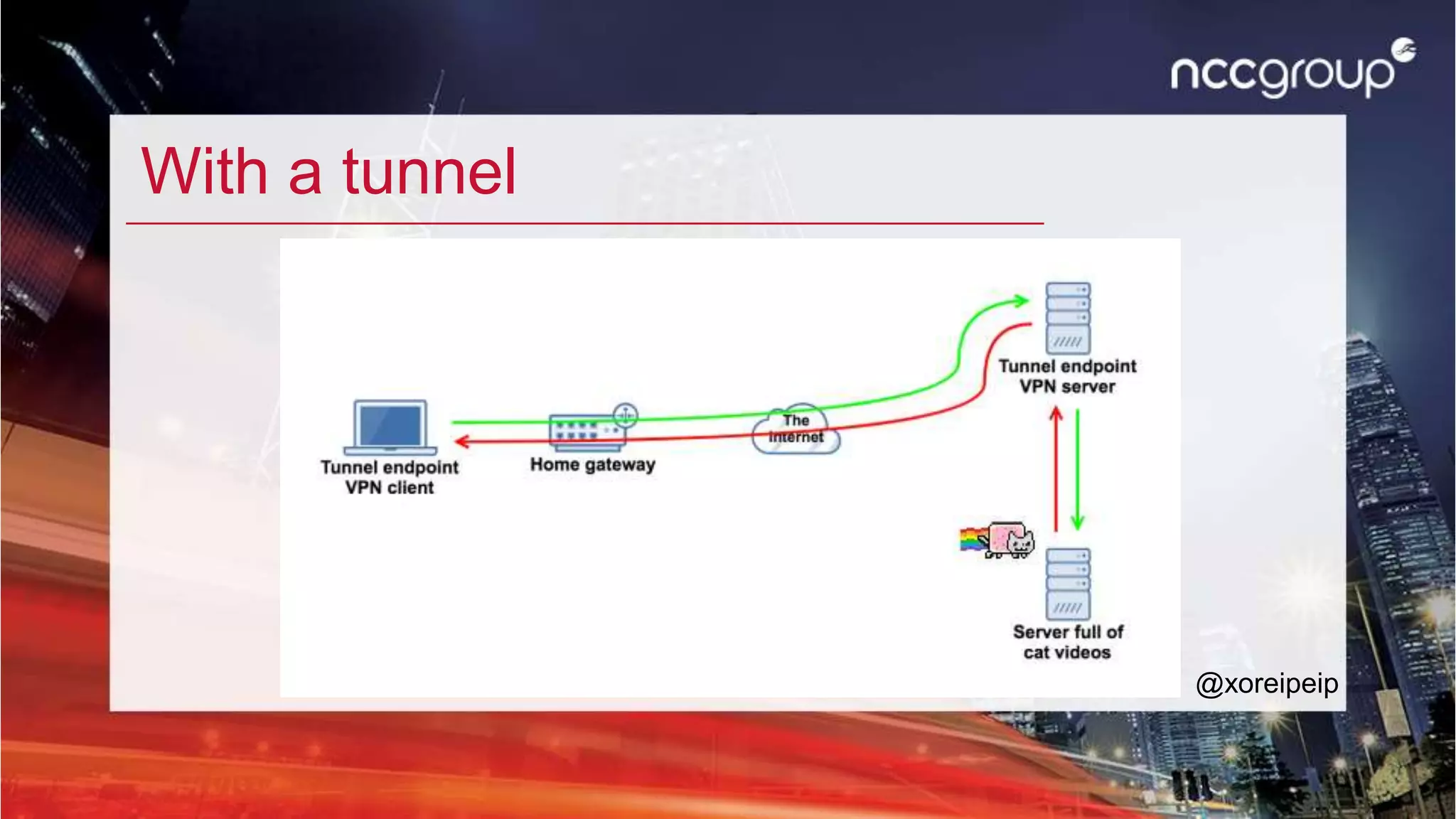
Tunnels
Without a tunnel
@xoreipeip
With a tunnel
@xoreipeip
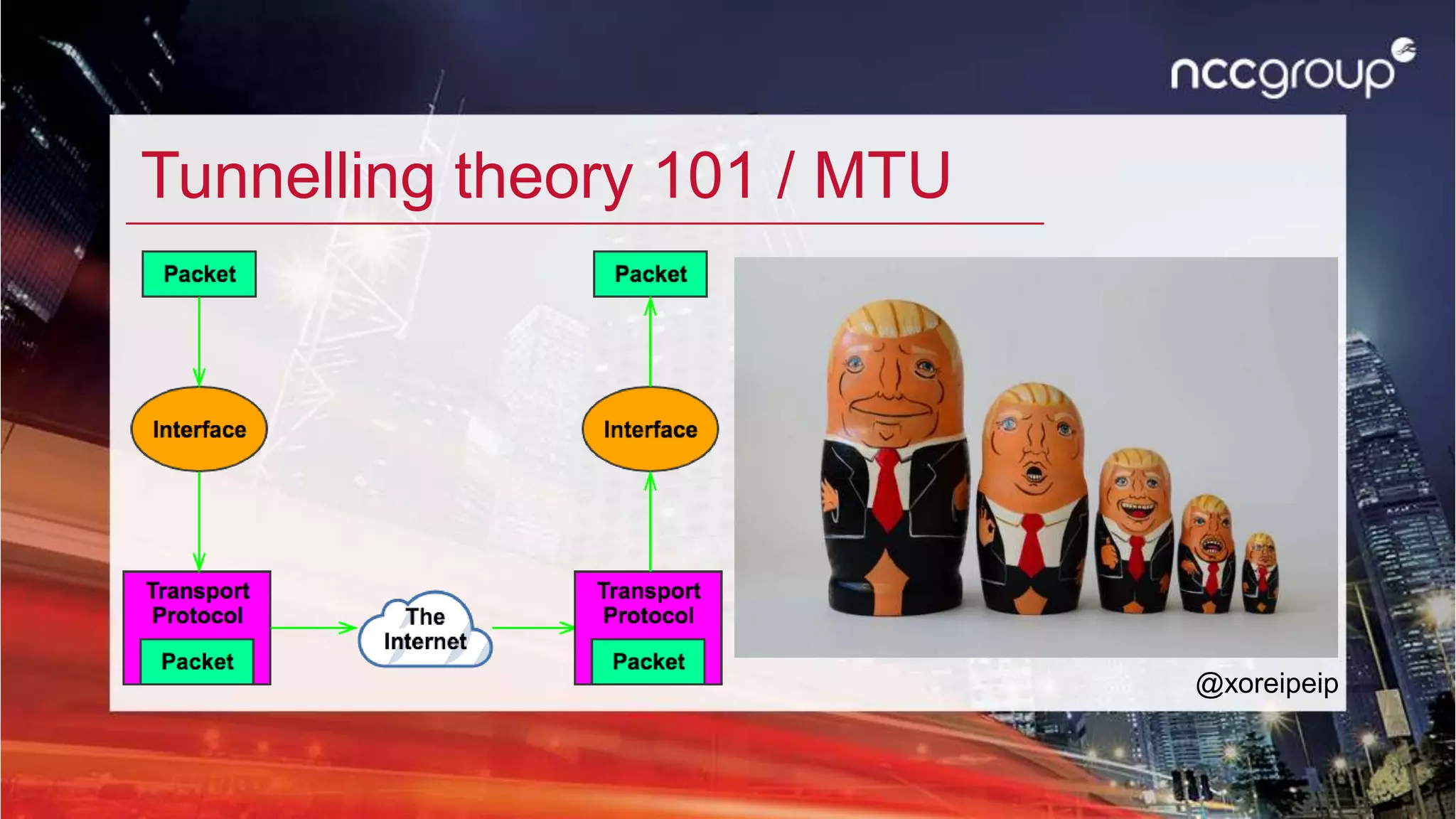
Tunnelling theory 101 / MTU
@xoreipeip
What is XFLTReaT?
XFLTReaT (say exfil-treat or exfiltrate)
• Tunnelling framework
• Open-source
• Python based
• OOP
• Modular
• Multi client
• Plug and Play (at least as easy as it can be)
• Check functionality
• STILL NOT PRODUCTION GRADE
@xoreipeip
Check functionality
• Easy way to figure out, which protocol is not filtered on the network
• Automated approach: No deep knowledge is needed
• Client sends a challenge over the selected (or all) modules to the server
• If the server responses with the solution:
• We know that the server is up and running
• The specific module/protocol is working over the network
• Connection can be made
@xoreipeip
Multi Operating System Support
@xoreipeip
Linux MacOS(X) Windows FreeBSD OpenBSD NetBSD
TCP Generic Supported Supported Supported N/A N/A N/A
UDP Generic Supported Supported N/A N/A N/A N/A
ICMP Supported Supported N/A N/A N/A N/A
SOCKS Supported Supported Supported N/A N/A N/A
HTTP CONNECT Supported Supported Supported N/A N/A N/A
DNS PoC N/A N/A N/A N/A N/A
SCTP Supported N/A N/A N/A N/A N/A
WebSocket Supported Supported N/A N/A N/A N/A
RDP N/A N/A Supported N/A N/A N/A
Module tree
@xoreipeip
WORKSHOP 1
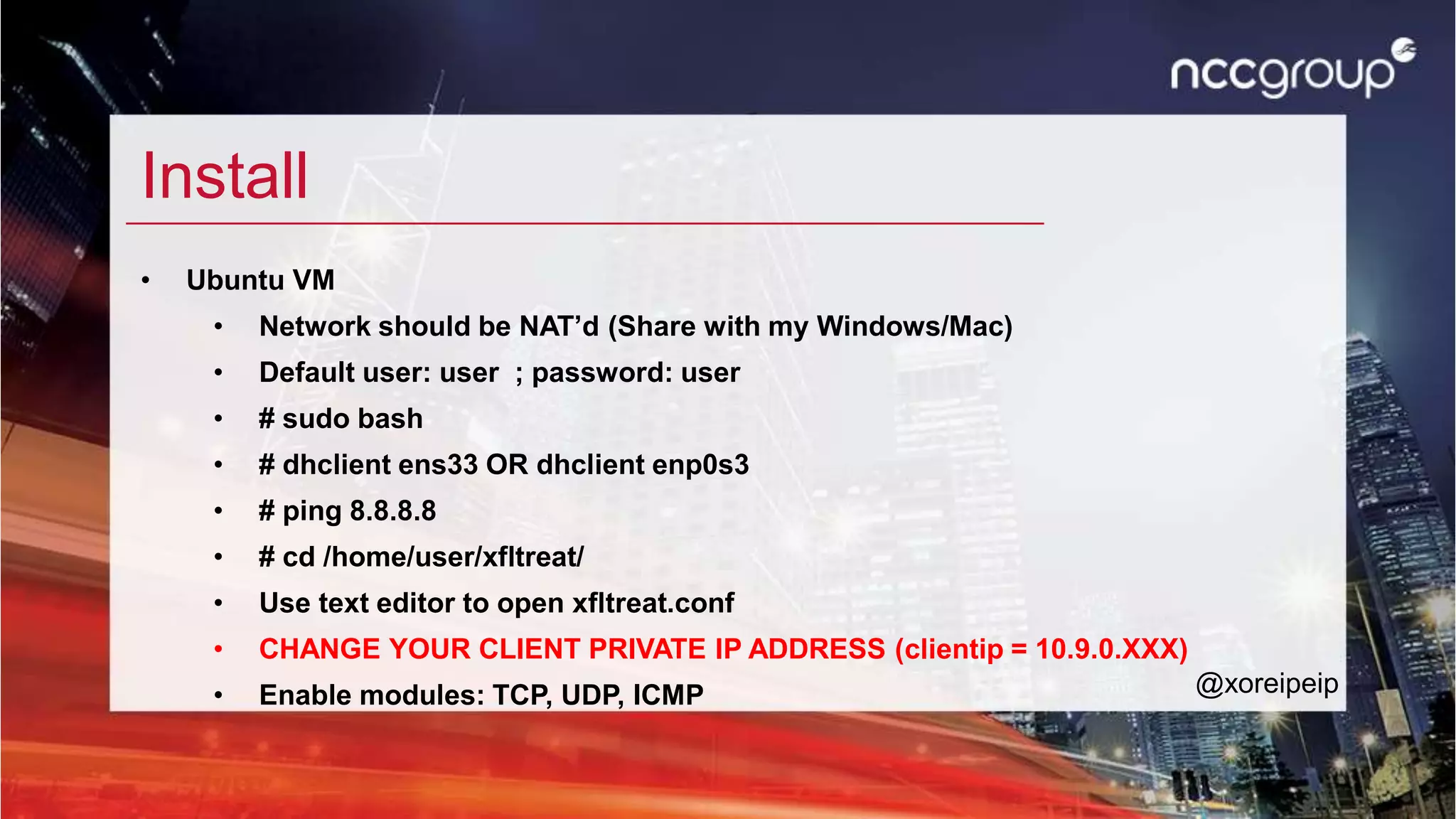
Install
• Ubuntu VM
• Network should be NAT’d (Share with my Windows/Mac)
• Default user: user ; password: user
• # sudo bash
• # dhclient ens33 OR dhclient enp0s3
• # ping 8.8.8.8
• # cd /home/user/xfltreat/
• Use text editor to open xfltreat.conf
• CHANGE YOUR CLIENT PRIVATE IP ADDRESS (clientip = 10.9.0.XXX)
• Enable modules: TCP, UDP, ICMP @xoreipeip
Check + Client mode
• python2.7 xfltreat.py --check
• Open browser
• http://www.whatismyipaddress.com
• Change config, enable ONLY ONE module that worked
• python2.7 xfltreat.py --client --verbose=2
• Check your IP again in the browser
• Repeat with a different module
@xoreipeip
Dynamic Virtual Channels
• Introduced in Window Server 2008 & Windows Vista SP1
• Bi-directional channels can be created in the active RDP session
• How it works:
• DLL plugin have to be loaded in the mstsc.exe process’ context
• When initialized it creates a listener with the channel name
• Magic happens only when the server connects to channel explicitly
• This is how Copy&Paste, Remote drives, remote hardware are working thru RDP
• Plugin could be implemented for Unices (FreeRDP)
@xoreipeip
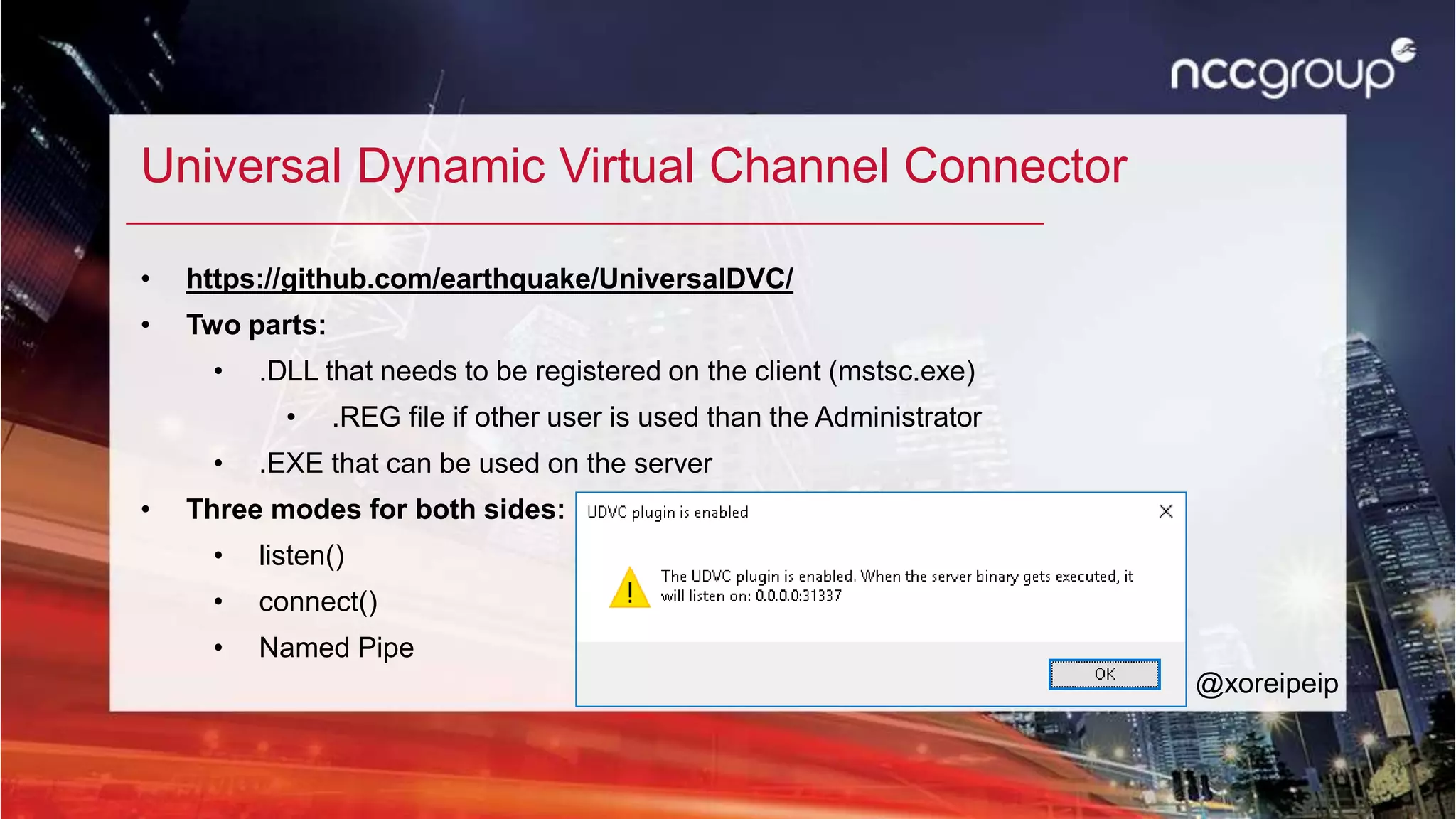
Universal Dynamic Virtual Channel Connector
• https://github.com/earthquake/UniversalDVC/
• Two parts:
• .DLL that needs to be registered on the client (mstsc.exe)
• .REG file if other user is used than the Administrator
• .EXE that can be used on the server
• Three modes for both sides:
• listen()
• connect()
• Named Pipe
@xoreipeip
Universal DVC Connector example use cases/1
@xoreipeip
Universal DVC Connector example use cases/2
@xoreipeip
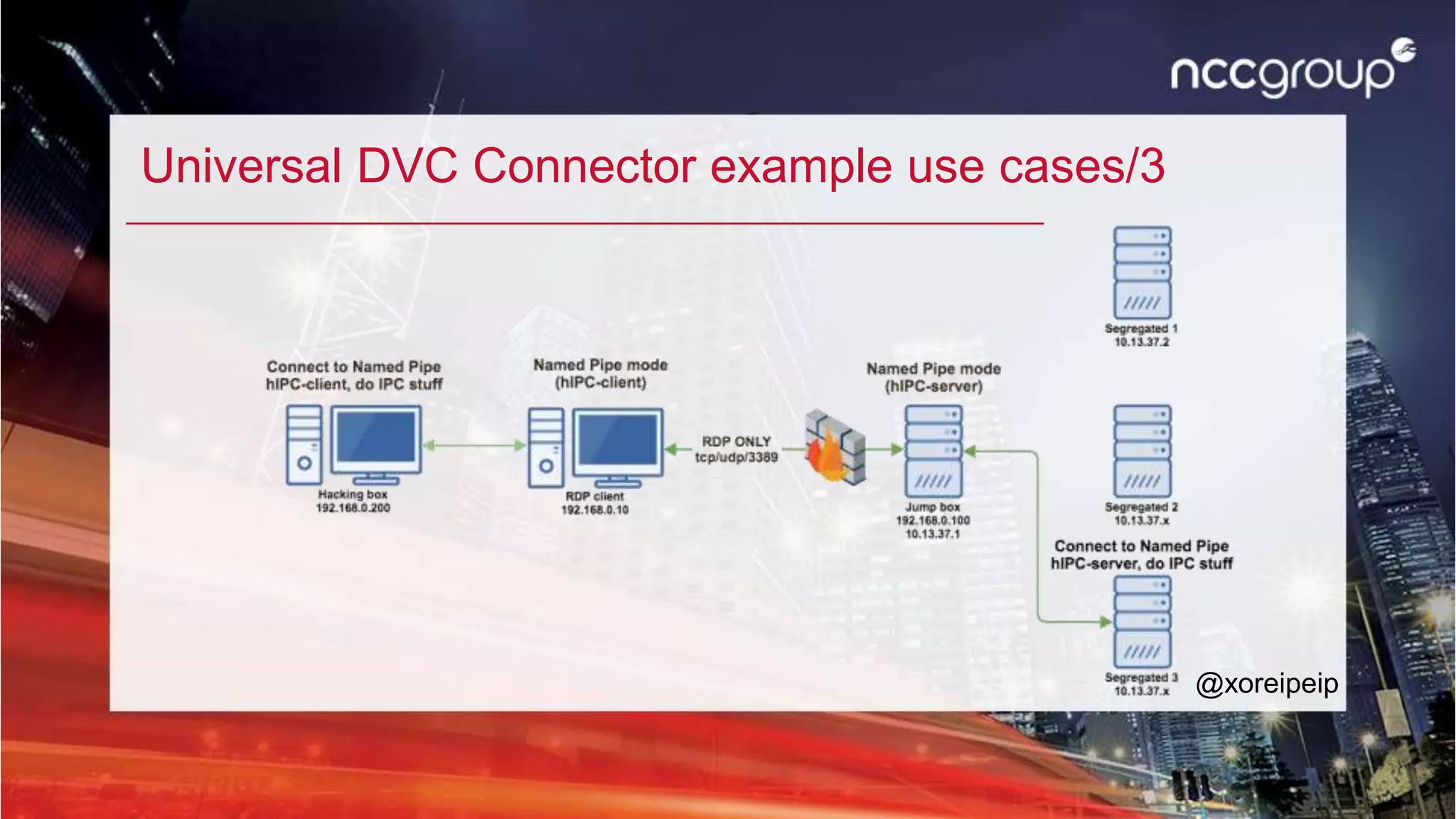
Universal DVC Connector example use cases/3
@xoreipeip
Elevator pitch
• Have you ever struggled testing over a Windows Jump box?
• Have you been asked to provide a list of tools that you need for testing?
• Have you spent a day or half a day installing your tools and still forgot something
to get approved?
@xoreipeip
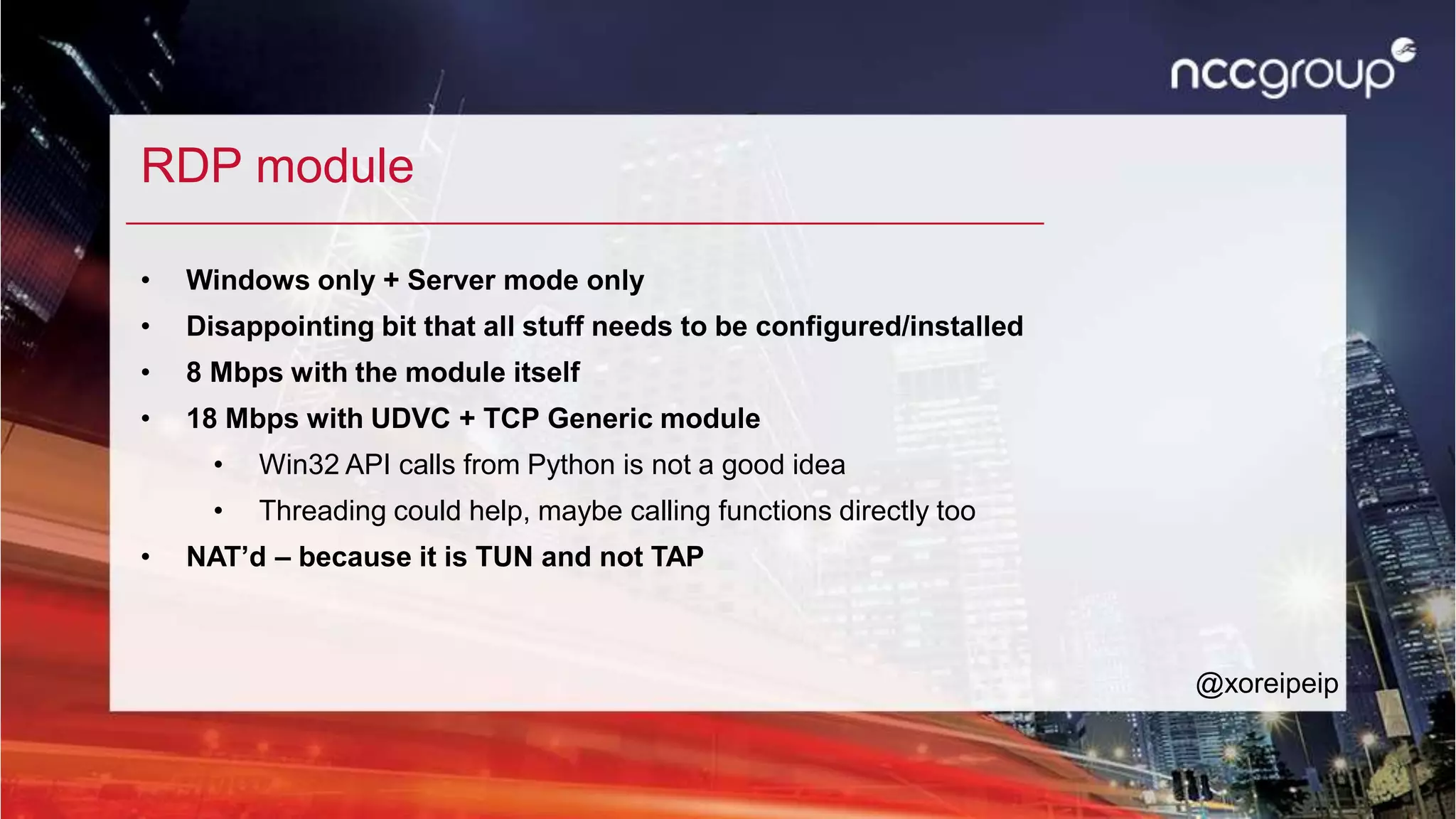
RDP module
• Windows only + Server mode only
• Disappointing bit that all stuff needs to be configured/installed
• 8 Mbps with the module itself
• 18 Mbps with UDVC + TCP Generic module
• Win32 API calls from Python is not a good idea
• Threading could help, maybe calling functions directly too
• NAT’d – because it is TUN and not TAP
@xoreipeip
WORKSHOP 2
Install
• Windows
• Are you using Vista SP1 or newer?
• Are you using 32bit or 64bit Windows?
• Install vc_redist.x86 / x64.exe
• Unzip the right zip file
• Open a cmd/powershell with Administrator rights
• regsvr32.exe /u UDVC-Plugin[x86 | x64].dll
@xoreipeip
Install
• Windows
• Is your user not an Administrator?
• Double click on UDVC-Plugin.reg (from Github)
• Start regedit.exe and go to:
HKEY_CURRENT_USERSOFTWAREMicrosoftTerminal Server
ClientDefaultAddInsUDVC-Plugin
• Change ip to 0.0.0.0
@xoreipeip
Config UDVC + connect RDP
• enabled -> 1
• mode -> 0
• ip -> 0.0.0.0
• port -> 31337
• Start mstsc.exe (Remote Desktop Client)
• Connect: 18.184.9.137
• User: xfl[your number]
• Password: HekkerSuli18
@xoreipeip
Start XFLTReaT
• Server side:
• C:xfltreat
• python xfltreat.py --server
• Client side
• edit xfltreat.py
• Set the IP of the RDP Client (RDP Client IP!)
• Enable only TCP Generic module
• Modify port to 31337
• python xfltreat.py --client
@xoreipeip
Find the secret service
• Target: 172.31.34.175
• Command: nmap -vvv -n 172.31.34.175
• What does it say? Netcat it!
@xoreipeip
Offense
• Bypass basic obstacles
• Specific ports are unfiltered (TCP / UDP)
• DNS allowed
• ICMP allowed
• Bypass not that basic obstacles
• Specific protocol allowed (IPS or any other active device in place)
• Special authentication required
• Test over jump boxes – segregated networks
• Exfiltrate information from internal networks
• Get unfiltered internet access @xoreipeip
Already released
@xoreipeip
http://xfltreat.info
https://github.com/earthquake/XFLTReaT
TODO + Help me!
@xoreipeip
• What to do next?
• Commenting
• Bug fixes
• Authentication + encryption modules
• New modules
• How can you help?
• Help develop stuff (use next-version branch)
• Follow me on twitter, retweet XFLTReaT related tweets
Q&A - Thank you for your attention
Balazs Bucsay / @xoreipeip
Office Locations
Europe
Manchester - Head Office
Amsterdam
Basingstoke
Cambridge
Copenhagen
Cheltenham
Delft
Edinburgh
Glasgow
The Hague
Leatherhead
Leeds
London
Madrid
Malmö
Milton Keynes
Munich
Vilnius
Zurich
North America
Atlanta, GA
Austin, TX
Boston, MA
Campbell, CA
Chicago, IL
Kitchener, ON
New York, NY
San Francisco, CA
Seattle, WA
Sunnyvale, CA
Toronto, ON
Asia-Pacific
Singapore
Sydney
Middle East
Dubai

Hogy jussunk ki lezárt hálózatokból?

  • 1.
    XFLTReaT: Hogy jussunkki lezárt hálózatokból? Balázs Bucsay / @xoreipeip Senior Security Consultant @ NCC Group
  • 2.
    Workshop • Needed: • VMwareOR VirtualBox • Windows Vista SP1 or later installed • Virtual Machine distributed • 5-6Gb free space • Windows and Linux BASIC skills • Grab it: • USB sticks • http://192.168.121.1/
  • 3.
    Bio / BalázsBucsay • Senior Security Consultant @ NCC Group • Strictly technical certificates: OSCE, OSCP, OSWP, GIAC GPEN, CREST CCT Inf • Former Research Director @ MRG Effitas • Twitter: @xoreipeip • Linkedin: https://www.linkedin.com/in/bucsayb
  • 4.
    Presentations • Talks aroundthe world: • North America: Hacker Halted, Shakacon • Australia: RuxCon • Asia: Hack in the Box GSEC • Europe: • DeepSec / Vienna (AT) • BruCON / Ghent (BE) • PHDays / Moscow (RU) • HackCon / Oslo (NO) • Hacktivity / Budapest (HU) • Inf. Gov. & eDisc. Summit / London (UK) @xoreipeip
  • 5.
  • 6.
    MAC Address Change •MAC => Media Access Control • Every modern network device has a MAC address • It can be changed • When/why to change? • Free limited sessions (20 min) • Steal other ppl session • Don’t be a jerk! • MAC collision would make both of you miserable
  • 7.
    Alternative gateways • Gateways/routersare routing the traffic • Very rare • Maybe there is another gateway on the network • Change router to the unfiltered one
  • 8.
    Misconfigured proxies • Checkif the proxy allows: • to connect to external sites • GET http://external.host HTTP/1.0 • to make a connection to HTTP ports (tcp/80; 8080; 8443…) • HTTP CONNECT • to connect specific ports (tcp/21; 25) • Broken HTTP or byte streams • One of the mobile operators was an example
  • 9.
    Misconfigured firewalls • ICMPis allowed (ping) • UDP on 53 allowed (DNS) • TCP on 21/80/443/465/587 Not really misconfiguration but: • Protocol specific traffic is allowed: • DNS is allowed • HTTP • etc.
  • 10.
  • 11.
  • 12.
  • 13.
    Tunnelling theory 101/ MTU @xoreipeip
  • 14.
    What is XFLTReaT? XFLTReaT(say exfil-treat or exfiltrate) • Tunnelling framework • Open-source • Python based • OOP • Modular • Multi client • Plug and Play (at least as easy as it can be) • Check functionality • STILL NOT PRODUCTION GRADE @xoreipeip
  • 15.
    Check functionality • Easyway to figure out, which protocol is not filtered on the network • Automated approach: No deep knowledge is needed • Client sends a challenge over the selected (or all) modules to the server • If the server responses with the solution: • We know that the server is up and running • The specific module/protocol is working over the network • Connection can be made @xoreipeip
  • 16.
    Multi Operating SystemSupport @xoreipeip Linux MacOS(X) Windows FreeBSD OpenBSD NetBSD TCP Generic Supported Supported Supported N/A N/A N/A UDP Generic Supported Supported N/A N/A N/A N/A ICMP Supported Supported N/A N/A N/A N/A SOCKS Supported Supported Supported N/A N/A N/A HTTP CONNECT Supported Supported Supported N/A N/A N/A DNS PoC N/A N/A N/A N/A N/A SCTP Supported N/A N/A N/A N/A N/A WebSocket Supported Supported N/A N/A N/A N/A RDP N/A N/A Supported N/A N/A N/A
  • 17.
  • 18.
  • 19.
    Install • Ubuntu VM •Network should be NAT’d (Share with my Windows/Mac) • Default user: user ; password: user • # sudo bash • # dhclient ens33 OR dhclient enp0s3 • # ping 8.8.8.8 • # cd /home/user/xfltreat/ • Use text editor to open xfltreat.conf • CHANGE YOUR CLIENT PRIVATE IP ADDRESS (clientip = 10.9.0.XXX) • Enable modules: TCP, UDP, ICMP @xoreipeip
  • 20.
    Check + Clientmode • python2.7 xfltreat.py --check • Open browser • http://www.whatismyipaddress.com • Change config, enable ONLY ONE module that worked • python2.7 xfltreat.py --client --verbose=2 • Check your IP again in the browser • Repeat with a different module @xoreipeip
  • 21.
    Dynamic Virtual Channels •Introduced in Window Server 2008 & Windows Vista SP1 • Bi-directional channels can be created in the active RDP session • How it works: • DLL plugin have to be loaded in the mstsc.exe process’ context • When initialized it creates a listener with the channel name • Magic happens only when the server connects to channel explicitly • This is how Copy&Paste, Remote drives, remote hardware are working thru RDP • Plugin could be implemented for Unices (FreeRDP) @xoreipeip
  • 22.
    Universal Dynamic VirtualChannel Connector • https://github.com/earthquake/UniversalDVC/ • Two parts: • .DLL that needs to be registered on the client (mstsc.exe) • .REG file if other user is used than the Administrator • .EXE that can be used on the server • Three modes for both sides: • listen() • connect() • Named Pipe @xoreipeip
  • 23.
    Universal DVC Connectorexample use cases/1 @xoreipeip
  • 24.
    Universal DVC Connectorexample use cases/2 @xoreipeip
  • 25.
    Universal DVC Connectorexample use cases/3 @xoreipeip
  • 26.
    Elevator pitch • Haveyou ever struggled testing over a Windows Jump box? • Have you been asked to provide a list of tools that you need for testing? • Have you spent a day or half a day installing your tools and still forgot something to get approved? @xoreipeip
  • 27.
    RDP module • Windowsonly + Server mode only • Disappointing bit that all stuff needs to be configured/installed • 8 Mbps with the module itself • 18 Mbps with UDVC + TCP Generic module • Win32 API calls from Python is not a good idea • Threading could help, maybe calling functions directly too • NAT’d – because it is TUN and not TAP @xoreipeip
  • 28.
  • 29.
    Install • Windows • Areyou using Vista SP1 or newer? • Are you using 32bit or 64bit Windows? • Install vc_redist.x86 / x64.exe • Unzip the right zip file • Open a cmd/powershell with Administrator rights • regsvr32.exe /u UDVC-Plugin[x86 | x64].dll @xoreipeip
  • 30.
    Install • Windows • Isyour user not an Administrator? • Double click on UDVC-Plugin.reg (from Github) • Start regedit.exe and go to: HKEY_CURRENT_USERSOFTWAREMicrosoftTerminal Server ClientDefaultAddInsUDVC-Plugin • Change ip to 0.0.0.0 @xoreipeip
  • 31.
    Config UDVC +connect RDP • enabled -> 1 • mode -> 0 • ip -> 0.0.0.0 • port -> 31337 • Start mstsc.exe (Remote Desktop Client) • Connect: 18.184.9.137 • User: xfl[your number] • Password: HekkerSuli18 @xoreipeip
  • 32.
    Start XFLTReaT • Serverside: • C:xfltreat • python xfltreat.py --server • Client side • edit xfltreat.py • Set the IP of the RDP Client (RDP Client IP!) • Enable only TCP Generic module • Modify port to 31337 • python xfltreat.py --client @xoreipeip
  • 33.
    Find the secretservice • Target: 172.31.34.175 • Command: nmap -vvv -n 172.31.34.175 • What does it say? Netcat it! @xoreipeip
  • 34.
    Offense • Bypass basicobstacles • Specific ports are unfiltered (TCP / UDP) • DNS allowed • ICMP allowed • Bypass not that basic obstacles • Specific protocol allowed (IPS or any other active device in place) • Special authentication required • Test over jump boxes – segregated networks • Exfiltrate information from internal networks • Get unfiltered internet access @xoreipeip
  • 35.
  • 36.
    TODO + Helpme! @xoreipeip • What to do next? • Commenting • Bug fixes • Authentication + encryption modules • New modules • How can you help? • Help develop stuff (use next-version branch) • Follow me on twitter, retweet XFLTReaT related tweets
  • 37.
    Q&A - Thankyou for your attention Balazs Bucsay / @xoreipeip
  • 38.
    Office Locations Europe Manchester -Head Office Amsterdam Basingstoke Cambridge Copenhagen Cheltenham Delft Edinburgh Glasgow The Hague Leatherhead Leeds London Madrid Malmö Milton Keynes Munich Vilnius Zurich North America Atlanta, GA Austin, TX Boston, MA Campbell, CA Chicago, IL Kitchener, ON New York, NY San Francisco, CA Seattle, WA Sunnyvale, CA Toronto, ON Asia-Pacific Singapore Sydney Middle East Dubai

Editor's Notes

  • #6 Kicsit clickbait-es cim Mi a hacker? Hackeles. Nem megyunk bele, nem is tudnam kifejteni. Nem lehet mindent kijatszani, nem arrol van szo h mikent lopj meg masokat Technologiat alapjaiban kell megerteni, megnezni mi mire valo, mi mukodik az aktualis helyzetben es atgondolni, hogy ez mikent hasznalhato ki. Amit megtanulsz: hasznalni egy toolt ami jo erre. Par otletet kapni mikent valosithato meg a cel
  • #12 Mi az h tunnel, vpn? Ismeros?
  • #35 TCP 334 HTTP CONNECT 147