Evolution of (OTA) Update in the IoT
world
About me
●
Freelancer Embedded Developer
●
U-Boot Custodian for NXP‘s i.MX
●
Author and Maintainer of SWUpdate
●
Focus on Linux Embedded
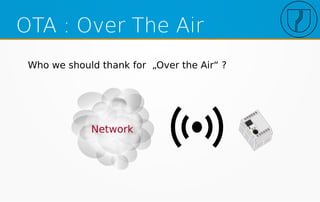
OTA : Over The Air
Who we should thank for „Over the Air“ ?
OTA Update
●
It must be „OTA“
– Over the Air is the keyword !
●
But really it is not provided by an update agent
●
It is provided by Chip Manufacturer (Atheros, ..)
●
It is provided by drivers in kernel
●
It is provided by infrastructure (WPA2, etc.)
An „OTA“ updater just uses sockets...
UTW Update
UTW: Update “Under the Water” !!! (TM)
https://www.blueyerobotics.com/
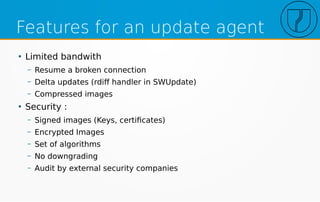
Features for an update agent
●
Limited bandwith
– Resume a broken connection
– Delta updates (rdiff handler in SWUpdate)
– Compressed images
●
Security :
– Signed images (Keys, certificates)
– Encrypted Images
– Set of algorithms
– No downgrading
– Audit by external security companies
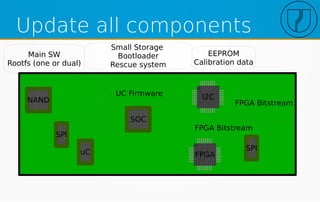
Update all components
SOC
FPGA
I2CNAND
SPI
SPI
uC
Main SW
Rootfs (one or dual)
Small Storage
Bootloader
Rescue system
EEPROM
Calibration data
FPGA Bitstream
FPGA Bitstream
UC Firmware
SWUpdate chosen by CIP
Bad points - wishes
●
Hard to manage updates from v1 to v5 directly
●
Depends on a u-boot library that needs to be
rebuilt for each target
– (replacement https://github.com/sbabic/libubootenv).
– SWUpdate 2019.04 with CONFIG_UBOOT_NEWAPI will
make use of the standalone libubootenv library, and
will read default initial environment from “/etc/u-boot-
initial-env”.
https://wiki.linuxfoundation.org/civilinfrastructureplatform/cip_comparison_report
System Update
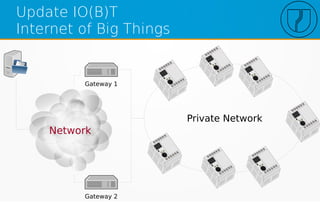
Update IO(B)T
Internet of Big Things
Private Network
Gateway 1
Gateway 2
Requirements
●
Same image for all devices
– Do not duplicate SWUs
●
Streaming of Software
●
Update devices in parallel
●
Detect topology by Update
●
Check successful update and initiate a network
restart (network update is „atomic“)
●
Still allow single update in private network
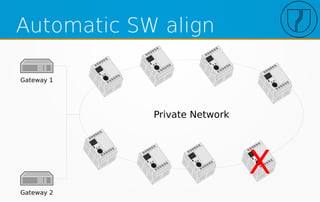
Automatic SW align
Private Network
Gateway 1
Gateway 2
X
More services for Update
●
system-update running on GW
●
SWUpdate : the usual updater (single device)
●
Pull-update: load SWU during HW substitution
Device SWU
software = {
device-controller = {
hardware-compatibility: [ "1.0"];
rescue : {
partitions: ( /* ubi volumes */ );
images: ( {…..});
uboot: ( {…..} );
};
};
production : {
copy1 : {
images: (...)
uboot: (...)
};
copy2 : {
images: (...)
uboot: (...)
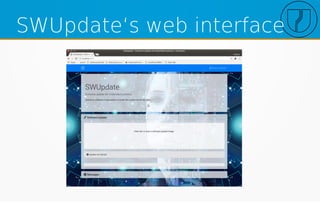
SWUpdate‘s web interface
Device
SWU
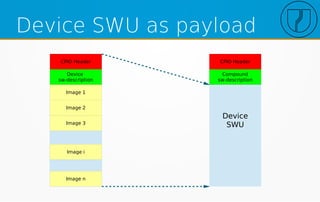
Device SWU as payload
CPIO Header
Device
sw-description
Image 1
Image 2
Image 3
Image i
Image n
CPIO Header
Compound
sw-description
Compound image
software = {
gateway-controller = {
embedded-script = „
function detect_topology(image)
……………………..
end
hardware-compatibility: [ "1.0"];
images: (
{
filename = "<SWU Image for each device>";
type = "swuforwarder“;
sha256 = "<hash 256 of SWU>“;
hook = "detect_topology“
properties {
}; // this will be filles by the embedded script
};
};
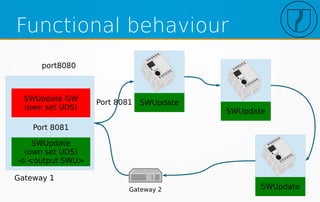
Functional behaviour
SWUpdate GW
(own set UDS)
SWUpdate
(own set UDS)
-o <output SWU>
Port 8081
port8080
SWUpdatePort 8081
SWUpdate
SWUpdateGateway 2
Gateway 1
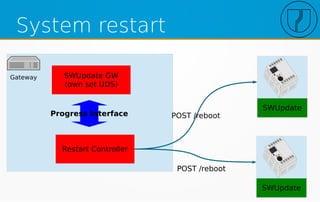
System restart
Gateway SWUpdate GW
(own set UDS)
POST /reboot
SWUpdate
SWUpdate
POST /reboot
Restart Controller
Progress Interface
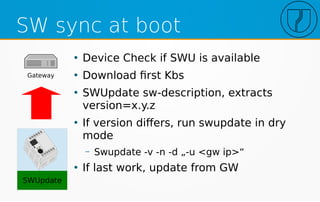
SW sync at boot
Gateway
SWUpdate
●
Device Check if SWU is available
●
Download first Kbs
●
SWUpdate sw-description, extracts
version=x.y.z
●
If version differs, run swupdate in dry
mode
– Swupdate -v -n -d „-u <gw ip>“
●
If last work, update from GW
Configuration deployment
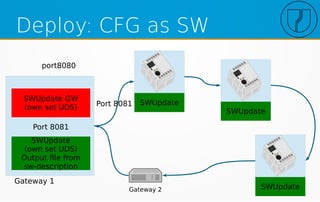
Deploy: CFG as SW
SWUpdate GW
(own set UDS)
SWUpdate
(own set UDS)
Output file from
sw-description
Port 8081
port8080
SWUpdatePort 8081
SWUpdate
SWUpdateGateway 2
Gateway 1
Configuration SWU
software = {
device-controller = {
output = „config.swu“
hardware-compatibility: [ "1.0"];
production : {
copy1 : {
files: (
filename = „configuration.tar.gz“
type = „archive“;
compressed = true;
path = „/etc/application“;
);
};
copy2 : {
ref = „ ../copy1“;
}
Factory SW deployment
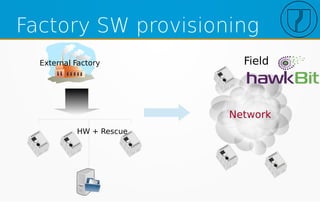
Factory SW provisioning
External Factory
HW + Rescue
Field
Updater Proxy
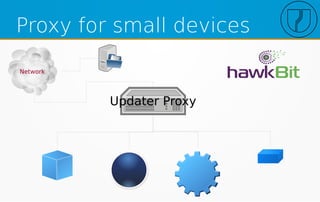
Proxy for small devices
Updater Proxy
Server unawareness
Layer to the server
Hawkbit
Generic Server
(HTTP redirect)
Scheduler / polling time
SWUpdate
main Task
Suricatta process
Generic Server Server X
SWUpdate
IPC
Custom protocol
Reason for custom protocol
●
There is already a well defined standard
●
Project has already an own download method
●
Compatibility with past / previous device
generation
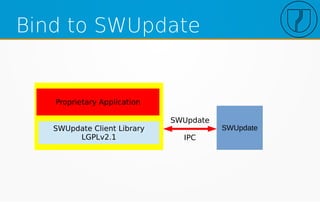
Bind to SWUpdate
SWUpdate
SWUpdate
IPC
SWUpdate Client Library
LGPLv2.1
Proprietary Application
Feature request:
selective downloading
●
EV Charging business
●
Protocol standardised (OCPP)
●
Vendors have many variants of devices and mode
of operations
●
Admins of backend just manage update files on
vendor basis, not on devices
●
Request for one file, but the updater should
retrieve just the parts that must be installed.
Continuous SW development
●
SW is installed on device for all developers
●
Single developer does not need to bother with
update
●
Single way to update, closer to the case in field
– An update process is well tested before production
– Ensure developers are working with same SW
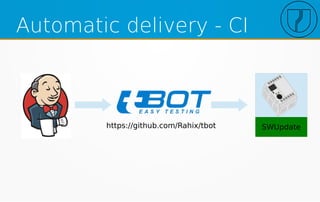
Automatic delivery - CI
SWUpdatehttps://github.com/Rahix/tbot
Integration with buildsystems
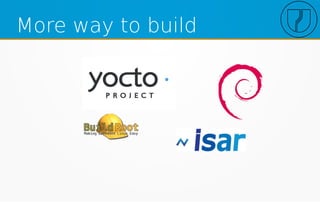
More way to build
Summary
●
Not just update „standard“ artifacts
– Flash, FPGA, uC, etc.
●
Deploy not just SW
– Configuration, OEM Data, etc.
●
Update complex system as one single device
●
Support different build systems
●
Support different fleet deployment servers
swupdate@googlegroups.com

Evolution of ota_update_in_the_io_t_world

  • 1.
    Evolution of (OTA)Update in the IoT world
  • 2.
    About me ● Freelancer EmbeddedDeveloper ● U-Boot Custodian for NXP‘s i.MX ● Author and Maintainer of SWUpdate ● Focus on Linux Embedded
  • 3.
    OTA : OverThe Air Who we should thank for „Over the Air“ ?
  • 4.
    OTA Update ● It mustbe „OTA“ – Over the Air is the keyword ! ● But really it is not provided by an update agent ● It is provided by Chip Manufacturer (Atheros, ..) ● It is provided by drivers in kernel ● It is provided by infrastructure (WPA2, etc.) An „OTA“ updater just uses sockets...
  • 5.
    UTW Update UTW: Update“Under the Water” !!! (TM) https://www.blueyerobotics.com/
  • 6.
    Features for anupdate agent ● Limited bandwith – Resume a broken connection – Delta updates (rdiff handler in SWUpdate) – Compressed images ● Security : – Signed images (Keys, certificates) – Encrypted Images – Set of algorithms – No downgrading – Audit by external security companies
  • 7.
    Update all components SOC FPGA I2CNAND SPI SPI uC MainSW Rootfs (one or dual) Small Storage Bootloader Rescue system EEPROM Calibration data FPGA Bitstream FPGA Bitstream UC Firmware
  • 8.
  • 9.
    Bad points -wishes ● Hard to manage updates from v1 to v5 directly ● Depends on a u-boot library that needs to be rebuilt for each target – (replacement https://github.com/sbabic/libubootenv). – SWUpdate 2019.04 with CONFIG_UBOOT_NEWAPI will make use of the standalone libubootenv library, and will read default initial environment from “/etc/u-boot- initial-env”. https://wiki.linuxfoundation.org/civilinfrastructureplatform/cip_comparison_report
  • 10.
  • 11.
    Update IO(B)T Internet ofBig Things Private Network Gateway 1 Gateway 2
  • 12.
    Requirements ● Same image forall devices – Do not duplicate SWUs ● Streaming of Software ● Update devices in parallel ● Detect topology by Update ● Check successful update and initiate a network restart (network update is „atomic“) ● Still allow single update in private network
  • 13.
    Automatic SW align PrivateNetwork Gateway 1 Gateway 2 X
  • 14.
    More services forUpdate ● system-update running on GW ● SWUpdate : the usual updater (single device) ● Pull-update: load SWU during HW substitution
  • 15.
    Device SWU software ={ device-controller = { hardware-compatibility: [ "1.0"]; rescue : { partitions: ( /* ubi volumes */ ); images: ( {…..}); uboot: ( {…..} ); }; }; production : { copy1 : { images: (...) uboot: (...) }; copy2 : { images: (...) uboot: (...)
  • 16.
  • 17.
    Device SWU Device SWU aspayload CPIO Header Device sw-description Image 1 Image 2 Image 3 Image i Image n CPIO Header Compound sw-description
  • 18.
    Compound image software ={ gateway-controller = { embedded-script = „ function detect_topology(image) …………………….. end hardware-compatibility: [ "1.0"]; images: ( { filename = "<SWU Image for each device>"; type = "swuforwarder“; sha256 = "<hash 256 of SWU>“; hook = "detect_topology“ properties { }; // this will be filles by the embedded script }; };
  • 19.
    Functional behaviour SWUpdate GW (ownset UDS) SWUpdate (own set UDS) -o <output SWU> Port 8081 port8080 SWUpdatePort 8081 SWUpdate SWUpdateGateway 2 Gateway 1
  • 20.
    System restart Gateway SWUpdateGW (own set UDS) POST /reboot SWUpdate SWUpdate POST /reboot Restart Controller Progress Interface
  • 21.
    SW sync atboot Gateway SWUpdate ● Device Check if SWU is available ● Download first Kbs ● SWUpdate sw-description, extracts version=x.y.z ● If version differs, run swupdate in dry mode – Swupdate -v -n -d „-u <gw ip>“ ● If last work, update from GW
  • 22.
  • 23.
    Deploy: CFG asSW SWUpdate GW (own set UDS) SWUpdate (own set UDS) Output file from sw-description Port 8081 port8080 SWUpdatePort 8081 SWUpdate SWUpdateGateway 2 Gateway 1
  • 24.
    Configuration SWU software ={ device-controller = { output = „config.swu“ hardware-compatibility: [ "1.0"]; production : { copy1 : { files: ( filename = „configuration.tar.gz“ type = „archive“; compressed = true; path = „/etc/application“; ); }; copy2 : { ref = „ ../copy1“; }
  • 25.
  • 26.
    Factory SW provisioning ExternalFactory HW + Rescue Field
  • 27.
  • 28.
    Proxy for smalldevices Updater Proxy
  • 29.
  • 30.
    Layer to theserver Hawkbit Generic Server (HTTP redirect) Scheduler / polling time SWUpdate main Task Suricatta process Generic Server Server X SWUpdate IPC
  • 31.
  • 32.
    Reason for customprotocol ● There is already a well defined standard ● Project has already an own download method ● Compatibility with past / previous device generation
  • 33.
    Bind to SWUpdate SWUpdate SWUpdate IPC SWUpdateClient Library LGPLv2.1 Proprietary Application
  • 34.
    Feature request: selective downloading ● EVCharging business ● Protocol standardised (OCPP) ● Vendors have many variants of devices and mode of operations ● Admins of backend just manage update files on vendor basis, not on devices ● Request for one file, but the updater should retrieve just the parts that must be installed.
  • 35.
    Continuous SW development ● SWis installed on device for all developers ● Single developer does not need to bother with update ● Single way to update, closer to the case in field – An update process is well tested before production – Ensure developers are working with same SW
  • 36.
    Automatic delivery -CI SWUpdatehttps://github.com/Rahix/tbot
  • 37.
  • 38.
  • 39.
    Summary ● Not just update„standard“ artifacts – Flash, FPGA, uC, etc. ● Deploy not just SW – Configuration, OEM Data, etc. ● Update complex system as one single device ● Support different build systems ● Support different fleet deployment servers
  • 40.