Is That A Penguin In My Windows?
Spencer (@zeroSteiner) McIntyre BSides Las Vegas Wednesday August 3rd, 2016
Agenda
• About Me
• Windows Subsystem for Linux Overview
• Why are we here and why do we care?
• How does it work?
• Implementation Details
• Syscall functionality
• Filesystem details
• Attacker Notes
• Fingerprinting WSL
• Payload Compatibility
• Inter process access
About Me
• Spencer McIntyre
• Work at SecureState
• Research, Development, “Special” Projects
• BSOD-inducer
• Avid open source contributor (Metasploit among others)
• Python enthusiast
• I can haz acronyms?
• OSCP, OSEE
Overview
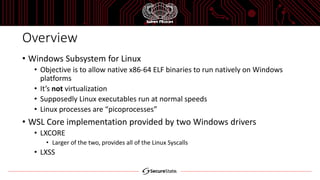
• Windows Subsystem for Linux
• Objective is to allow native x86-64 ELF binaries to run natively on Windows
platforms
• It’s not virtualization
• Supposedly Linux executables run at normal speeds
• Linux processes are “picoprocesses”
• WSL Core implementation provided by two Windows drivers
• LXCORE
• Larger of the two, provides all of the Linux Syscalls
• LXSS
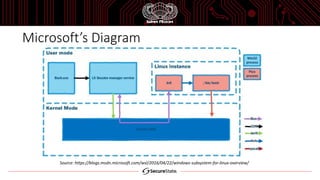
Microsoft’s Diagram
Source: https://blogs.msdn.microsoft.com/wsl/2016/04/22/windows-subsystem-for-linux-overview/
Implementation Details
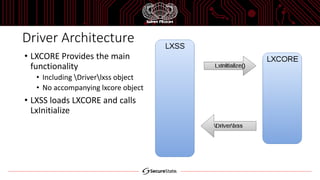
Driver Architecture
• LXCORE Provides the main
functionality
• Including Driverlxss object
• No accompanying lxcore object
• LXSS loads LXCORE and calls
LxInitialize
Picoprocesses
• Container process with a limited access to the Kernel API
• Product of Microsoft’s research project dubbed “Drawbridge” from
2011
• Project goal was to provide faster isolated / sandboxed execution
• Speed came from the lack of a virtualization overhead
• First added to Windows 8.1 and Server 2012 R2
• Process does not contain PEB / TEB / NTDLL.DLL / user32!gSharedInfo
• Windows Kernel still provides thread scheduling and memory
management
Syscalls You Say?
• Picoprocesses get a separate syscall dispatcher
• Driver registers itself as a picoprocess provider and dispatches it’s own syscalls
• Linux syscalls implemented in LXCORE!LxpSyscall_*
• 216 in Windows 10 Preview 14385 vs 345 in Linux 3.4-rc7
• 62.6% coverage
• Missing syscalls include some *32 equivalents
• Existing are 16-bit not 64-bit, 32-bit calls were introduced in Linux 2.4
Syscalls You Say?
• The kernel dispatches to the picoprovider for fulfillment
• Linux calls with NT equivalents forward the call to be fulfilled by the kernel
• Syscall is made by the user process with the convention expected by
the pico driver
• In this case, the one specified by Linux x86-64 / System V ABI
• System V ABI Syscall Convention
• Syscall number -> RAX
• Arguments -> RDI, RSI, RDX, RCX, R8, R9 (remaining on the stack)
Debugging Syscalls
• Useful for bug hunting
• We can break on specific conditions using the Linux calling convention
• Example call stack for MMAP
LXCORE!LxpSys_MMAP <- Break here for mmap syscalls and/or args to mmap
LXCORE!LxpSysDispatch
LXCORE!PicoSystemCallDispatch <- Break here for all WSL syscalls
nt!PsPicoSystemCallDispatch <- Break here for all picoprocess syscalls
nt!KiSystemServiceUser
Filesystems
• WSL 2 main file systems
• VoIFs
• Linux root directories
• Not accessible by Windows applications
• DriveFs
• Access to the Windows filesystem
• /mnt/c
• Additional filesystems for /proc, /sys, etc.
• Control file systems are incomplete
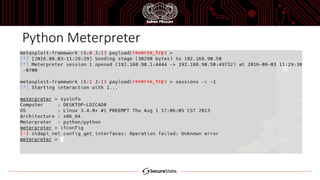
• /proc/net results in broken ifconfig
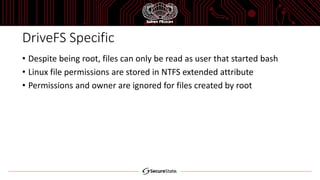
DriveFS Specific
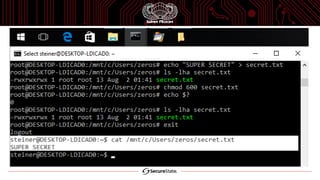
• Despite being root, files can only be read as user that started bash
• Linux file permissions are stored in NTFS extended attribute
• Permissions and owner are ignored for files created by root
Attacker Notes
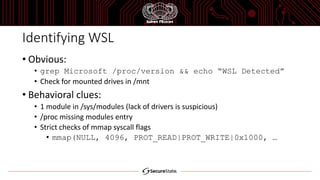
Identifying WSL
• Obvious:
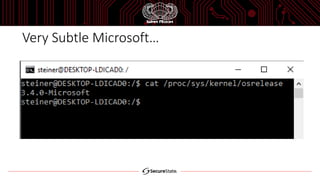
• grep Microsoft /proc/version && echo “WSL Detected”
• Check for mounted drives in /mnt
• Behavioral clues:
• 1 module in /sys/modules (lack of drivers is suspicious)
• /proc missing modules entry
• Strict checks of mmap syscall flags
• mmap(NULL, 4096, PROT_READ|PROT_WRITE|0x1000, …
Very Subtle Microsoft…
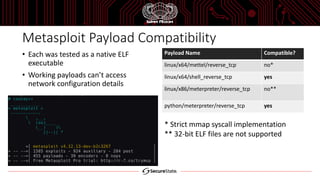
Metasploit Payload Compatibility
• Each was tested as a native ELF
executable
• Working payloads can’t access
network configuration details
Payload Name Compatible?
linux/x64/mettel/reverse_tcp no*
linux/x64/shell_reverse_tcp yes
linux/x86/meterpreter/reverse_tcp no**
python/meterpreter/reverse_tcp yes
* Strict mmap syscall implementation
** 32-bit ELF files are not supported
Python Meterpreter
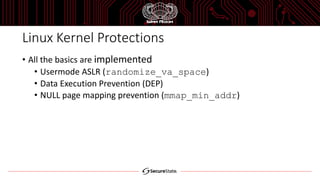
Linux Kernel Protections
• All the basics are implemented
• Usermode ASLR (randomize_va_space)
• Data Execution Prevention (DEP)
• NULL page mapping prevention (mmap_min_addr)
Cross Process Access
• Desirable for an attacker to infect the Linux container or Windows host
• Linux processes can not list Windows processes
• Windows can list Linux processes
• PIDs do not match
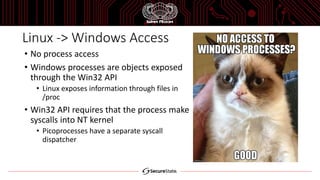
Linux -> Windows Access
• No process access
• Windows processes are objects exposed
through the Win32 API
• Linux exposes information through files in
/proc
• Win32 API requires that the process make
syscalls into NT kernel
• Picoprocesses have a separate syscall
dispatcher
Windows -> Linux Access
• Limited information is available
• Linux processes can not be debugged (OpenProcess fails)
• Acceptable flags: (PROCESS_QUERY_LIMITED_INFORMATION |
SYNCHRONIZE)
• Without this Meterpreter’s migrate will not function
• Low 8-bits of Linux process exit code can be retrieved with
GetExitCodeProcess from Windows
• dwStatus >> 8
• Windows user processes can obtain same info for “root” processes
• The Windows permissions are effectively the same (Can’t write to
%Systemroot%System32wbemMOF etc.)
Cross User Access
• WSL Environments are specific to the user who started them
• Hence the inherited permissions
• Resources in one running WSL environment can not be accessed from
another
• Multiple invocations of “bash” as one user do share an environment
• Files, processes, etc. are all inaccessible
• Primarily relevant in multi-user environments like Server 2012
Closing Thoughts
• “root” doesn’t mean much
• Nuances in what root means and how its handled will be a source of
user mistakes
References
• https://blogs.msdn.microsoft.com/wsl/2016/04/22/windows-subsystem-for-linux-overview/
• https://blogs.windows.com/windowsexperience/2016/04/06/announcing-windows-10-insider-
preview-build-14316/
• http://research.microsoft.com/en-us/projects/drawbridge/
• https://blogs.windows.com/buildingapps/2016/03/30/run-bash-on-ubuntu-on-windows/
• https://github.com/Microsoft/BashOnWindows
• https://blogs.msdn.microsoft.com/wsl/2016/06/15/wsl-file-system-support/
• https://blogs.msdn.microsoft.com/wsl/2016/06/08/wsl-system-calls/
• https://blogs.msdn.microsoft.com/wsl/2016/05/23/pico-process-overview/
Thanks for your time!
Spencer McIntyre
@zeroSteiner
github.com/zeroSteiner

Is That A Penguin In My Windows?

  • 1.
    Is That APenguin In My Windows? Spencer (@zeroSteiner) McIntyre BSides Las Vegas Wednesday August 3rd, 2016
  • 2.
    Agenda • About Me •Windows Subsystem for Linux Overview • Why are we here and why do we care? • How does it work? • Implementation Details • Syscall functionality • Filesystem details • Attacker Notes • Fingerprinting WSL • Payload Compatibility • Inter process access
  • 3.
    About Me • SpencerMcIntyre • Work at SecureState • Research, Development, “Special” Projects • BSOD-inducer • Avid open source contributor (Metasploit among others) • Python enthusiast • I can haz acronyms? • OSCP, OSEE
  • 4.
    Overview • Windows Subsystemfor Linux • Objective is to allow native x86-64 ELF binaries to run natively on Windows platforms • It’s not virtualization • Supposedly Linux executables run at normal speeds • Linux processes are “picoprocesses” • WSL Core implementation provided by two Windows drivers • LXCORE • Larger of the two, provides all of the Linux Syscalls • LXSS
  • 5.
  • 6.
  • 7.
    Driver Architecture • LXCOREProvides the main functionality • Including Driverlxss object • No accompanying lxcore object • LXSS loads LXCORE and calls LxInitialize
  • 8.
    Picoprocesses • Container processwith a limited access to the Kernel API • Product of Microsoft’s research project dubbed “Drawbridge” from 2011 • Project goal was to provide faster isolated / sandboxed execution • Speed came from the lack of a virtualization overhead • First added to Windows 8.1 and Server 2012 R2 • Process does not contain PEB / TEB / NTDLL.DLL / user32!gSharedInfo • Windows Kernel still provides thread scheduling and memory management
  • 9.
    Syscalls You Say? •Picoprocesses get a separate syscall dispatcher • Driver registers itself as a picoprocess provider and dispatches it’s own syscalls • Linux syscalls implemented in LXCORE!LxpSyscall_* • 216 in Windows 10 Preview 14385 vs 345 in Linux 3.4-rc7 • 62.6% coverage • Missing syscalls include some *32 equivalents • Existing are 16-bit not 64-bit, 32-bit calls were introduced in Linux 2.4
  • 10.
    Syscalls You Say? •The kernel dispatches to the picoprovider for fulfillment • Linux calls with NT equivalents forward the call to be fulfilled by the kernel • Syscall is made by the user process with the convention expected by the pico driver • In this case, the one specified by Linux x86-64 / System V ABI • System V ABI Syscall Convention • Syscall number -> RAX • Arguments -> RDI, RSI, RDX, RCX, R8, R9 (remaining on the stack)
  • 11.
    Debugging Syscalls • Usefulfor bug hunting • We can break on specific conditions using the Linux calling convention • Example call stack for MMAP LXCORE!LxpSys_MMAP <- Break here for mmap syscalls and/or args to mmap LXCORE!LxpSysDispatch LXCORE!PicoSystemCallDispatch <- Break here for all WSL syscalls nt!PsPicoSystemCallDispatch <- Break here for all picoprocess syscalls nt!KiSystemServiceUser
  • 12.
    Filesystems • WSL 2main file systems • VoIFs • Linux root directories • Not accessible by Windows applications • DriveFs • Access to the Windows filesystem • /mnt/c • Additional filesystems for /proc, /sys, etc. • Control file systems are incomplete • /proc/net results in broken ifconfig
  • 13.
    DriveFS Specific • Despitebeing root, files can only be read as user that started bash • Linux file permissions are stored in NTFS extended attribute • Permissions and owner are ignored for files created by root
  • 15.
  • 16.
    Identifying WSL • Obvious: •grep Microsoft /proc/version && echo “WSL Detected” • Check for mounted drives in /mnt • Behavioral clues: • 1 module in /sys/modules (lack of drivers is suspicious) • /proc missing modules entry • Strict checks of mmap syscall flags • mmap(NULL, 4096, PROT_READ|PROT_WRITE|0x1000, …
  • 17.
  • 18.
    Metasploit Payload Compatibility •Each was tested as a native ELF executable • Working payloads can’t access network configuration details Payload Name Compatible? linux/x64/mettel/reverse_tcp no* linux/x64/shell_reverse_tcp yes linux/x86/meterpreter/reverse_tcp no** python/meterpreter/reverse_tcp yes * Strict mmap syscall implementation ** 32-bit ELF files are not supported
  • 19.
  • 20.
    Linux Kernel Protections •All the basics are implemented • Usermode ASLR (randomize_va_space) • Data Execution Prevention (DEP) • NULL page mapping prevention (mmap_min_addr)
  • 21.
    Cross Process Access •Desirable for an attacker to infect the Linux container or Windows host • Linux processes can not list Windows processes • Windows can list Linux processes • PIDs do not match
  • 22.
    Linux -> WindowsAccess • No process access • Windows processes are objects exposed through the Win32 API • Linux exposes information through files in /proc • Win32 API requires that the process make syscalls into NT kernel • Picoprocesses have a separate syscall dispatcher
  • 23.
    Windows -> LinuxAccess • Limited information is available • Linux processes can not be debugged (OpenProcess fails) • Acceptable flags: (PROCESS_QUERY_LIMITED_INFORMATION | SYNCHRONIZE) • Without this Meterpreter’s migrate will not function • Low 8-bits of Linux process exit code can be retrieved with GetExitCodeProcess from Windows • dwStatus >> 8 • Windows user processes can obtain same info for “root” processes • The Windows permissions are effectively the same (Can’t write to %Systemroot%System32wbemMOF etc.)
  • 24.
    Cross User Access •WSL Environments are specific to the user who started them • Hence the inherited permissions • Resources in one running WSL environment can not be accessed from another • Multiple invocations of “bash” as one user do share an environment • Files, processes, etc. are all inaccessible • Primarily relevant in multi-user environments like Server 2012
  • 25.
    Closing Thoughts • “root”doesn’t mean much • Nuances in what root means and how its handled will be a source of user mistakes
  • 27.
    References • https://blogs.msdn.microsoft.com/wsl/2016/04/22/windows-subsystem-for-linux-overview/ • https://blogs.windows.com/windowsexperience/2016/04/06/announcing-windows-10-insider- preview-build-14316/ •http://research.microsoft.com/en-us/projects/drawbridge/ • https://blogs.windows.com/buildingapps/2016/03/30/run-bash-on-ubuntu-on-windows/ • https://github.com/Microsoft/BashOnWindows • https://blogs.msdn.microsoft.com/wsl/2016/06/15/wsl-file-system-support/ • https://blogs.msdn.microsoft.com/wsl/2016/06/08/wsl-system-calls/ • https://blogs.msdn.microsoft.com/wsl/2016/05/23/pico-process-overview/
  • 28.
    Thanks for yourtime! Spencer McIntyre @zeroSteiner github.com/zeroSteiner