
The Information Workbench as a Self-Service
Platform for Linked Data Applications
COLD Workshop @ ISWC, Nov 23, 2011
Peter Haase, Michael Schmidt, Andreas Schwarte
fluid Operations AG
Linked Data Application Development is a
Difficult Task
Example: Linked Data-Thon
Build an end user oriented Linked Data Application in two weeks,
using ISWC metadata and other Linked Data sources


Challenges

•   Discovery and automated integration of relevant data sources

•   Heterogeneity in various dimensions

•   Quality of Linked Data

•   End-user oriented interfaces
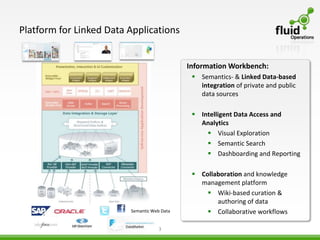
Platform for Linked Data Applications


                                             Information Workbench:
                                               Semantics- & Linked Data-based
                                                integration of private and public
                                                data sources

                                               Intelligent Data Access and
                                                Analytics
                                                   Visual Exploration
                                                   Semantic Search
                                                   Dashboarding and Reporting

                                               Collaboration and knowledge
                                                management platform
                                                   Wiki-based curation &
                                                     authoring of data
                         Semantic Web Data         Collaborative workflows

                                     3
E v e r y t h i n g S e l f -s e r v i c

                                             Self-Service Application Development Process

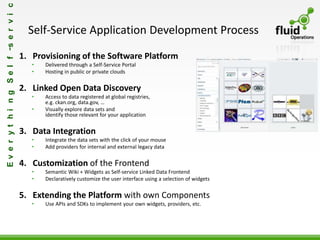
                                           1. Provisioning of the Software Platform
                                              •   Delivered through a Self-Service Portal
                                              •   Hosting in public or private clouds

                                           2. Linked Open Data Discovery
                                              •   Access to data registered at global registries,
                                                  e.g. ckan.org, data.gov, …
                                              •   Visually explore data sets and
                                                  identify those relevant for your application

                                           3. Data Integration
                                              •   Integrate the data sets with the click of your mouse
                                              •   Add providers for internal and external legacy data


                                           4. Customization of the Frontend
                                              •   Semantic Wiki + Widgets as Self-service Linked Data Frontend
                                              •   Declaratively customize the user interface using a selection of widgets


                                           5. Extending the Platform with own Components
                                              •   Use APIs and SDKs to implement your own widgets, providers, etc.
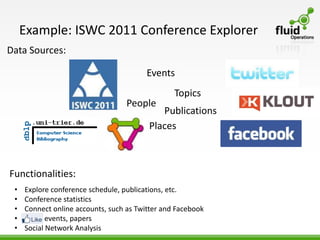
Example: ISWC 2011 Conference Explorer
Data Sources:

                                         Events
                                                 Topics
                                   People
                                            Publications
                                         Places


Functionalities:
 •   Explore conference schedule, publications, etc.
 •   Conference statistics
 •   Connect online accounts, such as Twitter and Facebook
 •   Like events, papers
 •   Social Network Analysis
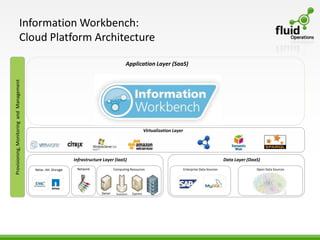
Information Workbench:
                            Cloud Platform Architecture

                                                                                          Application Layer (SaaS)
Provisioning, Monitoring and Management


                                                                                                     Virtualization Layer


                                                               Infrastructure Layer (IaaS)                                                            Data Layer (DaaS)
                                          Netw.-Att. Storage    Network            Computing Resources                      Enterprise Data Sources                  Open Data Sources
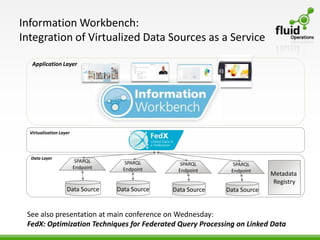
Information Workbench:
Integration of Virtualized Data Sources as a Service

   Application Layer


  Virtualization Layer


  Data Layer
                          SPARQL       SPARQL       SPARQL        SPARQL
                         Endpoint     Endpoint     Endpoint      Endpoint
                                                                              Metadata
                                                                               Registry
                    Data Source     Data Source   Data Source   Data Source


 See also presentation at main conference on Wednesday:
 FedX: Optimization Techniques for Federated Query Processing on Linked Data
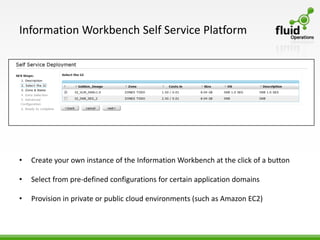
Information Workbench Self Service Platform


•   Create your own instance of the Information Workbench at the click of a button

•   Select from pre-defined configurations for certain application domains

•   Provision in private or public cloud environments (such as Amazon EC2)
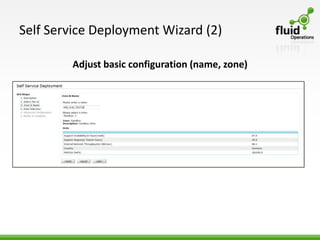
Self Service Deployment Wizard (2)

        Adjust basic configuration (name, zone)
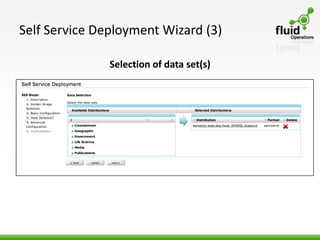
Self Service Deployment Wizard (3)

               Selection of data set(s)
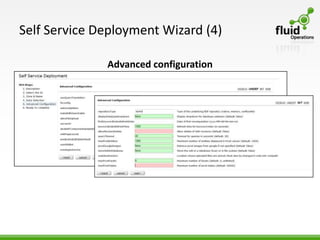
Self Service Deployment Wizard (4)

              Advanced configuration
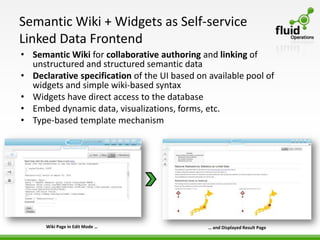
Semantic Wiki + Widgets as Self-service
Linked Data Frontend
• Semantic Wiki for collaborative authoring and linking of
  unstructured and structured semantic data
• Declarative specification of the UI based on available pool of
  widgets and simple wiki-based syntax
• Widgets have direct access to the database
• Embed dynamic data, visualizations, forms, etc.
• Type-based template mechanism


      Wiki Page in Edit Mode …                 … and Displayed Result Page
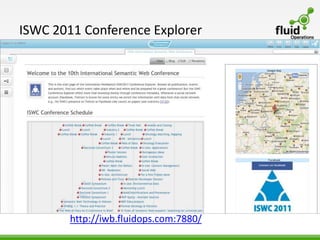
ISWC 2011 Conference Explorer


        http://iwb.fluidops.com:7880/
CONTACT:
fluid Operations
Altrottstr. 31
Walldorf, Germany

Email: contact@fluidOps.com
website: www.fluidOps.com
Tel.: +49 6227 3846-527

The Information Workbench as a Self-Service Platform for Linked Data Applications

  • 1.
    The Information Workbenchas a Self-Service Platform for Linked Data Applications COLD Workshop @ ISWC, Nov 23, 2011 Peter Haase, Michael Schmidt, Andreas Schwarte fluid Operations AG
  • 2.
    Linked Data ApplicationDevelopment is a Difficult Task Example: Linked Data-Thon Build an end user oriented Linked Data Application in two weeks, using ISWC metadata and other Linked Data sources Challenges • Discovery and automated integration of relevant data sources • Heterogeneity in various dimensions • Quality of Linked Data • End-user oriented interfaces
  • 3.
    Platform for LinkedData Applications Information Workbench:  Semantics- & Linked Data-based integration of private and public data sources  Intelligent Data Access and Analytics  Visual Exploration  Semantic Search  Dashboarding and Reporting  Collaboration and knowledge management platform  Wiki-based curation & authoring of data Semantic Web Data  Collaborative workflows 3
  • 4.
    E v er y t h i n g S e l f -s e r v i c Self-Service Application Development Process 1. Provisioning of the Software Platform • Delivered through a Self-Service Portal • Hosting in public or private clouds 2. Linked Open Data Discovery • Access to data registered at global registries, e.g. ckan.org, data.gov, … • Visually explore data sets and identify those relevant for your application 3. Data Integration • Integrate the data sets with the click of your mouse • Add providers for internal and external legacy data 4. Customization of the Frontend • Semantic Wiki + Widgets as Self-service Linked Data Frontend • Declaratively customize the user interface using a selection of widgets 5. Extending the Platform with own Components • Use APIs and SDKs to implement your own widgets, providers, etc.
  • 5.
    Example: ISWC 2011Conference Explorer Data Sources: Events Topics People Publications Places Functionalities: • Explore conference schedule, publications, etc. • Conference statistics • Connect online accounts, such as Twitter and Facebook • Like events, papers • Social Network Analysis
  • 6.
    Information Workbench: Cloud Platform Architecture Application Layer (SaaS) Provisioning, Monitoring and Management Virtualization Layer Infrastructure Layer (IaaS) Data Layer (DaaS) Netw.-Att. Storage Network Computing Resources Enterprise Data Sources Open Data Sources
  • 7.
    Information Workbench: Integration ofVirtualized Data Sources as a Service Application Layer Virtualization Layer Data Layer SPARQL SPARQL SPARQL SPARQL Endpoint Endpoint Endpoint Endpoint Metadata Registry Data Source Data Source Data Source Data Source See also presentation at main conference on Wednesday: FedX: Optimization Techniques for Federated Query Processing on Linked Data
  • 8.
    Information Workbench SelfService Platform • Create your own instance of the Information Workbench at the click of a button • Select from pre-defined configurations for certain application domains • Provision in private or public cloud environments (such as Amazon EC2)
  • 9.
    Self Service DeploymentWizard (2) Adjust basic configuration (name, zone)
  • 10.
    Self Service DeploymentWizard (3) Selection of data set(s)
  • 11.
    Self Service DeploymentWizard (4) Advanced configuration
  • 12.
    Semantic Wiki +Widgets as Self-service Linked Data Frontend • Semantic Wiki for collaborative authoring and linking of unstructured and structured semantic data • Declarative specification of the UI based on available pool of widgets and simple wiki-based syntax • Widgets have direct access to the database • Embed dynamic data, visualizations, forms, etc. • Type-based template mechanism Wiki Page in Edit Mode … … and Displayed Result Page
  • 13.
    ISWC 2011 ConferenceExplorer http://iwb.fluidops.com:7880/
  • 14.
    CONTACT: fluid Operations Altrottstr. 31 Walldorf,Germany Email: contact@fluidOps.com website: www.fluidOps.com Tel.: +49 6227 3846-527