Azure Data Lake Store
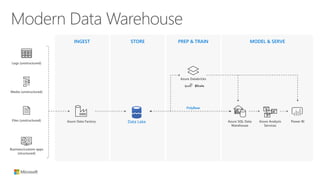
INGEST STORE PREP & TRAIN MODEL & SERVE
Modern Data Warehouse
Logs (unstructured)
Azure Data Factory
Azure Databricks
Media (unstructured)
Files (unstructured)
PolyBase
Business/custom apps
(structured)
Azure SQL Data
Warehouse
Azure Analysis
Services
Power BIData Lake
?
?
?
?
Why data lakes?
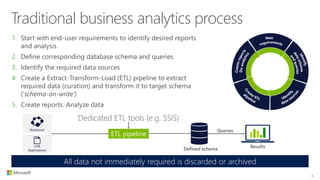
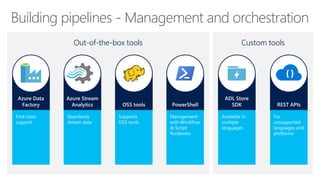
ETL pipeline
Dedicated ETL tools (e.g. SSIS)
Defined schema
Queries
Results
Relational
LOB
Applications
Traditional business analytics process
1. Start with end-user requirements to identify desired reports
and analysis
2. Define corresponding database schema and queries
3. Identify the required data sources
4. Create a Extract-Transform-Load (ETL) pipeline to extract
required data (curation) and transform it to target schema
(‘schema-on-write’)
5. Create reports. Analyze data
All data not immediately required is discarded or archived
4
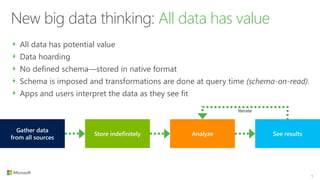
Store indefinitely Analyze See results
Gather data
from all sources
Iterate
New big data thinking: All data has value
All data has potential value
Data hoarding
No defined schema—stored in native format
Schema is imposed and transformations are done at query time (schema-on-read).
Apps and users interpret the data as they see fit
5
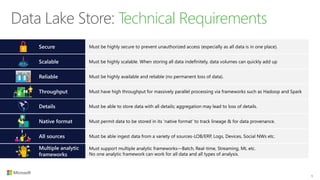
Data Lake Store: Technical Requirements
6
Secure Must be highly secure to prevent unauthorized access (especially as all data is in one place).
Native format Must permit data to be stored in its ‘native format’ to track lineage & for data provenance.
Must support multiple analytic frameworks—Batch, Real-time, Streaming, ML etc.
No one analytic framework can work for all data and all types of analysis.
Multiple analytic
frameworks
Details Must be able to store data with all details; aggregation may lead to loss of details.
Throughput Must have high throughput for massively parallel processing via frameworks such as Hadoop and Spark
Reliable Must be highly available and reliable (no permanent loss of data).
Scalable Must be highly scalable. When storing all data indefinitely, data volumes can quickly add up
All sources Must be able ingest data from a variety of sources-LOB/ERP, Logs, Devices, Social NWs etc.
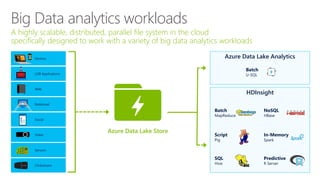
HDInsight
Azure Data Lake Analytics
Big Data analytics workloads
A highly scalable, distributed, parallel file system in the cloud
specifically designed to work with a variety of big data analytics workloads
Azure Data Lake Store
LOB Applications
Social
Devices
Clickstream
Sensors
Video
Web
Relational
Batch
MapReduce
Script
Pig
SQL
Hive
NoSQL
HBase
In-Memory
Spark
Predictive
R Server
Batch
U-SQL
Azure Data Lake Store
Overview
WebHDFS
YARN
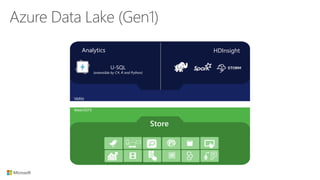
U-SQL
(extensible by C#, R and Python)
Analytics HDInsight
Store
Azure Data Lake (Gen1)
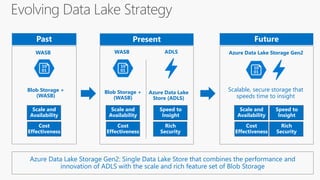
Blob Storage +
(WASB)
Azure Data Lake
Store (ADLS)
Blob Storage +
(WASB)
Rich
Security
Speed to
Insight
Cost
Effectiveness
Scale and
Availability
Cost
Effectiveness
Scale and
Availability
Azure Data Lake Storage Gen2
Rich
Security
Speed to
Insight
Cost
Effectiveness
Scale and
Availability
Scalable, secure storage that
speeds time to insight
WASB ADLSWASB
Azure Data Lake Storage Gen2: Single Data Lake Store that combines the performance and
innovation of ADLS with the scale and rich feature set of Blob Storage
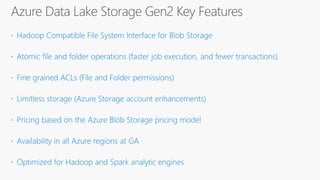
Azure Data Lake Storage Gen2 Key Features
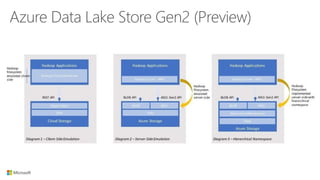
Azure Data Lake Store Gen2 (Preview)
Demo:
Provisioning a Data Lake
Scale, Performance, &
Reliability
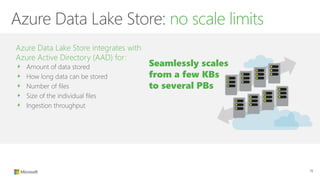
Azure Data Lake Store: no scale limits
Azure Data Lake Store integrates with
Azure Active Directory (AAD) for:
Amount of data stored
How long data can be stored
Number of files
Size of the individual files
Ingestion throughput
15
Seamlessly scales
from a few KBs
to several PBs
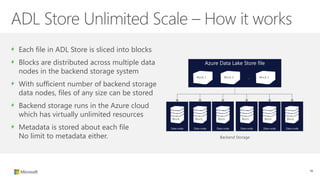
ADL Store Unlimited Scale – How it works
Each file in ADL Store is sliced into blocks
Blocks are distributed across multiple data
nodes in the backend storage system
With sufficient number of backend storage
data nodes, files of any size can be stored
Backend storage runs in the Azure cloud
which has virtually unlimited resources
Metadata is stored about each file
No limit to metadata either.
16
Azure Data Lake Store file
…Block 1 Block 2 Block 2
Backend Storage
Data node Data node Data node Data node Data nodeData node
Block Block Block Block Block Block
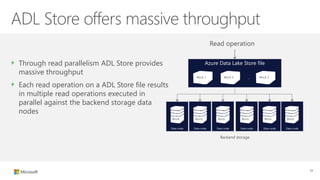
ADL Store offers massive throughput
Through read parallelism ADL Store provides
massive throughput
Each read operation on a ADL Store file results
in multiple read operations executed in
parallel against the backend storage data
nodes
Read operation
17
Azure Data Lake Store file
…Block 1 Block 2 Block 2
Backend storage
Data node Data node Data node Data node Data nodeData node
Block Block Block Block Block Block
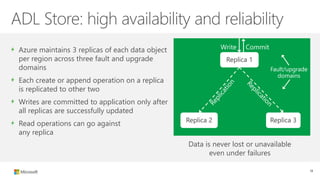
ADL Store: high availability and reliability
Azure maintains 3 replicas of each data object
per region across three fault and upgrade
domains
Each create or append operation on a replica
is replicated to other two
Writes are committed to application only after
all replicas are successfully updated
Read operations can go against
any replica
Data is never lost or unavailable
even under failures
Replica 1
Replica 2 Replica 3
Fault/upgrade
domains
Write Commit
18
The building
blocks
Ingestion, processing,
egress, visualization,
and orchestration tools
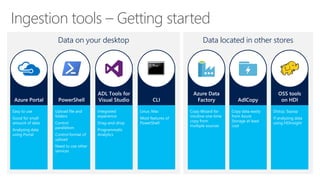
Ingestion tools – Getting started
Data on your desktop Data located in other stores
Building pipelines - Management and orchestration
Out-of-the-box tools Custom tools
Demo:
Management
Security
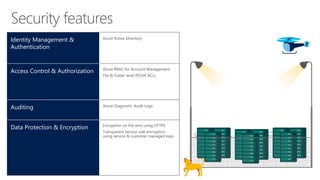
Security features
Identity Management &
Authentication
Access Control & Authorization
Auditing
Data Protection & Encryption
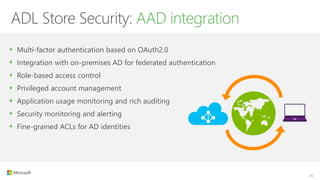
ADL Store Security: AAD integration
Multi-factor authentication based on OAuth2.0
Integration with on-premises AD for federated authentication
Role-based access control
Privileged account management
Application usage monitoring and rich auditing
Security monitoring and alerting
Fine-grained ACLs for AD identities
25
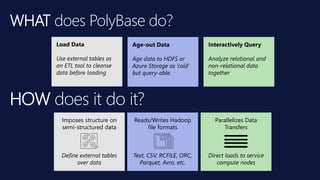
WHAT does PolyBase do?
Load Data
Use external tables as
an ETL tool to cleanse
data before loading
Interactively Query
Analyze relational and
non-relational data
together
Age-out Data
Age data to HDFS or
Azure Storage as ‘cold’
but query-able.
Reads/Writes Hadoop
file formats
Text, CSV, RCFILE, ORC,
Parquet, Avro, etc.
Parallelizes Data
Transfers
Direct loads to service
compute nodes
Imposes structure on
semi-structured data
Define external tables
over data
HOW does it do it?
Demo:
Polybase
DROP EXTERNAL TABLE dbo.DimCurrency_external;
DROP EXTERNAL FILE FORMAT TSVFileFormat;
DROP EXTERNAL FILE FORMAT CSVFileFormat;
DROP EXTERNAL DATA SOURCE AzureDataLakeStore;
DROP DATABASE SCOPED CREDENTIAL ADLCredential;
-- Create a Database Master Key.
--CREATE MASTER KEY;
-- Create a database scoped credential
CREATE DATABASE SCOPED CREDENTIAL ADLCredential
WITH
IDENTITY = 'e785bd5xxxxxx-465xxxxxxxxxx36b@https://login.microsoftonline.com/72f988bf-86f1-41af-91ab-2d7cd011db47/oauth2/token',
--IDENTITY = 'app_id@oauth_token'
SECRET = 'eAMyYHQhgTn/aslkdfj28347skdjoe7512=sadf2=‘; --(This is not the real key!)
-- Create an external data source
CREATE EXTERNAL DATA SOURCE AzureDataLakeStore
WITH (
TYPE = HADOOP,
LOCATION = 'adl://audreydatalake.azuredatalakestore.net',
CREDENTIAL = ADLCredential
);
-- Create an external file format
CREATE EXTERNAL FILE FORMAT CSVFileFormat
WITH
( FORMAT_TYPE = DELIMITEDTEXT
, FORMAT_OPTIONS ( FIELD_TERMINATOR = ','
, STRING_DELIMITER = ''
, DATE_FORMAT = 'yyyy-MM-dd HH:mm:ss.fff'
, USE_TYPE_DEFAULT = FALSE
)
);
CREATE EXTERNAL FILE FORMAT TSVFileFormat
WITH
( FORMAT_TYPE = DELIMITEDTEXT
, FORMAT_OPTIONS ( FIELD_TERMINATOR = ''
, STRING_DELIMITER = ''
, DATE_FORMAT = 'yyyy-MM-dd HH:mm:ss.fff'
, USE_TYPE_DEFAULT = FALSE
)
);
-- Create an External Table
CREATE EXTERNAL TABLE [dbo].[DimCurrency_external] (
[0] [int] NOT NULL,
[1] [varchar](5) NULL,
[2] [varchar](500) NULL
)
WITH
(
LOCATION='/Files/DimCurrency.csv'
, DATA_SOURCE = AzureDataLakeStore
, FILE_FORMAT = CSVFileFormat
, REJECT_TYPE = VALUE
, REJECT_VALUE = 0
);
--Query the file from ADLS
SELECT [0] as CurrencyKey, [1] as CurrencyCode, [2] as CurrencyDescription
FROM [dbo].[DimCurrency_external];
--Load file directly into DW with CTAS
IF EXISTS (SELECT * FROM sys.tables WHERE name = 'stgCurrency')
BEGIN
DROP TABLE stgCurrency
END;
CREATE TABLE dbo.stgCurrency
WITH (DISTRIBUTION = ROUND_ROBIN)
AS
SELECT [0] as CurrencyKey, [1] as CurrencyCode, [2] as CurrencyDescription
FROM dbo.DimCurrency_external;
SELECT * FROM stgCurrency;

Data Analytics Meetup: Introduction to Azure Data Lake Storage

  • 1.
  • 2.
    INGEST STORE PREP& TRAIN MODEL & SERVE Modern Data Warehouse Logs (unstructured) Azure Data Factory Azure Databricks Media (unstructured) Files (unstructured) PolyBase Business/custom apps (structured) Azure SQL Data Warehouse Azure Analysis Services Power BIData Lake
  • 3.
  • 4.
    ETL pipeline Dedicated ETLtools (e.g. SSIS) Defined schema Queries Results Relational LOB Applications Traditional business analytics process 1. Start with end-user requirements to identify desired reports and analysis 2. Define corresponding database schema and queries 3. Identify the required data sources 4. Create a Extract-Transform-Load (ETL) pipeline to extract required data (curation) and transform it to target schema (‘schema-on-write’) 5. Create reports. Analyze data All data not immediately required is discarded or archived 4
  • 5.
    Store indefinitely AnalyzeSee results Gather data from all sources Iterate New big data thinking: All data has value All data has potential value Data hoarding No defined schema—stored in native format Schema is imposed and transformations are done at query time (schema-on-read). Apps and users interpret the data as they see fit 5
  • 6.
    Data Lake Store:Technical Requirements 6 Secure Must be highly secure to prevent unauthorized access (especially as all data is in one place). Native format Must permit data to be stored in its ‘native format’ to track lineage & for data provenance. Must support multiple analytic frameworks—Batch, Real-time, Streaming, ML etc. No one analytic framework can work for all data and all types of analysis. Multiple analytic frameworks Details Must be able to store data with all details; aggregation may lead to loss of details. Throughput Must have high throughput for massively parallel processing via frameworks such as Hadoop and Spark Reliable Must be highly available and reliable (no permanent loss of data). Scalable Must be highly scalable. When storing all data indefinitely, data volumes can quickly add up All sources Must be able ingest data from a variety of sources-LOB/ERP, Logs, Devices, Social NWs etc.
  • 7.
    HDInsight Azure Data LakeAnalytics Big Data analytics workloads A highly scalable, distributed, parallel file system in the cloud specifically designed to work with a variety of big data analytics workloads Azure Data Lake Store LOB Applications Social Devices Clickstream Sensors Video Web Relational Batch MapReduce Script Pig SQL Hive NoSQL HBase In-Memory Spark Predictive R Server Batch U-SQL
  • 8.
    Azure Data LakeStore Overview
  • 9.
    WebHDFS YARN U-SQL (extensible by C#,R and Python) Analytics HDInsight Store Azure Data Lake (Gen1)
  • 10.
    Blob Storage + (WASB) AzureData Lake Store (ADLS) Blob Storage + (WASB) Rich Security Speed to Insight Cost Effectiveness Scale and Availability Cost Effectiveness Scale and Availability Azure Data Lake Storage Gen2 Rich Security Speed to Insight Cost Effectiveness Scale and Availability Scalable, secure storage that speeds time to insight WASB ADLSWASB Azure Data Lake Storage Gen2: Single Data Lake Store that combines the performance and innovation of ADLS with the scale and rich feature set of Blob Storage
  • 11.
    Azure Data LakeStorage Gen2 Key Features
  • 12.
    Azure Data LakeStore Gen2 (Preview)
  • 13.
  • 14.
  • 15.
    Azure Data LakeStore: no scale limits Azure Data Lake Store integrates with Azure Active Directory (AAD) for: Amount of data stored How long data can be stored Number of files Size of the individual files Ingestion throughput 15 Seamlessly scales from a few KBs to several PBs
  • 16.
    ADL Store UnlimitedScale – How it works Each file in ADL Store is sliced into blocks Blocks are distributed across multiple data nodes in the backend storage system With sufficient number of backend storage data nodes, files of any size can be stored Backend storage runs in the Azure cloud which has virtually unlimited resources Metadata is stored about each file No limit to metadata either. 16 Azure Data Lake Store file …Block 1 Block 2 Block 2 Backend Storage Data node Data node Data node Data node Data nodeData node Block Block Block Block Block Block
  • 17.
    ADL Store offersmassive throughput Through read parallelism ADL Store provides massive throughput Each read operation on a ADL Store file results in multiple read operations executed in parallel against the backend storage data nodes Read operation 17 Azure Data Lake Store file …Block 1 Block 2 Block 2 Backend storage Data node Data node Data node Data node Data nodeData node Block Block Block Block Block Block
  • 18.
    ADL Store: highavailability and reliability Azure maintains 3 replicas of each data object per region across three fault and upgrade domains Each create or append operation on a replica is replicated to other two Writes are committed to application only after all replicas are successfully updated Read operations can go against any replica Data is never lost or unavailable even under failures Replica 1 Replica 2 Replica 3 Fault/upgrade domains Write Commit 18
  • 19.
    The building blocks Ingestion, processing, egress,visualization, and orchestration tools
  • 20.
    Ingestion tools –Getting started Data on your desktop Data located in other stores
  • 21.
    Building pipelines -Management and orchestration Out-of-the-box tools Custom tools
  • 22.
  • 23.
  • 24.
    Security features Identity Management& Authentication Access Control & Authorization Auditing Data Protection & Encryption
  • 25.
    ADL Store Security:AAD integration Multi-factor authentication based on OAuth2.0 Integration with on-premises AD for federated authentication Role-based access control Privileged account management Application usage monitoring and rich auditing Security monitoring and alerting Fine-grained ACLs for AD identities 25
  • 26.
    WHAT does PolyBasedo? Load Data Use external tables as an ETL tool to cleanse data before loading Interactively Query Analyze relational and non-relational data together Age-out Data Age data to HDFS or Azure Storage as ‘cold’ but query-able. Reads/Writes Hadoop file formats Text, CSV, RCFILE, ORC, Parquet, Avro, etc. Parallelizes Data Transfers Direct loads to service compute nodes Imposes structure on semi-structured data Define external tables over data HOW does it do it?
  • 27.
  • 28.
    DROP EXTERNAL TABLEdbo.DimCurrency_external; DROP EXTERNAL FILE FORMAT TSVFileFormat; DROP EXTERNAL FILE FORMAT CSVFileFormat; DROP EXTERNAL DATA SOURCE AzureDataLakeStore; DROP DATABASE SCOPED CREDENTIAL ADLCredential; -- Create a Database Master Key. --CREATE MASTER KEY; -- Create a database scoped credential CREATE DATABASE SCOPED CREDENTIAL ADLCredential WITH IDENTITY = 'e785bd5xxxxxx-465xxxxxxxxxx36b@https://login.microsoftonline.com/72f988bf-86f1-41af-91ab-2d7cd011db47/oauth2/token', --IDENTITY = 'app_id@oauth_token' SECRET = 'eAMyYHQhgTn/aslkdfj28347skdjoe7512=sadf2=‘; --(This is not the real key!) -- Create an external data source CREATE EXTERNAL DATA SOURCE AzureDataLakeStore WITH ( TYPE = HADOOP, LOCATION = 'adl://audreydatalake.azuredatalakestore.net', CREDENTIAL = ADLCredential ); -- Create an external file format CREATE EXTERNAL FILE FORMAT CSVFileFormat WITH ( FORMAT_TYPE = DELIMITEDTEXT , FORMAT_OPTIONS ( FIELD_TERMINATOR = ',' , STRING_DELIMITER = '' , DATE_FORMAT = 'yyyy-MM-dd HH:mm:ss.fff' , USE_TYPE_DEFAULT = FALSE ) ); CREATE EXTERNAL FILE FORMAT TSVFileFormat WITH ( FORMAT_TYPE = DELIMITEDTEXT , FORMAT_OPTIONS ( FIELD_TERMINATOR = '' , STRING_DELIMITER = '' , DATE_FORMAT = 'yyyy-MM-dd HH:mm:ss.fff' , USE_TYPE_DEFAULT = FALSE ) ); -- Create an External Table CREATE EXTERNAL TABLE [dbo].[DimCurrency_external] ( [0] [int] NOT NULL, [1] [varchar](5) NULL, [2] [varchar](500) NULL ) WITH ( LOCATION='/Files/DimCurrency.csv' , DATA_SOURCE = AzureDataLakeStore , FILE_FORMAT = CSVFileFormat , REJECT_TYPE = VALUE , REJECT_VALUE = 0 ); --Query the file from ADLS SELECT [0] as CurrencyKey, [1] as CurrencyCode, [2] as CurrencyDescription FROM [dbo].[DimCurrency_external]; --Load file directly into DW with CTAS IF EXISTS (SELECT * FROM sys.tables WHERE name = 'stgCurrency') BEGIN DROP TABLE stgCurrency END; CREATE TABLE dbo.stgCurrency WITH (DISTRIBUTION = ROUND_ROBIN) AS SELECT [0] as CurrencyKey, [1] as CurrencyCode, [2] as CurrencyDescription FROM dbo.DimCurrency_external; SELECT * FROM stgCurrency;

Editor's Notes

  • #6 All data has immediate or potential value This leads to data hoarding—all data is stored indefinitely With an unknown future, there is no defined schema. Data is prepared and stored in native format; No upfront transformation or aggregation Schema is imposed and transformations are done at query time (schema-on-read). Applications and users interpret the data as they see fit.
  • #22 Azure Data Factory First-class support for ADL Store Support variety of endpoints WASB, OnPrem, Relational DB Integrated with Analytic tools Programmatic customization Azure Stream Analytics Stream data from Eventuhubs into ADL store OSS Tools Use Oozie & Falcon on HDInsight to manage tools like DistCP and Sqoop Use Storm to stream data from Eventhubs/Kafka into ADL Store PowerShell Use built-in commandlets Use PowerShell Workflow Runbooks to manage Use PowerShell Script Runbooks to manage ADL Store SDK Available in various languages (.NET, Java, Node.js, ..) REST APIs For unsupported languages and platforms
  • #25 Security imagery.