DATA VIRTUALIZATIONDATA VIRTUALIZATION
PRIMERPRIMER
THE ARCHITECTURETHE ARCHITECTURE
MAI N DATAMAI N DATA
VIRTUALIZATION COMPONENTSVIRTUALIZATION COMPONENTS
The Server
Design Tools
Administration Tools
THE SERVERTHE SERVER
The server is positioned between business applications/Consumers
and one or more data sources. An enterprise ready, scalable,
managable, runtime for the Query Engine that runs inside JBoss AS
that provides additional security, fault-tolerance, and administrative
features.
MOVE DOWN TO EXPLORE THE CONCEPT OR RIGHT FOR THE NEXT CONCEPT
SE RVE R COMPONENTSSE RVE R COMPONENTS
Virtual Database
Access Layer
Query Engine
Connector Architecture
VIRTUAL DATABASEVIRTUAL DATABASE
A virtual database (VDB) provides a unified view of data residing in
multiple physical repositories. A VDB is composed of various data
models and configuration information that describes which data
sources are to be integrated and how. In particular, source
models are used to represent the structure and characteristics of the
physical data sources, and view models represent the structure and
characteristics of the integrated data exposed to applications.
ACCESS L AYERACCESS L AYER
The access layer is the interface through which applications submit
queries (relational, XML, XQuery and procedural) to the VDB via
JDBC, ODBC or Web services.
QUERY ENGINEQUERY ENGINE
The heart of DV is a high-performance query engine that processes
relational, XML, XQuery and procedural queries from federated
datasources. Features include support for homogeneous schemas,
heterogeneous schemas, transactions, and user defined functions.
When applications submit queries to a VDB via the access layer, the
query engine produces an optimized query plan to provide efficient
access to the required physical data sources as determined by the
SQL criteria and the mappings between source and view models in
the VDB. This query plan dictates processing order to ensure
physical data sources are accessed in the most efficient manner.
CONNECTOR ARCH ITECTURECONNECTOR ARCH ITECTURE
Translators and resource adapters are used to provide transparent
connectivity between the query engine and the physical data
sources. DV includes a rich set of Translators and Resource Adaptors
that enable access to a variety of sources, including most relational
databases, web services, text files and LDAP. A translator is used to
convert queries into source-specific commands, and a resource
adapter provides communication with the source.
Need data from a different source? A custom translators and
resource adaptors can easily be developed.
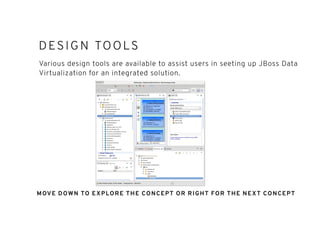
DESIGN TOOLSDESIGN TOOLS
Various design tools are available to assist users in seeting up JBoss Data
Virtualization for an integrated solution.
MOVE DOWN TO EXPLORE THE CONCEPT OR RIGHT FOR THE NEXT CONCEPT
DATA VIRTUALIZATION DESIGNERDATA VIRTUALIZATION DESIGNER
The designer is a visual tool that enables rapid, model-driven
definition, integration, management and testing of data services
without programming using the DV runtime framework. With the
designer you can:
create a virtual database (or VDB) containing your models, views,
procedures, dynamic XML documents which you deploy to DV
server and then access your data.
resolve semantic differences
create virtual data structures at a physical or logical level
use declarative interfaces to integrate, aggregate, and transform
the data on its way from source to a target format which is
compatible and optimized for consumption by your applications
Preview your data
DATA VIRTUALIZATION DESIGNERDATA VIRTUALIZATION DESIGNER
(CONTINUED)(CONTINUED)
Part of the JBoss Developer Studio Integration stack
DV WEBUIDV WEBUI
http://www.ossmentor.com/2015/03/data-virtualization-web-ui-now-released.html
Create Data Services through a
WebUI
Create Views and Models
through the WebUI without the
requirements of a local IDE
Currently for more simple data
services
Currently Developer Preview
CONNECTOR DEVELO PMENTCONNECTOR DEVELO PMENT
The process of integrating data from an enterprise information system into
JBoss Data Virtualization requires one to two components:
a translator (mandatory) and
a resource adapter (optional), also known as a connector. Most of the time,
this will be a Java EE Connector Architecture (JCA) Adapter.
A translator is used to:
translate JBoss Data Virtualization commands into commands understood by
the datasource for which the translator is being used,
execute those commands,
return batches of results from the datasource, translated into the formats
that JBoss Data Virtualization is expecting.
https://access.redhat.com/documentation/en-
US/Red_Hat_JBoss_Data_Vir tualization/6.1/html/Development_Guide_Volume_4_Server_Development/Introduction_to_the_JBoss_Data_Serv
ices_Connector_Architecture.html
CONNECTOR DEVELO PMENTCONNECTOR DEVELO PMENT
(CONTINUED)(CONTINUED)
A resource adapter (or connector):
handles all communications with individual enterprise information
systems, (which can include databases, data feeds, flat files and so
forth),
can be a JCA Adapter or any other custom connection provider
(the JCA specification ensures the writing, packaging and
configuration are undertaken in a consistent manner),
removes concerns such as connection information, resource
pooling, and authentication for translators.
CUSTOM ADAPTORS ANDCUSTOM ADAPTORS AND
TRANSL ATORSTRANSL ATORS
Translators - https://access.redhat.com/documentation/en-
US/Red_Hat_JBoss_Data_Virtualization/6.1/html/Development_Guide_Volume_4_Server_Development/chap-
Translator_Development.html#Custom_Translators
Adaptors - https://access.redhat.com/documentation/en-
US/Red_Hat_JBoss_Data_Virtualization/6.1/html/Development_Guide_Volume_4_Server_Development/chap-
Resource_Adapter_Development.html#Developing_JCA_Adapters
Extending Execution Factory Class - https://access.redhat.com/documentation/en-
US/Red_Hat_JBoss_Data_Virtualization/6.1/html/Development_Guide_Volume_4_Server_Development/chap-
Extending_the_Execution_Factory_Class.html
ADDITIONAL CUSTOMIZATIONSADDITIONAL CUSTOMIZATIONS
JBoss Data Virtualization is highly extensible in other ways:
You can add user defined functions.
You can adapt logging to your requirements, which is especially
useful for custom audit or command logging.
A delegating translator can be used to add custom code to all
methods for a given translator.
You can also customize authentication and authorization modules.
See the Red Hat JBoss Data Virtualization Security Guide.
TRANSL ATORSTRANSL ATORS
Apache Cassandra (Technical
Preview Only)
Apache Solr
Cloudera Impala
JDBC Translator
File Translator
Google Spreadsheet Translator
JBoss Data Grid 6.3
LDAP Translator
MongoDB Translator
Object Translator
OData Translator
OLAP Translator
Salesforce Translator
Web Services Translator
RESOURCE ADAPTORSRESOURCE ADAPTORS
With the exception of JDBC data sources, JBoss Data Virtualization provides a
JCA adapter for each supported data source. These are the resource adapter
identifiers, as specified in the server configuration file:
File Adapter - file
Google Spreadsheet Adapter - google
Red Hat JBoss Data Grid (6.1 & 6.2) Adapter - infinispan
LDAP Adapter - ldap
Salesforce Adapter - salesforce
Web Services Adapter - webservice
Mongo DB Adapter (technical preview) - mongodb
A resource adapter for the JDBC translator is provided with JBoss EAP by
default.
ADMINISTRATIVE TOOLSADMINISTRATIVE TOOLS
AdminShell- AdminShell provides a script-based programming environment enabling
users to access, monitor and control JBoss Data Virtualization.
Management Console - The Management Console provided by the Red Hat JBoss
Enterprise Application Platform (EAP) is a web-based tool allowing system administrators
to monitor and configure services deployed within a running JBoss EAP instance,
including JBoss Data Virtualization.
Management CLI - The Management CLI (command-line interface) is provided by JBoss
EAP to manage services deployed within a JBoss EAP instance. Operations can be
performed in batch modes, allowing multiple tasks to be run as a group.
JBoss Operations Network - Red Hat JBoss Operations Network provides a single
interface to deploy, manage, and monitor an entire deployment of Red Hat JBoss
Middleware applications and services, including JBoss Data Virtualization.
Dashboard Builder - The Dashboard builder allows connection to VDBs through the DV
JDBC driver to visualize the data for testing and Business Analytics.
MOVE DOWN TO EXPLORE THE CONCEPT OR RIGHT FOR THE NEXT CONCEPT
THE ADMIN SHELLTHE ADMIN SHELL
AdminShell provides the following features:
Administration - AdminShell can be used to connect to a JBoss Data
Virtualization instance in order to perform various administrative tasks.
Data Access - AdminShell can be used to connect to a virtual database (VDB)
and run SQL commands to query VDB data and view results.
Migration - AdminShell can be used to develop scripts that will move VDBs and
associated components from one development environment to another. (Users
can test and automate migration scripts before executing them in production
deployments.)
Testing -The built-in JUnit Test Framework allows users to write regression tests
to check system health and data integrity. The written tests validate system
functionality automatically, removing the need for manual verification by QA
Personnel.
https://access.redhat.com/documentation/en-
US/Red_Hat_JBoss_Data_Virtualization/6.1/html/Administration_and_Configuration_Guide/sect
-AdminShell.html
THE MANAGEMENT CONSOLETHE MANAGEMENT CONSOLE
The Configuration tab contains general and JBoss Data
Virtualization specific configuration properties.
Runtime tab shows runtime information about JBoss EAP server
and Teiid subsystem. You can view runtime information about Teiid
by clicking Virtual Databases in the left hand navigational tree.
You can configure roles and groups using the Administration tab.
Roles for a user to be included in and excluded from can be
configured in the Management Console. You can also configure
groups to be included or excluded from a role. Only users in the
SuperUser or Administrator roles can perform this configuration.
https://access.redhat.com/documentation/en-
US/Red_Hat_JBoss_Data_Virtualization/6.1/html/Administration_and_Configuratio
n_Guide/sect-Management_Console.html
MANAGE MENT CLIMANAGE MENT CLI
The Management CLI features a help dialog with general and
context-sensitive options.
Easy to launch and connect with the EAP_HOME/bin/jboss-cli.sh -
-connect or jboss-cli.bat
https://access.redhat.com/documentation/en-
US/Red_Hat_JBoss_Data_Virtualization/6.1/html/Administration_and_Configura
tion_Guide/sect-Management_CLI.html
JBOSS OPERATIONS NETWORKJBOSS OPERATIONS NETWORK
JBoss Operations Network has additional agent plug-ins to manage
other JBoss products. Although these are JBoss ON resource plug-
ins, they are included in separate packages and require a separate
subscription to download them.
https://access.redhat.com/documentation/en-
US/Red_Hat_JBoss_Data_Virtualization/6.1/html/Administration_an
d_Configuration_Guide/sect-
JBoss_Operations_Network.html#Installing_JBoss_Agent_Plug-
in_Packs
DASHBOARD BUILDERDASHBOARD BUILDER
Red Hat JBoss Dashboard Builder can be connected to an external database, be it
using JNDI of the container or connecting directly only using the JDBC driver to
access the database. Connections to databases can be configured in
workspace Showcase on page External Connections. After you have established the
connection to the database, you need to create a data provider that will collect the
data from the database and allow you to visualize it as an indicator in the dashboard
area of a page.
Note that Red Hat JBoss Dashboard Builder makes use of its own local internal
database to store its local data. This database is read-only for Dashboard Builder,
but is accessible from outside.
THANK YOU!THANK YOU!

dvprimer-architecture

  • 1.
  • 2.
  • 3.
    MAI N DATAMAIN DATA VIRTUALIZATION COMPONENTSVIRTUALIZATION COMPONENTS The Server Design Tools Administration Tools
  • 4.
    THE SERVERTHE SERVER Theserver is positioned between business applications/Consumers and one or more data sources. An enterprise ready, scalable, managable, runtime for the Query Engine that runs inside JBoss AS that provides additional security, fault-tolerance, and administrative features. MOVE DOWN TO EXPLORE THE CONCEPT OR RIGHT FOR THE NEXT CONCEPT
  • 5.
    SE RVE RCOMPONENTSSE RVE R COMPONENTS Virtual Database Access Layer Query Engine Connector Architecture
  • 6.
    VIRTUAL DATABASEVIRTUAL DATABASE Avirtual database (VDB) provides a unified view of data residing in multiple physical repositories. A VDB is composed of various data models and configuration information that describes which data sources are to be integrated and how. In particular, source models are used to represent the structure and characteristics of the physical data sources, and view models represent the structure and characteristics of the integrated data exposed to applications.
  • 7.
    ACCESS L AYERACCESSL AYER The access layer is the interface through which applications submit queries (relational, XML, XQuery and procedural) to the VDB via JDBC, ODBC or Web services.
  • 8.
    QUERY ENGINEQUERY ENGINE Theheart of DV is a high-performance query engine that processes relational, XML, XQuery and procedural queries from federated datasources. Features include support for homogeneous schemas, heterogeneous schemas, transactions, and user defined functions. When applications submit queries to a VDB via the access layer, the query engine produces an optimized query plan to provide efficient access to the required physical data sources as determined by the SQL criteria and the mappings between source and view models in the VDB. This query plan dictates processing order to ensure physical data sources are accessed in the most efficient manner.
  • 9.
    CONNECTOR ARCH ITECTURECONNECTORARCH ITECTURE Translators and resource adapters are used to provide transparent connectivity between the query engine and the physical data sources. DV includes a rich set of Translators and Resource Adaptors that enable access to a variety of sources, including most relational databases, web services, text files and LDAP. A translator is used to convert queries into source-specific commands, and a resource adapter provides communication with the source. Need data from a different source? A custom translators and resource adaptors can easily be developed.
  • 10.
    DESIGN TOOLSDESIGN TOOLS Variousdesign tools are available to assist users in seeting up JBoss Data Virtualization for an integrated solution. MOVE DOWN TO EXPLORE THE CONCEPT OR RIGHT FOR THE NEXT CONCEPT
  • 11.
    DATA VIRTUALIZATION DESIGNERDATAVIRTUALIZATION DESIGNER The designer is a visual tool that enables rapid, model-driven definition, integration, management and testing of data services without programming using the DV runtime framework. With the designer you can: create a virtual database (or VDB) containing your models, views, procedures, dynamic XML documents which you deploy to DV server and then access your data. resolve semantic differences create virtual data structures at a physical or logical level use declarative interfaces to integrate, aggregate, and transform the data on its way from source to a target format which is compatible and optimized for consumption by your applications Preview your data
  • 12.
    DATA VIRTUALIZATION DESIGNERDATAVIRTUALIZATION DESIGNER (CONTINUED)(CONTINUED) Part of the JBoss Developer Studio Integration stack
  • 13.
    DV WEBUIDV WEBUI http://www.ossmentor.com/2015/03/data-virtualization-web-ui-now-released.html CreateData Services through a WebUI Create Views and Models through the WebUI without the requirements of a local IDE Currently for more simple data services Currently Developer Preview
  • 14.
    CONNECTOR DEVELO PMENTCONNECTORDEVELO PMENT The process of integrating data from an enterprise information system into JBoss Data Virtualization requires one to two components: a translator (mandatory) and a resource adapter (optional), also known as a connector. Most of the time, this will be a Java EE Connector Architecture (JCA) Adapter. A translator is used to: translate JBoss Data Virtualization commands into commands understood by the datasource for which the translator is being used, execute those commands, return batches of results from the datasource, translated into the formats that JBoss Data Virtualization is expecting. https://access.redhat.com/documentation/en- US/Red_Hat_JBoss_Data_Vir tualization/6.1/html/Development_Guide_Volume_4_Server_Development/Introduction_to_the_JBoss_Data_Serv ices_Connector_Architecture.html
  • 15.
    CONNECTOR DEVELO PMENTCONNECTORDEVELO PMENT (CONTINUED)(CONTINUED) A resource adapter (or connector): handles all communications with individual enterprise information systems, (which can include databases, data feeds, flat files and so forth), can be a JCA Adapter or any other custom connection provider (the JCA specification ensures the writing, packaging and configuration are undertaken in a consistent manner), removes concerns such as connection information, resource pooling, and authentication for translators.
  • 16.
    CUSTOM ADAPTORS ANDCUSTOMADAPTORS AND TRANSL ATORSTRANSL ATORS Translators - https://access.redhat.com/documentation/en- US/Red_Hat_JBoss_Data_Virtualization/6.1/html/Development_Guide_Volume_4_Server_Development/chap- Translator_Development.html#Custom_Translators Adaptors - https://access.redhat.com/documentation/en- US/Red_Hat_JBoss_Data_Virtualization/6.1/html/Development_Guide_Volume_4_Server_Development/chap- Resource_Adapter_Development.html#Developing_JCA_Adapters Extending Execution Factory Class - https://access.redhat.com/documentation/en- US/Red_Hat_JBoss_Data_Virtualization/6.1/html/Development_Guide_Volume_4_Server_Development/chap- Extending_the_Execution_Factory_Class.html
  • 17.
    ADDITIONAL CUSTOMIZATIONSADDITIONAL CUSTOMIZATIONS JBossData Virtualization is highly extensible in other ways: You can add user defined functions. You can adapt logging to your requirements, which is especially useful for custom audit or command logging. A delegating translator can be used to add custom code to all methods for a given translator. You can also customize authentication and authorization modules. See the Red Hat JBoss Data Virtualization Security Guide.
  • 18.
    TRANSL ATORSTRANSL ATORS ApacheCassandra (Technical Preview Only) Apache Solr Cloudera Impala JDBC Translator File Translator Google Spreadsheet Translator JBoss Data Grid 6.3 LDAP Translator MongoDB Translator Object Translator OData Translator OLAP Translator Salesforce Translator Web Services Translator
  • 19.
    RESOURCE ADAPTORSRESOURCE ADAPTORS Withthe exception of JDBC data sources, JBoss Data Virtualization provides a JCA adapter for each supported data source. These are the resource adapter identifiers, as specified in the server configuration file: File Adapter - file Google Spreadsheet Adapter - google Red Hat JBoss Data Grid (6.1 & 6.2) Adapter - infinispan LDAP Adapter - ldap Salesforce Adapter - salesforce Web Services Adapter - webservice Mongo DB Adapter (technical preview) - mongodb A resource adapter for the JDBC translator is provided with JBoss EAP by default.
  • 20.
    ADMINISTRATIVE TOOLSADMINISTRATIVE TOOLS AdminShell-AdminShell provides a script-based programming environment enabling users to access, monitor and control JBoss Data Virtualization. Management Console - The Management Console provided by the Red Hat JBoss Enterprise Application Platform (EAP) is a web-based tool allowing system administrators to monitor and configure services deployed within a running JBoss EAP instance, including JBoss Data Virtualization. Management CLI - The Management CLI (command-line interface) is provided by JBoss EAP to manage services deployed within a JBoss EAP instance. Operations can be performed in batch modes, allowing multiple tasks to be run as a group. JBoss Operations Network - Red Hat JBoss Operations Network provides a single interface to deploy, manage, and monitor an entire deployment of Red Hat JBoss Middleware applications and services, including JBoss Data Virtualization. Dashboard Builder - The Dashboard builder allows connection to VDBs through the DV JDBC driver to visualize the data for testing and Business Analytics. MOVE DOWN TO EXPLORE THE CONCEPT OR RIGHT FOR THE NEXT CONCEPT
  • 21.
    THE ADMIN SHELLTHEADMIN SHELL AdminShell provides the following features: Administration - AdminShell can be used to connect to a JBoss Data Virtualization instance in order to perform various administrative tasks. Data Access - AdminShell can be used to connect to a virtual database (VDB) and run SQL commands to query VDB data and view results. Migration - AdminShell can be used to develop scripts that will move VDBs and associated components from one development environment to another. (Users can test and automate migration scripts before executing them in production deployments.) Testing -The built-in JUnit Test Framework allows users to write regression tests to check system health and data integrity. The written tests validate system functionality automatically, removing the need for manual verification by QA Personnel. https://access.redhat.com/documentation/en- US/Red_Hat_JBoss_Data_Virtualization/6.1/html/Administration_and_Configuration_Guide/sect -AdminShell.html
  • 22.
    THE MANAGEMENT CONSOLETHEMANAGEMENT CONSOLE The Configuration tab contains general and JBoss Data Virtualization specific configuration properties. Runtime tab shows runtime information about JBoss EAP server and Teiid subsystem. You can view runtime information about Teiid by clicking Virtual Databases in the left hand navigational tree. You can configure roles and groups using the Administration tab. Roles for a user to be included in and excluded from can be configured in the Management Console. You can also configure groups to be included or excluded from a role. Only users in the SuperUser or Administrator roles can perform this configuration. https://access.redhat.com/documentation/en- US/Red_Hat_JBoss_Data_Virtualization/6.1/html/Administration_and_Configuratio n_Guide/sect-Management_Console.html
  • 23.
    MANAGE MENT CLIMANAGEMENT CLI The Management CLI features a help dialog with general and context-sensitive options. Easy to launch and connect with the EAP_HOME/bin/jboss-cli.sh - -connect or jboss-cli.bat https://access.redhat.com/documentation/en- US/Red_Hat_JBoss_Data_Virtualization/6.1/html/Administration_and_Configura tion_Guide/sect-Management_CLI.html
  • 24.
    JBOSS OPERATIONS NETWORKJBOSSOPERATIONS NETWORK JBoss Operations Network has additional agent plug-ins to manage other JBoss products. Although these are JBoss ON resource plug- ins, they are included in separate packages and require a separate subscription to download them. https://access.redhat.com/documentation/en- US/Red_Hat_JBoss_Data_Virtualization/6.1/html/Administration_an d_Configuration_Guide/sect- JBoss_Operations_Network.html#Installing_JBoss_Agent_Plug- in_Packs
  • 25.
    DASHBOARD BUILDERDASHBOARD BUILDER RedHat JBoss Dashboard Builder can be connected to an external database, be it using JNDI of the container or connecting directly only using the JDBC driver to access the database. Connections to databases can be configured in workspace Showcase on page External Connections. After you have established the connection to the database, you need to create a data provider that will collect the data from the database and allow you to visualize it as an indicator in the dashboard area of a page. Note that Red Hat JBoss Dashboard Builder makes use of its own local internal database to store its local data. This database is read-only for Dashboard Builder, but is accessible from outside.
  • 26.